

12 Automated Email Templates You Can Actually Copy and Use
You set up your first welcome sequence, hit activate, and 42% of the list bounces. Now every automated flow you build - cart recovery, nurture drip, re-engagement - lands in spam instead of the inbox. Your sender reputation is wrecked before you've even started.
Most guides on automated email templates give you template names, not actual templates. You get a bullet that says "Welcome Email" with zero copy, no cadence, and no benchmarks. What follows are 12 templates with real subject lines, body copy you can steal, timing you can set today, and performance targets based on data from 183,000+ brands.
What You Need (Quick Version)
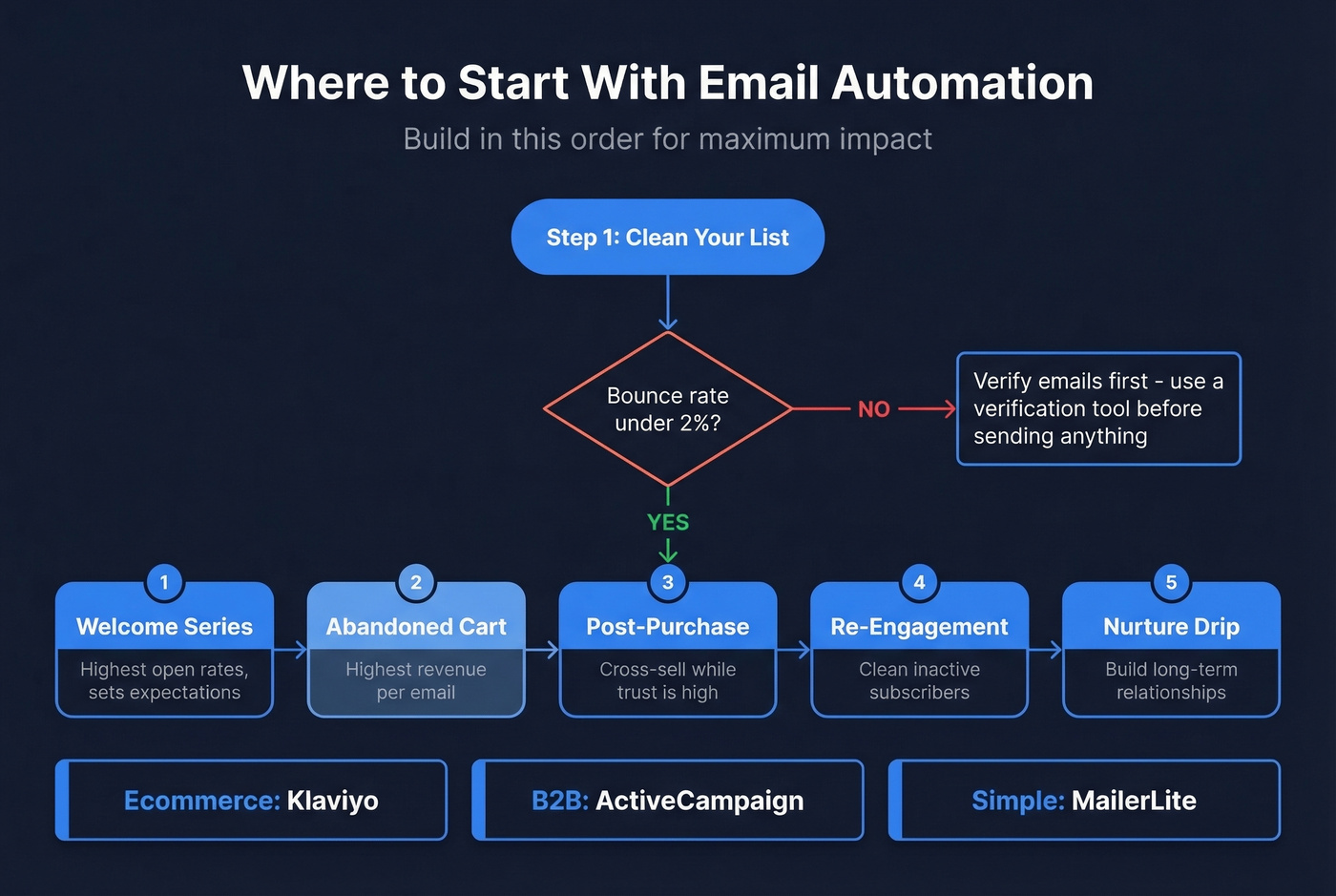
- A handful of core automations, not dozens. Welcome, abandoned cart, post-purchase, re-engagement, and nurture drip cover most use cases. Start there.
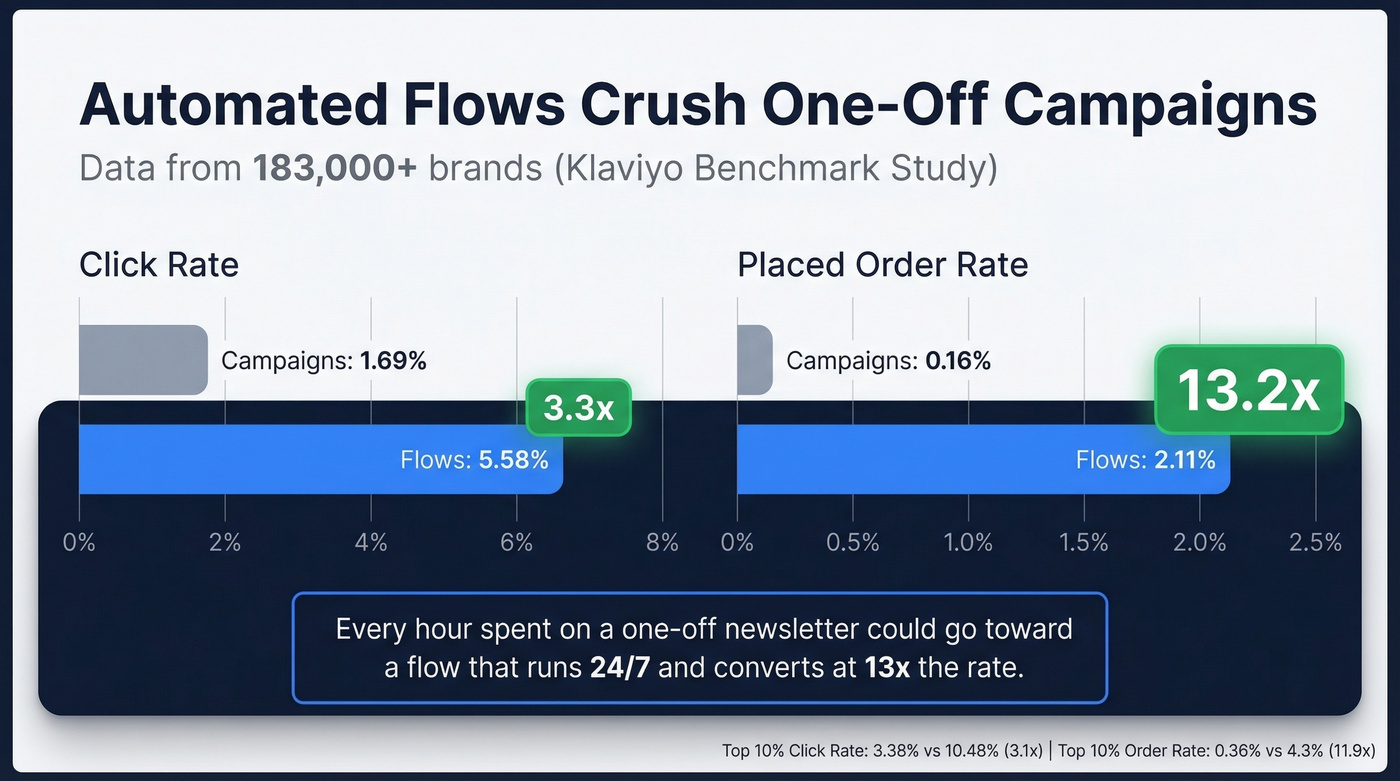
- Automated flows crush campaigns. Klaviyo's 183,000+-brand dataset shows 3.3x higher click rates and 13x higher placed order rates for flows vs. one-off campaigns.
- Clean data first. A welcome sequence that bounces hard will tank your sender reputation for every future email you send.
- Pick your tool by use case. Klaviyo for ecommerce, ActiveCampaign for B2B, MailerLite for simplicity. More on tools at the end.
Why Automation Outperforms One-Off Campaigns
The gap between one-off campaigns and automated flows shows up in every metric. Here's the data from Klaviyo's benchmark study across 183,000+ brands:
| Metric | Campaigns | Automated Flows | Multiplier |
|---|---|---|---|
| Click rate | 1.69% | 5.58% | 3.3x |
| Placed order rate | 0.16% | 2.11% | 13.2x |
| Top 10% click rate | 3.38% | 10.48% | 3.1x |
| Top 10% order rate | 0.36% | 4.3% | 11.9x |
That placed order rate - 0.16% for campaigns vs. 2.11% for flows - should change how you allocate time. Every hour you spend on a one-off newsletter could go toward building a flow that runs 24/7 and converts at 13x the rate. Let that sink in.
ActiveCampaign's email benchmarks (published January 2026) put the average open rate at 39.26% across their platform. A solid baseline is 30-40% opens. If you're below that, your list quality or deliverability needs work before you worry about templates. And keep in mind that Apple Mail Privacy Protection inflates open rates, so click rate is the more reliable engagement signal.
12 Templates With Copy You Can Steal
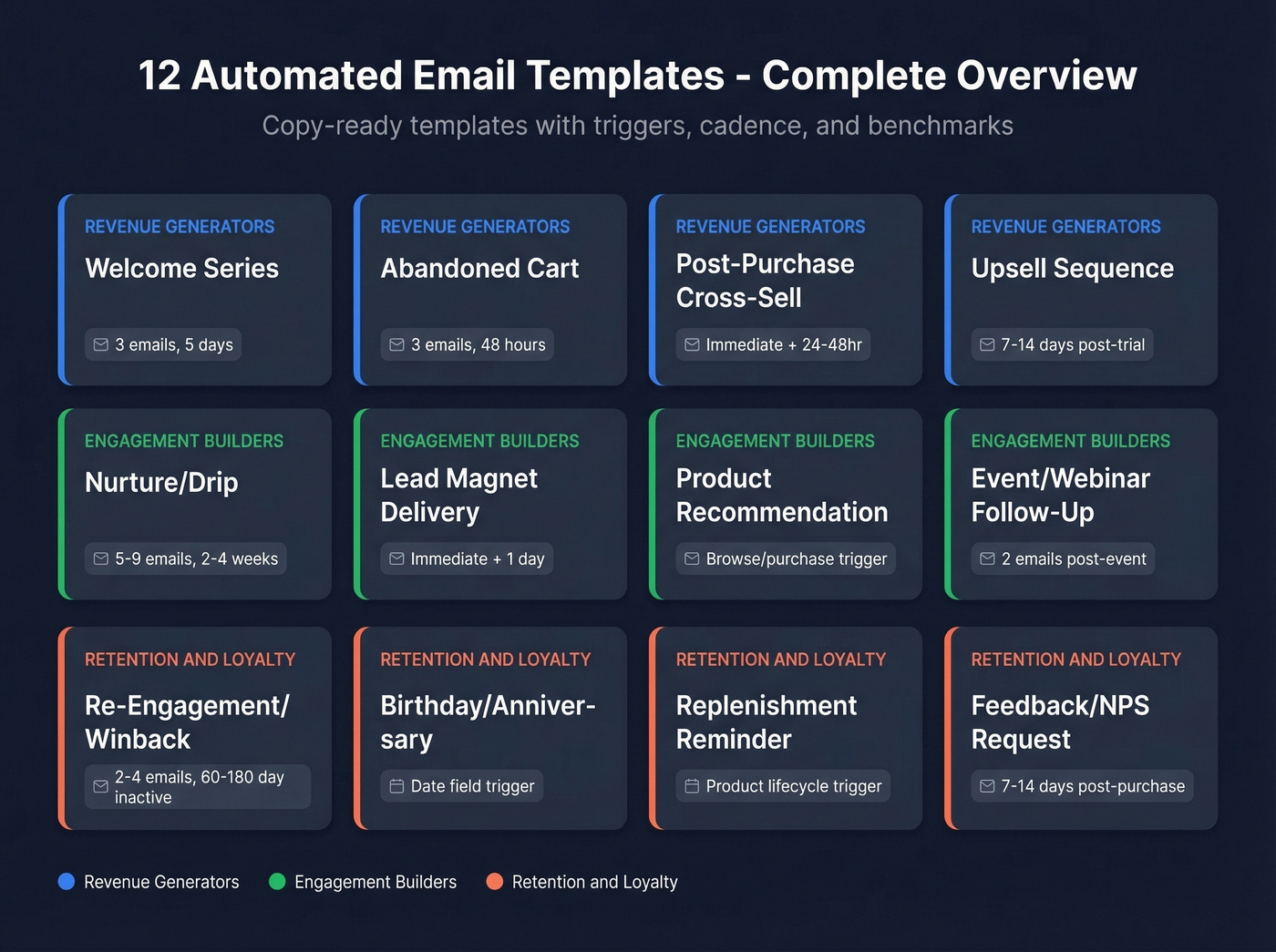
Every automation has three components: a trigger (what starts the flow), conditions (who qualifies), and actions (what gets sent and when). The templates below follow that structure. Steal what works. Modify what doesn't.
Welcome Email (Single + Series)
Trigger: New subscriber or signup. Cadence: 3 emails over 5 days (Email 1: immediate, Email 2: Day 2, Email 3: Day 5). Benchmark: 30-40% open rate on Email 1.
Subject: You're in - here's what happens next
Hey {{first_name}}, welcome. You signed up because [reason/lead magnet]. Over the next few days, I'll send you [specific value]. For now, here's the one thing most people miss: [key insight or quick win].
Use this if you're building a list from scratch and need to set expectations fast. Skip this if you're only collecting emails for transactional receipts - a single confirmation is enough.
A Business.com study found that 63% of consumers view email as the most important channel for brand personalization. Shop LIT Live, a small ecommerce brand, saw measurable lifts just by tailoring their welcome flow to the signup source. The welcome email is where that personalization starts - not with {{first_name}}, but with acknowledging why someone signed up.
Abandoned Cart Flow (3 Emails)
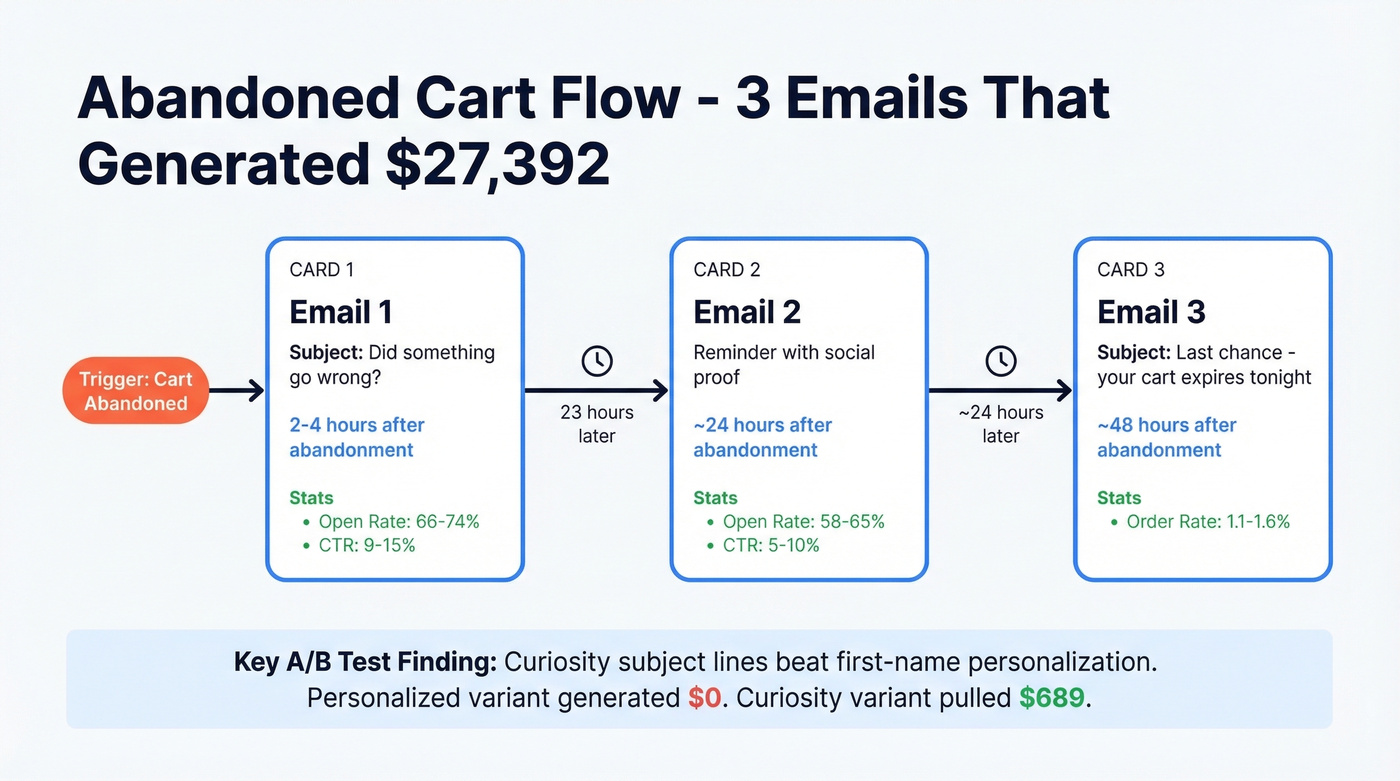
This is the highest-revenue flow in most businesses - and we have the A/B test data to prove it. A case study from an online course business tracked $27,392 in revenue from just three abandoned cart emails. Not hypothetical. Real test data from a real business.
Cadence:
- Email 1: 2-4 hours after abandonment (open rate: 66-74%, CTR: 9-15%)
- Email 2: ~23 hours later (open rate: 58-65%, CTR: 5-10%)
- Email 3: ~48 hours after abandonment (placed order rate: 1.1-1.6%)
Email 1 Subject: Did something go wrong?
You left [product] in your cart. If something broke during checkout, reply and we'll fix it. If you're still deciding, here's what [product] actually does for you: [one-sentence benefit].
Email 3 Subject: Last chance - your cart expires tonight
[Product] is still waiting. After tonight, we'll clear your cart and release the spot. [Link to cart].
The A/B testing data here is worth studying closely. Curiosity-based subject lines crushed first-name personalization. The personalized variant ("{{first_name}}, you left something behind") generated $0 in revenue. Zero. The curiosity variant ("Did something go wrong?") pulled $689. One structural A/B test lifted CTR from 11.21% to 17.38% just by changing the email layout.
Post-Purchase Thank You / Cross-Sell
Trigger: Purchase confirmation. Cadence: Thank-you email immediately; cross-sell 24-48 hours later.
Subject: Your order's confirmed - plus one thing that pairs with it
Thanks for grabbing [product]. It's on its way. Quick thought: most people who buy [product] also grab [complementary product] - and it's [discount]% off this week for existing customers.
Keep the recommendation genuinely complementary and easy to say yes to. If the add-on feels like a bigger commitment than the original purchase, it'll underperform.
Re-Engagement / Winback
Here's the thing: don't email your entire inactive list with "We miss you!" and a 20% coupon. That rewards disengagement and trains subscribers to go dark for discounts.
Trigger: No opens or clicks for 60-180 days. Cadence: 2-4 emails with ~3-day delays between each.
Email 1 Subject: We miss you (but we'll stop emailing if you want)
It's been a while since you opened anything from us. We get it - inboxes are brutal. Click here if you still want to hear from us. If not, we'll remove you in 7 days. No hard feelings.
The Food For Fitness team runs a 5-email winback sequence: one email every 2 days, targeting subscribers who've been on the list for 6+ months and haven't opened an email in 6 months. They save a reasonable chunk of subscribers - and more importantly, cleaning the rest off the list improves deliverability for everyone who stays.
Birthday / Anniversary
Trigger: Date field (birthday or signup anniversary).
Subject: Happy birthday, {{first_name}} - this one's on us
No strings. Here's [15-25% discount code] good for the next 48 hours. Treat yourself.
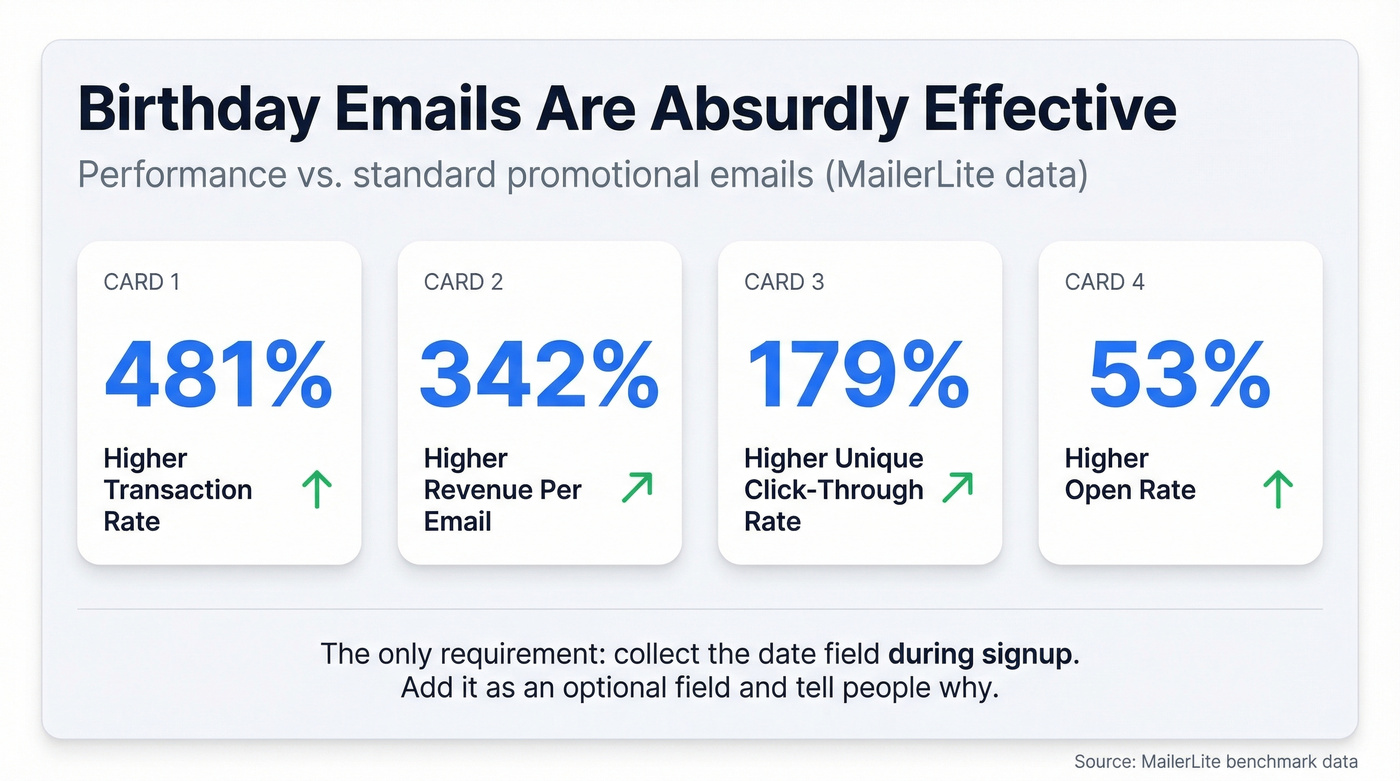
The only requirement is actually collecting the date field during signup - add it as an optional field on your form and most people will fill it in if you tell them why. Birthday emails are a standout promo type: MailerLite reports 481% higher transaction rates, 342% higher revenue per email, 179% higher unique click-through rates, and 53% higher open rates than other promotional emails. Those numbers are absurd, and they're consistent across industries.
Lead Magnet Delivery
Trigger: Form submission for a specific resource. Cadence: Immediate delivery, then 1-day delay, then tag subscriber and trigger welcome sequence.
Subject: Here's your [resource name]
Download link: [link]. This guide covers [one-sentence summary]. Tomorrow, I'll send you the one thing most people get wrong about [topic] - it's not in the guide.
This modular pattern lets you reuse the same welcome sequence across multiple lead magnets. The 1-day delay prevents the welcome email from competing with the download for attention.
Nurture / Drip Sequence
Trigger: Post-welcome or post-lead-magnet. Cadence: 5-9 emails over 2-4 weeks. A proven structure: 6 emails on Days 0, 2, 5, 9, 16, and 23.
Email 1 Subject: The biggest mistake in [topic]
Most people think [common assumption]. The data says otherwise. Here's what actually works: [insight]. Tomorrow, I'll show you the exact process.
Each email should deliver one idea and end with a reason to open the next one. Don't cram three lessons into a single send. The Quitting Corporate newsletter is a good example - individual nurture emails were written to be worth forwarding on their own, which is the bar you should aim for.
Product Recommendation
A common complaint about product recommendation emails is getting suggestions for items you already own. Filter out past purchases before you build this flow. It's basic, and most brands still get it wrong.
Trigger: Browse or purchase history.
Subject: Based on what you bought - you might like this
You grabbed [product]. People with similar taste also love [recommendation]. Here's why: [one-sentence reason].
Chewy does this well - their recommendation emails reference the specific pet and product type, not just generic "customers also bought" suggestions. That level of specificity is the difference between a helpful email and an annoying one.
Feedback / NPS Request
Most brands send a 15-question survey and wonder why nobody responds.
Trigger: 7-14 days post-purchase.
Subject: One quick question about your [product]
How likely are you to recommend [product] to a friend? [1-10 scale link]. Takes 10 seconds. Your answer shapes what we build next.
One question gets responses. Multi-page surveys in automated emails get ignored. If you need deeper feedback, trigger a longer survey only for people who click the initial NPS link.
Replenishment Reminder
This only works if you know the consumption cycle. Guess wrong and it feels intrusive - send too early and you're nagging, too late and they've already reordered or switched brands.
Trigger: Estimated product lifecycle (e.g., 25 days for a 30-day supply).
Subject: Running low on [product]?
If you started using [product] when it arrived, you're probably down to the last few days. Reorder now and it'll arrive before you run out. [Link].
When you have the data, base timing on each customer's actual reorder behavior instead of a fixed interval.
Upsell Sequence
What not to do: Send a pricing page link on Day 2 of a free trial. The subscriber hasn't experienced enough value to care about upgrading.
Trigger: Post-onboarding or post-trial (7-14 days in).
Subject: You've used [feature] 12 times this week - unlock the rest
You're clearly getting value from [product]. The [next tier] adds [specific capability] that power users love. Here's what changes: [one benefit]. No pressure - your current plan isn't going anywhere.
Lead with the value they've already experienced, not the price of the upgrade. Usage data in the subject line ("12 times this week") proves you're paying attention and makes the upsell feel earned rather than pushy.
Event / Webinar Follow-Up
Trigger: Event attendance or registration (no-shows get a different version).
Email 1 Subject: Recording + the slide everyone asked about
Here's the replay: [link]. The most-asked question was about [topic] - I added a bonus breakdown at [timestamp].
Email 2 (2 days later): Next step: [related resource or offer].
Two emails. Recap plus next step. Don't send five follow-ups for a 30-minute webinar - that's how you train people to skip your next event entirely.
Deliverability: The Hidden Killer
None of these templates matter if your emails land in spam. Litmus found that 70% of emails show at least one spam-related issue before they're even sent.
There's a distinction most marketers miss. Delivery means the mail server accepted your email. Deliverability means it actually hit the inbox instead of spam or promotions. You can have 98% delivery and 60% inbox placement - and your automations will silently underperform while you stare at "delivered" metrics thinking everything's fine.
If inbox placement drops below 90%, investigate immediately:
- SPF, DKIM, DMARC - authenticate all three. Non-negotiable.
- List hygiene - verify contacts before activating any flow.
- Sending cadence - don't blast 50,000 emails from a new domain on day one.
- Engagement monitoring - watch clicks and spam complaints weekly.
Here's where most automation setups fail: bad data. If 15% of your list is invalid addresses, your bounce rate craters sender reputation, and every subsequent email - across every flow - suffers. Before activating any sequence, verify your contact list. We've seen teams go from 35% bounce rates to under 4% just by running their list through Prospeo's email verification, which uses a 5-step process to catch catch-all domains, spam traps, and honeypots at 98% accuracy.


You just read that 42% of a list can bounce and wreck your sender reputation. Automated flows converting at 13x campaign rates mean nothing if half your emails never arrive. Prospeo's 5-step verification delivers 98% email accuracy - so your welcome sequences, cart flows, and nurture drips hit real inboxes from day one.
Fix your list before you fix your templates. Start at $0.01 per verified email.
7 Mistakes That Tank Your Automations
- No plan before building. Define goals, segments, timing, and measurement criteria before you touch the automation builder.
- Starting too big. Build one flow with 2-3 emails. Prove it works. Then expand. We've seen teams try to launch 12 automations in week one and abandon all of them by month two.
- Set and forget. Automations aren't "done." Review performance monthly. A flow that converted in January will be stale by June.
- Ignoring A/B tests. If you're not testing subject lines, CTAs, and send times, you're leaving money on the table.
- Fake personalization. Dropping {{first_name}} into a generic blast isn't personalization. Segmenting by behavior and sending relevant content is.
- Poor mobile optimization. 60% of emails are read on mobile. Keep subject lines under 30 characters, make CTAs thumb-friendly, and test on a phone before you activate.
- No CRM integration. Not connecting your automation tool to your CRM means you're personalizing blind - you can't segment on deal stage, lifetime value, or purchase history if that data lives in a separate system.
And one more, because it's the most common: over-sending without segmentation. Same message to your entire list, three times a week. The consensus on r/EmailWhisperers is clear - that's the fastest path to unsubscribes and spam complaints.
Compliance Checklist
One misconfigured automation can fire thousands of non-compliant emails before you notice. CAN-SPAM fines run up to $53,088 per email as of 2026. GDPR penalties reach EUR 20M or 4% of global annual turnover.
CAN-SPAM requirements for every automated email:
- No misleading "From" name or header information
- No deceptive subject lines
- Identify the message as an ad (if applicable)
- Include your physical mailing address
- Clear, conspicuous opt-out mechanism
- Honor opt-out requests within 10 business days
- Monitor what third parties are doing on your behalf
The critical distinction: US law uses an opt-out model (you can email until they unsubscribe). EU/UK law requires opt-in (explicit consent before you send anything). If you're emailing internationally, default to the stricter standard. It's easier than maintaining two compliance frameworks.
Best Tools for Email Automation
| Tool | Starting Price | Best For | Key Limitation |
|---|---|---|---|
| ActiveCampaign | $19/mo | B2B, advanced automations | Steep learning curve |
| Klaviyo | $20/mo | Shopify/ecommerce | Overpriced outside ecom |
| MailerLite | $15/mo | Simplicity + value | Limited advanced features |
| Omnisend | $16/mo | Ecommerce multichannel | Weak for non-ecommerce |
| Brevo | Free (300/day) | Budget teams | Basic editor/templates |
| Zoho Campaigns | $4/mo | Budget + CRM users | Smaller template library |
| HubSpot | $20/mo/seat | CRM integration | $800+/mo for many teams at Pro tier |
| Mailchimp | $13/mo | Beginners | No automations on free plan |
A Reddit thread on r/MarketingAutomation sums it up: ActiveCampaign gets praise for "deep automations" but a "brutal learning curve." Klaviyo's Shopify integration is best-in-class, but users consistently call it overpriced for anything outside ecommerce. MailerLite is the quiet favorite for teams that want simple, cheap, and functional. We've tested most of these ourselves - ActiveCampaign's automation builder is genuinely the deepest, but the onboarding takes a full week to feel comfortable.
The short version: Ecommerce? Klaviyo or Omnisend. Creators? Kit or MailerLite. B2B? ActiveCampaign paired with verified contact data feeding your sequences.
Let's be honest: if your average deal size is under $5,000, you don't need an $800/month HubSpot Pro plan or a complex multi-tool stack. MailerLite at $15/month with clean, verified data will outperform an expensive platform running on a garbage contact list every single time.
Build These First
Start with the welcome sequence - it fires on every new subscriber and sets the tone for everything that follows. Add abandoned cart second if you're in ecommerce; it's the highest-revenue flow per email sent. Everything else can wait until those two are performing above your baseline benchmarks.
The biggest mistake isn't picking the wrong template. It's activating any automated email template on an unverified list and wondering why nothing converts.
FAQ
What is an automated email template?
A pre-written email triggered by a specific action - signup, purchase, cart abandonment - that sends automatically without manual work. You build it once, set the trigger conditions, and it runs 24/7 generating revenue while you sleep.
How many emails should a sequence have?
Three to seven depending on the flow. Welcome: 3-5 over 1-2 weeks. Abandoned cart: 3 over 48 hours. Nurture drip: 5-9 over 2-4 weeks. Start shorter and add emails only when performance data justifies it.
What's a good open rate for automated flows?
30-40% is a solid baseline across industries. Automated flows get 3.3x higher click rates than one-off campaigns. Use click rate as your primary engagement signal - Apple Mail Privacy Protection inflates open rates significantly.
How do I stop automated emails from landing in spam?
Authenticate your domain (SPF, DKIM, DMARC), verify your contact list before activating any flow, and monitor inbox placement weekly. Prospeo's 5-step verification catches spam traps and invalid addresses at 98% accuracy - a free tier is available for smaller lists.
Should I personalize subject lines with first names?
Not by default. A/B testing shows curiosity-based subject lines can outperform first-name personalization - in one case study, the personalized variant generated $0 while the curiosity variant pulled $689. Always test both before committing.
Every template above assumes one thing: valid contact data. Curiosity subject lines and perfect cadence timing won't save you from a 35% bounce rate. Prospeo refreshes 300M+ profiles every 7 days with spam-trap removal and catch-all handling built in - so your automated sequences protect your domain instead of destroying it.
Stop building flows on bad data. Prospeo's free tier includes 75 verified emails per month.