

How to Check Email Reputation in 2026 (Tools + Fix)
Your ESP says 98% delivery rate. Your sales team says replies dried up two weeks ago. Your SDR manager is convinced the messaging is the problem. It's not the messaging - it's your sender reputation, and if you don't know how to check email reputation, you're flying blind while your emails land in spam.
Delivery and deliverability aren't the same thing. Delivery means the server accepted your email. Deliverability means it actually hit the inbox. 95% of people check their primary inbox daily, but only 58% bother opening their spam folder. If your reputation pushes you into spam, you're invisible to nearly half your audience.
Let's fix that.
What Email Reputation Actually Is
Sender reputation is a trust score that mailbox providers assign to your sending domain and IP address. It determines whether your emails reach the inbox, get routed to spam, or get rejected outright.
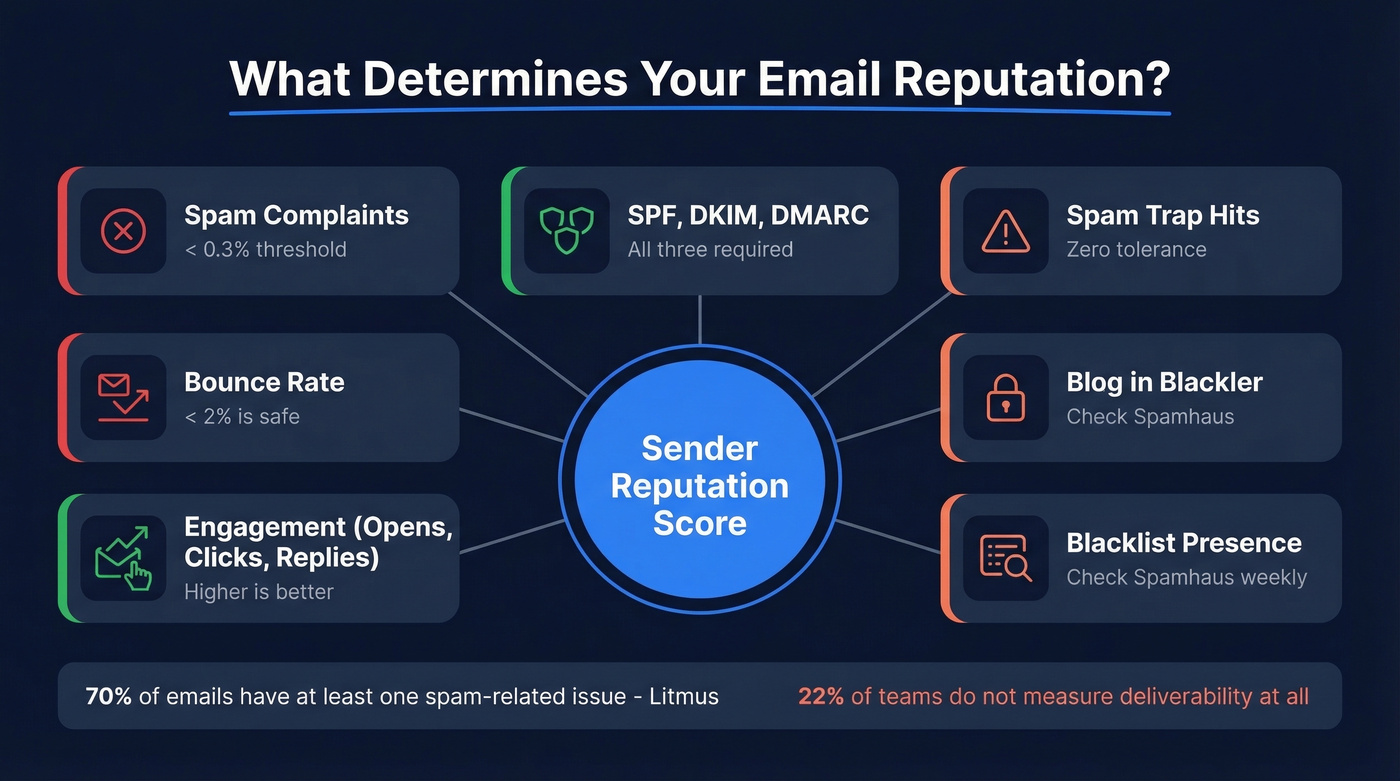
Providers don't publish their exact formulas, but the signals they weigh are well understood: spam complaints, bounce rates, authentication records (SPF, DKIM, DMARC), and recipient engagement like opens, clicks, and replies. Gmail weighs complaint rates heavily - cross the 0.3% spam complaint threshold and you're in trouble.
The numbers paint a grim picture. Litmus found that 70% of emails show at least one spam-related issue, and marketers who call their programs successful are 22% more likely to actively monitor deliverability. Meanwhile, 22% of email teams don't measure deliverability at all - or aren't sure if they do. That's a fifth of senders watching their reputation quietly degrade without knowing it.
Think of reputation as a credit score for your email infrastructure. Every bounce, every spam complaint, every unauthenticated message chips away at it. And just like a credit score, rebuilding takes far longer than destroying.
Free Tools to Monitor Sender Reputation
You don't need to buy anything to start monitoring. Three free tools cover the essentials:
- Google Postmaster Tools - your Gmail reputation dashboard covering domain reputation, IP reputation, spam rate, and authentication status
- Microsoft SNDS - your Outlook/Hotmail reputation dashboard for IP activity, spam complaints, and trap hits
- MxToolbox or Spamhaus - blacklist monitoring across major blocklists
Set up all three. Check weekly at minimum, daily during active campaigns.
IP Reputation vs. Domain Reputation
These are two separate scores, and they behave differently.
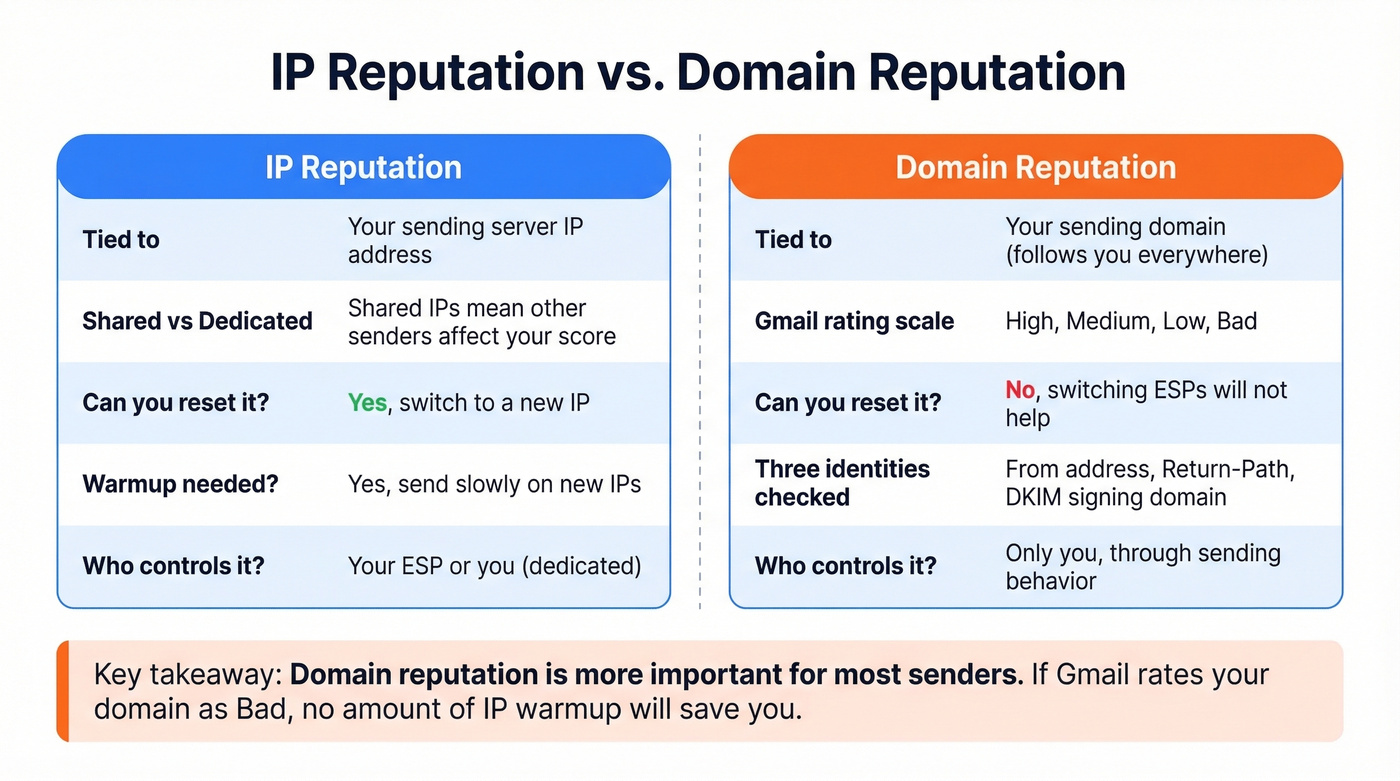
IP reputation is tied to the server sending your email. If you're on a shared IP - common with ESPs like Mailchimp or SendGrid's lower tiers - other senders on that IP can drag your reputation down. Dedicated IPs give you full control but require email warmup. Send too much too fast on a cold IP and providers flag you immediately.
Domain reputation is tied to your sending domain and is the more important signal for most providers. Gmail rates domain reputation on a four-level scale: High, Medium, Low, and Bad. "Bad" means near-certain spam placement or outright rejection.
There are actually three domain identities involved in every email you send. Your From address domain is what the recipient sees in their inbox. Your Return-Path domain is where bounces get routed. Your DKIM signing domain is the cryptographic signature that proves authenticity. Mailbox providers evaluate all three, and if they don't align - or if any one has a poor reputation - your deliverability suffers.
Here's the thing: if your domain reputation is "Bad" in Google Postmaster Tools, no amount of IP warmup will save you. You can "reset" IP reputation by switching IPs. You can't reset domain reputation by switching ESPs. Your domain follows you everywhere. Protecting it should be priority number one.
How to Check Email Reputation for Free
Google Postmaster Tools
Google Postmaster Tools is the single most important reputation tool if any meaningful portion of your audience uses Gmail - and statistically, they do. It's free, it's from Google, and it shows you exactly how Gmail views your sending domain.
Setup takes five minutes. Add your sending domain in the console, verify ownership by adding a DNS TXT record that Google provides, and wait roughly 24 hours for data to populate. You get dashboards for spam rate, IP reputation, domain reputation, authentication status, encryption, and delivery errors. The compliance dashboard reflects the Gmail/Yahoo sender requirements that are now strictly enforced.
In our experience, the 24-hour data lag catches teams off guard during incident response. Google won't show data on low-volume days either - you need roughly 100-200 emails per day minimum for dashboards to populate. Compliance dashboard changes can take up to 7 days to reflect fixes you've made. Don't panic if you fix your DMARC record and the dashboard still shows red on day three.
Microsoft SNDS
Microsoft's Smart Network Data Services covers Outlook.com and Hotmail inboxes. It's free, IP-focused, and shows you mail volume, spam complaints, and spam trap hits from Microsoft's perspective.
The signup process involves requesting access for your IP or range, choosing an authorization email address discovered via reverse DNS and WHOIS as explained in the official FAQ, and clicking the verification link. Like Google Postmaster Tools, you need at least 100 messages per day for data to appear.
One critical limitation: SNDS data excludes emails sent to Office 365 and Microsoft 365 enterprise mailboxes. If you're selling B2B and your prospects use corporate Exchange Online, SNDS won't tell you how those emails are performing. Still valuable for consumer Outlook/Hotmail traffic, but don't treat it as the full Microsoft picture.
Sender Score
Sender Score from Validity rates your sending IP on a 0-100 scale based on a rolling 30-day window. 80+ is generally good. 90+ is excellent.
But Sender Score isn't what Gmail or Microsoft actually use to filter your mail. It's a third-party approximation - useful as a directional signal, not gospel. Google Postmaster Tools and SNDS are closer to ground truth because they come from the providers themselves.
Other Free Checkers
MxToolbox runs blacklist checks across dozens of blocklists and tests your DNS records - it's the Swiss Army knife of email diagnostics. Spamhaus is a major blocklist operator; if you're listed there, fix it immediately. Mail-tester.com lets you send a test email and get a spam score with actionable feedback, which is great for one-off checks before a campaign launch.
Cisco Talos, Barracuda Central, and Yahoo Sender Hub round out the free options for secondary lookups and provider-specific monitoring.
Free Tools at a Glance
| Tool | What It Checks | Best For |
|---|---|---|
| Google Postmaster Tools | Domain + IP rep, spam rate | Gmail deliverability |
| Microsoft SNDS | IP rep, spam traps | Outlook/Hotmail traffic |
| Sender Score | IP score (0-100) | Single-number IP score |
| MxToolbox | Blacklists, DNS, auth | Blacklist + DNS audit |
| Spamhaus | Domain + IP blocklist | Critical blocklist status |
| mail-tester.com | Spam score per email | Pre-send message testing |

High bounce rates are the fastest way to tank your sender reputation. Prospeo's 5-step email verification - with catch-all handling, spam-trap removal, and honeypot filtering - delivers 98% accuracy so your domain stays clean.
Stop diagnosing reputation damage. Prevent it with verified data.
Paid Monitoring Tools
The free stack covers the essentials. Paid tools add inbox placement seed testing - actually sending to seed accounts and checking where mail lands - plus automated alerting and historical trend analysis. They're worth it once you're sending at scale and need proactive monitoring rather than reactive firefighting.
| Tool | What It Does | Best For | Starting Price |
|---|---|---|---|
| MXToolbox Delivery Center | Blacklist + auth monitoring | Multi-domain ops | $129/mo |
| GlockApps | Inbox placement testing | See where mail lands | ~$85/mo |
| SendForensics | Reputation analytics | Deep-dive on failures | ~$49/mo |
| Everest by Validity | Inbox placement + rep | Enterprise senders | ~$29/mo |
| InboxAlly | Engagement-based warmup | Damaged IPs/domains | ~$149/mo |
Skip the paid tools if you haven't set up Google Postmaster Tools yet. We've seen teams spending $129/mo on Delivery Center while ignoring the free dashboard that actually matters most. Start free, add paid when volume justifies it.
2026 Sender Requirements
Gmail and Yahoo enforce strict requirements for bulk senders pushing 5,000+ messages per day. These aren't suggestions - exceed the thresholds and your emails go to spam automatically.
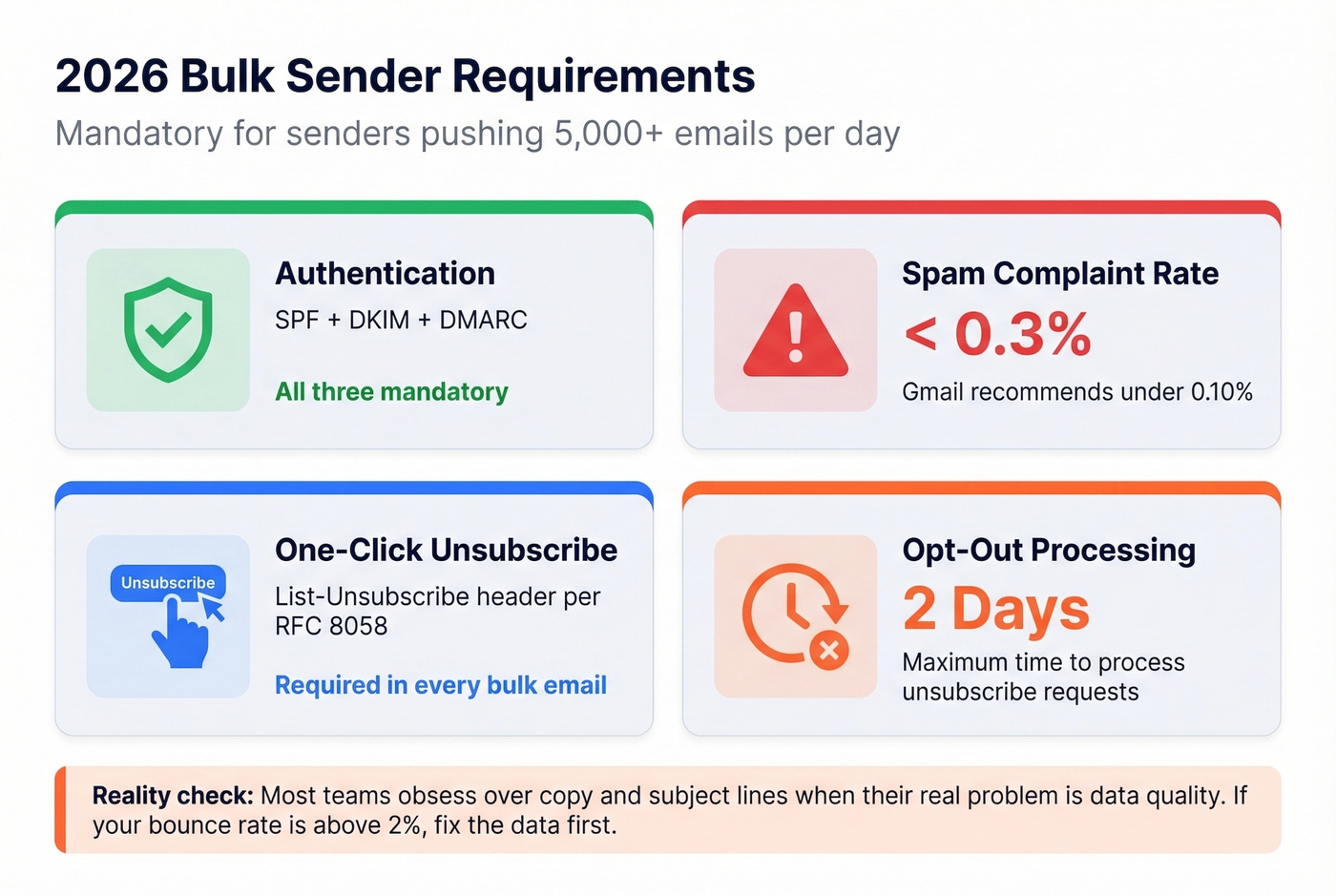
- SPF, DKIM, and DMARC are mandatory. No authentication, no inbox.
- Spam complaint rate must stay below 0.3%. Gmail recommends under 0.10%.
- One-click unsubscribe via List-Unsubscribe header per RFC 8058 is required.
- Opt-out processing must happen within 2 days.
These requirements have been enforced since 2024, and providers have only gotten stricter. For teams running cold outbound at scale, the complaint rate threshold is the one that bites hardest. A single bad list can push you over 0.3% in a day.
Most teams obsess over email copy and subject lines when their real problem is data quality. If your bounce rate is above 2%, no amount of A/B testing will save your deliverability. Fix the data first.
How to Fix a Damaged Reputation
Recovery is possible, but it takes patience. Expect 2-4 weeks minimum. Here's the playbook, in order:
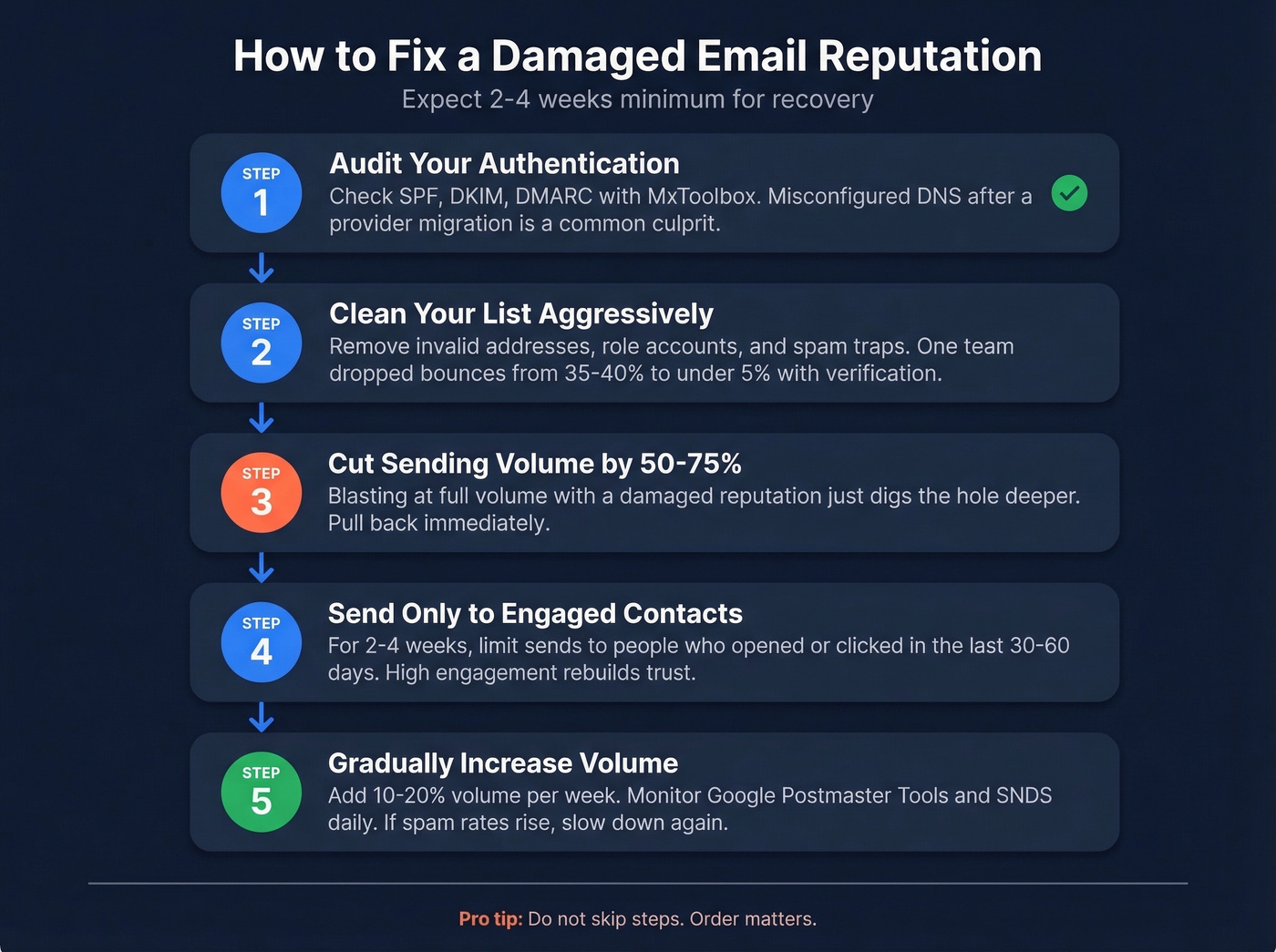
Step 1: Audit your authentication. Run SPF, DKIM, and DMARC checks using MxToolbox. A surprising number of reputation problems trace back to a misconfigured DNS record after a provider migration.
Step 2: Clean your list aggressively. Remove invalid addresses, role accounts, and spam traps. When Snyk's 50-person sales team ran their entire database through real-time verification, bounce rates dropped from 35-40% to under 5% and they generated 200+ new opportunities per month from the cleaned pipeline.
Step 3: Reduce sending volume. Cut your daily volume by 50-75% immediately. Continuing to blast at full volume with a damaged reputation just digs the hole deeper.
Step 4: Send only to engaged contacts. For the next 2-4 weeks, limit sends to people who've opened or clicked in the last 30-60 days. High engagement signals to providers that recipients want your mail.
Step 5: Gradually increase volume. Treat this like an email warmup - add 10-20% volume per week while monitoring Google Postmaster Tools and SNDS daily. If spam rates tick up, slow down.
Step 6: Monitor daily during recovery. Check your dashboards every day until your domain reputation returns to "High" and your Sender Score climbs back above 80.
Preventing Reputation Damage
Checking reputation after emails hit spam is like checking your credit score after the bank declines your mortgage. Prevention is the whole game.
Verify every address before sending - not after the first bounce. Sunset inactive subscribers who haven't engaged in six months or more; they're dragging your engagement metrics down and increasing the odds of hitting a recycled spam trap. Monitor complaint rates weekly rather than waiting for your ESP to flag you. Never buy email lists. Purchased lists are riddled with traps and dead addresses, and they're the fastest path to a destroyed reputation. For marketing, use double opt-in. It reduces list size but dramatically improves quality.
We've seen teams recover domain reputation in as little as 2 weeks when they combine list cleaning with volume reduction. GreyScout cut their bounce rate from 38% to under 4% by switching to verified contact data with Prospeo's 5-step verification, which catches spam traps and honeypots that basic syntax checks miss entirely. Their 7-day data refresh cycle also keeps contact data from going stale between campaigns - a common blind spot for teams that verify once and assume the data stays good forever.

Teams using bad data providers watch their domain reputation drop to "Bad" in Google Postmaster Tools - and there's no reset button. Prospeo refreshes every record on a 7-day cycle and verifies emails at $0.01 each, so you only send to real inboxes.
Bounce rates under 4% aren't luck - they're better data.
FAQ
What's a good email sender score?
80+ on Sender Score is generally good, and 90+ is excellent. In Google Postmaster Tools, aim for "High" domain reputation. Anything labeled "Low" or "Bad" needs immediate attention - expect spam placement until you fix the underlying issues.
How often should I check email reputation?
Weekly at minimum during steady-state sending. During active campaigns, list imports, or recovery periods, check Google Postmaster Tools and SNDS daily. Paid tools like GlockApps can automate alerts so you catch drops before they snowball.
Can I fix a bad email reputation?
Yes, but expect 2-4 weeks of disciplined recovery. Clean your list, fix authentication records, cut volume by 50-75%, send only to engaged contacts, and warm back up gradually. Most teams see "High" domain reputation return within 14-28 days if they follow the steps consistently.
Does domain reputation follow me if I switch ESPs?
Yes. Domain reputation is tied to your sending domain, not your ESP or IP address. Switching platforms won't reset a damaged score - you have to fix the underlying data quality and authentication issues directly.
What's the best free tool to check email reputation?
Google Postmaster Tools is the most authoritative free option because it shows how Gmail - the largest mailbox provider - views your domain. Pair it with Microsoft SNDS for Outlook coverage and MxToolbox for blacklist monitoring.