

Daily Sales Activity Report Format: Templates, Examples & Benchmarks (2026)
69% of B2B sales reps missed quota last year. That's not a strategy problem - it's a visibility problem. Teams using a structured daily sales activity report format are 2.8x more likely to hit their numbers than teams flying blind. The gap between a rep who books three meetings this week and one who books zero often comes down to whether anyone noticed the dials dropping on Tuesday.
Why Your Daily Report Format Matters
A daily sales report is a real-time snapshot of what your team did in the last 24 hours - calls made, emails sent, meetings booked, pipeline moved. It's your early-warning system for quota attainment. A sudden drop in dials might mean a bad contact list, a scheduling conflict, or a rep who needs coaching before the week is lost.
The format should change based on who reads it. Your CEO wants pipeline dollars. Your sales manager wants activity volume and conversion rates. Your reps want personal tracking against targets. One report can serve all three, but only if you design the fields with every audience in mind.
Here's the constraint that matters most: reps spend just 28% of their time actually selling. A good daily format takes 3-7 minutes to complete. Anything longer and adoption craters.
What to Include in Every Report
Every daily sales activity report needs these core fields, regardless of role:
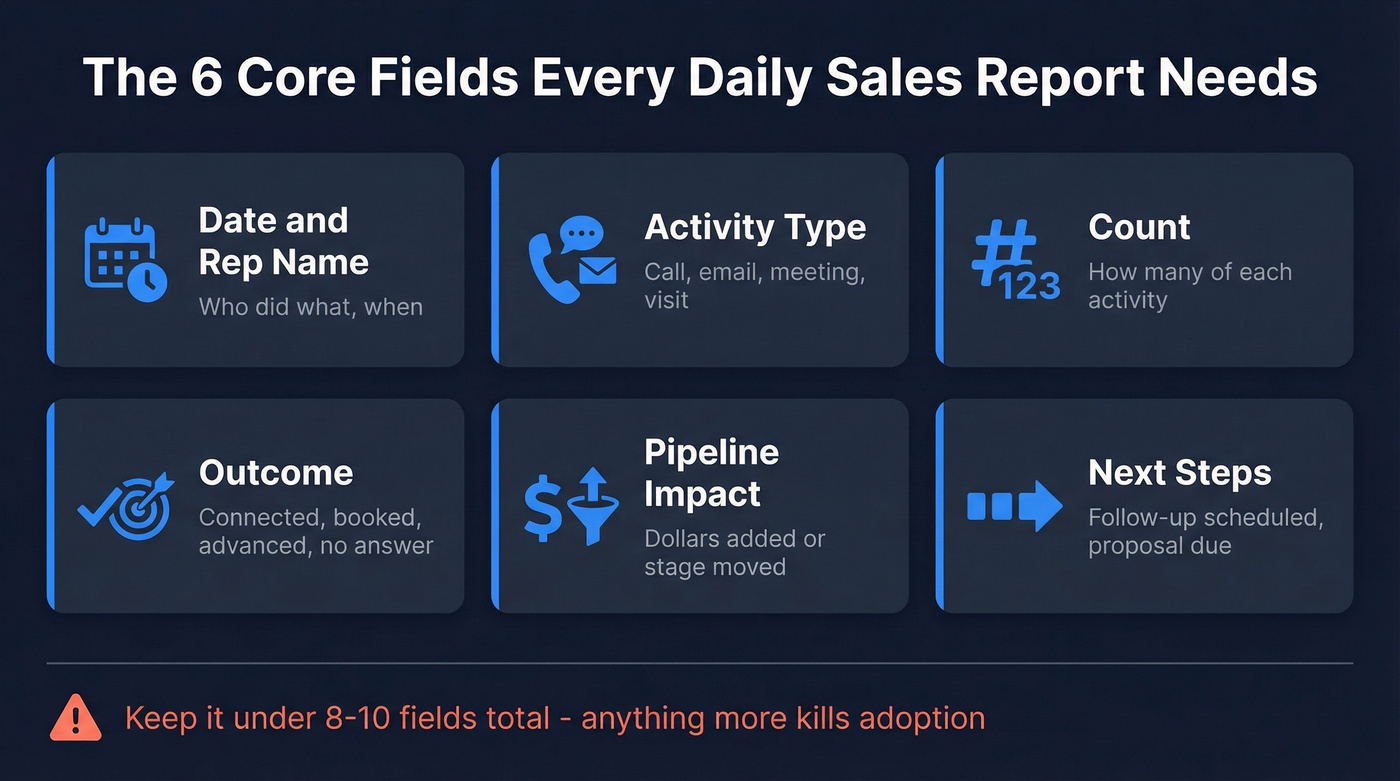
- Date and rep name
- Activity type - call, email, meeting, visit
- Count - how many of each
- Outcome - connected, booked, advanced, no answer
- Pipeline impact - dollars added or stage moved
- Next steps - follow-up scheduled, proposal due
Keep it under 8-10 fields total. Simple, consistent fields beat a bloated template that nobody completes.
Report Templates by Role
The format that works for an SDR dialing 50 numbers a day looks nothing like what a field rep tracking client visits needs. Inside sales is the primary model for 80%+ of B2B organizations today, so we start there.
Inside Sales (SDR/BDR)
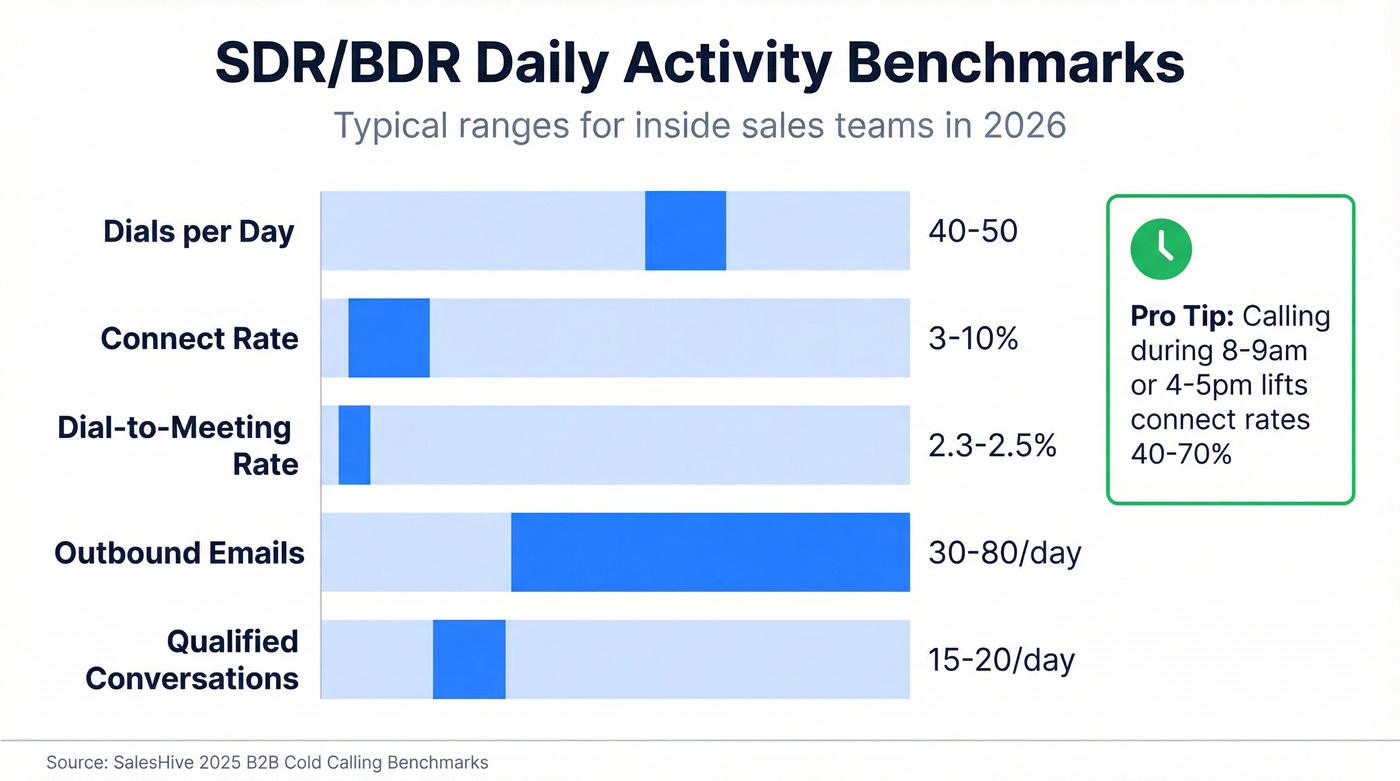
SDRs live in volume. The daily report should capture dials, connects, meetings booked, and pipeline added. Typical benchmarks: 40-50 dials per day, a 3-10% connect rate, roughly 1 meeting per 40-45 dials, with a target of 15-20 qualified conversations per day. Calling during 8-9am or 4-5pm windows lifts connect rates 40-70% versus random times.
| Rep | Dials | Connects | Meetings | Pipeline Added |
|---|---|---|---|---|
| Sarah K. | 47 | 4 | 2 | $18K |
| Marcus T. | 51 | 3 | 1 | $9K |
| Priya R. | 39 | 5 | 2 | $22K |
Notice Priya dialed fewer but connected more - that's a coaching conversation about list quality, not effort. She's working smarter contacts, and the data proves it in a single row.
Field Sales Rep
Field reps track client visits, travel time, and deal stage movement. Volume is lower, but each interaction carries more weight.
| Rep | Visits | Travel Hrs | Demos | Stage Movement |
|---|---|---|---|---|
| James L. | 4 | 3.5 | 2 | Discovery -> Proposal |
| Anika S. | 3 | 2.0 | 1 | Proposal -> Negotiation |
The travel-hours column matters more than people think. If a rep spends 5 hours driving for 2 visits, that's a territory planning problem, not a sales cadence problem.
Retail / Transactional
Retail daily reports focus on transactions, average order value, and returns. This template is simpler but the returns column is non-negotiable.
| Location | Transactions | AOV | Returns | Cash/Card Split |
|---|---|---|---|---|
| Store #12 | 187 | $34.20 | 11 | 28% / 72% |
| Store #15 | 214 | $29.80 | 8 | 22% / 78% |
Ignoring returns inflates your revenue picture and hides product issues. Log them like you log sales.

Priya out-converted her teammates because she had better contacts, not more dials. Prospeo gives every rep that advantage - 98% verified emails and mobile numbers with a 30% pickup rate. Stop logging activity that never had a chance of converting.
Turn every row in your daily report into a real conversation.
Daily Activity Benchmarks
Use these as starting points, not gospel. Your numbers will vary by market, ACV, and sales funnel stage.
| Role | Metric | Benchmark |
|---|---|---|
| SDR/BDR | Dials/day | 40-50 |
| SDR/BDR | Connect rate | 3-10% |
| SDR/BDR | Dial-to-meeting | 2.3-2.5% |
| AE | Demos/day | 1-3 |
| SDR/BDR | Outbound emails | 30-80/day |
If your team consistently falls below these ranges, don't redesign the report. Dig into why. The answer is almost always upstream.
Five Mistakes That Break Reports
1. Tracking vanity metrics over outcomes. Dials mean nothing without connects. Emails mean nothing without replies. Always pair activity with outcome columns.
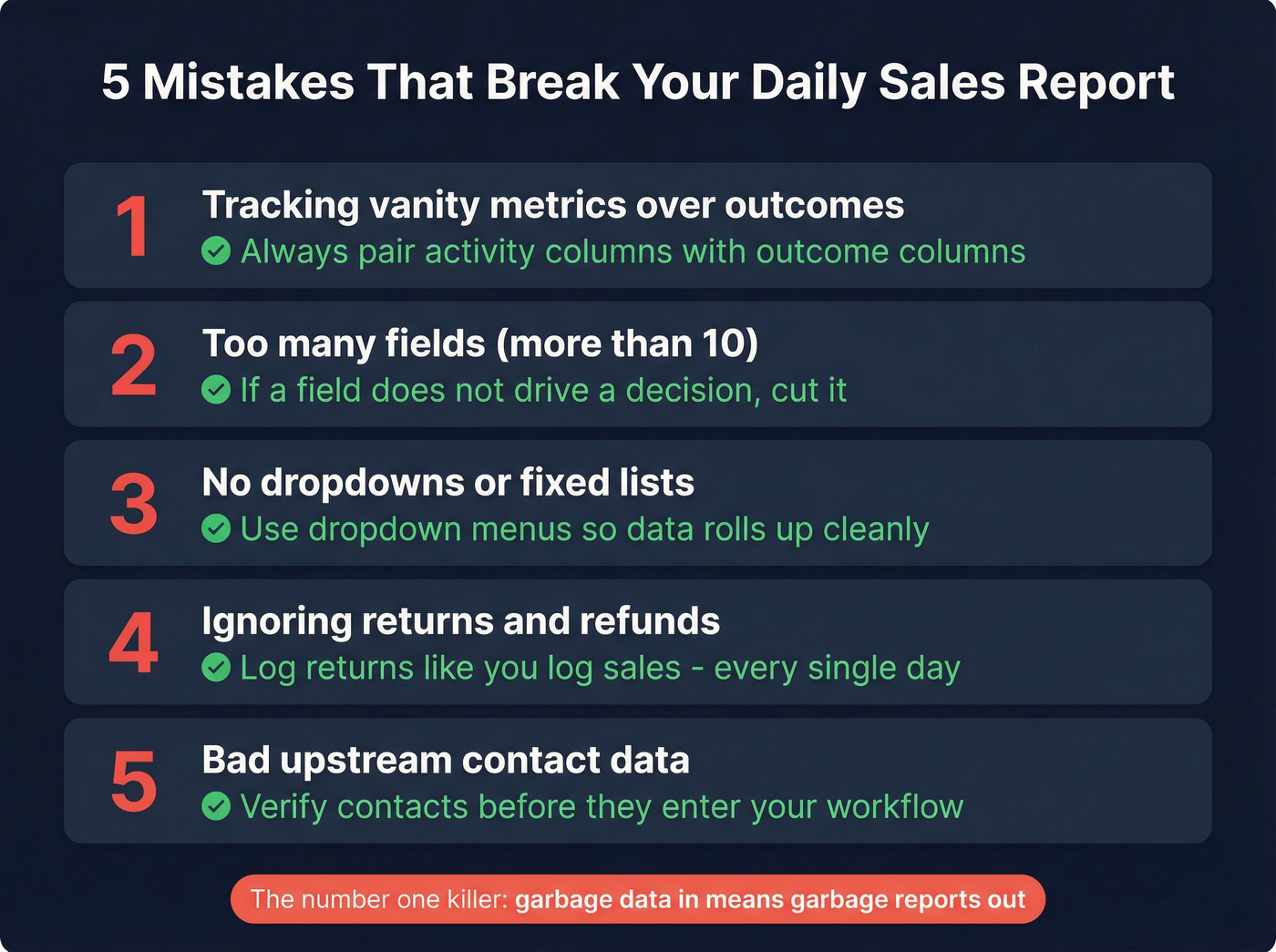
2. Too many fields. More than 10 fields kills adoption. We've seen teams build 15-column spreadsheets that nobody fills out past week two. Trim ruthlessly - if a field doesn't drive a decision, cut it.
3. No dropdowns or fixed lists. Free-text entry creates chaos. One rep types "call," another types "phone," a third types "outbound dial." Use dropdown menus and fixed product lists so your data actually rolls up cleanly.
4. Ignoring returns and refunds. Especially in retail and transactional sales, skipping returns inflates daily revenue and hides problems that compound over weeks.
5. Bad upstream contact data. Look - if your reps dial 50 numbers and connect twice, the report template isn't broken. The data is. The fastest way to fix daily outcomes is to fix what reps are dialing and emailing in the first place. Prospeo verifies emails at 98% accuracy and delivers mobile numbers with a 30% pickup rate, so activity actually converts into conversations instead of voicemails and bounces.
Spreadsheet vs. CRM
Over 70% of small businesses still rely on spreadsheets or notebooks to track sales. That works until it doesn't. Three signs it's time to upgrade:
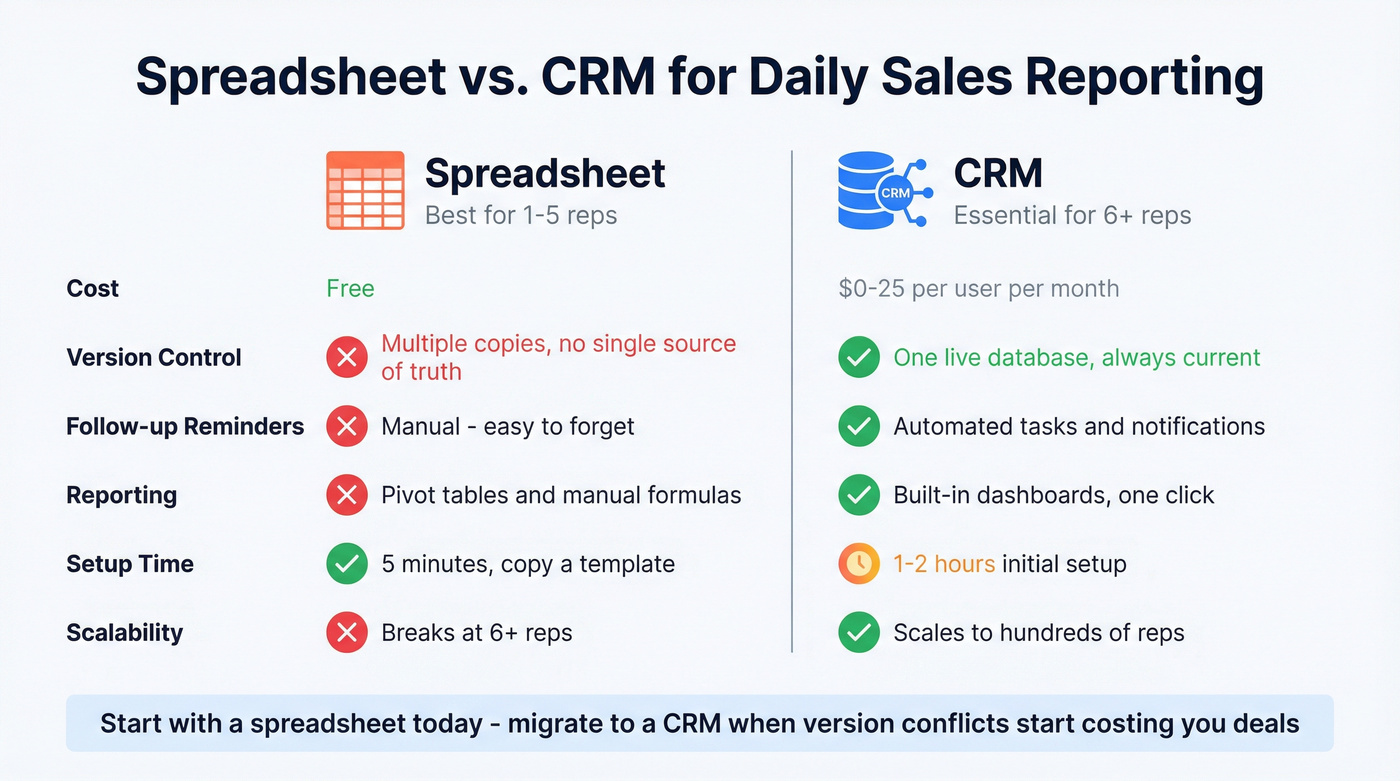
- Version conflicts - multiple "master" copies floating around, nobody sure which is current
- Buried deals - opportunities hiding in row 847 with no follow-up reminder
- Missed follow-ups - no automated tasks means follow-ups die silently
Spreadsheets are fine for very small teams of 1-5 reps. Beyond that, even a free HubSpot CRM or Pipedrive at roughly $15-25/user/month will save you hours of pivot-table guesswork. You can copy the tables above directly into Google Sheets or Excel to get started today - just add data validation dropdowns before you share them with the team.
Fix the Data, Fix the Report
Most daily reports that show high activity but low outcomes don't have a format problem. They have a data quality problem. Reps are dialing disconnected numbers, emailing invalid addresses, and logging activity that never had a chance of converting.
Before you redesign the template, audit the data feeding it. Pull a random sample of 50 contacts from your CRM and verify them. If you're seeing repeated bounces and wrong numbers, your report's activity numbers are fiction.
In our experience, teams that fix their contact data see conversion rates jump within the first week - because the daily sales activity report format was never the bottleneck. The bottleneck was garbage in, garbage out.
Let's be honest: most sales teams don't need a better daily report. They need better data going into the report they already have. A perfect template built on disconnected numbers is just a prettier way to document failure.
You just read that reps spend only 28% of their time selling. Bad contact data makes that number worse - every bounced email and disconnected number is wasted activity on your daily report. Prospeo delivers 143M+ verified emails refreshed every 7 days at $0.01 each, so your activity columns actually translate to pipeline.
Fix the data upstream and watch your daily conversions climb this week.
FAQ
What fields should a daily sales activity report include?
Every report needs date, rep name, activity type, count, outcome, and next steps - six core fields. Keep total fields under 10. Anything more kills adoption and leads to incomplete entries that skew your pipeline data.
How long should filling out a daily report take?
A well-designed report takes 3-7 minutes. If reps spend more than 10 minutes, the format has too many fields or lacks dropdowns. Simplify until nobody skips it - compliance above 90% is the goal.
Should I use a spreadsheet or CRM for daily reporting?
Spreadsheets work for teams of 1-5 reps. Beyond that, version conflicts and missed follow-ups make a CRM worth the investment. HubSpot's free tier or Pipedrive at $15-25/user/month handle daily reporting without the chaos of competing file copies.
How do I get reps to actually complete daily reports?
Keep it under 5 minutes, use dropdown menus instead of free text, and act on the data visibly. Reps stop reporting when nobody reads the report. Review it daily in standup and coach from it - that creates accountability and shows reps their numbers matter.
Why does my report show high activity but low results?
Almost always a data quality issue. Reps dialing disconnected numbers or emailing invalid addresses inflate activity counts without producing pipeline. Verify your contact data before it enters your workflow so every dial reaches a real person - that single change often doubles connect rates within days.