

Best Email Extractor Chrome Extensions in 2026
One of the most-installed email extractor Chrome extensions on the Web Store has over 500,000 users. It can also allegedly read the owner's emails, runs background tasks with no tabs open, and stores your data permanently on external servers. A cybersecurity thread on Reddit tore it apart - and the developer, Conversion Boooster SL, hasn't exactly rushed to address the concerns.
Here's the scenario that plays out every week: an SDR installs the first email extractor plugin that shows up in the Chrome Web Store, exports 1,000 emails from company websites, loads them into a sequence, and watches 350 bounce by Thursday. Their domain reputation takes a hit that takes weeks to recover from. The extension was free. The damage wasn't.
Not all these tools are created equal. Some scrape raw text off web pages. Others query verified databases and return deliverable business emails. That gap is the difference between a productive prospecting week and a deliverability crisis.
Our Top Picks (TL;DR)
Prospeo - Best for verified B2B emails. 98% email accuracy, 7-day data refresh cycle, and a free tier with 75 emails plus 100 extension credits per month. The strongest cost-per-email in the category at roughly $0.01 on paid plans.
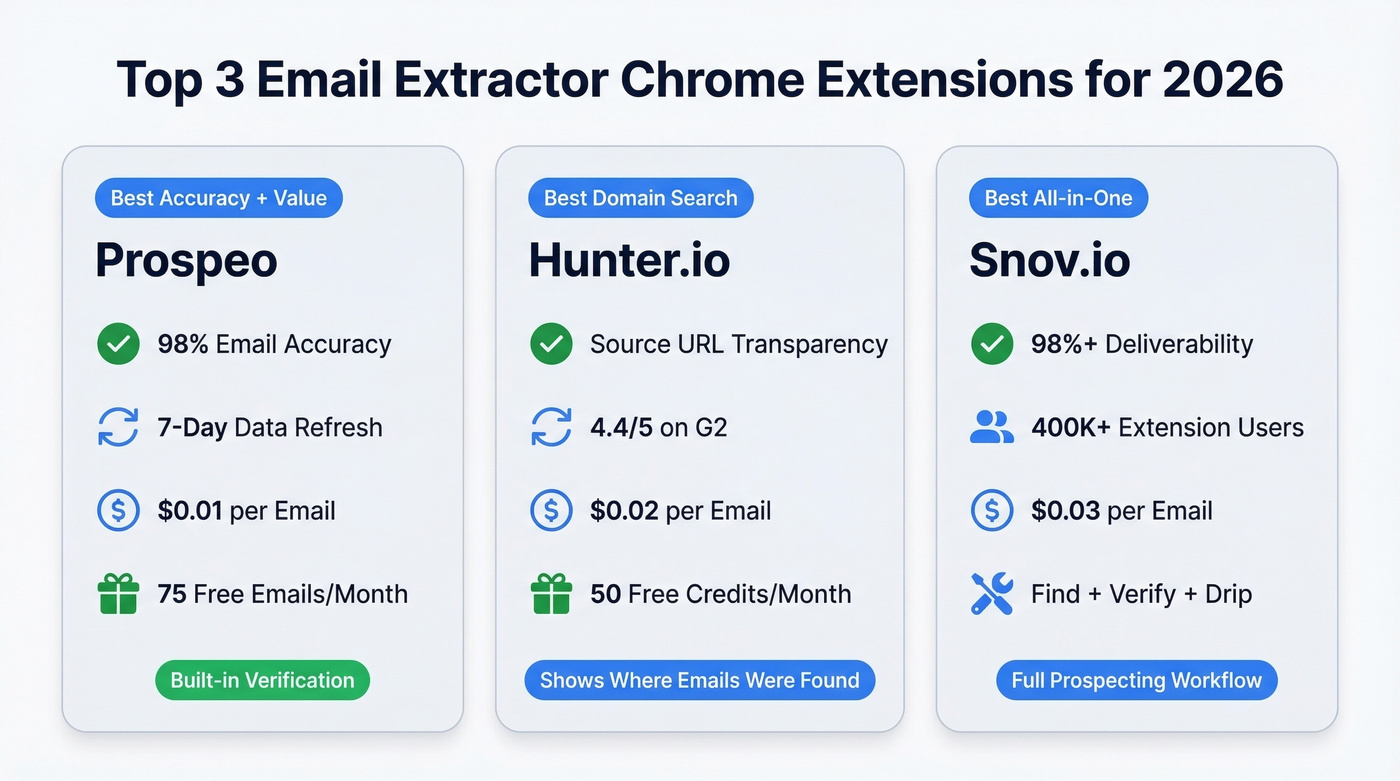
Hunter.io - Best for domain-level email discovery. Shows you exactly where each email was found and when. 50 free credits per month on the free plan.
Snov.io - Best all-in-one. Email finding plus drip campaigns plus verification in a single platform. 400,000+ extension users and a 4.5/5 rating on 300+ G2 reviews.
Page Scrapers vs. Email Finders
This is the single most important distinction in the category, and most people miss it entirely.
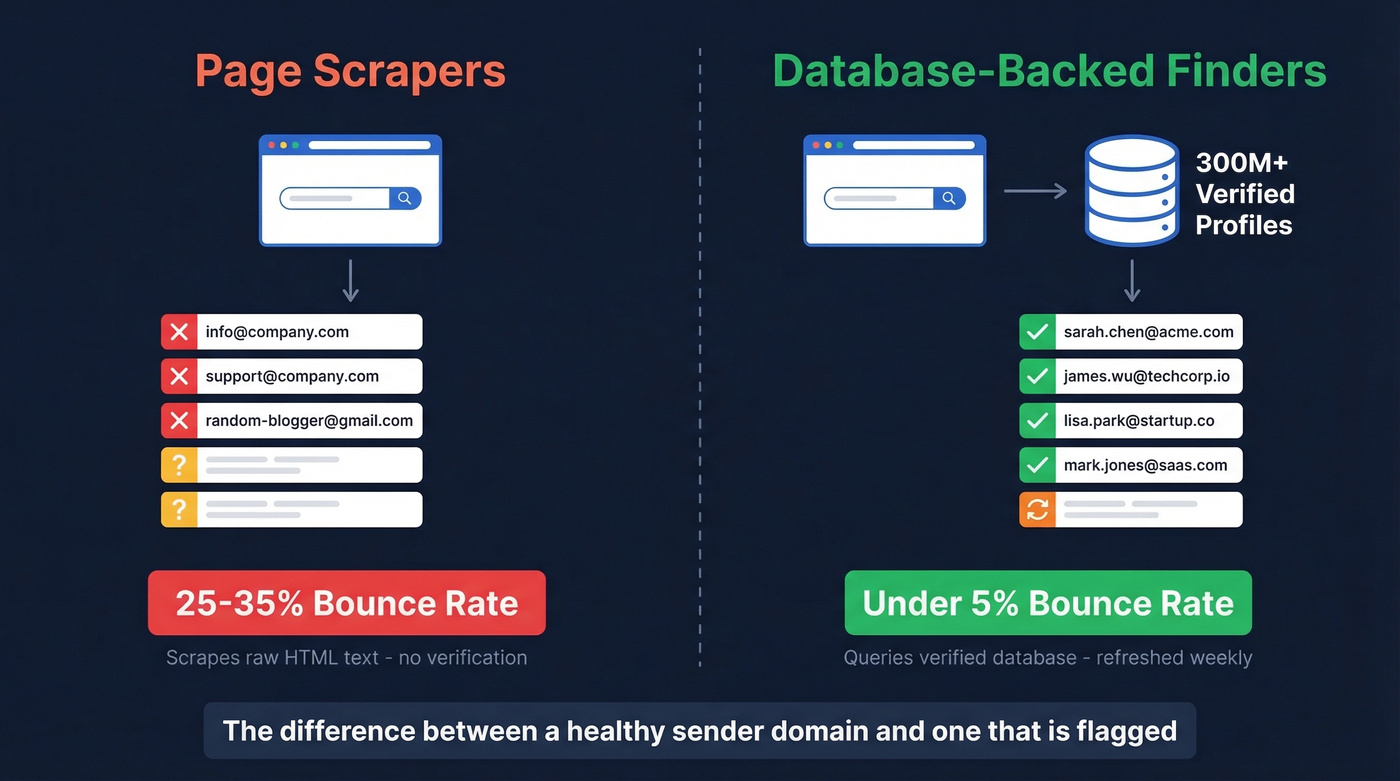
Page scrapers use regex patterns to scan the visible text of a web page and grab anything that looks like an email address. They pull mailto: links, contact@ addresses, and whatever else is sitting in the HTML. Email Extractor Lite is a classic example - a free tool that requires no account and is built for exactly this kind of extraction, including pulling emails from pages you visit and from search results.
The problem? You end up with info@company.com, support@company.com, and the personal Gmail of someone who left a blog comment in 2019. None of those help you reach the VP of Engineering.
Database-backed finders query verified contact databases rather than scraping raw text. You give them a name and company - or just a domain - and they return a specific person's deliverable business email, one that was verified days ago rather than scraped from a page that hasn't been updated since 2022.

The bounce rate difference is dramatic. We've seen teams running page scrapers hit 25-35% bounce rates consistently, while database-backed finders with built-in verification typically keep you under 5% . For anyone running cold outreach at scale, that gap is the difference between a healthy sender domain and one that's flagged.
Here's the thing: even if your average deal size is under $5k, you can't afford free scrapers. One week of bounced sequences tanks your domain reputation for a month. The $30-40/month for a proper email finder is the cheapest insurance in your entire sales stack.
Pricing and Feature Comparison
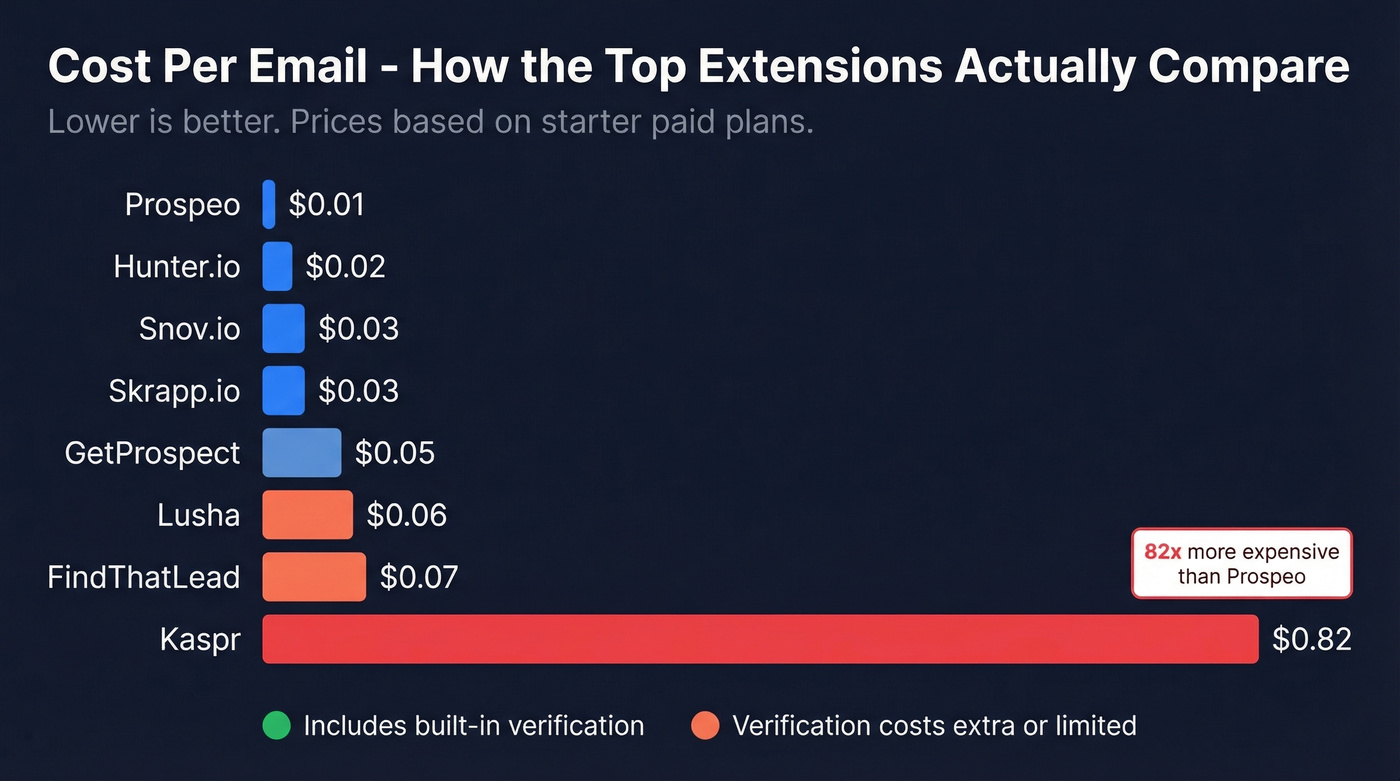
We ran the numbers on cost-per-email across all ten tools. Pay attention to that column - it reveals which tools are actually affordable at scale and which ones look cheap until you do the math.
| Tool | Free Tier | Starter Price | Credits | Verification | ~Cost/Email | Export Formats | Best For |
|---|---|---|---|---|---|---|---|
| Prospeo | 75 emails/mo | ~$39/mo | Varies | Built-in | ~$0.01 | CSV, API, CRM sync | Best accuracy + value |
| Hunter.io | 50 credits/mo | $34/mo (annual) | 2,000/mo | 0.5 credits | ~$0.02 | CSV, API, Google Sheets | Best domain search |
| Snov.io | Trial | $29.25/mo (annual) | 1,000/mo | 1 credit | ~$0.03 | CSV, API, XLSX | Best all-in-one |
| GetProspect | 50 emails/mo | $49/mo | 1,000/mo | Included | ~$0.05 | CSV, XLSX, API | Best rollover credits |
| Skrapp.io | 100 credits/mo | $30/mo (annual) | 1,000/mo | Built-in | ~$0.03 | CSV, API | Best fair-credit policy |
| Lusha | 70 credits/mo | ~$14.95/mo | 3,000/yr | Partial | ~$0.06 | CSV, API, CRM sync | Best free tier volume |
| FindThatLead | 7-day trial | $37/mo (annual) | 500/mo | Basic | ~$0.07 | CSV | Avoid - poor hit rate |
| Kaspr | 5 emails/mo | $49/mo | 60/mo | Basic | ~$0.82 | CSV, API | Avoid - worst value |
| Email Extractor Lite | Unlimited | Free | N/A | None | $0 | Copy/paste | Quick page scrapes only |
| Fast Mail Finder | Unlimited | Free | N/A | None | $0 | Local storage, CSV/TXT | Privacy-first scraping |
Look at Kaspr's cost per email. $0.82 for a single email on the Starter plan. That's not a typo - you get 60 emails for $49/month.

Most email extractor extensions scrape raw text and leave you with 30%+ bounce rates. Prospeo's Chrome extension queries a 300M+ profile database refreshed every 7 days - returning verified emails at 98% accuracy for ~$0.01 each. Meritt cut their bounce rate from 35% to under 4% and tripled their pipeline.
Stop paying for bounces. Start with 75 free verified emails today.
Best Extensions Reviewed
Prospeo
Use this if: You need verified B2B emails that won't bounce and you're tired of paying for bad data. The 5-step verification process with catch-all handling, spam-trap removal, and honeypot filtering produces 98% email accuracy - and that number holds up in production. Meritt went from a 35% bounce rate to under 4% after switching, and their pipeline tripled from $100K to $300K per week.
The extension has 40,000+ users and works on company websites, professional profiles, and CRMs. You get verified emails and phone numbers in one click, with 50+ data points per contact. Behind the extension sits a database of 300M+ profiles, 143M+ verified emails, and 125M+ verified mobile numbers with a 30% pickup rate - all refreshed on a 7-day cycle versus the six-week industry average.
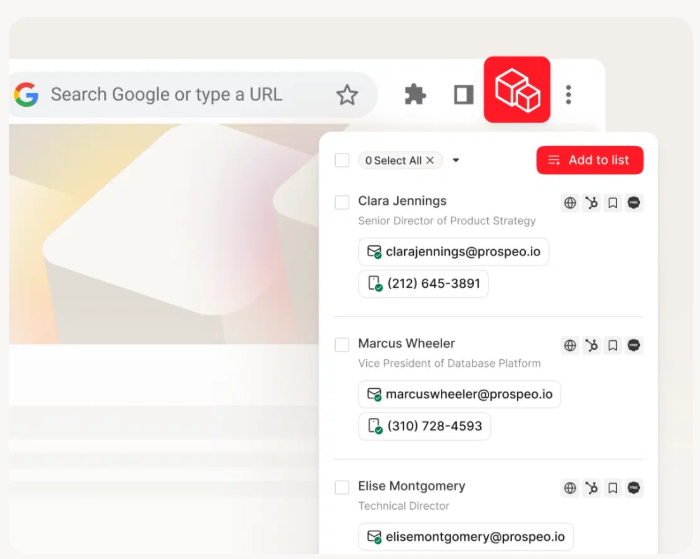
The free tier gives you 75 emails and 100 extension credits per month. Paid plans run about $0.01 per email with no contracts - cancel anytime. Integrations cover the full stack: Salesforce, HubSpot, Smartlead, Instantly, Lemlist, Salesloft, Outreach, Clay, Zapier, n8n, and Make.
Skip this if: You only need to scrape raw mailto: links from web pages - Email Extractor Lite is free for that. But if you're doing any kind of outbound, this is the tool to start with.
At $0.82/email, Kaspr costs 82x more than Prospeo - with worse accuracy. Prospeo's extension gives you verified emails, direct dials, and 50+ data points per contact in one click. No contracts, no credit card on the free tier.
Join 40,000+ users who ditched overpriced extensions with bad data.
Hunter.io
Use this if: Domain-level email discovery is your primary workflow. You have a list of companies and need to find every reachable person at each one. Hunter's domain search is the best in the category for this - type in a domain and get a list of emails with the exact source URL and discovery date for each one. That transparency is a genuine differentiator. Few tools show you where the email was found.

The free plan gives you 50 credits per month. Starter runs $49/mo, or $34/mo on annual billing, with 2,000 credits. Growth is $149/mo ($104 annual) for 10,000 credits. Verification costs half a credit per email, which is reasonable. Hunter has a 4.4 rating on G2 and has earned it.
Skip this if: You need phone numbers alongside emails, or you want outreach sequences built into the same tool. Hunter's strength is finding and verifying emails - it's not trying to be an all-in-one platform, and that's fine. Pair it with a sequencer like Instantly or Lemlist.
Snov.io
Use this if: You're a solo founder or small team that doesn't want to stitch together three different tools. Snov.io genuinely covers the full prospecting workflow - email finding, verification, and drip campaigns - inside a single platform.

The extension has 400,000+ users and claims a 1.72% bounce rate on valid emails, translating to 98%+ deliverability. The Starter plan runs $29.25/mo on annual billing with 1,000 credits and 5,000 email recipients. Pro jumps to $74.25/mo for 5,000 credits and 25,000 recipients.
One catch worth knowing: you can collect emails on the free plan, but exporting them requires a paid account. Threads on r/coldemail surface this frustration regularly - people discover the paywall after they've already built a list.
Skip this if: You need best-in-class data accuracy above all else, or you want a tool that does one thing exceptionally rather than three things well.
GetProspect
Every plan, including free, gets the same features - the only difference is volume. Free gives you 50 valid emails and 100 verifications per month. Starter is $49/mo for 1,000 valid emails. The verification add-on is a steal at 10,000 verifications for $29 with credits that never expire. GetProspect's rollover credits make it a solid mid-tier choice for teams with uneven monthly prospecting volume.
Skrapp.io
Skrapp's Fair Credit Policy is the standout feature: you're never charged for emails that come back as invalid or unknown. You only pay for valid or catch-all results. The Professional plan starts at $30/mo on annual billing for 1,000 credits, making it one of the cheapest database-backed options. Vendor claims put search success at 92% and verification accuracy at 97%+. The database is smaller than the Tier 1 tools, though, and the extension UI feels dated.
Lusha: Watch the Hidden Costs
Lusha's free tier looks generous at 70 credits per month, and Pro at $14.95/mo seems like a bargain. Then the credit math kicks in. A phone reveal costs 5 credits. An email costs 1. A CSV export costs 1 credit per 25 rows. That "unlimited" Scale plan? Review sites regularly surface fair-use caps around 2,000 contacts per month - which isn't unlimited by any definition.
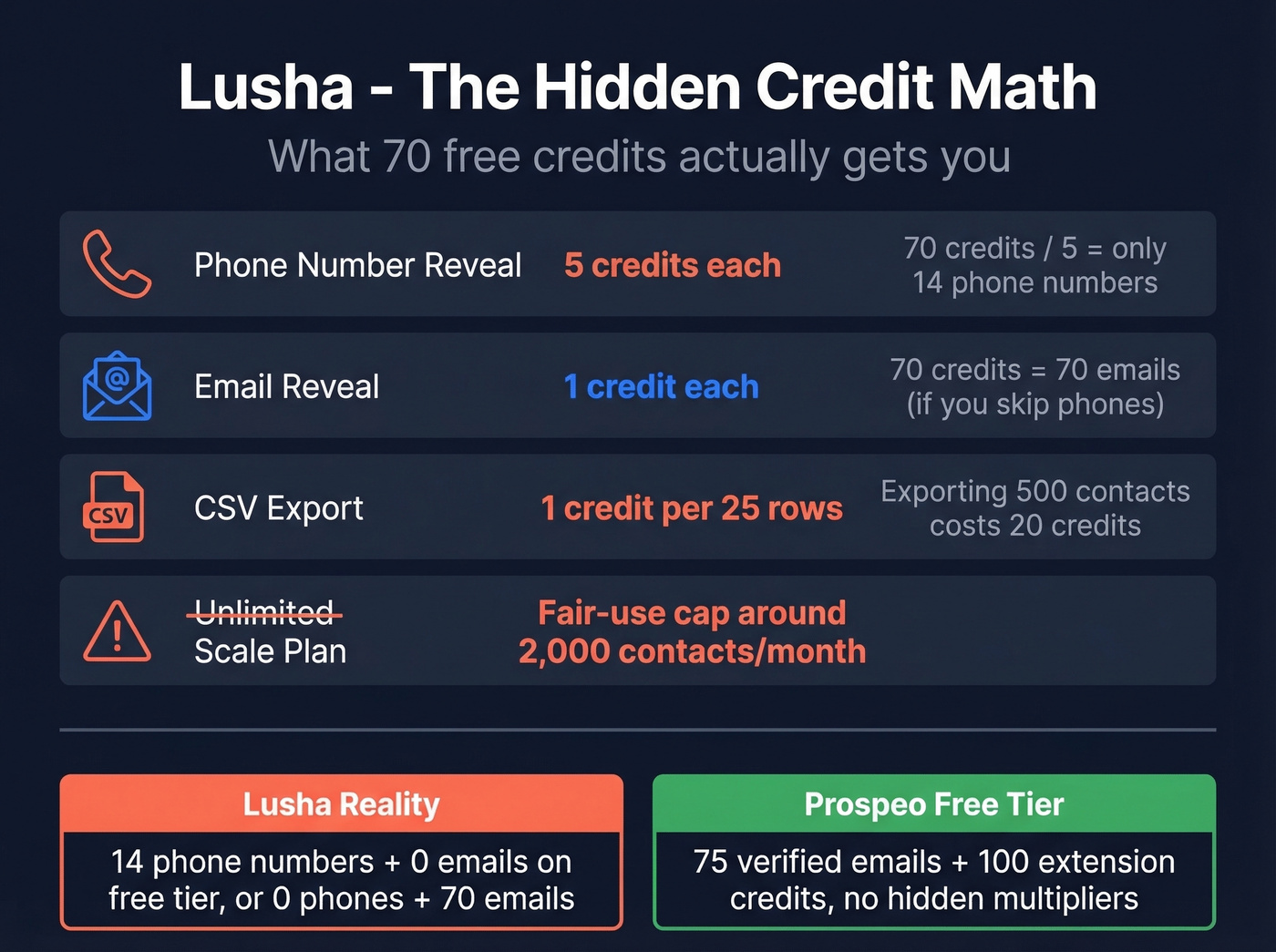
The #1 complaint on review sites is outdated data, followed closely by HubSpot integration bugs that merge or override existing records. Lusha emphasizes GDPR and CCPA compliance, which is a genuine strength, but the credit structure means your effective cost-per-contact is higher than the sticker price suggests.
FindThatLead
Annual-commitment plans at $37/mo (Starter), $55/mo (Pro), and $75/mo (Ultimate). The "unlimited" Ultimate plan has undisclosed fair-use limits. Users report email-finding success rates around 1%. Hard to recommend.
Kaspr
Five free emails per month. Starter is $49/mo for 60 emails - $0.82 per email, the worst unit economics on this list. Business at $79/mo for 2,400 emails is more reasonable but still expensive compared to every other option here.
Email Extractor Lite
Free, no account required, scrapes mailto: links and email-like text from whatever page you're on. No verification, no database. Fine for grabbing emails from a conference speaker page. Not a prospecting tool.
Fast Mail Finder
A free extension that stores everything locally in your browser. The free version exports extracted emails in CSV or TXT and filters out duplicates automatically. The Pro version supports bulk extraction by pasting up to 2,000 URLs, then visiting them sequentially in a minimized window with configurable delays. Estimated Pro pricing falls in the $15-30/mo range. Useful for privacy-conscious users, but there's no verification layer - so you're still flying blind on deliverability.
How Accurate Are These Tools?
Vendor accuracy claims are marketing. Real-world benchmarks tell a different story.
The Dropcontact benchmark tested 15 email-finding tools against 20,000 real contacts in February 2026, measuring effective enrichment rates and hard bounce rates by actually sending emails. Effective enrichment rates ranged from 31% to 55%, and hard bounce rates ran between 0.9% and 3.6%. Even the best tools in that test couldn't find a valid email for nearly half the contacts.

What "verified" means varies wildly across tools. Some run a basic MX check. Others do full SMTP verification. In our testing, the gap between a basic MX check and a full multi-step verification process consistently translates to a 10-20 percentage point difference in bounce rates on real sends.
The production results back this up. Snyk's 50-person AE team dropped from 35-40% bounces to under 5% after switching to a database-backed finder with multi-step verification. Stack Optimize built from $0 to $1M ARR while maintaining 94%+ client deliverability and zero domain flags across all clients. Those aren't vendor claims on a marketing page - they're results from real outbound teams running real sequences.
Let's be honest: if a tool claims 99% accuracy and doesn't publish methodology, be skeptical. The Dropcontact data shows that even well-regarded tools produce bounce rates above 1%. The question isn't whether you'll get some bounces - it's whether your tool keeps them low enough to protect your sender reputation.
Security Checklist Before Installing
Not every extension deserves access to your browser. Before you install anything, check these:
- Permissions scope. Does it request access to read your browsing history, access all tabs, or run background processes? A legitimate email finder needs access to the active tab. It doesn't need to read your Gmail or run tasks when you're not using it.
- The developer. The most-installed "Email Extractor" extension from Conversion Boooster SL was flagged on r/cybersecurity for alleged remote code injection capabilities, permanent data storage on external servers, and scheduled tasks running with no tabs open. Check the developer's other extensions and look for red flags.
- Local vs. server-side processing. Extensions that process everything in your browser can't leak your data to a third party. Extensions that send data to external servers should have a clear privacy policy explaining what's stored and for how long.
- GDPR and CCPA. If you're extracting business emails for outreach, you need a legal basis for processing that data. Tools that source from compliant databases with opt-out mechanisms are safer than raw scrapers pulling addresses from random web pages.
- Platform rate limits. For extensions that extract from professional profiles, keep visits under ~150 per day to minimize account restriction risk.
Email Extractor Chrome Extension FAQ
Are email extractor Chrome extensions legal?
Extracting publicly displayed emails from websites is generally legal. Using scraped data for unsolicited outreach can violate GDPR or CCPA depending on jurisdiction. Extensions that scrape professional networking platforms violate those platforms' terms of service. For B2B prospecting, choose tools sourcing from compliant, opt-out-enabled databases.
Which email finder extension is most accurate?
Database-backed finders consistently outperform page scrapers. The Dropcontact benchmark shows even top tools produce 0.9-3.6% hard bounce rates on real sends. Multi-step verification with catch-all handling makes the biggest difference. Always verify before sequencing.
Is a free email extractor for Chrome good enough?
For occasional use, yes. Email Extractor Lite handles quick page scrapes, and Hunter gives you 50 credits per month. For consistent B2B outreach, paid tools with built-in verification prevent the bounce-rate damage that free scrapers cause. A few bounced sequences can tank your domain reputation for weeks. Prospeo's free tier - 75 emails/mo - bridges the gap with verified data at no cost.
How many emails can I extract per day?
Page scrapers have no inherent limit - they grab whatever's on the page. Database-backed finders are credit-gated based on your plan tier. For profile-based extraction, stay under roughly 150 visits per day to avoid triggering account restrictions on the source platform.
What's the difference between extraction and finding?
Extraction scrapes visible email text from web pages - outdated addresses, role-based inboxes like info@ and support@, personal emails from blog comments. Finding queries a verified database to return a specific person's deliverable business email. For B2B outreach, you want a finder. The bounce rate difference alone justifies the distinction.