

IP Reputation for Email Marketing: The Practitioner's Playbook
It's Monday morning and your bounce log looks like a crime scene. Microsoft is throwing 451 4.7.650 ... temporarily rate limited due to IP reputation errors across every Outlook recipient on your list. Your sequences are dead. Your SDRs are pinging Slack asking what happened. And the answer almost always traces back to the same place: your email marketing IP reputation cratered and nobody noticed until it was too late.
The Short Version
Check your reputation right now with Google Postmaster Tools and SenderScore. If it's bad, fix your data first - bounces and spam traps from unverified lists cause more IP reputation damage than anything else. Then warm up properly over 8-12 weeks using the schedule below.
What IP Reputation Actually Is
Every time you send an email, the receiving mailbox provider - Gmail, Outlook, Yahoo - evaluates the reputation of your sending IP address. Think of it as a credit score for email. Bounce rates, spam complaints, engagement patterns, blacklist signals, and authentication records (SPF/DKIM/DMARC) all feed into that score.
Strong reputation means inbox delivery. Weak reputation means the spam folder, throttling, or outright rejection.
Why It Matters More in 2026
The rules got tighter. Google's stricter enforcement beginning late 2025, with Yahoo and Microsoft aligning on similar standards, means the grace period is over. Here's what every sender must have in place now - and for those pushing 5,000+ messages/day, the full enhanced set is mandatory:
- SPF, DKIM, and DMARC implemented (DMARC at minimum
p=none, ideallyp=reject) - Spam complaint rate under 0.3% - ideally below 0.1%
- One-click unsubscribe honored within 2 business days
- "From" domain alignment with SPF or DKIM
- Visible unsubscribe link in the email body
Miss any of these and you're not just risking the spam folder. You're risking outright mail rejection.
What Tanks Your Sender Reputation
IP reputation doesn't collapse overnight from one bad send. It's usually a slow bleed from multiple factors compounding, and by the time you notice, the damage has been accumulating for weeks.
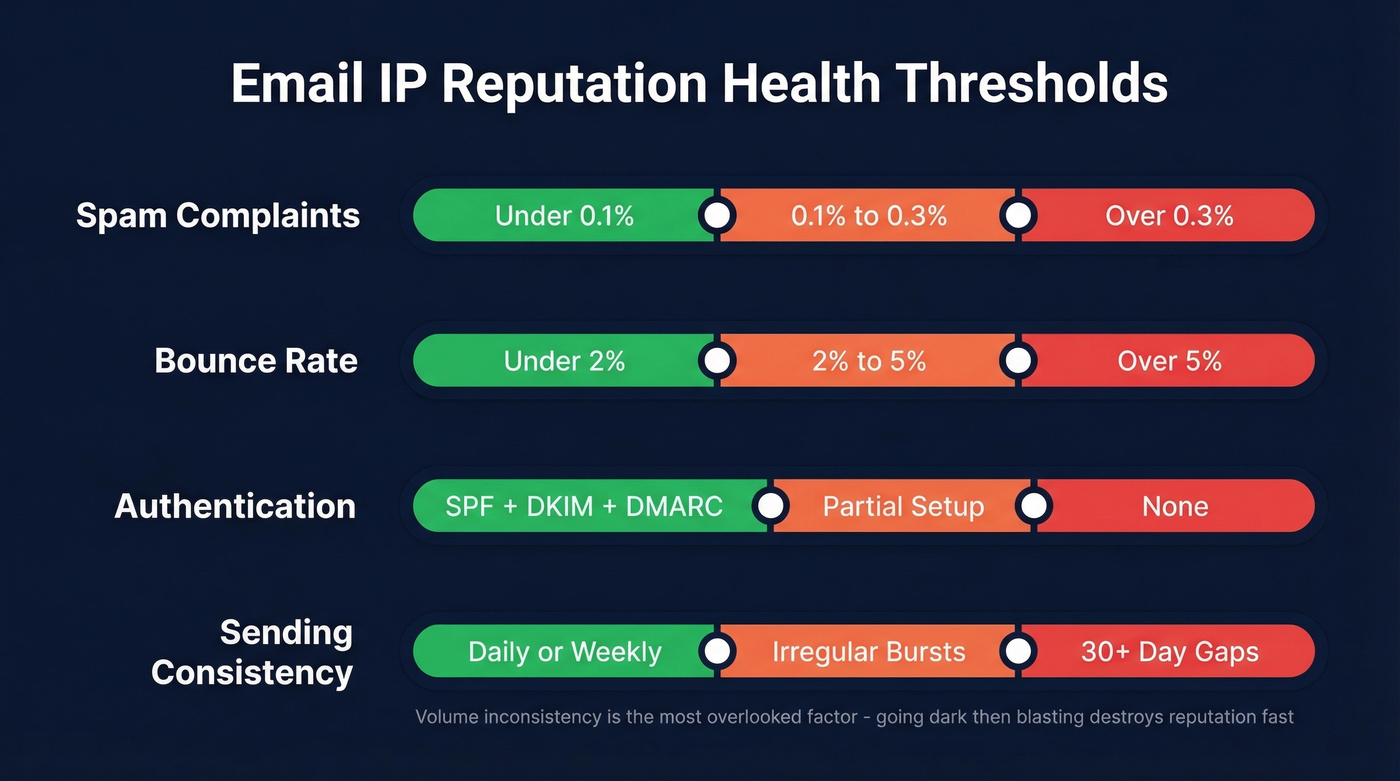
| Factor | Healthy | Warning | Danger |
|---|---|---|---|
| Spam complaints | <0.1% | 0.1-0.3% | >0.3% |
| Bounce rate | <2% | 2-5% | >5% |
| Authentication | SPF+DKIM+DMARC | Partial setup | None |
| Sending consistency | Daily/weekly | Irregular bursts | 30+ day gaps |
Volume inconsistency is the one most teams overlook. Send 500 emails a day for three months, go dark for six weeks, then blast 10,000 in a day - that pattern screams spam to every mailbox provider on the planet. Engagement signals matter too: if recipients aren't opening or clicking, providers notice and start routing you to junk.
Here's the thing: inherited reputation can bite you before you've sent a single message. If you're on a new dedicated IP, the previous owner's sending history follows that IP. Always check a new IP's reputation before you touch it.


Bad data is the #1 cause of IP reputation damage. Every unverified email that bounces pushes you closer to the spam folder. Prospeo's 5-step verification delivers 98% email accuracy - keeping bounce rates under 2% so your sending IP stays clean.
Stop guessing which emails are real. Verify before you send.
How Email Content Affects Deliverability
Beyond list hygiene and authentication, the content inside your emails plays a direct role in deliverability. Spammy subject lines, excessive links, image-heavy layouts with minimal text, and URL shorteners all trigger content filters that feed back into your reputation score. When recipients mark those emails as spam, the complaint signal compounds the damage.
Write emails that read like a human sent them - clear subject lines, a reasonable text-to-link ratio, no deceptive formatting. We've seen teams nail their authentication setup and warm-up schedule, then torpedo their reputation with emails that look like they were designed by a late-night infomercial producer. Content quality and sending infrastructure aren't separate problems; they're two sides of the same coin.
IP Reputation vs. Domain Reputation
Let's be honest: domain reputation matters more than IP reputation for most senders in 2026. IPv6 enables massive IP pools, which makes IPs easier to swap than domains. Mailbox providers know this, so they've shifted toward using your authenticated DMARC domain as the stable identifier. Your domain follows you everywhere. You can't swap it out.
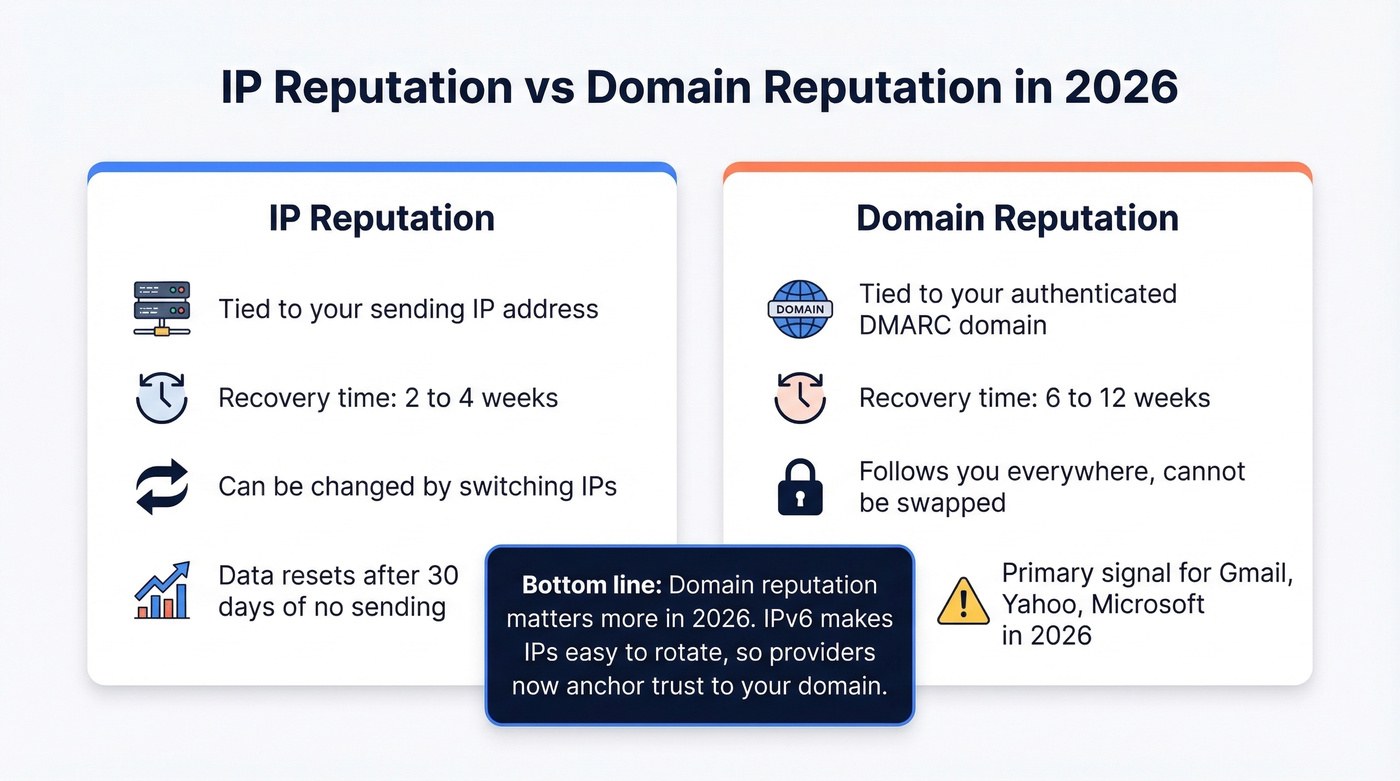
Here's the critical difference: IP reputation typically recovers in 2-4 weeks of clean sending. Domain reputation takes 6-12 weeks. If you're only monitoring IP reputation and ignoring domain reputation, you're watching the wrong dashboard - and setting yourself up for a much longer recovery when things go sideways.
Shared vs. Dedicated IP
If you're sending under 50,000 emails per month, a shared IP is fine. It's pre-warmed, cheaper (usually included with your ESP), and requires no warm-up effort. The tradeoff is neighbor risk - if another sender on your shared IP behaves badly, your deliverability suffers too.
Dedicated IPs give you full control, but they demand a proper warm-up period and consistent volume. We've watched teams grab a dedicated IP, blast their full list on day one, and destroy the reputation before it ever existed. Don't do that.
Skip the dedicated IP entirely if your monthly volume is under 25,000. The warm-up overhead isn't worth it, and you'll struggle to maintain enough consistent volume to keep the reputation stable.
How to Check Your IP Reputation
Google Postmaster Tools
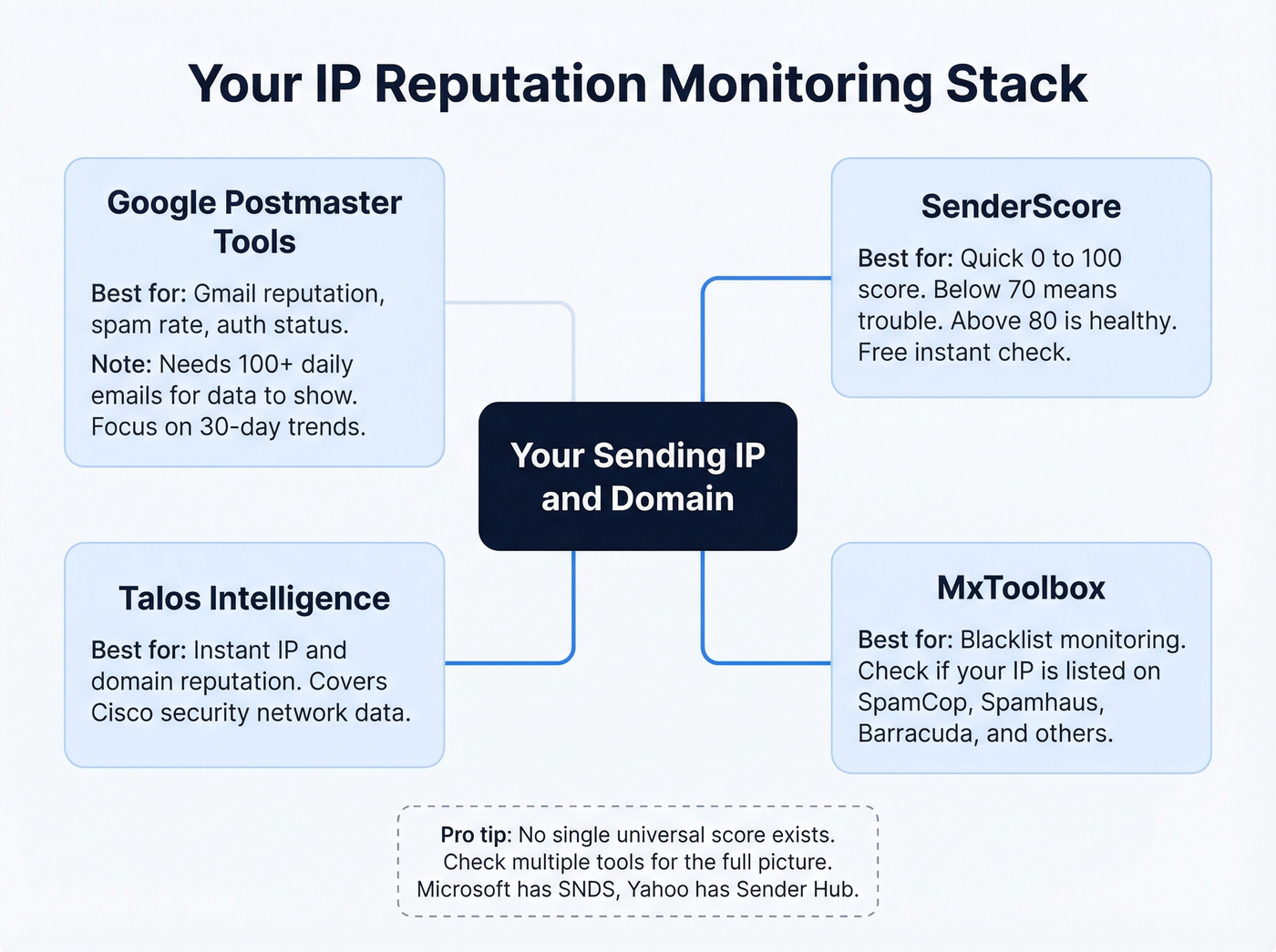
Add your sending domain, verify via DNS TXT record, and wait 24-48 hours for data. The dashboard shows reputation, spam rate, and authentication signals. Google won't display data on low-volume days (under roughly 100-200 emails), and if you see a 100% spam rate on a day you barely sent, delayed user complaints can skew the metric. Focus on the 30-day trend, not single-day anomalies.
SenderScore
Enter your sending IP at SenderScore for a score from 0-100. Below 70 means you've got a problem. Above 80 is healthy.
No single universal reputation score exists across all mailbox providers. Different providers and security companies score reputation differently, even if many tools present a 0-100 scale. Consistent monitoring across multiple tools gives you the most accurate picture.
Other Tools Worth Checking
Paste your IP into Talos Intelligence for an instant reputation assessment covering both IP and domain. Pair it with MxToolbox for blacklist monitoring. For Microsoft-specific data, check SNDS. Yahoo offers Sender Hub.
How to Fix and Protect Your Email Marketing IP Reputation
Warm Up Properly
A full warm-up takes 8-12 weeks to reach optimal deliverability. Start with internal addresses and your most engaged recipients - move any messages out of spam and add to contacts to build positive signals early.
| Week | Daily Volume | Gating Metric |
|---|---|---|
| 1 | 10-20 | Monitor bounces |
| 2 | 20-40 | Check complaints |
| 3 | 40-80 | Track open rates |
| 4 | 80-150 | All metrics stable? |
| 5-8 | +50-100/week | Slow if any metric degrades |
| 8-12 | Reach target | Maintain <0.1% complaints |
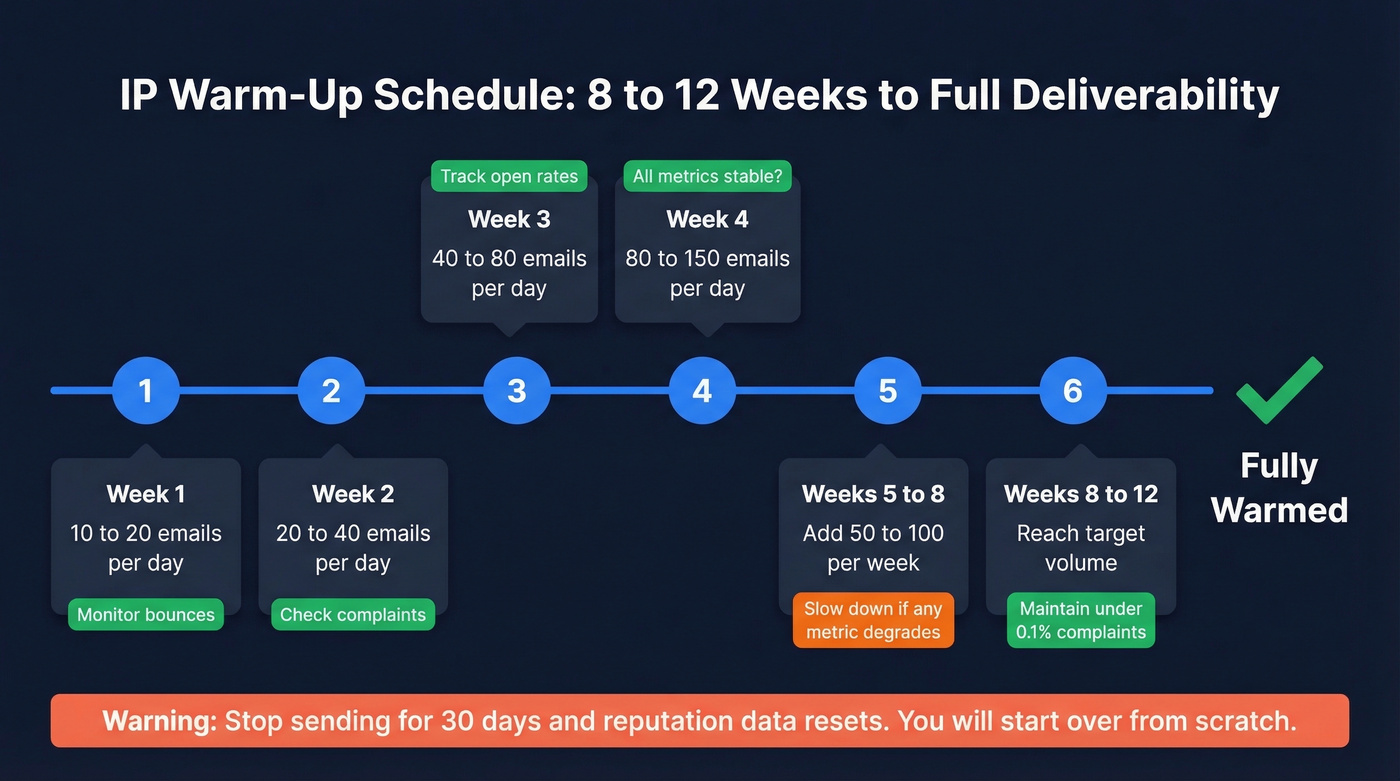
One critical rule: most reputation systems only store data for 30 days. Stop sending for a month and you're starting over from scratch.
Lock Down Authentication
SPF, DKIM, and DMARC must all be configured before you send a single warm-up email. Set DMARC to p=none at minimum, p=reject if you're ready. Enable one-click unsubscribe. If you're unsure about your setup, run your domain through MxToolbox's diagnostic tools.
Fix Your Data First
This is where most teams get it backwards. They obsess over warm-up schedules and DNS records while 8% of their list is dead on arrival. The #1 cause of reputation damage isn't sending frequency - it's unverified lists loaded with invalid addresses, spam traps, and honeypots. Every bounce and every trap hit chips away at your sender score.
Real talk: if your average deal size is under five figures and you're running cold outbound, bad data will kill your IP reputation faster than any misconfigured DNS record ever will. The consensus on r/coldemail is pretty clear on this - verify before you send, or don't send at all.
Prospeo's 5-step verification filters spam traps, honeypots, and invalid addresses before they touch your sending infrastructure - 98% email accuracy with a 7-day data refresh so contacts don't go stale between campaigns. Stack Optimize maintained 94%+ deliverability with under 3% bounce rates across every client using Prospeo-verified lists, clean data that helped them scale to $1M ARR.

Get Off Blacklists
Fix the root cause before you request delisting. If you don't, you'll be re-listed within days.
| Blacklist | Delisting Time | Process |
|---|---|---|
| SpamCop | 24-48 hours | Automatic |
| Spamhaus | 24-48 hours | Manual request |
| Barracuda | 12-24 hours | Self-service form |
Clean your list, lock down authentication, then submit the request. In that order.
You just spent 8-12 weeks warming up your IP. One send to a stale list full of spam traps can undo all of it. Prospeo refreshes its 300M+ profiles every 7 days - not every 6 weeks like competitors - so your outbound never hits dead addresses.
Data refreshed weekly at $0.01/email. Your IP reputation is worth it.
FAQ
How long does it take to fix IP reputation?
A full warm-up takes 8-12 weeks of consistent, clean sending. Blacklist delisting takes 12-48 hours, but rebuilding the underlying reputation requires sustained volume with sub-0.1% complaint rates and under 2% bounces.
What's a good IP reputation score?
On SenderScore, above 80 is healthy and below 70 signals serious problems. On Google Postmaster Tools, aim for "High" status - focus on the 30-day trend, not single-day fluctuations.
How do I stop bad data from destroying my reputation?
Run every address through a verification tool before it enters your sending pipeline. Catch-all domain handling, spam-trap removal, and honeypot filtering are non-negotiable for any outbound program sending at scale.
Does cold email reputation differ from marketing email reputation?
The mechanics are identical - mailbox providers evaluate bounces, complaints, and engagement regardless of email type. But cold email carries higher risk because recipients didn't opt in, so complaint rates run higher. List verification and gradual warm-up are even more critical for outbound prospecting than for opted-in marketing sends.