


G-Lock EasyMail7: Pricing, Reviews, Pros and Cons (2026)
You're staring at a $300/month Mailchimp invoice for a list you could send through Amazon SES for pennies. G-Lock EasyMail7 promises a way out - and understanding its pricing, renewal terms, and real-world tradeoffs is the first step to deciding if it delivers. We dug into the sliding-scale renewal costs that EasyMail7's own site buries, the reporting gaps nobody explains, and the setup complexity that separates this tool from the plug-and-play crowd.
30-Second Verdict
EasyMail7 is a genuinely cheap way to send high-volume email through Amazon SES - if you're technical, on Windows, and don't need built-in analytics. It carries a 4.8/5 on Capterra from 33 reviews, with a perfect 5.0 for customer service. If you want plug-and-play simplicity, look at Sendy ($69) or Brevo instead.
Pricing Breakdown
What Each Plan Includes
| Plan | Price | Users | Spam Tests | Updates & Support |
|---|---|---|---|---|
| Personal | $159 | 1 | 30 | 12 months |
| Business | $259 | 3 (+2 free) | 150 | 12 months |
| Enterprise | $1,569 | 30 | 1,500 | 24 months |
Every plan includes every feature - no gating by tier. The difference is users, spam tests, and support duration. There's a 60-day money-back guarantee and a free trial capped at 250 emails/hour, 1,000/day, and 12,000/month. EasyMail7 doesn't include an SMTP server; you bring your own (Amazon SES, SendGrid, SparkPost, or Mailgun).
Renewal After Year One
Here's the detail no other review covers. After your license's update period expires, you keep the last version forever - no forced subscription. That's the good news.
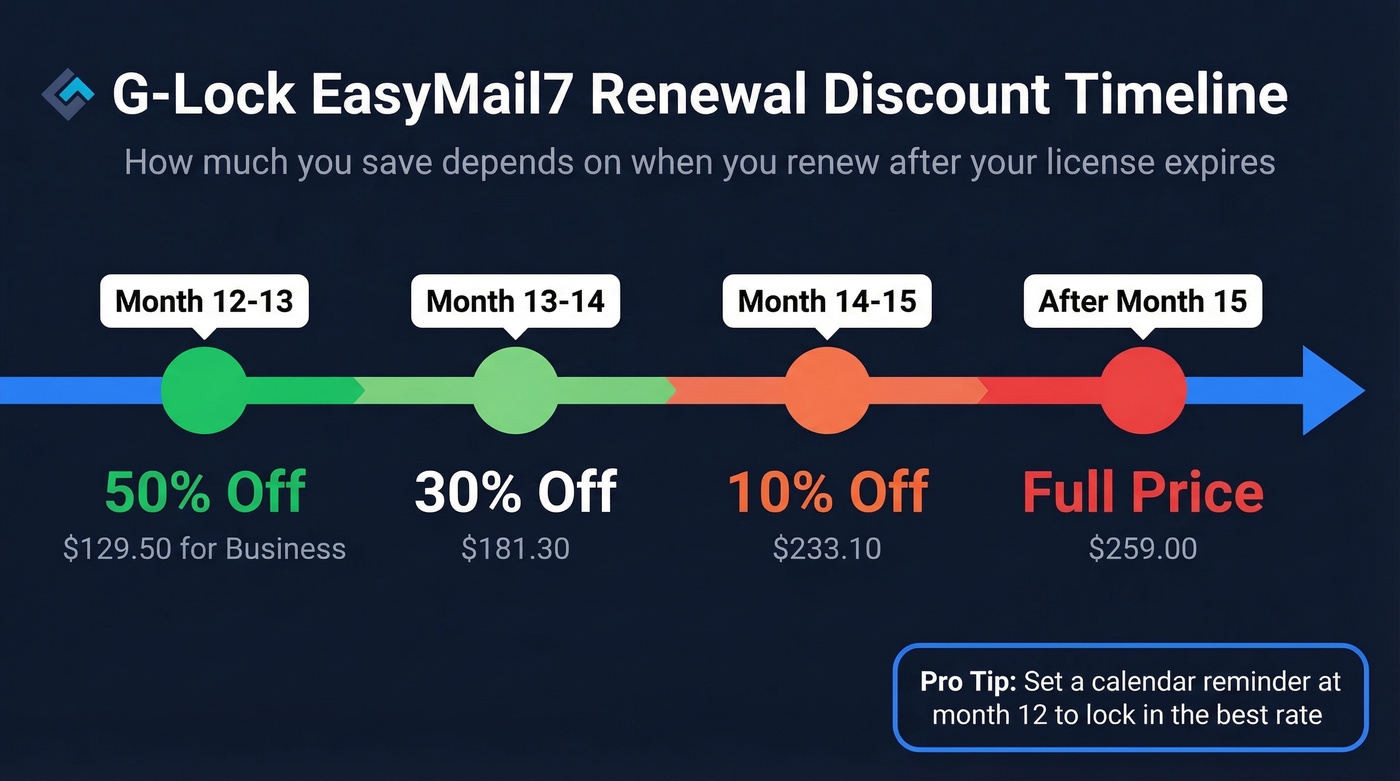
But if you want continued updates and support, the renewal discount depends on how soon you renew after expiration: 50% off in months 12-13, then 30% off in months 13-14, 10% off in months 14-15, and full price after month 15. For the Business plan, that means $129.50 if you renew promptly, climbing back to $259 if you wait too long. Set a calendar reminder.
Total Cost of Ownership
| Cost Component | EasyMail7 + SES | Mailchimp |
|---|---|---|
| Year 1 (100K emails/mo) | ~$379 | ~$3,600-$4,800 |
| Year 2+ (renewal + SES) | ~$250/yr | ~$3,600-$4,800/yr |
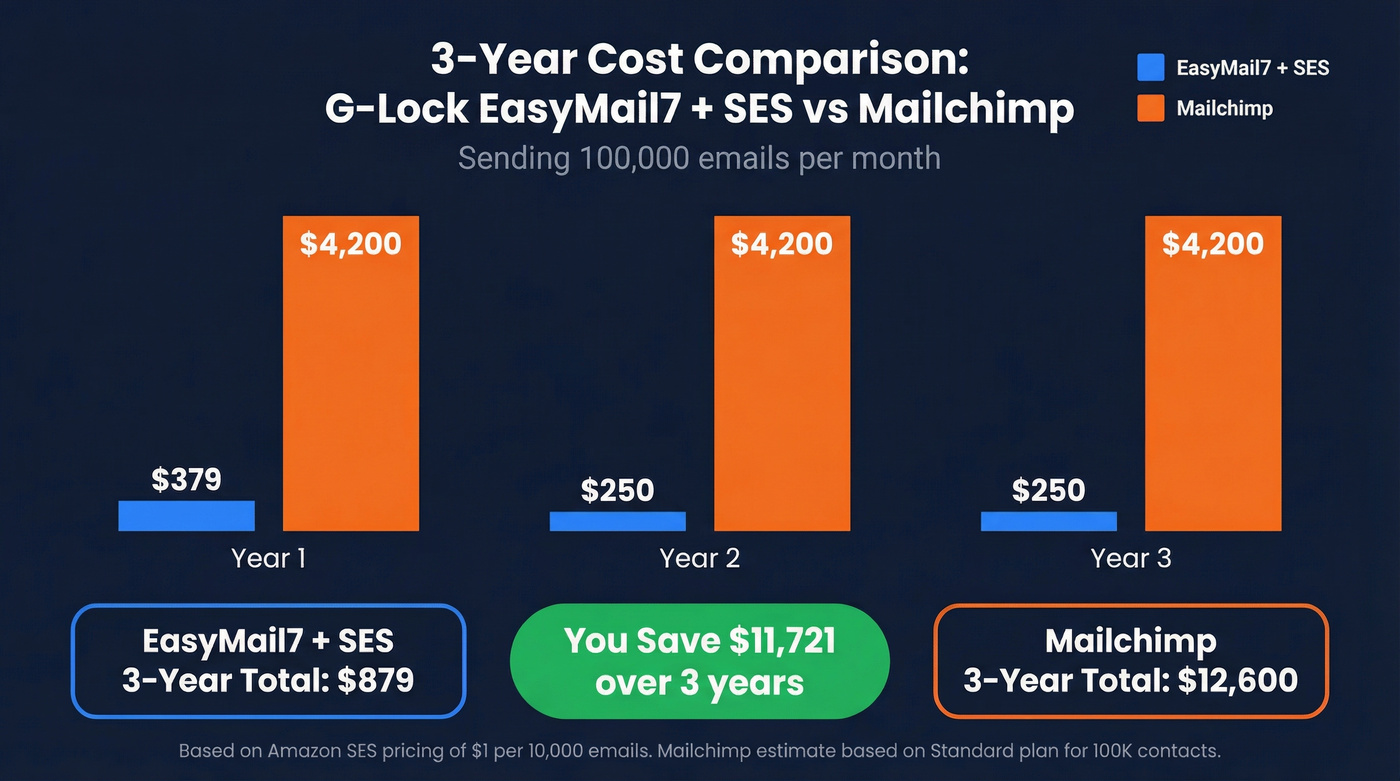
One Capterra reviewer reports sending 65,000 emails daily through SES at a monthly cost "in the hundreds." The gap only widens at higher volumes, which is exactly why this tool has a loyal following among high-volume senders who don't mind getting their hands dirty.
Pros Worth Highlighting
- One-time pricing - no subscription creep, no per-email charges from the software itself
- Amazon SES integration with automatic quota management that respects SES rate limits
- All features in every plan - you're paying for seats, not feature gates
- 5.0/5 customer service on Capterra, which is rare for any software category
- 1M-email import in 43 seconds - fast enough for enterprise-scale lists
- Full data ownership - your server, your database, your subscriber records
- ODBC/CRM integration for database-driven list building, a real differentiator for technical teams

EasyMail7 saves you thousands on sending - but one dirty list can get your SES account suspended permanently. Prospeo's 5-step email verification catches invalid addresses, spam traps, and honeypots at 98% accuracy for ~$0.01/email. 15,000+ companies trust it to protect their sender reputation.
Clean your list before SES cleans out your account.
Cons You Should Know
- Setup complexity - Capterra reviewers call it "more challenging to set up" than typical ESPs
- Not beginner-friendly - one G2 reviewer put it bluntly: "not for novices used to highly structured models like Mailchimp"
- Reporting is the biggest functional gap - multiple reviews describe the statistics as minimal, and real analysis often means exporting data into Access or working directly with the SQLite database
- Windows-only - this feels like a deliberate choice to ignore half the market
- Missing features depending on your workflow - some third-party reviews call out no click-through tracking, no event-triggered email, and no image library; in practice, tracking is handled via integrations rather than a modern all-in-one dashboard
- API isn't as plug-and-play as modern tools - EasyMail7 offers a RESTful API, but reviewers want more examples and easier access patterns
- No built-in email verification - and this one can hurt you
That last point deserves emphasis. Amazon SES is strict about bounce and complaint rates. Cross the threshold and SES suspends your sending - sometimes permanently. EasyMail7 handles sending, not list hygiene. We've seen teams get burned by this exact gap: they save thousands on sending costs, then torch their SES reputation with a dirty list on day one.
Prospeo's email verification catches bad addresses before they touch SES, using a 5-step process that includes catch-all handling and spam-trap removal at 98% accuracy. The free tier covers 75 emails/month; paid plans run about $0.01/email. For high-volume SES senders, pre-send verification isn't optional - it's the difference between a working setup and a suspended account.

You're building a high-volume sending stack with EasyMail7 and SES - but where are your contacts coming from? Prospeo gives you 300M+ professional profiles with 98% verified emails, refreshed every 7 days. Build targeted lists with 30+ filters, then send them through your own infrastructure at SES prices.
Stop scraping for contacts. Start with verified data at $0.01/email.
Who Should (and Shouldn't) Buy
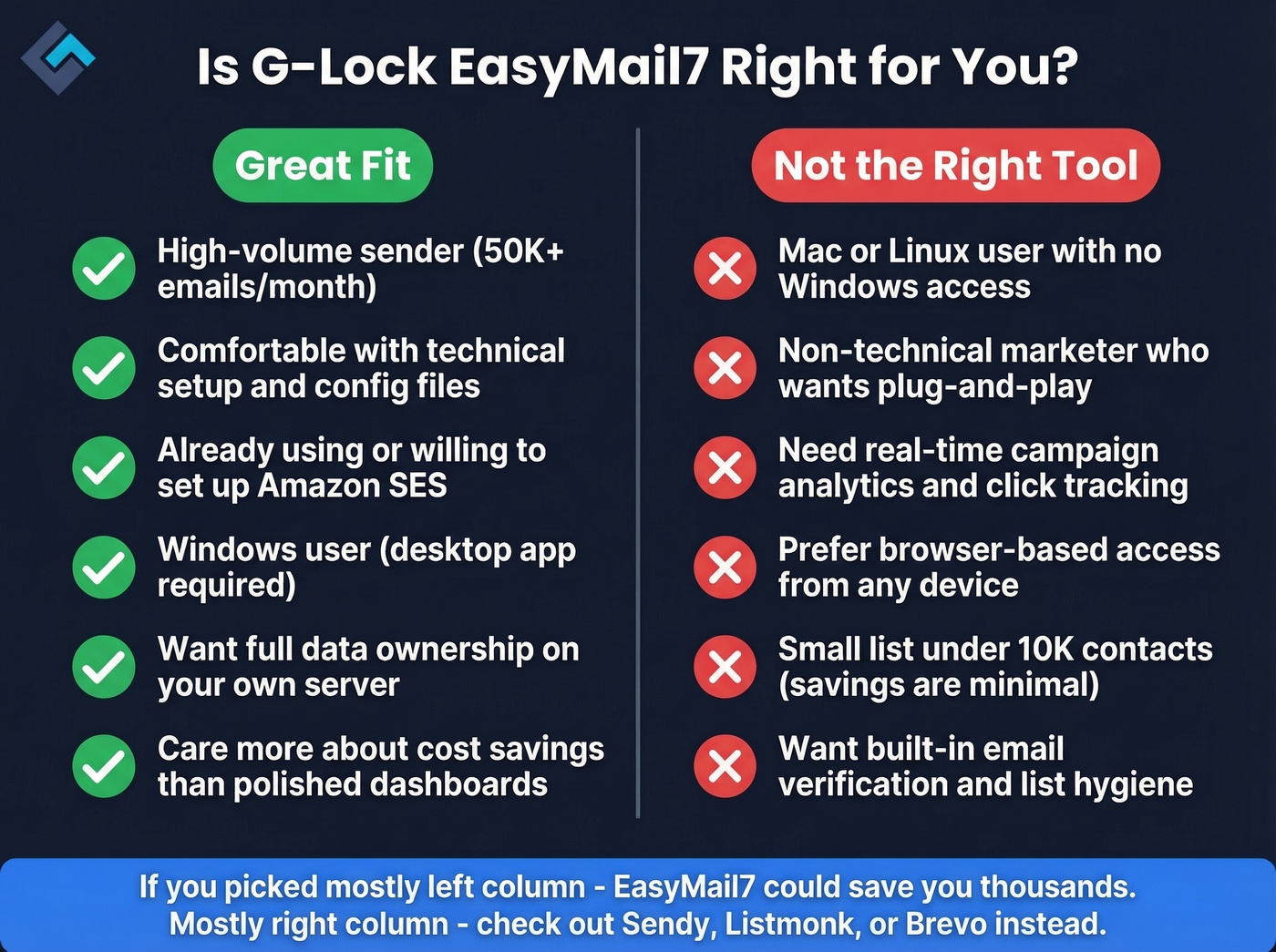
Let's be honest: EasyMail7 isn't trying to be Mailchimp. Use this if you're a high-volume sender comfortable with technical setup, already on Amazon SES, want data ownership, and care more about cost savings than polished dashboards. Skip this if you're on Mac or Linux, want browser-based access, need real-time campaign analytics, or you're a non-technical marketer. The learning curve will frustrate you.
Here's our hot take: EasyMail7 is the cheapest legitimate way to send 100K+ emails per month in 2026. But "cheapest" and "best" aren't synonyms. If you value your time at more than $20/hour, the hours you'll spend wrestling with reporting and setup might erase the savings over Sendy or Listmonk. We ran through the setup process ourselves, and while the documentation is decent, there are moments where you're just staring at a config screen hoping you picked the right ODBC driver.
Alternatives Worth Considering
The real competitive set isn't Mailchimp - it's other self-hosted SES front-ends.
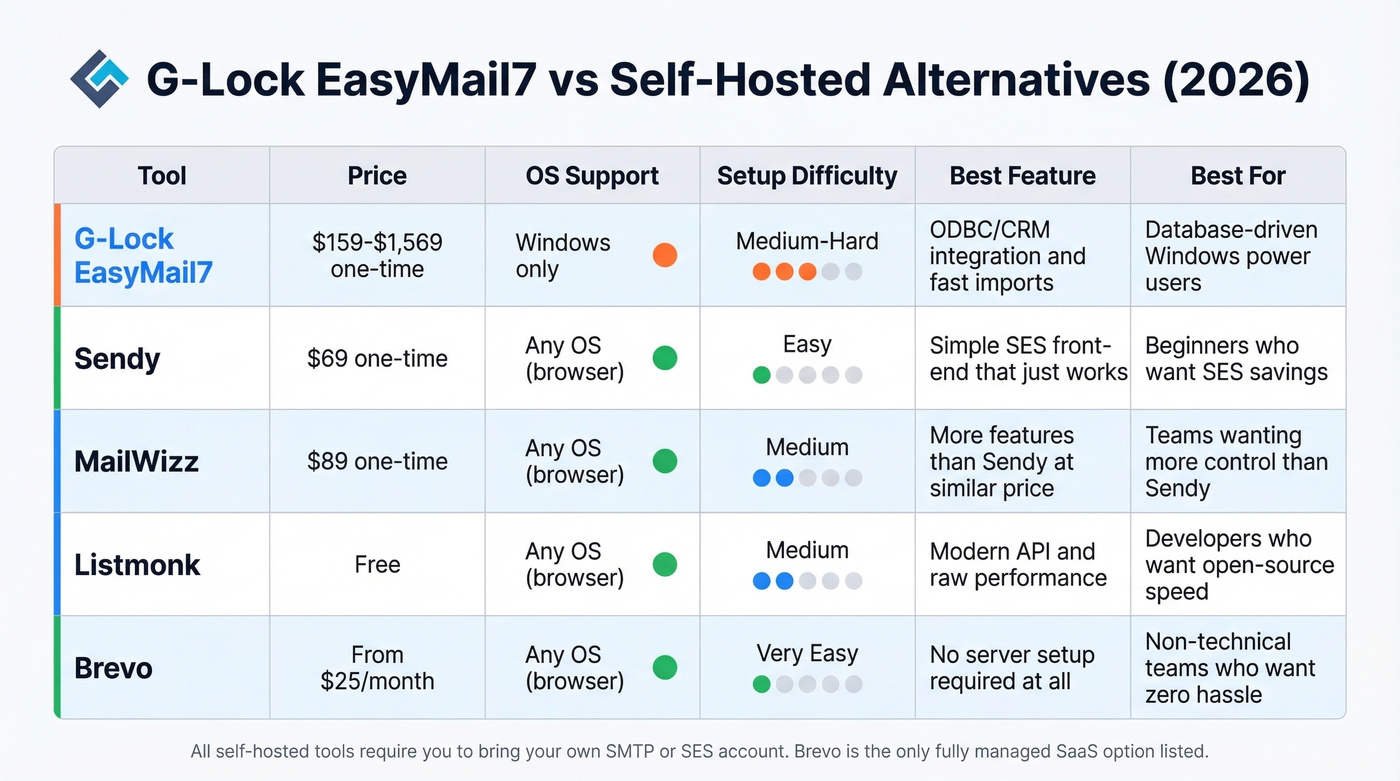
| Tool | Price | Type | Best For |
|---|---|---|---|
| Sendy | $69 one-time | Self-hosted | Simpler SES front-end |
| MailWizz | $89 one-time | Self-hosted | More features than Sendy |
| Listmonk | Free | Open-source | Modern API, raw performance |
| Mautic | Free | Open-source | Full marketing automation |
| Brevo | From $25/mo | SaaS | Plug-and-play, no server needed |
In self-hosted community discussions, Sendy is the default recommendation, with MailWizz a close second. Listmonk gets called "super performant" and praised for its API. EasyMail7 doesn't show up much in those threads - the consensus on Reddit's r/selfhosted and r/emailmarketing leans heavily toward Sendy and Listmonk for teams that want open-source or one-time-payment tools without the Windows dependency.
For teams that need verified contact data before they even think about sending, a tool like Prospeo pairs well with any of these - you build a clean list first, then push it through whichever sending platform fits your stack.
FAQ
Is G-Lock EasyMail7 really a one-time payment?
Yes. You pay once and keep the software forever. Updates and support expire after 12 months (24 for Enterprise). Renewal runs 50% off in months 12-13, scaling to full price after month 15. Budget roughly $130/year for ongoing Business-plan updates.
Does EasyMail7 include an SMTP server?
No. You connect your own sending infrastructure - Amazon SES ($1 per 10,000 emails), SendGrid, SparkPost, or Mailgun. SES is the most popular pairing for senders pushing 50K+ emails monthly.
Can I use EasyMail7 on Mac or Linux?
No, it's Windows-only desktop software. For Mac or Linux, consider Listmonk (free, web-based) or Sendy ($69, web-based). Both run in a browser with no OS restriction.
How does EasyMail7 compare to Sendy?
Sendy ($69) is simpler to set up and runs in a browser on any OS, but EasyMail7 offers deeper ODBC/CRM integrations, faster list imports (1M records in 43 seconds), and more granular SMTP rotation. Choose Sendy for simplicity; choose EasyMail7 for advanced database-driven workflows on Windows.