

How to A/B Test Emails: 2026 Field Guide
Only 1 in 8 A/B tests produce a statistically significant result. That's not a reason to stop testing - it's a reason to stop testing badly.
We've watched teams waste months of splits on the wrong variable, call winners too early, or trust open rates that Apple inflated by 15-20+ points. If you want to learn how to A/B test emails effectively, you need to move past random subject-line swaps and start running disciplined experiments with a clear hypothesis, a single variable, and a metric that actually reflects human behavior. Here's how to run tests that move revenue.
The Short Version
- Start with a hypothesis, not a hunch ("shorter subject lines will lift clicks by 10%")
- Test one variable at a time against a control
- Use clicks or conversions as your primary metric - not opens
- Randomize within your segment, not across segments
- Run the test 48-72 hours minimum (3-7 days for newsletters)
- You need at least 10,000 recipients for reliable results - smaller lists require bigger swings
- Document the result and roll out the winner immediately
That 1-in-8 success rate means most tests will be inconclusive. The ones that hit will compound.
Why Email Split Testing Pays Off
A single A/B test at Bing - changing how ad headlines displayed - increased revenue 12%, worth over $100M annually. Email tests are even cheaper. You're changing a subject line or swapping a CTA, not rewriting code.
Running consistent experiments, even small wins, means hundreds of additional engaged contacts per quarter. The math gets interesting fast when you test instead of guess.
Set a Baseline First
You can't measure improvement without knowing where you stand. Pull your last 90 days of campaign data and compare against MailerLite's 2026 medians (3.6M campaigns, 181,000 accounts):
| Industry | Open Rate | Click Rate |
|---|---|---|
| All industries | 43.46% | 2.09% |
| E-commerce | 32.67% | 1.07% |
| Software & web apps | 39.31% | 1.15% |
| Non-profits | 52.38% | 2.90% |
| Health & fitness | 47.81% | 1.45% |
The overall click-to-open rate sits at 6.81%. If your numbers fall significantly below your industry median, you've got a clear starting point for your first test hypothesis. One caveat: these open rates are inflated by Apple MPP - the next section explains why that matters.
Opens Are Broken
Apple Mail Privacy Protection accounts for roughly half of all email opens as of early 2025 - and that share has almost certainly grown since. MPP preloads tracking pixels via Apple's proxy servers, recording an "open" even when the recipient never reads your email. The inflation runs 15-20+ points: campaigns that genuinely hit ~28% opens can report ~52% after MPP distortion, with clicks and conversions unchanged. Even Gmail or Outlook accounts read through the Apple Mail app trigger false opens.
Use click-based metrics when testing subject lines, preview text, send times, or anything where the "winner" decision matters. Clicks, conversions, and revenue per recipient are intentional actions that MPP can't fake.
Ignore open rate as your primary metric if more than a third of your list uses Apple Mail. In Apple-heavy segments, up to 75% of reported opens are artificial. You're not measuring engagement at that point. You're measuring Apple's proxy servers.
The one exception: open rate still works as a rough deliverability signal. If opens crater to near-zero, you've got an inbox placement problem, not a messaging problem.


A/B tests are worthless if half your emails bounce. Prospeo's 5-step verification and 98% email accuracy mean your test variants actually land in inboxes - so you're measuring messaging, not deliverability problems.
Stop A/B testing against your own bounce rate. Start with clean data.
Email A/B Testing Step by Step
Here's how to set up an email split test that produces trustworthy results.
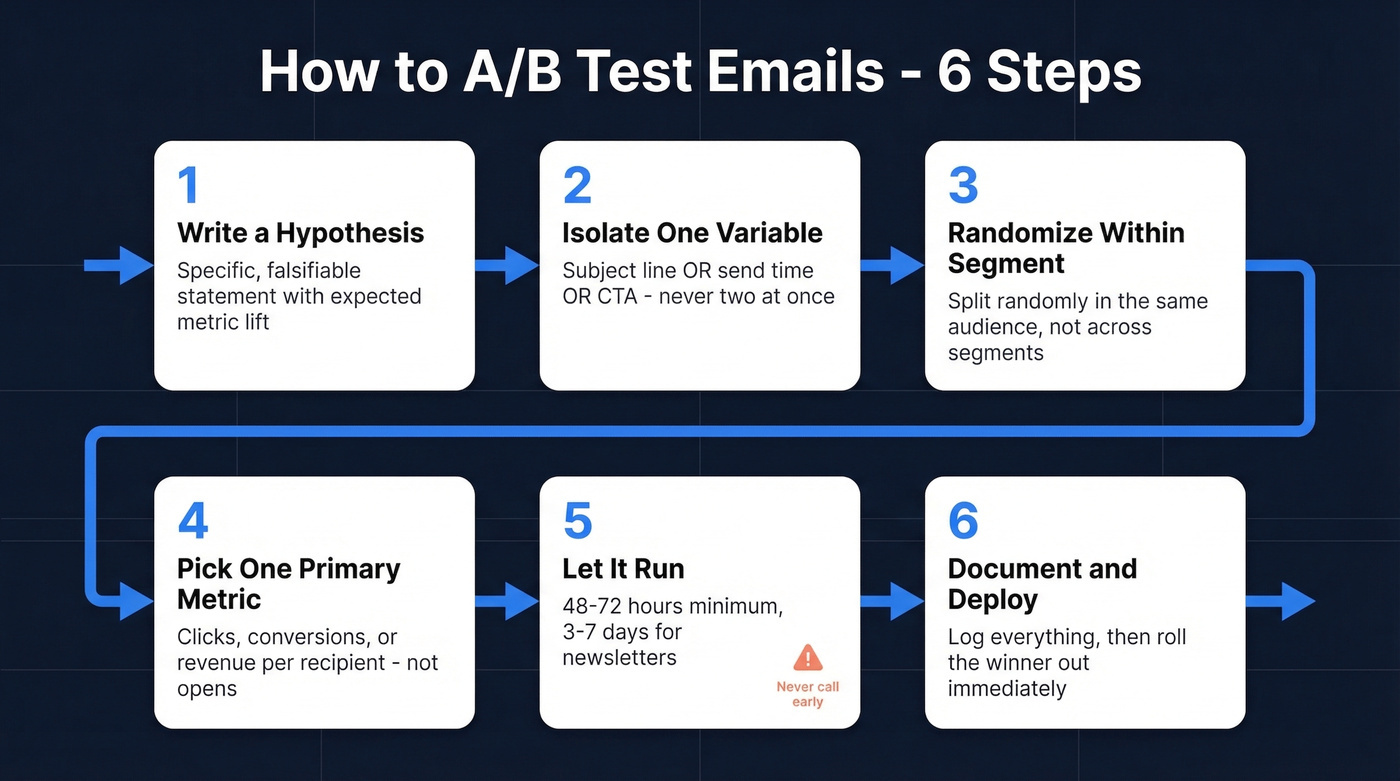
Step 1: Write a hypothesis. Not "let's try a new subject line" but a specific, falsifiable statement. Use this template:
We believe [change] will [increase/decrease] [metric] by [X%] because [reason]. We'll test with [sample size] over [duration].
Example: "We believe a question-format subject line will increase click rate by 10% vs. our standard format. We'll test with 12,000 recipients over 72 hours."
Step 2: Isolate one variable. Subject line OR send time OR CTA copy - never two at once. If you change the subject and the hero image simultaneously, you won't know which drove the result. Multivariate testing requires much larger samples; stick with A/B splits until you have the volume.
Step 3: Randomize within your segment. Don't send variant A to your engaged segment and variant B to your cold list. Split randomly within the same audience so the only difference is your test variable. This sounds obvious. We've seen teams get it wrong more than once.
Step 4: Pick one primary metric. For promotional emails, that's conversion rate or revenue per recipient. For newsletters, click-through rate. For re-engagement, open rate plus unsub as a guardrail.
Step 5: Let it run. 48-72 hours minimum for most campaigns. 3-7 days for newsletters to capture day-of-week variation. Here's the thing: ending early is the single most common mistake. Early winners reverse constantly, and the dopamine hit of checking results at hour six isn't worth the bad data.
Step 6: Document and deploy. Log the hypothesis, sample size, metric, result, and confidence level in a centralized test log. Then roll the winner out to your full list immediately. The documentation is the asset - it's what turns isolated experiments into institutional knowledge.
Most teams would get more value from running one well-documented test per month than from running four sloppy ones.
Do the Math
Forget the statistics degree. Grab a sample size calculator.
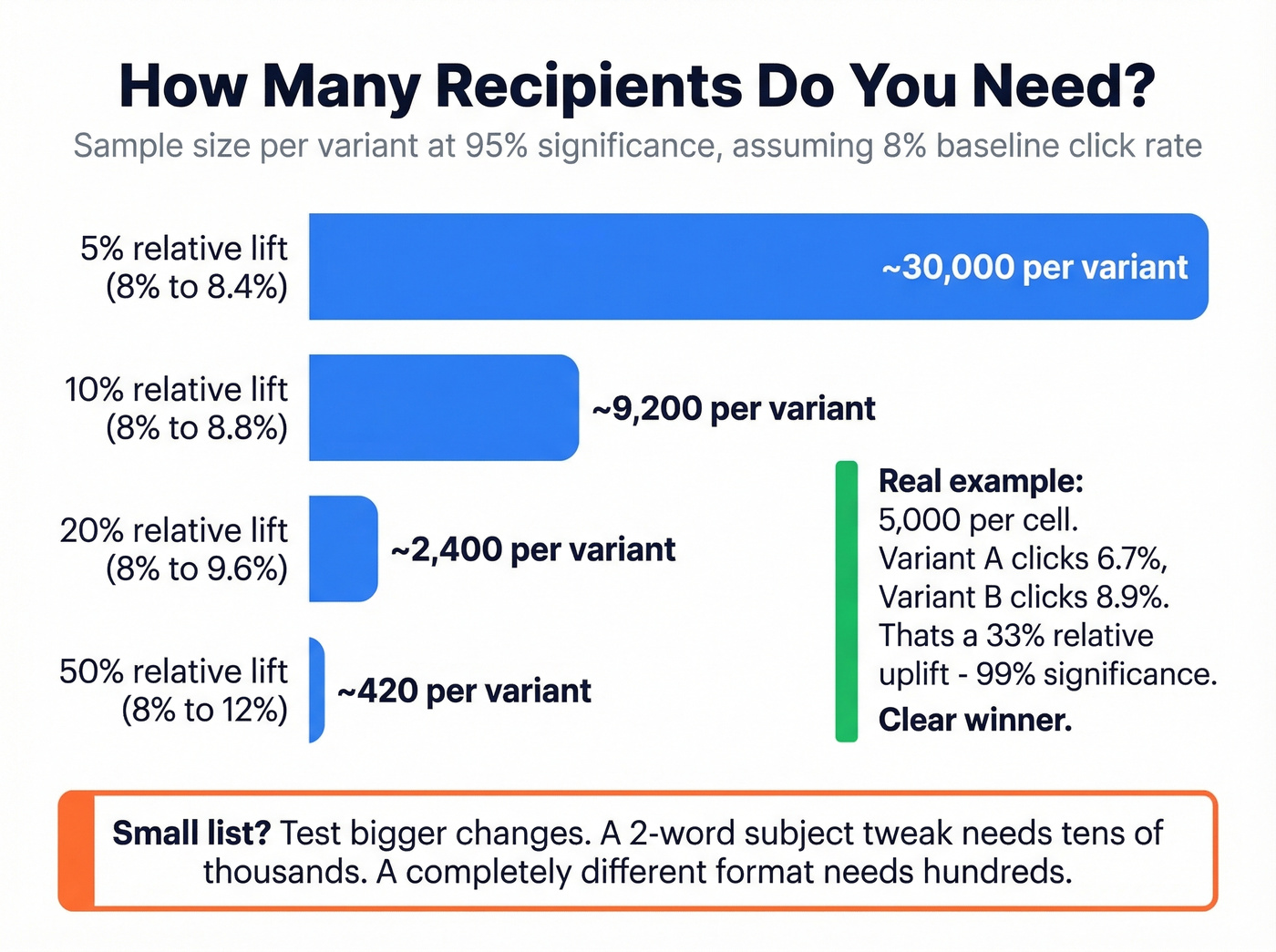
Worked example: two cells of 5,000 recipients each. Variant A clicks at 6.7%, variant B at 8.9%. That's a 33% relative uplift and 99% statistical significance. Clear winner, ship it.
Now flip it - you're planning a test. Your baseline click rate is 8%, and you want to detect a 10% relative uplift (a jump to 8.8%). At 95% significance, you'll need 9,235 recipients per variant - 18,470 total. If your list is smaller, test a bigger change or accept lower confidence. Statsig's calculator explains the tradeoffs between significance level and power clearly.
Small List Playbook
Litmus recommends a randomized sample of at least 10,000 for meaningful A/B results. Most teams don't have that.
Under 5,000 subscribers: Test dramatic changes, not micro-edits. A completely different email format vs. your standard template will produce a detectable signal. A 2-word subject line tweak won't.
5,000-10,000 subscribers: You can test moderate changes like new CTA placement or long vs. short copy, but aim for 20%+ relative lifts. Don't try to detect a 5% difference with this volume.
Over 10,000: Full testing flexibility. This is where disciplined experimentation pays the biggest dividends.
Small lists demand big swings. Save the fine-tuning for when you have the volume to measure it.
What to Test First
Most teams default to subject line tests because they're easy. That's fine as a starting point, but it's not where the money is.
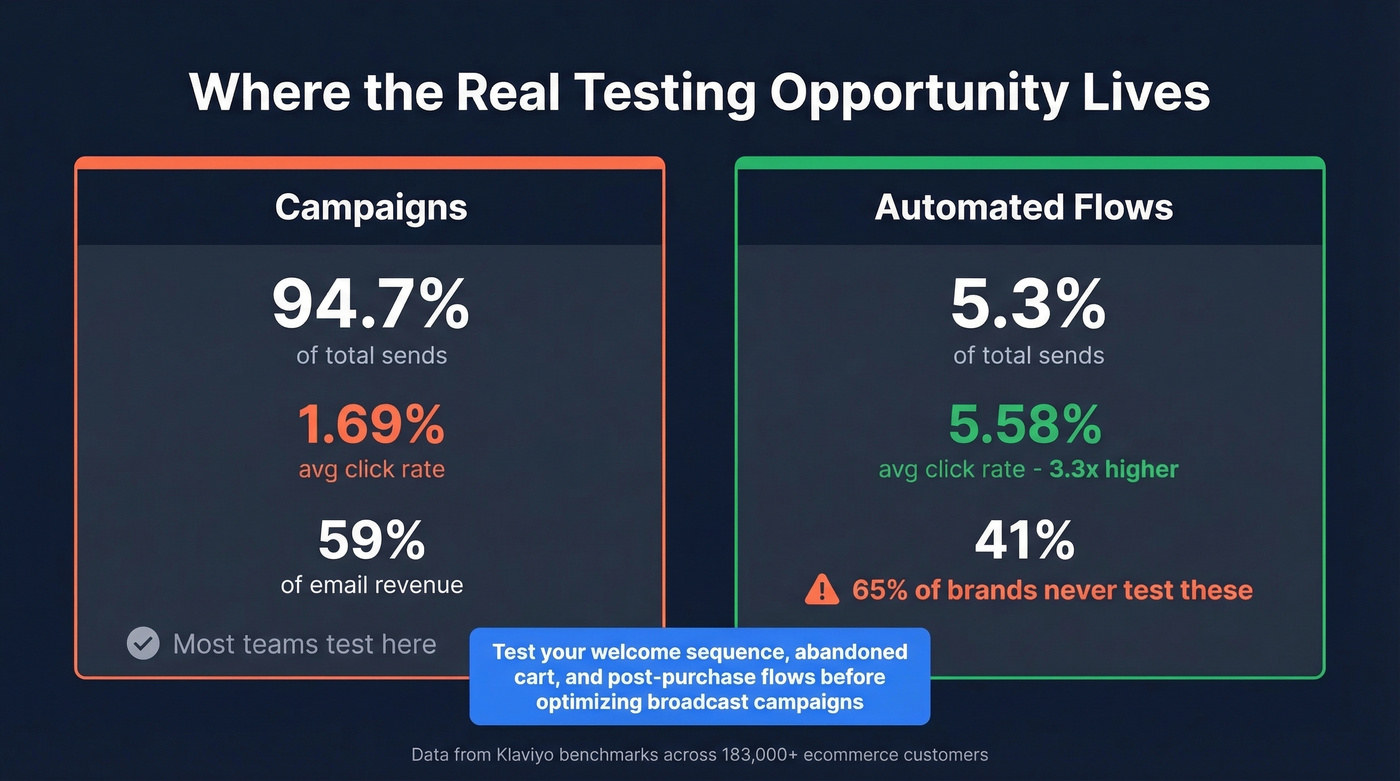
Klaviyo's benchmarks across 183,000+ ecommerce customers show that automated flows generate nearly 41% of total email revenue from just 5.3% of sends. Flows click at 5.58% vs. 1.69% for campaigns - roughly 3x higher. And yet 65% of brands never test triggered emails. That's the biggest missed opportunity in email marketing right now.
In our experience, teams that shift testing focus from campaigns to flows see results within the first month. If you're only running splits on your weekly newsletter and ignoring your welcome sequence, abandoned cart flow, and post-purchase series, you're optimizing the wrong 95% of your send volume. Skip subject line tests on your broadcast campaigns until you've tested your highest-revenue flows first.
Smaily's framework is a useful mental model: the subject line earns the open, the content earns the click, and the timing earns relevance. Test each layer in that order within your highest-revenue flows.
AI tools can accelerate variant generation - use them to produce 10 subject line alternatives in seconds, then pick the two most distinct for your split. But don't let AI pick the winner. Predictive send-time optimization is genuinely useful for timing tests, though the algorithm's recommendation still needs validation through your own data. Trust the test, not the model.
Outbound Sequence Testing
Cold email A/B testing has a prerequisite that marketing teams don't face: deliverability. If your bounce rate is above ~5%, your test is mostly measuring which variant landed in the inbox, not which message resonated.
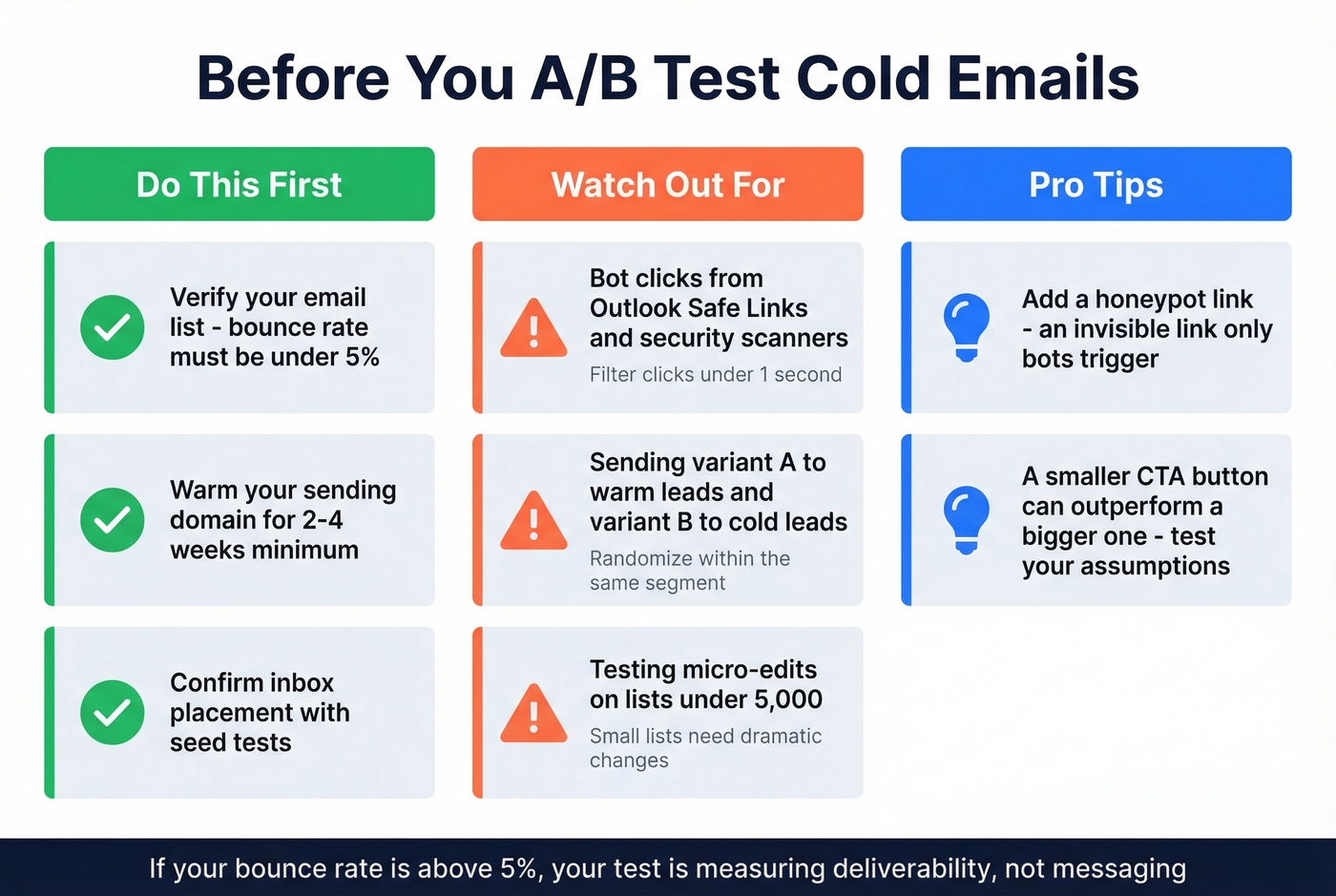
Let's be honest - we've seen teams run elaborate multivariate tests on cold sequences while sending to lists with 12% bounce rates. The results were meaningless. Before you split-test a single subject line, verify your list. Clean inputs mean your test results actually reflect messaging performance, not deliverability noise. Tools like Prospeo's email verification (98% accuracy) catch invalid addresses before they corrupt your data.
Watch out for bot clicks too. Security scanners like Outlook Safe Links click every link before the human sees it. Filter clicks that happen in under ~1 second and consider a honeypot link - an invisible link that only bots trigger. One counterintuitive finding from r/Emailmarketing: a smaller CTA button outperformed a larger one on click rate. Test your assumptions.
Need 10,000+ recipients for reliable split tests? Prospeo's 300M+ profile database with 30+ filters lets you build precise, high-volume test segments in minutes - with data refreshed every 7 days, not 6 weeks.
Build test-ready lists at $0.01 per verified email. No contracts.
The best email A/B test is the one you actually run and document. Start with one test this week - hypothesis, single variable, click-based metric. Compound from there.
FAQ
What's the minimum sample size for email A/B tests?
At least 10,000 randomized recipients for reliable results. Smaller lists should test bigger changes - a 20%+ relative difference is detectable with fewer contacts, while a 5% lift requires tens of thousands per variant.
How long should I run an A/B test?
Run promotional sends for 48-72 hours and newsletters for 3-7 days. Never call a winner in the first few hours - early leads reverse frequently, and premature calls are the most common testing mistake.
Which metric should decide the winner?
Use clicks, conversions, or revenue per recipient. Open rates are unreliable because Apple Mail Privacy Protection inflates them by 15-20+ points, making them useless for split-test decisions.
Should I verify emails before A/B testing cold outreach?
Yes - bounces above ~5% add noise that drowns out messaging differences. Verify first so results reflect recipient behavior, not deliverability problems.