

How to Combine Multiple SPF Records Without Breaking Email Delivery
Your marketing team just added a new email tool. The vendor said "add this SPF record to your DNS." So did the CRM vendor last month. And the transactional email service before that. Now you've got three SPF records on one domain, and your deliverability just cratered.
Here's the thing: you need exactly one SPF record per domain. Over 20% of SPF records for business domains are misconfigured, and research from Cornell found that among the 56.5% of domains publishing SPF records, 2.9% contain errors - including duplicate records. Multiple SPF records on a single domain trigger a PermError, which means some receivers deliver your email, some spam-folder it, and some reject it outright. The fix isn't complicated, but you have to get it right.
What You Need (Quick Version)
- One SPF record per domain. RFC 7208 requires it.
- Merge all
include:andip4/ip6mechanisms into a singlev=spf1 ... ~allrecord. - Keep total DNS lookups at 10 or fewer.
- Validate with MXToolbox before you walk away.
- If it doesn't start with
v=spf1, it's not an SPF record - don't touch it.
How to Merge SPF Records Step by Step
The rule is simple: v=spf1 appears once at the start, your mechanisms go in the middle, and one all qualifier sits at the end.
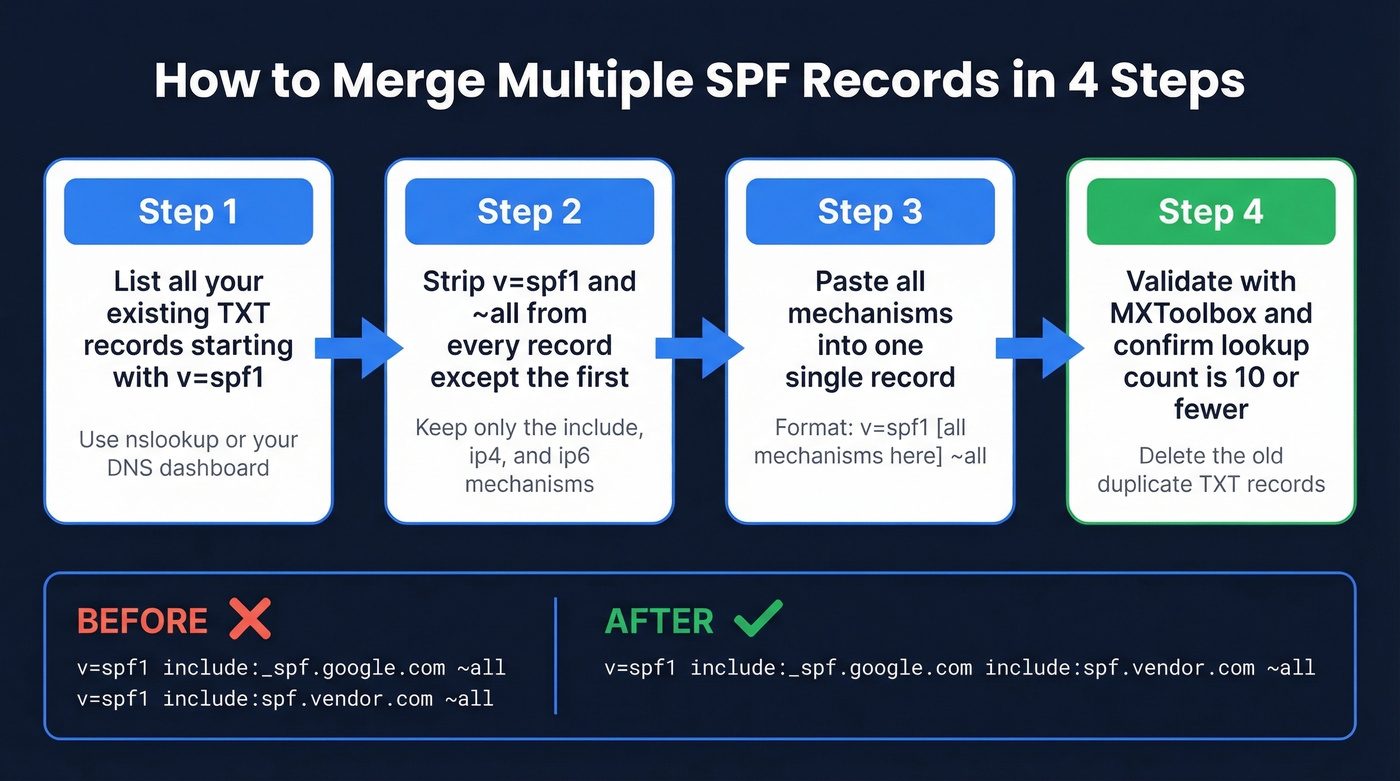
Basic Merge (Two Includes)
The most common scenario - you're using Google Workspace and a marketing platform.
Before (two separate records):
v=spf1 include:_spf.google.com ~all
v=spf1 include:spf.protection.outlook.com ~all
After (one merged record):
v=spf1 include:_spf.google.com include:spf.protection.outlook.com ~all
Strip the v=spf1 and ~all from the second record, paste the mechanisms into the first, done.
Mixing IP Ranges with Includes
This exact scenario comes up constantly on r/sysadmin - one vendor gives you IP blocks, another gives you an include:, and you're staring at two records with different qualifiers.
Before:
v=spf1 ip4:207.171.1.96/28 ip4:207.171.2.224/27 ?all
v=spf1 include:spf.registeredsite.com ~all
After:
v=spf1 ip4:207.171.1.96/28 ip4:207.171.2.224/27 include:spf.registeredsite.com ~all
When your source records have different all qualifiers, use the stricter one. ~all (softfail) beats ?all (neutral).
Adding IPv6 Ranges
Before:
v=spf1 ip6:2001:4860:4000::/37 ~all
v=spf1 include:_spf.google.com ~all
After:
v=spf1 ip6:2001:4860:4000::/37 include:_spf.google.com ~all
The ip6 mechanism doesn't trigger a DNS lookup, so it won't eat into your lookup budget.
Choosing Your all Qualifier
Use ~all (softfail) while testing. Once every legitimate sender passes SPF checks consistently, graduate to -all (hardfail).
Never use +all. It tells receivers that every server on the internet is authorized to send as your domain - that's worse than having no SPF record at all.

Fixing duplicate SPF records saves your authentication. But authentication alone won't save your domain if 15% of your list bounces. Prospeo's 5-step verification delivers 98% email accuracy on a 7-day refresh cycle - so your newly merged SPF record actually protects a clean sender reputation.
Stop fixing SPF just to blast unverified addresses into the void.
The 10-DNS-Lookup Limit
Merging SPF records is a five-minute fix. In our experience, the real problem is that nobody checks their lookup count afterward.
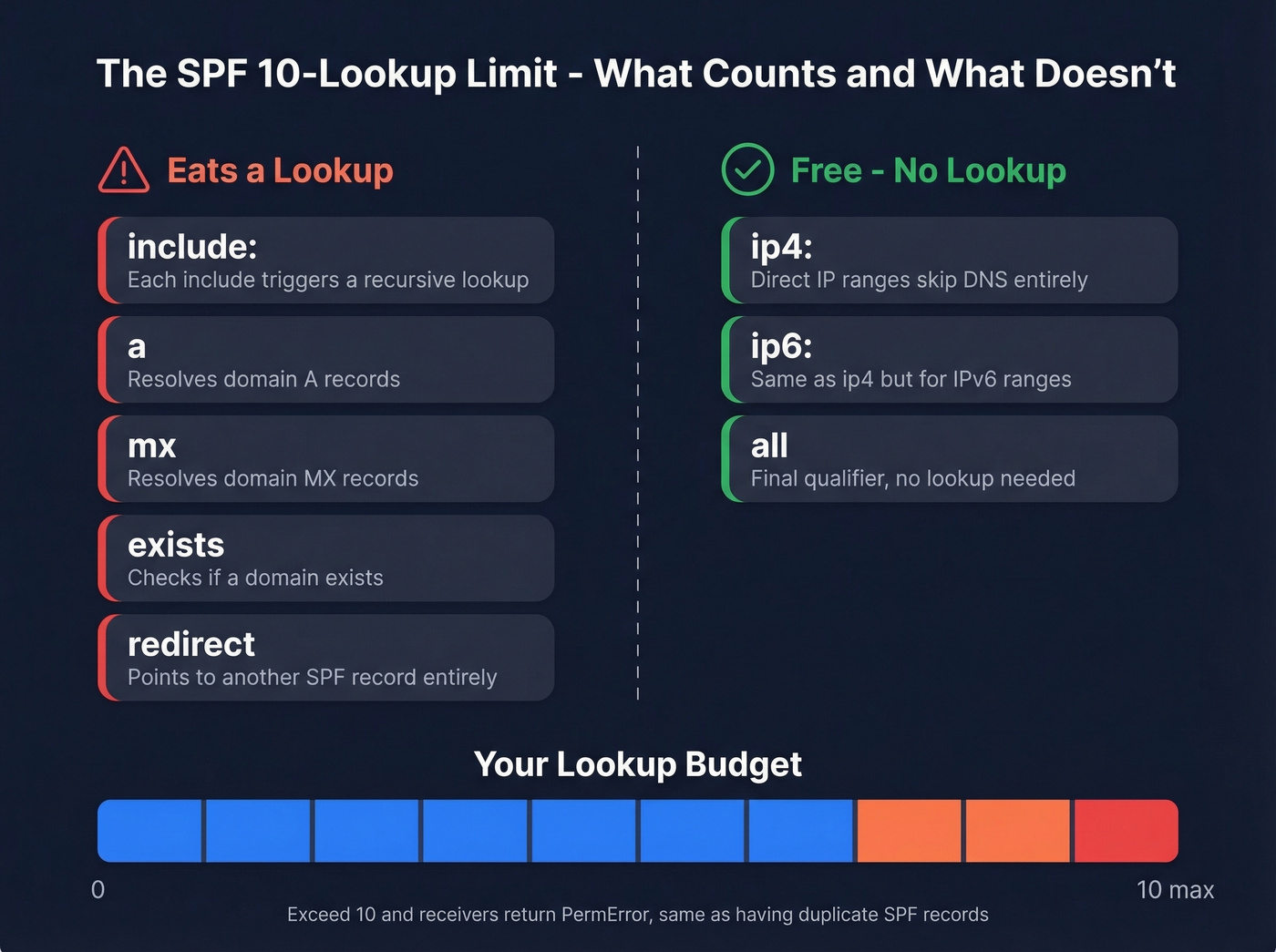
Every include:, a, mx, exists, and redirect mechanism triggers a DNS lookup, and the lookups inside those included records count too. You get 10 total. Exceed that and receivers return a PermError, which tanks deliverability the same way duplicate SPF records do. The ptr mechanism is deprecated - if you see it in an old record, remove it during the merge.
| Counts as a Lookup | Does NOT Count |
|---|---|
include |
ip4 |
a |
ip6 |
mx |
all |
exists |
Initial record |
redirect |
Three ways to stay under the limit:
- Replace includes with IP ranges. If a vendor's SPF record resolves to a small, stable set of IPs, use
ip4/ip6directly. The tradeoff: if the vendor rotates IPs, your record breaks silently. - Delegate to subdomains. Put marketing email on
marketing.example.comand transactional onnotify.example.com. Each subdomain gets its own 10-lookup budget, which is the cleanest solution for organizations running five or more sending services from one root domain. - Be cautious with flattening tools. Services like AutoSPF resolve includes to raw IPs automatically, but vendors rotate IPs without warning. If the flattener doesn't update fast enough, legitimate mail fails.
Don't Delete the Wrong TXT Record
When you open your DNS zone and see six TXT records, resist the urge to clean house. Apple domain verification tokens (apple-domain-verification=...), Google site verification entries, and DKIM public keys are all TXT records that have nothing to do with SPF. Quick rule: if it doesn't start with v=spf1, leave it alone.
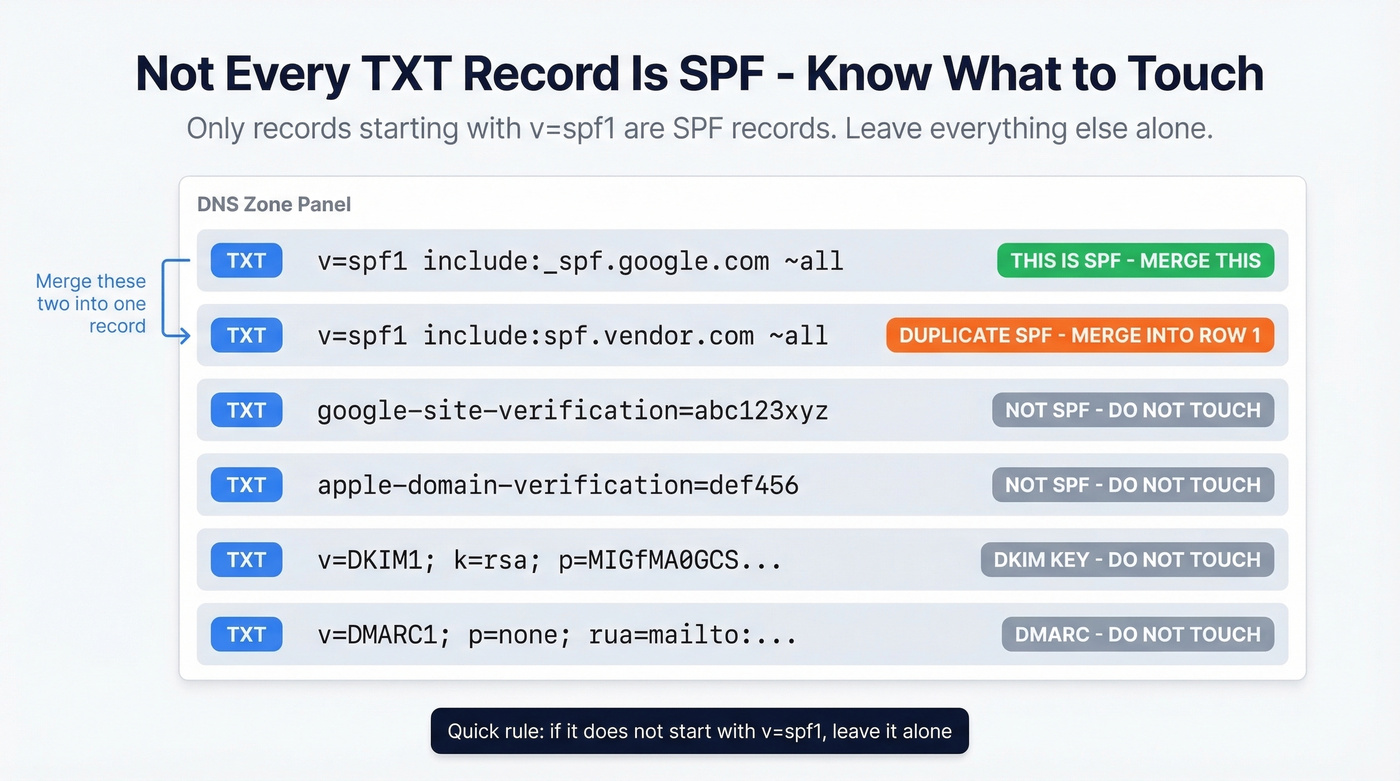
One more wrinkle. SPF records longer than 255 characters need to be split into multiple quoted strings within a single TXT record. That's not the same as having multiple SPF records - it's a DNS formatting requirement. Your DNS provider usually handles the quoting automatically, but double-check if your merged record is getting long.
Validate Your Merged Record
Don't trust yourself. Validate. These are all free for basic checks:
- MXToolbox - fastest way to confirm a single
v=spf1record exists and check your lookup count. - dmarcian - breaks down each mechanism and its lookup cost.
- Kitterman - bare-bones syntax validation.
Or from a terminal:
nslookup -type=txt yourdomain.com
You should see exactly one entry starting with v=spf1. If you see two, you're not done. We've seen records that look valid in the editor but fail validation because of a trailing space or an invisible Unicode character - always check with a tool, not your eyes.
Complete Your Auth Stack
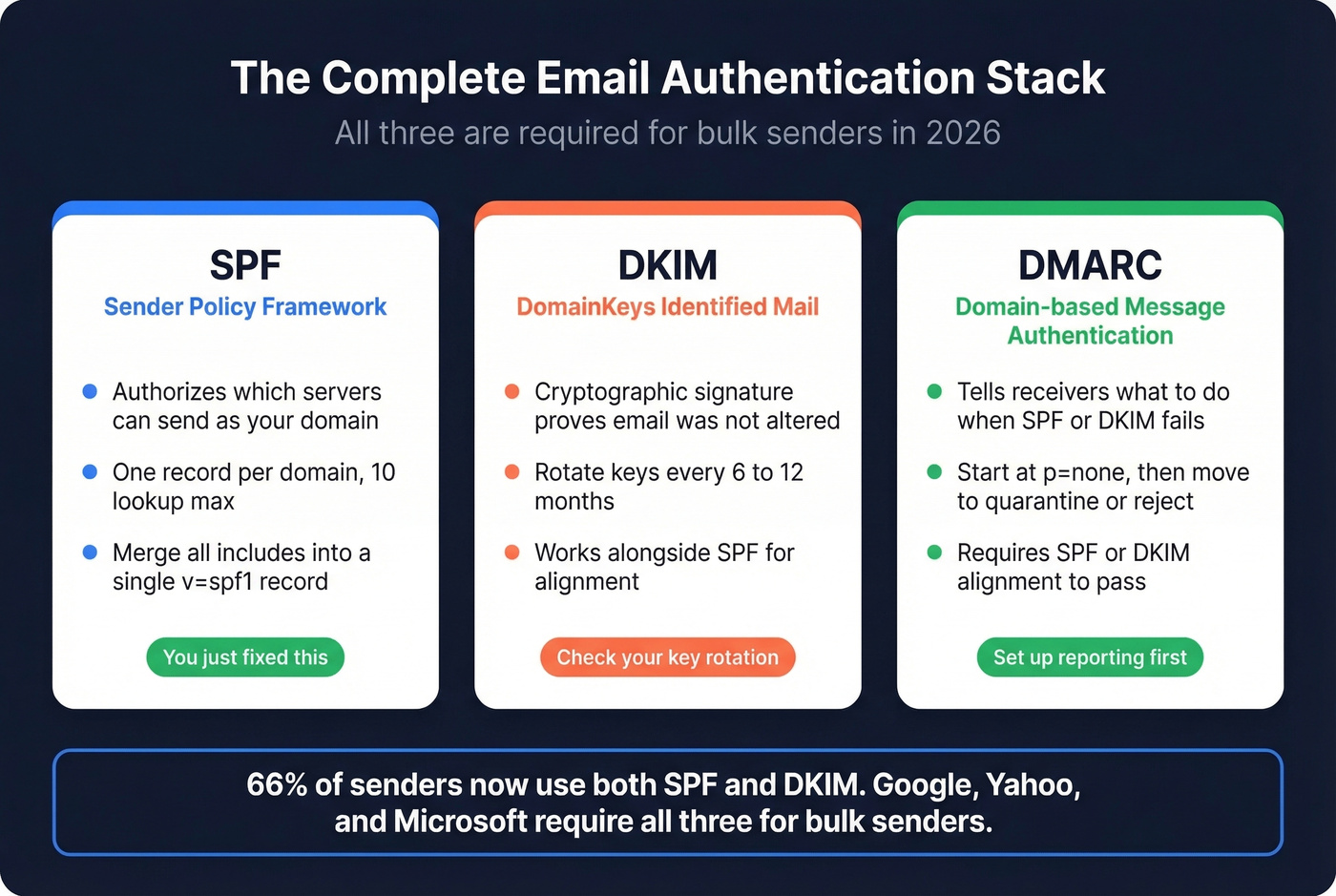
SPF is one leg of the stool. 66% of senders now use both SPF and DKIM, and Google, Yahoo, and Microsoft enforce bulk-sender requirements that include SPF and DKIM passing, DMARC at least p=none, and SPF or DKIM alignment. All three are non-negotiable if you're sending at any kind of volume. Rotate DKIM keys every 6-12 months and tighten your DMARC policy from p=none to quarantine or reject once you're confident.
Let's be honest, though: most teams that fix their SPF still wreck their domain reputation by blasting unverified email lists. Authentication gets you in the door; data quality keeps you there. We've watched teams nail every authentication standard and still land in spam because 15% of their list was dead addresses. Prospeo's 5-step email verification catches those before they become bounces - 98% accuracy on a 7-day refresh cycle, so your outreach hits real inboxes instead of honeypots.

Teams that nail SPF, DKIM, and DMARC still land in spam when their data is stale. Prospeo refreshes 300M+ profiles every 7 days - not every 6 weeks like other providers. Bounce rates drop under 4%, and your authentication stack actually does its job.
Your SPF is merged. Now make sure every email you send reaches a real inbox.
FAQ
Can I have two SPF records on one domain?
No. RFC 7208 requires exactly one SPF record per domain. If a DNS lookup returns two v=spf1 entries, receivers flag a PermError and may reject or spam-folder your mail. Combine them into a single record using the merge steps above.
What's the maximum number of includes in an SPF record?
There's no hard cap on include: mechanisms, but each one counts toward the 10-DNS-lookup limit. Most enterprise domains hit 7-9 lookups. Replace stable vendor IPs with ip4/ip6 blocks to conserve lookups.
How long until a merged SPF record takes effect?
DNS propagation typically takes 15 minutes to 48 hours, depending on your TTL settings. Most changes are live within an hour. Validate with MXToolbox after updating to confirm the old duplicate is gone.
Does fixing SPF alone protect my domain reputation?
No. SPF authenticates your sending servers, but domain reputation also depends on bounce rates, spam complaints, and list hygiene. Skip this step if you think authentication alone will save you - it won't. Teams running verified contact data alongside proper authentication see bounce rates drop below 4%, which is the threshold most ESPs use to flag sender quality issues.