

Return-Path Explained: The Email Header That Controls Your Deliverability
SPF passing and SPF alignment passing aren't the same thing. This single misunderstanding causes more DMARC failures than anything else - and the return-path is at the center of it. Most guides define it in one sentence and move on, which is exactly why people keep misconfiguring it.
What You Need (Quick Version)
- The return-path is the bounce address set by the SMTP envelope, not a header you can manually edit in your message.
- It's the domain used for SPF alignment under DMARC - if it doesn't match your From domain, DMARC SPF alignment fails even when SPF itself passes.
- Set up a custom bounce subdomain (CNAME to your ESP's domain) to fix alignment.
- Google and Yahoo now require bulk senders (5,000+ emails/day) to authenticate with SPF and DKIM, publish DMARC, and keep spam rates under 0.3%.
- The best bounce strategy is prevention: verify emails before sending so your bounce inbox stays quiet.
Looking for Return Path by Validity? Return Path was acquired by Validity in 2019 and folded into the Everest platform. This guide covers the technical return-path email header - the SMTP mechanism that controls where bounces go and how DMARC alignment works.
What Is a Return-Path?
The return-path is the email address where bounce notifications land when a message can't be delivered. RFC 5321 calls it the "reverse-path" - the address carried in the SMTP MAIL FROM command during message transmission. You'll also see it called envelope from, bounce address, MAIL FROM, or 5321.MailFrom. They all refer to the same thing: the sender address on the SMTP envelope, not the one displayed in your inbox.
Recipients never see it in their mail client. It lives in the message headers, invisible unless you inspect the raw source. In Gmail, click the three dots next to the reply button and select "Show Original." In Outlook, open the message, go to File, then Properties, and check the Internet Headers box. The Return-Path: header you find there wasn't set by the sender - it was stamped by the receiving mail server based on the SMTP envelope.
It exists for one reason: to give mail servers a destination for non-delivery reports. When a message bounces, the receiving server sends the notification to whatever address was in the MAIL FROM command. No bounce address, no bounce feedback.
Return-Path vs. From vs. Reply-To
Think of email like a physical letter. The envelope has a return address on the outside - that's your return-path. Inside the envelope, the letter has a "From" line and maybe a "Reply to this address" note. The postal system only cares about the envelope. The recipient only sees the letter.
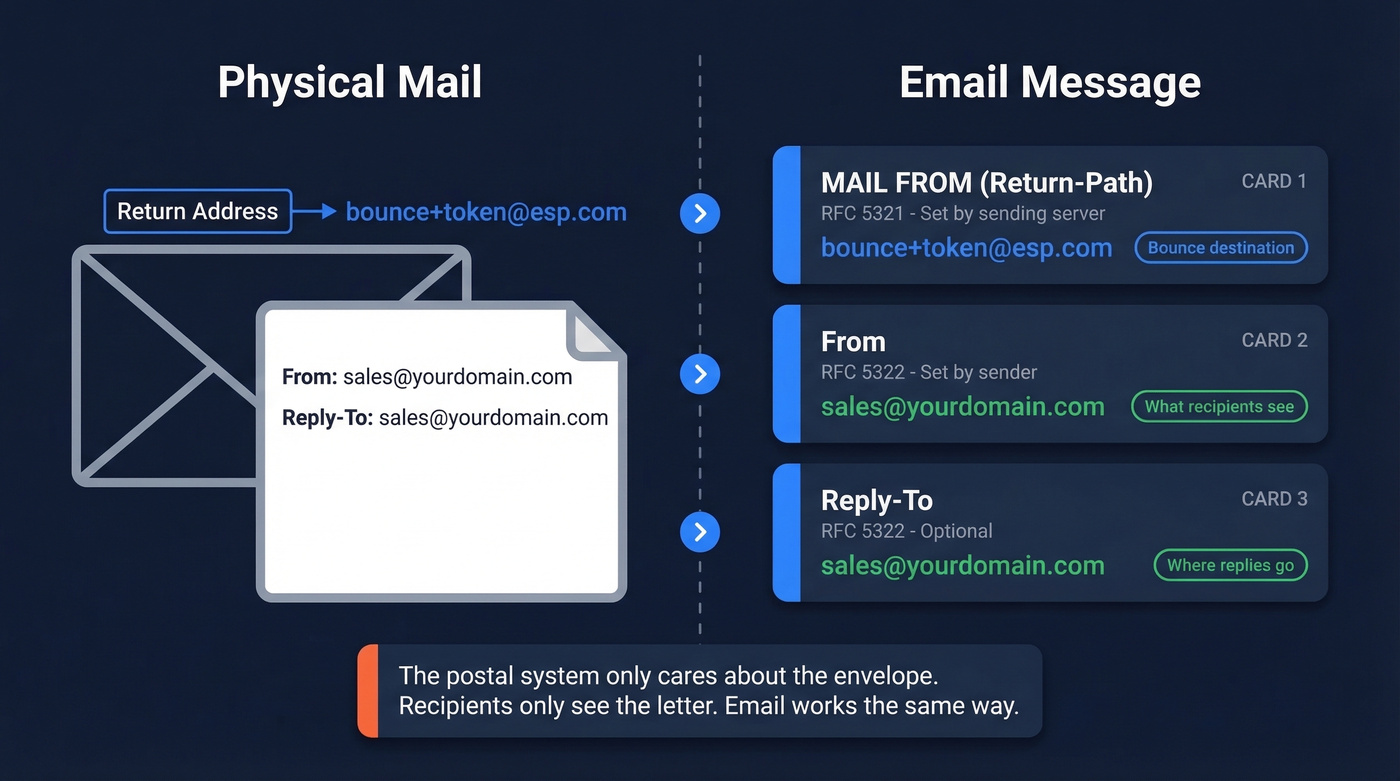
| Address Type | RFC | Set By | Purpose |
|---|---|---|---|
| MAIL FROM (Return-Path) | RFC 5321 | Sending server | Bounce destination |
| From | RFC 5322 | Sender | Displayed sender |
| Reply-To | RFC 5322 | Sender (optional) | Where replies go |
| RCPT TO | RFC 5321 | Sending server | Delivery target |
The envelope fields are discarded upon delivery. What remains is a Return-Path: header added by the receiving server as a record of what the envelope said. The From and Reply-To headers travel inside the message and are what your mail client displays.
This separation is why your ESP can use a completely different bounce domain in the envelope while your recipients see your brand in the From line - and why DMARC alignment gets tricky.
How It Works in SMTP
Here's a simplified SMTP session showing what actually happens when your ESP sends an email:
EHLO mail.youresp.com
MAIL FROM:<bounce+token@youresp.com>     <- envelope return-path
RCPT TO:<prospect@company.com>
DATA

From: sales@yourdomain.com               <- visible From header

Reply-To: sales@yourdomain.com

Subject: Quick question about your stack
...
Notice the mismatch. The MAIL FROM uses youresp.com, while the visible From header shows yourdomain.com. The recipient sees your brand. The mail infrastructure sees your ESP's bounce domain.
The receiving mail transfer agent overwrites any existing Return-Path header in the message with the value from MAIL FROM. You can't reliably set it by adding a message header. This trips people up constantly - there's a recurring thread on r/sysadmin where someone tries to add a Return-Path header manually and wonders why the server ignores it. The server is supposed to ignore it. That's how the protocol works.

You just read how a mismatched return-path kills DMARC alignment. But the real upstream fix? Never hitting invalid addresses in the first place. Prospeo's 5-step email verification delivers 98% accuracy - teams using it see bounce rates drop below 4%.
Fix your bounce rate at the source, not in your DNS records.
Why It Matters for Deliverability
The return-path isn't a deliverability "nice-to-have." It's the foundation of SPF alignment, which is half of DMARC.
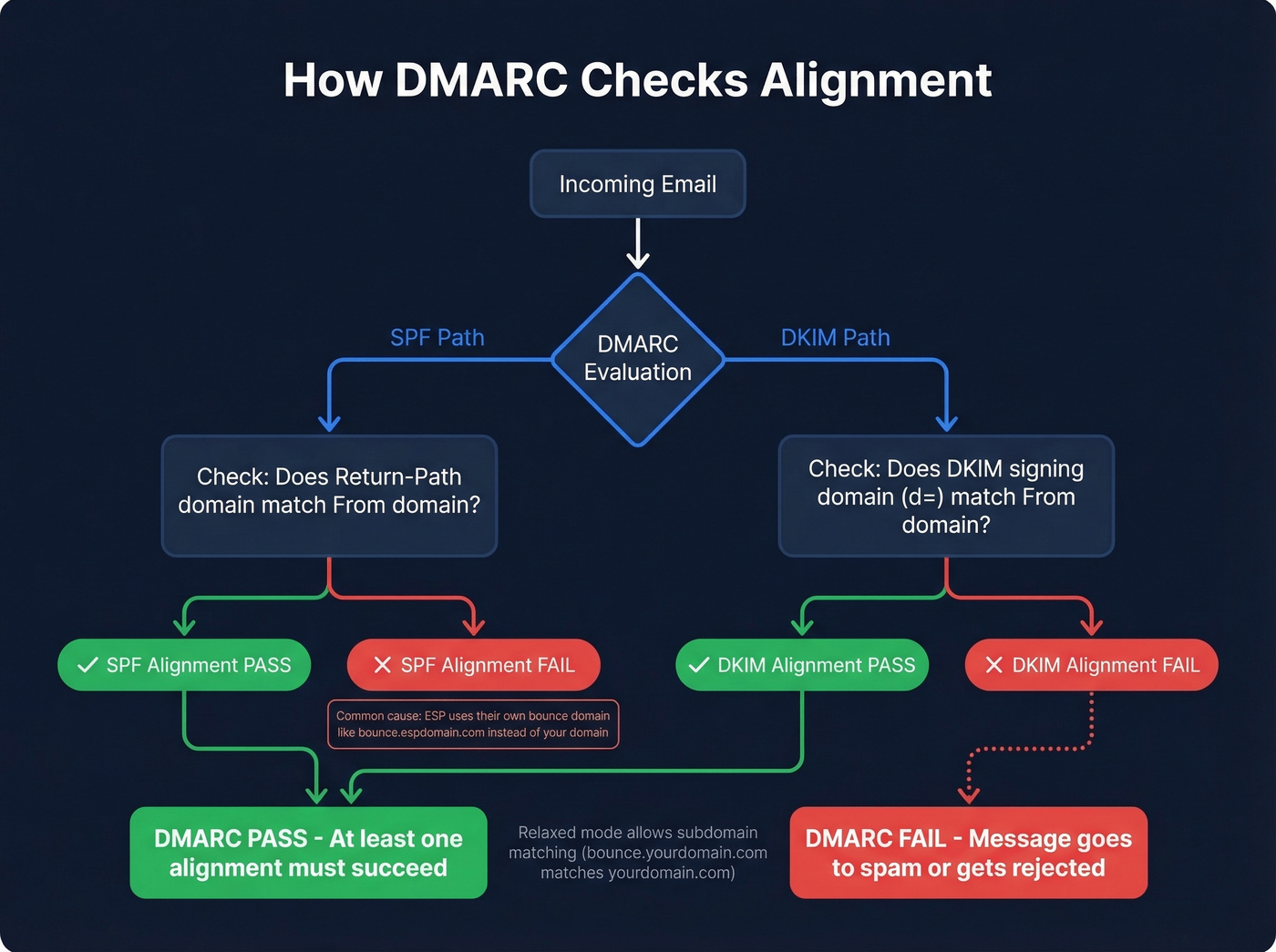
When a receiving server evaluates DMARC, it checks two authentication paths: SPF alignment (does the envelope-from domain match the From domain?) and DKIM alignment (does the DKIM signing domain match the From domain?). At least one must pass. If your ESP uses their own bounce domain as the envelope sender - and most do by default - SPF alignment fails even though SPF itself passes. DMARC needs alignment, not just a pass.
Gmail alone blocks nearly 15 billion unwanted emails daily. If your authentication isn't aligned, your messages land in spam or get silently dropped.
DMARC offers two alignment modes: strict, which requires an exact domain match, and relaxed, which allows subdomains of the From domain. Most organizations use relaxed, meaning a bounce subdomain like bounce.yourdomain.com aligns with a From of yourdomain.com. That's the setup you want.
Here's the thing most deliverability guides won't tell you: perfect authentication can't save you from bad data. High bounce rates hurt deliverability and reputation, and no DNS configuration fixes that. If your bounce rate is high, the problem isn't your records - it's your list. The upstream fix is verified data: sending to addresses that actually exist before bounce processing even kicks in. In our experience, teams that verify before sending spend far less time debugging deliverability issues afterward.
Setting Up a Custom Return-Path
The fix for SPF alignment is straightforward: make the envelope-from domain match your From domain.
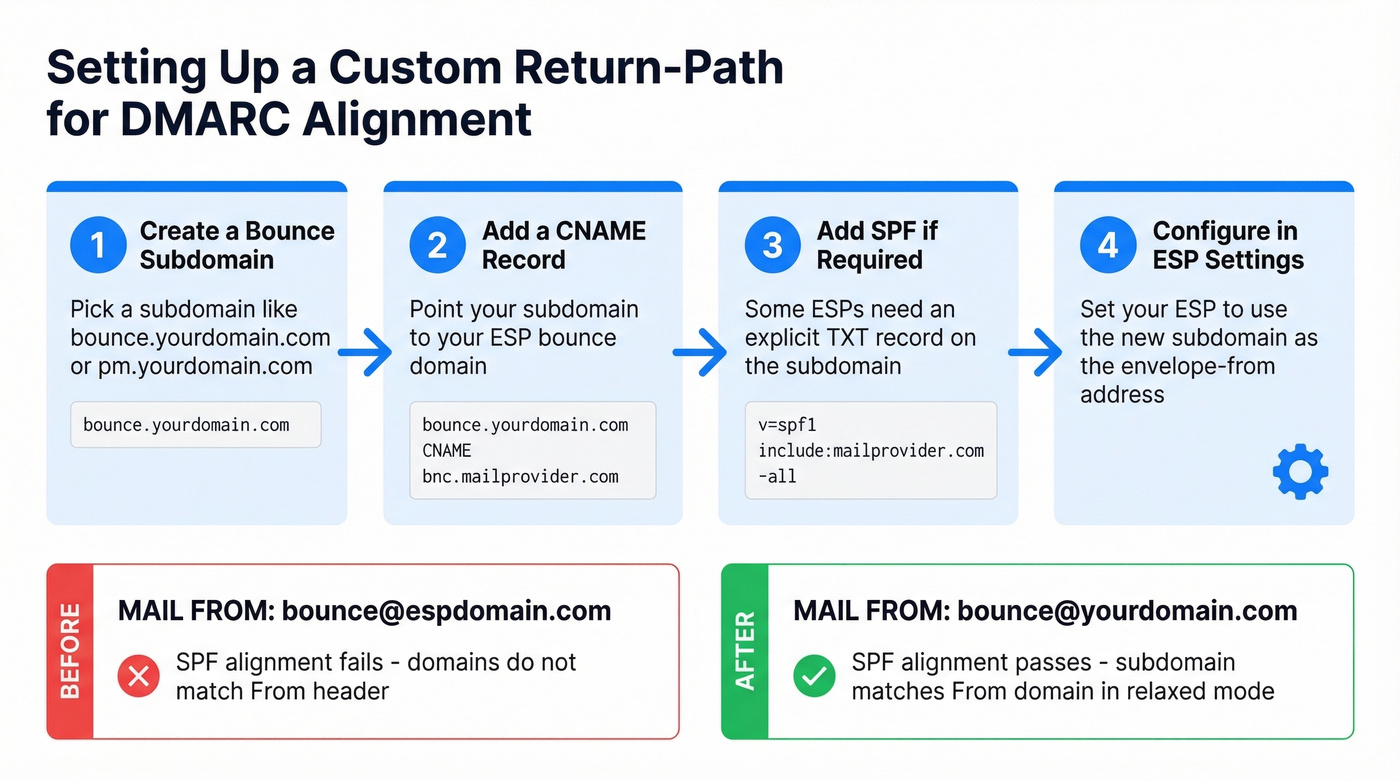
- Create a subdomain for bounces - something like
bounce.yourdomain.comorpm.yourdomain.com. - Add a CNAME record pointing that subdomain to your ESP's bounce domain so bounces still route into your ESP's processing system.
- Add an SPF record on the subdomain if your ESP requires an explicit TXT record rather than handling it via the CNAME.
- Configure the subdomain in your ESP settings so it uses your subdomain as the envelope-from.
SendGrid's domain authentication offers two approaches: with "Automated Security" on, you add CNAME records that handle SPF and DKIM together; with it off, you create an MX record on a branded subdomain pointing to mx.sendgrid.net, plus a TXT record for SPF. Postmark uses a similar CNAME-based approach.
If your ESP doesn't support a custom bounce domain at all, DKIM alignment becomes your only fallback. But relying on a single alignment path is riskier than having both.
Common Mistakes
SPF Passes, DMARC Fails
This is the most common DMARC failure we see. You've added your ESP's IP ranges to your SPF record. SPF passes. But your DMARC report shows "SPF alignment: fail."
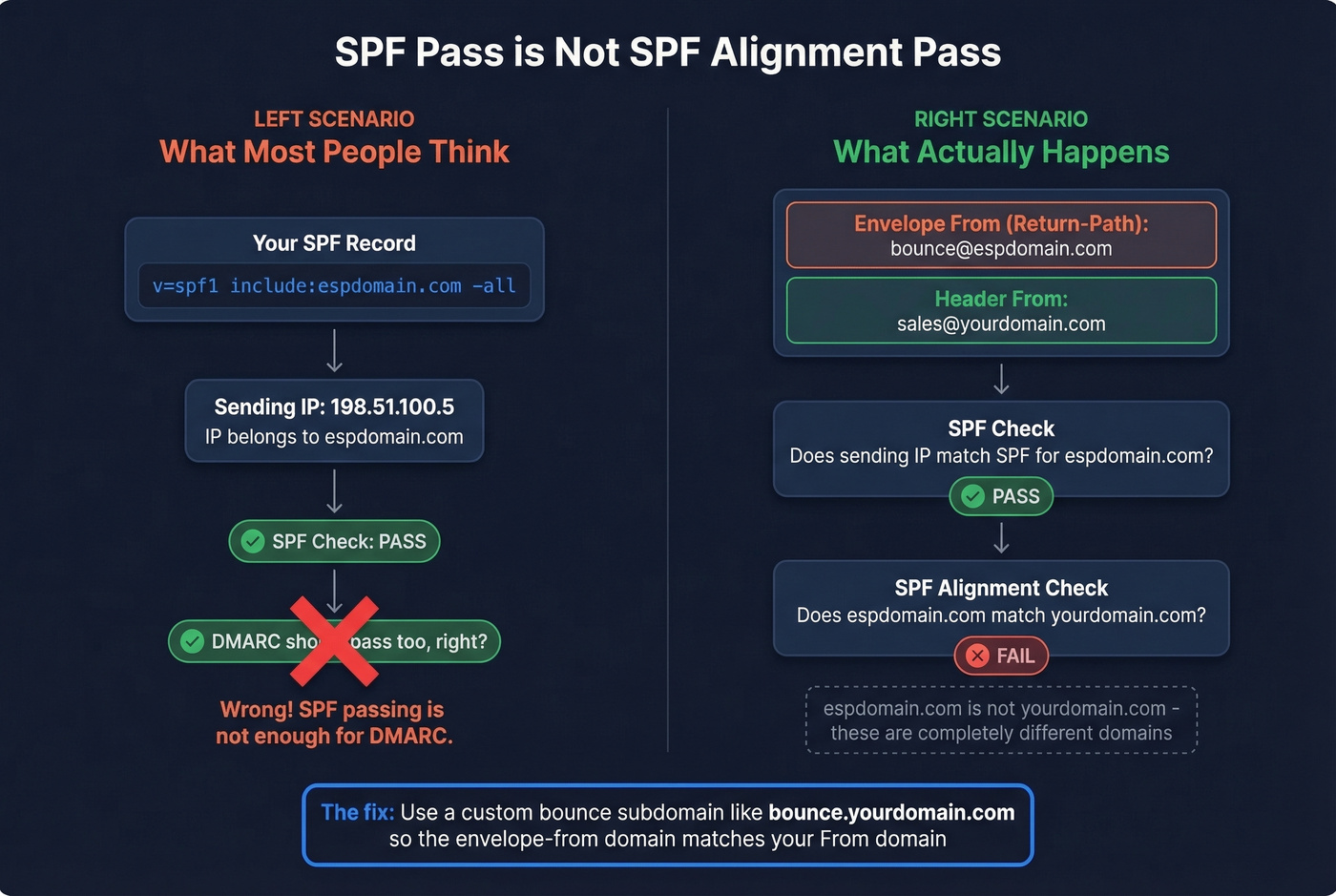
SPF alignment doesn't check whether the sending IP is authorized for your domain. It checks whether the envelope-from domain matches your From domain. If your ESP uses bounce.espdomain.com as the envelope sender, SPF validates against espdomain.com - not yourdomain.com. The r/sysadmin threads on this exact scenario capture the frustration perfectly: "We added them to SPF so alignment should pass." It doesn't work that way.
Fix: set up a custom bounce subdomain as described above.

Setting It as a Header
You can add a Return-Path: header to your outgoing message, but the receiving server will strip it and replace it with whatever was in the SMTP MAIL FROM command. This is by design per RFC 5321. The fix is always at the ESP/SMTP level, never at the message header level. Skip any guide that tells you otherwise.
Hitting the SPF 10-Lookup Limit
SPF records are limited to 10 DNS lookups. Every include: mechanism counts as one and can cascade. When you're using multiple cloud services - marketing automation, transactional email, CRM, helpdesk - you hit that limit fast.
One workaround is using subdomains with separate SPF records for each service. But not every cloud service lets you configure a custom envelope-from, so you'll need to check each vendor's capabilities before committing to this strategy. MXToolbox's SPF lookup tool is useful for auditing your current lookup count.
Advanced Topics
VERP (Variable Envelope Return Path)
VERP encodes the recipient's address into the bounce address so bounces can be automatically mapped to the failing recipient without parsing bounce message bodies. The canonical encoding replaces @ with =:
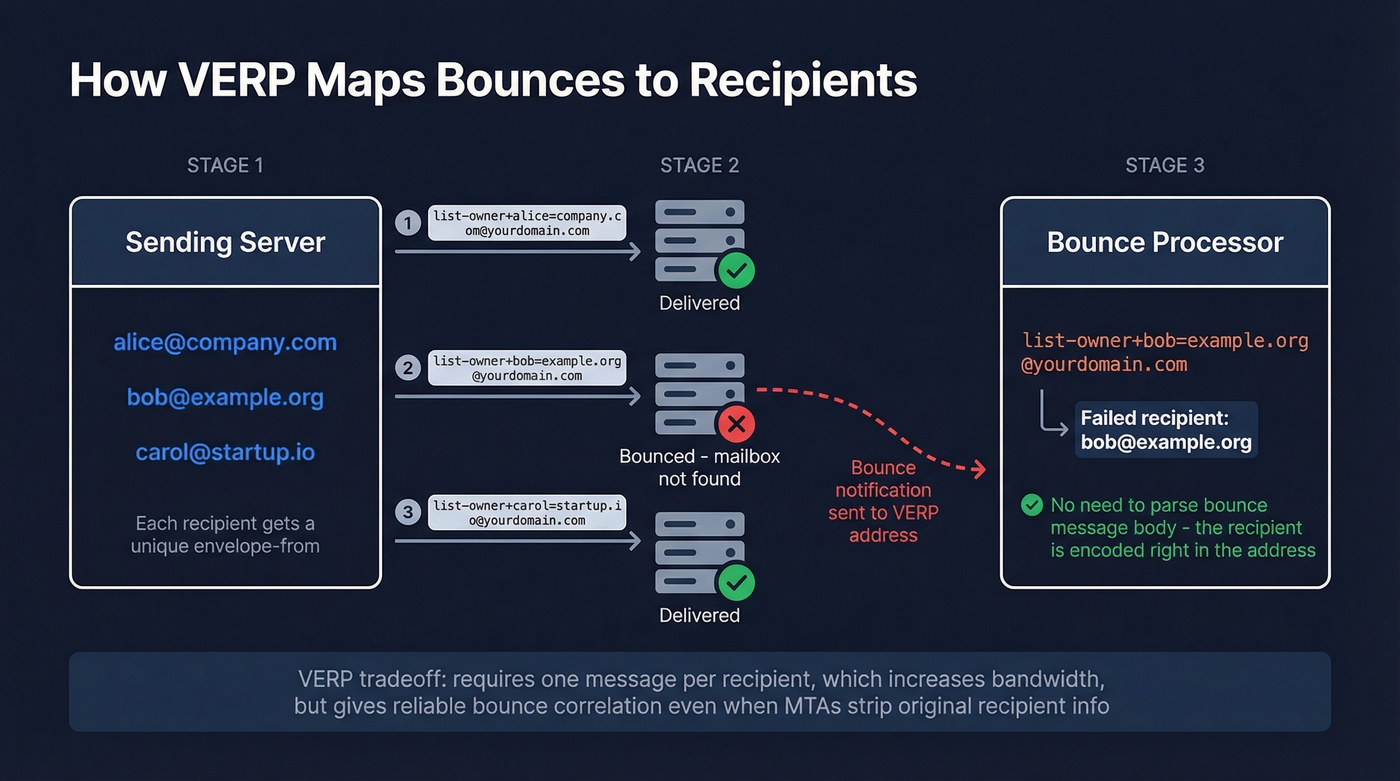
MAIL FROM:<list-owner+bob=example.org@example.net>
When bob@example.org bounces, the notification goes to list-owner+bob=example.org@example.net - and your system immediately knows which recipient failed. Some MTAs, Exchange being a notable example, strip the original recipient address from bounce messages, making VERP the only reliable way to correlate bounces to recipients.
The tradeoff: VERP typically requires sending one message per recipient, which increases bandwidth and processing overhead. There's also an operational gotcha - if your message lacks a properly formatted RFC 5322 From header, some receiving systems display the VERP-encoded bounce address as the visible sender. Always include a clean From header.
Forwarding, SRS, and ARC
Email forwarding breaks SPF. When a forwarder relays your message, the new SMTP connection comes from the forwarder's IP, which isn't authorized in your domain's SPF record. If DKIM was also modified during forwarding, DMARC fails entirely.
SRS (Sender Rewriting Scheme) fixes this by rewriting the envelope-from to the forwarder's domain so SPF validates against the forwarder instead. The original sender's address is encoded into the rewritten value so bounces can still route back. ARC (Authenticated Received Chain) takes a different approach, recording authentication results at each hop in the forwarding chain so the final destination can evaluate trust even when SPF and DKIM broke along the way.
Google Workspace Multi-Domain Behavior
Google Workspace uses the primary domain in the envelope-from for all outgoing mail, even when you're sending from an alias domain. If your primary domain is company.com but you send from brand.com, the return-path will show company.com - creating an SPF alignment mismatch for the brand.com From address.
DMARC can still pass via DKIM alignment, since Google signs with DKIM for the From domain when properly configured. But for teams that need strict SPF alignment across multiple domains, you'll need an external SMTP relay that lets you control the envelope sender per domain.
FAQ
What happens when the return-path is null?
A null envelope sender (MAIL FROM:<>) tells receiving servers the message is itself a bounce notification - a Delivery Status Notification. Servers use this to prevent infinite bounce loops: a bounce of a bounce would have nowhere to go. You'll see null senders on automated non-delivery reports and some system-generated messages.
Can I use a different return-path per campaign?
Yes. VERP does this automatically by encoding recipient data into the envelope-from. Many ESPs also let you configure campaign-specific bounce subdomains, giving you granular tracking of which campaigns generate the most bounces without parsing notification bodies.
How do I reduce email bounces before they happen?
Verify addresses before sending. Tools like Prospeo catch invalid addresses at 98% accuracy using a 5-step process that includes catch-all handling, spam-trap removal, and honeypot filtering. Preventing bounces upstream protects sender reputation far more effectively than processing them after delivery fails.
High bounce rates wreck sender reputation faster than any misconfigured SPF record. Prospeo refreshes 300M+ contacts every 7 days - not every 6 weeks - so you're never sending to stale addresses. At $0.01 per email, list hygiene costs less than a single deliverability audit.
Clean data is the deliverability fix no DNS record can replace.