


Salesflare Review 2026: Pricing, Pros, Cons, and Our Honest Verdict
Sales reps spend just 28% of their week actually selling. The rest disappears into data entry, CRM updates, and admin busywork that doesn't close deals. Salesflare's entire pitch is killing that overhead with a zero-input CRM that fills itself in - and for small B2B teams, it's a compelling promise.
We pulled the latest G2 review data, compared it against the outdated pricing tables still floating around on aggregator sites, and looked closely at how Salesflare's Gmail/Outlook workflow handles the "forgot to log it" problem. Here's whether it delivers.
30-Second Verdict
Salesflare scores a 4.8/5 on G2 across 304 reviews, with 85% of them at five stars. It's best for B2B teams of 3-10 reps who live in Gmail or Outlook and genuinely hate manual data entry. Skip it if you need advanced reporting, complex multi-channel sequences, or a built-in dialer. Pricing runs $29-99/user/month on annual billing, but monthly rates are significantly higher - and a lot of review sites still show the old numbers.
Salesflare Pricing in 2026
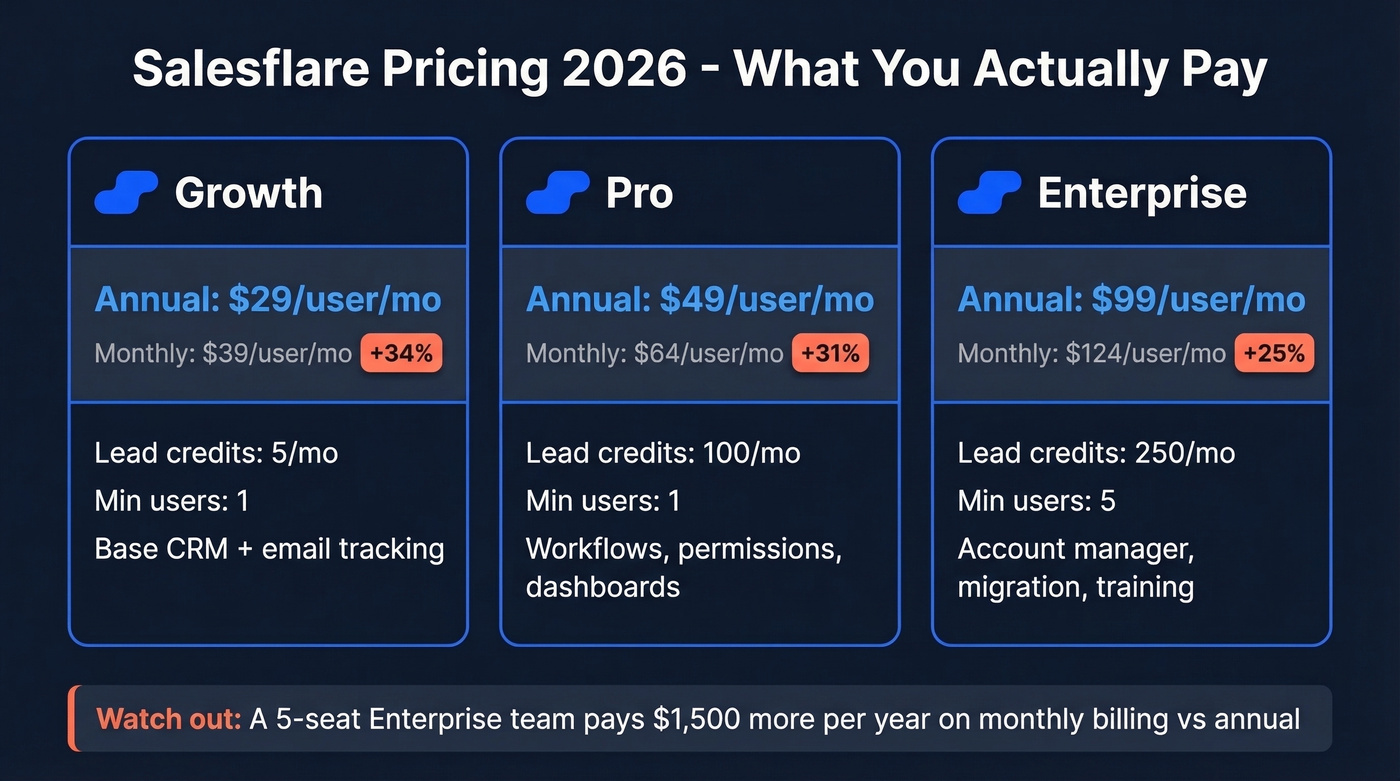
Several aggregator sites still list outdated monthly rates ($35 for Growth, $55 for Pro). Here's what Salesflare's pricing page actually shows right now:
| Growth | Pro | Enterprise | |
|---|---|---|---|
| Monthly | $39/user/mo | $64/user/mo | $124/user/mo |
| Annual | $29/user/mo | $49/user/mo | $99/user/mo |
| Lead credits/mo | 5 | 100 | 250 |
| Min. users | 1 | 1 | 5 |
| Key unlocks | Base CRM + tracking | Workflows, permissions, dashboards | AM + migration + training |
The annual-to-monthly gap is steep. Growth jumps 34% from $29 to $39, and Enterprise balloons to $124/user/month without an annual commitment. A 5-seat Enterprise team on monthly billing pays $620/month versus $495/month on annual - that's $1,500 per year you're leaving on the table.
At higher seat counts, those numbers start overlapping with what many teams pay for more full-featured CRMs like HubSpot, especially once you factor in the reporting and automation depth you're giving up.
One genuinely nice touch: the 30-day free trial requires no credit card, and Salesflare doesn't charge for onboarding help. No hidden limits on contacts, pipelines, templates, or tracked emails either.
What Users Actually Like
Review data across 304 ratings tells a clear story.
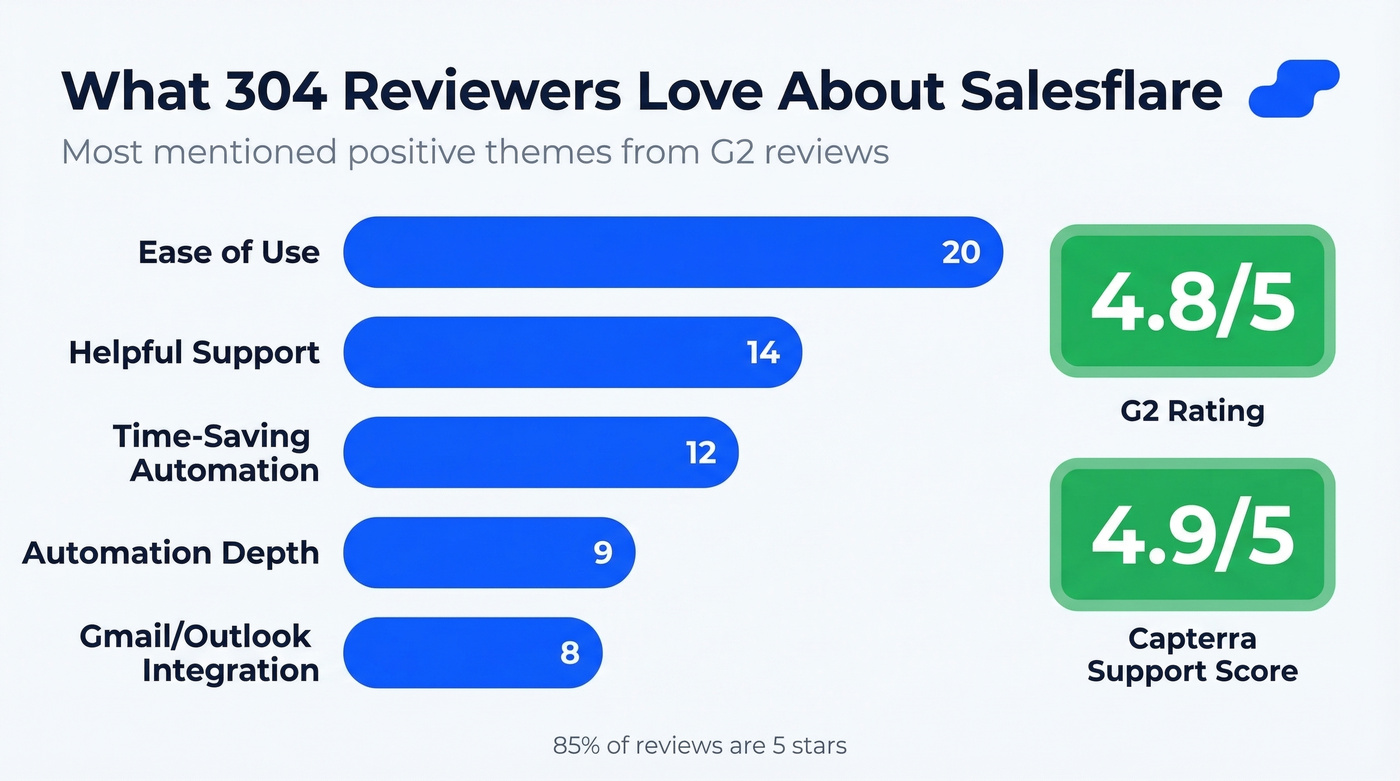
Ease of use dominates the conversation with 20 separate mentions - the most praised aspect by a wide margin. Setup feels fast compared to traditional CRMs, and the inbox workflow is the whole point: Salesflare sits next to Gmail or Outlook so reps can work deals from their email instead of constantly tab-switching into a separate CRM window. One reviewer described it as "the CRM that doesn't feel like a CRM," which honestly sums up the appeal better than any feature list could.
Customer support comes in strong. On Capterra, Salesflare's Customer Service score sits at 4.9/5, which is rare for a CRM in this price range. "Helpful" appeared in 14 separate review mentions - the second most common positive theme.
The automation story rounds things out. Time-saving automation and automation depth together account for 21 mentions, reflecting the core strength: contact and company data captured automatically from email and calendar activity, plus enrichment from public profiles. Email tracking, website visit tracking, and follow-up reminders all run in the background without reps lifting a finger.

Salesflare's built-in email finder caps you at 5 credits/month on Growth - and charges $0.13-$0.16 per extra credit. Prospeo delivers 98% verified emails at roughly $0.01 each, with 75 free every month. No CRM lock-in required.
Stop overpaying for lead credits inside your CRM.
Where Salesflare Falls Short
The flip side of "intentionally simple" is "limited."
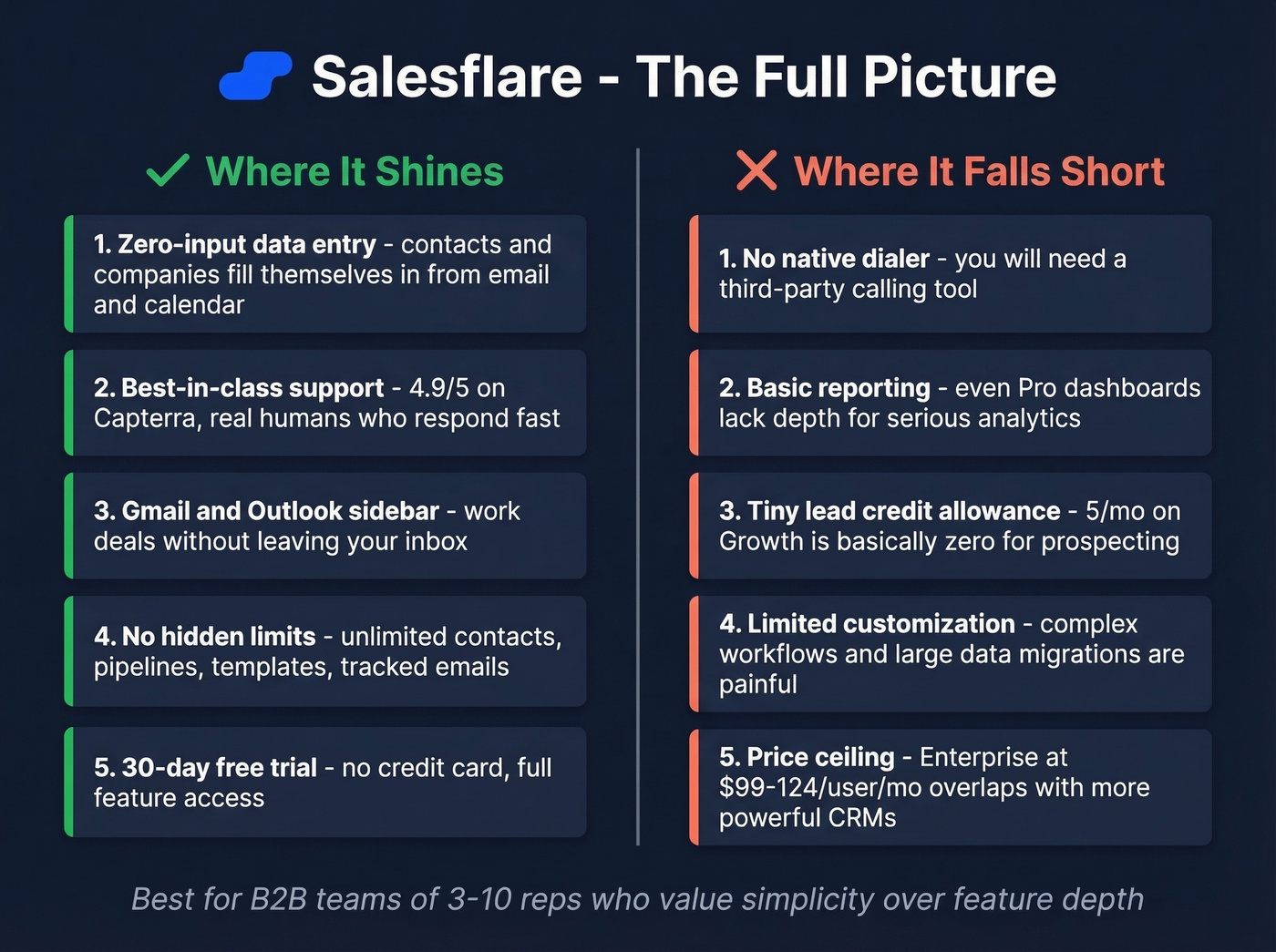
Missing features top the complaint list at 11 mentions. There's no native dialer, no advanced multi-channel sequences, and no deep ABM functionality. If you're used to Outreach or Salesloft, you'll feel constrained by Salesflare's lighter-weight workflows. A February 2026 reviewer put it bluntly: "limited customization for complex workflows" and "data import and large migrations can be quite frustrating." Limited reporting at 3 mentions rounds out the pattern - custom dashboards unlock on Pro, but even then, don't expect Salesforce-level analytics.
Here's the thing: if your average deal size is under $5k and your team is under 10 reps, these limitations probably don't matter. The CRM you actually use beats the CRM you bought and abandoned after six weeks. But the moment you need to layer in calls, social touches, or serious pipeline analytics, Salesflare becomes the bottleneck.
There's another ceiling worth flagging. Salesflare's built-in email finder gives you just 5 lead credits per month on Growth. That's essentially zero for any real prospecting. Even Pro's 100 credits won't last long for an active SDR, and extra lead credits run about $0.13-$0.16 per credit depending on the pack.
For teams that need prospect emails at scale, we've found Prospeo works well as a complement - 75 verified emails per month free at 98% accuracy, with paid plans running roughly $0.01 per email. It feeds verified contacts into your existing stack regardless of which CRM you're running.

Who Should Buy Salesflare?
Salesflare fits best when you're a B2B team of 3-10 reps who want a CRM that fills itself in, especially if you live in Gmail or Outlook and you're tired of tab-switching between your inbox and a clunky CRM. It's ideal for relationship-driven sales where tracking touchpoints matters more than complex automation - think consultancies, agencies, and SaaS companies with a founder-led sales motion.
Walk away if you need advanced reporting, revenue forecasting, or custom objects. Same goes for teams running complex multi-channel sequences or anyone who needs a built-in dialer. And as seat count grows, Enterprise's 5-seat minimum and per-seat pricing add up fast. At that point, you're paying premium CRM money for a simpler product.
Alternatives Worth a Look
HubSpot Sales Hub starts with a free option and scales into paid tiers that commonly land around $20-$150+/user/month depending on edition and add-ons. Far more feature depth, but complexity scales fast. Best if you'll eventually need marketing and sales on one platform. HubSpot's pricing page breaks down the tiers.
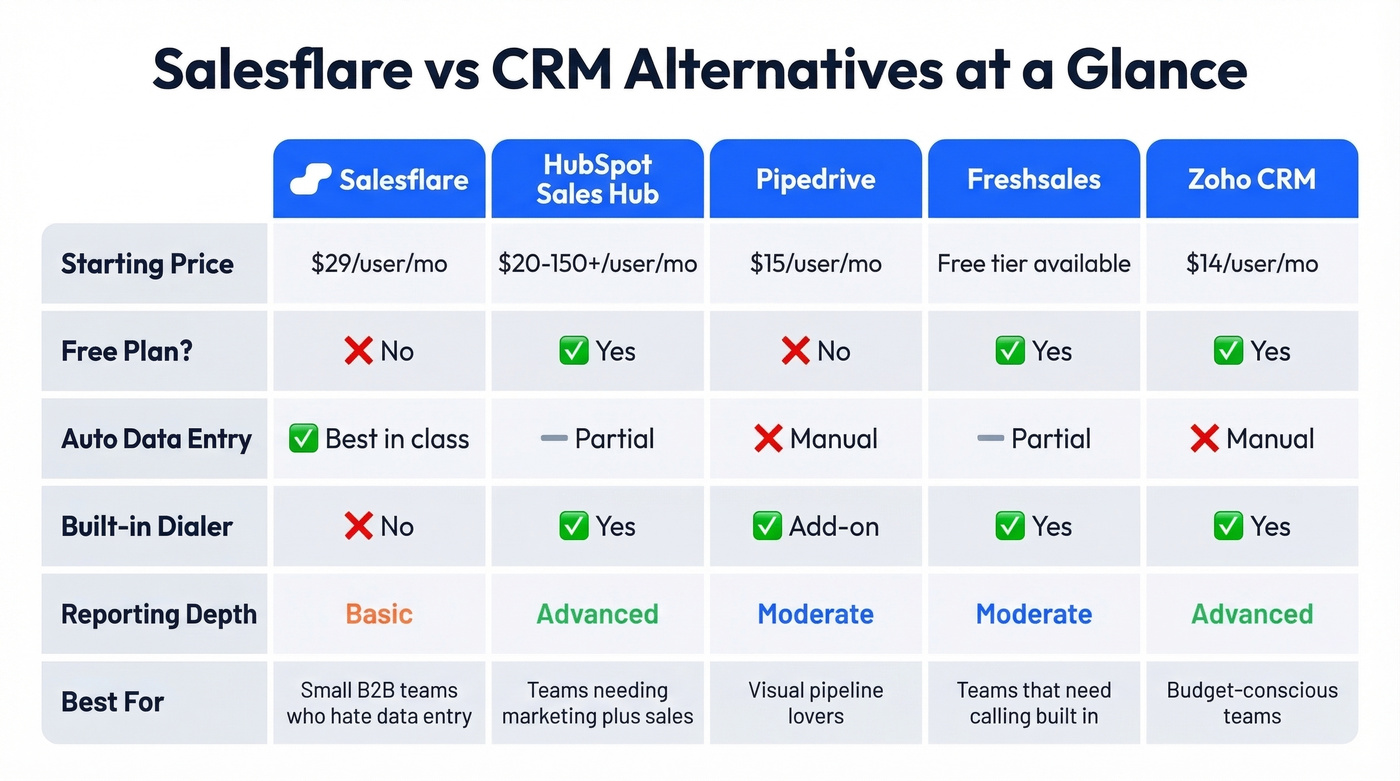
Pipedrive typically runs $15-$100/user/month and offers more pipeline customization and visual deal management than Salesflare. Less automation magic, more manual control - which some teams actually prefer. Pipedrive's comparison page is worth a look.
Freshsales has a free tier and offers a built-in dialer on certain plans. If calling is core to your workflow, this solves a gap Salesflare can't. Freshworks' CRM page has the details.
Zoho CRM has a free edition, with paid plans starting around $14/user/month. The budget option with surprising depth, though the UX isn't as polished.
Let's be honest - none of these are perfect. The "best CRM" is the one your team will actually open every day. If that means trading feature depth for zero-friction data entry, Salesflare wins. If you need the features, you'll have to accept the setup overhead that comes with bigger platforms.
The Bottom Line
Salesflare does one thing exceptionally well: it makes CRM data entry disappear. For small B2B teams who've been burned by bloated platforms they never fully adopt, that's genuinely valuable. The 4.9/5 Customer Service rating on Capterra isn't an accident - this is a team that cares about its users.
But easy has a ceiling. If your team outgrows basic workflows, needs serious reporting, or wants a dialer without duct-taping third-party tools, you'll hit Salesflare's walls within a year. After weighing the pricing, reviews, pros and cons, our take is straightforward: buy it for what it is - the best zero-friction CRM for small teams - and pair it with dedicated tools for everything else.
FAQ
Is Salesflare worth it for solo founders?
Yes. The Growth plan at $29/month on annual billing auto-logs emails, meetings, and contact data so you skip manual entry entirely. For a solo founder running fewer than 50 active deals, it's one of the lowest-friction CRMs available. You'll outgrow it only when you need multi-channel sequences or advanced reporting.
How does Salesflare compare to Pipedrive?
Salesflare automates data entry from your inbox; Pipedrive gives you more pipeline customization and visual deal management. Salesflare is better for teams that hate logging activity. Pipedrive suits teams that want granular control over stages and fields, and it starts cheaper at roughly $15/user/month.
Can I use Salesflare for prospecting?
Barely. Growth includes just 5 email-finder credits per month, and Pro caps at 100. For real outbound prospecting, pair Salesflare with a dedicated tool like Prospeo, which offers 75 free verified emails monthly at 98% accuracy and connects to any CRM via native integrations or Zapier.
Does Salesflare have a free plan?
No free plan exists, but there's a 30-day free trial with no credit card required. All features are accessible during the trial, and there aren't hidden caps on contacts, pipelines, or tracked emails.
A zero-input CRM is only as good as the contacts you feed it. Prospeo's 300M+ verified profiles and 125M+ mobile numbers plug directly into HubSpot, Salesforce, or any CRM via API - so your pipeline stays full no matter which CRM you pick.
Fill your CRM with contacts that actually connect.