

Urgent Meeting Request Email: Templates, Subject Lines, and Follow-Up Tactics
It's 2 PM. A client flags a critical issue, your boss needs a decision before end of day, and the three people who can fix it aren't answering Slack. You need to send an urgent meeting request email - today. The problem? One study found 83% of meeting request emails never get a response. Most templates floating around are built for "sometime next week," not a time-sensitive request that needs a yes in the next two hours.
What You Need (Quick Version)
- Deadline: "By 3:00 PM New York time"
- Why it's urgent: one sentence with a real consequence
- Proposed time: one option, with time zone (or both local times)
- One-line agenda: the single decision you need
- Easy yes: "Reply Y to confirm" or a calendar link
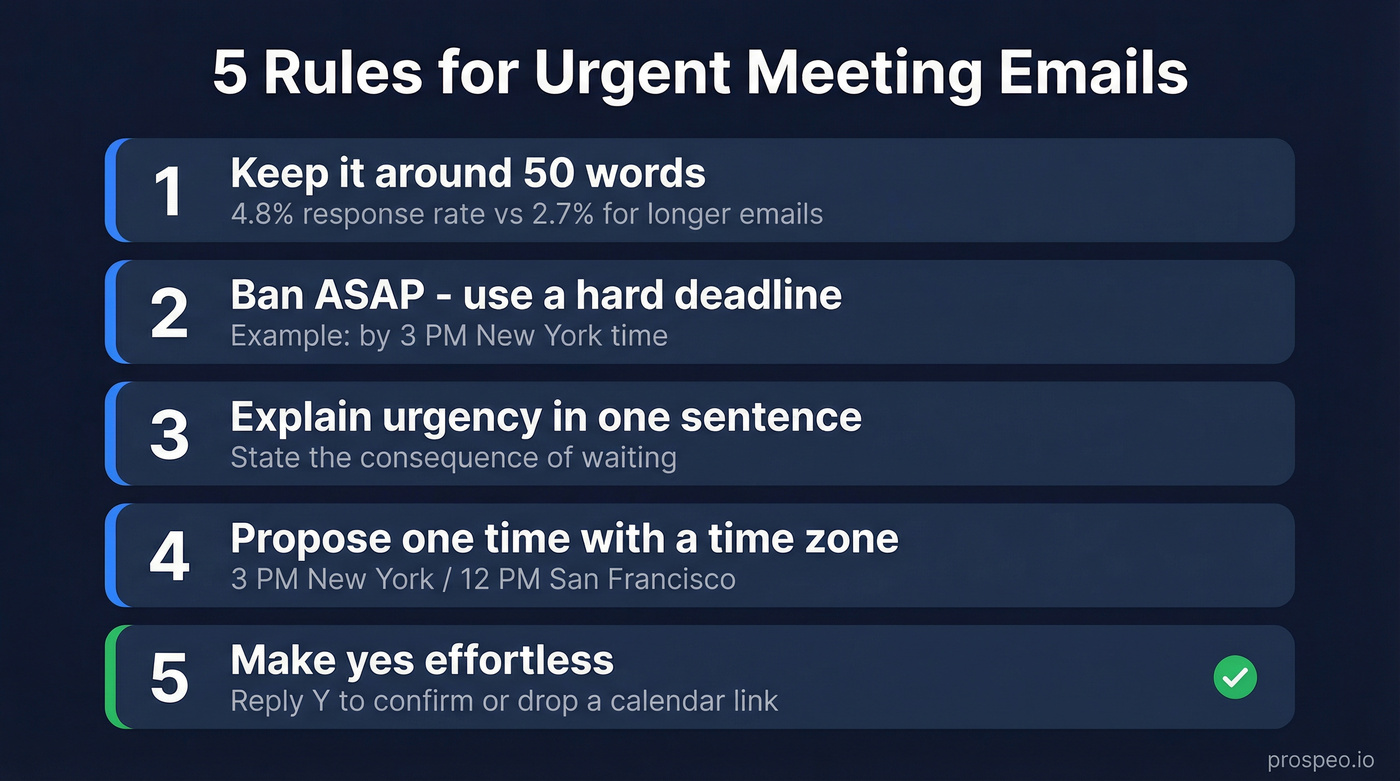
Five Rules for Urgent Meeting Emails
- Keep it around 50 words. 49-word emails see about 4.8% response vs 2.7% for 127-word emails.
- Ban "ASAP." It's vague and annoying. Use a hard time like "by 3 PM New York time."
- Explain urgency in one sentence. State the consequence of waiting.
- Propose one time with a time zone. "3 PM New York / 12 PM San Francisco" beats any abbreviation.
- Make "yes" effortless. Ask for a one-letter reply or drop a scheduling link.
In our experience, the fastest replies come from emails that make saying yes easier than saying no. That's the whole game.
Copy-Paste Templates
To Your Boss or Manager
Subject: Need 15 min today - [project] decision
Hi [Name],
[One sentence: what's happening]. I need your input before [deadline] to avoid [consequence].
Can we do 15 minutes at [time + time zone]?
Thanks, [Your name]
Keep it blunt. If they need background, they'll ask - don't bury the ask under three paragraphs of context.
To a Client or External Contact
Subject: Time-sensitive: [topic] - can we connect today?
Hi [Name],
[One sentence situation]. I'd like to align before [deadline] to avoid [consequence].
Does [time] your time / [time] my time work for 15 minutes? If easier: [calendar link].
Best, [Your name]
We always include both local times for external contacts. It removes the tiny bit of friction that turns "I'll reply later" into "I forgot." That one detail has saved us more meetings than any clever subject line.
Cross-Functional Team
Executives already spend 23 hours per week in meetings, so keep the attendee list tight. Don't invite ten people to solve a two-person decision. People are drowning in messages - Microsoft research shows knowledge workers average 117 emails/day and 153 Teams messages/day - so your email has to be scannable in five seconds flat.
Subject: Decision needed by EOD: [project]
Team - [what's blocked]. We need [decision] by [deadline] or [consequence].
15-min agenda: decide [single decision] Time: [time + time zone] Attendees: [2-5 names]
Reply Y to confirm and I'll send the invite.
One decision, one time, named attendees, and a one-letter confirmation. That's why this works.
Short Notice Escalation to Leadership
Escalations go wrong when they sound emotional or blame-y. The clean structure is: Issue -> Prior attempts -> Impact -> Ask + deadline. It reads like a status update, not a complaint - even when you're sending a short notice meeting request that you wish you didn't have to send.
Subject: Escalation: [project] at risk - need guidance by [time]
Hi [Name],
Issue: [One sentence - what's happening] Prior attempts: Raised with [person/team] on [dates] without resolution Impact: [What breaks if we don't act]
Ask: 15 minutes at [time + time zone]? I need [decision] by [deadline].
Thank you, [Your name]
Follow-Up (No Response)
Don't send this:
"Friendly reminder - just checking in."
Send this instead:
Subject: Re: [original subject]
Hi [Name] - still blocked on [decision]. Deadline is now [time].
If I don't hear back by [time], I'll proceed with [default action].
That "default action" line is the difference between "later" and "now." It gives the recipient a reason to respond immediately because silence becomes a decision.

An urgent meeting request that bounces is worse than one that's ignored - it burns your credibility and wastes the deadline. Prospeo verifies emails in real time with 98% accuracy, so your time-sensitive messages actually land.
Don't let a bad email address blow your deadline. Verify first.
Sound Urgent Without Being Rude
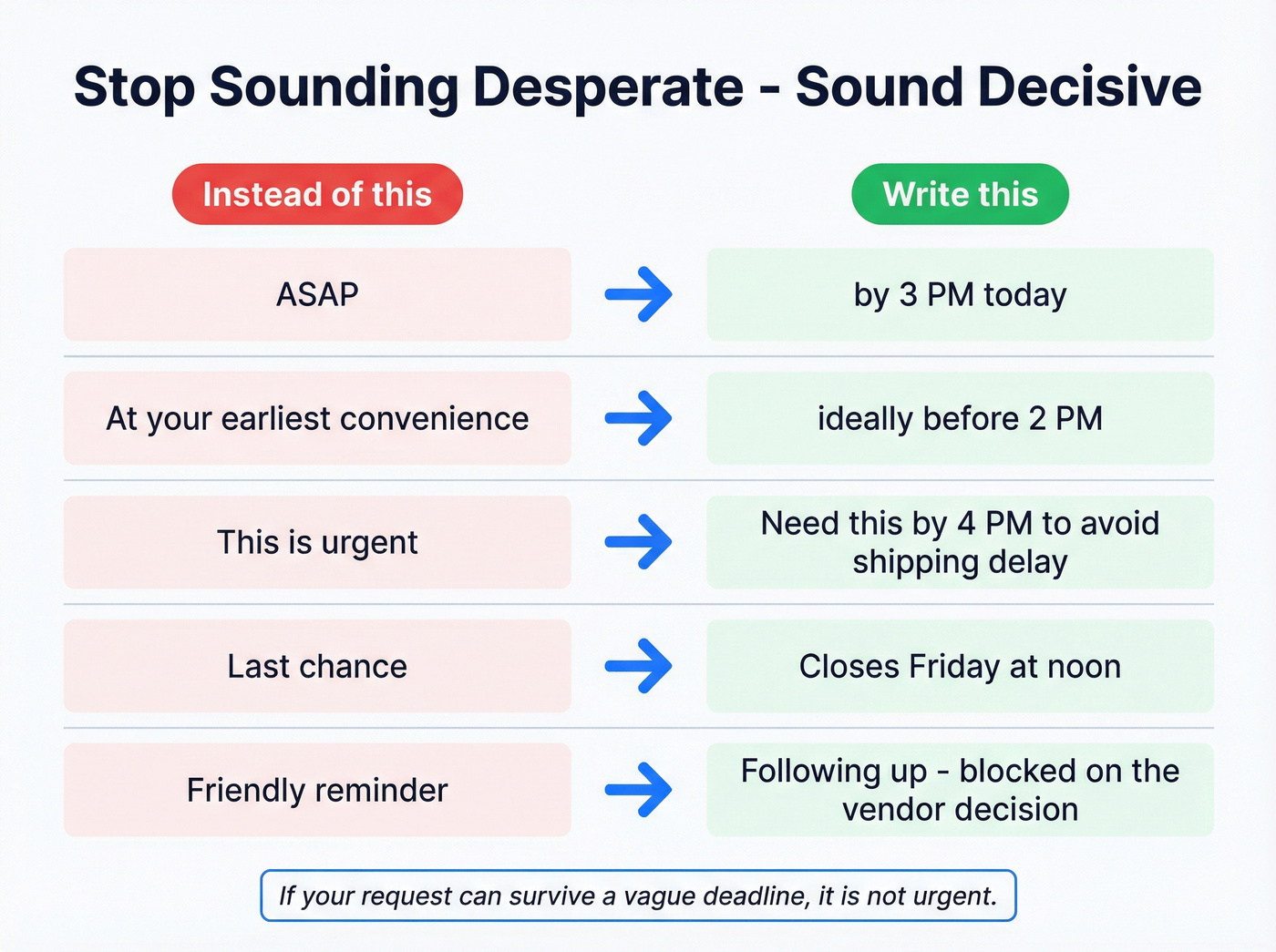
Here's the thing: if you have to write "this is urgent," you've already lost. Put the urgency in the deadline + consequence, then keep your tone calm.
Executive assistants on r/ExecutiveAssistants regularly complain about people faking urgency - claiming "the exec asked for this" when they didn't. Once you burn that credibility, your real emergencies get buried.
| Instead of | Write this |
|---|---|
| "ASAP" | "by 3 PM today" |
| "At your earliest convenience" | "ideally before [time]" |
| "This is urgent" | "Need this by [time] to avoid [impact]" |
| "Last chance" | "Closes [date/time]" |
| "Friendly reminder" | "Following up - blocked on [decision]" |
If your request can survive a vague deadline, it's not urgent. Don't dress it up as one.
Subject Lines That Get Opened
Aim for 50-60 characters and lead with the decision + deadline. Meeting-request templates can hit ~46% open rates, while a typical B2B baseline sits closer to ~15%. If your opens are low, the subject line is the first thing to fix.
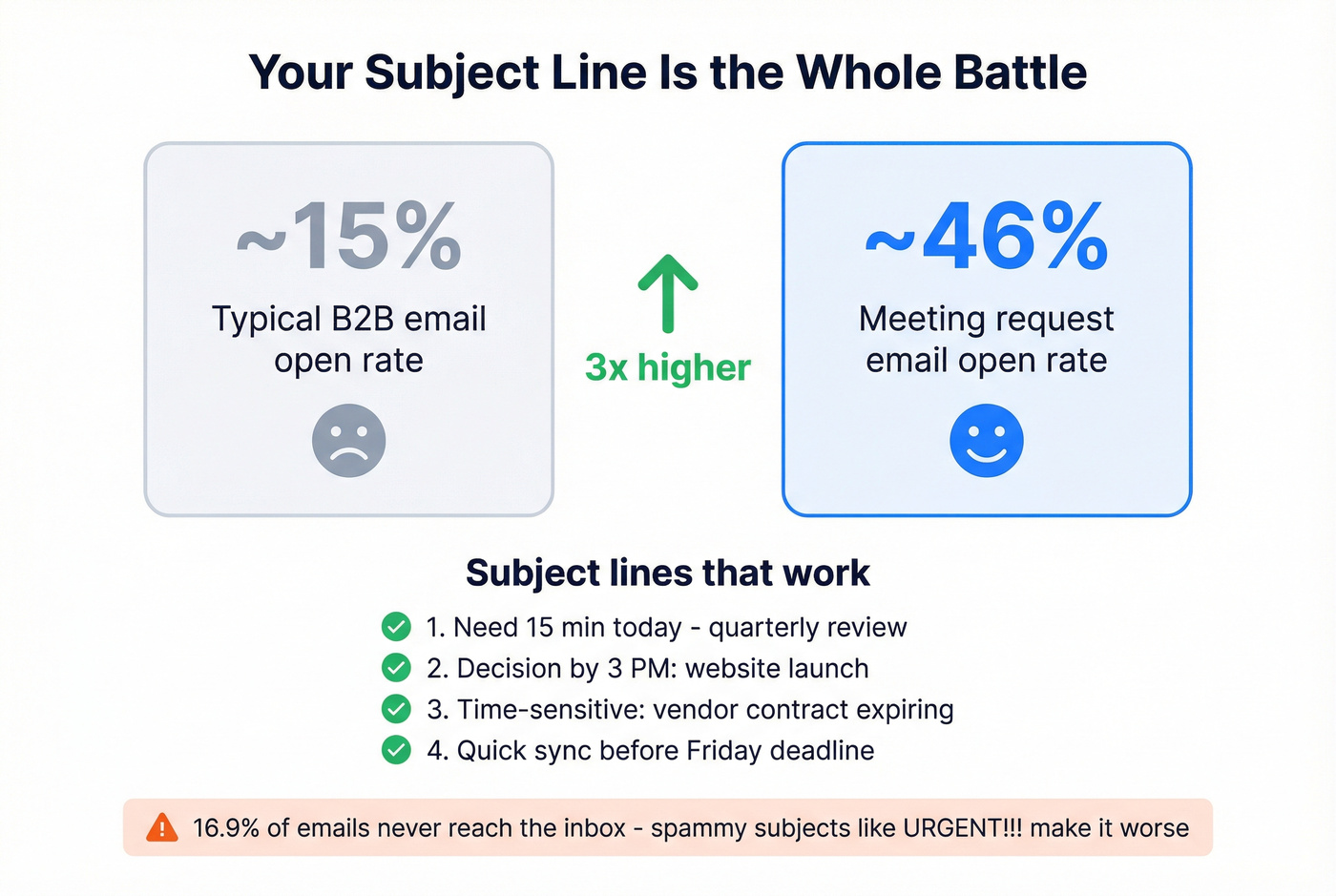
Good options:
- "Need 15 min today - [topic]"
- "Decision by 3 PM: [project]"
- "Time-sensitive: [one-line agenda]"
- "Quick sync before [deadline]"
Avoid spammy urgency. About 16.9% of emails never reach the inbox, and "URGENT!!!" style subjects make it worse. CAN-SPAM penalties reach $53,088 per violation - and deceptive subject lines qualify.
Follow-Up Cadence When Minutes Matter
Standard advice says "wait three days." For time-sensitive requests, that's fantasy.
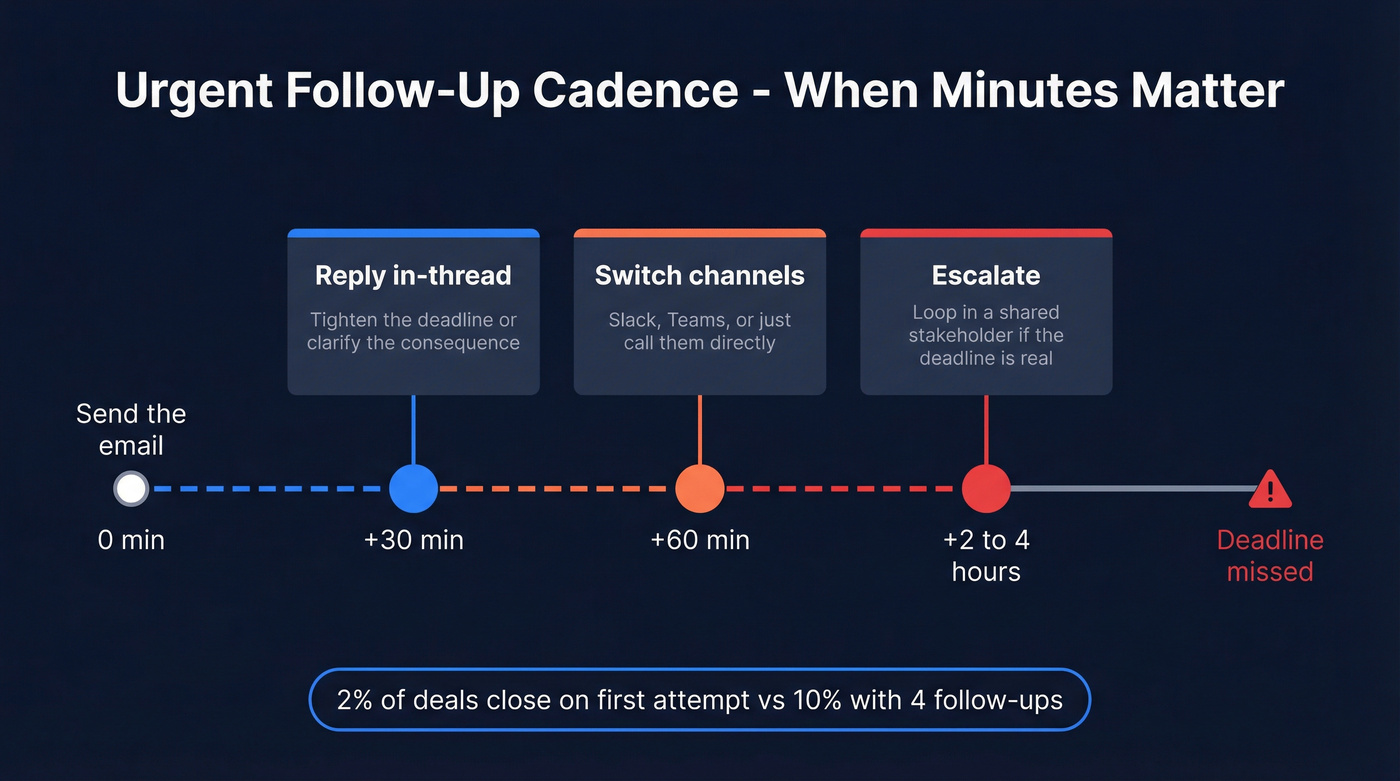
- +30 minutes: Reply in-thread with a tighter deadline or clearer consequence.
- +60 minutes: Switch channels. Slack, Teams, or just call.
- +2-4 hours: Escalate to a shared stakeholder if the deadline is real.
Persistence pays in sales and vendor coordination: 2% of deals close on the first attempt vs. 10% with four follow-ups. The same principle applies to internal requests - people aren't ignoring you on purpose, they're just buried.
If an external follow-up bounces, don't waste another hour guessing at the right address. Verify it first. Prospeo checks emails in real time with 98% accuracy, and the free tier gives you 75 verifications per month - plenty for the "this has to land today" moments. You can run a quick check with the Email Finder.
When to Skip Email and Call
Email is async. If you need a sync answer, act like it.
Call instead when you need a response in under 15 minutes, when you've followed up once and still have no reply after an hour, or when missing the deadline is irreversible - a lost client, a missed launch, a compliance breach. Then send the urgent meeting request email afterward as documentation. The decision happens live; the email is the paper trail.
FAQ
How long should an urgent meeting request email be?
Around 50 words. State the reason, the deadline, one proposed time with time zone, and a one-step yes. Grab any template above and trim from there.
Is it unprofessional to mark an email as urgent?
Only when you do it casually. Reserve the high-priority flag for real deadlines with measurable consequences. Otherwise people stop believing you, and your actual emergencies get buried under all the fake ones.
How do I make sure my time-sensitive email reaches the right person?
Start by verifying the address so you don't lose time to bounces. A tool like Prospeo's Email Finder lets you check 75 emails per month free with 98% accuracy, which covers most "this has to land today" situations without slowing you down.
Following up on an urgent request only to discover you had the wrong email? That's a meeting you'll never get back. Prospeo's Email Finder pulls verified addresses from 300M+ profiles - 75 free lookups per month, no credit card required.
Find the right email in seconds, not hours. Start free today.