

What Is IP Reputation - and Why Is Bad Data the Fastest Way to Destroy It?
Your outbound sequences are built, your copy is tight, and your SDRs are ready. Then 22% of your first campaign bounces and your sender IP reputation starts its death spiral. Soon after, transactional emails like password resets, invoices, and onboarding flows start landing in spam too. So what is IP reputation, and why does it have this much power? It's the mechanism designed to punish senders who look untrustworthy - and it doesn't care about your intentions.
The Short Version
IP reputation is a trust score assigned to your IP address that determines whether your emails reach the inbox or land in spam. The biggest reputation killers for B2B teams are bounces from bad data, spam complaints, and missing authentication. Fix your data first, authenticate second, warm your IP third. Most guides get this order backwards.
How IP Reputation Works
Think of it like a credit score for your sending infrastructure. Every time you send an email, the receiving mail server checks the reputation of the IP address it came from. High score? Message gets delivered. Low score? It gets filtered, throttled, or rejected outright - often before the recipient's server even looks at the content.
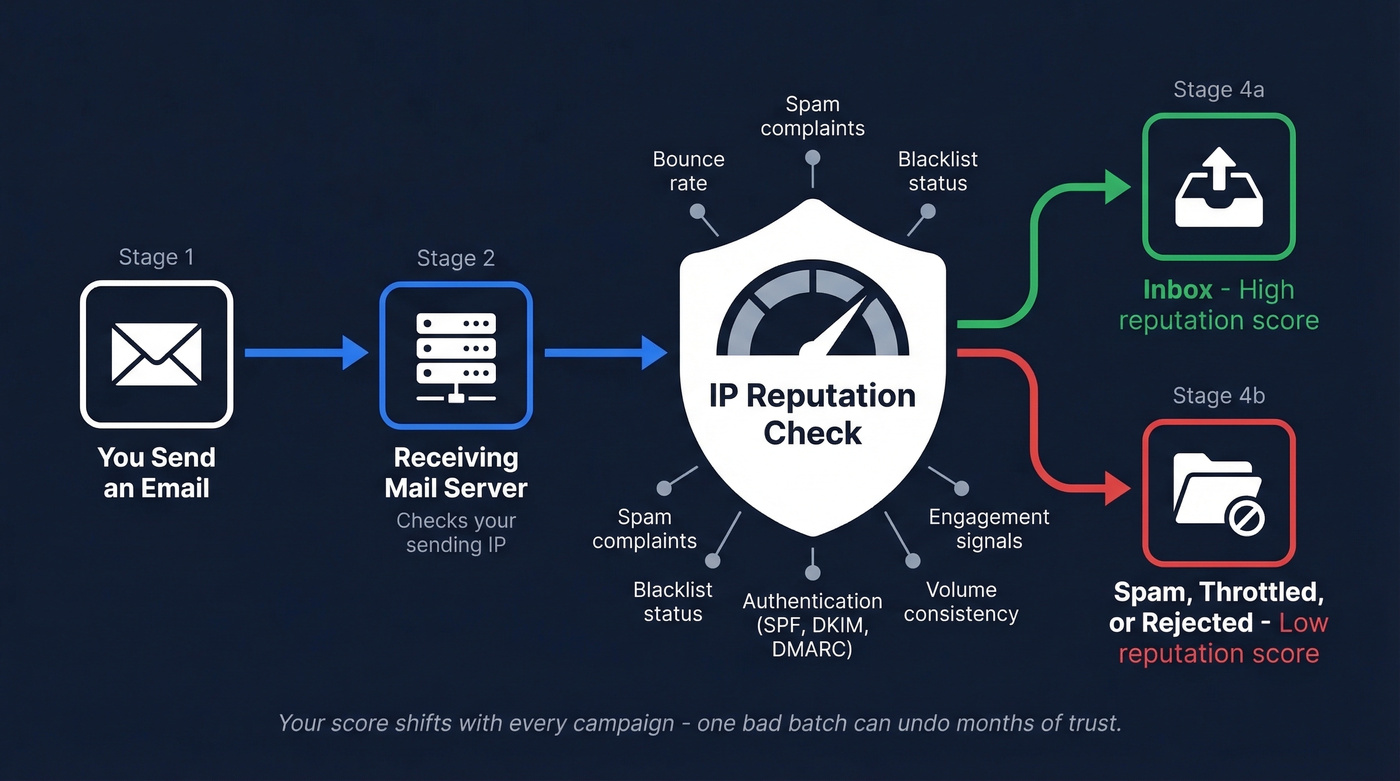
ISPs and email providers like Google, Microsoft, and Yahoo maintain these scores based on historical sending behavior from each IP. They track bounce rates, spam complaints, blacklist presence, and engagement patterns. Proofpoint describes it as a "digital trustworthiness score," and that's exactly right. It's not about what you're saying. It's about whether the infrastructure you're saying it from has earned trust.
The score isn't static. It shifts with every campaign, which means a single bad batch of emails can crater months of careful sending.
Why It Matters More Than Ever
Deliverability has gotten harder across the board. Proofpoint's data shows significant declines among major ESPs: Mailgun's deliverability dropped 27.75%, and Mailchimp fell 19.63%. If mainstream platforms with massive sender pools are struggling, smaller senders with less established reputations are getting hit even harder.
The big shift happened when Google and Yahoo rolled out mandatory sender requirements. SPF, DKIM, and DMARC authentication became table stakes for anyone sending bulk email. Miss any of these, and your messages get heavily filtered or rejected. Combined with tighter spam complaint thresholds, the margin for error has shrunk dramatically.
Your sender score isn't a nice-to-have metric anymore. It's the gatekeeper.
Domain vs. IP Reputation
These two get confused constantly, but they work at different layers of your sending infrastructure.
| IP Reputation | Domain Reputation | |
|---|---|---|
| Tied to | Sending server's IP | Your @domain.com |
| Follows you? | No - changes with IP | Yes - across any IP |
| Who controls it | You (dedicated) or ESP (shared) | Always you |
| Weight trend | Still critical for new/dedicated IPs | Increasingly important |
Domain reputation is gaining weight, but your IP-level score still matters - especially if you're on a dedicated IP or just starting to send from a new one. The practical takeaway: you need both clean. A pristine domain on a blacklisted IP still gets filtered.

Your IP reputation lives or dies by your bounce rate. Every unverified email you send pushes you closer to blacklists and spam folders. Prospeo's 5-step verification - with spam-trap removal and honeypot filtering - delivers 98% email accuracy. Meritt dropped bounces from 35% to under 4%. Stack Optimize runs zero domain flags across all clients.
Stop burning IPs on bad data. Verify before you send.
What ISPs Actually Measure
Let's be honest: the complaint rate is the factor most teams underestimate. Google and Yahoo's ceiling is 0.3% - that's only 3 complaints per 1,000 emails. Exceed it and you're in serious trouble. Optimal is under 0.02%.
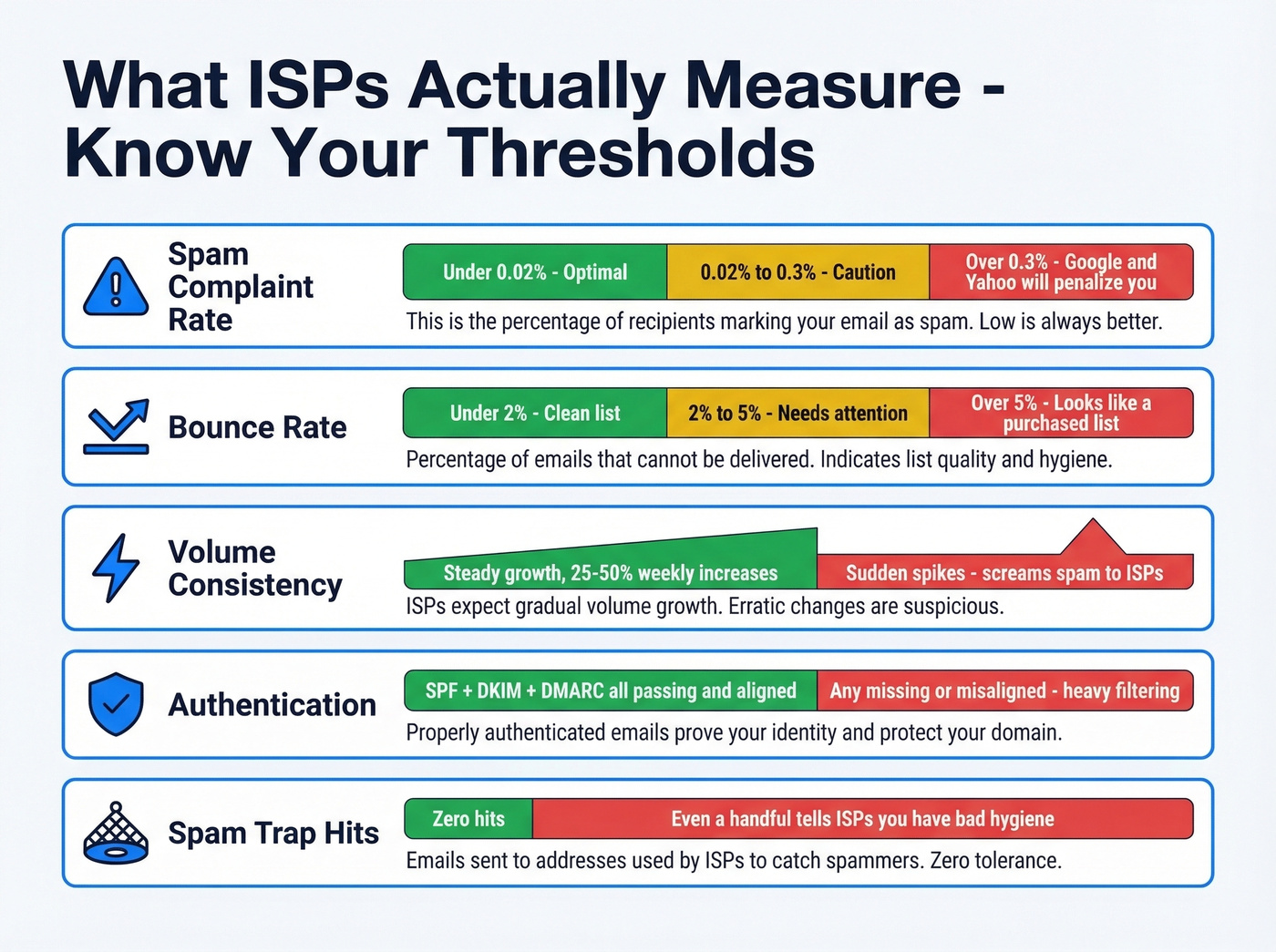
Beyond complaints, ISPs watch bounce rate (keep it under 5% or you look like you're sending to purchased lists), sending volume consistency (sudden spikes scream spam), and blacklist presence. One Spamhaus listing can tank deliverability overnight.
Authentication alignment matters too. SPF, DKIM, and DMARC all need to pass and align with your sending domain. Spam trap hits, even a handful, tell ISPs you're not maintaining hygiene. And engagement signals - opens, clicks, replies, forwards - all feed positive reputation, while ignores and deletes feed negative.
How to Check Your Score
All of the tools below have free lookup options. You don't need to pay for basic monitoring.
| Tool | What It Shows | Scoring |
|---|---|---|
| Sender Score | Overall IP reputation | 0-100 (80+ = good) |
| Google Postmaster | Domain/IP rep for Gmail | Low/Med/High/Bad |
| Microsoft SNDS | IP rep for Outlook | Traffic light system |
| Spamhaus | Blacklist status | Listed or clean |
| Cisco Talos | IP/domain reputation | Good/Neutral/Poor |
| IPQualityScore | Fraud score + abuse risk | 0-100 |
| MXToolbox | Multi-blacklist check | Pass/fail per list |
Sender Score is the quickest gut check. Their categories map cleanly to action: 0-70 needs repair, 70-80 has room for improvement, 80-100 means you're in good shape. IPQualityScore uses a similar 0-100 scale where scores below 70 indicate high risk and above 90 indicate strong legitimacy.
Google Postmaster Tools is non-negotiable if Gmail makes up a significant portion of your recipient base. We recommend checking at least two tools monthly, because each provider weighs signals differently.
How Bad Data Destroys Reputation
Here's the scenario we've seen play out dozens of times with outbound teams. An SDR team buys or scrapes a list of 5,000 contacts, loads it into their sequencer, and hits send. The list hasn't been verified, so 22% of those emails bounce. Buried in that list are spam traps - addresses ISPs use specifically to catch senders with poor hygiene.
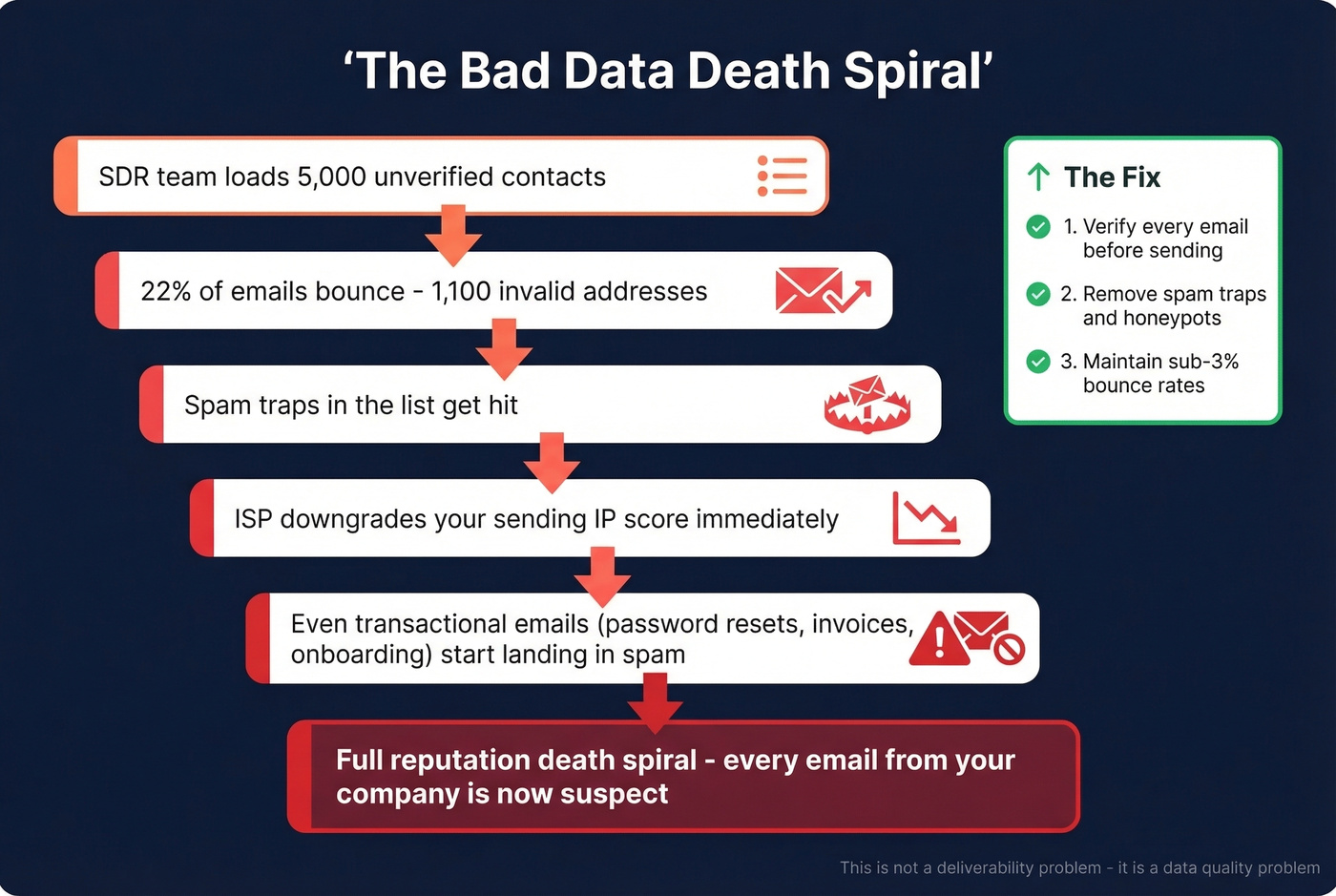
The ISP sees the bounce rate spike, registers the spam trap hits, and immediately downgrades the sending IP's score. Within days, even the company's transactional emails start landing in spam. The damage cascades from outbound prospecting into every email the company sends.

The compounding is fast and brutal. Webroot research found that 97.3% of the top 50,000 recurring malicious IPs displayed at least four distinct risk factors - once an IP starts accumulating negative signals, each one accelerates the next.
This is why verification before sending isn't optional. Prospeo's 5-step verification catches invalid addresses, spam traps, and honeypots before you ever hit send, delivering 98% email accuracy. One customer, Meritt, saw bounce rates drop from 35% to under 4%, and Stack Optimize maintains 94%+ deliverability with under 3% bounce rates and zero domain flags across all their clients.
Here's the thing: most teams treat this as a deliverability problem. It's not. It's a data quality problem wearing a deliverability costume. Fix the data and the reputation fixes itself. Try to warm your way out of a dirty list and you'll burn through IPs indefinitely.
How to Improve Sender Reputation
Recovery follows a specific order. Get it wrong and you dig the hole deeper.
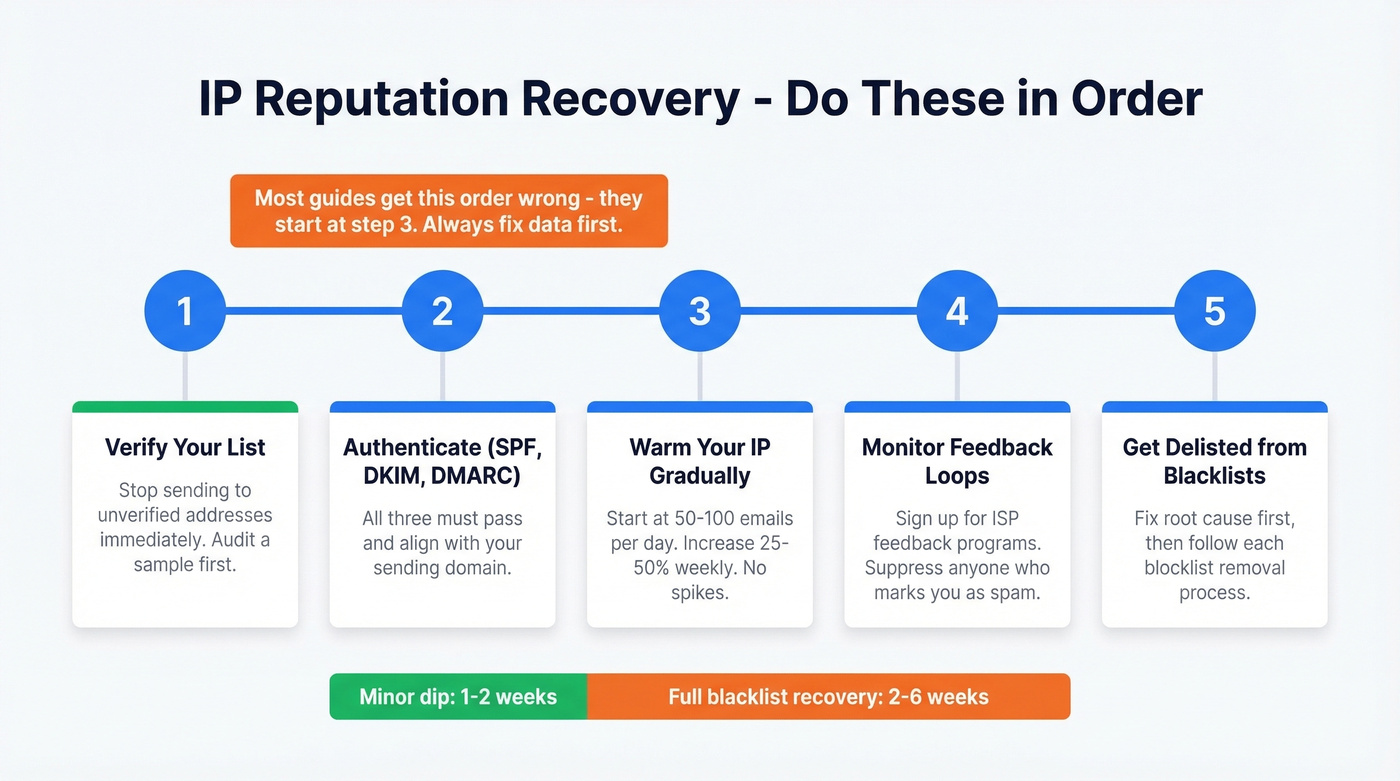
1. Verify your list before sending anything else. Every email you send to an invalid address compounds the damage. If you're unsure how bad things are, audit a segment first - even a small sample tells you a lot.
2. Set up SPF, DKIM, and DMARC. SPF tells receiving servers which IPs are authorized to send for your domain. DKIM cryptographically signs your messages. DMARC ties them together and tells ISPs what to do with failures. All three need to pass.
3. Warm your IP gradually. Start at 50-100 emails per day and increase volume by 25-50% weekly. ISPs reward consistency and punish spikes. This is where patience pays off - rushing the warm-up is one of the most common mistakes we see, and it undoes the work from steps one and two.
4. Monitor feedback loops. Sign up for feedback loop programs where available. These tell you exactly who's marking your emails as spam, so you can suppress those addresses immediately.
5. Get delisted from blacklists. Each blocklist has its own process. You'll need to fix the root cause - bad list, compromised account, misconfigured auth - and then follow the blocklist's specific removal steps.
Teams that verify before sending recover faster than those who try to warm their way out of a reputation hole. A minor dip often recovers in 1-2 weeks of clean sending. Full blacklist recovery typically takes 2-6 weeks with active remediation.
You just learned that exceeding a 5% bounce rate makes you look like a purchased-list sender to ISPs. Prospeo's proprietary email infrastructure verifies every address through catch-all handling, spam-trap detection, and honeypot filtering - refreshed every 7 days, not the 6-week industry average. That's how teams maintain sub-3% bounce rates at scale.
Clean data is the fastest path to inbox placement. Start at $0.01 per email.
Dedicated vs. Shared IPs
Use a dedicated IP if you're sending 50,000+ emails per month and want full control over your reputation. You'll need to warm it properly, but once established, your deliverability isn't affected by anyone else's behavior.
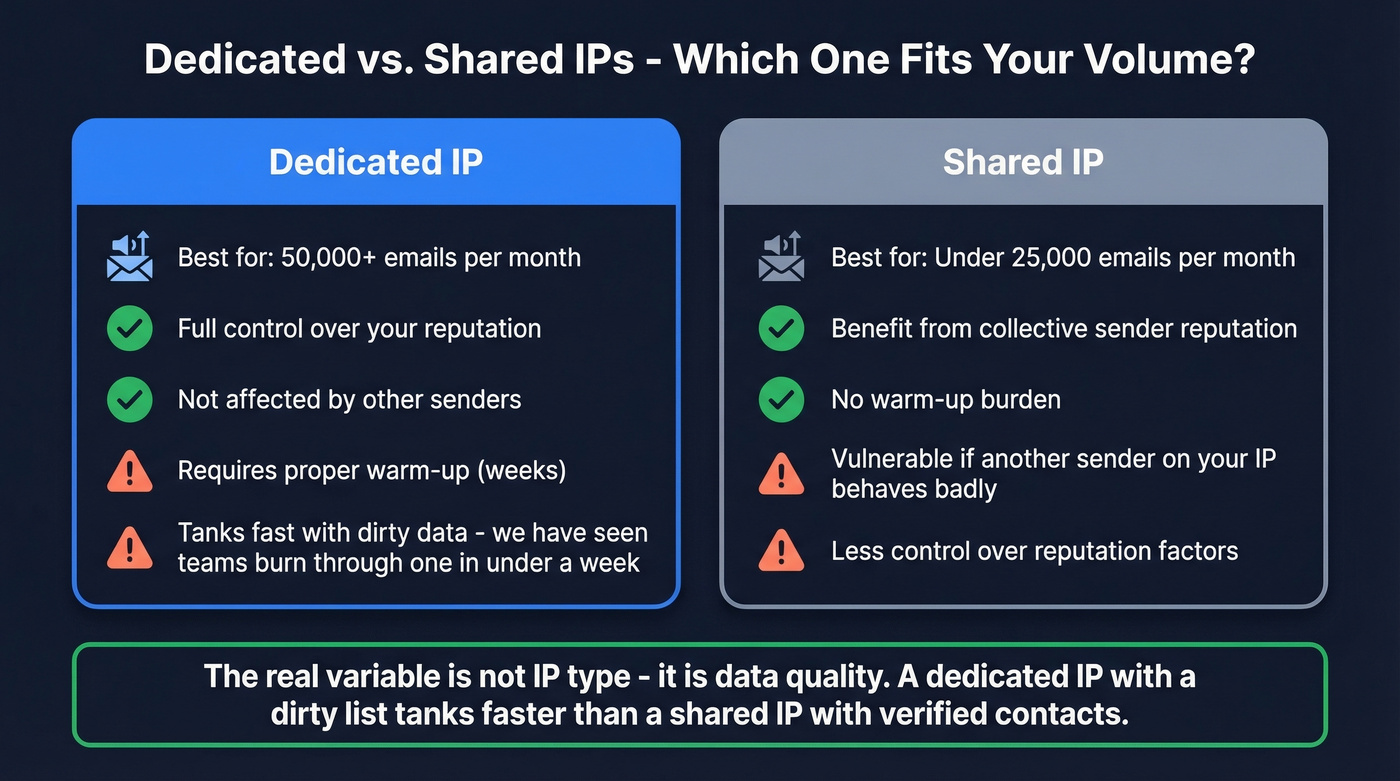
Stick with a shared IP if your volume is lower. Most ESPs pool shared IPs across multiple senders, which means you benefit from collective reputation - but you're also vulnerable if another sender on your IP behaves badly. Skip the dedicated IP if you're under 25,000 emails per month; the warm-up burden usually isn't worth it at that volume.
We've watched teams burn through dedicated IPs in under a week because they skipped verification. Shared or dedicated, list hygiene is the variable that matters most. A dedicated IP with a dirty list will tank faster than a shared IP with verified contacts. The IP type is a tactical choice. The data quality is the strategic one.
FAQ
How long does it take to fix a bad IP reputation?
A minor dip typically recovers in 1-2 weeks of clean, verified sending. Full blacklist recovery takes 2-6 weeks depending on the blocklist and your remediation steps. Stop sending to unverified lists immediately before attempting any recovery.
Can I check my IP reputation for free?
Yes. Google Postmaster Tools, Sender Score, Microsoft SNDS, Spamhaus lookup, and Cisco Talos all offer free lookups. Use at least two for a complete picture since each provider weighs signals differently.
What's a good Sender Score?
Above 80 is good and indicates strong deliverability. Between 70-80 means you're at risk of filtering on stricter providers. Below 70 and your emails are likely hitting spam or getting rejected outright.
Does email verification help IP reputation?
Directly and measurably. Bounces from invalid addresses are a top signal ISPs track. Keeping bounce rates under 3-4% prevents the cascade that tanks sender scores - Meritt dropped from 35% bounces to under 4% after switching to verified data.
Is IP reputation the same as domain reputation?
No. IP reputation is tied to your sending server's address and resets when you change IPs. Domain reputation follows your brand across any IP you send from. Major providers weigh both, but domain reputation carries increasing weight for established senders.