

Account Manager Email Templates for 2026 (12 Ready to Use)
You just inherited 40 accounts and need to introduce yourself by Friday. You don't need 55 templates - you need 12 that map to the moments that actually matter. Lifecycle-mapped templates drive 40% higher engagement than generic one-offs, and the ones below cover everything from your first intro to the rate increase conversation nobody wants to have.
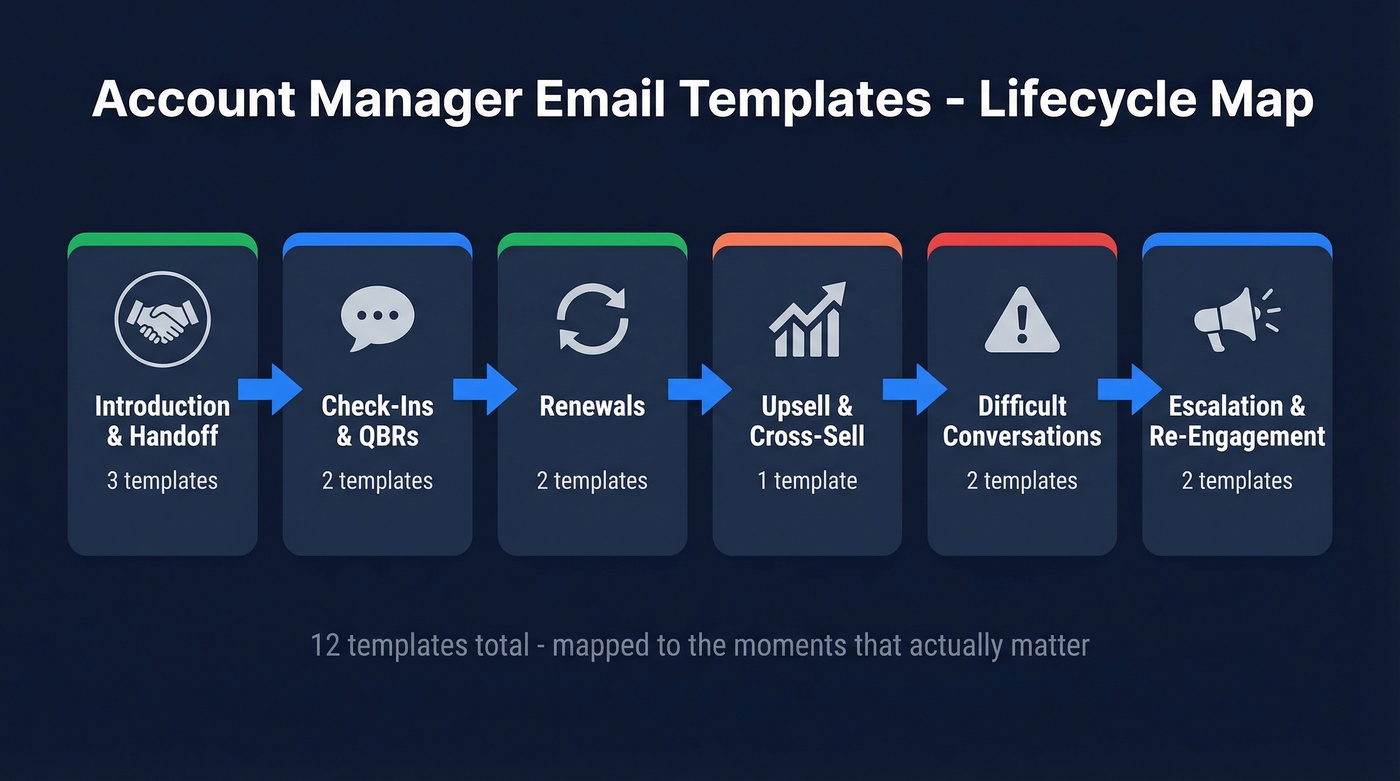
Quick shortcut? Grab the intro/handoff, the QBR recap, and the 30-day renewal reminder. They cover 80% of your critical touchpoints.
Introduction & Client Handoff Templates
The best AM intros skip the personal bio. Practitioners on r/CustomerSuccess recommend leading with three things: you're their primary contact, their internal advocate, and you'll help with their renewal. No dog-and-pony show.
Some clients will ignore your intro entirely - especially transactional IT stakeholders. That's normal. Reply rates typically land between 5-20% depending on relationship strength and seniority. If you get ghosted, the re-engagement template further down is built for exactly that.
New AM Self-Introduction
Subject: [Your Name] - Your New AM at [Company]
Hi [First Name],
I'm [Your Name], your new account manager at [Company]. I'll be your primary point of contact, your internal advocate, and the person making sure your renewal goes smoothly.
I've reviewed your account history and have a few ideas I'd love to run by you. Do you have 20 minutes this week or next? [Calendly link]
Best, [Your Name]
When to use: Taking over an account with no outgoing AM to make introductions.
Manager-Led Warm Handoff
Subject: Introducing [New AM Name], your new point of contact
Hi [First Name],
I wanted to personally introduce [New AM Name], who'll be taking over as your account manager. [New AM] has been briefed on your account goals and recent [specific project/initiative].
I'm cc'ing [New AM] here so you can connect directly. You're in great hands.
Best, [Manager Name]
When to use: A team lead or director introduces the new AM to add credibility. This client handoff email template works well when account transitions need a personal touch from leadership rather than a cold outreach.
Outgoing AM Transition
Subject: Handing off your account to [New AM Name]
Hi [First Name],
I'm moving to a new role at [Company], and I wanted to make sure nothing falls through the cracks. [New AM Name] will be your new account manager starting [date]. I've briefed them on [specific detail - current project, upcoming renewal, open ticket].
[New AM] will reach out this week to introduce themselves. Thanks for being a great partner.
Best, [Outgoing AM Name]
When to use: You're leaving and want to set your successor up for success.
Check-In & QBR Templates
Not every check-in needs a call. High-touch accounts get proactive outreach tied to product signals. Low-touch accounts get a lighter pulse check pointing to self-serve resources. Think of these as relationship-building touchpoints - consistent, value-driven messages that compound trust over time.
Casual Check-In
Subject: Quick pulse check on [Product/Project]
Hi [First Name],
Wanted to check in - how's [specific feature/initiative] working for your team? If anything's off, I'd rather hear it now than at renewal.
No call needed unless you want one. A quick reply works.
Best, [Your Name]
When to use: Monthly or bi-monthly touchpoint for accounts that don't need a formal meeting.
Pro tip: Tie your check-in to a specific usage signal or recent support ticket. "How's the new dashboard working?" beats "Just checking in" every time.
QBR Invite
Most template guides skip QBR invites entirely, which is strange - a good invite with an agenda preview is the single biggest driver of attendance.
Subject: Q[X] review - [Company Name] + [Your Company]
Hi [First Name],
It's time for our quarterly review. Here's what I'd like to cover:
- Results from Q[X-1]: [specific metric or initiative]
- Roadmap items relevant to your team
- Your priorities for next quarter
Can you do [Date/Time]? I'll send a calendar invite with a pre-read doc.
Best, [Your Name]
When to use: 2-3 weeks before the quarter ends.
Renewal Email Templates
Here's the thing: if your renewal email goes out 3 days before expiration, you've already lost. Knowing how to follow up - and when - is the difference between a smooth renewal and a panicked last-minute scramble.
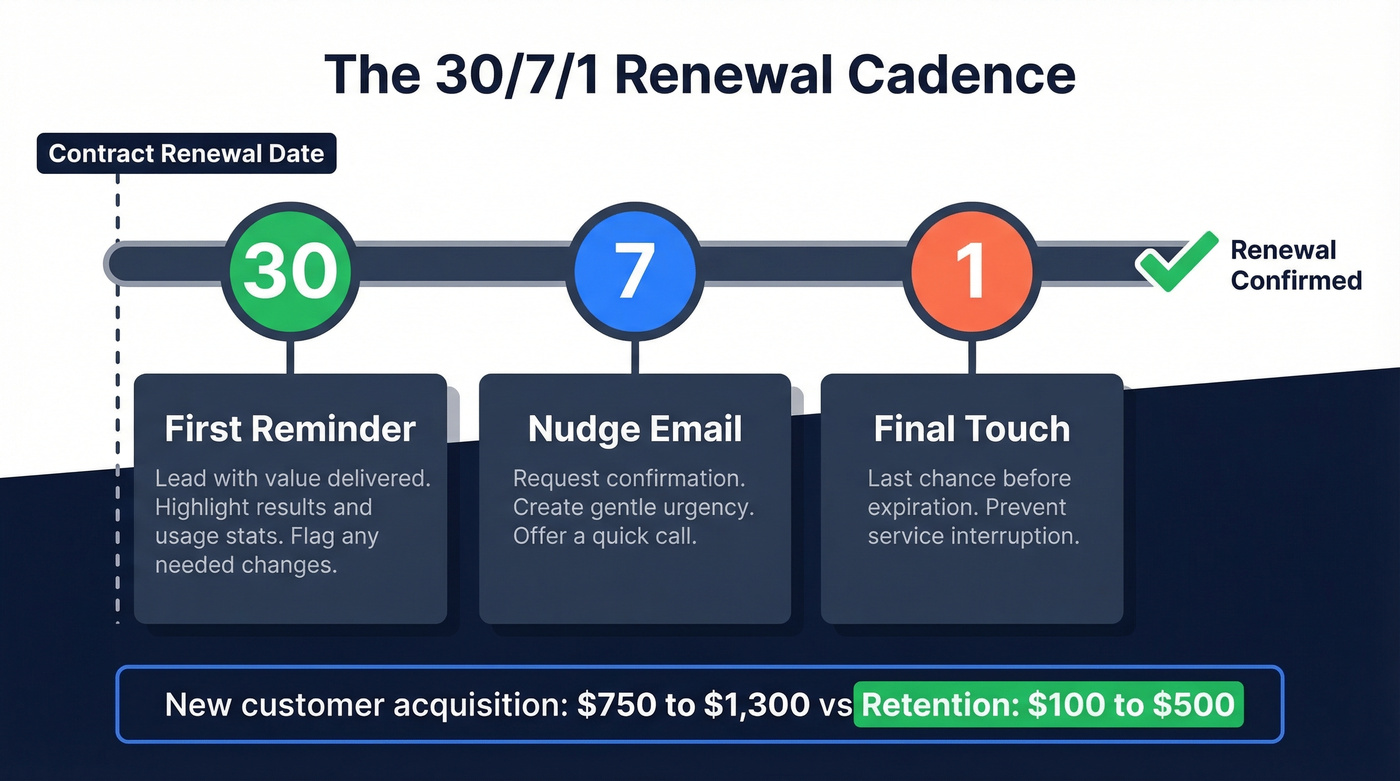
The 30/7/1 Renewal Cadence
First reminder at 30 days. A nudge at 7. A final touch at 1 day out. This three-touch sequence gives clients time to flag changes and gives you time to handle them. Set it up as an automated sequence in your CRM so nothing slips. Acquiring a new B2B customer costs $750-$1,300 on average, while retaining one costs $100-$500. The math isn't subtle.
30-Day Renewal Reminder
Subject: Your renewal is coming up on [Date]
Hi [First Name],
Your [Product] contract renews on [Date]. Here's a quick snapshot of what your team's accomplished this cycle:
- [Specific result or usage stat]
- [Second result]
If anything needs to change - seats, tier, scope - let's talk now so there are no surprises. Otherwise, I'll confirm renewal details next week.
Best, [Your Name]
When to use: Around 30 days before renewal. Lead with value delivered, not the invoice.
7-Day Final Nudge
Subject: Renewal confirmation needed by [Date]
Hi [First Name],
Quick follow-up - your renewal is [Date]. I need confirmation by [deadline] to avoid any interruption on your end.
Any questions or changes? Happy to hop on a 10-minute call.
Best, [Your Name]
When to use: 7 days out, especially if the 30-day email got no response.

Templates won't save a renewal if your contact left the company six months ago. Prospeo refreshes 300M+ profiles every 7 days - so your check-ins, QBR invites, and renewal reminders always land with the right person at the right address. 98% email accuracy, verified.
Stop sending perfect templates to outdated contacts.
Upsell & Cross-Sell Template
Subject: Idea for [Client Company] - [specific outcome]
Hi [First Name],
Based on how your team's using [current feature], I think [new feature/tier] could [specific quantified result - e.g., "cut your reporting time by half" or "give your EMEA team the same access"]. [Similar client] saw [quantified result] after making the switch.
Worth a 15-minute walkthrough? I can show you exactly what it'd look like for your setup.
Best, [Your Name]
When to use: After a QBR or milestone where the client's outgrown their current plan. Lead with the quantified outcome, not the feature name. Cross-sell campaigns can automate this at scale, but for strategic accounts, a personalized email from their AM will always outperform a drip sequence.
Difficult Conversation Templates
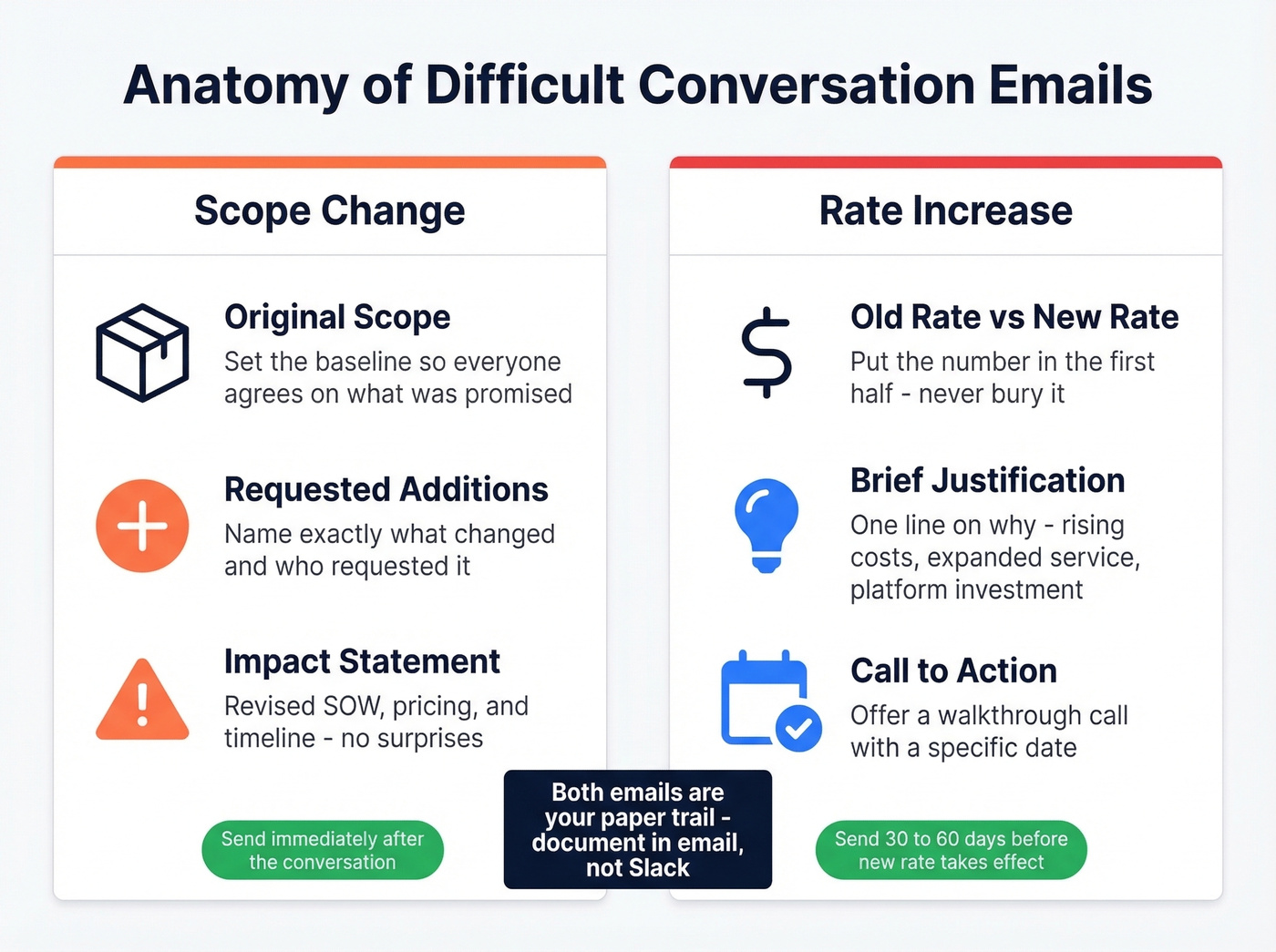
These are the emails nobody else gives you. Scope creep and rate increases happen to every AM - document them in email, not Slack.
Scope Change Notification
Subject: Updated scope for [Project Name]
Hi [First Name],
Thanks for the conversation about [new requirement]. I want to make sure we're aligned on what this means for the project:
- Original scope: [brief description]
- Requested additions: [new items]
- Impact: This will require a revised SOW. Pricing and timeline will adjust accordingly.
I'll send the updated proposal by [date]. Let me know if you have questions before then.
Best, [Your Name]
Why this works: The bullet structure forces clarity on both sides. You're not saying "no" - you're saying "yes, and here's what changes." This email is your paper trail. Send it immediately after the conversation, not three days later when details get fuzzy.
Rate Increase Announcement
Subject: Pricing update effective [Date]
Hi [First Name],
I'm writing to let you know that our pricing will be updated effective [Date]. Your new rate will be [new rate], up from [current rate].
This reflects [brief justification - rising costs, expanded service, platform investment]. We're committed to continuing to deliver [specific value].
I'm happy to walk through this in detail. Would [date/time] work for a quick call?
Best, [Your Name]
Why this works: Naming the old rate and new rate side-by-side shows transparency. The justification line prevents the client from filling the silence with their own worse narrative. Send this 30-60 days before the new rate takes effect.
Common mistake: Burying the number. Put the new rate in the first half of the email. Clients who have to scroll to find the price feel ambushed.
Escalation & Re-Engagement Templates
Internal Escalation
Subject: Escalation: [Client Name] - [Issue Summary]
Hi [Manager/Stakeholder Name],
I'm escalating an issue with [Client Name] that needs your input.
Problem: [One-sentence description] Previous attempts: [What you've tried - e.g., "Two calls with their ops team, one ticket with engineering, no resolution in 10 days"] Action needed: [Specific ask - approval, resource allocation, executive outreach]
This is impacting [renewal timeline / client satisfaction / revenue at risk]. Can we discuss today?
Thanks, [Your Name]
The three-part structure - problem, previous attempts, action requested - keeps it focused and actionable. We've seen escalation emails that skip "previous attempts" get bounced back with "what have you tried?" almost every time.
Client Re-Engagement (Ghosted)
Subject: [Specific thing relevant to them] - thought of your team
Hi [First Name],
I know things get busy, so I'll keep this short. We just released [specific update relevant to their use case], and I immediately thought of your team's work on [specific initiative].
[One concrete detail - a benchmark from similar accounts, a relevant case study, or a feature that solves a problem they've mentioned.]
Worth a quick reply? Even a "not now" helps me calibrate.
Best, [Your Name]
When to use: After 2+ unanswered emails. Don't send another "just checking in." Lead with something concrete that earns a reply.
Making These Templates Actually Work
Your subject line decides whether anything else matters. 47% of recipients open based on the subject line alone - keep yours under 50 characters and make it specific. "Q2 QBR recap + next steps" beats "Quick check-in." Drop the jargon too: tie every email back to the client's KPIs, not your internal terminology. Your client doesn't care about your "enablement framework."
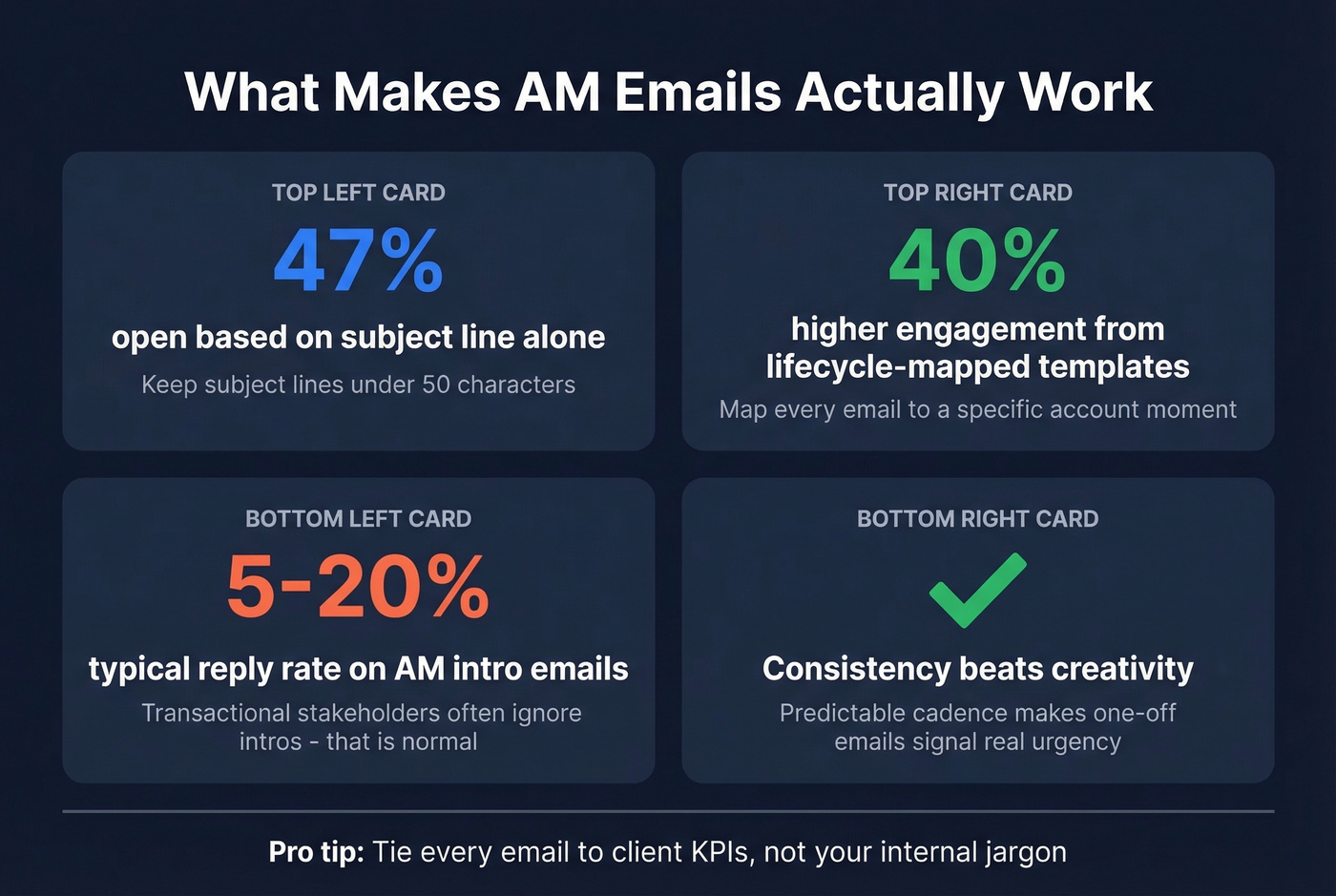
Let's be honest about what separates good AMs from great ones here - it's consistency, not creativity. Establish a predictable cadence so one-off emails actually signal urgency instead of getting lost in noise. Personalize with account-specific details: usage data, recent wins, their stated goals. Generic templates read like generic templates.
For your renewal cadence, set up sequences in your CRM so nothing slips. Most outreach tools automate the 30/7/1 flow without much setup. When sending a company profile to a client, attach a one-pager with relevant case studies rather than linking to your homepage - specificity wins.
One thing we can't stress enough: verify your contact data before you send anything. When you inherit 40 accounts, half the CRM data is stale. Run your list through Prospeo before firing off intro emails - bounced messages are a terrible first impression, and they'll tank your sender reputation on top of it.
Skip the difficult conversation templates if your deal sizes are under $10k. You probably only need five templates total: intro, check-in, renewal, upsell, and re-engagement. The scope change and rate increase emails matter most when the contract size justifies the documentation overhead. But when it does, they'll save your quarter.
Inherited 40 accounts and half the contacts are stale? Prospeo's CRM enrichment returns 50+ data points per contact with a 92% match rate. Upload your book of business and get verified emails, direct dials, and updated job titles back in minutes - not days.
Enrich your entire account list before Friday's intro emails go out.
FAQ
How do I introduce myself as a new account manager?
Lead with three things: you're their primary contact, their internal advocate, and you'll help with their renewal. Include one specific next step - like a 20-minute intro call - and keep the whole email under 150 words. Skip the personal bio entirely.
How often should account managers email clients?
Monthly check-ins and quarterly QBRs work for most accounts. Over-communicating trains clients to ignore you when it actually matters. One to two touchpoints per month is the sweet spot for mid-market relationships.
What's the best subject line length for AM emails?
Keep subject lines between 30-50 characters. 47% of recipients decide to open based on the subject line alone. "Q2 QBR recap + next steps" outperforms vague lines like "Quick check-in" every time.
How do I re-engage a client who stopped responding?
Don't send another "just checking in." Lead with something concrete - a product update, a benchmark from similar accounts, or a direct question about a specific challenge they've mentioned. Make it easy to reply with one sentence.
How do I verify my contact list before sending templates?
Stale CRM records mean bounced emails and damaged sender reputation. Run your list through a verification tool before any outreach - especially when you're inheriting accounts and half the records are outdated. Prospeo's bulk verification returns 50+ data points per contact at 98% accuracy, which is worth the five minutes it takes.