

How to Improve Sender Reputation: A Practitioner's Guide
Office365 inbox placement dropped from 77% to 51% in a single year, according to 2026 B2B benchmarks. Outlook/Hotmail fell harder - 49% down to 27%. Your emails aren't bouncing. They're quietly disappearing into spam folders while your dashboard still shows "delivered." With only 7.6% of the top 10 million domains enforcing DMARC, most senders haven't even started fixing the problem. If you want to improve sender reputation, you need to understand what's driving these numbers and act before your domain gets permanently flagged.
The Short Version
Authentication is table stakes. SPF, DKIM, and DMARC get you in the door, but engagement and data quality keep you there. Most reputation problems are actually data problems - verify your list before every campaign, not after deliverability tanks. And monitor weekly with Google Postmaster Tools, Microsoft SNDS, and Talos Intelligence.
What Is Sender Reputation?
Sender reputation is the trust score mailbox providers assign to your sending infrastructure. It works on two levels: IP reputation covers the server you send from, while domain reputation covers your sending domain. Domain reputation has become the dominant signal, especially at Gmail.
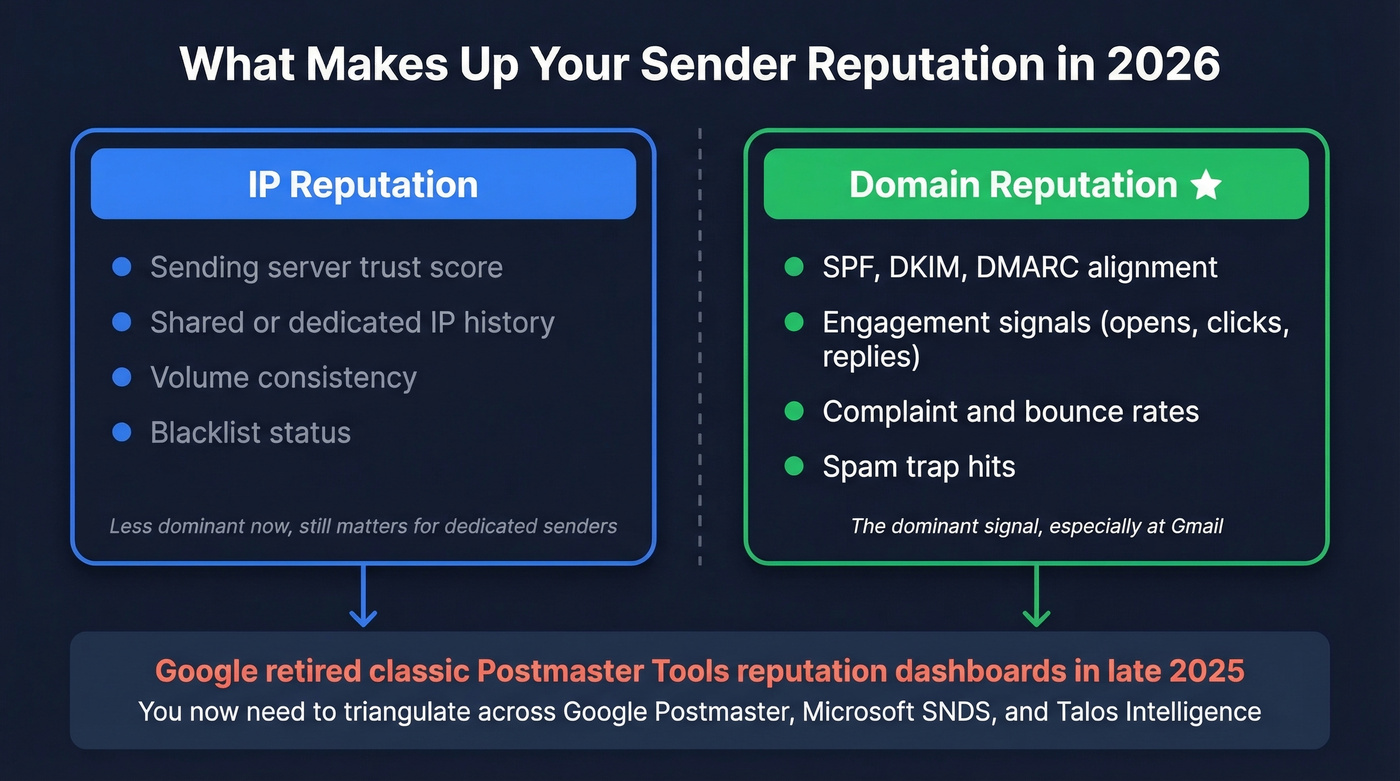
Diagnosing reputation just got harder. Google began retiring the classic Postmaster Tools experience in late 2025, and the domain/IP reputation dashboards are gone. The new dashboard is compliance-focused - spam rates, authentication pass rates, delivery errors. You still get signal, but you've lost the simple reputation warning light.
That means you now need to triangulate across multiple tools and metrics to understand where your email deliverability reputation actually stands. It's annoying, but it's the reality we're all working with now.

Most sender reputation problems are data problems. Prospeo's 5-step verification eliminates spam traps, honeypots, and dead addresses before they torch your domain - 98% email accuracy on a 7-day refresh cycle. Stack Optimize ran all client campaigns through Prospeo: 94%+ deliverability, under 3% bounce, zero domain flags.
Stop fixing deliverability after the damage. Start with clean data.
How to Improve Email Sender Reputation
Authenticate Properly
If you haven't done these, nothing else matters:
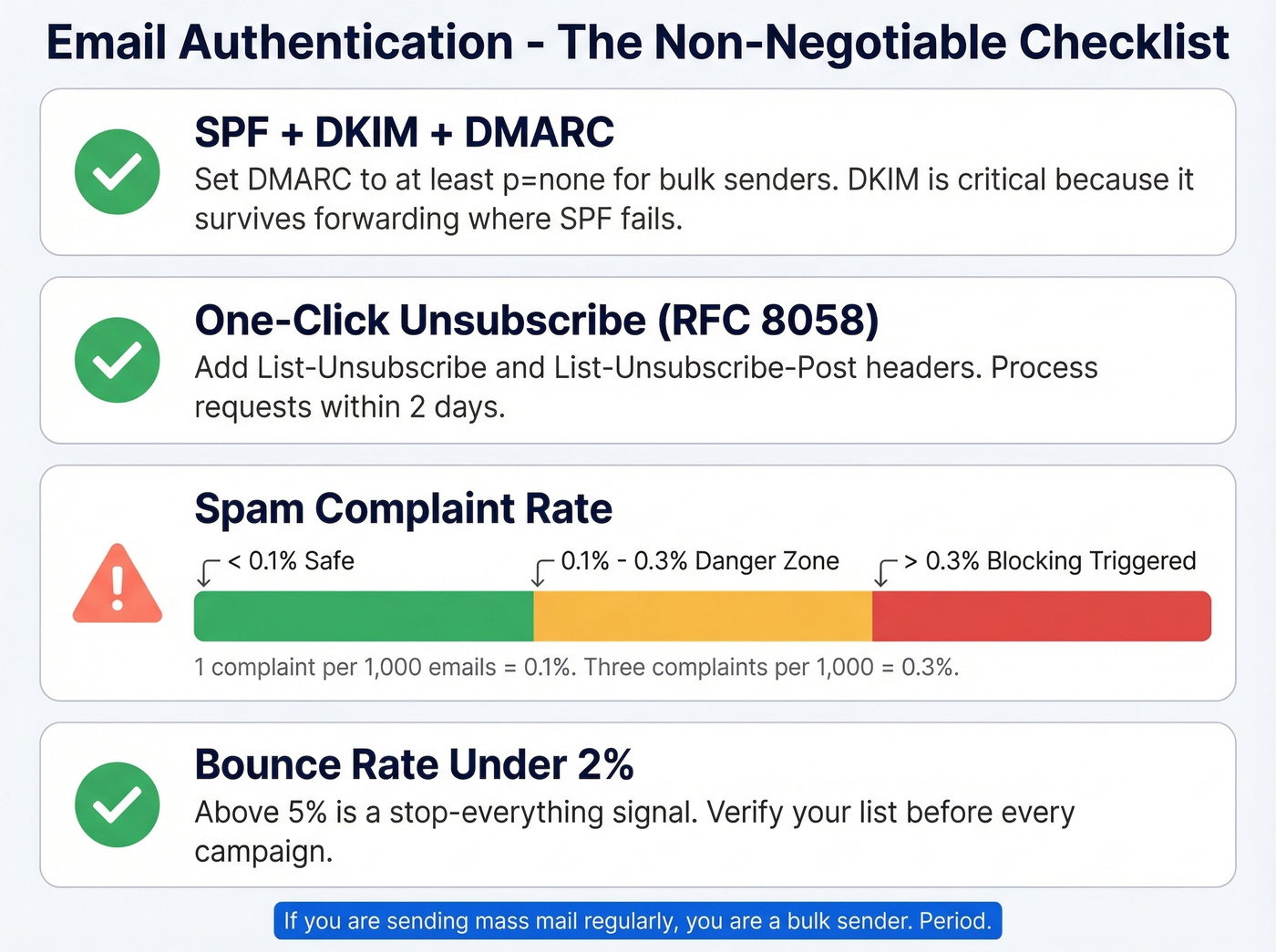
- Configure SPF + DKIM + DMARC with at minimum
p=nonefor bulk senders. DKIM is especially critical because it ties cryptographic trust directly to your domain, surviving forwarding scenarios where SPF fails. (If you need syntax help, start with these SPF record examples.) - Implement RFC 8058 one-click unsubscribe with List-Unsubscribe and List-Unsubscribe-Post headers.
- Process unsubscribe requests within 2 days.
- Keep spam complaint rate below 0.1% - 0.3% is the hard ceiling that triggers blocking.
The math is simple. One complaint per 1,000 emails puts you at 0.1%. Three complaints per 1,000 and you're at 0.3%. Don't fixate on the 5,000/day threshold - as Yahoo's Marcel Becker put it, if you send mass mail regularly, you're a bulk sender. Period. (For the three different meanings of "bulk sender," see this bulk email threshold breakdown.)
Verify Your List Before You Send
Here's the thing: sending to unverified lists in 2026 is professional malpractice. Your bounce rate needs to stay under 2% per send. Anything above 5% is a stop-everything signal. Bounces are just the visible damage, though - spam traps are the silent killers that wreck your domain without any warning in your dashboard. If you're already seeing issues, start with email bounce rate diagnostics.
Bad data degrades fast. Prospeo's 5-step verification catches the stuff that destroys domains: spam traps, honeypots, catch-all handling, and dead addresses, all at 98% email accuracy on a 7-day refresh cycle. Stack Optimize built from zero to $1M ARR running client campaigns through Prospeo - 94%+ deliverability, under 3% bounce, zero domain flags across all clients. That's what clean data looks like in production.

Warm Up Your Domain
Before you send a single cold email, your domain needs 7-14 days of aging with SPF/DKIM/DMARC configured. Use a secondary domain - never warm your primary. Verify your list to project bounce under 2% before starting. We've tested this schedule across dozens of domains, and the gating metrics are non-negotiable. (If you're choosing tooling, compare options in our guide to email warmup tools.)
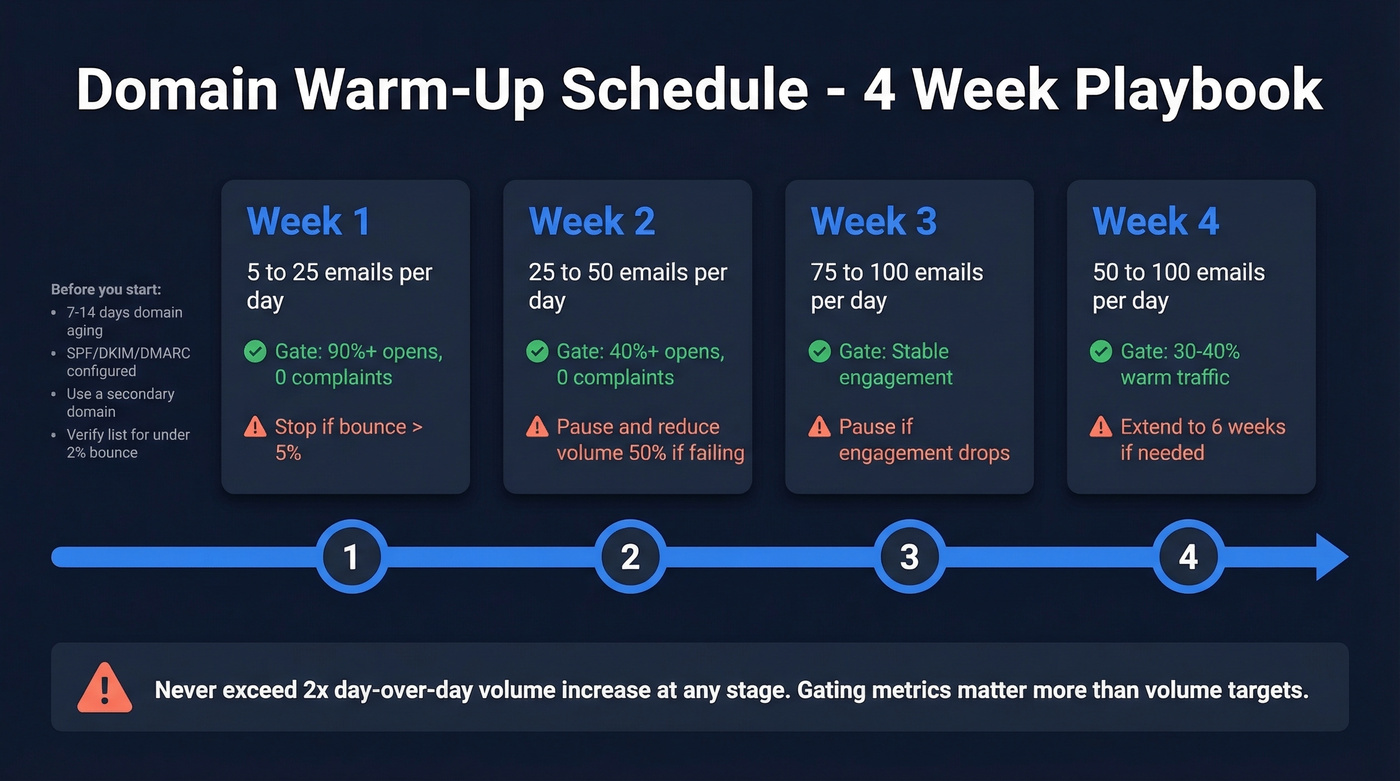
| Week | Daily Volume | Gating Metrics | Action if Failing |
|---|---|---|---|
| Week 1 | 5 - 25 | 90%+ opens, 0 complaints | Stop if bounce >5% |
| Week 2 | 25 - 50 | 40%+ opens, 0 complaints | Pause, reduce 50% |
| Week 3 | 75 - 100 | Stable engagement | Pause if engagement drops |
| Week 4 | 50 - 100 | 30-40% warm traffic | Extend to 6 weeks if needed |
The gating metrics matter more than the volume targets. If opens drop below 40% in week 2, don't push through - cut volume in half and stabilize. Never exceed a 2x day-over-day increase at any stage. For dedicated IP warm-up, which is different from domain warm-up, Kickbox recommends starting around 2,000/day and growing 20-30% daily. A disciplined warm-up is one of the most reliable ways to rebuild trust with mailbox providers over time.
Manage Complaints and Engagement
Reputation recovery comes down to two things: cleaning your list and reducing volume. Suppress contacts who haven't engaged in 90+ days. Segment by engagement tier and send your best content to your most active contacts first.
Reduce weekend volume by 50-70%, but don't stop completely - consistency matters. We've seen teams try to "send their way out" of a reputation dip by increasing volume. It never works. A common pattern we've watched unfold: sudden open-rate collapses from 68% to 22% in 10 days, with no obvious trigger, because the damage was accumulating invisibly for weeks before the cliff hit. If you need a baseline, use these email open rate benchmarks to spot abnormal drops.
Separate Your Outreach Infrastructure
Do this:
- Use a secondary domain for all cold outreach, like
team.yourcompany.com - Set up a custom tracking domain, like
track.yourdomain.com - Stick to plain-text or simple formatting
Skip this if you're already doing cold email from your primary domain - stop immediately and migrate. Mailshake's research makes the risk of shared tracking domains clear: other users' spam behavior tanks your reputation. A custom tracking domain isolates you completely. If you want the technical setup details, start with tracking domain.
Let's be honest about dedicated IPs: if your deal size is under $15k, you probably don't need one at all. For teams that can't maintain consistent volume and warm-up, a reputable shared IP from an ESP like Postmark or Mailgun often performs better than a dedicated IP you can't warm properly.
Monitor Weekly
Three tools, checked every week: Google Postmaster Tools, Microsoft SNDS, and Talos Intelligence.
Postmaster Tools now emphasizes compliance status, spam/feedback loop reporting, authentication pass rates, and delivery errors. The domain/IP reputation graphs are gone, so you're interpreting signal differently. Keep spam rate below 0.1%. Above 0.3% consistently and Gmail starts blocking. If you see a "100% spam rate" on a zero-send day, don't panic - that's delayed complaints creating a division-by-zero anomaly. In our experience, the 30-day trend matters far more than any single day's reading.
Stop obsessing over your Sender Score number. It's a lagging indicator. By the time it drops, the damage is done. Leading metrics - bounce rate per send, complaint rate, 7-day engagement trends - tell you what's actually happening right now. (If you want a fuller stack, see our roundup of email reputation tools.)
Reputation Crash Recovery: The Delisting Playbook
Stop sending immediately. Every email you send while listed makes things worse and delays removal. Identify which list you're on using a blacklist checker like MXToolbox, then fix the root cause before requesting removal. Otherwise you'll just get re-listed within days. If you're dealing with Spamhaus specifically, follow this Spamhaus blacklist removal playbook.
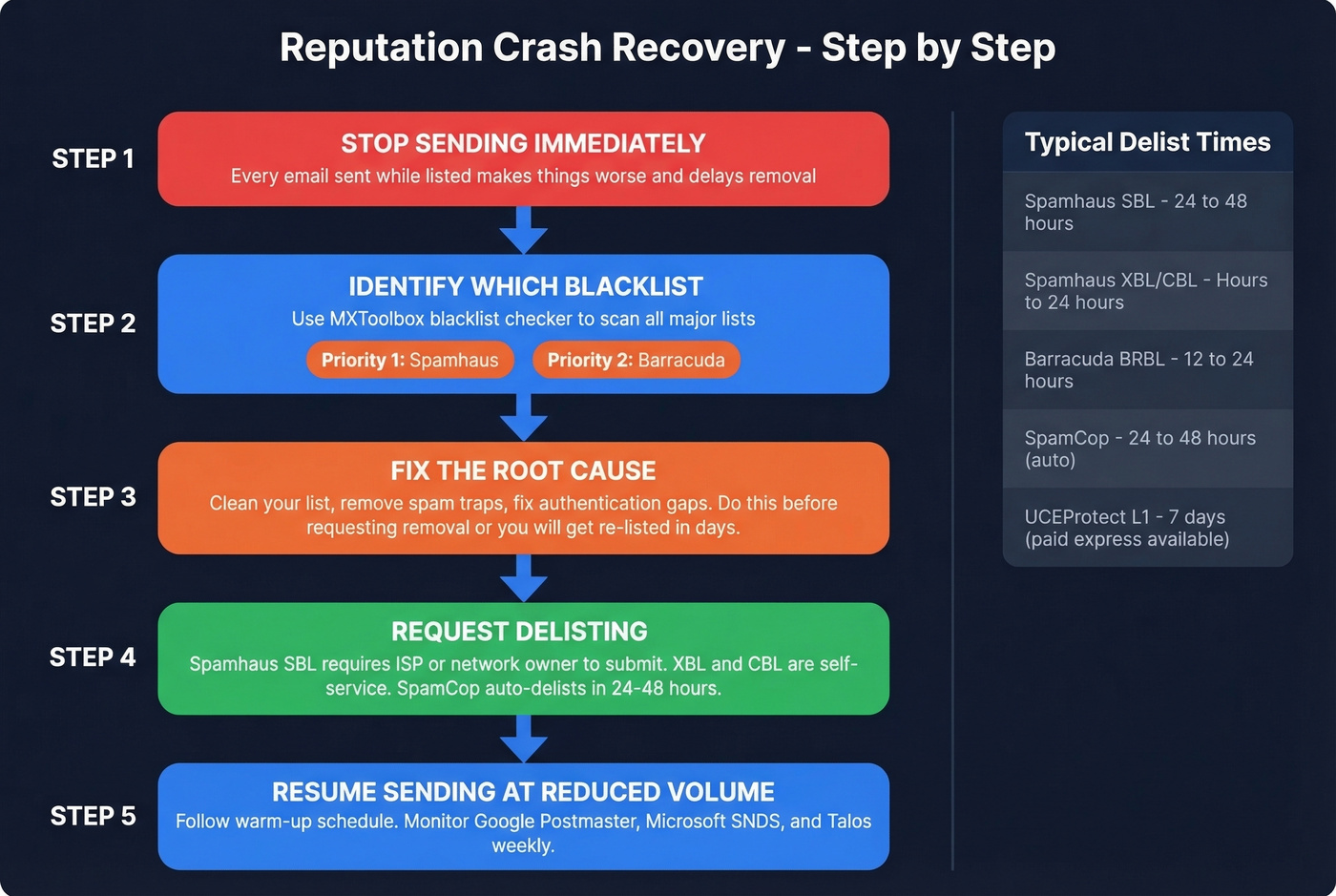
| Blacklist | Delist Time | Process | Who Submits |
|---|---|---|---|
| Spamhaus SBL | 24-48h | Manual review | ISP/network owner |
| Spamhaus XBL/CBL | Hours-24h | Auto after fix | Self-service |
| Barracuda BRBL | 12-24h | Form + email confirm | Self-service |
| SpamCop | 24-48h | Auto-delist | No action needed |
| UCEProtect L1 | 7 days | Auto (paid express available) | Self-service |
Prioritize Spamhaus and Barracuda first - they're used by the major mailbox providers. For Spamhaus SBL, your ISP or network owner must submit the removal request; end users generally can't do it themselves. Spamhaus doesn't accept payment for faster delisting, despite what some services claim. UCEProtect's paid express option exists but is controversial in the deliverability community - use it at your own discretion.
What a Reputation Crash Actually Looks Like
Stripo published a detailed case study that every email sender should read. Their delivery rate went from 99.8% to 80%, open rates collapsed from 25% to 11%, and complaints peaked at roughly 20%.
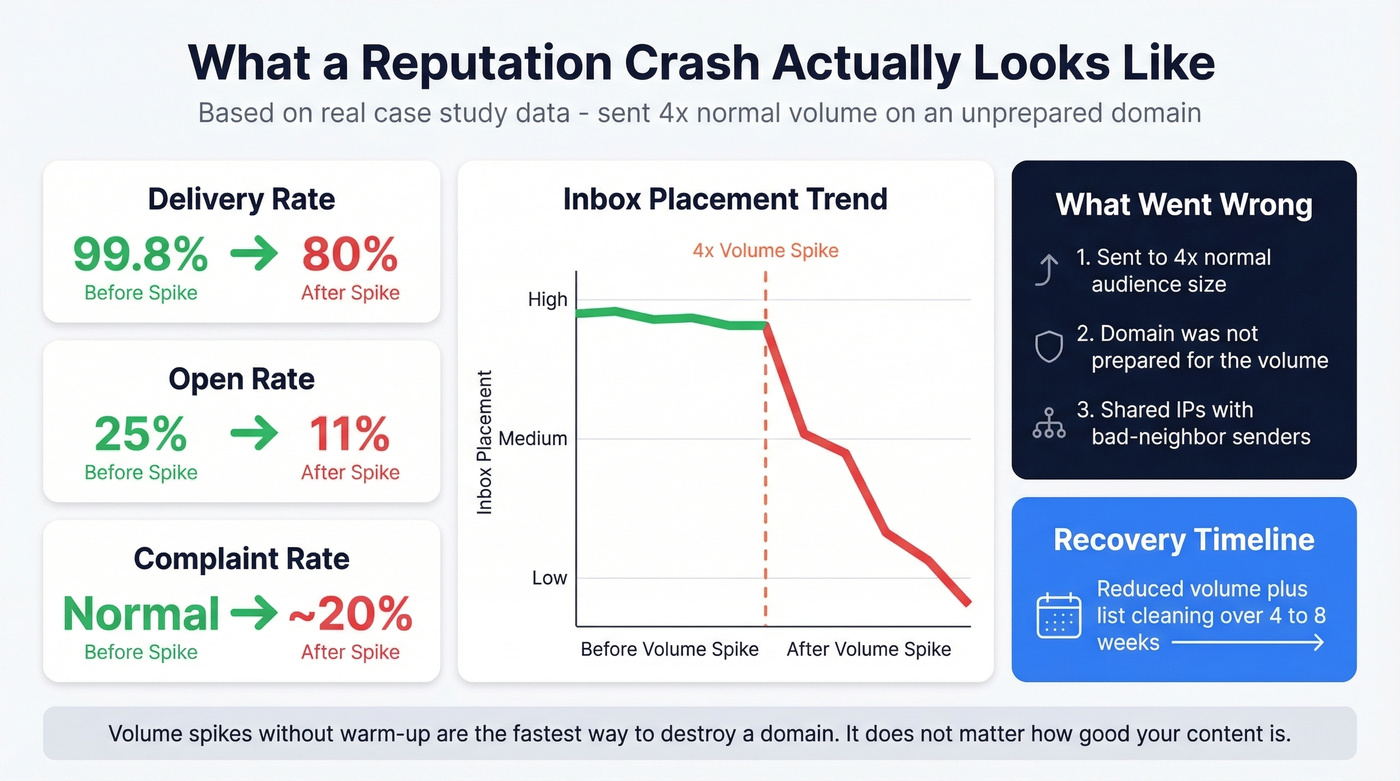
The trigger was two campaigns sent to roughly 4x their normal audience size on a domain that wasn't prepared for the volume spike. The amplifier: shared IPs with bad-neighbor senders who already had reputation issues. Both IP and domain reputation dropped to "Bad" in Postmaster Tools, and mailbox providers started rejecting with 550 5.7.1 errors.
Reddit threads echo this pattern constantly. One poster on r/Emailmarketing described going from healthy metrics to near-total spam folder placement after a single aggressive campaign, with recovery taking over a month of reduced volume and list cleaning. If you suspect traps are involved, start with spam trap removal.
The lesson is straightforward. Volume spikes without warm-up are the fastest way to destroy a domain. It doesn't matter how good your content is or how clean your authentication looks. Send 4x your normal volume on a Tuesday and you'll spend the next month recovering.
Your warm-up schedule means nothing if 5% of your list bounces on day one. Prospeo verifies every email through proprietary infrastructure - catch-all handling, spam-trap removal, honeypot filtering - so you hit your gating metrics from the first send. At $0.01 per email, clean data costs less than one reputation crash.
Rebuild your sender reputation on data that's verified every 7 days.
FAQ
How long does it take to recover sender reputation?
Typically 2-6 weeks if you immediately reduce volume, clean your list, and fix the root cause. Severe cases involving Spamhaus listings combined with "Bad" domain reputation can take 4-8 weeks. Stop the damage first - don't keep sending while you troubleshoot.
What's a good sender score to aim for?
A Sender Score above 80 is healthy; above 90 is excellent. But scores are lagging indicators - by the time yours drops, the damage is done. Focus on leading metrics instead: bounce rate under 2% per send, complaint rate under 0.1%, and positive 7-day engagement trends. The score recovers as your underlying metrics stabilize.
Can bad contact data hurt sender reputation?
It's the number one silent killer. Invalid addresses cause bounces, stale contacts hit spam traps, and both send negative signals to mailbox providers. Verify every list before sending, not after your metrics collapse.