

SPF Record Examples You Can Actually Copy and Use
Over 20% of SPF records on business domains are misconfigured. That's one in five companies with broken email authentication - silently losing messages or leaving their domain wide open to spoofing. With major mailbox providers tightening bulk sender requirements, a missing or malformed record doesn't just hurt deliverability anymore. It can get your outbound mail throttled or rejected outright. Some receiving organizations now quarantine mail from domains without SPF, no questions asked.
Here's every pattern you'll actually need, the syntax behind them, and the mistakes that break them.
What You Need (Quick Version)
If you're running Google Workspace and just need a working record right now:
v=spf1 include:_spf.google.com -all
If you have a domain that doesn't send email at all - parked domains, redirect domains - publish this:
v=spf1 -all
The universal rule: list only the services that actually send mail for your domain, end with -all, and stay under 10 DNS lookups. Everything below explains why and how.
What Is an SPF Record?
An SPF record is a DNS TXT record that tells receiving mail servers which IP addresses are authorized to send email on behalf of your domain. When someone gets an email claiming to be from yourcompany.com, the receiving server checks your domain's SPF record, compares the sending server's IP against your authorized list, and decides whether to trust it.
The spec lives in [RFC 7208](https://datatracker.ietf.org/doc/html/rfc7208), published in 2014 and still the authoritative standard. SPF checks the envelope sender (the Return-Path header), not the visible "From" address - a distinction that matters more than most people realize, and one we'll come back to.
Most companies don't get SPF wrong because they don't understand the concept. They get it wrong because they add SaaS tools over time, never audit their record, and eventually hit silent failures that nobody notices until a prospect says "your email went to spam."
SPF Record Syntax Explained
Every record follows the same structure: a version tag, one or more mechanisms, optional qualifiers, and a catch-all directive. Knowing the syntax is what lets you adapt any SPF record example to your specific stack instead of blindly copying one that doesn't fit.
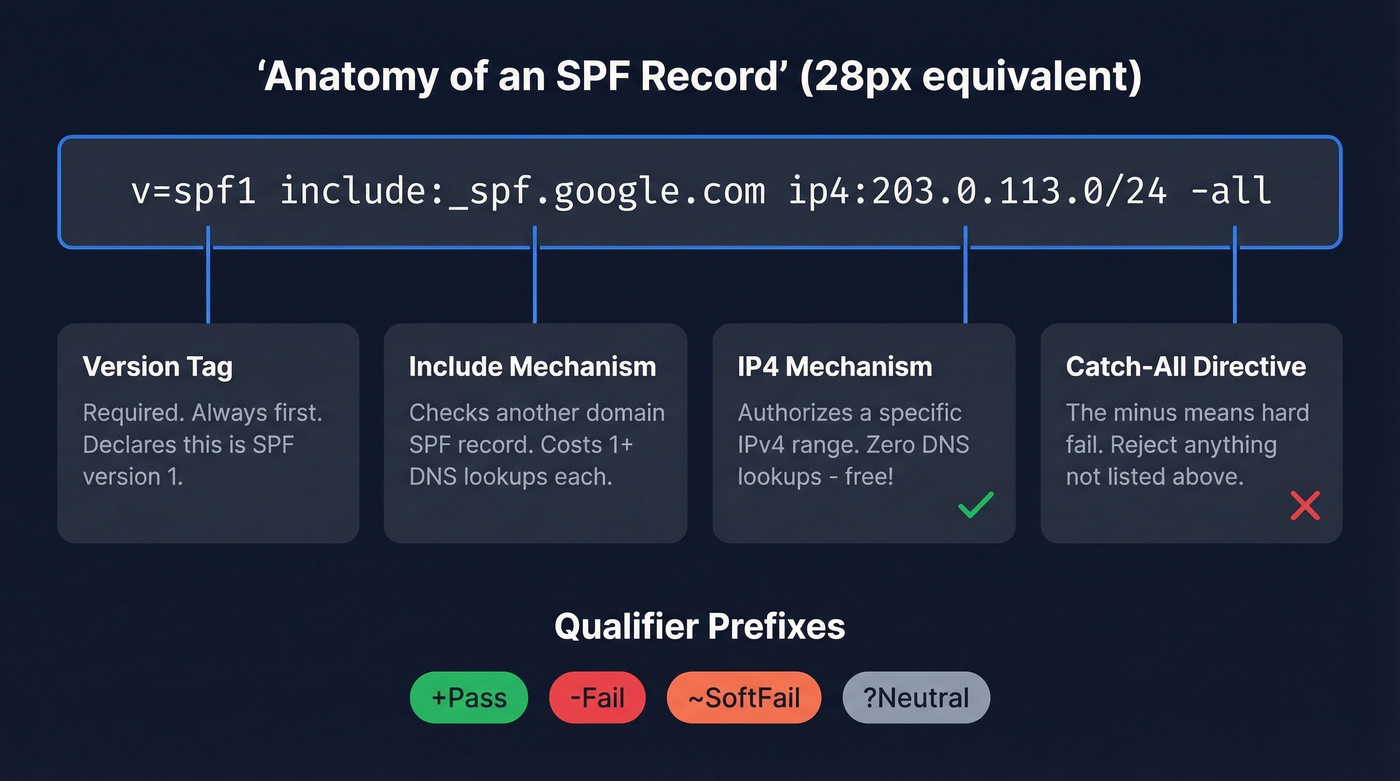
| Component | Example | What It Does |
|---|---|---|
| Version | v=spf1 |
Required. Always first. |
include: |
include:_spf.google.com |
Checks another domain's SPF |
ip4: |
ip4:203.0.113.0/24 |
Authorizes an IPv4 range |
ip6: |
ip6:2001:db8::/32 |
Authorizes an IPv6 range |
a |
a |
Authorizes domain's A record IPs |
mx |
mx |
Authorizes domain's MX IPs |
all |
-all |
Catch-all for everything else |
Each mechanism can carry a qualifier that changes how a match is handled:
| Qualifier | Meaning | When to Use |
|---|---|---|
+ (Pass) |
Authorize | Default if omitted. Rarely typed. |
- (Fail) |
Reject | Use this. Always. |
~ (SoftFail) |
Flag but accept | Testing only. Training wheels. |
? (Neutral) |
No opinion | Almost never useful. |
Two modifiers worth knowing: redirect= points evaluation to another domain's record entirely, useful for multi-domain setups sharing one policy. The exp= modifier provides a custom rejection message.
The ptr mechanism still exists in the spec but is deprecated - it's slow, unreliable, and burns DNS lookups. Don't use it.
One operational detail that catches people off guard: DNS TXT records have a 255-character string limit. Records longer than 255 characters must be split into multiple quoted strings within a single TXT record. Most DNS providers handle this automatically, but verify after publishing.
The a and mx mechanisms each cost one DNS lookup. Every include: costs at least one, plus whatever the included record itself contains. This is where the 10-lookup limit starts to bite.
Copy-Paste SPF Record Examples
Google Workspace
v=spf1 include:_spf.google.com -all
This is one of the most common configurations - the v=spf1 include:_spf.google.com -all pattern is what Google recommends in their own admin documentation. The include:_spf.google.com directive pulls in Google's sending IP ranges. Be aware that this single include typically consumes 3-4 DNS lookups due to nested includes underneath it. If Google Workspace is your only sender, you've still got headroom. Stack other services on top and those lookups add up fast.
One thing that trips people up constantly: you publish this record in your DNS host (Cloudflare, GoDaddy, Namecheap - wherever your domain's nameservers point), not inside Google Admin. The r/sysadmin threads about this confusion are endless.
Microsoft 365
v=spf1 include:spf.protection.outlook.com -all
Straightforward, but there's a catch. Microsoft's spf.protection.outlook.com can expand into a deep chain of nested includes. Tools and practitioners have documented it hitting up to 11 lookups depending on how Microsoft structures its records at any given time. If you're running M365 plus even one other sending service, check your total lookup count before you assume everything's fine.
Multiple Senders
Here's what a realistic modern stack looks like - Google handles employee email, SendGrid fires transactional messages, and HubSpot sends marketing campaigns:
v=spf1 include:_spf.google.com include:sendgrid.net include:spf.hubspot.com -all
Each include: adds its own lookup chain. This record alone can consume 7-9 lookups depending on nested includes, leaving almost no room for anything else. Need a fourth or fifth service? You're going to hit the 10-lookup wall. That's when you need subdomain segmentation.
IP-Based (Dedicated Server)
Skip the include: mechanism entirely if you run your own mail server on a known IP range. The ip4: and ip6: mechanisms don't cost any DNS lookups - they're literal values, not references. This makes them ideal for conserving your lookup budget:
v=spf1 ip4:203.0.113.0/24 -all
Replace the example CIDR with your actual server's IP range.
Parked / Non-Sending Domain
v=spf1 -all
Every domain you own that doesn't send email should have this record. No mechanisms, just a hard fail. Attackers love spoofing parked domains precisely because most companies forget to protect them. This takes 30 seconds and costs nothing.
Subdomain Segmentation
When your root domain is running out of lookup headroom, the scalable fix is splitting senders across subdomains. Move your transactional sender to mail.yourcompany.com or notify.yourcompany.com. Each subdomain gets its own SPF record with its own 10-lookup budget. Configure your transactional service to use the subdomain as its envelope sender, and you've effectively doubled your lookup capacity.
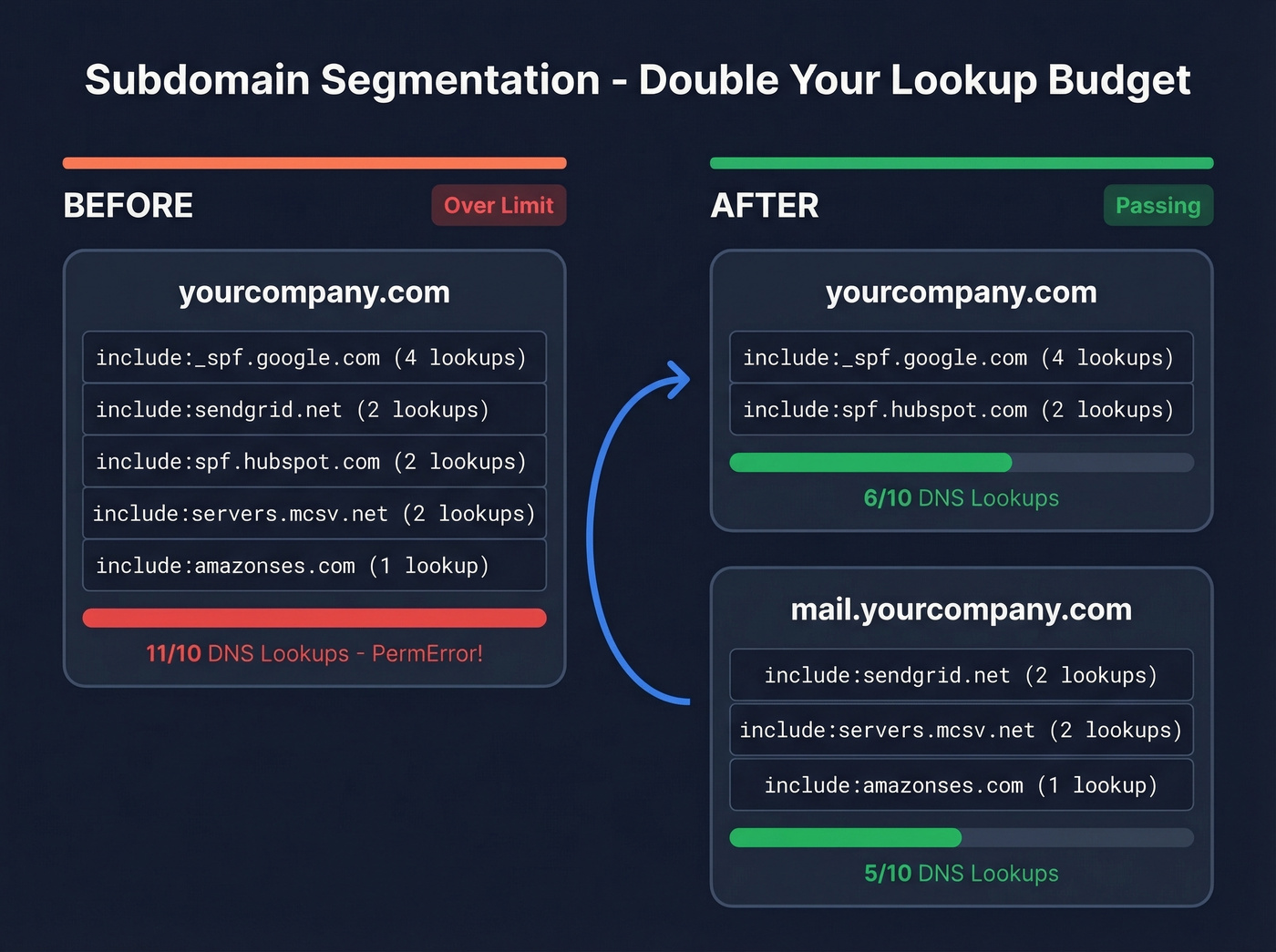
# On mail.yourcompany.com:
v=spf1 include:sendgrid.net -all

# On yourcompany.com (root):
v=spf1 include:_spf.google.com include:spf.hubspot.com -all
Your root domain stays clean, and each subdomain is independently authenticated.

A perfect SPF record keeps your domain off blocklists. Bad email data puts it right back on. Prospeo's 5-step verification delivers 98% email accuracy - teams using it cut bounce rates from 35% to under 4%.
Don't let bad data undo the SPF work you just did.
Provider Include Reference
Bookmark this table. These are common include: values used by popular sending services.
| Provider | Include Value | Est. Lookups |
|---|---|---|
| Google Workspace | _spf.google.com |
3-4 |
| Microsoft 365 | spf.protection.outlook.com |
2-11* |
| SendGrid | sendgrid.net |
1-2 |
| Mailchimp | servers.mcsv.net |
1-2 |
| Amazon SES | amazonses.com |
1 |
| Zoho Mail | zoho.com |
2-3 |
| Mailgun | mailgun.org |
1-2 |
| HubSpot | spf.hubspot.com |
1-2 |
| Postmark | spf.mtasv.net |
1 |
*Microsoft's lookup count varies and has been documented as high as 11. Always verify after publishing.
Mid-market companies run 5-10 email-sending services on average. Cross-reference that with a 10-lookup ceiling and you see the problem immediately.
Verify your record after publishing. Run dig TXT yourdomain.com +short from a terminal, or paste your domain into MXToolbox's SPF checker. Don't trust your DNS panel's preview - external validation is the only way to confirm what the world actually sees.
The 10-DNS-Lookup Limit
Here's the scenario. It's Monday morning. Your SDR team reports that half their outbound emails bounced overnight. You check your SPF record and it looks fine - all the right includes are there. But somewhere in the last month, marketing added Mailchimp, customer success added Intercom, and nobody told you. Your record now triggers 13 DNS lookups, and per the spec, anything over 10 returns a PermError. Authentication fails silently.
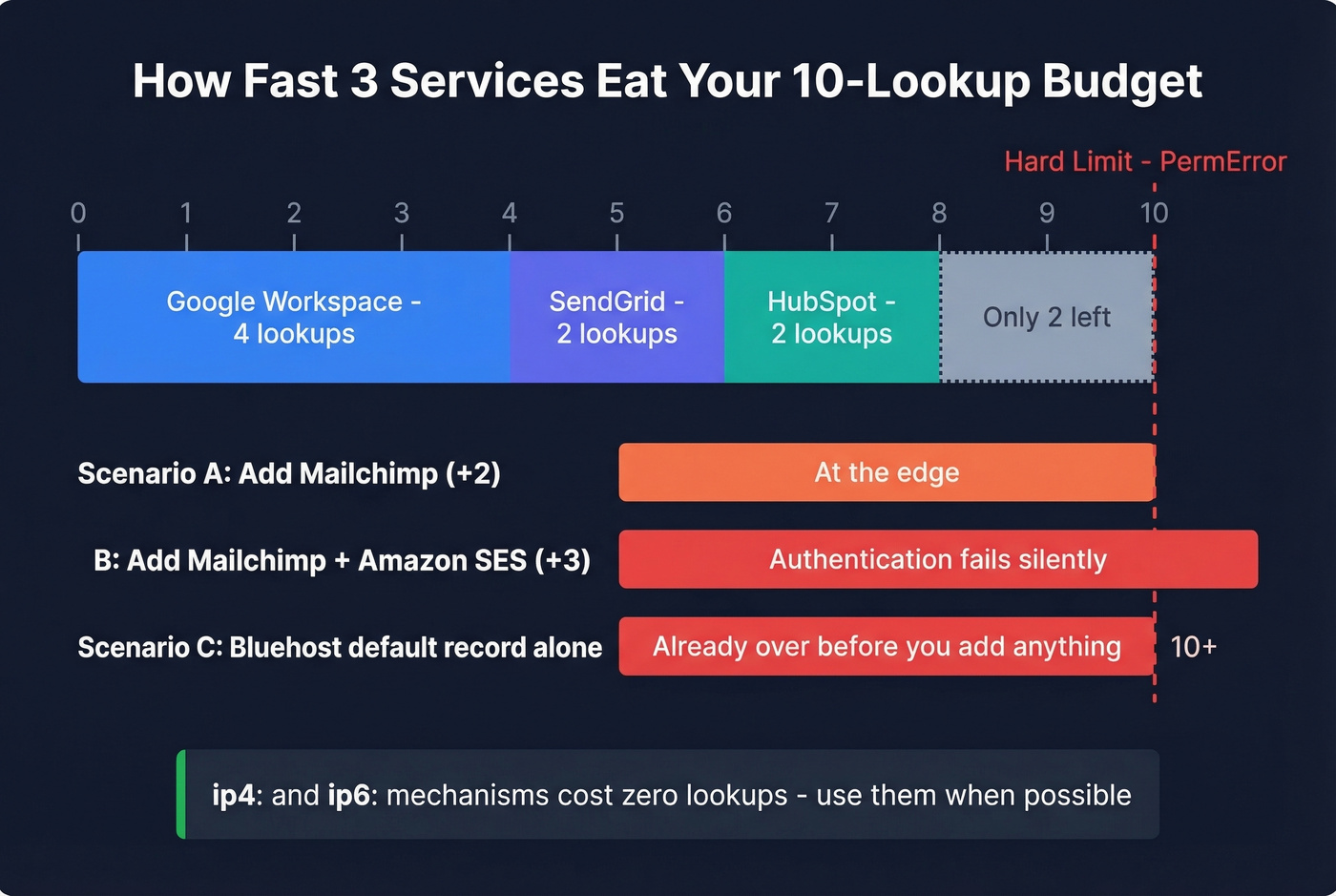
Let's count the lookups for our multi-sender example:
include:_spf.google.com- 1 lookup, but Google's record chains to_netblocks.google.com,_netblocks2.google.com,_netblocks3.google.com- 4 totalinclude:sendgrid.net- 1 lookup, plus nested - ~2 totalinclude:spf.hubspot.com- 1 lookup, plus nested - ~2 total
That's roughly 8 lookups for three services. Add one more include: and you're at the edge. Add two and you're over.
We've seen this exact pattern with hosting providers. Bluehost ships a default SPF record that includes websitewelcome.com, which expands into a chain containing Google, Microsoft, and multiple Bluehost-specific includes. One Reddit user found it blew through the 10-lookup limit before they'd even added their own services. The fix was simple: rip out the hosting default and list only the services actually sending mail.
How to fix lookup overflow:
- Audit first. Use MXToolbox or EasyDMARC's SPF checker to count your current lookups. Remove any
include:for services you've decommissioned. - Replace includes with IPs where possible. If a service sends from a small, stable IP range, use
ip4:instead ofinclude:. IP mechanisms don't count toward the limit. - Segment by subdomain. Move transactional and marketing senders to subdomains. Each subdomain gets its own 10-lookup budget.
- Be cautious with SPF flattening. Flattening replaces
include:directives with hardcoded IP addresses, which eliminates lookups. But if the provider rotates IPs - and they do - your flattened record goes stale and mail breaks. Dmarcian's best practices guide calls manual flattening a trap for exactly this reason. Subdomain segmentation is the more durable fix.
The 10-lookup limit is a legacy design constraint. It hasn't aged well. But it's the spec, receivers enforce it, and you have to work within it.
Common SPF Mistakes
Five mistakes we see over and over:
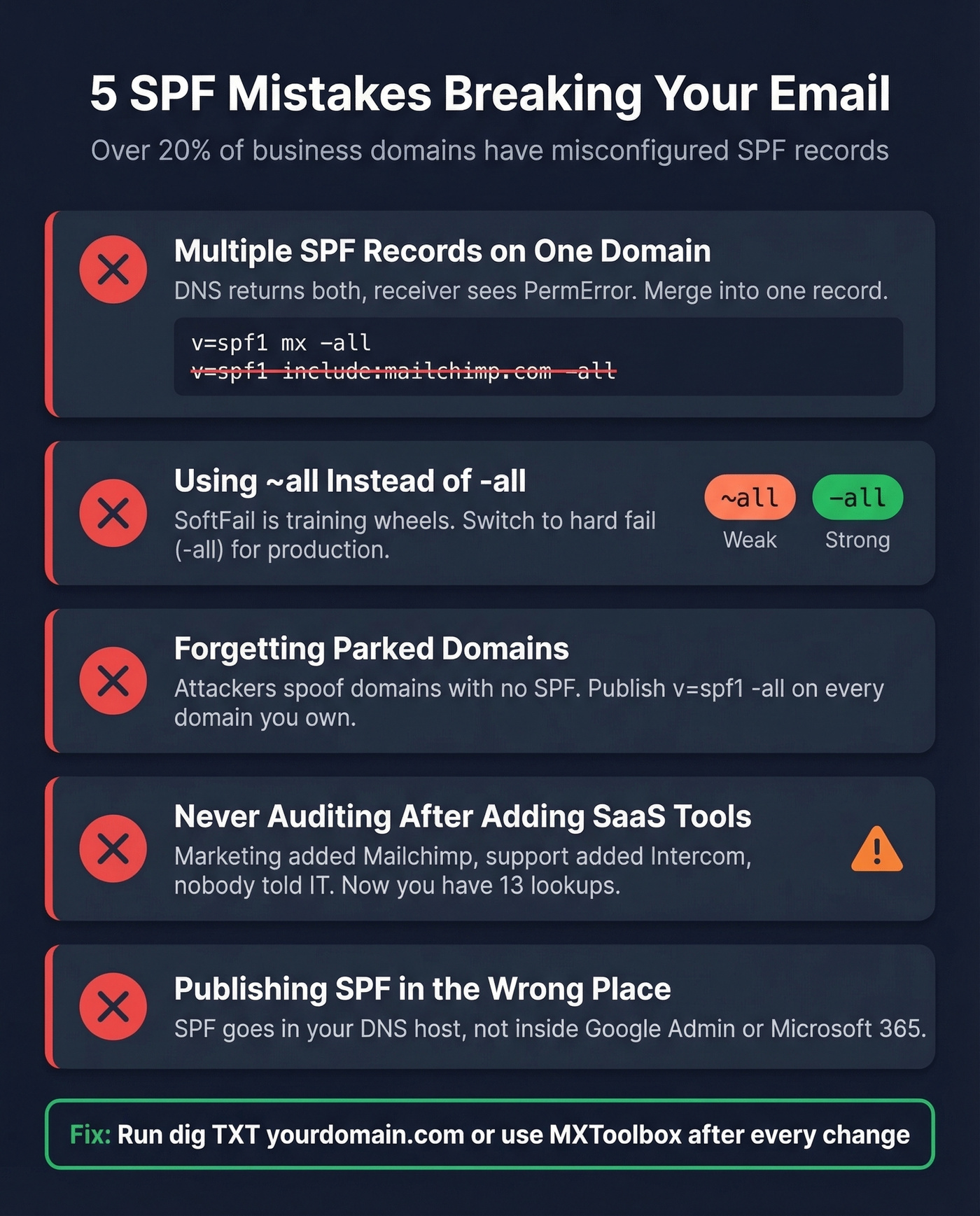
Multiple SPF records on one domain. You can only have one SPF TXT record per domain. Two records cause a PermError - authentication breaks entirely. If you're adding a new sender, merge it into your existing record. Don't create a second one.
Publishing SPF in the wrong DNS. If your domain is registered at GoDaddy but DNS is hosted at Cloudflare, the record goes in Cloudflare. This is the single most common confusion with Google Workspace setups - people try to add SPF "inside Google" or at their registrar when DNS is elsewhere.
Using +all. This tells receivers "anyone can send as my domain." There's no legitimate use case. Ever. If you see +all in your record, fix it immediately.
Using the deprecated ptr mechanism. It does a reverse DNS lookup, it's slow, unreliable, and wastes DNS lookups. Remove it and use ip4: or include: instead.
DNS panel formatting errors. Some DNS panels split long TXT records into quoted chunks. Others auto-append the domain name, creating doubled hostnames like example.com.example.com. Always verify your published record with an external tool after saving.
SPF, DKIM, and DMARC
SPF alone doesn't prevent spoofing. Let's be clear about that.
SPF checks the envelope sender (Return-Path), not the "From" header your recipient actually sees. An attacker can spoof the visible From address while passing SPF with a completely different envelope domain. This is why DKIM and DMARC exist.
DKIM adds a cryptographic signature to each email, tied to your domain. The receiving server verifies the signature against a public key in your DNS. Unlike SPF, DKIM survives forwarding because the signature travels with the message.
DMARC ties the two together. It requires that either SPF or DKIM passes and aligns with the From domain. "Alignment" means the domain in the Return-Path (for SPF) or the DKIM signing domain must match the visible From address. DMARC also gives you reporting - you can see who's sending as your domain and whether they're passing authentication. Adoption surged 75% between 2023 and 2025, but 84% of B2B sending domains remain completely unprotected. That gap is staggering.
To check your own results: open any email in Gmail, click "Show Original," and search for spf=pass, dkim=pass, and dmarc=pass. If any show fail, you've got work to do.
Look - if you're running outbound, SPF/DKIM/DMARC is table stakes. But the thing that actually kills your deliverability isn't usually a DNS misconfiguration. It's bad data. Bounce rates above 2-3% erode your sender reputation even if your DNS is perfect. We've seen teams with flawless authentication still landing in spam because they were sending to dead addresses. Prospeo verifies emails in real-time before you send, with 98% accuracy and a free tier covering 75 verifications per month. Authentication is step one; verified contact data is step two.
You're protecting your domain with SPF so outbound mail actually lands. Now make sure every address you're sending to is real. Prospeo verifies 143M+ emails with catch-all handling and spam-trap removal - at $0.01 per email.
Authenticate your domain, then only email addresses that hit real inboxes.
Why Forwarding Breaks SPF
When someone forwards your email, the forwarding server opens a new SMTP connection to deliver it. The receiving server sees the forwarder's IP address, checks it against your domain's SPF record, and - predictably - it fails. Your record doesn't authorize random forwarding servers.
Two protocols fix this. SRS (Sender Rewriting Scheme) rewrites the envelope sender to the forwarder's domain, so SPF checks pass against the forwarder's record instead of yours. ARC (Authenticated Received Chain) preserves the original authentication results as the message passes through intermediaries, creating a chain of custody that downstream servers can evaluate.
One edge case worth knowing: SRS can create scenarios where a spoofed email fails DMARC at the first hop but passes after being forwarded through a major provider that applies SRS. It's a known issue in the security community, sometimes called "LaunDroMARC." Microsoft doesn't consider it a vulnerability. Whether you agree depends on your threat model.
FAQ
Can I have multiple SPF records on one domain?
No. Two SPF TXT records on the same domain cause a PermError and break authentication entirely. Merge all sending sources into a single record. If you're adding a new service, append its include: to your existing record rather than creating a second one.
What's the difference between -all and ~all?
-all (hardfail) tells receivers to reject unauthorized senders outright. ~all (softfail) flags but typically accepts the message. Use -all once you've confirmed all your sending sources are listed - softfail is training wheels you should remove once setup is verified.
Does SPF prevent email spoofing?
Not by itself. SPF validates the envelope sender (Return-Path), not the visible From address recipients see. You need DMARC with both SPF and DKIM alignment to block From-header spoofing. SPF is one authentication layer, not the whole solution.
How long does SPF propagation take?
DNS propagation typically completes within 15 minutes to 48 hours, depending on your TTL settings and upstream caching. Lower your TTL to 300 seconds before making changes if you want faster propagation, then raise it back afterward.
How do I protect sender reputation after setting up SPF?
After configuring your SPF record, verify every email address before sending outbound campaigns. Bounce rates above 2-3% erode sender reputation regardless of DNS setup. Real-time verification catches invalid addresses before they damage your domain - our team uses Prospeo for this, which handles catch-all domains and spam traps as part of its 5-step verification process.