

DMARC Record: The Complete Setup and Enforcement Guide
$38,000 in pipeline - gone. Not because the pitch was wrong, but because Gmail rejected every email your domain sent last Tuesday. No warning your reps would notice. Just a 550-5.7.26 error buried in server logs and a sales team wondering why nobody replied. That's what happens when your DMARC record is missing or misconfigured.
What You Need (Quick Version)
Here's the minimum viable policy you can publish right now:
v=DMARC1; p=none; rua=mailto:dmarc@yourdomain.com
Where it goes: DNS TXT record at _dmarc.yourdomain.com.
The mandate: Google and Yahoo began enforcing bulk-sender requirements in 2024, and Microsoft aligned later. If you send 5,000+ emails/day to these providers, DMARC isn't optional - non-compliant messages get deferred or rejected at the SMTP level. (If you’re unsure what “bulk” means operationally, see 5,000+ emails/day.)
Your next step: Publish p=none, monitor aggregate reports for 2-4 weeks, then follow the rollout strategy below to move toward enforcement.
What Is a DMARC Record?
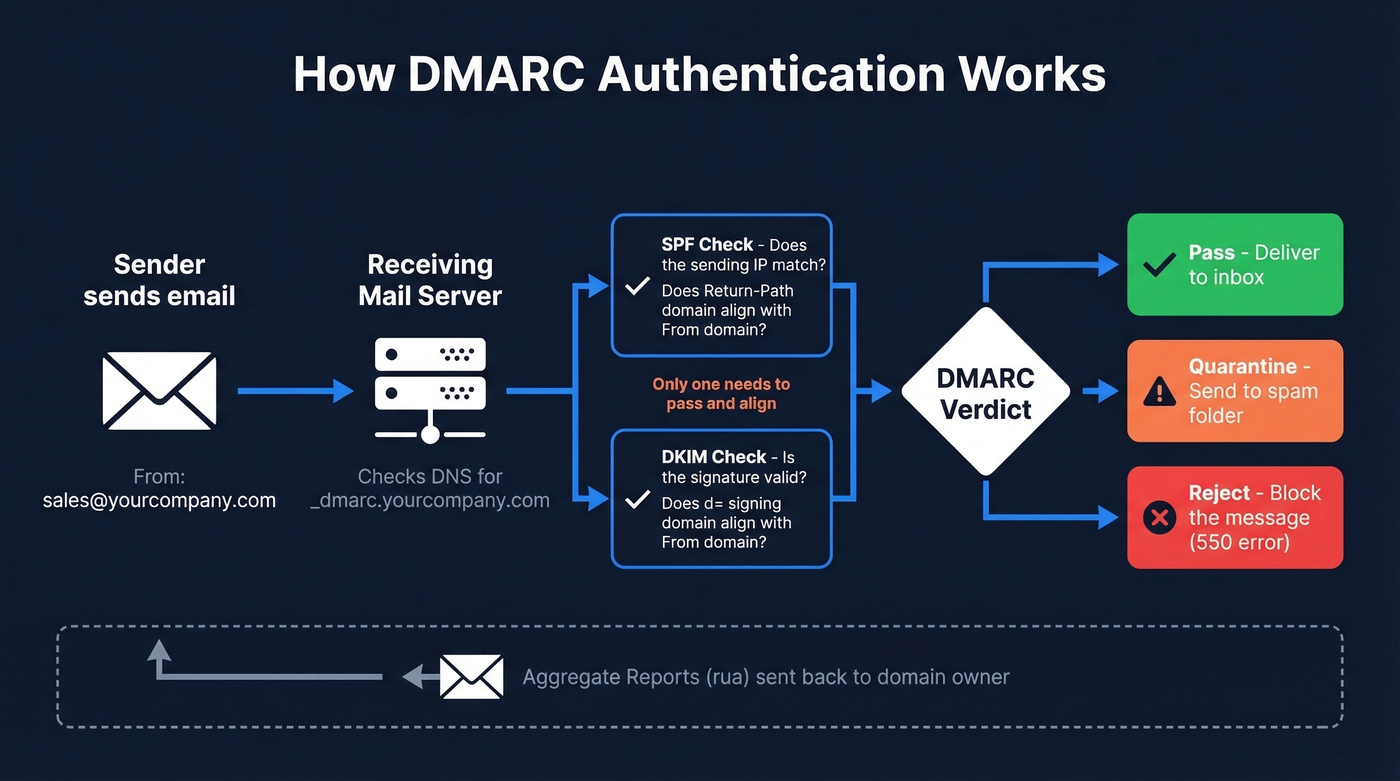
A DMARC record is a DNS TXT entry published at _dmarc.yourdomain.com that tells receiving mail servers what to do when an email claiming to be from your domain fails authentication checks. It builds on two existing protocols - SPF, which validates the sending server's IP, and DKIM, which validates a cryptographic signature on the message - and adds a critical layer: alignment. The visible "From" address must align with the domain authenticated by SPF or DKIM. Without that match, DMARC fails.
The protocol was formalized in RFC 7489, published in March 2015. Standards-track work continues in the IETF DMARC working group, and dmarc.org remains the central project site. DMARC introduced the concept of the "organizational domain" - the registrable domain under which subdomains are grouped for alignment purposes. So mail.yourcompany.com and yourcompany.com share the same organizational domain, which matters when you're choosing between strict and relaxed alignment modes.
Here's what happens in practice: a receiver gets an email with From: sales@yourcompany.com, checks DNS for a TXT entry at _dmarc.yourcompany.com, reads your policy, evaluates whether SPF or DKIM aligns with that From domain, and acts accordingly. It also sends you reports about what it saw - which is where the real operational value lives.
Why DMARC Matters in 2026
Email authentication rules shifted permanently between 2024 and 2026. What used to be a best practice is now a hard requirement for bulk senders.
| Date | What Happened |
|---|---|
| Feb 2024 | Google/Yahoo begin enforcement; 421 deferrals |
| Apr 2024 | Rejection rates increase for unauthenticated mail |
| May 2025 | Microsoft Outlook.com starts rejecting |
| Nov 2025 | Gmail ramps to permanent 550 rejections |
| 2026 | Full enforcement across all three - industry standard |
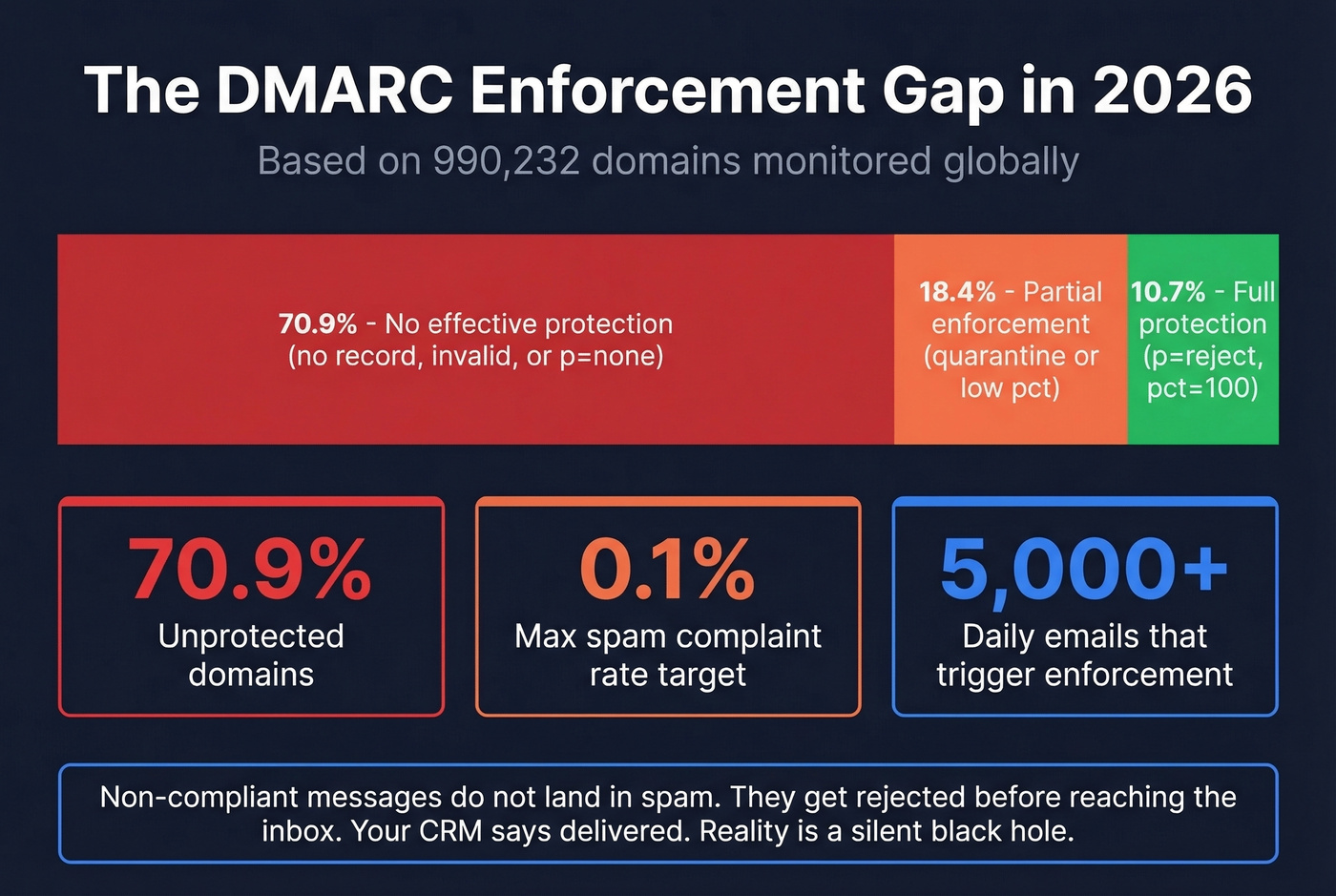
The threshold that triggers enforcement is 5,000+ emails per day to a provider. But even lower-volume senders feel the impact - domains without a published policy see higher spam-folder placement across the board. Spam complaint rate targets are equally unforgiving: stay below 0.1%, and never let it hit 0.3%. (If you’re troubleshooting placement issues end-to-end, use this email deliverability guide.)
The adoption numbers tell a stark story. Across 990,232 domains monitored globally, 70.9% have no effective DMARC protection - meaning no record, an invalid record, or a policy that doesn't enforce. Only 10.7% have reached full protection at p=reject with pct=100. That gap between what the industry requires and what most domains have actually implemented is enormous.
Look, if you're running outbound sales, sending marketing emails, or even just using Google Workspace for internal communication, email authentication isn't optional anymore. Non-compliant messages don't just land in spam - under modern bulk-sender enforcement they get rejected before they reach the inbox. Your recipients never see them. Your CRM shows "delivered." The reality is a silent black hole.
Most teams treat DMARC as a security checkbox. It's not. It's a deliverability prerequisite. If you're closing five-figure deals and running outbound, a misconfigured authentication policy costs you more pipeline than a bad sales script ever will.
Syntax and Tags Explained
Every DMARC record is built from a set of tags. Only two are required - the rest have defaults that kick in when you don't specify them.
| Tag | Required | Values | Default | What It Does |
|---|---|---|---|---|
v |
Yes | DMARC1 |
- | Protocol version; must be first |
p |
Yes | none / quarantine / reject |
- | Domain policy |
sp |
No | none / quarantine / reject |
Same as p |
Subdomain policy |
rua |
No | mailto: URI |
None | Aggregate report destination |
ruf |
No | mailto: URI |
None | Forensic report destination |
adkim |
No | r / s |
r |
DKIM alignment mode |
aspf |
No | r / s |
r |
SPF alignment mode |
pct |
No | 0-100 | 100 | % of failing mail to apply policy |
ri |
No | Seconds | 86400 | Reporting interval |
fo |
No | 0 / 1 / d / s |
0 |
Failure reporting options |
The pct tag defaults to 100, meaning your policy applies to all failing mail unless you explicitly dial it down. This is the tag you'll use during your gradual rollout. Receivers don't always honor pct exactly - some round or approximate - so don't rely on it as a precision instrument.
The sp tag is one people forget. If you don't set it, subdomains inherit the parent domain's policy. That's fine if you want uniform enforcement, but it causes problems when your marketing team sends from mail.yourcompany.com with a different authentication setup.
Both aspf and adkim default to relaxed, which means subdomains align with the organizational domain. Strict requires an exact match. We'll cover when to use each in the alignment section.
What Does a DMARC Record Look Like?
Six records covering the most common scenarios, from monitoring to full enforcement.
Monitoring only (start here):
v=DMARC1; p=none; rua=mailto:dmarc@yourcompany.com
Collects reports without affecting mail delivery. Always your starting point.
Quarantine with gradual rollout:
v=DMARC1; p=quarantine; pct=25; rua=mailto:dmarc@yourcompany.com
Sends 25% of failing mail to spam; the rest passes through.
Full reject:
v=DMARC1; p=reject; rua=mailto:dmarc@yourcompany.com
Blocks all mail that fails alignment. The end goal.
Subdomain policy override:
v=DMARC1; p=reject; sp=none; rua=mailto:dmarc@yourcompany.com
Enforces reject on the root domain but lets subdomains pass while you configure them.
Strict alignment:
v=DMARC1; p=reject; adkim=s; aspf=s; rua=mailto:dmarc@yourcompany.com
Requires exact domain match for both DKIM and SPF - no subdomain flexibility.
Gradual ramp to reject:
v=DMARC1; p=reject; pct=10; rua=mailto:dmarc@yourcompany.com
Rejects only 10% of failing mail - a stepping stone before full enforcement.
How to Add a DMARC Record
The process is the same regardless of your DNS provider. The UI labels vary, but the fields don't.
- Log into your DNS management console - GoDaddy, Cloudflare, Route 53, Namecheap, wherever your domain's DNS is hosted.
- Create a new TXT record.
- Set the Host/Name field to
_dmarc. Most providers append the domain automatically, so don't enter the full_dmarc.yourcompany.com. - Set the Type to
TXT. - Paste your full DMARC string into the Value field.
- Set TTL to 1 hour (3600 seconds) or leave it on auto/default.
- Save and wait for propagation - typically 1-4 hours, though some providers take up to 48 hours.
Validate your record with dig TXT _dmarc.yourcompany.com from the command line, or use MxToolbox's DMARC lookup for a browser-based check.

A perfect DMARC record means nothing if you're emailing addresses that bounce. Prospeo's 5-step verification and 98% email accuracy keep your bounce rate under control - so your authentication work actually pays off in pipeline, not 550 rejections.
Protect your domain reputation with data that's verified before you hit send.
Understanding DMARC Alignment
This is where most failures actually happen - and where most guides don't spend enough time.
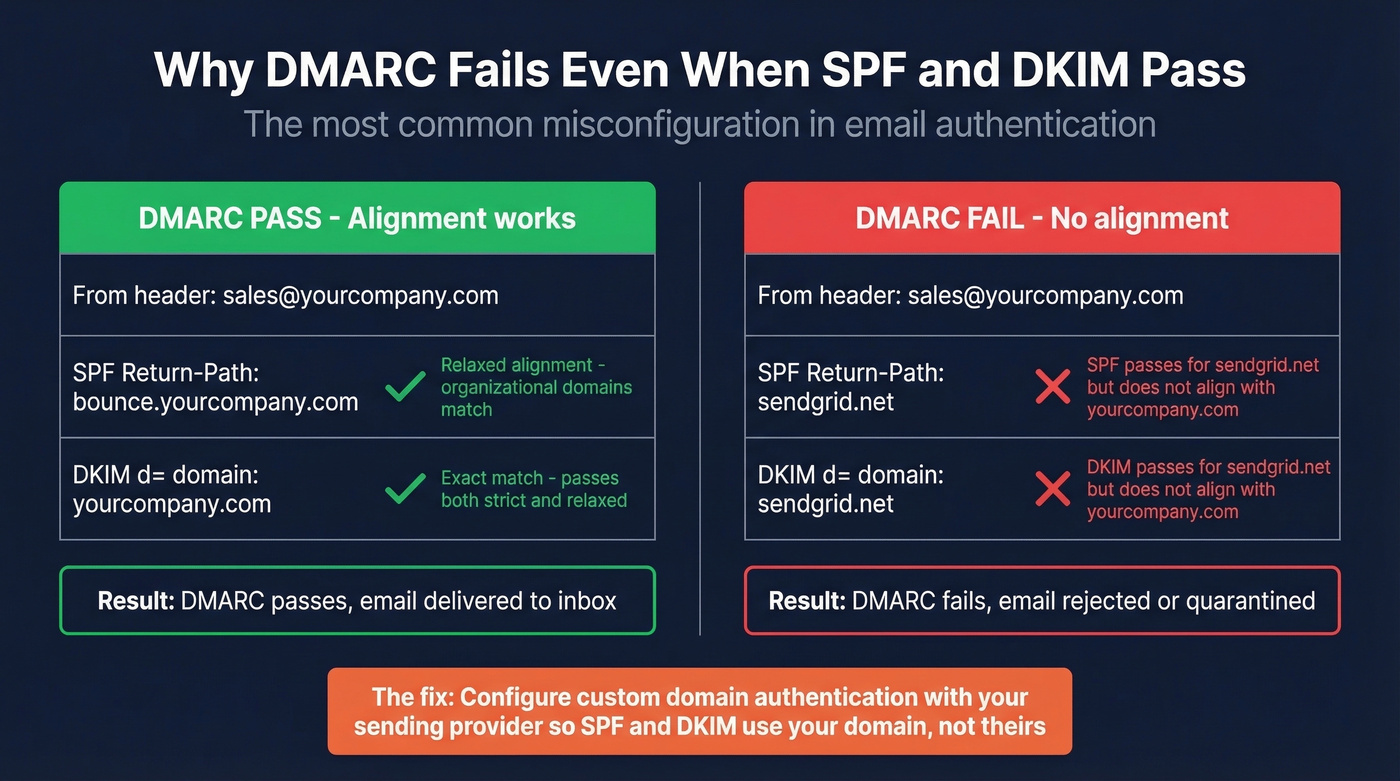
Alignment checks whether the domain in the visible From header matches the domain authenticated by SPF or DKIM. SPF alignment compares the Return-Path domain against the From domain. DKIM alignment compares the d= signing domain against the From domain. DMARC passes if either one aligns - you don't need both. (For a deeper breakdown, see alignment.)
Relaxed alignment means the organizational domains just need to match. So bounce.yourcompany.com (Return-Path) aligns with yourcompany.com (From) under relaxed mode. Strict alignment requires an exact match - bounce.yourcompany.com would fail against yourcompany.com.
A common thread on r/sysadmin captures the confusion perfectly: "DMARC fails even though SPF and DKIM both pass." The culprit is almost always alignment. Here's the scenario that trips up most teams:
You're using SendGrid to send marketing emails. SPF passes - but for SendGrid's bounce domain, not yours. DKIM passes - but for SendGrid's signing domain, not yours. Your From header says @yourcompany.com. Both SPF and DKIM clear their own authentication checks, but neither domain aligns with your From domain. DMARC fails. Your email gets rejected, and you're staring at a report wondering what went wrong when "everything passed."
The fix is configuring custom domain authentication with your sending provider, which the next section covers.
The decision on strict vs. relaxed is simpler than most people make it: use relaxed unless you have a specific security reason for strict. Relaxed handles subdomains gracefully and doesn't break when you add new sending services. Strict is for high-security environments where you want to lock down exactly which domains can send on your behalf.
Rollout Strategy - Monitoring to Enforcement
Don't jump straight to p=reject. We've seen teams do this and immediately block their own marketing emails, transactional receipts, and calendar invites. It's a bad day.
The Schedule
Weeks 1-2: Monitor. Publish p=none with rua pointed at a mailbox or parsing service. Collect aggregate reports and identify every service sending mail as your domain.
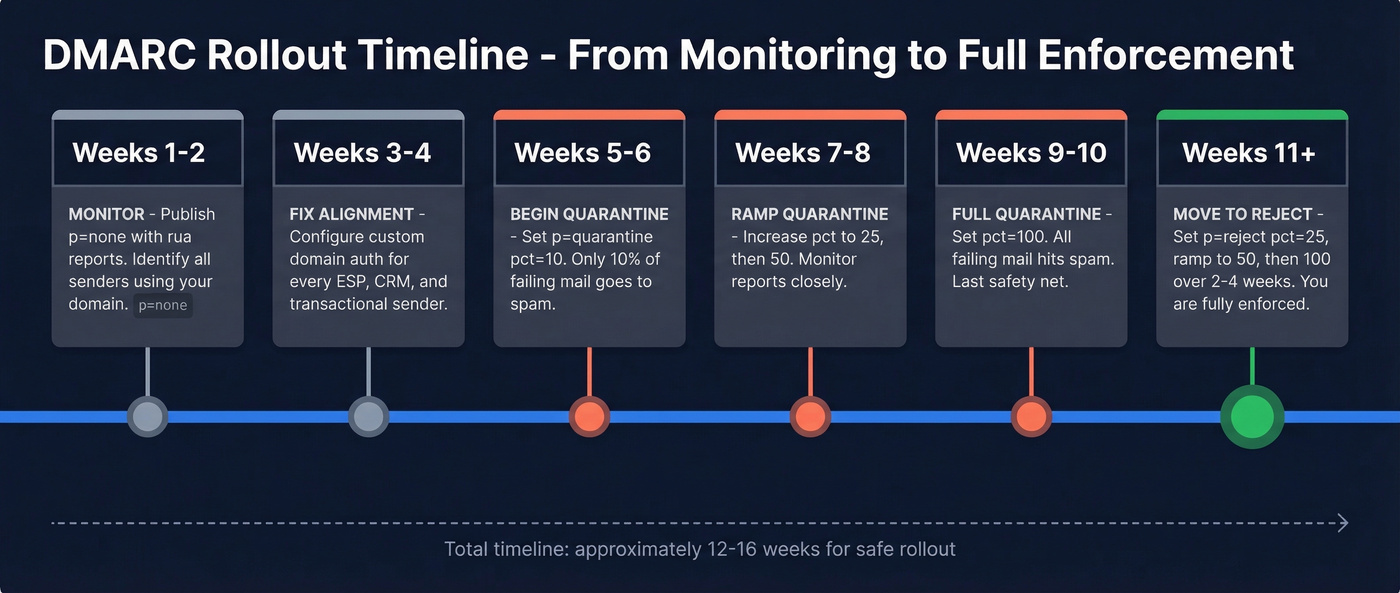
Weeks 3-4: Fix alignment. Configure custom domain authentication for every legitimate sender - your ESP, marketing platform, CRM, transactional email service. This is where the real work happens.
Weeks 5-6: Begin quarantine. Update to p=quarantine; pct=10. Only 10% of failing mail goes to spam. Watch your reports for any legitimate senders you missed.
Weeks 7-8: Ramp quarantine. Move pct to 25, then 50. If reports look clean, keep going.
Weeks 9-10: Full quarantine. Set pct=100. All failing mail hits spam - your last safety net before reject.
Weeks 11+: Move to reject. Update to p=reject; pct=25, then ramp to 50, then 100 over 2-4 weeks.
What to Expect on Day One
Don't panic when your first aggregate report shows hundreds of failures. On r/DMARC, admins regularly report seeing hundreds of failures on day one from legitimate marketing tools - this is expected, not a crisis. Every survey platform, notification service, and marketing tool that sends as your domain will show up as failing because most aren't configured with custom domain authentication out of the box. That's exactly what p=none monitoring is designed to surface.
You'll also see forwarding failures. When someone at a university or large enterprise forwards your email, the forwarding server changes the sending IP (breaking SPF) and sometimes modifies headers (breaking DKIM). You can't fix the forwarder. ARC (Authenticated Received Chain) helps, but adoption is still inconsistent. Focus on what you control: your own alignment and your own senders.
While you're cleaning up authentication, clean up your data too. Sending to invalid addresses tanks your sender reputation regardless of how perfect your policy is. Run your list through an email verification tool before your next campaign - authentication and data quality are the two pillars of deliverability, and you need both.
How to Read an Aggregate Report
Aggregate reports arrive as daily XML files. They're not meant for manual review - but you should understand what's in them.
<!-- unknown MDX component: feedback -->
The fields that matter most: <source_ip> tells you which server sent the mail. <count> tells you how many messages. <disposition> shows what the receiver did. The <dkim> and <spf> results under <policy_evaluated> show whether each protocol produced a DMARC-evaluable pass under your alignment settings.
Skip building infrastructure for forensic reports (ruf). Major providers often don't send them due to privacy constraints. Aggregate reports are your primary source of truth. For parsing, use dmarcian's free XML reader or any of the free tools below. Reading raw XML is a party trick, not a workflow.
Fixing Common Failures
Alignment Fixes for Popular Senders
The most common Mailchimp failure: teams verify the domain but skip the DKIM CNAMEs. Navigate to Account > Domains > Add & Verify Domain, publish the CNAME records Mailchimp provides, and actually enable DKIM. The verification step alone doesn't fix alignment - you need those DNS records live. (If you’re using Mailchimp specifically, start with Mailchimp failure patterns.)
SendGrid requires you to publish CNAME records like s1._domainkey.yourcompany.com pointing to SendGrid's signing infrastructure. Find this under Settings > Sender Authentication > Domain Authentication. Once published, SendGrid signs emails with your domain's DKIM key, and alignment passes.
Google Workspace is the one people overlook because internal email "just works" without it. Go to Admin Console > Apps > Gmail > Authenticate Email, generate a DKIM key, and publish the TXT record at google._domainkey.yourcompany.com. Five minutes of work that prevents a class of failures most teams don't discover until enforcement day.
After publishing DNS changes for any provider, wait 24-48 hours, then verify in Gmail by opening a test message, clicking the three dots, and selecting "Show Original" to check SPF, DKIM, and DMARC results.
One critical warning: SPF has a hard limit of 10 DNS lookups. Every include: statement counts toward that limit. If you're using SendGrid, Mailchimp, Google Workspace, Salesforce, and a transactional email service, you're probably already over. Use a subdomain strategy - mail.yourcompany.com for marketing, app.yourcompany.com for transactional - to isolate SPF records and stay under the cap.
SMTP Error Codes
When enforcement blocks your mail, here's what you'll see in bounce logs:
| Provider | Error Code | Message |
|---|---|---|
| Gmail | 550-5.7.26 | Unauthenticated email not accepted due to domain's DMARC policy |
| Outlook | 550 5.7.509 | Sending domain does not pass DMARC verification |
| Yahoo | 554 5.7.9 | Message not accepted for policy reasons |
If you're seeing these in production, your policy is working - it's your alignment that's broken. Go back to the sender-specific fixes above. (For more on bounces and what they mean, see bounce logs.)
Forwarding Breakage
ARC (Authenticated Received Chain) lets forwarding servers vouch for the original authentication results even after modifying a message in transit. The practical reality: you can't force forwarding servers to implement it. University mail systems and legacy enterprise forwarders are the worst offenders. Focus on what you control and accept that forwarded mail will generate some noise in your reports. This is the one failure mode you often can't fix, and that's okay.
Seven Mistakes to Avoid
We've audited hundreds of setups, and these seven mistakes appear over and over.
- Missing
ruatag. No reports means you're flying blind. Always include an aggregate report address. - Leaving
p=noneindefinitely. Monitoring mode doesn't protect your domain. Set a deadline to move to enforcement - we recommend 30 days max. - No
sp=for subdomains. If your subdomains have different sending patterns, set an explicit subdomain policy or you'll inherit the parent's enforcement and break things. - Long TXT record splitting errors. Some DNS UIs break long strings incorrectly. Paste the full record as a single string and let the provider handle splitting.
- Wrong Host field. Enter
_dmarc, not_dmarc.yourcompany.com. Most DNS UIs append the domain automatically, and entering the full path creates a record at_dmarc.yourcompany.com.yourcompany.com- which does nothing. - Duplicate records. DMARC expects a single policy entry at
_dmarc.yourdomain.com. Multiple records can cause receivers to ignore the policy entirely. - Forgetting third-party senders in SPF. Every service that sends as your domain needs to be included. Miss one and you'll see alignment failures the moment you enforce.
Skip the first six if you've already published - but double-check number seven. It's the one that bites teams hardest during the quarantine-to-reject transition.
Tools and Next Steps
MxToolbox - Free lookups and DNS diagnostics. The fastest way to check if your record is published correctly.
dmarcian - Free XML report parser plus a record wizard. Their paid platform adds monitoring dashboards and alerting. Worth it if you're managing multiple domains.
EasyDMARC - Free record checker with a 14-day trial for their full monitoring platform. Good UI for teams that want visual dashboards over raw data.
Valimail Monitor - Free monitoring with automated sender identification. Solid for larger organizations with complex sending ecosystems.
Once you're at p=reject, you're eligible for BIMI - a standard that displays your brand logo next to emails in supported inboxes. It's the deliverability cherry on top.

A properly enforced DMARC record handles authentication. But if 15% of your list is invalid, your sender reputation still tanks regardless of how perfect your DNS setup is. Prospeo verifies emails in real time with 98% accuracy across 143M+ verified addresses - the free tier gives you 75 emails/month, no contracts required.
You're enforcing DMARC to protect deliverability. Don't undermine it with stale contact data. Prospeo refreshes 300M+ profiles every 7 days - not every 6 weeks - so your outbound hits real inboxes at $0.01 per email.
Bad data kills sender reputation faster than a missing DMARC record.
FAQ
Can I have multiple DMARC records on one domain?
No. The standard expects a single TXT policy entry at _dmarc.yourdomain.com. Publishing multiple records causes receivers to ignore the policy entirely. Modify the existing record rather than adding a second one.
What if my domain doesn't send email?
Publish v=DMARC1; p=reject to tell receivers to reject all mail claiming to be from your domain, preventing spoofing with a single DNS entry. You can still include rua if you want visibility into attempted spoofing.
How long does DNS propagation take?
Typically 1-4 hours, though some providers take up to 48 hours. Verify with dig TXT _dmarc.yourdomain.com or any online DNS lookup tool before assuming your changes are live.
Does DMARC stop phishing completely?
DMARC prevents exact-domain spoofing - someone sending as @yourdomain.com without authorization. It doesn't stop lookalike domains like yourcompanny.com or display-name spoofing. One essential layer of defense, not a complete anti-phishing solution.
How does email verification complement DMARC?
DMARC protects authentication; sending to invalid addresses still damages sender reputation through high bounce rates. Verifying addresses before you send keeps bounces under control so your authenticated emails actually reach real inboxes.