

How to Verify DKIM Is Working: The Complete Guide
Most DKIM checkers only test half the equation. They'll confirm your DNS record exists and the syntax looks right, but that doesn't tell you whether a real email sent from your domain actually passes DKIM verification on the receiving end. If you're trying to verify DKIM is working, you need to test both DNS records and real messages.
We've seen teams spend hours debugging DKIM records that looked perfect in DNS - only to discover the actual emails were failing because a gateway was rewriting message bodies after signing. Let's cover both sides, starting with the method that actually matters.
The 60-second version: send yourself a test email, open it in Gmail, click the three dots, hit Show Original. If you see dkim=pass, you're done. If not, keep reading.
Find Your DKIM Selector First
Every DKIM tool asks for a selector, but almost none explain how to find yours. The selector lives in the [DKIM-Signature header](https://datatracker.ietf.org/doc/html/rfc6376) of any email you've already sent. Open the raw source and look for the s= tag.
DKIM-Signature: v=1; a=rsa-sha256; d=example.com; s=dkim1; ...
Here, your selector is dkim1. The DNS lookup path is dkim1._domainkey.example.com.
If your ESP manages DKIM for you, the DNS record is often a CNAME pointing to the provider's key host rather than a TXT record with the raw public key. This is normal, but it means TXT-only DKIM lookup tools can miss your record if they don't follow the CNAME chain. We've run into this with several marketing automation platforms - the record is there, the tool just can't see it.
Three Methods to Check DKIM Authentication
1. Inspect Email Headers (The Real Test)
This is the only method that confirms DKIM worked on an actual delivered message. DNS tools tell you what should happen. Headers tell you what did happen.
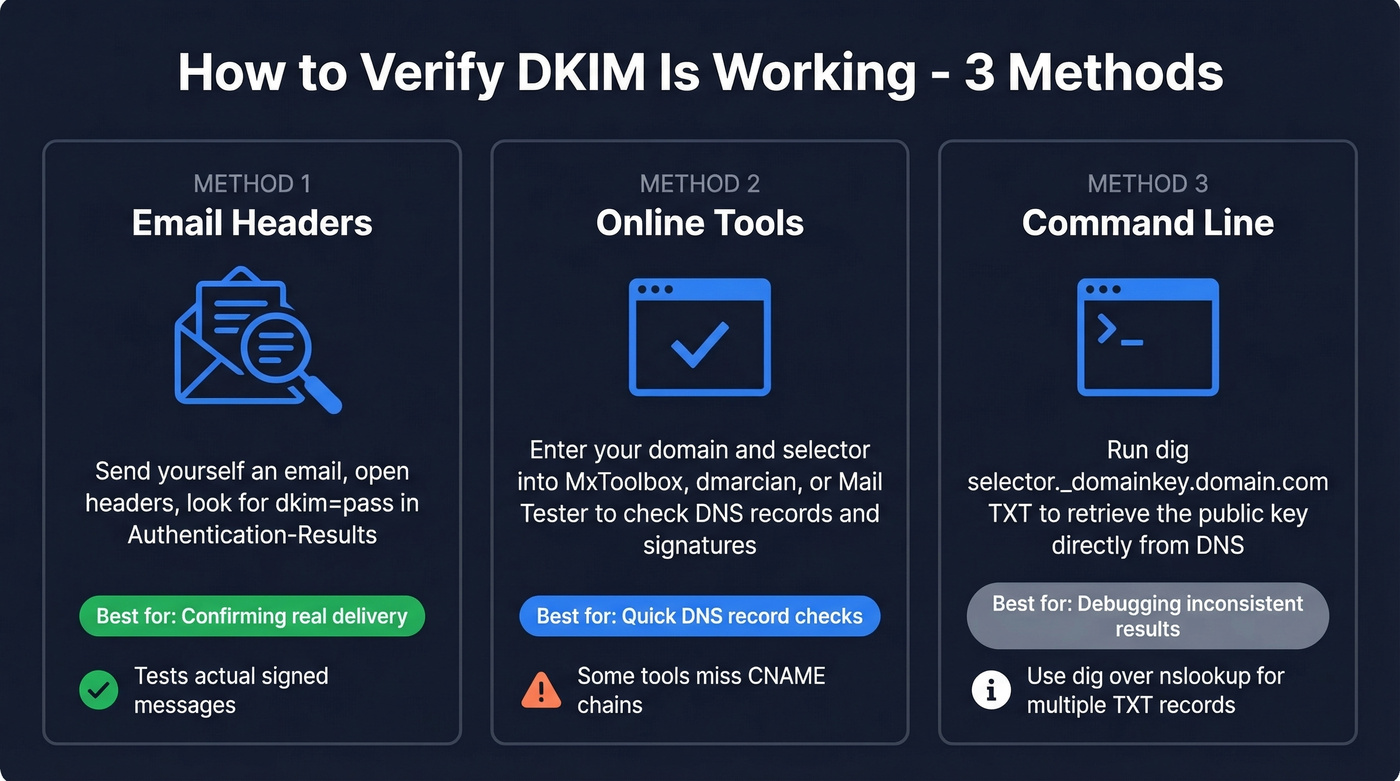
Send a test email to a Gmail address, open it, hit Show Original, and search for Authentication-Results. If SPF, DKIM, and DMARC all show PASS, your setup is solid. Takes under a minute.
Here's how to access raw headers in other clients:
| Email Client | Steps |
|---|---|
| Gmail | Open email → three-dot menu → Show original |
| Outlook (desktop) | File → Properties → Internet headers |
| Outlook (web) | Three-dot menu → View message source |
| Apple Mail | View → Message → Raw Source |
| Yahoo | More → View raw message |
The Authentication-Results format varies by provider. Google shows dkim=pass with header.i=, header.s=, and header.b=. Microsoft shows dkim=pass (signature was verified) with header.d= but often omits the selector. Yahoo shows dkim=pass header.i=... header.s=... and typically skips header.b=.
2. Use an Online DKIM Checker
You don't need a paid tool for this. The options below all have free tiers or free checker pages.
| Tool | Input Method | Selector Required? | Extra Features |
|---|---|---|---|
| MxToolbox | Domain + selector | Yes | Syntax validation, record retrieval test |
| dmarcian | Domain + selector | Yes | Tag-by-tag breakdown |
| EasyDMARC | Domain + selector | Not always - can auto-detect in many cases | DKIM key discovery using predefined selectors |
| Mail Tester | Send to test address | No | Full SPF/DKIM/DMARC report |
| AppMailDev | Send to test address | No | SPF/DKIM/DMARC plus PTR/RBL checks |
| spf.access.nu | Domain | No - attempts selector discovery | Selector discovery + key strength checks |
The send-to-test-address tools like Mail Tester and AppMailDev verify the full signing chain on a real message, not just the DNS record. That's what makes them more useful than pure DNS lookups.
A thread on Reddit's r/DMARC highlighted spf.access.nu for selector discovery and encryption strength checks - worth bookmarking if you manage multiple domains.
3. Verify Your DKIM Record via Command Line
CLI verification is the debug-level method. Reach for it when online tools give inconsistent results or you need to test against specific DNS resolvers.
dig selector._domainkey.example.com TXT
nslookup -type=txt selector._domainkey.example.com
You should see a response containing v=DKIM1; k=rsa; p=MIGf... - the public key. One practical pitfall from Cisco's documentation: nslookup can fail to list records when multiple TXT records exist on the same domain. If you get empty results but suspect the record is there, switch to dig.

DKIM keeps your domain safe. Bad email data destroys it. Prospeo's 5-step verification and spam-trap removal deliver 98% email accuracy - so your perfectly authenticated emails actually reach real inboxes, not bounced-address dead ends.
Don't let bad data undo all your DKIM work.
Why DKIM "Pass" Can Still Fail DMARC
This trips up more teams than any other authentication issue. Here's the thing: DKIM authentication and DKIM alignment are two different checks, and DMARC cares about both.
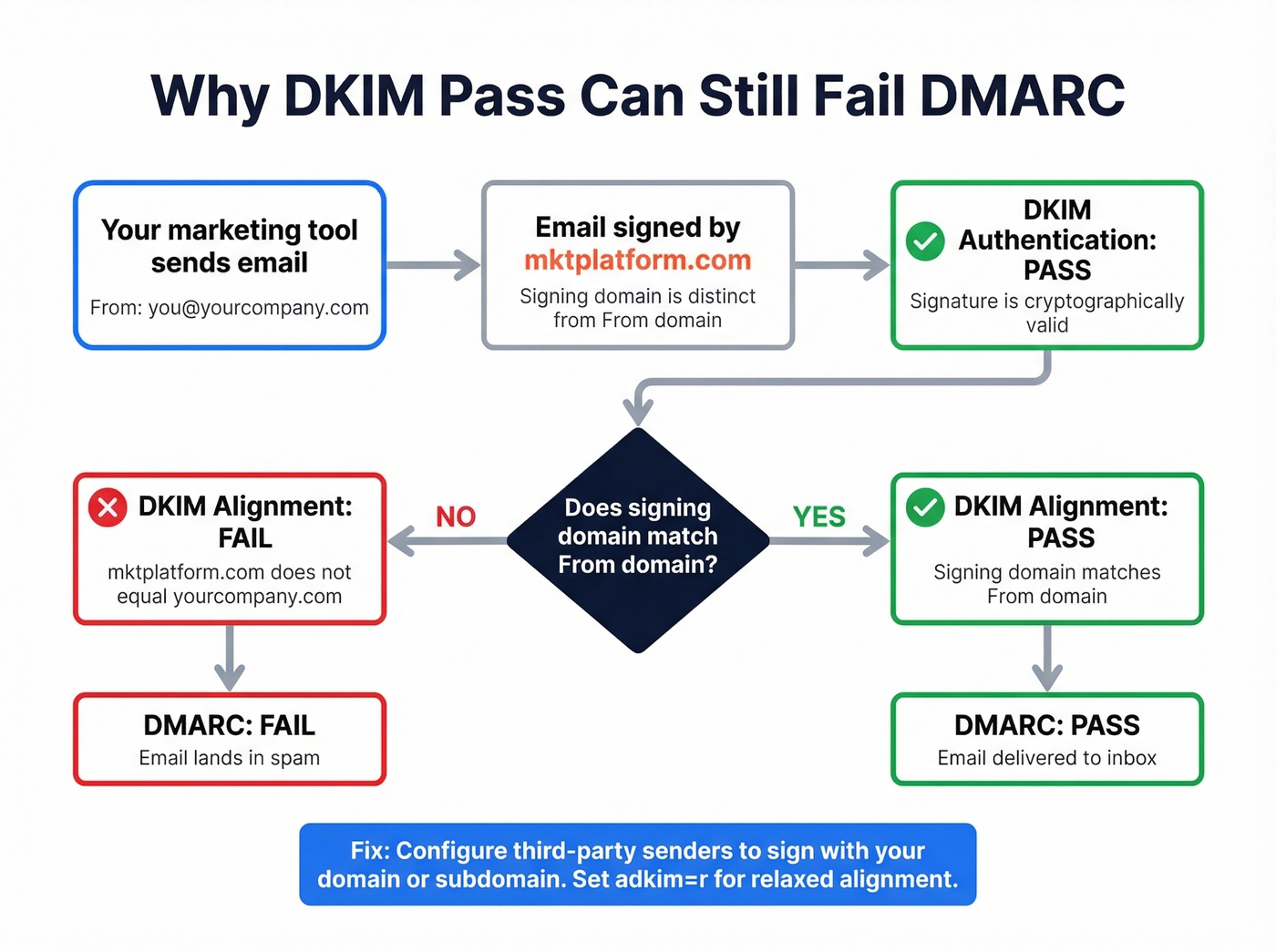
DKIM authentication confirms the signature is valid. DKIM alignment checks whether the signing domain matches your visible From domain. DMARC passes when either SPF or DKIM passes and aligns with the From domain.
Picture this scenario: your marketing automation tool signs outbound emails with its own domain - say mktplatform.com - but the From address shows you@yourcompany.com. DKIM passes because the signature is cryptographically valid. Alignment fails because the signing domain doesn't match the From domain. DMARC fails, and your email lands in spam. Frustrating, because everything looks correct at the DNS level.

Check your DMARC record for the adkim tag: adkim=r allows subdomain matches while adkim=s requires an exact domain match. Most organizations should use relaxed alignment and configure third-party senders to sign with a subdomain of the brand domain. Google's email sender guidelines explain alignment requirements in detail.
Troubleshooting Common DKIM Failures
| Failure Pattern | Likely Cause | Fix |
|---|---|---|
dkim=fail (no key for signature) |
DNS can't find the public key | Check for missing ._domainkey in record name; test from multiple resolvers |
| SPF pass + DKIM fail | Message modified after signing | Verify selector; check for gateways or footers altering the body |
| DKIM pass + DMARC fail | Alignment failure | Configure third-party senders to sign with your domain or subdomain |
| Intermittent DKIM failures | DNS propagation or server sync | Test authoritative + public resolvers; wait 24-48 hrs after changes |
dkim=fail with correct DNS |
Record syntax error | Check for broken quotes, truncated p= values, extra spaces |
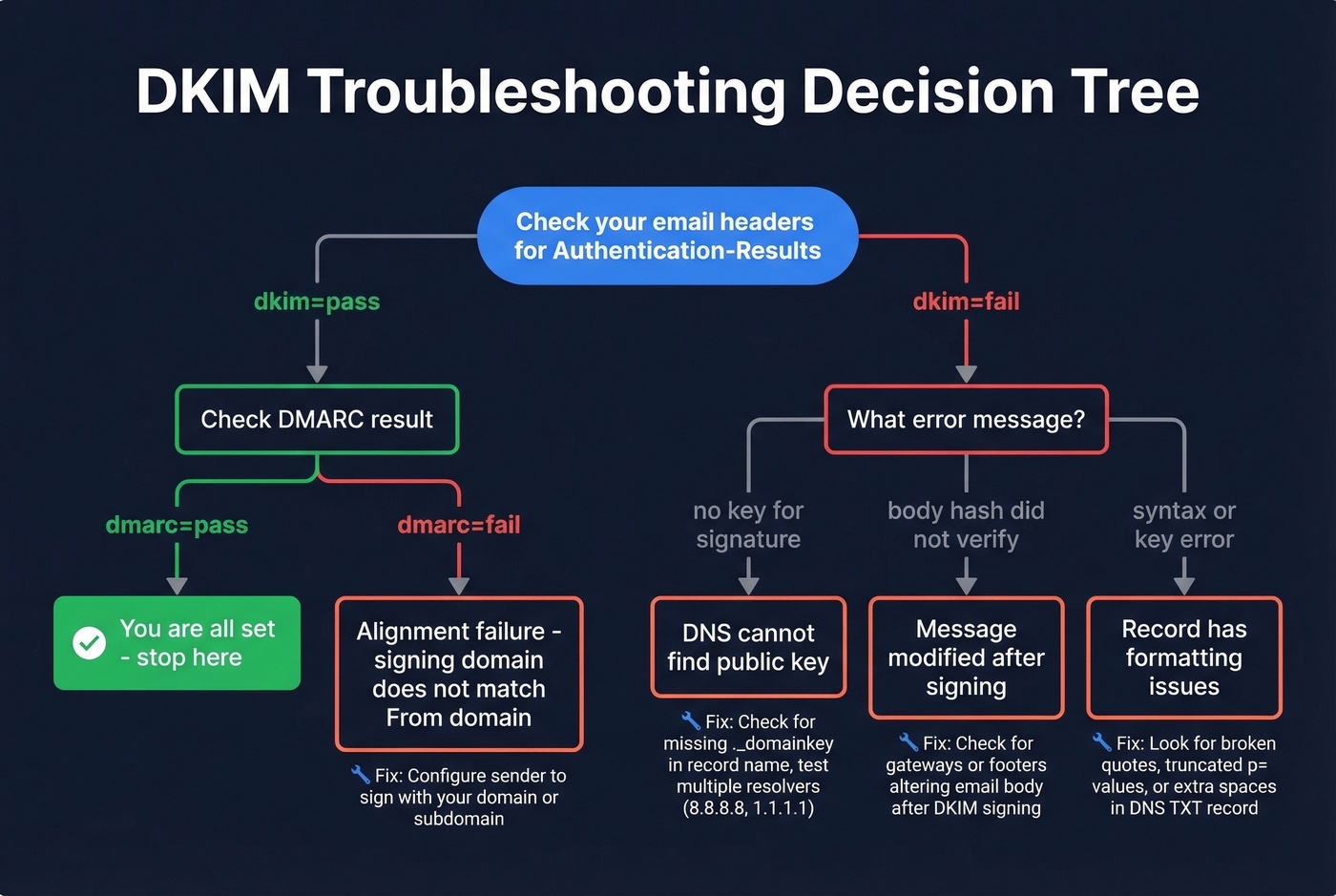
The dkim=fail (no key for signature) error deserves special attention. It means the receiving server couldn't find your public key for the selector in the signature. Common culprits: authoritative DNS servers not in sync, caching after a recent update, or forgetting the ._domainkey portion of the record name.
Test from multiple DNS resolvers - Google's 8.8.8.8, Cloudflare's 1.1.1.1, and your authoritative nameservers - to isolate the issue. Once fixed, DNS-caused "no key" failures don't create long-term reputation damage.
Skip the troubleshooting table entirely if your headers show dkim=pass and dmarc=pass. If both pass, you're good. Don't go looking for problems that aren't there.
DKIM Best Practices for 2026
Use 2048-bit RSA keys minimum. 1024-bit keys are increasingly treated as insufficient, and some receivers will downgrade trust. Rotate keys at least once a year - set a calendar reminder, because nobody remembers otherwise.
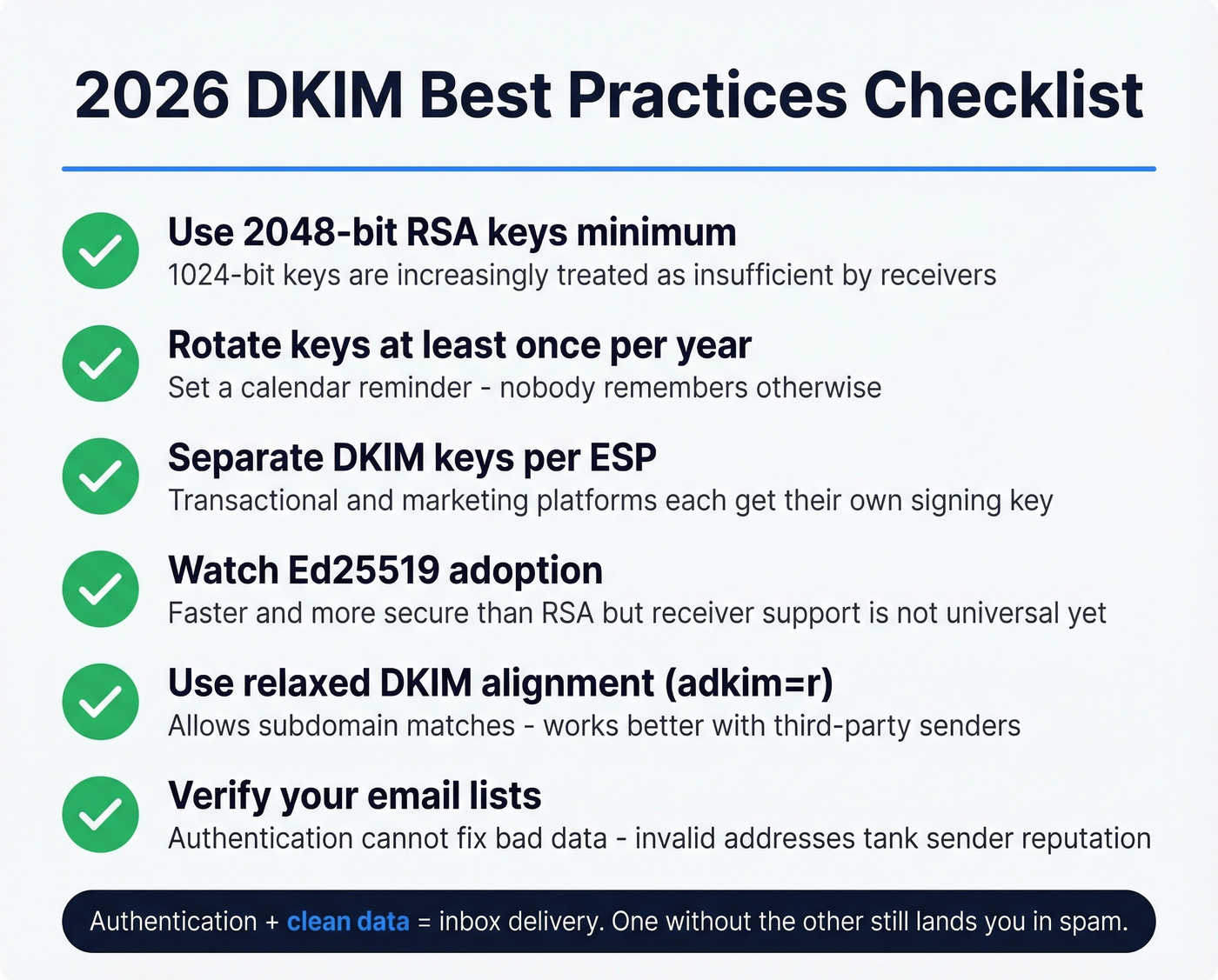
Maintain separate DKIM keys per ESP. Your transactional provider and marketing platform should each have their own signing key so a compromise in one doesn't affect the other. Watch Ed25519 adoption too - it's faster and more secure than RSA, though receiver support isn't universal yet.
Once DKIM, SPF, and DMARC are all passing, most deliverability problems aren't authentication problems anymore - they're data problems. Sending to invalid addresses tanks your sender reputation faster than a misconfigured DKIM record ever will. In our experience, teams that fix authentication but ignore list hygiene still end up in spam folders. Prospeo's email finder delivers 98% accuracy with a 5-step verification process, so your authentication work doesn't get undone by bounces.
You just spent time perfecting DKIM, SPF, and DMARC alignment. One batch of unverified emails can tank the domain reputation you worked to protect. Prospeo verifies every email through proprietary infrastructure with catch-all handling, honeypot filtering, and a 7-day refresh cycle - keeping bounce rates under 4%.
Protect the deliverability you just built. Start at $0.01 per email.
FAQ
How do I find my DKIM selector and check the record?
Open any sent email's raw source, find the DKIM-Signature header, and look for the s= tag - that value is your selector. Query selector._domainkey.yourdomain.com via dig or an online DKIM checker to confirm the public key is published and valid.
Can DKIM pass but DMARC still fail?
Yes. DMARC requires domain alignment, meaning the DKIM signing domain must match your visible From domain. Third-party senders signing with their own domain are the most common cause - configure them to sign with your domain or a subdomain.
How often should I rotate DKIM keys?
Rotate at least once per year. Use 2048-bit RSA keys minimum and maintain separate keys per email service provider. Mark rotation dates in your calendar so keys don't go stale.
Does DKIM verification protect against bounces?
No. DKIM proves your emails are authentic, but it can't fix bad recipient data. If you're sending to invalid addresses, your sender reputation still suffers regardless of perfect authentication.