Email Deliverability Guide: Start Where the Problem Actually Starts
One in six emails you send never reaches an inbox. That's the global average - roughly 84% inbox placement across all providers. Most deliverability advice jumps straight to DNS records and warm-up schedules. That's solving the wrong problem first. Your deliverability issue starts before you hit send, with bad data sitting in your list.
What You Need (Quick Version)
- Verify your list first. Your bounce rate must stay under 2%. Run every list through a verification tool before sending. If you're comparing options, start with our breakdown of email ID validators.
- Authenticate with SPF + DKIM + DMARC. All three. Non-negotiable for bulk sending since February 2024. If you need a step-by-step, use this SPF, DKIM, DMARC explained.
- Know your thresholds. Target a spam complaint rate below 0.1%. Hit 0.3% and Google and Yahoo block your messages entirely.
- Cold email isn't marketing email. Different formats, different volumes, different rules. Treating them the same tanks deliverability for both. Use these cold email tactics to keep reply rates up without wrecking reputation.
What Good Inbox Placement Looks Like
Not all mailbox providers treat your emails equally, and the gaps are bigger than most teams realize:
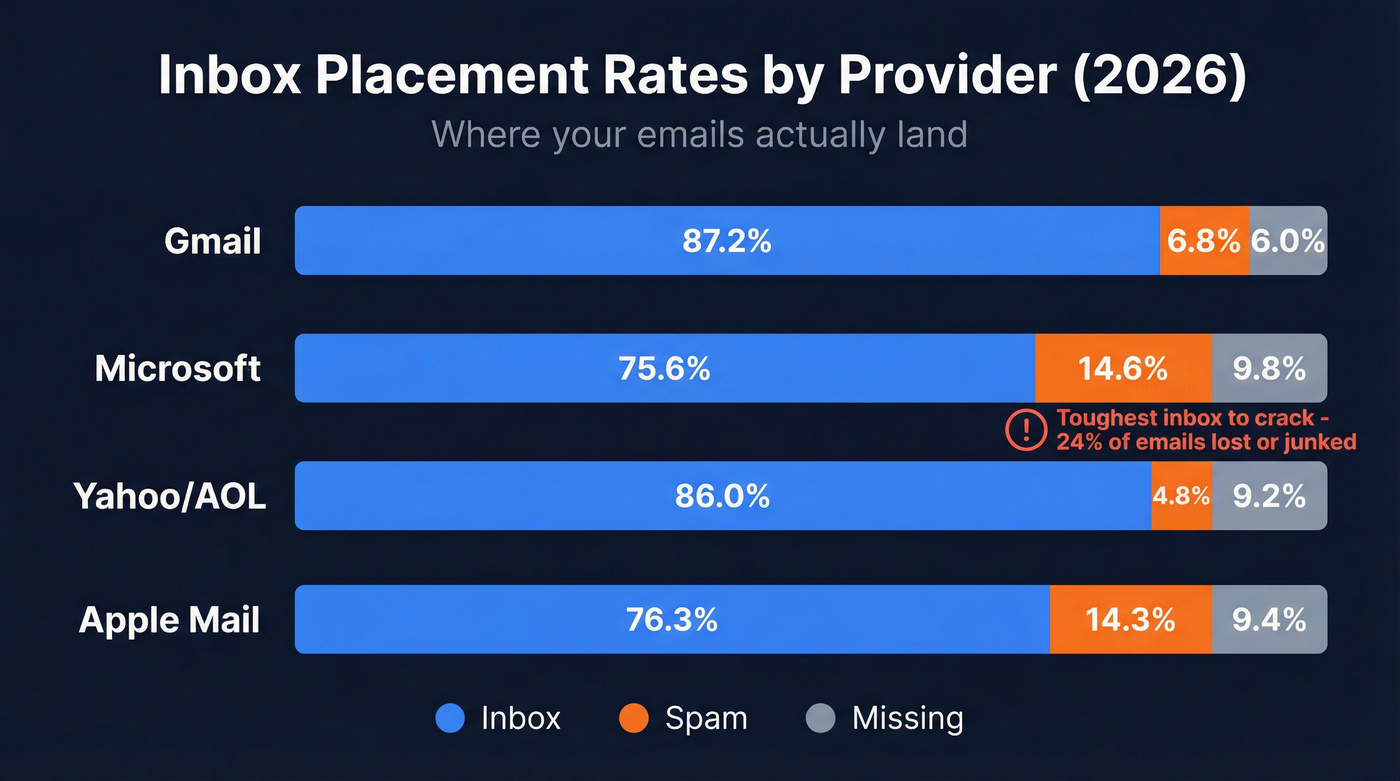
| Provider | Inbox | Spam | Missing |
|---|---|---|---|
| Gmail | 87.2% | 6.8% | 6.0% |
| Microsoft | 75.6% | 14.6% | 9.8% |
| Yahoo/AOL | 86.0% | 4.8% | 9.2% |
| Apple Mail | 76.3% | 14.3% | 9.4% |
Microsoft is the toughest inbox to crack. About 24% of emails either hit spam or vanish entirely, which means if your ICP skews toward enterprise companies on Outlook, you need to pay extra attention to authentication and sender reputation. Gmail is more forgiving on placement but stricter on complaint thresholds.
Aim for a bounce rate at or below 2%, spam complaints under 0.1%, and open rates above 20%. Hit all three consistently and you're in the top tier of senders. (If you're still diagnosing, this email deliverability tracking guide helps you set up the right metrics.)

List Hygiene: The Real Problem
Here's the thing most people miss: the majority of deliverability problems aren't technical. They're data problems. You're sending to addresses that don't exist, and every bounce chips away at your sender reputation like termites in a load-bearing wall. If you're seeing this at scale, it's usually B2B contact data decay showing up in your sending metrics.
A bounce rate under 2% means your list is healthy. Above 5%, you've got a data problem. Above 10%, ISPs start blocking you outright - and recovery takes weeks of reduced volume and careful re-warming. If you want the mechanics behind bounces, read our guide to a hard bounce.
We've seen this play out firsthand. One team found 13% of their contacts were invalid after running verification. Once they cleaned the list, engagement jumped from 22% to 87% and their ESP's abuse-detection warning disappeared. That's not an edge case. It's what happens when you stop guessing which addresses are real. For a deeper breakdown, see invalid emails.
Prospeo's 5-step verification catches invalid addresses, spam traps, and honeypots before they touch your sending infrastructure, with a 98% email accuracy rate and records refreshing on a 7-day cycle. There's a free tier to test it - no contracts required.

Every bounce chips away at your sender reputation. Prospeo's 5-step verification eliminates invalid addresses, spam traps, and honeypots before they touch your sending infrastructure - 98% accuracy on 143M+ verified emails, refreshed every 7 days.
Stop warming up domains just to burn them on bad data.
Compliance in 2026
The rules changed fast between 2024 and 2025. Let's break down how we got here.
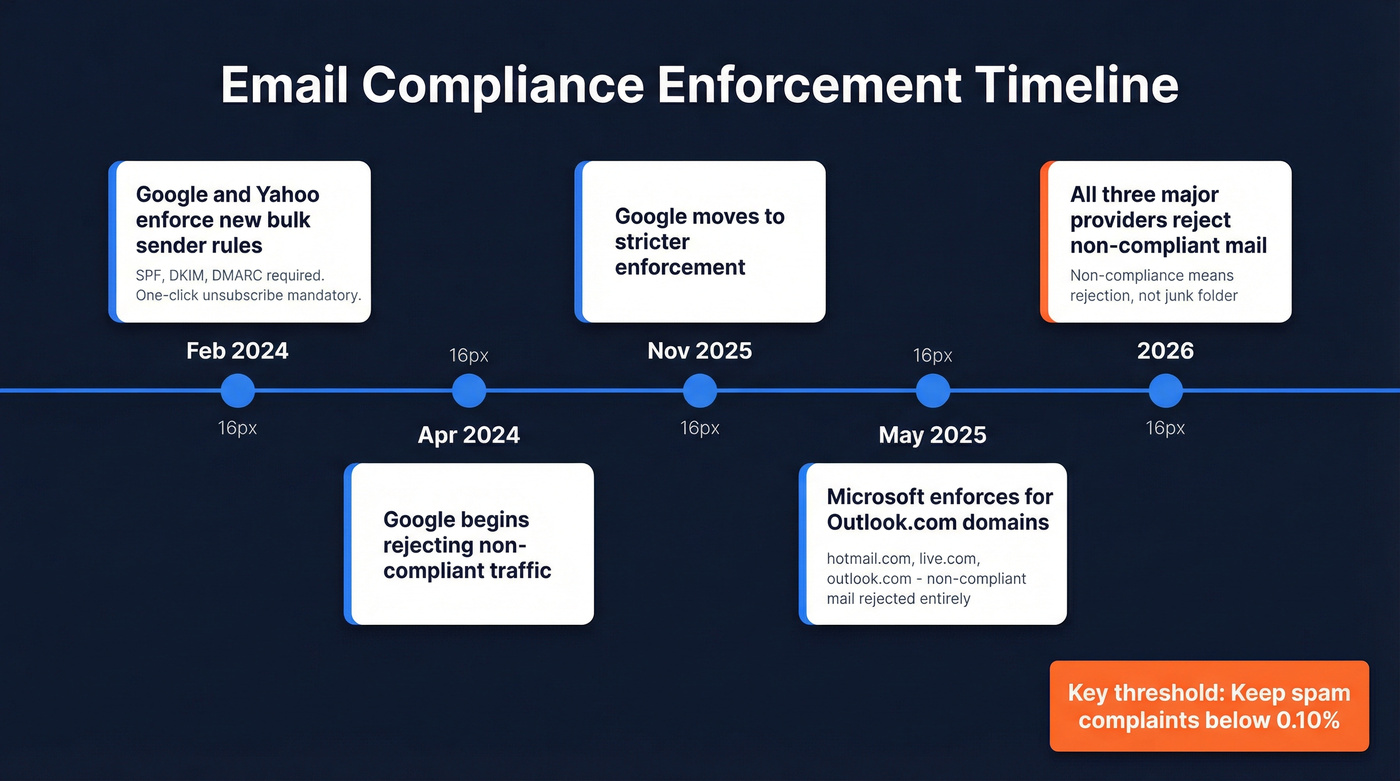
Google and Yahoo enforced new bulk sender requirements in February 2024: SPF, DKIM, and DMARC authentication, one-click unsubscribe for promotional mail, and a spam complaint rate below 0.3%. Google began rejecting non-compliant traffic in April 2024 and moved into stricter enforcement starting in November 2025.
In May 2025, Microsoft followed for Outlook.com consumer domains (hotmail.com, live.com, outlook.com). The original plan was routing non-compliant mail to Junk. They updated it to reject entirely - your emails don't just land in spam, they bounce.
As of 2026, all three major providers enforce these requirements. Non-compliance means rejection, not junk folder placement. The threshold to memorize: keep your spam complaint rate below 0.10% as measured in Google Postmaster Tools. Hit 0.30% and you're blocked.
Authentication Setup That Works
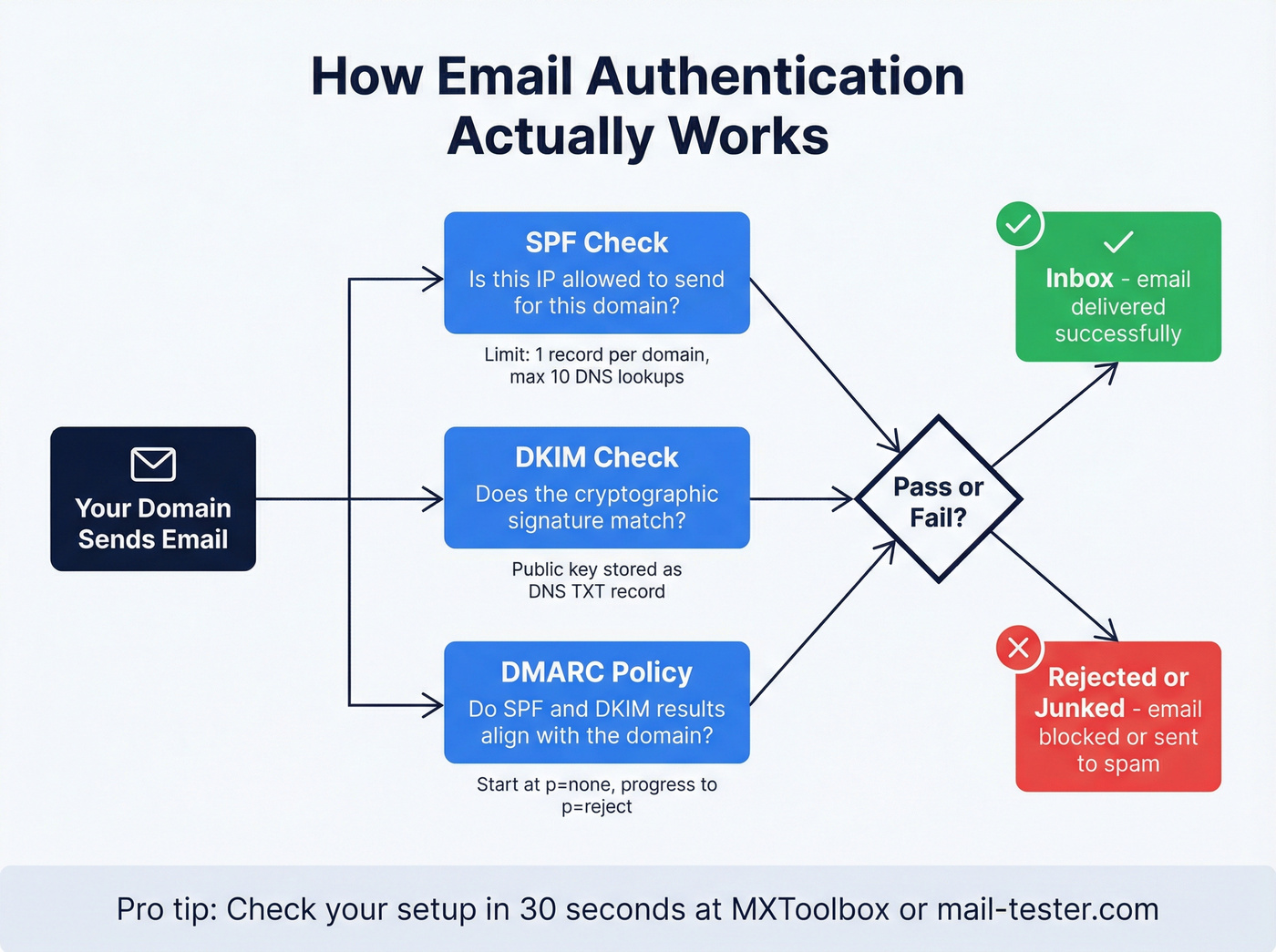
SPF tells receiving servers which IPs can send on your domain's behalf. A basic record looks like:
v=spf1 include:_spf.google.com include:sendgrid.net ~all
Two constraints most guides bury: you can only have one SPF record per domain, and SPF checks can't exceed 10 DNS lookups. Every include counts toward that limit. We've seen teams break SPF by adding a second record without realizing it - MXToolbox catches this in seconds. If you're setting this up specifically for outbound, follow our SPF DKIM DMARC setup for cold email.
DKIM adds a cryptographic signature to your emails. Your ESP generates the keys; you add the public key as a DNS TXT record. If you're not sure whether yours is set up, run a test email through mail-tester.com. Takes two minutes.
DMARC ties SPF and DKIM together. Start with this record:
v=DMARC1; p=none; rua=mailto:dmarc-reports@yourdomain.com
The p=none policy means "monitor but don't act." Once legitimate mail is passing, progress to p=quarantine and eventually p=reject. About 40% of DMARC users don't know what their policy is set to. Check yours today - it takes 30 seconds.
Cold Email vs. Marketing Email
If you're mixing cold and marketing email on the same domain, stop. These are fundamentally different channels and treating them as one is the fastest way to burn a domain. If you're building a system around this, use our outbound email campaign guide to separate infrastructure, targeting, and measurement.
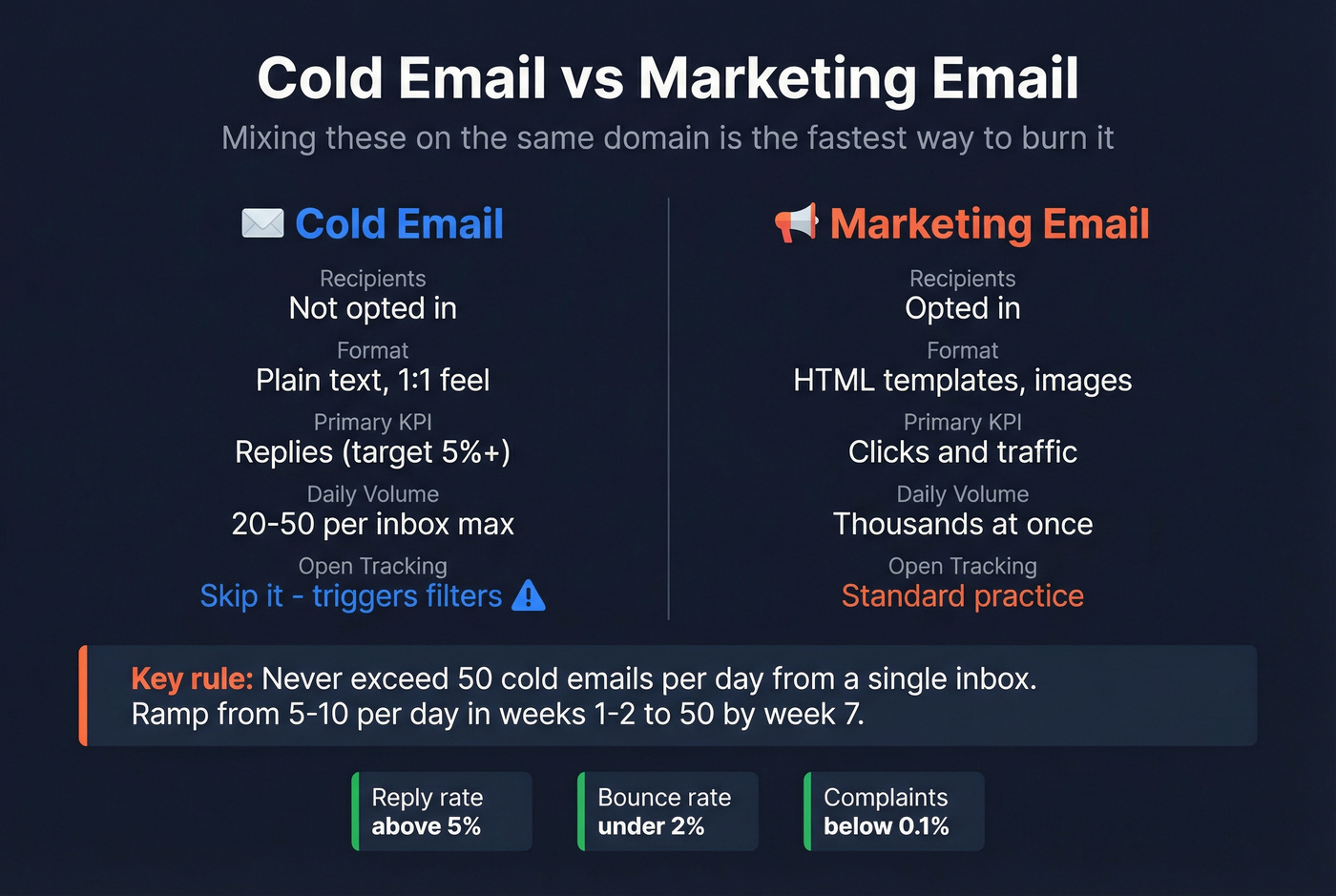
| Factor | Cold Email | Marketing Email |
|---|---|---|
| Recipients | Not opted in | Opted in |
| Format | Plain text, 1:1 feel | HTML templates, images |
| Primary KPI | Replies | Clicks/traffic |
| Volume | 20-100 prospects | Thousands at once |
| Tracking | Avoid open pixels | Open/click tracking standard |
For cold email, ramp from 5-10 emails per day in weeks one and two to a max of 50 per day by week seven, splitting 25 warm-up and 25 cold. Never exceed 50 per day from a single inbox. The consensus across r/coldemail and most outbound playbooks is clear: skip open-tracking pixels entirely in cold sequences. They trigger filters and the data isn't reliable anyway. (If you want the deliverability details, see does open tracking hurt cold email.)
Target a reply rate above 5%, bounce rate under 2%, and complaints below 0.1%. If your bounce rate is higher, the problem isn't your copy or your sending schedule - it's your data. Skip the warm-up hacks and fix the list first. If you're scaling, follow cold email volume best practices to avoid tripping provider thresholds.
Cold email bounce rates above 2% aren't a sending problem - they're a data problem. Prospeo verifies every email through proprietary infrastructure with catch-all handling and honeypot filtering, so your outbound hits real inboxes at $0.01 per verified address.
Fix deliverability where it actually breaks: your contact list.
Monitoring and Troubleshooting
Set up Google Postmaster Tools immediately. It's free and shows your domain's spam rate, authentication status, and reputation with Gmail. Microsoft SNDS does the same for Outlook. These two aren't optional. If you need a structured process, use this email deliverability checklist.
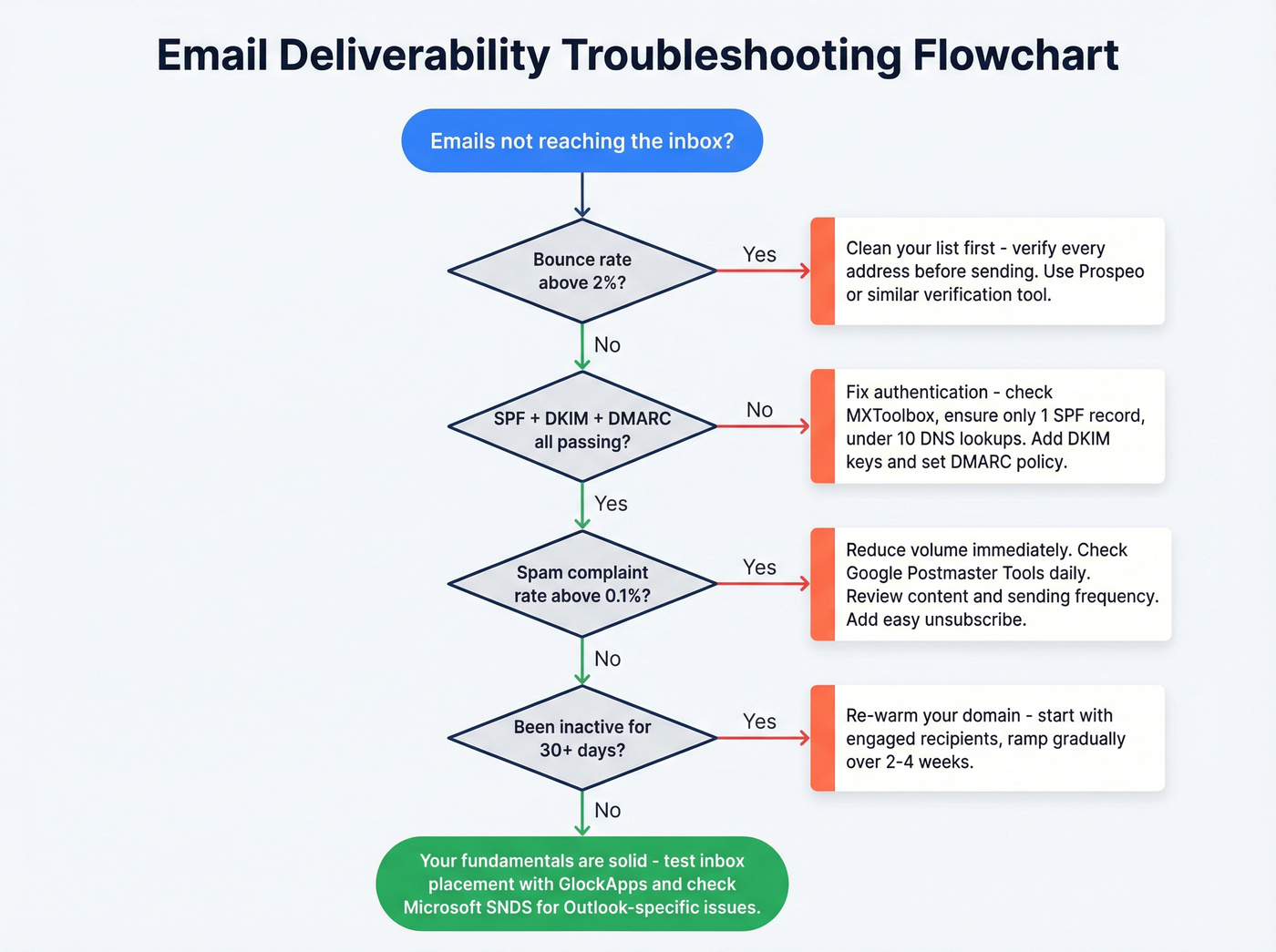
For inbox placement testing, GlockApps (Essential plan from $59/mo) lets you test where you land across providers. MXToolbox ($129-$399/mo) handles blacklist monitoring and DNS diagnostics. If you're actively fighting reputation issues, this blacklist alert guide helps you triage fast.
One rule that catches teams off guard: most reputation systems only store data for 30 days. If you stop sending for a month, you'll likely need to re-warm your domain. We learned this the hard way after a holiday pause - two weeks of careful ramp-up to get back to normal placement rates.
FAQ
What's the difference between delivery and deliverability?
Delivery means the receiving server accepted your email without a hard bounce. Deliverability means it actually reached the inbox instead of spam. Your ESP dashboard might show delivery rates of 98%+ while half your mail sits in junk - always check inbox placement separately via Google Postmaster Tools.
How long does domain warm-up take?
Two to four weeks for most senders, up to 60 days for new dedicated IPs. Start with your most engaged recipients and ramp gradually. If you stop sending for 30+ days, plan to re-warm from scratch.
Can I fix inbox placement without switching ESPs?
Yes. Most problems are data and authentication issues, not platform issues. Verify your list, fix your SPF/DKIM/DMARC records, and monitor via Postmaster Tools. Switch platforms only after ruling out the fundamentals.
What spam complaint rate gets you blocked?
Google and Yahoo block bulk senders who exceed a 0.3% complaint rate, but you should target below 0.1%. Monitor this daily in Google Postmaster Tools - once you cross the threshold, recovery takes weeks of reduced volume and re-warming.