The Email Deliverability Checklist You Actually Need in 2026
Your cold email campaign launched Monday. By Wednesday, your bounce rate hit 8% and Google Postmaster showed your domain reputation sliding from High toward Low/Bad. You didn't change your copy. You imported a new list without verifying it. That's the thing about deliverability - 80% of it is decided before you write a single word, and any email deliverability checklist worth following should start with data quality, not copywriting tips.
The average global inbox placement rate sits around 83-85%. Roughly one in six emails never reaches the inbox. Most checklists tell you to "write better subject lines" or "avoid spam words." That's not wrong, but it's not what actually fixes the problem. Authentication, data quality, and volume discipline are what move the needle.
Quick-Reference Checklist
If you only do three things, do these:
- Authenticate properly. SPF, DKIM, and DMARC - all three, configured correctly, with DMARC progressing past
p=none. - Verify every list before you send. A single unverified import can tank your domain reputation in 48 hours. No exceptions.
- Respect sending limits and monitor weekly. Stay under safe daily caps, warm up new domains gradually, and check Google Postmaster every week.
The full walkthrough below covers each step with exact DNS records, benchmarks, and tool recommendations.
Know Your Numbers First
Before you fix anything, you need to know what "good" looks like. Here's a distinction most people miss: delivery rate and deliverability aren't the same thing. Delivery means the server accepted your email. Deliverability means it actually hit the inbox, not spam or promotions. Pull an email health report from your sending platform - that's the fastest way to see where you actually stand.
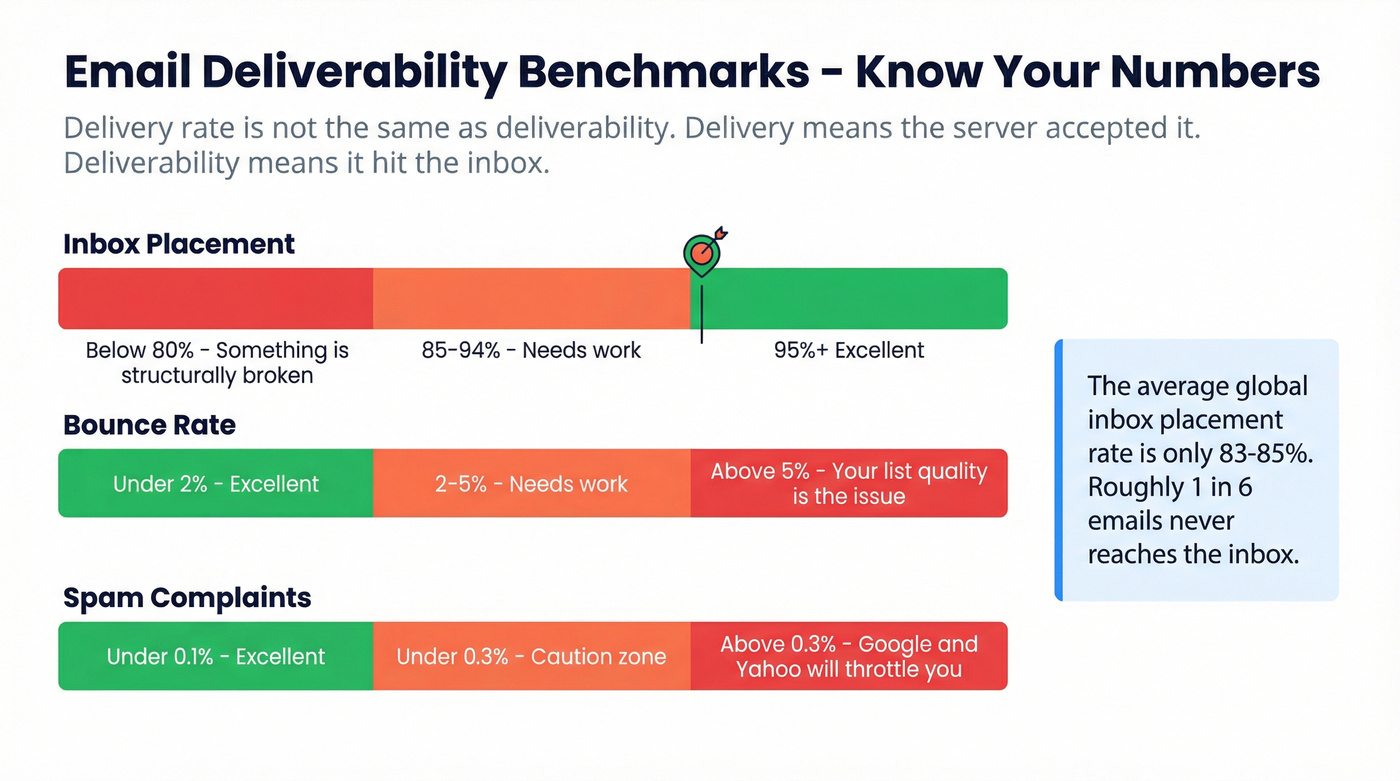
Read your numbers against these benchmarks:
| Metric | Excellent | Needs Work | Critical |
|---|---|---|---|
| Inbox placement | 95%+ | 85-94% | Below 80% |
| Bounce rate | Under 2% | 2-5% | Above 5% |
| Spam complaints | Under 0.1% | Under 0.3% | Above 0.3% |
Below 80% inbox placement means something is structurally broken - it's not a content problem. Above 5% bounce rate? Your list quality is the issue. Spam complaints over 0.3% and Google and Yahoo will throttle you regardless of everything else you've done right.

Authentication Setup
Most checklists say "set up SPF/DKIM/DMARC" without showing you the actual DNS records. Let's fix that.
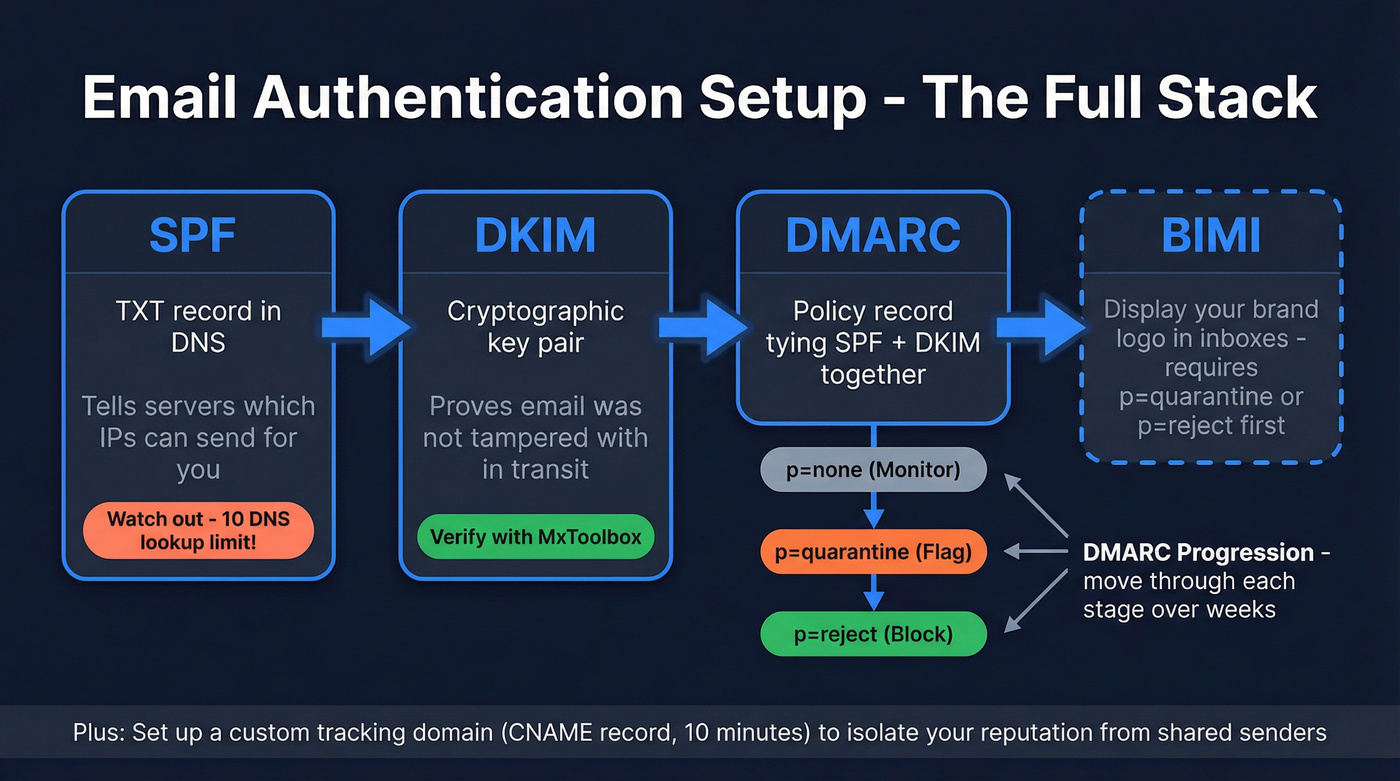
SPF: The 10-Lookup Trap
SPF tells receiving servers which IPs can send on your domain's behalf. Add a TXT record to your DNS:
v=spf1 include:_spf.google.com include:sendgrid.net ~all
The trap nobody warns you about: SPF has a 10 DNS lookup limit. Every include: counts as a lookup, and nested includes count too. If you're using Google Workspace, a CRM, a cold email tool, and a marketing platform, you can blow past 10 lookups easily. When that happens, SPF fails silently. Use an SPF flattening tool to audit your record - we've seen teams debug deliverability issues for weeks before realizing their SPF record was broken the entire time.
DKIM: Key Signing
DKIM adds a cryptographic signature to every email, proving it wasn't tampered with in transit. Your ESP or email provider generates the key pair - you publish the public key as a DNS TXT record. Verify it's actually working with MxToolbox. A misconfigured DKIM record causes DKIM=fail, which hurts trust and alignment with DMARC.
DMARC: The Full Progression
DMARC ties SPF and DKIM together and tells receiving servers what to do when authentication fails:
Host: _dmarc.yourdomain.com

Type: TXT

TTL: 3600

Value: v=DMARC1; p=none; rua=mailto:dmarc-reports@yourdomain.com; ruf=mailto:dmarc-failures@yourdomain.com; pct=100
Here's where most teams stall: they set p=none and never look at it again. Meanwhile, someone is spoofing their domain and they have no idea. The progression should be p=none (monitor) to p=quarantine (flag suspicious messages) to p=reject (block them outright). Monitor reports at each stage for at least a week before tightening. Dmarcian's free tools can help you parse those XML reports into something readable.
Custom Tracking Domains
If you're using a cold email tool or marketing platform, set up a custom tracking domain instead of the provider's shared one. Shared tracking domains carry the reputation of every other sender on that platform. A custom domain keeps yours isolated. It takes 10 minutes and a CNAME record.
Once your DMARC reaches p=quarantine or p=reject, BIMI lets you display your brand logo next to emails in supported inboxes. Get DMARC right first.
2026 Bulk Sender Requirements
Google and Yahoo rewrote the rules starting in February 2024. Microsoft followed on May 5, 2025. If you're sending at any meaningful volume, these aren't optional.
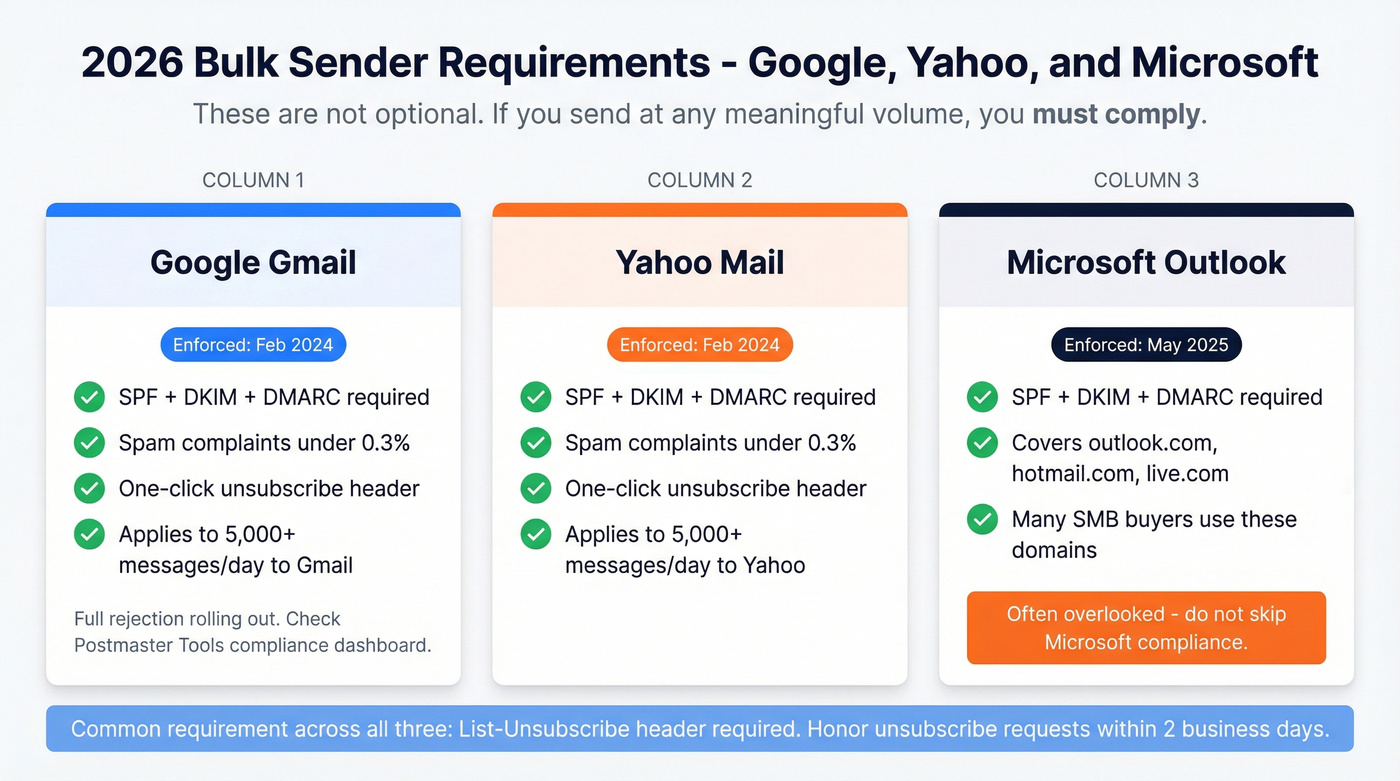
| Provider | Enforcement Date | Key Requirements |
|---|---|---|
| Feb 2024 (full rejection rolling out) | SPF+DKIM+DMARC, complaints under 0.3%, one-click unsubscribe | |
| Yahoo | Feb 2024 | SPF+DKIM+DMARC, complaints under 0.3%, one-click unsubscribe |
| Microsoft | May 2025 | SPF+DKIM+DMARC for Outlook/Hotmail/Live.com senders |
The bulk sender threshold is 5,000+ messages per day to Gmail or Yahoo addresses. But even under that, authentication is table stakes. Google added a Compliance status dashboard to Postmaster Tools in mid-2024 - check it.
What most articles miss: Microsoft's enforcement covers consumer domains - outlook.com, hotmail.com, live.com. If your prospects use these domains, and plenty of SMB buyers do, you need the same authentication stack you've built for Gmail. The one-click unsubscribe requirement means promotional emails must include a List-Unsubscribe header, and you must honor requests within 2 business days.

You just read that a single unverified import can tank your domain reputation in 48 hours. Prospeo's 5-step verification - syntax, MX, mailbox, catch-all detection, and spam-trap removal - delivers 98% email accuracy. That's how teams like Snyk dropped bounce rates from 35% to under 5%.
Stop gambling with your sender reputation. Start with verified data.
List Hygiene and Data Quality
This is the step most people skip. It's the one that matters most.
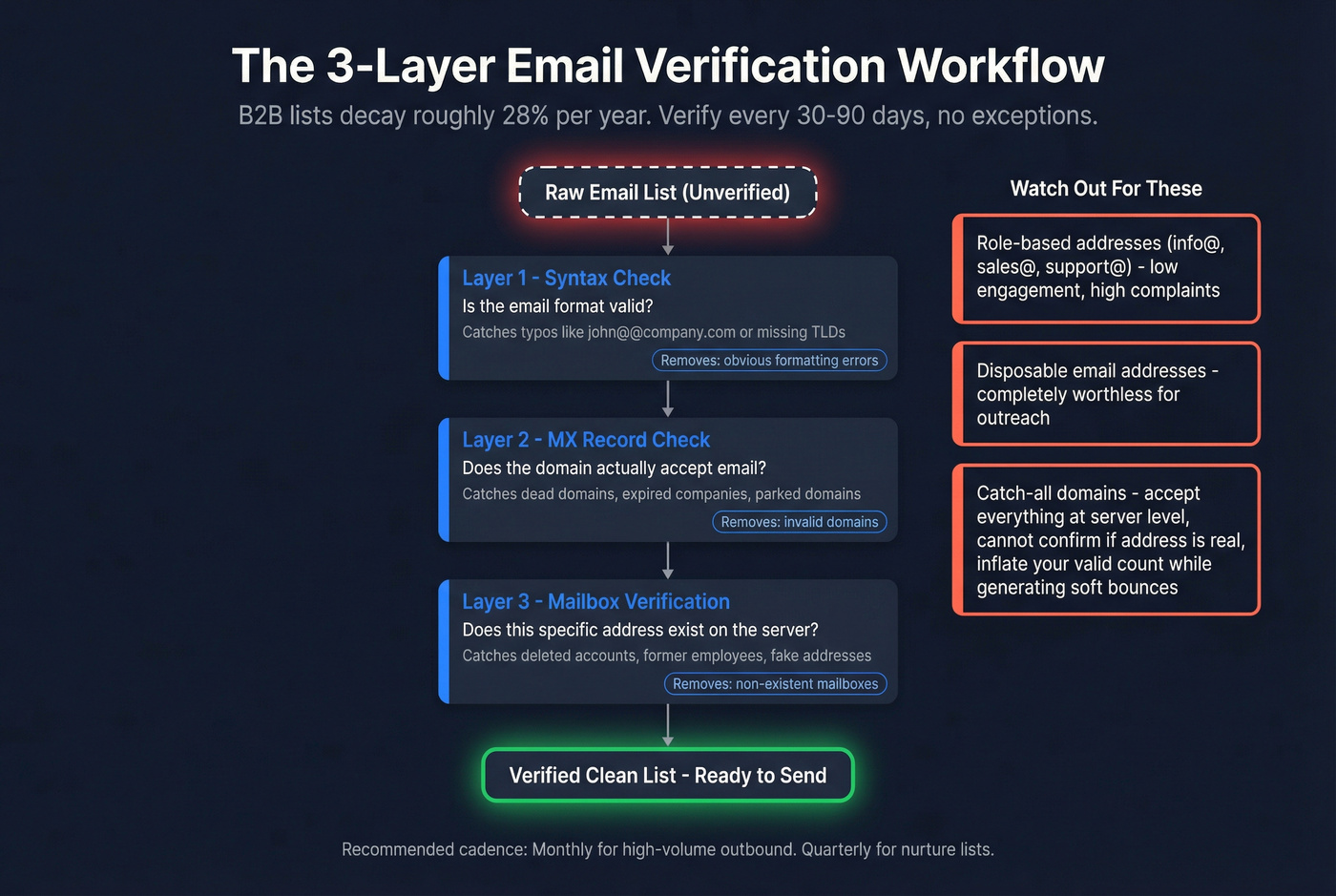
A typical B2B outreach list decays roughly 28% per year - people change jobs, companies get acquired, domains expire. If you're sending to a list you built six months ago without re-verifying, you're gambling with your domain reputation. And that gamble has a terrible expected value.
The verification workflow has three layers: syntax check (is the format valid?), MX record check (does the domain accept email?), and mailbox verification (does this specific address exist?). All three matter. Syntax catches typos. MX catches dead domains. Mailbox verification catches the rest. Running this process is the core of any serious deliverability audit - without clean data, every other optimization is cosmetic.
Pay special attention to risky address categories. Role-based addresses like info@, sales@, and support@ have low engagement and high complaint rates. Disposable addresses from throwaway email services are worthless. Catch-all domains deserve their own warning: they accept everything at the server level, so you can't confirm whether a specific address is real. They'll inflate your "valid" count while quietly generating soft bounces.
Prospeo handles all of this through a 5-step verification process - syntax, MX, mailbox, catch-all detection, and spam-trap removal. The 98% email accuracy rate and 7-day data refresh cycle mean you're working with current data, not records that were valid three months ago. Pricing starts with a free tier at 75 emails/month and scales to roughly $0.01 per verified email, no contracts required.
List decay hits 28% per year. Most providers refresh data every 6 weeks. Prospeo refreshes every 7 days - so the emails you pull today are still valid next week. At $0.01 per email, clean data costs less than one bounced campaign.
Fix your list hygiene problem at the source for a penny per email.
Verify your lists every 30-90 days. For high-volume outbound, monthly is the right cadence. For nurture lists, quarterly works. Don't wait for bounces to tell you the data is bad.
Sending Volume and Warmup
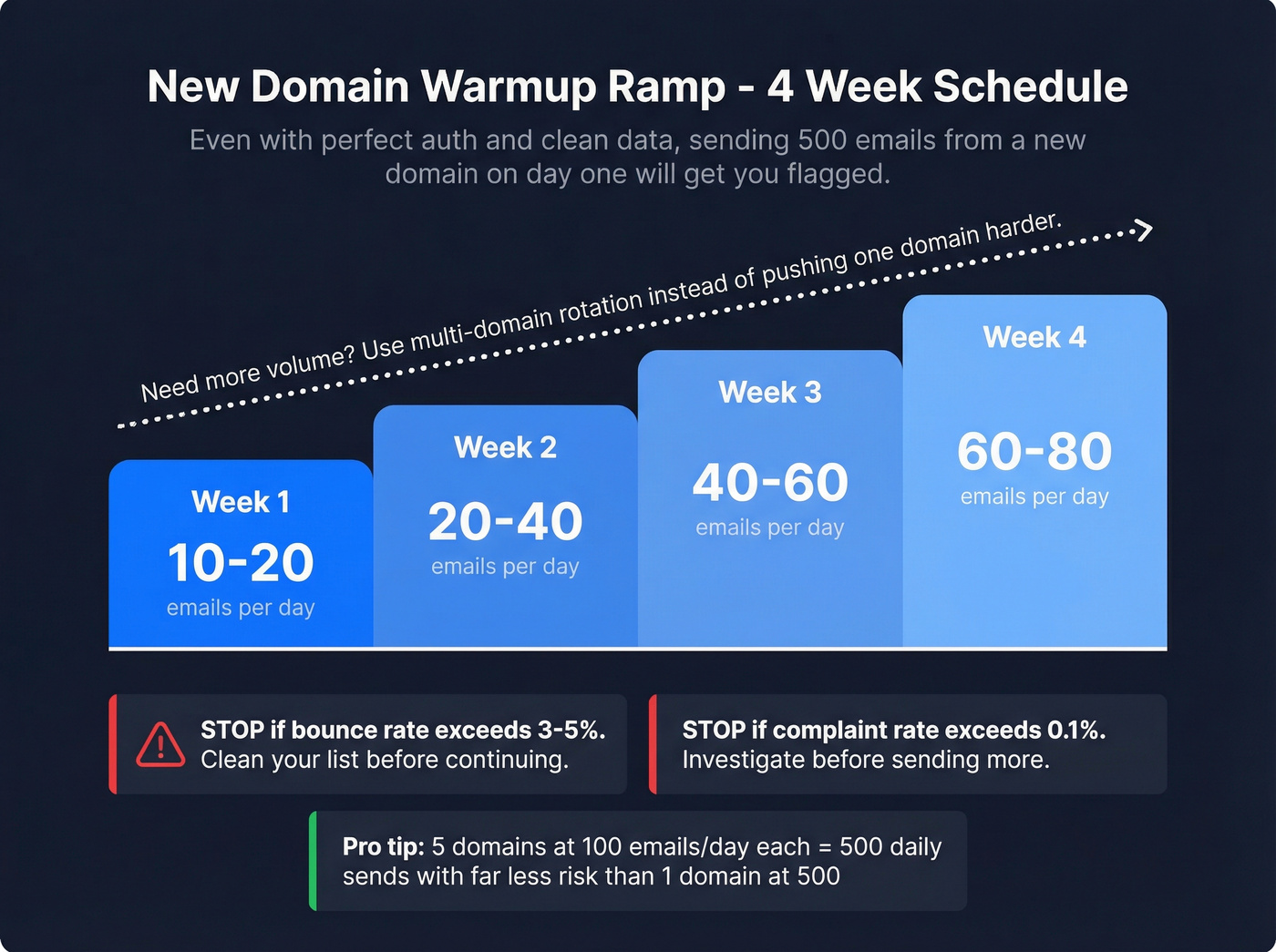
Even with perfect authentication and clean data, sending 500 emails from a brand-new domain on day one will get you flagged. Volume discipline is non-negotiable.
Safe daily limits that actually matter (not the technical maximums):
| Provider | Technical Limit | Safe Daily Limit |
|---|---|---|
| Google Workspace | 2,000/day | 100-150/day |
| Microsoft 365 | 10,000 recipients | 100-150/day |
| GoDaddy | 250 recipients | 50-75/day |
| Free Gmail | 500/day | Don't use it |
For new domains, follow this warmup ramp:
| Week | Daily Volume |
|---|---|
| Week 1 | 10-20 |
| Week 2 | 20-40 |
| Week 3 | 40-60 |
| Week 4 | 60-80 |
If you need more volume, don't push a single domain harder. Use a multi-domain rotation strategy - 5 domains at 100 emails/day each gives you 500 daily sends with far less risk than one domain at 500. For teams running dedicated IPs, the general heuristic is one IP per ~2M emails/day, with a minimum of ~200K/month to build and maintain IP reputation. Below that threshold, shared IPs are usually the better call. (If you're weighing infrastructure, see dedicated IPs.)
Here's the reality: Warmup tools help new or inactive inboxes build initial reputation. But warmup doesn't guarantee long-term inbox placement. In our experience, teams that skip list verification but invest in warmup tools are solving the wrong problem entirely.
Watch two warning thresholds during any ramp: bounce rate above 3-5% and complaint rate above 0.1%. If either triggers, stop sending, clean your list, and investigate before continuing.
Content and Engagement Signals
Content matters less than infrastructure and data quality, but it's still part of the equation. Don't overthink it - just don't sabotage yourself.
Keep links under 3 per email. Heavy image-to-text ratios trigger spam filters, and plain text or minimal HTML outperforms image-heavy designs for cold outreach. Skip ALL CAPS in subject lines. It's a basic spam filter trigger that still catches people in 2026. (If you want a tighter rule set, see email subject line spam.)
Personalization beyond first name makes a measurable difference. Reference the prospect's company, a recent trigger event, or a specific pain point. Mailbox providers track engagement, and personalized emails get replies - replies are the strongest positive signal you can send to a mailbox provider. That's also why you should never send from noreply@. If you need a structure that keeps personalization tight, use a proven sales email structure.
Separate your subdomains: run marketing email from marketing.yourdomain.com and transactional from notifications.yourdomain.com. If marketing takes a reputation hit, your transactional delivery stays clean. (For the full stack, see email sending infrastructure.)
One thing worth internalizing: Gmail's Promotions tab is a categorization feature, not a deliverability failure. A significant portion of Gmail-delivered email goes to Promotions - that's normal behavior. Focus on inbox vs. spam, not inbox vs. Promotions. If you're trying to diagnose this specifically, read Emails Landing in Promotions Tab?
Look, if your deal sizes are under five figures, you probably don't need a dedicated IP or enterprise deliverability tooling. Shared infrastructure with clean data and proper authentication will outperform an expensive setup built on dirty lists every single time.
Monitoring and Ongoing Health Checks
Deliverability isn't a one-time setup. It's a weekly habit. We've seen domains recover from low reputation in Google Postmaster within 2-3 weeks of pausing, cleaning, and resuming at lower volume. But only when teams caught the drop early.
| Tool | Cost | What It Does |
|---|---|---|
| Google Postmaster | Free | Domain reputation, spam rate, authentication pass rates |
| Microsoft SNDS | Free | IP reputation for Outlook/Hotmail delivery |
| MxToolbox | Free tier / paid (~$30-$150+/mo) | Blacklist monitoring, DNS checks |
| SenderScore.org | Free | IP reputation score (0-100) |
| GlockApps | ~$30-$150+/mo | Inbox placement testing across providers |
Google Postmaster Tools is non-negotiable. It shows your domain reputation, spam complaint rate, and authentication results. If you're not checking it weekly, you're flying blind. Microsoft SNDS is the underused equivalent for Outlook - most teams don't even know it exists. If you suspect a reputation hit, follow a proper blacklist alert triage flow.
Set up a weekly rhythm: check Postmaster and SNDS every Monday, run a blacklist scan monthly, and do a full inbox placement test before any major campaign launch. One diagnostic tip most teams miss - compare open and click rates by mailbox provider domain. If Gmail engagement is strong but Outlook is tanking, you've isolated the problem to Microsoft's filtering, and that changes your fix entirely.
For contacts that go cold, run a re-engagement campaign every 90 days. If they don't engage after two attempts, remove them. Dead weight drags down engagement metrics, which drags down reputation for everyone else on the list.
FAQ
What's the difference between delivery rate and deliverability?
Delivery rate measures whether the server accepted your email. Deliverability measures whether it reached the inbox instead of spam. You can have a 98% delivery rate and still land 30% in spam - always track inbox placement separately.
How often should I verify my email list?
Every 30-90 days depending on volume. B2B lists decay roughly 28% per year, so a list that was clean in January is significantly degraded by summer.
Does email warmup still work in 2026?
Yes, for new or inactive inboxes - follow a 4-week ramp from 10-20 emails/day up to 60-80. But warmup is a starting point, not a strategy. Engagement and data quality matter far more once you're past the initial ramp phase.
What's a good inbox placement rate?
95%+ is excellent. 85-94% is worth investigating. Below 80% means something is structurally broken - usually authentication misconfiguration, list quality, or accumulated reputation damage that requires a pause-and-clean cycle.
Do I need DMARC if I'm not a bulk sender?
Yes. DMARC protects your domain from spoofing regardless of volume, and Microsoft now enforces it for all Outlook/Hotmail/Live.com senders. Start at p=none, then progress to p=quarantine and p=reject as you confirm all legitimate sources pass authentication.
Run through this email deliverability checklist quarterly. Authentication, data quality, and volume discipline are the three things that actually move inbox placement. Everything else is optimization.