How to Write a Virtual Introduction via Email (Without Making It Awkward)
You open your inbox on a Monday morning, coffee in hand, and there it is: "Intro: You should meet Sarah!" No context. No reason. No idea who Sarah is or why you should care. You're stuck in a thread you didn't ask for, with a stranger who's equally confused, and the person who introduced you has already vanished.
There's a better way. Whether you're crafting a virtual introduction via email to connect two people, introducing yourself to a new team, or responding to an introduction someone made on your behalf, the mechanics matter more than most people think. Get them right and you build social capital. Get them wrong and you burn it.
The Quick Version
Five rules. Memorize them.
- Always double opt-in before introducing two people. Ask both parties separately. (Details)
- Subject line format:
Intro: Name (Company) <> Name (Company) - [topic]. (Examples) - Keep the intro to 3-5 sentences with specific context and a clear reason to connect. (Step-by-step)
- Step out of the thread after sending. Don't hover. (Templates)
- If you're the recipient, reply within 24-48 hours and BCC the introducer after your first reply. (Recipient playbook)
The rest of this guide fills in the details, gives you copy-paste templates, and covers the situations nobody talks about - like what to do when nobody replies.
What Counts as a Virtual Introduction via Email?
Two scenarios fall under this umbrella. The first is a three-way introduction, where you're the connector bringing two people together. The second is a self-introduction, where you're reaching out to someone new - a colleague, a prospect, a contact from a networking event.
The principles work across Gmail, Outlook, or any email client. What changes is the context, the tone, and whether you asked permission first.
The Double Opt-In Rule (And When to Skip It)
The "double opt-in" introduction, popularized by Fred Wilson, is the gold standard for a reason. Before you introduce Person A to Person B, you email each of them separately and ask if they're interested. Only if both say yes do you make the intro.

Why bother? Because skipping this step puts the recipient in an impossible position. As Howard Gray breaks it down, there are four bad outcomes when you skip the opt-in: (A) the recipient has to awkwardly decline, (B) they ignore the email entirely, (C) they take forever to reply with a limp excuse, or (D) they take a meeting they never wanted. Alexander Jarvis has a perfect example of what not to do: "Hi Jarvis, Mary is CC'd on this email and is thinking about doing a startup. You should chat!" No context. No reason. No benefit stated. That's not an introduction - it's an inbox ambush.

Double opt-in introductions see roughly 2-3x higher response rates than unsolicited intros. Makes sense: when someone's already agreed to the connection, they actually reply.
In our experience, the people who skip the opt-in are the same people who wonder why their network stops returning favors.
When You Can Skip the Double Opt-In
Three exceptions - and they're narrower than most people think:
- You're certain on value. Introducing a founder to a startup lawyer, for example. Both sides clearly benefit and the value proposition is obvious enough that permission is a formality.
- You're tight with both people. Close friends or co-workers who'd just say "WTF, dude?" if the intro was bad - not people who'd silently resent you.
- You're a known super connector. If making introductions is literally your thing and both parties know that, some misses are acceptable. But even super connectors get tracked - Jarvis notes he stops accepting intros from repeat offenders who waste his time.
If you're unsure which category you fall into, default to asking permission. It takes 60 seconds and saves everyone from awkwardness.

A perfect virtual introduction means nothing if it lands in the wrong inbox. Prospeo's 143M+ verified emails with 98% accuracy ensure your intros reach the right person every time - no bounces, no awkward dead ends.
Stop introducing people to invalid email addresses. Verify first.
How to Write an Email Introduction Step by Step
Here's the thing: most introduction emails fail because the writer treats them like a casual text message. "Hey, you two should connect!" isn't an introduction. It's a homework assignment for two busy people.

The Muse outlines a solid six-step process that I've refined based on what actually works in practice:
Step 1: Write a clear subject line. Use the format Intro: Alice (Company X) <> Bob (Org Y) - [topic]. This tells both parties exactly what the email is before they open it. (If you want more options, see our subject line ideas.)
Step 2: Get to the point immediately. Your first sentence should explain why you're making this introduction. Not pleasantries. Not "I hope this email finds you well." The reason.
Step 3: Introduce both parties with specific context. Don't just say "Alice is great." Say "Alice runs product marketing at Stripe and just launched their enterprise positioning - she's the person who figured out how to sell to banks." Give each person a reason to be interested in the other.
Step 4: State the mutual benefit. Why should these two people talk? Be explicit. "Alice is exploring B2B pricing models, and Bob literally wrote the book on usage-based pricing" is infinitely better than "I think you'd get along."
Step 5: Include a clear next step. "I'll let you two take it from here" works. So does "Bob, would you be open to a 15-minute call next week?" Give them something to do. (More examples: schedule a call email.)
Step 6: Walk away. This is the step most people skip. Once you've made the introduction, leave the thread. Don't hover. Don't follow up three times asking "did you guys connect?" You're the matchmaker, not the chaperone.
One more thing before you hit send: make your email forwardable. If the person you're asking can just forward your email to the third party without rewriting anything, you've made it effortless for them. That's the difference between an intro that happens and one that dies in someone's drafts folder.
Subject Lines That Get Opened
Personalized subject lines get 50% higher open rates. For introduction emails, the subject line does double duty: it tells the recipient what the email is about and signals that this isn't spam. (If you're testing variations, use an A/B testing framework.)
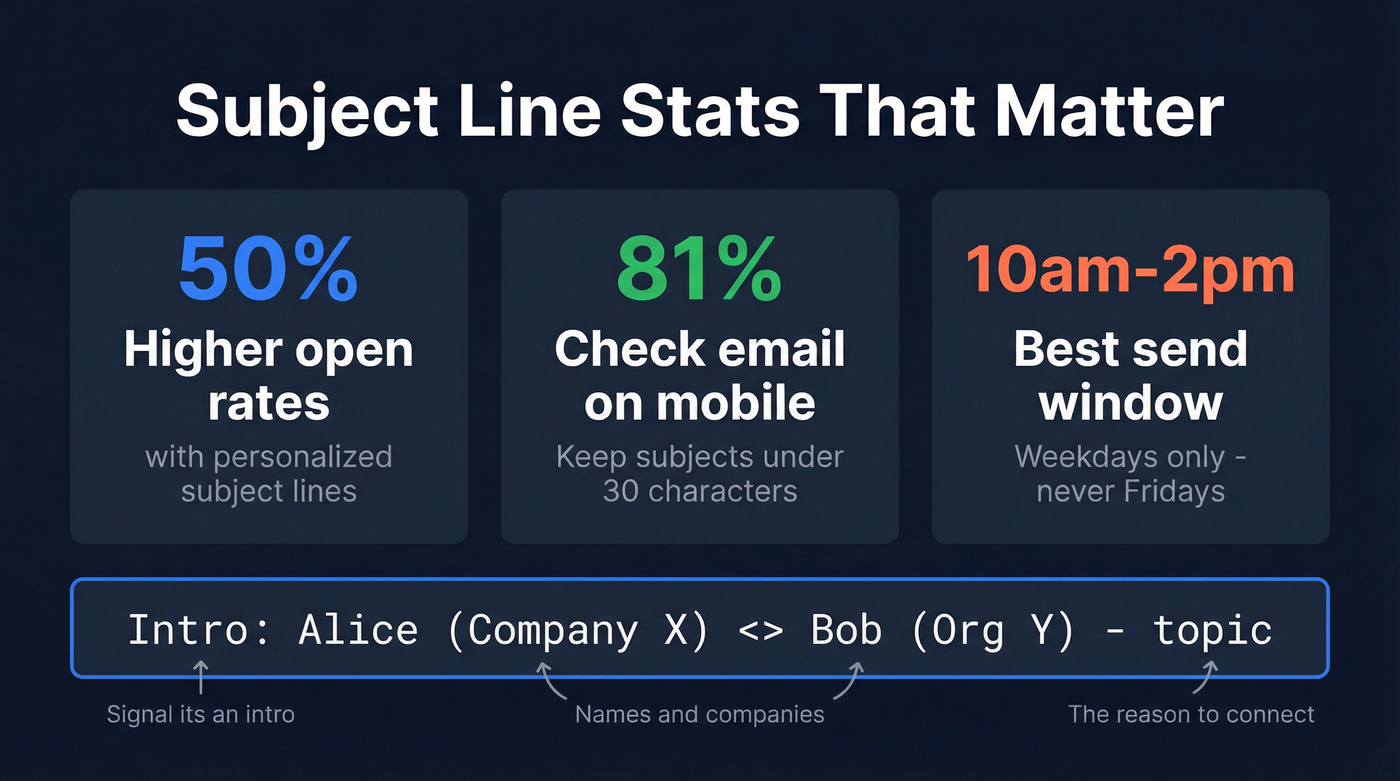
Howard Gray's gold-standard format is hard to beat: Intro: Alice (Company X) <> Bob (Org Y) - [topic]. Clear, scannable, works on mobile.
And mobile matters. 81% of people check email on their phones, so your subject line needs to land in 25-30 characters on the preview screen. The full format above is longer, but the key information - "Intro: Alice <> Bob" - appears first, which is what counts on a small screen.
Best send window: 10 a.m. to 2 p.m. on weekdays. Never Fridays. Never weekends. (More timing rules: when should I send a follow up email.)
| Scenario | Subject Line Example | Why It Works |
|---|---|---|
| Three-way intro | Intro: Sara (Acme) <> Tom (Bolt) |
Names + companies upfront |
| Topic-specific intro | Intro: Sara <> Tom - pricing strategy |
Adds the "why" |
| Self-intro to team | Quick hello from your new PM |
Warm, casual, clear role |
| Event follow-up | Great meeting you at SaaStr! |
Triggers memory instantly |
| Virtual meeting prep | Intro ahead of our call Tuesday |
Time-anchored urgency |
| Referral intro | [Name] suggested we connect |
Social proof in subject |
| Virtual hello | Pleased to e-meet you, [Name] |
Friendly, personal |
| Client referral | Acme + Bolt - worth a chat? |
Implies mutual benefit |
Virtual Introduction Email Templates for Every Scenario
Below you'll find an introduction via email template for the most common situations. Adapt the tone and length to your relationship with each party - these are starting points, not scripts.
Asking Permission (Double Opt-In Request)
When to use this: Before every three-way introduction, unless you fall into one of the three exceptions above.
Subject: Quick question - intro to [Name]?
Hi [Name],
[Name] from [Company] reached out about [specific topic]. They're [one sentence of context - what they do, what they've accomplished]. I think you two would have a great conversation about [specific reason].
Would you be open to an introduction? Happy to share more context if helpful.
Best, [Your name]
Ask what information your contact is comfortable sharing and how they'd prefer to connect. Some people want email; others prefer a calendar link.
The Standard Three-Way Introduction
After both parties have agreed, send this:
Subject: Intro: [Name] ([Company]) <> [Name] ([Company]) - [topic]
Hi [Name A] and [Name B],
I wanted to connect you two. [Name A] is [one sentence - role, company, relevant accomplishment]. [Name B] is [one sentence - role, company, relevant accomplishment].
[One sentence on why this connection makes sense - the mutual benefit.]
I'll let you two take it from here!
Best, [Your name]
Resist the urge to write a paragraph about each person. Three to five sentences total. That's it.
The Name-Drop Alternative
Sometimes a formal introduction feels like overkill. Instead of making the intro yourself, tell the person: "Feel free to mention my name when you reach out to [Name]. I'll give them a heads-up that you might be in touch."
This works especially well when the power dynamic is uneven - it lets the junior person decide if and when to reach out, without putting the senior person on the spot. It also reduces your overhead and gives both parties more agency.
Skip this approach if both people are at the same level and clearly want to connect. In that case, just make the intro directly.
Introducing Yourself to a New Team
Before/after - because most people get this wrong:

Bad: "Hi team! I'm thrilled to be joining such an incredible group of talented individuals. I've spent the last decade building world-class products across multiple verticals and I'm passionate about..."
Good:
Subject: Excited to join the [Team Name] team - [Your Name]
Hi everyone,
I'm [Name], your new [Job Title]. I'll be working on [brief scope - one sentence]. Before this, I was at [Company] doing [one sentence].
Outside of work, I [one personal detail - hobby, pet, fun fact]. Looking forward to meeting everyone - feel free to reach out anytime.
Best, [Your name]
A short intro is more powerful than a long speech. If you're senior, you don't need to prove yourself. Keep it human, not impressive.
After a Networking Event
Send within 24-48 hours. After that, conversations blur together and you become "that person I vaguely remember." (If you want more copy/paste options, see it was a pleasure meeting you email sample.)
Fill in the blanks:
- Subject: Great connecting at
___________! - Opening: Really enjoyed our conversation about
___________. - Specificity hook: Your point about
___________stuck with me. - Next step: I'd love to continue the conversation - would you be open to
___________? - Bonus: Here's that
___________I mentioned.
The key: reference something specific. "Great meeting you" is forgettable. "Your take on PLG pricing was the most interesting thing I heard all day" is not.
Client or Customer Referral
When to use this: When introducing a client to someone in your network who can help them.
Subject: Intro: [Client Name] ([Company]) <> [Contact Name] ([Company]) - [topic]
Hi [Client Name] and [Contact Name],
[Client Name], meet [Contact Name] - they're [one sentence on expertise and why it's relevant]. [Contact Name], [Client Name] is [one sentence on their company and the specific challenge they're working on].
I think there's a natural fit here around [specific mutual benefit]. I'll step out and let you two connect directly.
Best, [Your name]
Common mistake here: being vague about the mutual benefit. The client needs to understand why this person can help. The contact needs to understand the opportunity. Spell it out.
How to Respond When You're the One Being Introduced
Nobody talks about this side of the equation, and it's where most people fumble.
Reply within 24-48 hours. Waiting longer signals disinterest - even if you're just busy. The introducer put their reputation on the line for this connection. Respect that. (Related: average lead response time.)
Mirror their tone. If the introduction was casual and first-name, don't reply with "Dear Mr. Johnson." If it was formal, don't open with "Hey!" Match the energy.
Move the introducer to BCC. This is the move that separates amateurs from professionals. After your first reply, put the introducer on BCC. They get confirmation that the connection happened, but they're not stuck in a 14-email scheduling thread they don't need to follow.
Don't just say "thank you." Continue the conversation with something specific. Reference the shared connection, share a bit about yourself (two to three sentences max), and suggest a next step.
Here's a template:
Hi [Name],
Thanks for reaching out - [Introducer] has told me great things about [specific thing]. I'm [your name], [one sentence about your role and what you're working on].
I'd love to learn more about [specific topic from the introduction]. Would a 15-minute call work sometime next week? I'm flexible on [days].
Looking forward to it, [Your name]
The biggest mistake recipients make is overthinking it. You don't need a perfect response. You need a prompt, warm, specific one.
What to Do When There's No Response
You sent the introduction two weeks ago. Nothing. The thread sits in your inbox like an unanswered text from someone you thought liked you.
This is normal. It happens constantly.
The follow-up cadence: First follow-up 3 days after the initial email. Second follow-up 5 days after that. Then stop. Two follow-ups is the standard - anything beyond that crosses from persistent to pushy. (More templates: short follow up email after no response.)
Always reply to the original thread. Don't start a new email. Replying to the existing thread puts the context right in front of them without making them dig.
Never send on Fridays or weekends. Schedule for mornings or right after lunch - that's when people are actually processing their inbox.
Here's a follow-up template:
Hi [Name],
Wanted to bump this to the top of your inbox - I know things get busy. [One sentence restating the reason for the connection.] Would love to find 15 minutes if you're open to it.
Happy to work around your schedule.
Best, [Your name]
If you still hear nothing after two follow-ups, move on. Silence is an answer. Don't take it personally - people's bandwidth fluctuates, and it's rarely about you.
I've seen introductions revive months later with a simple reply to the original thread. Since your initial email was specific, it jogs their memory instantly. Don't delete old threads.
Closing the Loop - The Thank-You Email to Your Introducer
Most people skip this step, and it's the one that matters most for your long-term network.
After the introduction leads to a meeting (or even just a good conversation), circle back to the person who made it happen. It makes them more willing to help you again. It's the single best way to build a reputation as someone worth introducing.
Send it within 24 hours of the meeting:
Hi [Introducer],
Just wanted to let you know - I had a great conversation with [Name] today. We talked about [brief topic] and are planning to [next step]. Really appreciate you making the connection.
Thanks again, [Your name]
Three sentences. Takes 30 seconds to write. Keeps the door open for years.
When NOT to Make an Introduction
Here's the hot take most networking advice won't give you: stop making introductions nobody asked for. The best connectors aren't the ones who make the most introductions - they're the ones who make the fewest bad ones. A mediocre introduction costs more social capital than no introduction at all.
Don't make the intro if:
- There's no clear reason for the two people to connect
- One person hasn't agreed to it (double opt-in violation)
- The introduction benefits only one side - the other person is just doing you a favor
- It's a disguised sales pitch wrapped in a "you two should connect"
- You've been making too many intro requests to the same person recently - spread the load across your network
Give yourself permission to say no when someone asks you to make an introduction you're not comfortable with. A bad introduction damages your reputation with both parties.
The litmus test: if you can't articulate in one sentence why both people would benefit, don't send the email.
Mistakes That Kill Email Introductions
No context provided. Include who both people are, what they do, and specifically why they should connect. "You should chat" isn't context.
No clear CTA. Tell the recipients what to do next. "I'll let you two take it from here" or "Would a 15-minute call next week work?" Give them a path forward. (More: sales CTA.)
Too long or too short. Three to five sentences for the introduction itself. Emails that run long lose the reader's attention; emails that are too brief come across as discourteous. The sweet spot is tight but complete.
Forgetting mobile readers. Keep subject lines to 25-30 characters for the preview. Use short paragraphs. No giant blocks of text.
Sending at the wrong time. 10 a.m. to 2 p.m. on weekdays. Not Fridays. Not weekends. Not 11 p.m. on a Sunday.
Sending to an outdated email address. Verify the address before you send. A bounced introduction email doesn't just fail silently; it makes you look careless to both parties. (If you need a workflow, see how to verify an email address.)
Not closing the loop with the introducer. Send a three-sentence thank-you within 24 hours of the meeting. It takes 30 seconds and keeps the door open for future introductions.
Writing a great intro email is step one. Finding the decision-maker's actual email is step zero. Prospeo's Chrome extension lets 40,000+ users pull verified contact data from any LinkedIn profile or company website in one click.
Find anyone's verified email in seconds - for $0.01 each.
FAQ
How long should a virtual introduction email be?
Three to five sentences covering who both people are, why they should connect, and a clear next step. If you're writing more than a short paragraph, you're overcomplicating it. Review the three-way intro template above for the ideal length.
Should I CC or BCC the introducer after replying?
CC them on the initial reply so they see the connection happened. After that first exchange, move the introducer to BCC - they don't need to follow a 14-email scheduling thread. This is standard email introduction etiquette in 2026.
What if someone asks me to make an introduction I'm not comfortable with?
Decline gracefully: "I don't think I'm the right person for this, but here's another way to reach them." Protecting your network is more important than being agreeable - one bad intro costs more social capital than saying no.
How do I find someone's correct email address before making an introduction?
Use a verification tool so your intro doesn't bounce. Prospeo's email finder covers 75 free lookups per month at 98% accuracy - enter a name and company, get a verified address in seconds. A bounced introduction makes you look careless to both parties.
Is it rude to follow up on an introduction that got no reply?
Not at all - one follow-up after 3 days is expected, and a second 5 days later is acceptable. After two attempts, stop. Always reply to the original thread so the recipient has full context without digging through their inbox.