Why Your Emails Keep Landing in the Promotions Tab - and What Actually Works in 2026
A newsletter operator with 60,000 subscribers watched their open rates crater from 45% to 25% starting April 2024. Same content. Same schedule. Same list they'd been mailing for six years. When they asked their ESP what happened, the answer was maddening: "Try improving your content quality." That's the email equivalent of a doctor telling you to drink more water.
Here's what actually happened - and what nobody told that sender. Gmail didn't just change where emails land. It changed how it decides what's worth showing you at all. Your emails landing in the promotions tab isn't the real problem. Gmail's September 2025 relevance update is the actual threat, and your data quality is probably the root cause.
What You Need to Know Right Now (Quick Version)
Before you change a single thing, figure out which problem you actually have:
If you send marketing emails - stop fighting the Promotions tab. Optimize within it. Gmail Annotations, BIMI logos, and engagement-first sending will do more for your revenue than any "hack" to reach Primary.
If you send cold email - you need a completely different playbook. Plain text, one link max, verified contact data, warmed domain. Cold outreach ending up in promotions is a different beast than marketing emails getting categorized, and the stakes are higher.
Before anything else - set up Google Postmaster Tools (free) and verify your list. A 5% bounce rate does more damage to your inbox placement than any subject line, template, or send time ever could.
How Bad Is the Promotions Tab, Really?
Most articles about the Promotions tab start with panic. Let's start with math instead.
The Real Engagement Gap
The Primary tab has a read rate of about 22%. Promotions sits at 19.2%. That's a 2.8 percentage point difference - roughly 12% in relative terms - not the catastrophic gap most marketers imagine.
Here's the thing: 41% of people check email specifically looking for discounts from brands. Nearly half of Promotions tab users check it every day. These aren't people accidentally stumbling into your email. They're in buying mode.
The flip side is real, though. 25% of Gmail users never check their Promotions tab at all. That's a quarter of your Gmail audience you're missing. But "a quarter of your Gmail audience" is smaller than you think.
The "5-10% Math" Most Guides Skip
Gmail accounts for about 29% of email opens per Litmus's December 2025 data. Of those Gmail users, estimates range from 20% to 50% actually having the tabbed inbox enabled. Most people don't change defaults, but many never turned tabs on in the first place.

Run the numbers: if 29% of your list opens in Gmail and maybe 20-50% of those have tabs enabled, the Promotions tab affects roughly 5-10% of your total subscriber base. Not nothing - but not the apocalypse either.
The real damage isn't the tab. It's what happened inside the tab in September 2025.
What Actually Changed in 2024-2025
Gmail's inbox placement ratios shifted dramatically from roughly 50/50 Primary/Promotions to 25/75 since Q3 2024. That's not a subtle tweak. Klaviyo's inbox placement rates dropped from 56.90% to 43.66% - a 13.24% decline from Q1 2024 to Q1 2026. Gmail's overall inbox placement fell 5.02% year-over-year.
Something fundamental changed. Actually, several things did.
Gmail's September 2025 Relevance Update
This is the big one.

Gmail stopped sorting the Promotions tab chronologically and switched to "most relevant" by default. Chronological sorting is dead. What this means in practice: two subscribers can receive your identical email, but one sees it as a "Top deal" near the top of their Promotions tab while the other never scrolls far enough to notice it exists. Gmail now ranks messages by predicted relevance to each specific user - based on engagement history, interaction patterns, and broader Gmail trends.
As Mailgun put it: "You're no longer optimizing for filters; you're optimizing for interest."
Sending more emails to unengaged subscribers doesn't just waste money anymore. It actively hurts your visibility for the subscribers who do engage. The update rewards senders who maintain strong engagement and punishes those who prioritize reach over relevance. Mailchimp recommends sending at least every 2-3 weeks to maintain subscriber recognition - go dark longer and Gmail treats your next send as unfamiliar.
The New Purchases Tab and Manage Subscriptions
Gmail introduced a dedicated Purchases tab for receipts, order confirmations, and shipping notifications. This matters because if you're sneaking upsells or promotional banners into transactional emails, Gmail will reclassify them as promotional. Use separate subdomains for transactional emails (e.g., notifications.yourdomain.com).
The new Manage Subscriptions area lets users see all active subscriptions and how many emails each sender has sent recently. Heavy senders appear first - and not in a good way. If you're blasting daily, your subscribers now have a dashboard that makes it trivially easy to unsubscribe. That's worth remembering: 43% of people unsubscribe because a sender emails too often.
Google Postmaster Tools v2
Postmaster Tools v1 retired September 30, 2025. The v2 dashboard gives you a clearer compliance view, better delivery error reporting, and user-reported spam rate monitoring. One notable change: IP reputation reporting is gone. Google is championing domain reputation over IP reputation now.
If you haven't switched yet: log in with your Google Account, add your domain, verify ownership via TXT DNS record. No re-verification needed if you were already using v1. Takes five minutes.

A 5% bounce rate damages inbox placement more than any subject line trick. Prospeo's 5-step email verification and 7-day data refresh cycle keep your bounce rate under control - 98% accuracy, catch-all handling, spam-trap removal included.
Stop landing in Promotions because your contact data is stale.
Why Emails Get Pushed to Promotions (and How Gmail Decides)
Gmail's classification runs on three pillars. Understanding which one matters most will save you from wasting time on the wrong fixes.
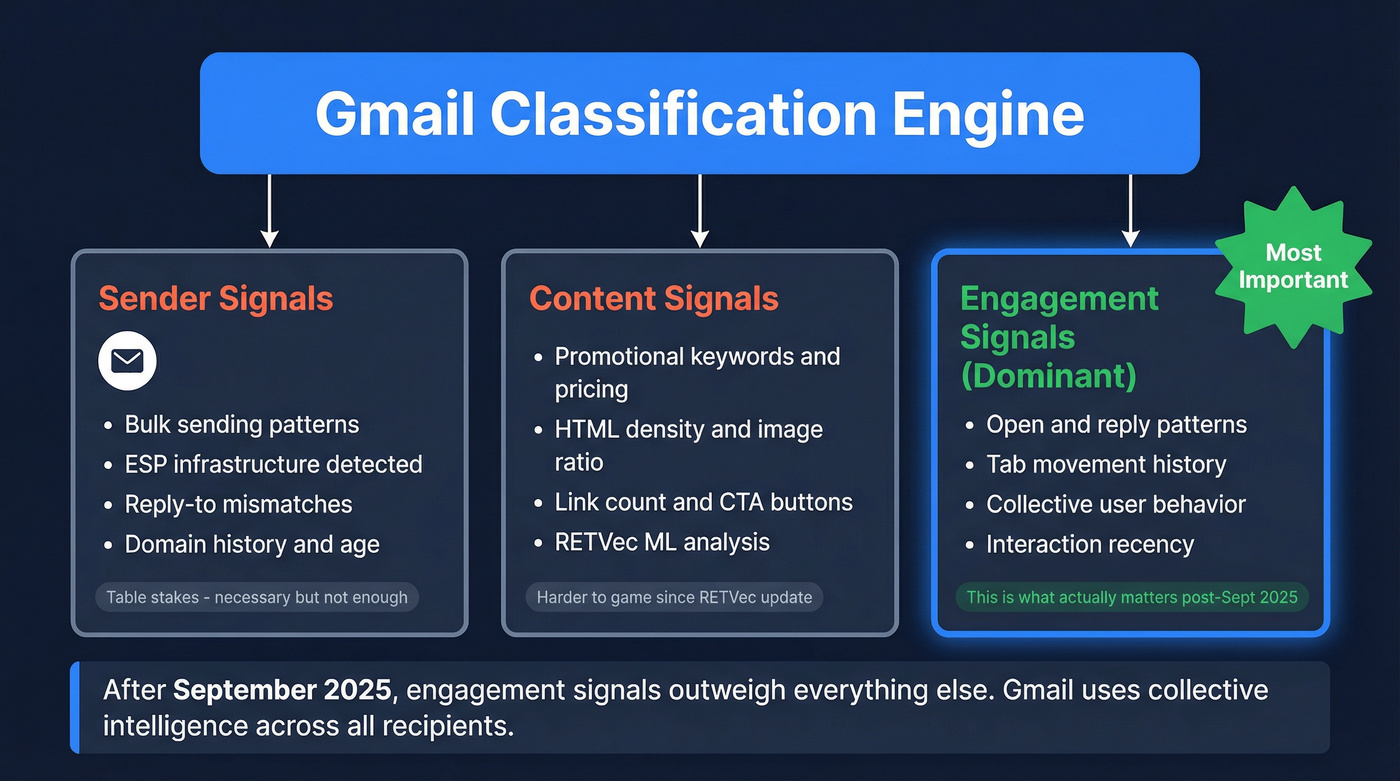
Sender Signals
Bulk sending patterns, ESP infrastructure detection, reply-to mismatches, and domain history. Gmail knows you're sending through Mailchimp before it reads a single word of your email. This is table stakes - get authentication right, but don't expect it to move you to Primary.
Content Signals
Promotional keywords, pricing info, CTAs, HTML formatting, image density, link count. Gmail's RETVec machine-learning vectorizer reads through cosmetic tricks and gimmicks. It's harder to fool than the old keyword-based filters. An email that looks like marketing will be classified as marketing, regardless of how cleverly you word it.
Engagement Signals (the Dominant Factor)
Post-September 2025, this is what actually matters. Open patterns, tab movement history, interaction history, and how other users interact with similar messages from you. Gmail uses collective intelligence - if most recipients ignore your emails, new recipients will see your messages buried deeper in Promotions.
| Pushes Toward Primary | Pushes Toward Promotions |
|---|---|
| High reply rate | Bulk ESP headers |
| Plain text format | Heavy HTML/images |
| Single recipient | List-based sending |
| Personal tone | Marketing language |
| Few or no links | Multiple CTAs/links |
| Strong open history | Low engagement rate |
| Recipient moved you | No interaction history |
| Conversational subject | Discount/offer subject |
There's no checklist that guarantees Primary placement. Gmail's classification is probabilistic, not rule-based. Anyone telling you otherwise is selling something.
Here's the irony most guides won't tell you: promotional emails that do reach Primary often get marked as spam. Users expect marketing content in Promotions - when it shows up in Primary, it feels intrusive and unsubscribe rates spike. Fighting your way into Primary can backfire spectacularly.
It's Not Just Gmail Anymore
If you've been focused exclusively on Gmail's Promotions tab, you're missing the bigger picture.
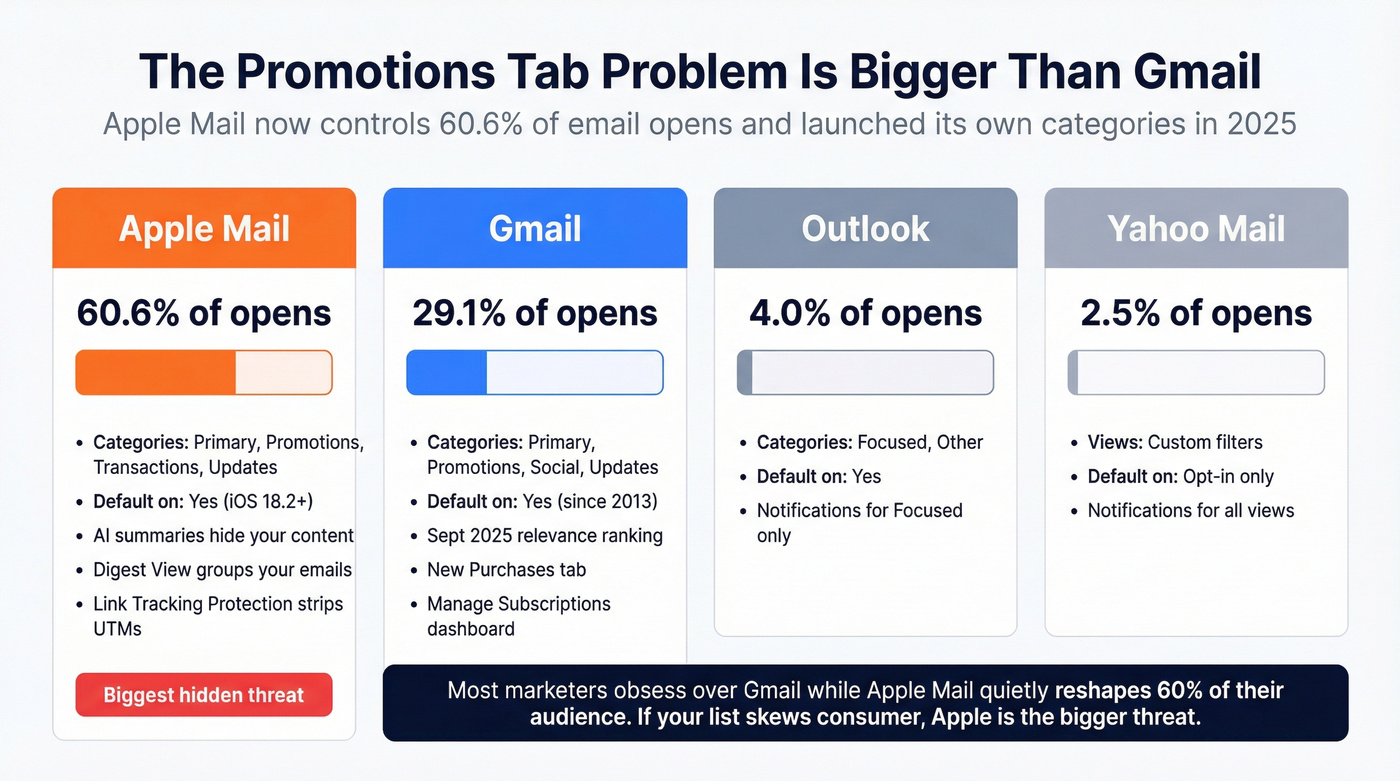
Apple Mail now accounts for 60.6% of all email opens - more than double Gmail's 29.10%. And Apple Mail introduced its own categories with iOS 18, rolling out publicly in January 2025: Primary, Promotions, Transactions, and Updates. Here's what makes Apple's version more disruptive: categories are enabled by default on iOS 18.2+. Most users don't change defaults, so roughly 70-80% of updated iOS users have them active - and many don't even realize it.
Apple Intelligence creates AI summaries in the inbox and inside emails. Users read the AI preview and never actually open your message. Braze flagged another feature called Digest View: emails from the same brand get grouped into a single thread. Recipients don't see your newest email in its entirety - they see a condensed version alongside your previous sends. If your last three emails were mediocre, your newest one inherits that context.
Apple's Link Tracking Protection also strips identifiable tracking parameters from URLs, muddying your analytics. Open rates and click attribution become less reliable, which means the "open rate drops" you're seeing are partly a measurement problem, not a placement problem.
Real talk: many of the "open rate drops" marketers blamed on Gmail in late 2024 and early 2025 were actually caused by Apple Mail's new categorization rolling out silently across billions of devices. If Apple Mail represents 60% of your opens and suddenly starts categorizing your emails, that dwarfs anything Gmail did.
Most email marketers are obsessing over Gmail's Promotions tab while Apple Mail quietly reshapes 60% of their audience. If you're selling deals under $10k and your list skews consumer, Apple Mail's categorization is a bigger threat to your revenue than anything Gmail has done since 2013.
| Client | Tab Names | Default On? | Market Share | Push Notifications |
|---|---|---|---|---|
| Gmail | Primary, Promotions, Social, Updates | Yes (since 2013) | 29.1% of opens | Primary only |
| Apple Mail | Primary, Promotions, Transactions, Updates | Yes (iOS 18.2+) | 60.6% of opens | Varies by category |
| Outlook | Focused, Other | Yes | 4.0% of opens | Focused only |
| Yahoo Mail | Views (custom filters) | Opt-in | 2.5% of opens | All views |
For Marketing Emails: Stop Fighting Promotions and Win Inside It
One experienced marketer on Reddit nailed it: "Stop trying to move your emails from Promotions to Primary. People go into the Promotions tab to see the new deals they can shop through. They're already in the mindset to shop or browse."
The winning strategy isn't escaping Promotions. It's being the most visible, most clicked email inside Promotions.
Gmail Annotations: The Tactic Almost Nobody Uses
Fewer than 5% of email marketers use Gmail Annotations. That's a massive missed opportunity. Annotations let you add deal badges, logos, images, and discount codes that display directly in the Promotions tab - before the subscriber even opens your email. No pre-registration required for basic annotations, just valid JSON-LD markup.
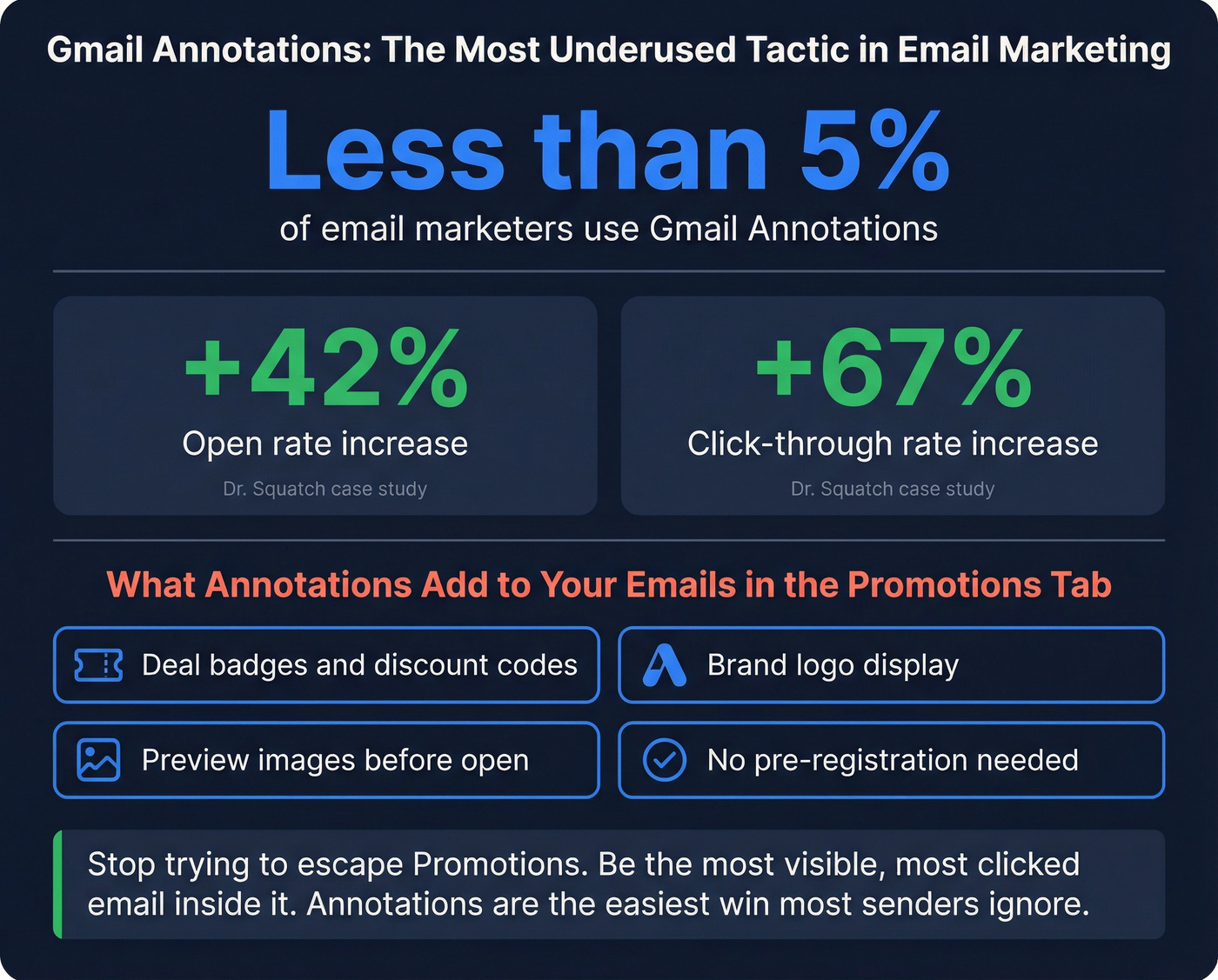
The results speak for themselves. Dr. Squatch saw a 42% open rate increase and 67% CTR increase after optimizing their inbox placement strategy. Ministry of Supply gained a 27% open rate improvement in a single day. Clevr Blends reported 21% gains. These aren't outliers - annotations give you a visual advantage that most competitors simply aren't using.
Here's the JSON-LD code you need:
<script type="application/ld+json">
{
  "@context": "http://schema.org/",
  "@type": "PromotionCard",
  "image": "https://yourdomain.com/promo-image.png",
  "description": "Summer Sale   -   30% off everything",
  "discount": {
    "@type": "Discount",
    "discountCode": "SUMMER30",
    "discount": "30%"
  },
  "validUntil": "2026-08-31T23:59:59-07:00",
  "url": "https://yourdomain.com/summer-sale"
}
</script>
Drop this in the <head> of your email HTML. Common pitfalls: invalid markup, poor image quality, and irrelevant content that doesn't match the email body.
BIMI: Get Your Logo in the Inbox
BIMI (Brand Indicators for Message Identification) puts your verified logo next to your email in the inbox. Average open-rate lift: 10%. Some studies report 21-39% gains. It's not a silver bullet, but it's free visibility that compounds over every send.
Implementation requires a DMARC policy at enforcement level (p=quarantine or p=reject) and a Verified Mark Certificate. One-time setup that pays dividends forever.
Subject Lines and Preview Text That Win the Scroll
With relevance sorting, your subject line isn't competing against the email sent one minute before yours. It's competing against every sender in your subscriber's Promotions tab fighting for perceived value.
67% of people prefer short emails. 46% open all emails from a brand because the brand consistently sends relevant messages. The pattern is clear: relevance and brevity beat cleverness.
You can ask subscribers to move your email to Primary or add you to contacts in your welcome email. I'll be honest - adoption on this is low. Maybe 2-5% of subscribers will actually do it. But those 2-5% become your highest-engagement cohort, which signals to Gmail that your emails deserve better placement for everyone else.
How to Stop Emails Going to Promotions: The Cold Email Playbook
One cold emailer on Reddit captured the frustration perfectly: they tried Instantly, Lemlist, and Saleshandy - same result with all three tools. Emails never hit the main inbox. Always Promotions. "Domains are warmed. Copy is clean. Setup looks fine." Their question: "Is inbox placement dead now?"
It's not dead. But the rules are stricter than they've ever been.
The Plain Text Advantage
HubSpot ran multiple A/B tests across their database. In every single test, simpler-designed emails won with statistical significance. HTML emails decreased open rates. The more HTML-rich, the lower the open rate.
Geeks for Growth confirmed this with 2025 data: adding images or GIFs to identical copy produced 23-37% lower opens than the plain-text version. That's not a marginal difference.
Here's what works for cold email in 2026:
- Plain text only. No HTML templates, no images, no branded banners.
- One link maximum. Your calendar link or a single resource. That's it.
- No "view in browser" link. Dead giveaway you're using an email tool.
- Personal subject lines. "Quick question about [specific thing]" beats "Exclusive Offer Inside" every time.
- Real reply-to address. Never use no-reply@.
Authentication and Infrastructure Checklist
Before you touch your copy, nail the technical foundation:
- SPF: Single record, 10 or fewer DNS lookups. Multiple SPF records break authentication.
- DKIM: 2048-bit keys, rotated regularly.
- DMARC: Move from p=none to p=quarantine, then p=reject. Enforcement matters.
- Branded bounce domain: Your return-path should match your sending domain.
- Forward/reverse DNS consistency: Mismatches are a red flag.
- TLS with valid certificate: Table stakes in 2026.
Cold email lives and dies on data quality. If 5% of your list bounces, your domain reputation tanks within weeks. Verify every address before sending - Prospeo's real-time verification catches invalid addresses, spam traps, and honeypots before they damage your sender score. (If you need a broader shortlist, see these email verifier websites or this guide on how to verify an email address.)
Recovery Protocol: Getting Out of Promotions
If your domain is already flagged and messages are going to promotions instead of primary, don't panic - and don't switch domains at the first sign of trouble. Fix core issues on your existing domain first:
- Reduce volume for 2-3 weeks. Cut to 20-30% of your current daily sends.
- Run reply-focused warm-up. Send to contacts who'll actually reply. Real conversations, not automated warm-up loops. (More detail: how to warm up an email address.)
- Align all domains. Your From address, return-path, and tracking domains should all match or share the same root domain.
- Monitor Postmaster Tools weekly. Watch your spam rate and domain reputation. You need spam complaints under 0.1%. (Benchmarks: spam rate threshold.)
- Gradually rebuild volume only after you see reputation metrics stabilize.
The Upstream Problem Nobody Talks About: Data Quality
Here's the cause chain that nobody's ESP will explain to you:
Bad contact data -> bounces -> reputation damage -> Promotions tab -> spam folder.
Every bounce tells Gmail your sending practices are sloppy. Gmail's threshold is brutal: keep spam complaints under 0.1% for best results. Cross 0.3% regularly and Gmail starts throttling your delivery. 80% of recipients mark an email as spam if it "looks like spam." 55% report spam if the sender didn't ask permission. And 43% of people unsubscribe simply because a sender emails too often - frequency compounds the damage from bad data.
Your ESP won't tell you your data is the issue. They'll say "improve your content quality" or "try a different subject line." I've seen this deflection pattern dozens of times. The real problem is upstream: you're sending to addresses that don't exist, that are spam traps, or that belong to people who never opted in.
If you're wondering why your messages keep ending up in the wrong tab, start here - not with subject line tweaks. (If you're building lists for outreach, this is also where B2B contact data decay quietly wrecks performance.)

The fastest way to improve inbox placement isn't rewriting subject lines - it's cleaning your list. We've watched teams spend months tweaking send times and preview text when the real culprit was a 6% bounce rate silently destroying their domain reputation. One agency we spoke with cut their bounce rate from 35% to under 4% just by verifying their list before every campaign, and their inbox placement recovered within three weeks.
Look, this isn't glamorous advice. "Verify your email list" doesn't make for a sexy blog post title. But it's the single highest-leverage fix for persistent tab placement issues, and it's where we'd start every time. (SOP: email verification list.)
Gmail's relevance update punishes senders who blast unengaged contacts. Start with clean data: Prospeo delivers 143M+ verified emails at $0.01 each, with honeypot filtering and weekly refreshes so you're never mailing dead addresses.
Fix your data quality before you touch a single email template.
Tools to Monitor and Fix Your Inbox Placement
Before you change anything about your email strategy, set up monitoring. You can't fix what you can't measure.
Start Free: The Three Dashboards You Need Today
Google Postmaster Tools is your single most important dashboard for Gmail deliverability. It shows spam rate, domain reputation, and compliance status. Set it up first: log in with your Google Account, add your domain, verify via TXT DNS record. Takes five minutes.
Microsoft SNDS covers Outlook and Hotmail. Smaller audience, but Outlook's 4% of opens still matters - especially for B2B senders where Outlook skews much higher than the overall average.
Yahoo Sender Hub monitors Yahoo email performance. Yahoo's 2.5% share is small but their filtering signals often correlate with Gmail's.
My recommendation: set up all three today. Run them for two weeks before making any changes. You'll be surprised how much you learn just from watching the data.
Paid Tools Worth the Investment
Skip these if your free dashboards look clean. But if you're seeing reputation issues or need to warm up a new domain, here's what's worth your money:
| Tool | Price | Best For | Key Feature | Free Tier |
|---|---|---|---|---|
| Postmaster Tools | Free | Gmail monitoring | Spam rate + compliance | Full product |
| Microsoft SNDS | Free | Outlook monitoring | IP/domain reputation | Full product |
| Yahoo Sender Hub | Free | Yahoo monitoring | Delivery metrics | Full product |
| Mailtrap | $15/mo | Dev/staging testing | Inbox analytics | 1,000 emails/mo |
| MailReach | $25/mo/inbox | Warm-up + testing | 30+ real inbox testing | No |
| Everest | $29/mo | Deep analytics | IP rep + spam monitoring | No |
| Instantly | $37/mo | Cold email warm-up | Unlimited warm-up | No |
| Smartlead | $39/mo | Multi-channel outreach | Unified inbox + warm-up | No |
| GlockApps | $85/mo | Full-stack testing | Inbox placement testing | 2 free tests |
FAQ
Does the Promotions tab affect email deliverability?
No - the Promotions tab is still the inbox, not spam. The real engagement gap is only 2.8 percentage points (22% Primary read rate vs 19.2% Promotions). What hurts deliverability is spam complaints, bounces, and low engagement - not tab placement itself.
Do Gmail Annotations actually improve open rates?
Yes. Dr. Squatch reported a 42% open rate increase after implementing annotations with deal badges and discount codes. Fewer than 5% of marketers use them, so the competitive advantage is significant - and the JSON-LD markup requires no pre-registration.
Why did my open rates drop in 2024 even though nothing changed?
Gmail shifted placement ratios from 50/50 to 25/75 Primary/Promotions starting Q3 2024, while Apple Mail introduced default-on categories with iOS 18.2 across 60% of email opens. Apple's Link Tracking Protection also stripped tracking parameters, making open rate measurement less reliable. Many of those "drops" were partly a measurement problem.
How do I get cold emails out of the Promotions tab?
Switch to plain text with one link maximum, verify your contact list to eliminate bounces, and warm your domain with real reply-based conversations. Prospeo's free tier (75 credits/month) catches spam traps and invalid addresses before they damage your sender score.
How does email list quality affect which tab my messages land in?
Bad data causes bounces, which directly damage sender reputation - the #1 factor Gmail uses to classify and rank your emails. A bounce rate above 5% pushes you deeper into Promotions or straight to spam. Verifying your list is almost always the highest-leverage fix for persistent tab placement issues.