Sender Score Checker (2026): Check Your Email Reputation + What to Do Next
If your outbound "suddenly stopped working," odds are nothing "sudden" happened. Your reputation slid for a week, then inbox placement fell off a cliff.
EmailToolTester found an average 83.1% delivered / 16.9% missing across providers in its deliverability testing. That's enough to quietly erase pipeline when you're scaling outbound. A sender score checker won't fix deliverability, but it will tell you when you're drifting into the danger zone.
This is one of those problems you want to catch early.
What you need (quick version)
Run these 3 checks first (15 minutes total):
- SenderScore.org -> quick 0-100 canary for reputation drift
- Spamhaus blocklists -> are you actually blocklisted?
- Cisco Talos Intelligence -> independent email reputation signal (-10 to +10)
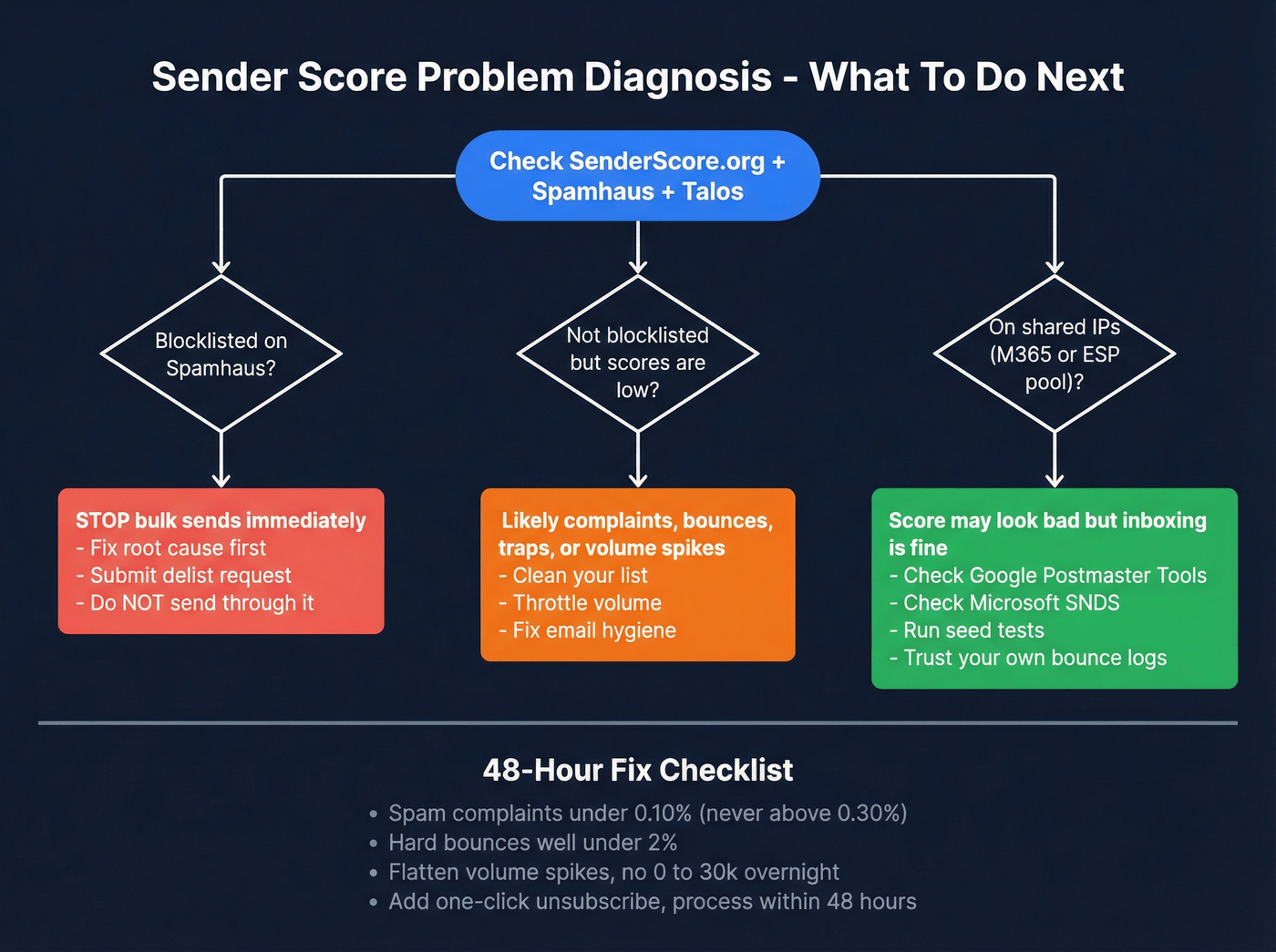
Then decide what kind of problem you've got:
Mini decision tree
- If you're blocklisted (Spamhaus hit): pause bulk sends -> fix root cause -> delist request (don't "send through it").
- If you're not blocklisted but scores are low: it's complaints, bounces, traps, or volume spikes -> fix hygiene + throttle.
- If you're on shared IPs (common with Microsoft 365/ESP pools): Sender Score can look awful while inboxing is fine -> rely more on provider telemetry (Postmaster/SNDS) + your bounce logs + seed tests.
If your score is low, do this in the next 48 hours:
- Get spam complaints under <0.10% and don't let them sit >0.30%.
- Get hard bounces well under 2% (if you're trending toward 2%+, stop and clean).
- Flatten volume spikes (no "0 -> 30k" sends overnight).
- Add one-click unsubscribe (RFC 8058) and process unsubscribes within 48 hours.
Hot take: if you're sending cold outbound and your deal size is modest, you don't need more tools. You need fewer sends to better targets with cleaner data.
Reputation is a math problem.

What a sender score checker does (and doesn't)
Sender Score is a 0-100 reputation metric that Validity frames like a credit score for email. It's useful because it compresses a messy reality (complaints, bounces, trap hits, sending patterns) into something you can track and explain to a non-deliverability teammate without a 30-minute lecture.
Here's the catch: Sender Score is primarily IP reputation, not a universal "will Gmail inbox me?" verdict. If you send from a shared IP (ESP pool, Microsoft 365 region pool, etc.), your score can reflect other senders' behavior more than yours. I've watched teams panic over a 10/100 score while their actual campaigns landed fine because their tenant signals were clean and volume was controlled.
IP reputation vs domain reputation (the part most teams miss)
Mailbox providers score both your sending IP and your sending domain (and often your specific From domain plus DKIM signing domain alignment). A clean IP doesn't fully rescue a burned domain, and a pristine domain won't save you if your IP is spewing bounces and complaints.
This is also why third-party tools disagree. Some are IP-first (Sender Score), while others blend in domain and behavioral signals. Spamhaus, for example, evaluates domain reputation using a mix of automated detection and manual investigation, which is a fancy way of saying your history and patterns matter, not just what you did today. If you want the domain-side view, start with domain reputation so you’re not optimizing the wrong metric.
Myths vs reality
- Myth: "My Sender Score is 90, so I'm safe." Reality: Gmail and Microsoft still throttle and spam-folder you when complaints spike or you fail bulk-sender requirements.
- Myth: "My Sender Score is 40, so I'm blocklisted." Reality: Low score means "risk signals detected," not "you're on Spamhaus."
- Myth: "One checker equals the truth." Reality: There's no single dashboard for reputation. Provider filtering is internal and opaque.
Use Sender Score as an early warning system. Then confirm with blocklists, provider telemetry, and your own bounce and complaint data.
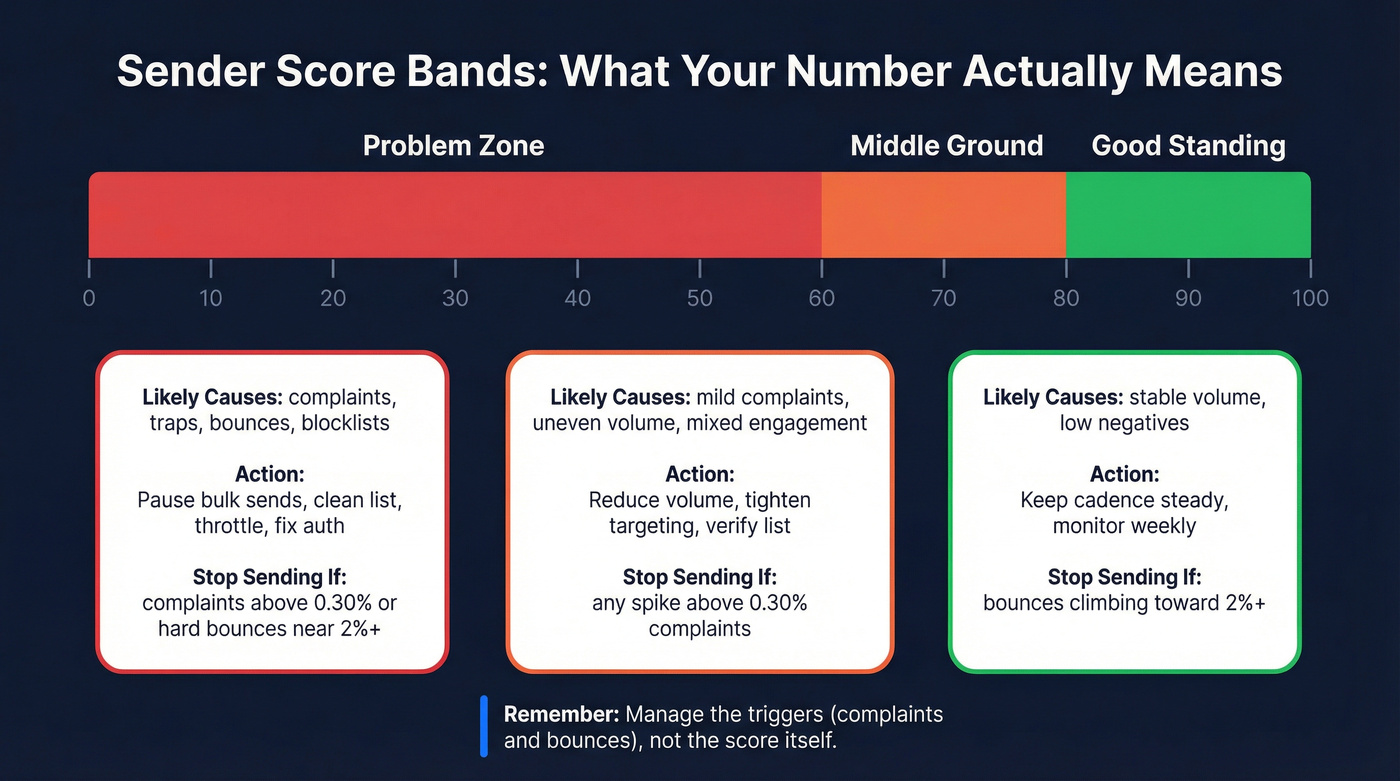
Sender Score bands (0-100) and what to do next
Validity's bands are the cleanest way to interpret the number:
- <70 = problem
- 70-80 = middle
- >80 = good
Don't manage to the score. Manage to the triggers that get you blocked: complaints and hard bounces.
Score bands triage table
| Sender Score band | Likely causes | Immediate actions | Stop sending trigger |
|---|---|---|---|
| <70 (problem) | complaints, traps, bounces, spikes, blocklists | pause bulk; clean list; throttle; fix auth | complaints >0.30% or hard bounces ~2%+ |
| 70-80 (middle) | mild complaints; uneven volume; mixed engagement | reduce volume; tighten targeting; verify list | any spike >0.30% complaints |
| >80 (good) | stable volume; low negatives | keep cadence steady; monitor weekly | bounces climbing toward ~2%+ |
One opinion I'll defend all day: complaints are the fastest way to torch reputation. You can survive mediocre engagement for a while. You won't survive people hitting "Report spam." If you’re unsure where your limits actually are, map them to a clear spam rate threshold so ops has a single “stop sending” line.

Your sender score tanks when hard bounces cross 2%. Most teams fix the symptom - cleaning lists after the damage. Prospeo fixes the cause: 98% verified email accuracy, 5-step verification with spam-trap removal, and data refreshed every 7 days so contacts don't go stale between campaigns.
Protect your reputation at the source - start with data that doesn't bounce.
How to use a sender score checker (SenderScore.org step-by-step)
SenderScore.org is the tool most people mean when they Google "sender score checker." It's free, fast, and great for spotting obvious problems.
If you want the simplest workflow: pull the score, then validate it against blocklists and your own bounce and complaint trends.
Step-by-step
- Go to https://senderscore.org/ and start the "Get your score" flow.
- Enter an IP address or domain (IP is the cleanest signal if you've got a dedicated one).
- Fill in the gate fields: basic lead info plus estimated annual email volume and country.
- Sanity-check the result against what changed recently:
- volume ramp
- ESP or IP change
- new list or new source
- new copy or offer that triggered complaints
- If the score is low, immediately check Spamhaus + Talos and your bounce logs.
Two practical gotchas:
- Shared IPs mislead. On a shared pool, treat the number like weather, not climate.
- It's not real-time. Reputation lags. Fixes today show up over days, not minutes.
If you’re deciding whether shared infrastructure is the culprit, it helps to understand dedicated IP vs shared IP tradeoffs before you change anything.
What else SenderScore.org includes (and when it's worth using)
SenderScore.org is more than a single number. If you're already there, these are the only extras I'd bother with:
- Blocklist Lookups (Return Path Blocklist): quick confirmation when you suspect a Return Path Blocklist listing
- Bounce Lookups: useful when you've got a specific bounce pattern and want a second read on what it means
- List Quality Checks: helpful for diagnosing "unknown users" and trap risk before you scale
- Complaint Monitor: handy if you need a simple operational view of complaint signals
- Blocklist Remover: the official "remove me" workflow for the Return Path Blocklist (use it after you fix the cause)
Don't confuse Sender Score with the "Sender Score Reputation Network" (blacklist)
This trips up smart people constantly.
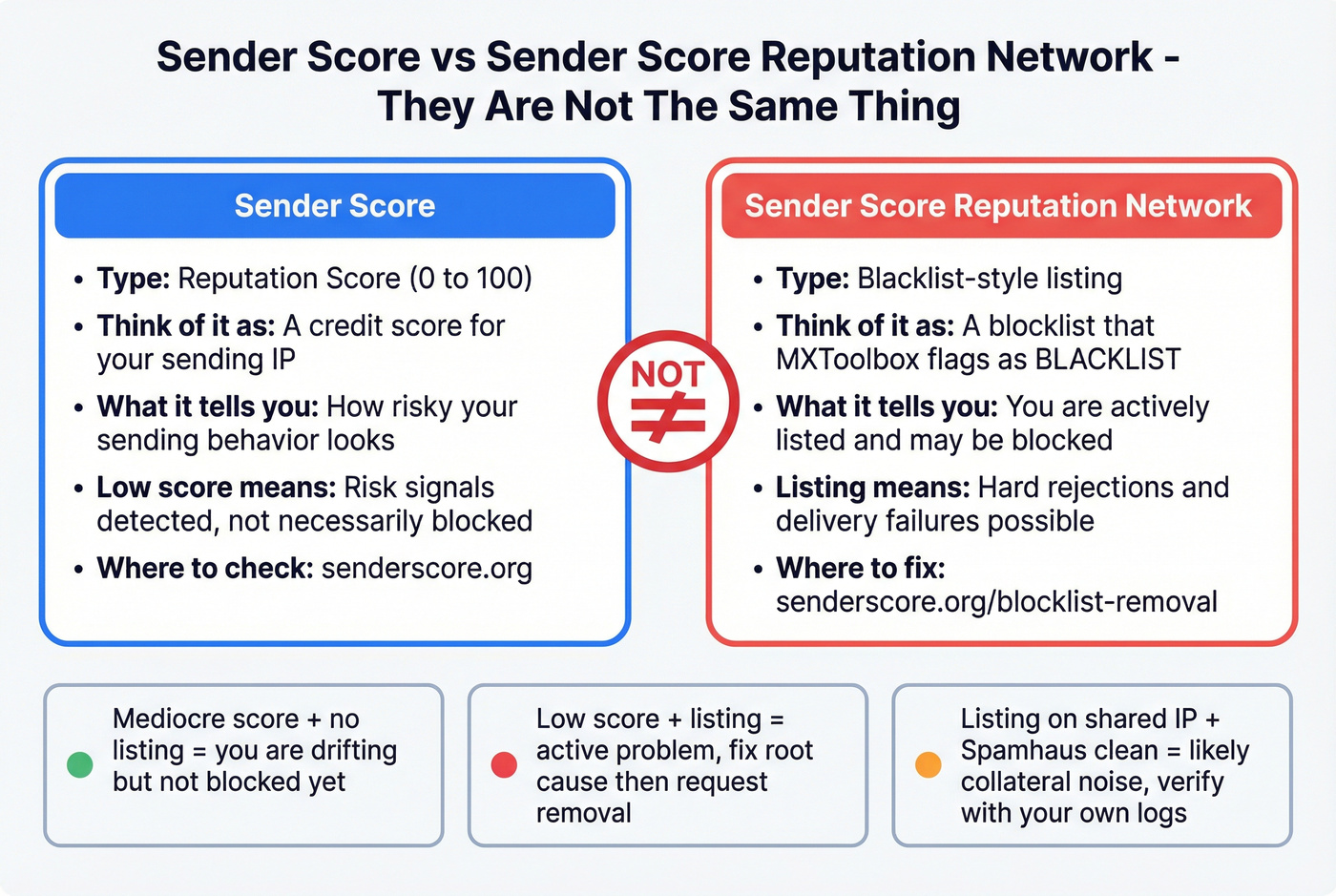
- Sender Score = a score (0-100).
- Sender Score Reputation Network = a blacklist-style listing that MXToolbox labels as a BLACKLIST.
So you can have:
- a mediocre score but no blacklist listing, or
- a low score and a listing, or
- a scary-looking listing tied to shared infrastructure.
If the listing you're seeing is tied to Return Path, don't guess. Use SenderScore.org's Blocklist Remover to check status and request removal after you've fixed the root cause: https://www.senderscore.org/blocklist-removal
How to tell which problem you've got
- Hard rejections (widespread 550 5.7.x blocks) across providers usually means blocklist or provider enforcement.
- Delivering but landing in spam usually means reputation and engagement signals.
- One tool says "listed" but Spamhaus is clean and provider telemetry looks fine often means niche list noise or shared-IP collateral.
MXToolbox lists common triggers as complaints, unusual volume patterns, spam traps, and unknown users. That's the whole game. If you’re getting a specific 550 wall, start with the 550 recipient rejected breakdown so you don’t misdiagnose the source.
Best sender score checker stack (SenderScore + Spamhaus + Talos)
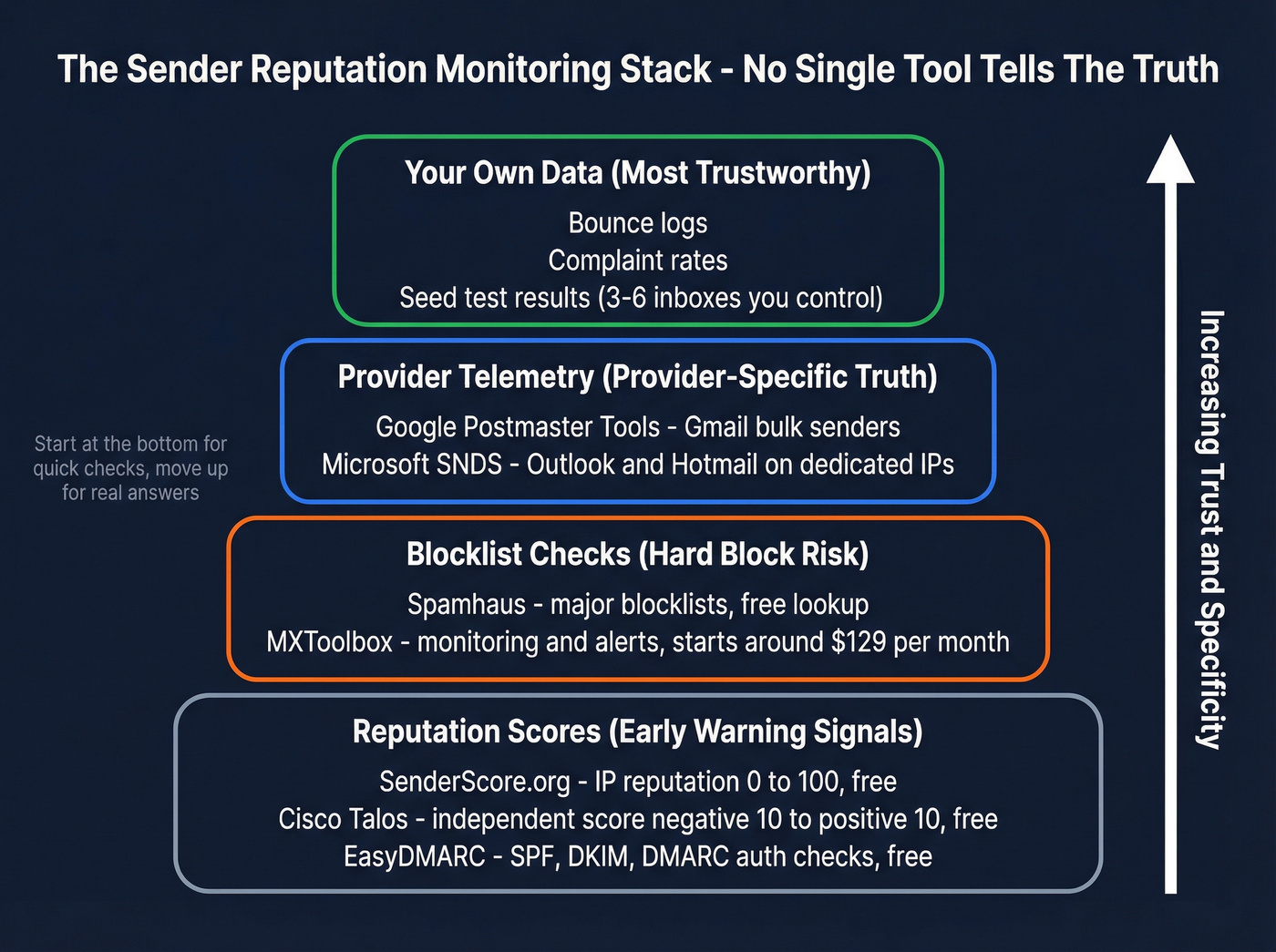
Look, there's no master console where you type in a domain and get "the truth." The only approach that holds up is layered: score + blocklists + provider telemetry + your own logs.

Common complaints about SenderScore (from practitioners)
- "It's volatile." Yep, especially on shared IPs. Trend it weekly; don't worship daily swings.
- "It blames me for other senders." Also true on shared pools. Validate with Postmaster or SNDS (when you can), bounce logs, and seed tests before you hit the panic button.
Monitoring stack table (what to trust, when)
| Tool | What it measures | When to trust it | Cost |
|---|---|---|---|
| SenderScore.org | IP rep (0-100) | trend / early warning | Free |
| Spamhaus | major blocklists | hard blocks risk | Free (API paid) |
| Cisco Talos | rep score -10 to +10 | independent signal | Free |
| Google Postmaster Tools | Gmail telemetry | bulk Gmail senders | Free |
| Microsoft SNDS | Outlook/Hotmail logs | dedicated IP senders | Free |
| MXToolbox | monitoring + alerts | ongoing ops | starts around ~$129/month |
| EasyDMARC | SPF/DKIM/DMARC checks | auth sanity | Free |
Add a cheap reality check (seed tests)
Keep 3-6 seed inboxes you control (Gmail, Outlook, Yahoo; add a corporate Microsoft 365 inbox if you sell B2B). Once a week, send the same message to those seeds and record:
- inbox vs spam placement
- whether images or links are clipped
- whether you see warning banners
Seed tests don't replace provider telemetry, but they stop you from chasing ghosts, especially when Sender Score swings on shared IPs. If you want a more formal approach, build a repeatable seed list instead of ad-hoc inboxes.
SenderScore.org (Tier 1)
SenderScore.org is a great "are we drifting?" indicator. In our experience, it's most useful when you treat it like a smoke alarm: it won't tell you where the fire is, but it tells you to stop ignoring the smell.
Where it wins: quick read on IP reputation and a familiar 0-100 scale that non-deliverability folks understand.
Where it misleads: shared IPs. That's why people complain about "crazy fluctuations." They're trying to use it as a stable KPI and it isn't.
Pricing: Free.
Spamhaus (Tier 1)
Spamhaus is the blocklist check that actually matters. If you're on a Spamhaus list, you'll feel it: bounces, throttling, and downstream filtering.
At a high level, the key lists you'll run into include SBL, XBL, PBL, and DBL.
Pricing: the checker is free; commercial APIs exist for automation.
Cisco Talos Intelligence (Tier 1)
Talos gives you a different lens: a reputation score from -10 to +10, grouped into Good / Neutral / Poor. Neutral is sneaky. It often means "not enough history" at low volume.
Two truths:
- Talos doesn't block directly. Networks and providers use it as an input.
- After you fix the underlying issue, Talos says reputation should improve within 3-5 days. If it doesn't, open a ticket.
Pricing: Free.
Google Postmaster Tools (Tier 2)
Postmaster is Gmail's mailbox-side telemetry for qualified high-volume senders. When you've got access, it's more valuable than any third-party score because it reflects Gmail's view of your traffic: complaints, authentication, delivery errors, and volume patterns, and you can tie those signals back to specific days you changed targeting, copy, or list sources.
The catch is eligibility. If you're not sending enough consistent Gmail volume, you won't get meaningful data (or access). That's not you failing; that's Google gating the tool.
Pricing: Free.
Microsoft SNDS (Tier 2)
SNDS is Microsoft's view of inbound mail to consumer domains (outlook.com/hotmail.com/live.com/msn.com), built around IP reputation and complaint/trap signals. It's the closest thing to "provider truth" for Microsoft consumer traffic.
The catch is ownership. SNDS access is designed for senders who can prove they control the IP range (dedicated IPs). If you're on shared infrastructure, you often can't use SNDS directly.
Pricing: Free.
MXToolbox (Tier 2)
MXToolbox is what you use when you're tired of reactive panic-checking and want ongoing monitoring: alerts, history, and a place to centralize the checks your team repeats.
Skip this if you send tiny volume and you already have solid ESP dashboards. You'll just add another tab to ignore.
Pricing: starts around ~$129/month for monitoring plans.
EasyDMARC checker (Tier 2)
EasyDMARC's checker is the fastest way to catch "we broke SPF" or "DKIM isn't aligning" mistakes that quietly wreck deliverability. It's not a reputation score, but authentication failures feed reputation problems fast.
Use it for:
- SPF/DKIM/DMARC visibility
- quick misconfig detection after DNS changes
- sanity checks when you switch ESPs or add a new sending domain
Pricing: the checker is Free. If you need a deeper walkthrough, bookmark our SPF, DKIM, and DMARC guide for the exact checks that prevent silent failures.
Gmail reality in 2026: Postmaster changed (and what to watch instead)
Google Postmaster Tools still matters, but the UI people remember has been retired since 2025. The old reputation buckets and the domain and IP reputation charts were removed, so if you're hunting for "High/Medium/Low/Bad" and can't find it, you're not missing anything. It's gone.
What replaces it is more operational (and, honestly, more useful if you're willing to do the work).
The Gmail signals that actually move the needle
- Spam complaint rate: keep it <0.10% and treat >0.30% as an emergency.
- Delivery errors / throttling: sudden spikes mean Gmail's pushing back (reputation hit, volume anomaly, or both).
- Authentication compliance: SPF/DKIM/DMARC alignment and consistent headers.
- Volume patterns: Gmail punishes bursty senders. Smooth ramps win.
- Engagement proxies: opens are messy, but "are people deleting without reading / never replying / never clicking" shows up as long-term drag.
One nuance most guides skip: complaint rate can look "better" when you're already spam-foldered, because fewer people see the message in the inbox where the "Report spam" button is easy to hit. That's why you can't watch complaint rate alone. Pair it with delivery errors and seed tests so you can spot quiet failure.
Operating without Postmaster access (or without useful data)
If you can't access Postmaster, or you're too low-volume for it to be meaningful, run a simple loop:
- Daily: watch hard bounces, spam-block bounces, and complaint rate from your ESP.
- Weekly: run SenderScore + Spamhaus + Talos, and do a seed test to Gmail + Outlook + Yahoo.
- After any change (new list source, new domain, new offer): throttle sends for 48-72 hours and watch for complaint spikes.
Also remember the operational threshold: Gmail treats you like a bulk sender at around 5,000+ messages/day to @gmail addresses. Once you're in that zone, you don't get to wing it.
If you’re scaling and keep hitting ceilings, build a simple email pacing and sending limits SOP so the team ramps safely.
Microsoft reality in 2026: SNDS (when it matters, how to access, how to interpret)
Microsoft SNDS is the closest thing to "provider truth" you'll get for Outlook/Hotmail consumer traffic. SNDS is built from Microsoft's inbound mail logs: mailbox-side observation, not a third-party guess.
The catch: SNDS is IP-based, and access is built around proving you own the IP range. Microsoft verifies ownership using signals like reverse DNS, WHOIS, and routing tables. If you're on shared IPs, SNDS often isn't available to you directly.
Operationally, these benchmarks keep you out of trouble:
- complaints <0.1% = healthy
- 0.1-0.5% = concerning
- >0.5% = serious
- trap hits should be zero (any trap hit is a list hygiene problem)
SNDS mini table: what "healthy" looks like
| SNDS metric | Healthy target | Action if off |
|---|---|---|
| Complaint rate | <0.1% (healthy); 0.1-0.5% (concerning); >0.5% (serious) | tighten targeting; throttle; pause bulk if serious |
| Trap hits | 0 | stop + verify/clean sources |
| Volume pattern | steady ramps | smooth sends; avoid spikes |
One more nuance: SNDS is strongest for consumer Microsoft domains (outlook.com/hotmail.com/live.com/msn.com). Microsoft 365 business mailboxes can behave differently, so don't treat SNDS as "all Microsoft everywhere."
Fix low Sender Score fast (48-hour playbook)
When Sender Score drops, the instinct is to check more tools. That's procrastination.
The fix is operational: stop feeding bad addresses, stop spiking volume, and stop generating complaints.
Here's a scenario I've seen too many times: a team imports a "fresh" list on Monday, ramps from 2,000 to 25,000 sends by Wednesday, sees hard bounces jump, shrugs because "we'll clean it later," and by Friday they're staring at a 550 5.7.1 wall and arguing about whether to buy another warmup tool. The warmup tool isn't the problem. The list is.
Do first (today)
Pause bulk sends if complaints are >0.30% or hard bounces are trending ~2%+. Continuing to send trains providers to distrust you.
Audit the last 7 days of changes
- new list source?
- new domain?
- new ESP/IP?
- sudden volume jump?
- new copy/offer that triggered complaints?
Turn on one-click unsubscribe (RFC 8058)
- Add the headers your ESP supports.
- Process unsubscribes within 48 hours. Not "end of week."
Do next (next 24-48 hours)
List hygiene / bounce control (where most teams win back reputation) Before you send another batch, verify the list and remove risky addresses. Prospeo, "The B2B data platform built for accuracy," is a strong fit here because it's built for accuracy and freshness: 98% email accuracy, catch-all handling, and spam-trap + honeypot filtering, with records refreshed every 7 days (the industry average is about 6 weeks). You can upload a CSV (or enrich from your CRM), verify in bulk, then export only valid contacts so your next send isn't a bounce-fest that drags your sender reputation down again. If you want to compare options, start with the email verifier websites roundup or the deeper email verification list SOP.
Throttle volume (especially to Gmail) If you're near bulk territory, assume ~5,000/day to Gmail is where scrutiny ramps. Smooth your sends. No cliffs.
Tighten targeting Cut broad segments. Focus on people who actually want the email. Complaint rate drops fast when relevance goes up - this is where a sharper ideal customer definition pays for itself.
Fix authentication + alignment SPF: don't exceed DNS lookup limits. DKIM: ensure signing is consistent. DMARC: at least p=none with reporting, then move toward enforcement when stable. If you need the mechanics, follow our SPF record setup guide.
Don't do this (it makes it worse)
- Don't "warm up" by blasting more volume. Warming is controlled, gradual, and list-clean. If you’re rebuilding after an incident, use a proper warm up an email address plan instead.
- Don't rotate domains every time you get in trouble. That's how you build a graveyard of burned domains.
- Don't buy random lists to "replace" the one that caused the issue. That's how trap hits happen.
I've run deliverability bake-offs where the "best copy" lost because the list was dirty. Reputation is math, not vibes.
Complaints and bounces are the two fastest ways to torch IP reputation. Prospeo's proprietary email infrastructure catches invalid addresses, honeypots, and catch-all traps before they ever hit your sending queue. Teams using Prospeo report bounce rates under 4% - well below the danger zone.
Send to real inboxes. Skip the sender score panic entirely.
Diagnose blocks from bounces + delisting timelines (what to expect)
Your bounce log is the most underrated diagnostic tool. It tells you who's blocking you and often why, without guessing.
Bounce decoder table
| Bounce snippet | Likely source | First action | Expected timeline |
|---|---|---|---|
| 550 5.7.1 Client host blocked | often Spamhaus | check listing; fix cause; delist | 24-48h typical |
| 550 SC-001 | Barracuda | check rep; clean list; slow sends | 12-24h to 1-3 biz days |
| 550 5.7.606 Access denied, banned sending IP | Microsoft | delist path + SNDS review | 24-48h typical |
How to read bounce logs like an operator (not a tourist)
Don't stare at one scary line. Pattern-match across three fields:
- Status code family:
- 5xx = hard failure (blocked, invalid user, policy rejection)
- 4xx = temporary (throttling, greylisting, "try again later")
- Provider hints: "outlook", "protection.outlook.com", "gmail", "google", "mimecast", "proofpoint" often show up in the diagnostic text.
- Timing + volume: if failures start right after a volume spike or a new list import, you've already got your root cause.
Two common patterns you won't see in most tables:
- 421 / 451 "Try again later" (Gmail/Microsoft): that's throttling. Reduce volume, slow concurrency, and stop sending to low-engagement segments.
- 550 5.1.1 "User unknown" spikes: that's list decay or bad sourcing. Stop and clean. Continuing to send teaches providers you don't control bounces.
Delisting timeline reality (mini table)
| System | Typical delist window | What actually matters |
|---|---|---|
| Spamhaus | 24-72h | root cause fixed first |
| Barracuda | 12-24h / 1-3 biz days | complaints + list hygiene |
| Microsoft | 24-48h | SNDS + complaint control |
If the listing is Return Path/Validity (Sender Score Reputation Network)
If you're dealing with a Return Path-style listing, use the official workflow: SenderScore.org Blocklist Remover. Check status, fix the cause, then request removal: https://www.senderscore.org/blocklist-removal
If you want a broader incident flow (beyond Return Path), use our blacklist alert triage to avoid relisting.
What to include in delist requests (what reviewers actually care about)
When you submit a delist request, "please remove me" is useless. Include proof you changed behavior:
- Root cause: new list source removed, compromised form fixed, open relay closed, etc.
- Hygiene actions: invalids removed, traps addressed, opt-in confirmed where relevant.
- Volume plan: reduced daily volume + gradual ramp schedule.
- Auth confirmation: SPF/DKIM/DMARC aligned and stable.
- Complaint control: one-click unsubscribe enabled; unsub processing within 48 hours.
What not to do during delisting
- Don't keep sending at the same volume "to test." You're just generating more negative signals.
- Don't switch domains or IPs mid-incident unless you're stopping the bad traffic. Otherwise you spread the damage.
- Don't argue with the list operator. Fix the behavior, show the fix, then ask for removal.
FAQ
How often should I check my Sender Score?
Check weekly during normal operations, and every 24 hours during an incident until you're back above 80 and complaints are stable under 0.10%. Daily checks only help when you're actively changing volume, lists, or authentication and need to confirm the trend is improving.
Why is my Sender Score low on a shared IP even if Gmail is inboxing?
On shared infrastructure, the score reflects the whole pool, so you can see 10-40/100 while your tenant still lands fine. In that setup, trust Gmail and Microsoft telemetry (when available), your hard bounce rate (keep it <2%), and weekly seed tests more than the pool-wide number.
What's a good spam complaint rate for Gmail and Outlook?
Keep complaints under 0.10% and treat anything above 0.30% as "pause and fix now." In Microsoft SNDS, <0.1% is healthy, 0.1-0.5% is concerning, and >0.5% is serious.
What's a good free alternative for cleaning a list before sending?
If you want a free start, Prospeo includes 75 email credits + 100 extension credits/month and delivers 98% email accuracy with catch-all handling and spam-trap filtering, which is exactly what reduces bounces fast. Pair it with a seed test (3-6 inboxes) and a Spamhaus lookup before you ramp volume.
Summary: use a sender score checker, then fix the inputs
A sender score checker is a solid early-warning signal, but the recovery play stays the same: cut complaints, cut hard bounces, smooth volume, and keep auth aligned.
Do that, and inbox placement gets predictable again. Fast.