

550 Recipient Rejected: What It Means and How to Fix It (2026)
Your "verified" list bounces 23% on the first sequence. Suddenly you don't trust your ESP, your data provider, or your own sanity.
Here's the thing: "550 recipient rejected" isn't one problem. It's a family of problems, and the bounce itself tells you which one you have.
Read the right line, and this turns into a 5-minute fix instead of a day of guessing.
Quick fix summary (do this first)
- Find the enhanced code family: 5.1.x = address, 5.4.x = network/routing, 5.7.x = policy/security.
- Find the SMTP stage in the bounce: "in reply to RCPT TO" = recipient validation (identity/routing/relay). After DATA = content/size/spam policy.
- If you see Microsoft 365 (
*.mail.protection.outlook.com) +550 5.4.1 Recipient address rejected: Access denied: treat it as DBEB rejecting an unrecognized recipient. Verify the address first, then ask the recipient admin to check accepted domain type/directory/routing.Rule: stop retrying 5xx bounces. A class 5 failure is permanent until something changes.
What "recipient rejected" means (in plain English)
A 550 error means the recipient's mail server permanently refused to accept your message.

"550" is the protocol-level "no." Paired with an enhanced status code like 5.1.1 or 5.7.1, it tells you the rejection category. And because it's a 5.x.y, resending the same message over and over won't fix it.
What it is:
- A recipient-side rejection (their server decided "don't accept this").
- Triggered during RCPT TO (recipient validation) or during DATA (content/policy checks).
What it isn't:
- Not a temporary "try again later" issue (that's usually 4xx, like 421/450/451).
- Not automatically "your email platform is broken." Most of the time it's addressing, routing, or policy.
We've debugged enough bounce storms to say this plainly: the RCPT TO vs DATA distinction kills most confusion immediately, because it tells you whether you're dealing with a recipient identity/routing problem or a message/policy problem.
Recipient rejected vs sender rejected (don't chase the wrong problem)
People mix these up constantly.
Recipient rejected happens at RCPT TO and points to recipient validity/routing/relay rules. Example:
550 5.1.1 User unknownor550 5.4.1 Recipient address rejected: Access denied.Sender rejected happens at MAIL FROM and points to your identity (SPF/DKIM/DMARC alignment, authentication, reputation, or "sender not permitted"). Example:
550 5.7.1 Sender rejectedor550 5.7.26 Unauthenticated email from ... is not accepted.
If your bounce mentions MAIL FROM or "sender," stop diagnosing recipients. You're in authentication/reputation territory - start with your SPF/DKIM/DMARC alignment and sending reputation.
Decode the code: 550 + 5.x.y enhanced status codes
SMTP bounces often carry two layers:
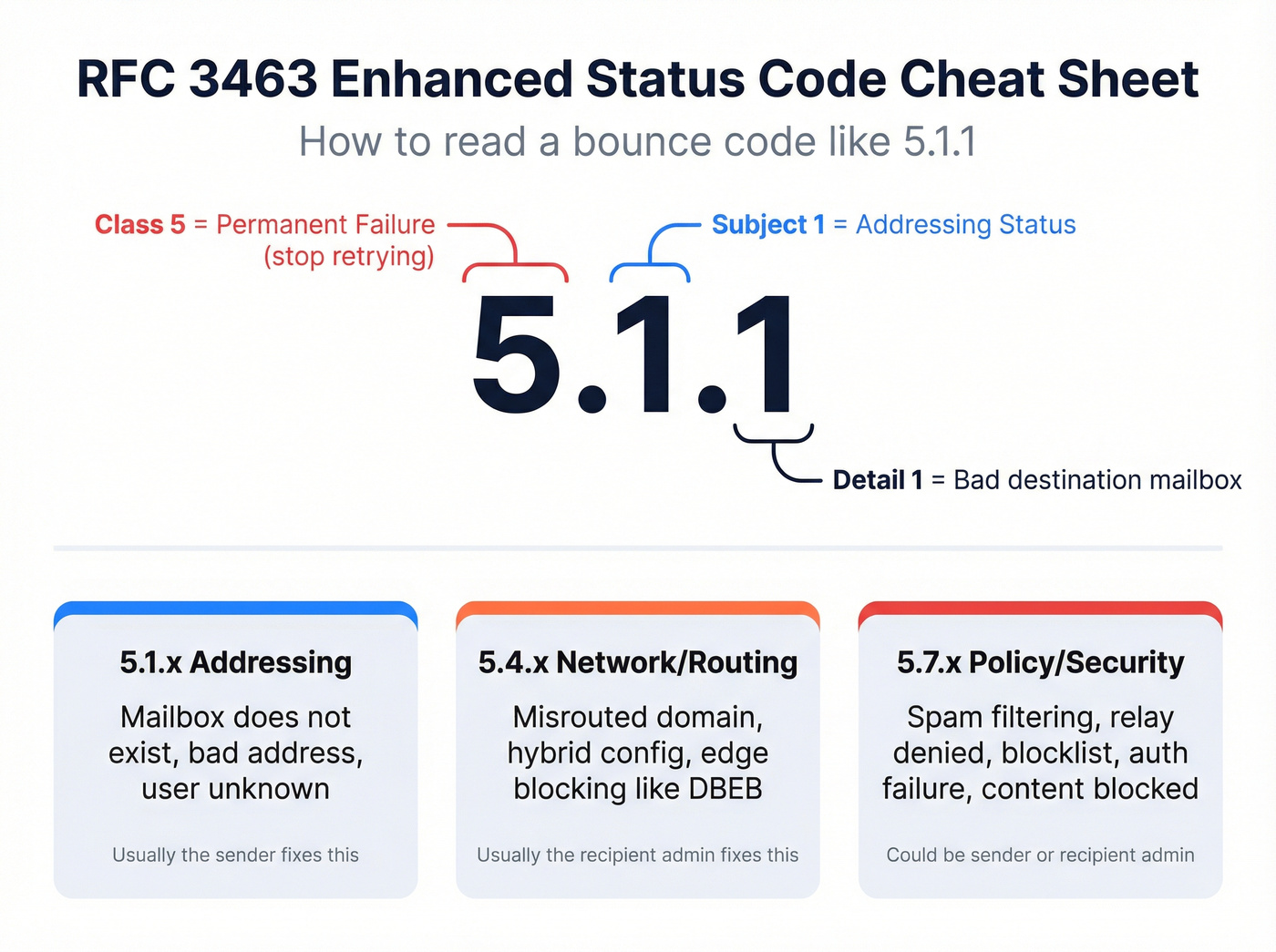
- Basic SMTP status (like 550)
- Enhanced status code (like 5.1.1)
Enhanced codes follow RFC 3463 format:
class.subject.detail
Example: 5.1.1
- Class = 5 -> permanent failure
- Subject = 1 -> addressing status
- Detail = 1 -> the specific addressing failure
The IANA enhanced status code registry defines X.1.1 as "Bad destination mailbox address": the mailbox doesn't exist, or the part left of the "@" is invalid. That's why you see 550 paired with 5.1.1 so often.
Mini cheat sheet:
| Family | Meaning | Who usually owns the fix |
|---|---|---|
| 5.1.x | Addressing | Sender/list owner |
| 5.4.x | Network/routing | Recipient admin |
| 5.7.x | Policy/security | Recipient admin or sender (auth/reputation/content) |
One nuance: providers don't always use enhanced codes perfectly consistently. Use the numeric family to pick the bucket, then use the text string to find the vendor-specific root cause.
Match your exact bounce string: lookup tables
Don't overthink it. Match the text you got, then do the next action.
RCPT TO failures (recipient validation: identity, routing, relay)
| Bounce string (example) | Family | Who fixes it | Next action |
|---|---|---|---|
550 5.1.1 ... does not exist |
5.1.x | Sender | Fix the address, then suppress |
550 5.1.1 User unknown |
5.1.x | Sender | Fix the address, then suppress |
550 5.1.1 <user@domain>: Recipient address rejected: User unknown in virtual mailbox table |
5.1.x | Sender | Fix the address (often a stale list) |
550 5.1.1 The email account that you tried to reach does not exist |
5.1.x | Sender | Fix the address |
550 5.1.10 Recipient not in directory |
5.1.x | Recipient admin | Add/sync the recipient object |
550 5.4.1 Recipient address rejected: Access denied (Microsoft 365) |
5.4.x | Recipient admin (after you verify address) | Check DBEB + accepted domain type |
550 5.7.1 Unable to relay |
5.7.x | Sender/admin | Fix SMTP auth / correct server |
550 5.7.1 Relaying denied |
5.7.x | Sender/admin | Fix SMTP auth / correct server |
DATA failures (message accepted, then rejected: content, size, spam policy)
| Bounce string (example) | Family | Who fixes it | Next action |
|---|---|---|---|
550 5.7.1 Message rejected due to content restrictions |
5.7.x | Sender | Remove risky content/URLs/attachments |
550 5.7.1 ... rejected as spam by Content Filtering |
5.7.x | Sender (then recipient) | Fix auth + content; ask for allowlisting if needed |
550 5.7.1 Service unavailable; Client host [x.x.x.x] blocked using ... |
5.7.x | Sender | Repair reputation; follow delist steps |
550 5.7.1 Message size exceeds ... |
5.7.x | Sender | Reduce size |
Two tells that don't lie:
- RCPT TO rejection = identity/routing/relay bucket.
- DATA rejection = content/size/spam-policy bucket.

Every 550 bounce you're debugging started with bad data. Prospeo's 5-step verification - including catch-all handling, spam-trap removal, and honeypot filtering - delivers 98% email accuracy. Teams switching from other providers cut bounce rates from 35%+ to under 4%.
Fix your bounce problem at the source, not in your logs.
550 recipient rejected decision tree (5-minute fix)
Use this like a flowchart. You don't need perfect certainty. You need the right bucket.

Step 1: Is it 5.1.x, 5.4.x, or 5.7.x?
If it's 5.1.x (addressing)
- If the string says "does not exist" / "user unknown" -> the mailbox is invalid. Fix the address or stop sending.
- If it says "not in directory" -> the mailbox exists somewhere, but the recipient system can't see it. Recipient IT fixes directory sync/routing.
If it's 5.4.x (network/routing)
- If you see Microsoft 365 + "Access denied" -> jump to the DBEB section below.
- Otherwise, suspect misrouted domain/MX, hybrid routing, or edge routing blocks on the recipient side.
If it's 5.7.x (policy/security)
- If it says unable to relay / relaying denied / authentication required -> you're sending through a server that won't relay for you. Fix SMTP settings.
- If it mentions spam/content/blocklist -> it's reputation, content, or recipient policy. Change the message/sending setup or get allowlisted/delisted.
Real talk: if you're blasting cold lists, your biggest deliverability "strategy" isn't clever copy. It's not sending to bad addresses - use an email verification list SOP and enforce suppression.
Stop retrying 5xx bounces. You're just hammering a closed door.
Microsoft 365: 550 5.4.1 "Access denied" (DBEB)
If your bounce looks like this:

550 5.4.1 Recipient address rejected: Access denied
...and the rejecting host ends in *.mail.protection.outlook.com, you're looking at Directory-Based Edge Blocking (DBEB) behavior in Exchange Online Protection.
DBEB rejects mail for recipients that aren't valid in the tenant directory before anti-malware/anti-spam and mail flow rules run. Microsoft documents this exact NDR and their checklist here: https://support.microsoft.com/en-us/topic/ndr-error-code-550-5-4-1-recipient-address-rejected-access-denied-c0e98a8e-81db-49c2-9bf1-32a1734d3e77
A real-world NDR often includes the giveaway line:
... For more information see https://aka.ms/EXOSmtpErrors ... (in reply to RCPT TO command)
That last bit matters. Exchange Online rejected the recipient during address validation, not because your message looked spammy.
One scenario we see a lot: a sales rep emails jane.doe@company.com, but the real mailbox is jane.a.doe@company.com and the alias never existed. DBEB does exactly what it's supposed to do and blocks it at the edge, and the sender wastes an hour rewriting copy that never even got evaluated.
DBEB "proof" checklist (sender vs recipient admin)
If you're the sender (not the admin):
- Confirm the rejecting host ends in
mail.protection.outlook.com. - Find the line "in reply to RCPT TO command" in the DSN.
- Capture the enhanced code (often 5.4.1) and the full text string.
- Double-check the recipient address for typos/aliases before you blame IT - use a quick how to verify an email address workflow.

If you're the recipient admin:
- Check EAC -> Mail flow -> Accepted domains and confirm the domain type.
- Authoritative means Exchange Online rejects unknown recipients (DBEB is doing its job).
- Internal relay is for hybrid/migration routing when Exchange Online should pass unknown recipients onward (with the right connectors).
PowerShell quick check:
Get-AcceptedDomainGet-AcceptedDomain -Identity <Name> | Format-List
Fix when it affects everyone in the domain
Symptom: multiple users at the domain bounce for multiple external senders with 550 5.4.1.
Microsoft's fast, reversible workaround is to toggle the accepted domain type to force a refresh:
- In EAC -> Mail flow -> Accepted domains, select the domain.
- Toggle Authoritative -> Internal relay -> Authoritative.
- Save.
PowerShell equivalent:
Set-AcceptedDomain -Identity <Name> -DomainType InternalRelay- Then set it back:
Set-AcceptedDomain -Identity <Name> -DomainType Authoritative
I've seen this clear tenant-wide "nothing changed but it broke" incidents more times than I'd like to admit.
Fix when it's one mailbox in hybrid
Symptom: internal mail works, but external mail bounces with 550 5.4.1 Access denied for one person.
In hybrid, this is often an object/address stamping issue. The clean Microsoft-supported move is to reset the SMTP proxy address:
- Change the user's primary SMTP to a temporary value.
- Sync.
- Change it back.
- Sync again.
Then wait. DBEB replication after directory changes can take up to 24 hours, so don't keep "testing" every two minutes and calling it broken.
Hybrid edge cases (the ones that waste afternoons)
Two patterns we've seen repeatedly in hybrid tenants:
- Missing routing address: the mailbox is missing the
user@tenant.mail.onmicrosoft.comrouting address, so Exchange Online can't route it correctly. Restoring that address and syncing clears the rejection. - Dynamic distribution groups: on-prem dynamic distribution groups don't sync as real recipients in Exchange Online, so DBEB blocks them. A practical workaround is creating an Exchange Online mail contact that represents that address so DBEB recognizes it.
If the rejected "recipient" is a mail-enabled public folder, Microsoft points admins to ensure public-folder objects are properly synced to Exchange Online, often via the Sync-ModernMailPublicFolder script referenced in their DBEB/NDR guidance.
Accepted domain behavior reference (Authoritative vs Internal relay): https://learn.microsoft.com/en-us/exchange/mail-flow-best-practices/manage-accepted-domains/manage-accepted-domains
550 5.7.1 rejections: policy, security, reputation (not "bad address")
5.7.1 is where teams burn time because they assume "recipient rejected" means "bad email." It doesn't. It means policy said no.
Use this section if the bounce mentions authentication, relay, blocked, spam, content restrictions, or permission, or if the failure happens after DATA (after the message body is transmitted).
Skip this section if you have a clean 5.1.1 does not exist. That's a dead mailbox.
Concrete Microsoft 365 examples and what to do:
550 5.7.1 RESOLVER.RST.AuthRequired; authentication required [Stage: CreateMessage]Admin fix: the recipient object is set to require authenticated senders. Change it to allow external senders.5.7.1 Service unavailable; Client host [x.x.x.x] blocked using ... delist@microsoft.comAction: you're blocked at the IP level. Fix your sending reputation, then follow the delist process.
If you're getting 5.7.1 across Microsoft + Google + Yahoo, it isn't "one picky recipient." It's your sending setup, your content, or your list quality, and the fastest path out is to tighten authentication (SPF/DKIM/DMARC alignment), slow down volume, and stop feeding your domain bad addresses. Use a sender score checker and a domain reputation checklist to narrow it fast.
Non-Microsoft causes (and the Postfix gotcha)
Outside Microsoft 365, the story's the same: the server refused the message. The only question is when it refused it.
If it fails at RCPT TO
- Relay restrictions / auth required: you're sending through an SMTP host that won't relay to external domains without authentication (wrong server, wrong port, wrong credentials).
- Recipient verification: some MTAs verify recipients and reject unknown ones immediately.
- Misrouted domain/MX: the recipient domain points somewhere unexpected; you're talking to the wrong server, which then rejects RCPT TO.
Postfix callback verification gotcha (why the error can be misleading)
Postfix can be configured with restrictions like reject_unverified_sender. That can trigger callback probes and then return a 550 during RCPT TO based on what the probe found.
The gotcha is nasty: the bounce can look like a clean "recipient rejected" even when the underlying issue is verification behavior, upstream timeouts, or a strict anti-abuse posture that doesn't play nicely with modern sending patterns. If you control the Postfix server and you're seeing confusing 550s, check smtpd_recipient_restrictions / smtpd_sender_restrictions for reject_unverified_sender and disable it or scope it tightly.
If it fails at DATA
- Content policy blocks: URLs, attachments, or certain phrases trip filters.
- RBL/content filtering: your sending IP/domain is blocked or scored as spam.
- Size limits: "message size exceeds ..."
For a readable roundup of common 550 variants (relay, spam, size, not-in-directory): https://world.siteground.com/kb/smtp-error-550/
If you're not the admin: what to send to the recipient's IT (copy/paste)
Sometimes you can't fix this. Full stop.
This hits hardest when you're emailing large orgs. You can do everything right on your side and still get 550 5.4.1 because their perimeter rejects unknown recipients by design.
Send this to the recipient's IT team:
Subject: Help needed: SMTP 550 recipient rejected (full DSN included)
Body (copy/paste):
Hi team - my email to <recipient@domain> was rejected by your mail server. Here are the delivery details:
- Timestamp (UTC/local):
<time> - Rejected by host:
<host> - Basic code:
550 - Enhanced code:
<5.x.y> - SMTP stage line:
... (in reply to RCPT TO command)or... after DATA - Full DSN / NDR text (verbatim):
<paste full bounce>
What to check on your side:
- If it's 550 5.4.1 Access denied on Microsoft 365, check DBEB/accepted-domain type/directory sync and confirm the recipient exists.
- If it's 5.7.1 policy, check recipient restrictions or blocklist decisions.
Prevention for senders: stop generating 550 hard bounces (especially 5.1.1)
The easiest 550 to prevent is 5.1.1.
Treat 5.1.1 as a hard bounce, suppress it immediately, and move on. If you keep mailing dead addresses, you're not just wasting sends - you're training inbox providers to distrust you.
Two quick opinions from the trenches:
- If your process doesn't automatically suppress 5.1.1, fix that before you touch copy or warmup - build it into your email outreach analytics and suppression rules.
- Skip "spray and pray" list uploads. They feel fast until they torch a domain - especially if you're running cold email outreach tools at scale.
If you want to cut hard bounces before you ever hit send, tools like Prospeo can help. Prospeo is "The B2B data platform built for accuracy" and includes real-time verification with 98% email accuracy, a 7-day data refresh cycle, and a free tier with 75 emails + 100 Chrome extension credits/month, which is enough to sanity-check a new list before you scale.

You're reading this because a "verified" list just torched your sender reputation. Prospeo refreshes 300M+ profiles every 7 days - not every 6 weeks like the provider that gave you stale addresses. At $0.01 per email, replacing bad data costs less than one more bounce storm.
Stop retrying 5xx bounces. Start with emails that actually exist.
FAQ
Is "550 recipient rejected" a hard bounce?
Yes. 550 recipient rejected is a hard bounce because 550 plus any 5.x.y enhanced code is a permanent rejection until something changes (address corrected, routing fixed, or policy updated). As a rule: 5.1.x = address, 5.4.x = routing, and 5.7.x = policy/security.
Should I retry after a 550 error?
No. Don't retry a 550/5.x.y bounce unless you changed something concrete (fixed the address, corrected SMTP relay/auth, or the recipient admin updated routing/policy). Repeated retries just create noise and can hurt your sender reputation.
What does "in reply to RCPT TO command" tell me?
It means the rejection happened during SMTP recipient validation (RCPT TO), before the server accepted the message body. That points to mailbox existence, directory visibility, routing, or relay rules, not content filtering (which usually happens after DATA).
Why does Microsoft 365 return "550 5.4.1 Access denied" for a real person?
Because Exchange Online's DBEB rejects mail at the perimeter when the recipient isn't recognized in the tenant directory or routing is misconfigured (common in hybrid/migrations). The most common admin checks are Accepted domain type (Authoritative vs Internal relay), directory sync health, and correct proxy/routing addresses; replication can take up to 24 hours.
What's a good free way to reduce hard bounces before sending?
Use an email verifier and suppress any address that fails validation before it ever hits your sequence. Prospeo's free tier includes 75 email credits/month and real-time verification with 98% accuracy, which is enough to spot-check a new list before you scale.
Summary: fix 550 recipient rejected without wasting a day
To fix 550 recipient rejected quickly, read the bounce like a mechanic reads an engine code: identify the 5.x.y family, check whether it failed at RCPT TO or DATA, and hand it to the right owner (your list, your SMTP/auth, or the recipient's routing/policy). For Microsoft 365 5.4.1, DBEB and accepted-domain settings are the usual culprits.