

AI Lead Qualification in 2026: The End-to-End System (Not Just a Bot)
$15k/month in inbound pipeline can die quietly because nobody answered a demo request until the next morning. That's not an AI problem. It's a system problem: rubric, SLAs, routing, data, and governance working together.
AI lead qualification is the workflow that makes scoring + routing + response time real.
What you need (quick version)
Build a qualification system that can score, route, and respond fast without turning your funnel into a black box.
Workato tested 114 B2B companies and found the average time to a personalized email was 11h 54m and 0% called within 5 minutes. If you don't operationalize speed-to-lead, "we'll follow up quickly" is just marketing copy.
Checklist (copy/paste into your RevOps doc):
Define your ICP in writing
- Target industries, geos, company size bands, and must-have attributes.
- "Hard no" list (students, competitors, job seekers, etc.).
Pick a single scoring rubric (100 points)
- Fit + intent + engagement - negative signals.
- Decide thresholds and what happens at each threshold.
Write your SLA like an SRE team
- Hot leads: response + routing within minutes.
- Warm: fast follow-up, but not paging your whole sales org.
- Nurture/disqualify: automated, logged, and measurable.
Build routing rules that prevent lead rot
- Ownership logic (territory, account owner, round-robin).
- Calendar availability checks so "assigned" doesn't mean "ignored."
Add human-in-the-loop guardrails
- Escalation triggers for complex deals and compliance-sensitive scenarios.
- A clear "AI stops here" boundary.
Instrument everything
- Time-to-first-touch, meeting rate by score band, disqualification reasons, and drift.

What lead qualification with AI is (and what it isn't)
Lead qualification with AI is a decisioning workflow that collects a few critical inputs, scores them consistently, and triggers the right next action (route, book, nurture, or disqualify). The AI part can be an agent that asks questions, summarizes context, and applies rules, or a model that predicts conversion likelihood. But the output still has to land in a human sales process, with clear ownership and a paper trail in your CRM.
Here's the failure mode I see constantly: teams buy an "AI SDR" and accidentally outsource their definition of a qualified lead to a prompt. That's how you end up with reps complaining about junk meetings and marketing complaining that sales "never follows up."
A useful mental model:
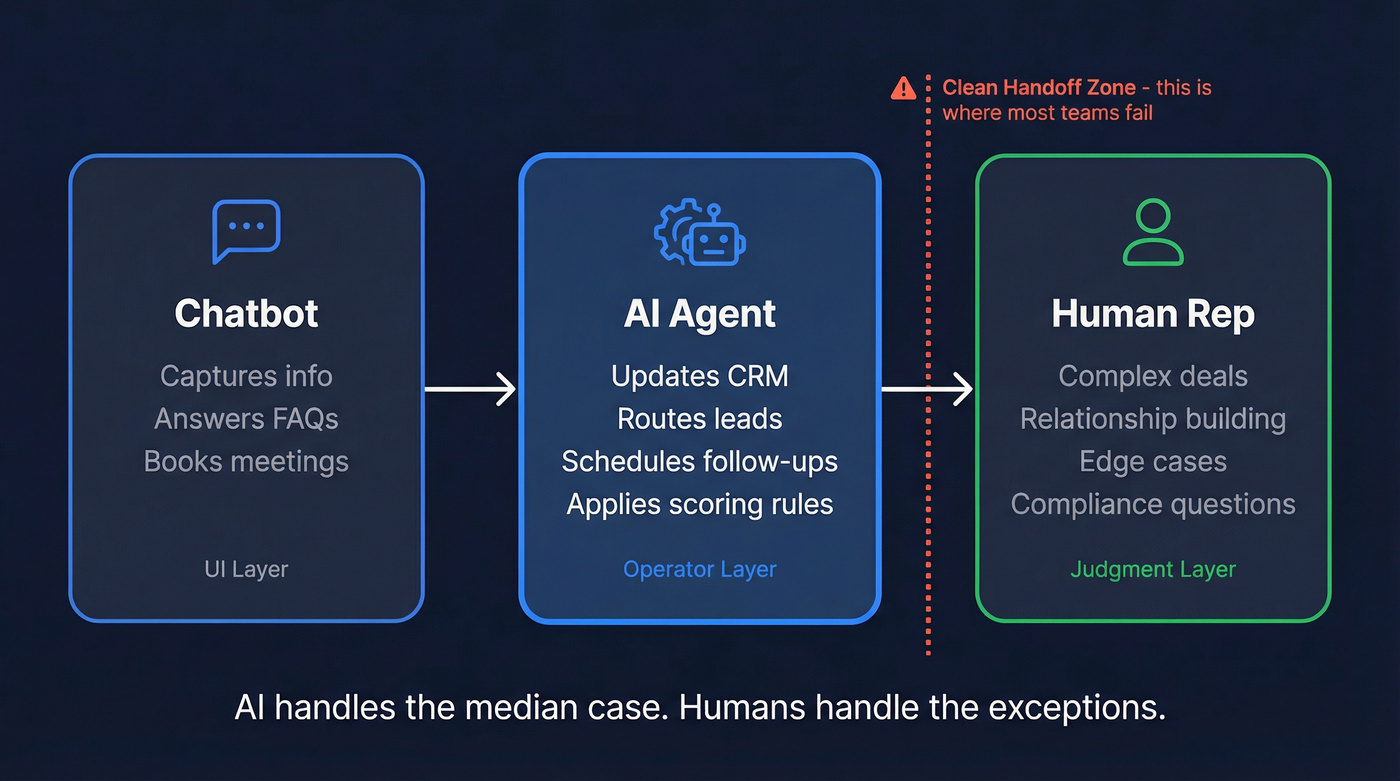
- Chatbots are mostly UI: they capture info, answer FAQs, and maybe book a meeting.
- AI agents are operators: they can take actions (update CRM, route, schedule, send follow-ups) based on rules and context.
Humans still matter because qualification is full of edge cases: multi-product companies, regulated industries, weird procurement paths, and "this person isn't the buyer but they're the internal champion." AI handles the median case. Humans handle the exceptions. You need a clean handoff.
Myth vs reality (what teams get wrong):
- Myth: "AI qualification replaces SDRs." Reality: It replaces unstructured triage. You still need humans for complex deals and relationship building.
- Myth: "More questions = better qualification." Reality: More questions = more drop-off. Ask less, route faster.
- Myth: "If it's automated, it's consistent." Reality: Without monitoring, it drifts and quietly degrades.
Hot take: if your deal size is small and your sales cycle is simple, you don't need a "smart" qualification agent. You need ruthless speed-to-lead, a short rubric, and clean routing. Most teams overbuy brains and underbuild plumbing.
AI lead qualification rubric: the 100-point model you can deploy this week
If you don't have a rubric, you don't have a system. You've got gut feel.
This 100-point model is simple enough to ship fast and strict enough to stop junk from hitting sales. I've seen versions of this work best when you keep the math boring, keep the thresholds firm, and spend your energy on the handoff (routing + availability + follow-up), not on arguing whether "pain" should be worth 18 points or 22.
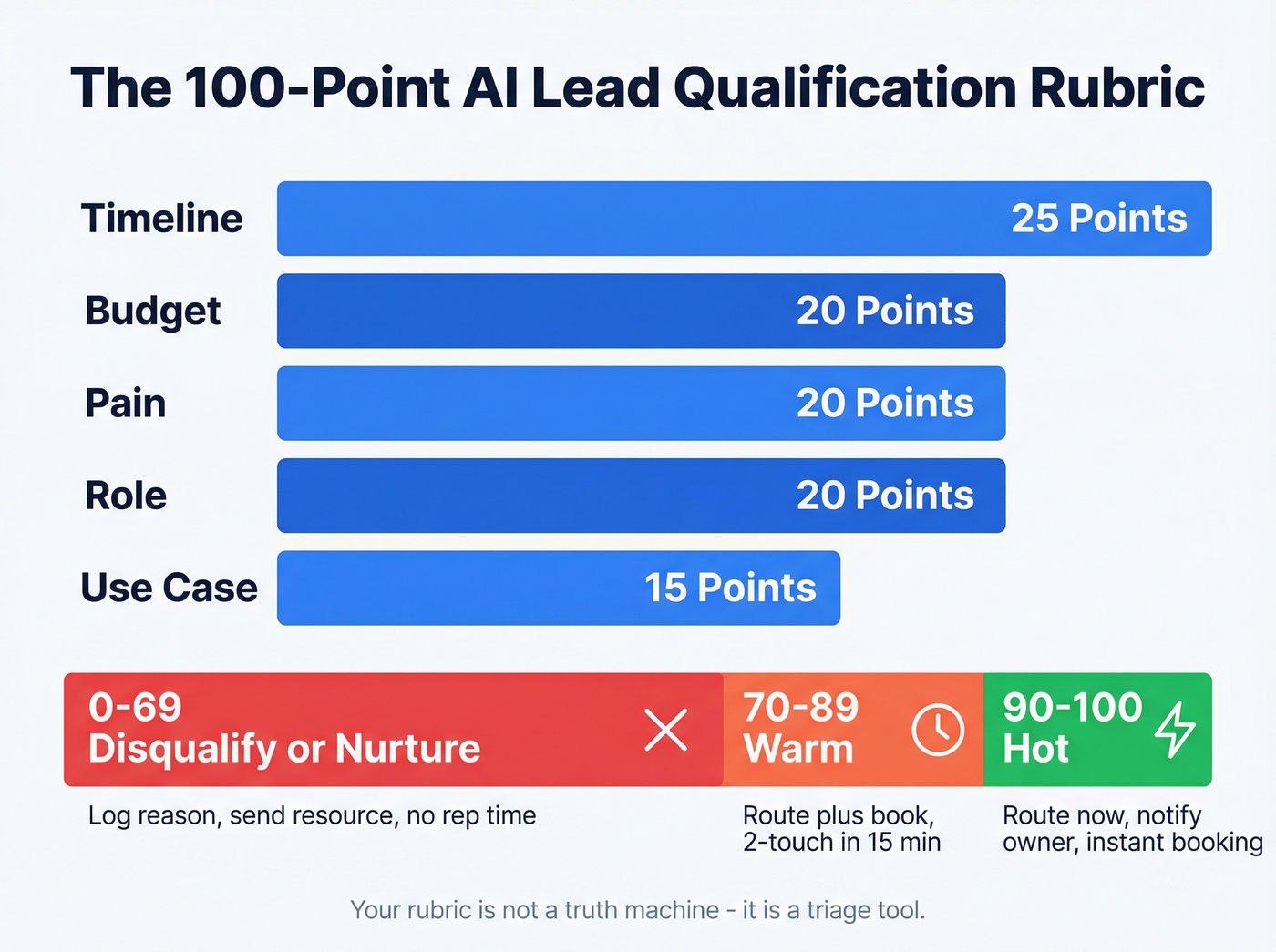
100-point scoring table (copy/paste)
| Dimension | Weight | What "full points" means |
|---|---|---|
| Budget | 20 | Budget fits target range |
| Timeline | 25 | Buying in <=30 days |
| Pain | 20 | Clear, relevant pain |
| Role | 20 | Decision-maker/influencer |
| Use case | 15 | Matches core use cases |
Thresholds (non-negotiable defaults):
- 90+ = Hot -> route immediately + notify owner + offer instant booking
- 70-89 = Warm -> route + book if possible; otherwise 2-touch follow-up within 15 minutes
- <70 = Disqualify / Nurture -> log reason; send helpful resource; don't burn rep cycles
One sentence that saves a lot of internal drama: your rubric isn't a truth machine, it's a triage tool.
Use/skip rules (so you don't over-engineer):
- Use this rubric if you're qualifying inbound demo requests, chat leads, webinar leads, or high-intent site traffic.
- Skip predictive modeling (for now) if you don't have enough history. In practice, if you're under ~1,000 historical leads/year, predictive scoring turns into false confidence.
- Don't add more dimensions until you've reviewed 200+ scored leads and you can prove a new dimension improves meeting-to-opportunity rate.
Question bank
Keep it to 1-2 questions per dimension. Your goal is to qualify, not interrogate.
Pain (20)
- "What triggered you to look for a solution now?"
- "What happens if you don't fix this in the next quarter?"
Timeline (25)
- "When do you need this live?"
- "Are you evaluating vendors now or just researching?"
Budget (20)
- "Do you already have budget allocated for this project?"
- "Are you comparing options in a specific price band?"
Role / authority (20)
- "What's your role in the decision?"
- "Who else needs to sign off?"
Use case fit (15)
- "What are you trying to achieve in the first 30 days?"
- "Which systems does this need to integrate with?"
Scoring tip: if the lead won't answer budget, don't auto-zero them. Give partial credit and use a follow-up question. Hard-zeroing trains your agent to "extract" budget instead of helping.
Immediate disqualifiers
These are binary. Don't waste tokens, time, or rep attention.
- Personal email domains (Gmail/Yahoo/etc.)
- Wrong geo (outside supported regions)
- Student/researcher/job seeker
- Competitor or vendor selling to you
- Obvious spam patterns (nonsense text, repeated submissions, disposable domains)
- "Looking for partnership" when you don't do partnerships
Human escalation triggers
Escalate to a human when:
- Deal looks complex (multi-team rollout, custom security, procurement)
- Authority is unclear but intent is high
- High ARR potential (set your own line; I like "enterprise motion" triggers, not a single dollar number)
- Compliance-sensitive industries (health, finance, public sector)
- The lead asks a question that's legal/security/contractual
I've seen teams lose six-figure deals because an agent confidently answered a security question wrong instead of escalating. That one still annoys me.
The one-page "Qualification Spec" (copy/paste template)
If you want your qualification workflow to survive contact with reality, write the spec. One page. No exceptions.
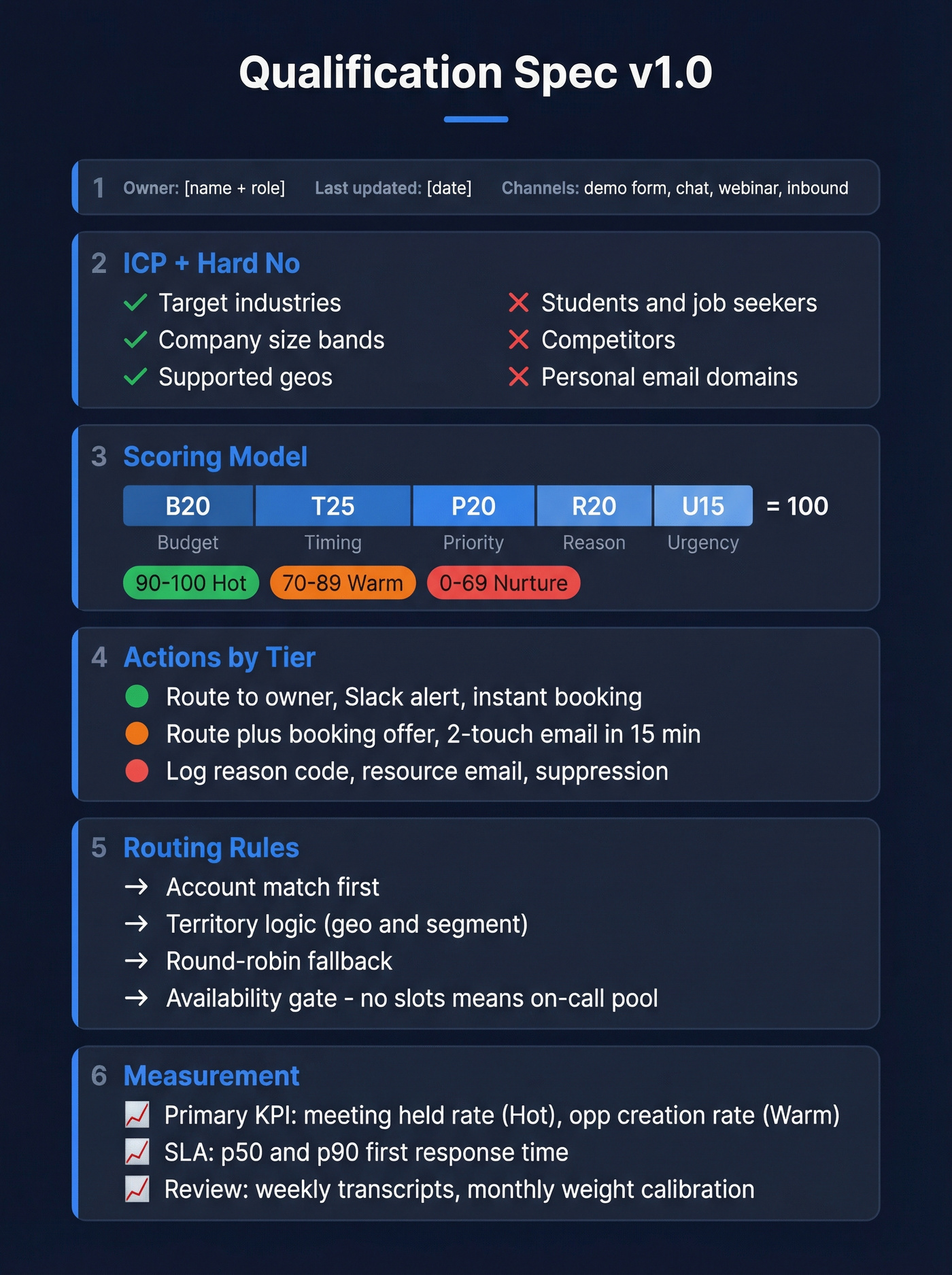
This is what keeps marketing, sales, and RevOps from arguing in Slack forever.
Qualification Spec v1.0
- Owner: (name + role)
- Last updated: (date)
- Applies to channels: (demo form / chat / webinar / inbound phone / etc.)
- ICP definition: (2-4 bullets)
- Hard no list: (bullets)
Scoring model
- Rubric: (Budget 20 / Timeline 25 / Pain 20 / Role 20 / Use case 15)
- Score thresholds:
- Hot: 90-100
- Warm: 70-89
- Nurture/Disqualify: 0-69
- Default scoring rules:
- Unknown budget = partial credit (10/20) unless explicit "no budget"
- Unknown role = partial credit (10/20) unless explicit "student/job seeker"
- Timeline "researching" = 10/25 unless explicit "no project"
Decisioning + actions
- Hot action: (route to owner + Slack alert + instant booking + human touch SLA)
- Warm action: (route + booking offer + 2-touch email within 15 minutes)
- Nurture action: (resource + sequence + re-score trigger)
- Disqualify action: (log reason code + suppression rules)
Routing rules
- Account match: (account owner first)
- Territory logic: (geo/segment)
- Round-robin pool: (names/roles)
- Availability gate: (if no slots in next X hours -> on-call pool)
Human escalation
- Escalation triggers: (bullets)
- Escalation destination: (queue / on-call / named owner)
- What gets handed off: (summary, transcript, extracted fields, reason code)
Data requirements
- Required fields: (email, company, geo, role)
- Enrichment fields: (employee band, industry, tech stack, intent topic)
- Verification rules: (email verified required for "Hot" outreach; mobile verified for "call now")
Measurement
- Primary KPI: (meeting held rate for Hot; opp creation rate for Warm)
- SLA metrics: (p50/p90 first response; p50/p90 human touch)
- Review cadence: (weekly transcript review; monthly weight calibration)

Your 100-point rubric means nothing if the contact data underneath it is stale. Prospeo refreshes 300M+ profiles every 7 days - not every 6 weeks - so your AI qualification workflow scores against real, current data. 98% email accuracy means your routing rules actually connect reps to buyers.
Stop qualifying leads you can't reach. Start with verified data.
Signals to score (fit, intent, engagement, and negative signals)
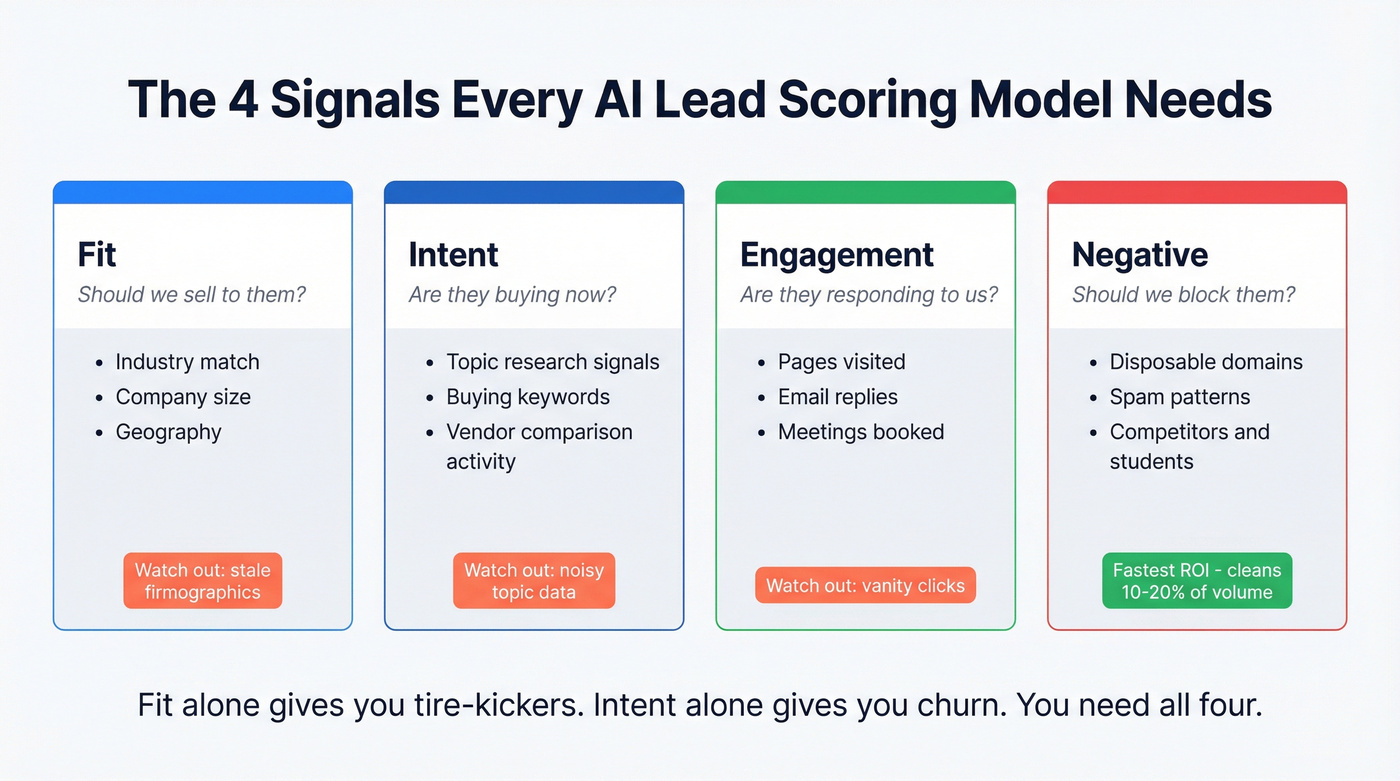
Most scoring models fail because they only score one thing. Fit alone gives you "perfect ICP" tire-kickers. Intent alone gives you "random high-intent" that churns. You need both, plus engagement, minus negatives.
| Signal type | Examples | How to capture | Pitfalls |
|---|---|---|---|
| Fit | industry, size, geo | form + enrichment | stale firmographics |
| Intent | topic research, buying signals | intent feeds + Qs | noisy topics |
| Engagement | pages, replies, meetings | web + email events | vanity clicks |
| Negative | disposable domains, spam | validation rules | false positives |
Table stakes distinctions:
- Fit answers "should we sell to them?"
- Intent/behavior answers "are they buying now?"
- Engagement answers "are they responding to us?"
- Negative signals protect you from garbage and fraud.
Real talk: negative signals are where you get your fastest ROI. Blocking personal emails, disposable domains, and obvious spam can clean up 10-20% of inbound volume overnight, which makes every downstream metric look better.
What practitioners complain about (and they're right):
- Region gaps: your "global" dataset is great in North America and suddenly mushy elsewhere, so routing and calling performance collapses by region.
- Setup overhead: the fanciest enrichment/automation stacks die in implementation because nobody owns the schema and reason codes.
- False precision: teams obsess over a 73 vs 76 score while half the emails bounce and the rep never gets a clean phone number.

AI lead qualification SLAs: speed-to-lead benchmarks + targets
Everyone loves to debate scoring. The teams that win obsess over response time.
Workato's lead response-time study across 114 B2B companies found >99% didn't respond within 5 minutes. Even companies with routing tools still averaged 3h 32m. Without routing tools, it was nearly 13h. Average time to a personalized email: 11h 54m.
What Workato also found (the part that should scare you):
- Only 31% of companies called leads at all.
- Average call response time was 14h 29m.
- 1 in 5 companies never responded by email.
Default has another useful reality check: across 88,000 inbound leads, teams using automated inbound workflows moved 31% faster. That's the real promise here: not "smarter," just faster and more consistent.
Targets to adopt
These are sane defaults that won't melt your team:
| Lead band | Score | First response | Human touch |
|---|---|---|---|
| Hot | 90+ | <=5 min | <=5 min |
| Warm | 70-89 | <=15 min | <=15 min |
| Nurture | <70 | same day | next day |
Two operational notes:
- "First response" can be an agent message + booking link, but human touch still matters for hot leads.
- If you can't hit these, don't lower the target. Fix routing and coverage.
Routing rules that prevent lead rot
Routing is where good qualification goes to die.
Use rules like:
- Account ownership first: if the account exists, route to the owner (or account team).
- Terrory second: geo/segment routing for net-new.
- Round-robin third: only within the right pool.
- Calendar availability gate: if the owner has no availability in the next X hours, route to an on-call pool or offer instant scheduling with whoever's free.
We've watched teams "route instantly" but still miss the SLA because the lead landed on a rep who was in back-to-back calls for 6 hours. Routing without availability is just faster failure.
Skip this if: don't roll out voice calling until you can actually accept warm transfers. A voice agent that qualifies and then dumps the lead into voicemail is worse than doing nothing. It burns trust at the exact moment you finally got attention.
Inbound reality: disqualification volume + meeting booking lift
Inbound isn't pure gold. A meaningful chunk is junk, and you need to plan for it.
Chili Piper analyzed ~4 million form submissions and found 14.1% disqualified. That's spam, personal emails, and people who simply don't fit. The same benchmark showed 66.7% of qualified submissions booked a meeting when scheduling was embedded, versus a "30% industry average" baseline.
The operational takeaway isn't "buy a scheduler." It's this:
Decision rules that keep you sane:
- If disqualification is under ~10%, your criteria are probably too loose (or you're not detecting spam).
- If it's over ~25%, your targeting or form UX is broken (or you're attracting the wrong traffic).
- If qualified leads aren't booking meetings, your handoff is the bottleneck: slow routing, no calendar availability, or too many steps.
One pattern I see repeatedly: teams obsess over "AI chat" while their demo form still asks 11 fields and then sends a "thanks, we'll reach out" email. That's self-sabotage.
Channel playbooks (web chat, email, voice) with handoff patterns
Channel matters because the best qualification question is the one the prospect'll actually answer.
Below are three playbooks you can implement with most stacks (CRM + routing + an agent layer + automation glue like Zapier/Make/n8n). This is where automation pays off: consistent triage, faster handoffs, and fewer "lost" leads.
Web chat / conversational forms (capture, summarize, route, book)
Goal: qualify in 60-120 seconds and either book or route.
Flowchart (text version):
- Visitor asks question / requests demo -> agent asks 2-4 questions (pain + timeline + role + use case) -> compute score -> if 90+ book now + notify owner -> if 70-89 offer booking + route to SDR queue -> if <70 send resource + log disqualify reason
Build steps:
- Ask one question at a time. Multi-part questions tank completion.
- After the last question, show a summary: "Here's what I heard..." and let them correct it.
- Route based on score + territory + availability.
- Always write back to CRM: transcript, extracted fields, score, and reason codes.
Guardrail: don't let the agent answer pricing/security questions beyond your approved snippets. If it's not in the snippet library, escalate.
Email follow-up agent (summarize intent, ask 1-2 questions, book)
This is the speed-to-lead patch when you can't staff instant coverage.
Flowchart:
- Form submit -> agent sends personalized email in minutes -> asks 1-2 missing rubric questions -> if reply indicates hot -> route + book -> if no reply -> follow cadence + nurture
Rules that keep it from being spammy:
- Don't ask five questions. Ask the minimum to place them into hot/warm/nurture.
- Use the lead's own words from the form/chat in the first sentence.
- If they don't respond after 2 touches, stop "qualifying" and switch to nurture.
We've tested this pattern in a few stacks, and the win isn't magical copywriting. It's that you're finally responding while the prospect still remembers filling out the form.
Voice AI SDR (warm transfer + voicemail detection + escalation)
Voice is high impact and high risk. Do it when you've got real inbound volume, after-hours demand, or a strong reason to call quickly.
Retell's guardrails are a good blueprint because they force you to be explicit:
- Use transfer_call when qualified (warm transfer).
- Use end_call when unqualified.
- Enable voicemail detection so you don't leave weird, robotic messages.
- Use "user initiates" silence so the agent doesn't talk over greetings/IVRs.
- Configure warm transfer settings: whisper message, human detection timeout, and what happens if nobody picks up.
Flowchart:
- Call connects -> confirm identity + permission to proceed -> ask 3-4 qualification questions -> score -> if qualified -> transfer_call with whisper summary -> if unqualified -> end_call politely + log reason -> if compliance/security question -> escalate to human, don't improvise
Close's guidance is the other half of the story: TCPA consent, recording disclosure, and ongoing script refinement from transcripts aren't optional. Voice agents aren't set-and-forget. They're a program, and the teams that treat them like production software (change control, QA, incident response) are the ones that don't end up with a PR problem.
Rule-of-thumb budgeting range (estimates):
- Voice agent platform: ~$300-$2,000/month for smaller deployments
- Telephony + usage: varies by minutes/SMS/recording/storage (budget extra)
- Implementation + ops: often the real cost once you add routing, CRM logging, and compliance reviews At serious scale (multiple queues, warm transfers, governance), many teams land in the $12k-$60k/year neighborhood.
Data quality layer (the limiter nobody fixes) + how to operationalize it
Qualification accuracy is capped by input quality. Garbage in doesn't just create garbage out. It creates confident garbage out, which is worse.
Here's a scenario we've seen play out: marketing celebrates because "Hot leads got a 4-minute response time," sales complains because nobody answers, and then you find out 18% of the "hot" emails were invalid and half the phone numbers were office lines that haven't worked since the last reorg. The dashboard looked great. The pipeline didn't.
Two benchmarks matter in practice:
- Freshness: a 7-day refresh beats the 6-week industry average because titles, teams, and emails change constantly.
- Verification: if you score and route on unverified emails/mobiles, your SLA metrics lie. "Responded in 5 minutes" doesn't matter if the email bounced.
Common failure modes -> fixes
| Failure mode | What happens | Fix |
|---|---|---|
| Stale titles | wrong routing | weekly refresh |
| Bad emails | bounces, spam flags | real-time verify |
| Region gaps | low connect rates | multi-source data |
| Setup overhead | ops stalls | start simple, iterate |
I've run bake-offs where the "smartest" scoring model lost because 20% of contacts were wrong, and reps stopped trusting the system within a week. Trust is fragile.
A practical way to keep inputs clean is to put verification and enrichment in front of your "Hot" actions. Tools like Prospeo fit well here because it's built for accuracy: 300M+ professional profiles, 143M+ verified emails, 125M+ verified mobile numbers, 98% email accuracy, and a 7-day refresh cycle. If you're routing fast, you want to be sure you're routing to something you can actually reach.

Governance & compliance checklist (GDPR + TCPA + security controls)
If you're automating qualification, you're processing personal data at scale. That means governance isn't paperwork. It's risk management.
A simple rule that keeps you out of trouble: when the conversation turns contractual, security-related, or high-stakes, escalate to a human.
GDPR + vendor due diligence checklist
- DPA required. If a vendor can't provide a Data Processing Agreement, walk away.
- Know data residency + processing locations. Where's it stored? Where's it processed?
- EU -> US transfers: require SCCs + TIAs (post-Schrems II reality).
- Retention periods: define them. "As long as necessary" isn't a policy.
- Deletion + export: you need a real process to fulfill data subject requests.
- Sub-processors list: who else touches the data?
- Lawful basis mapping (GDPR Art. 6): document what you're relying on for each channel.
Security controls checklist (AI-specific included)
These are common controls used to meet GDPR Art. 32 expectations. Confirm with your security team.
- TLS 1.3 in transit
- AES-256 at rest
- Access controls + least privilege
- Audit logs (who accessed what, when)
- Consent logs (auditable, queryable)
- DPIA triggers for high-risk processing
- Prompt-injection risk controls (don't let users override system instructions)
- Hallucination containment (approved snippets, escalation paths, "I don't know" behavior)
TCPA + calling/recording checklist (voice qualification)
- Documented consent for automated calls where required
- Recording disclosure (and state-by-state requirements)
- Clear opt-out handling
- Call time windows by region
- Script review + change control (treat it like production code)
Procurement "walk away if..." box
- No DPA
- No SCC/TIA support for EU data flows
- No retention/deletion controls
- No audit logs
- No clear consent logging story
- "The model learns from your data" with no isolation guarantees
Compliance isn't fun. But it's cheaper than cleaning up a mess after you've scaled.
Monitoring & continuous improvement (avoid "set and forget")
Qualification that isn't monitored becomes a quiet pipeline leak.
Benchmarks to sanity-check your funnel (directional, but useful)
Use these as guardrails, not gospel:
- Response-time reality (Workato): most B2B teams miss the 5-minute window; average personalized email is 11h 54m.
- Inbound junk rate (Chili Piper): 14.1% of form submissions get disqualified at scale.
- Speed gains (Default): automated inbound workflows moved 31% faster across 88,000 inbound leads.
- Funnel conversion (directional MQL->SQL ranges): many B2B funnels live in the ~10-30% band depending on channel quality and definition discipline. If you're at 5%, your MQL definition's probably too loose. If you're at 60%, you're probably calling SQLs "MQLs."
Dashboard spec (minimum viable)
- Volume by channel (form/chat/voice/email)
- Score distribution (hot/warm/nurture) week over week
- Time-to-first-response by band (p50/p90)
- Meeting booked rate by band
- Meeting held rate by band
- Opportunity creation rate by band
- Disqualification reasons (top 10)
- Escalation rate to humans + outcomes
- Drift indicators (sudden score inflation, rising false positives)
- Drop-off points (which question causes exits)
Alerting rules (copy/paste into your ops runbook)
These are the "make it real" rules. If you don't alert, you don't operate.
Score inflation / drift
- If Hot share increases >10% WoW, investigate: prompt changes, enrichment failures, or a broken disqualifier.
- If Nurture share drops >15% WoW, check spam filters/validators and form changes.
SLA regression
- If p90 first response for Hot exceeds 5 minutes for 2 consecutive days, page whoever owns routing/coverage.
- If p90 human touch for Hot exceeds 15 minutes, your availability gate or on-call pool's broken.
Quality regression
- If meeting-held rate for Hot drops below your baseline for 2 weeks, tighten the rubric or add an escalation step before booking.
- If opportunity creation rate for Warm drops >20% month-over-month, your Warm band's too generous or your follow-up's too slow.
Data/validator failures
- If disqualify reason "personal email" drops suddenly, your email-domain validator broke.
- If bounce rate rises above your normal band, your verification/enrichment pipeline's failing upstream.
Cadence checklist
- Weekly: review 20 transcripts across bands; adjust questions and disqualifiers
- Biweekly: calibrate scoring weights with sales (what became pipeline?)
- Monthly: audit compliance logs + retention
- Quarterly: revalidate ICP assumptions and routing rules
Implementation paths by stack (HubSpot vs Salesforce vs "agent platform")
You don't need a perfect stack. You need a stack that can (1) store fields, (2) score, (3) route, and (4) measure SLAs.
Stack comparison (practical view)
| Stack path | Best for | What you get | Pricing signal (2026) |
|---|---|---|---|
| HubSpot | SMB-mid | native scoring + workflows + reporting | ~$800-$3,600/month in Pro/Enterprise territory |
| Salesforce | enterprise | deep controls + enterprise routing + AI add-ons | ~$30k-$100k+/year all-in for many teams |
| Agent platform | fast pilots | chat/voice agents + extraction + actions | ~$300-$2k/month + usage + implementation |
If you're on HubSpot, do this
- Use HubSpot's lead scoring tool (Marketing Hub Pro/Enterprise and Sales Hub Pro/Enterprise) to implement the 100-point rubric as Fit + Engagement groups.
- If you want AI-based scores, HubSpot supports AI scores for Contacts in Marketing Hub Enterprise.
- Use score properties in workflows to route, notify, and enroll in nurture.
Migration landmine: legacy scoring stopped updating Aug 31, 2026. So in 2026, if you haven't migrated, your scores are already frozen.
Operational reasons migration matters (beyond "it's new"):
- Score history + distribution makes drift visible instead of vibes-based.
- List exclusions let you keep partners, students, and internal traffic from polluting your model.
- Reset scores lets you fix bad logic without carrying old mistakes forever.
If you're on Salesforce, do this
Salesforce's pitch is "AI SDR" automation: qualify, schedule, enrich, and log. Their own pilot framing is reps handling 20 qualified leads/day passed by an AI SDR agent, which is believable if your inbound volume's high and your routing's tight.
Plan like an enterprise: you'll need meaningful historical conversion volume, clear field hygiene, and a retraining cadence. Also plan for security review and governance up front.
Salesforce pricing signal: enterprise AI SDR programs typically land $30k-$100k+/year once you include platform, add-ons, and implementation.
If you're building on an agent platform, do this
This is the fastest path to value if you're not ready to replatform:
- Keep your rubric in one place (a config file or a single "scoring rules" doc).
- Use the agent for conversation + summarization + structured field extraction.
- Use Zapier/Make/n8n to write fields into CRM and trigger routing.
- Start with one channel (web chat or after-hours voice), then expand.
I'm not naming a single "best" agent platform here because your channel + CRM constraints matter more than logos. The winning pattern's consistent: runbooks, structured extraction, and SLA instrumentation.
If you want a clean add-on for intent signals, pair your scoring with a dedicated intent feed. Prospeo's intent data tracks 15,000 topics via Bombora, which is plenty to sharpen routing without turning your process into a science project.
Speed-to-lead dies when your CRM is full of outdated emails and dead phone numbers. Prospeo enriches contacts with 50+ data points at a 92% match rate - feeding your AI scoring model the firmographic, role, and intent signals it needs to route accurately and fast.
Enrich your leads before your AI scores them. 100 credits free.
The "start Monday" plan: a 48-hour rollout
If you want this live fast, do it in two days. Not perfectly. Just operationally.
Implement the rubric + thresholds (2-3 hours) Create the five dimensions, set the 90+/70+ thresholds, and define your disqualifiers.
Set SLA targets and coverage (1-2 hours) Commit to <=5 minutes for Hot and <=15 minutes for Warm. Decide who's on point when the owner's unavailable.
Add routing + the availability gate (half day) Route by account owner -> territory -> round-robin, then block assignments to reps with no near-term calendar slots.
Add a verified data layer (half day) Enrich missing firmographics and verify email/mobile so your "fast response" actually reaches a human.
Ship the dashboard + alerts + weekly transcript review (2-3 hours) Build the minimum dashboard, add the drift/SLA alerts, and schedule a weekly 30-minute calibration where sales and marketing review real transcripts.
Do those five steps and you'll beat the market's baseline immediately because the baseline's slow, inconsistent, and unmeasured.
FAQ: AI lead qualification
What's the difference between AI lead scoring and AI lead qualification?
AI lead scoring assigns a numeric priority based on fit/intent/engagement signals, while AI lead qualification is the full workflow that collects missing info, applies disqualifiers, escalates edge cases, and triggers actions like routing or booking. Scoring's a component; qualification's the operating system around it.
What speed-to-lead SLA should we set for inbound demo requests?
Set <=5 minutes for hot leads, <=15 minutes for warm leads, and same-day automated response for nurture. Workato's benchmark across 114 B2B companies shows >99% miss the 5-minute window, so hitting it becomes a real competitive advantage.
How does AI qualify leads without turning the funnel into a black box?
AI qualifies leads without becoming a black box by using a visible rubric plus deterministic routing rules, then logging the transcript, extracted fields, score, and reason codes in your CRM so humans can audit decisions. If you can't explain why a lead was routed or disqualified, you don't have a system.
How do we keep AI qualification compliant with GDPR and TCPA?
Stay compliant by using DPAs, defining retention/deletion, and implementing SCCs + TIAs for EU->US transfers, plus auditable consent logs and standard security controls like TLS and access logging. For TCPA, document consent for automated calls, provide recording disclosures, and enforce opt-outs and calling windows.
What's a good free tool for verified emails before we automate qualification?
Prospeo's free tier includes 75 emails + 100 Chrome extension credits/month, which is enough to prove the workflow before you spend money on bigger automation. If you just need a quick sanity check, that's the move: verify contactability first, then start tightening SLAs and routing.
Summary: what actually makes AI lead qualification work
AI lead qualification works when you treat it like an operating system: a simple 100-point rubric, aggressive speed-to-lead SLAs, routing with availability gates, verified data inputs, and monitoring that catches drift before pipeline leaks.
Ship the spec, instrument the funnel, and keep humans for edge cases. That's how you get the real win: faster response, fewer junk meetings, and more revenue from the same inbound volume.