How to Build AI-Personalized Email Sequences That Actually Get Replies
You've seen the pitch: "Let AI write your cold emails and watch the replies roll in." So you plug ChatGPT into your workflow, generate 500 personalized sequences, blast them out - and your reply rate barely moves. Maybe it drops. Half your recipients spot AI-generated content, and the other half don't care about your "congrats on the Series B" opener that's three months stale.
The average cold email reply rate is 3.43% across billions of sends. Top performers exceed 10%. The gap isn't about whether you use AI - it's about how. Only 5% of senders personalize each email, yet those senders see 2-3x the replies. Segmented campaigns generate 760% more revenue than batch-and-blast.
AI-personalized sequences work. But only when the data feeding them is clean, the prompts are specific, and the sending infrastructure doesn't torch your domain.
What You Need to Launch AI-Personalized Sequences (Quick Version)
Three things: clean data, an AI layer for personalization, and a sending platform. Don't overcomplicate this.
Recommended starter stack (under $100/month):
- AI: ChatGPT (GPT-4) - $20/month for Plus, or free tier for lower volume
- Sending: Instantly.ai - $30/month, unlimited email accounts, built-in warmup
Data first, AI second, sending third. If your data's bad, your AI personalization is just polishing garbage. If your AI output is generic, your sending platform can't save you. Get the order right.
What AI-Personalized Email Sequences Actually Are
These aren't marketing automation drip campaigns. Tools like ActiveCampaign and Mailchimp handle opt-in nurture flows - people who already know you. Cold email sequence tools (Instantly, Smartlead, Lemlist) handle outbound to people who've never heard of you. Marketing automation sends to people who opted in. Cold email tools earn attention from strangers, and the deliverability, personalization, and compliance requirements work completely differently.
At their core, these sequences use large language models to generate unique elements for each recipient - a custom first line, a tailored value prop, a CTA that references something specific about their role or company. Not mail merge with {{first_name}}. Actual personalization that makes the reader think you spent five minutes researching them.
63% of marketers now use AI tools in email marketing. The ones getting results aren't generating content faster - they're generating context-aware content that connects a prospect's situation to a specific outcome. Personalized CTAs alone produce 97% more booked appointments than generic ones.
The Benchmarks - What "Good" Looks Like
Before you build anything, know what you're aiming for:
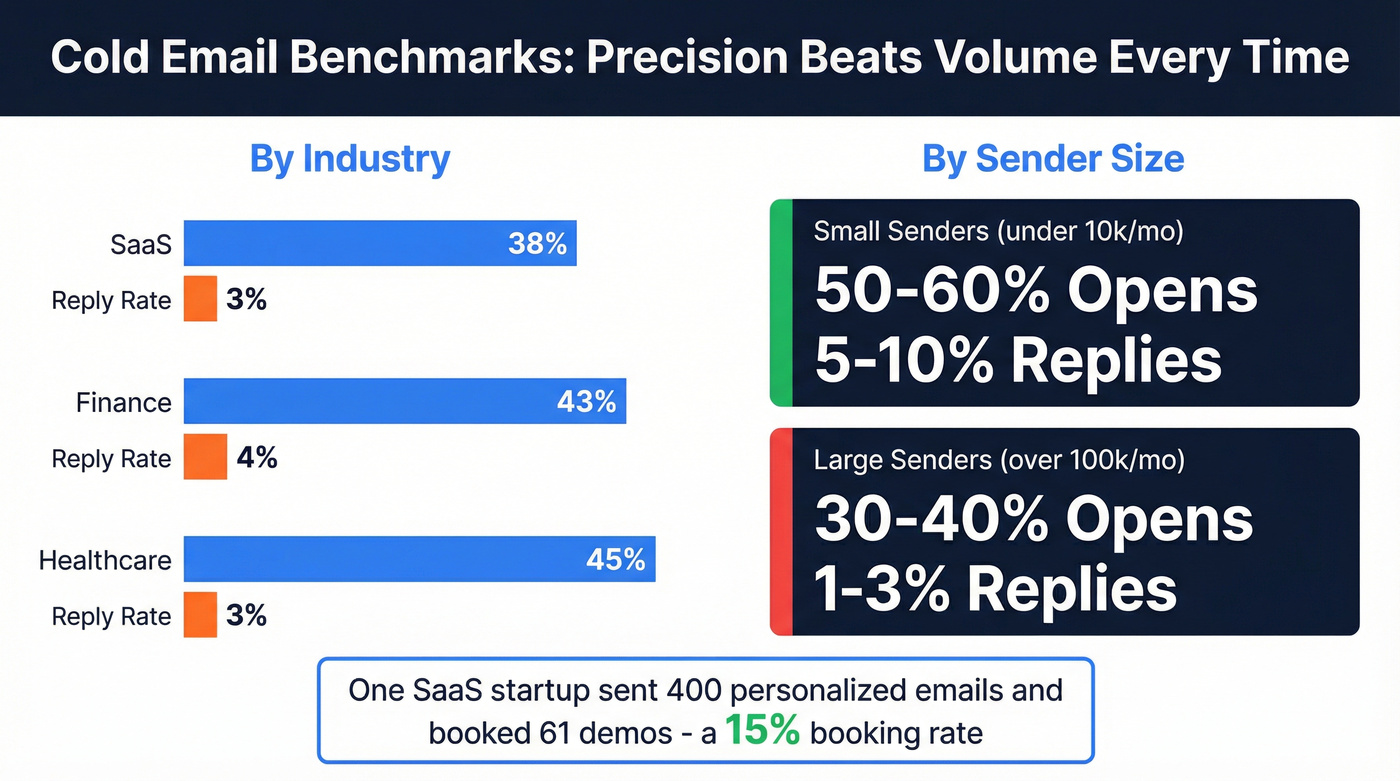
| Industry | Avg. Open Rate | Avg. Reply Rate |
|---|---|---|
| SaaS | 38% | 3% |
| Finance | 43% | 4% |
| Healthcare | 45% | 3% |
Volume matters more than industry:
| Sender Size | Avg. Open Rate | Avg. Reply Rate |
|---|---|---|
| Small (<10k/mo) | 50-60% | 5-10% |
| Large (>100k/mo) | 30-40% | 1-3% |
Small teams running hyper-segmented campaigns hit 60% opens and 8-10% replies. Large teams blasting at scale are lucky to break 3%.
Fewer, better emails beat more, generic ones - every time.
For concrete proof: one SaaS startup sent just 400 highly personalized emails over 8 weeks and booked 61 demos - roughly a 15% booking rate. That's precision over volume in action.
Here's the thing: if you're getting under 3% reply rates on personalized sequences, something's broken upstream. It's usually the data or the targeting, not the copy.
Most teams don't need to send more emails. They need to send 80% fewer emails to 80% better-matched prospects. A 500-person list with 98% verified data and genuine personalization will outperform a 5,000-person list with generic AI copy every single time. The math always favors precision.

This article made it clear: bad data upstream kills even the best AI sequences. Prospeo's 5-step verification, catch-all handling, and 7-day refresh cycle keep your bounce rate under 4% - so your AI personalization actually lands in inboxes, not spam folders.
Stop polishing garbage. Feed your AI sequences 98% accurate data.
Mistakes That Kill AI-Personalized Sequences
Mistake 1: Stale Signals
"Congrats on your recent funding round!" - sent four months after the announcement. This is the #1 way to signal that your "personalization" is automated garbage.
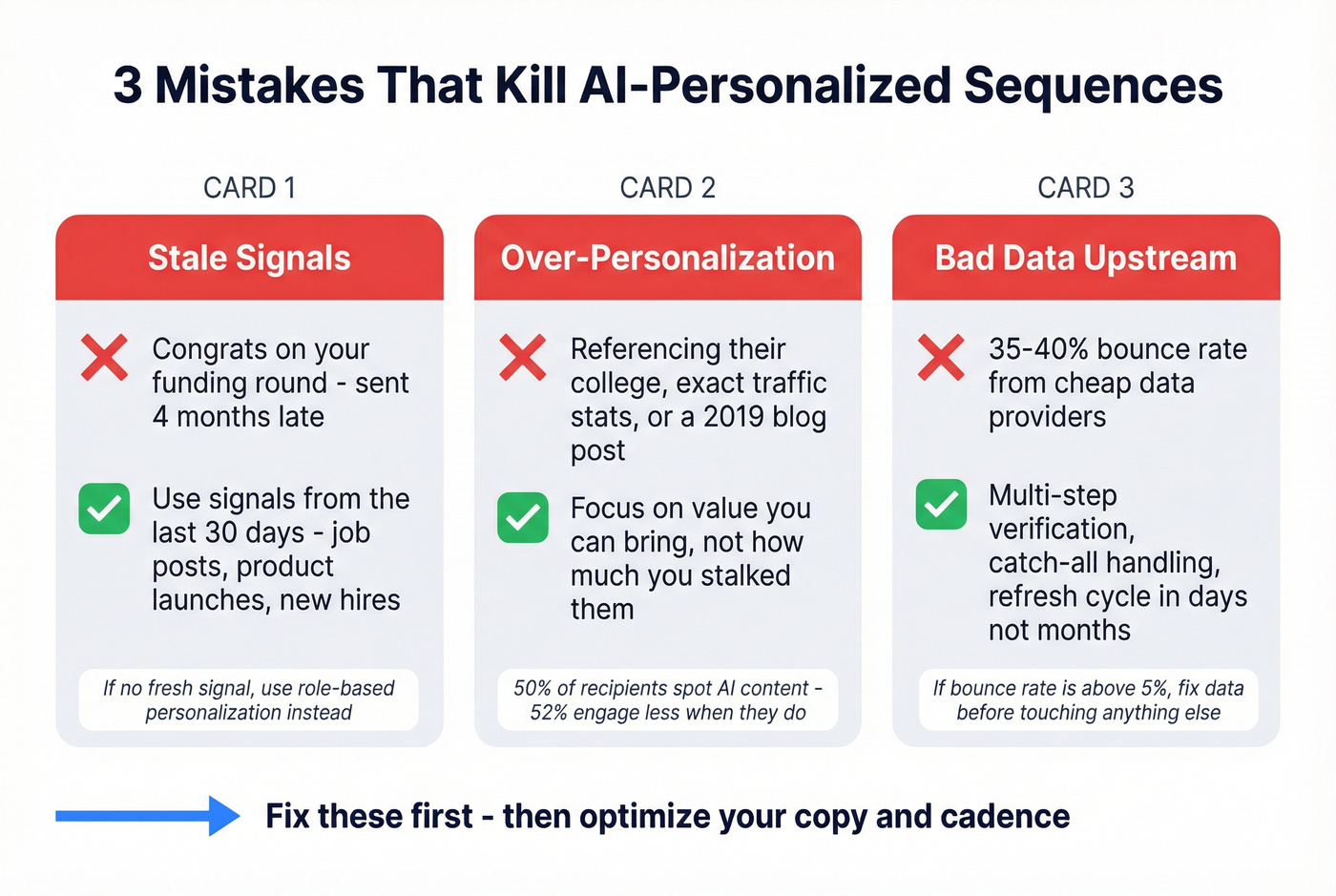
The fix: use signals from the last 30 days. A recent hire, a product launch, a job posting that reveals a pain point. If you can't find a fresh signal, don't fake one - use role-based personalization instead. "As a VP of Sales scaling a team past 20 reps, you're probably dealing with..." beats a stale congratulations every time.
Mistake 2: Over-Personalization
Referencing someone's college, their exact SimilarWeb traffic numbers, or their personal blog post from 2019 doesn't feel thoughtful - it feels creepy. And when the data's wrong (SimilarWeb estimates are notoriously inaccurate), you've just destroyed your credibility in the first sentence.
50% of recipients spot AI-generated content, and 52% engage less when they do. Prospects don't care that you did research. They care whether you can bring them value.
Mistake 3: Bad Data Upstream
This is the silent killer. You build a beautiful AI-personalized sequence, craft perfect prompts, nail the timing - and 35-40% of your emails bounce. Your domain reputation craters. Gmail starts routing everything to spam.
Game over.

We've seen teams waste months debugging their copy and cadence when the real problem was a dirty list from a cheap data provider. What to look for in a data source: multi-step verification, catch-all handling, spam-trap removal, and a refresh cycle measured in days, not months. If your bounce rate is above 5%, fix your data before you touch anything else.
The Complete Workflow - Building AI Email Sequences Step by Step
Step 1 - Build Your Prospect List with Verified Data
Your AI sequence is only as good as the data feeding it.

Start with a free tier to test your ICP filters. Export to CSV or push directly to your sending platform via native integrations. The goal: a list where every email is verified and every contact matches your ideal customer profile.
Skip this step if you enjoy watching your sender score burn.
Step 2 - Enrich with Company and Role Context
Raw contact data isn't enough. You need context for your AI to work with - this enrichment step is what makes AI-driven email personalization actually effective instead of surface-level.
Quick enrichment checklist:
- Company description (what they do, who they serve)
- Recent news or signals (last 30 days)
- Role-specific pain points
- Tech stack / tools they use
- Headcount growth or hiring signals
- Funding stage or revenue range
A workflow that works well: use Perplexity AI to research each company, pulling recent news, product updates, and hiring signals. For automation at scale, an n8n workflow handles this - fetch the company website, convert to markdown, then use GPT-4 to summarize what they do, who they serve, and any standout specifics.
CRM enrichment tools return 50+ data points per contact - job title, department, company size, tech stack, funding stage. Layer that with a quick AI summary of their website, and you've got everything you need for Step 3.
Focus on signals from the last 30 days. A recent job posting beats a stale bio every time.
Step 3 - Generate Personalized Outreach Messages with AI
Now you've got clean data and rich context. Time to turn it into messages that sound human despite being generated at scale.

The CIDI framework is the most reliable structure for AI prompts:
- Context: Your company, product, and ICP details
- Instructions: What you need (icebreaker, full email, subject line)
- Details: Format, tone, length constraints
- Input: Prospect-specific data
Here's a prompt template that works:
You are a concise cold-email copywriter. Using the following tokens:
- {{first_name}}: prospect's first name
- {{title}}: their job title
- {{company}}: their company name
- {{context_snippet}}: a 2-3 sentence summary of their company

Produce 3 one-line icebreakers using these tones:
1. Curiosity   -   make them want to know more
2. Mirror   -   reflect their situation back to them
3. Insight   -   share something they might not know

Then write a 1-sentence CTA. Keep each icebreaker under 120 characters.
Write at a 6th-grade reading level   -   simpler language performs 67% better.
The two-prompt approach works even better. First, ask GPT-4 to summarize the company from enrichment data. Then, in a second prompt, feed that summary into the icebreaker generator. In our testing, this separation consistently outperforms single-prompt generation because the AI isn't trying to research and write simultaneously.
One practitioner documented going from 2% to 5% reply rates - a 2.5x increase - just by adding this AI personalization layer to their existing n8n workflow, with Supabase tracking send history and reply status plus multi-sender rotation for reputation management. The emails weren't longer or fancier. They just referenced something specific about each company in the first line.
Step 4 - Build Your Sequence Architecture
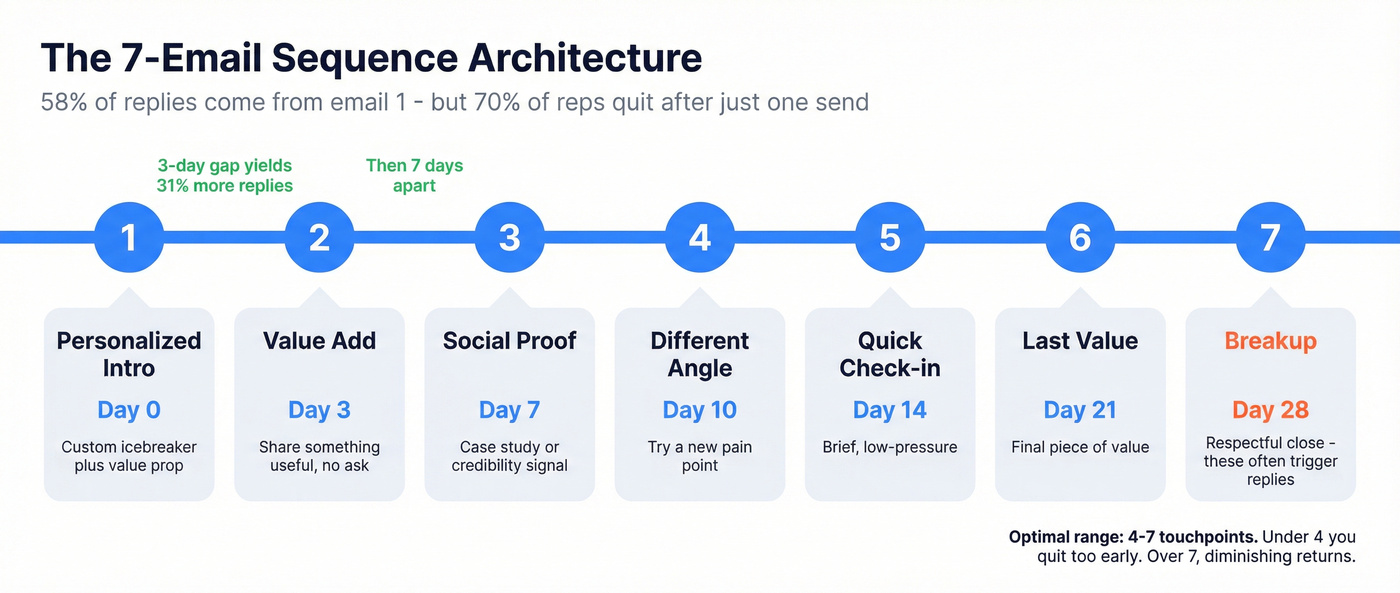
58% of all replies come from the first email. But 70% of sales reps quit after sending just one.
Don't be that rep.
Here's a 7-email framework that gives each touchpoint a distinct job:
| Day | Role | |
|---|---|---|
| Initial Outreach | Day 0 | Personalized intro + value |
| Value Add | Day 3 | Share something useful, no ask |
| Social Proof | Day 7 | Demonstrate credibility |
| Different Angle | Day 10 | Try a new pain point |
| Quick Check-in | Day 14 | Brief, low-pressure |
| Last Value | Day 21 | Final piece of value |
| Breakup | Day 28 | Respectful close |
The optimal range is 4-7 touchpoints. Under 4, you're giving up too early. Beyond 7, diminishing returns kick in hard. Breakup emails often trigger replies - something about the finality makes people respond.
The critical insight: step 2 emails that feel like replies (not reminders) outperform formal follow-ups by about 30%. Write them conversationally, as if you're continuing a conversation they just haven't responded to yet.
Step 5 - Set Timing, Send, and Iterate
The mechanics matter more than most people think:
| Do | Don't |
|---|---|
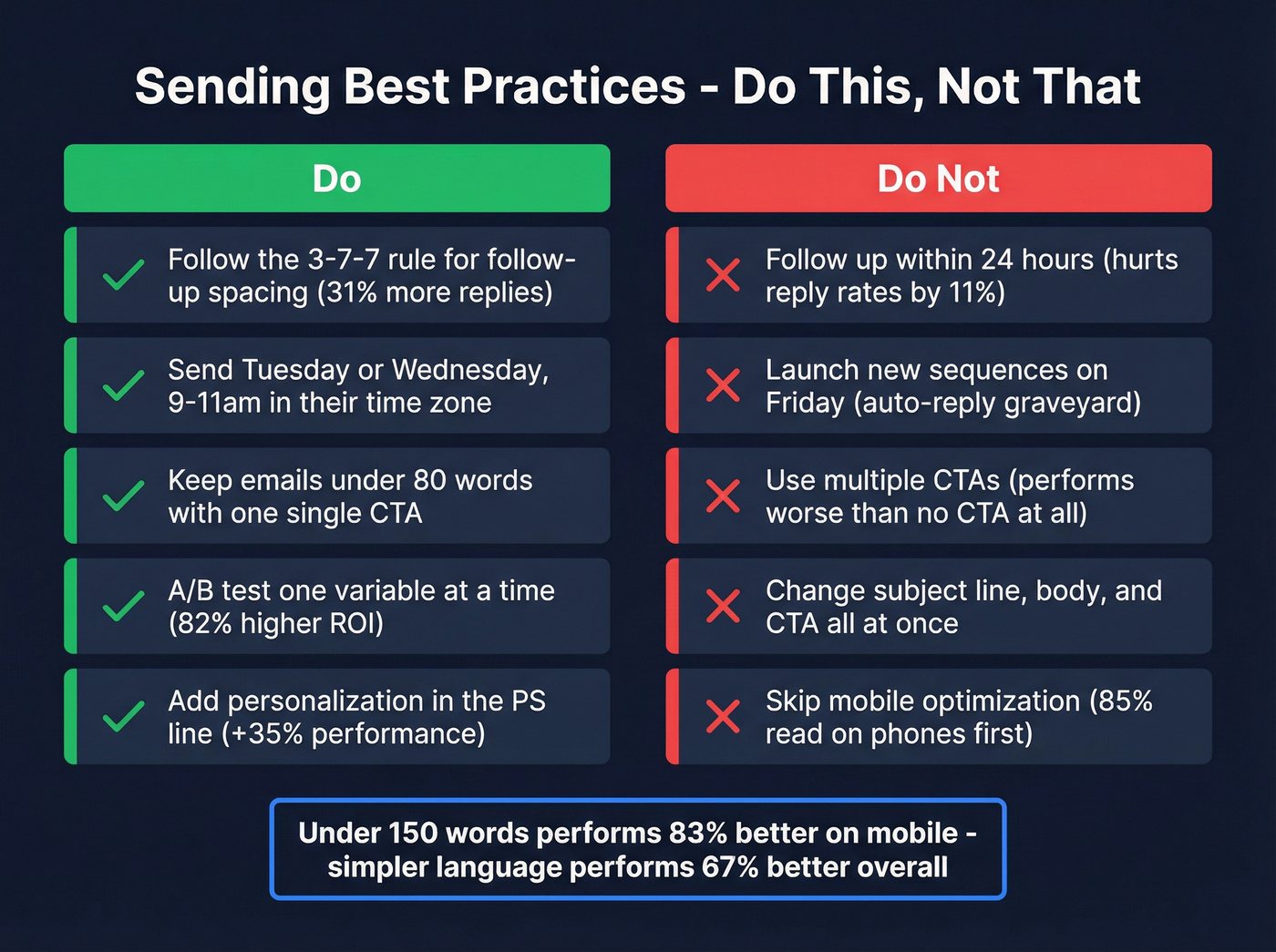
| Follow the 3-7-7 rule (first follow-up 3 days out, then 7 days apart - the 3-day gap yields 31% more replies) | Follow up within 24 hours (hurts reply rates by ~11%) |
| Send Tuesday or Wednesday mornings, 9-11am in prospect's time zone | Launch new sequences on Friday (auto-reply graveyard) |
| Keep emails under 80 words with one CTA | Use multiple CTAs (performs worse than no CTA) |
| A/B test one variable at a time (brands that do see 82% higher ROI) | Change subject line, body, and CTA simultaneously |
| Add personalization in the PS line (+35% email performance) | Skip mobile optimization (85% of emails are read on phones first; under 150 words performs 83% better on mobile) |
Personalized subject lines boost open rates by 49%. That's nearly half your opens riding on whether the subject line feels relevant. Use the prospect's company name or a specific signal - never "Quick question" or "Touching base." If you need examples, borrow patterns from proven cold email subject lines.
Read every AI-generated email aloud before it goes into your sequence. If it sounds like a robot wrote it, rewrite it.
Prompt Templates You Can Copy
Template 1: Role-Setting + Icebreaker Generator
You are a seasoned B2B sales mentor who writes concise, human-sounding
cold emails. Your tone is direct, warm, and never salesy.

Using these inputs:
- First name: {{first_name}}
- Title: {{title}}
- Company: {{company}}
- Company summary: {{context_snippet}}
- Recent signal: {{recent_signal}}

Write:
1. Three one-line icebreakers (curiosity, mirror, insight)   -   each under
   120 characters
2. One soft CTA sentence (suggest a 10-15 min call with a clear
   deliverable, not a generic "chat")

Rules: No exclamation marks. No "I noticed..." openers. No compliments
that could apply to anyone. Reference something specific from the
company summary or recent signal. Write at a 6th-grade reading level.
Template 2: Full Sequence Generation (CIDI Framework)
CONTEXT: I sell {{your_product}} to {{your_ICP}}. Our main value prop
is {{value_prop}}. Typical pain points we solve: {{pain_points}}.

INSTRUCTIONS: Write a 5-email cold outreach sequence for the prospect
below. Each email should have a distinct angle (intro, value-add,
social proof, different angle, breakup).

DETAILS: Each email under 80 words. Conversational tone, 6th-grade
reading level. One CTA per email. No "just checking in" language.
Subject lines under 6 words. Include a personalized PS line in
emails 1 and 3.

INPUT:
- Name: {{first_name}} {{last_name}}
- Title: {{title}} at {{company}}
- Company context: {{context_snippet}}
- Recent signal: {{recent_signal}}
Template 3: Follow-Up Using "Same Conversation" Technique
Return to the same ChatGPT conversation so the AI remembers the prospect context:
The prospect hasn't replied to the email above. Write a follow-up that:
1. Doesn't repeat the original pitch
2. Adds one new piece of value (a relevant stat, case study, or insight)
3. Feels like a natural reply, not a scheduled follow-up
4. Ends with a softer CTA than the original

Keep it under 60 words. No "just bumping this" or "circling back."
Remember: 50% of recipients spot AI content. The fix isn't better prompts - it's better editing. Run every output through your own voice. If you wouldn't say it in a real conversation, rewrite it.
Best AI Email Sequence Tools Compared (2026)
You need 3 tools, not 30. Here's what's worth your money, organized by function:
| Tool | Starting Price | Best For | Key Differentiator |
|---|---|---|---|
| Instantly.ai | $30/mo | Easiest sending setup | Unlimited accounts, AI warmup, built-in lead database |
| Smartlead | ~$39/mo | Agency white-label sending | Multi-client management, 100k+ sends |
| Lemlist | $55/mo | Visual personalization | Image personalization, AI-generated intros |
| Apollo.io | Free / ~$49/mo | Database + sequencing combo | 275M+ contacts with built-in AI writing |
| Saleshandy | $25/mo | Budget all-in-one | AI Sequence CoPilot, 26 A/B variants |
| Reply.io | $49/mo | Multi-channel outreach | AI assistant across email, calls, social |
| Woodpecker | $20/mo | Inbox placement rates | Dynamic snippets, deliverability-first design |
| SmartReach.io | ~$29/mo | Time zone optimization | In-app domains, automated timezone sending |
| Smartwriter.ai | $49/mo | AI icebreakers only | Prospect research + first-line generation |
| Lyne.ai | $120/mo | Premium AI first lines | Deep B2B enrichment + AI-written lines |
| Warmer.ai | $79/mo | Tone-controlled AI writing | AI intros with granular tone selection |
Category Winners:
- Best sending platform: Instantly - easiest setup, best warmup infrastructure
- Best for agencies: Smartlead - white-label, multi-client, high-volume
- Best budget all-in-one: Saleshandy - $25/mo gets you sequencing + AI
- Best database + sequencing combo: Apollo - if you want one tool for both (though deliverability isn't its strongest suit)
Recommended stacks by budget:
- Mid-tier ($150-250/mo): Prospeo (data) + Instantly or Smartlead (sending) + n8n or Make (orchestration)
- Agency ($300+/mo): Prospeo (data + enrichment API) + Smartlead (white-label sending) + n8n (automation)
Instantly is the obvious choice for most teams getting started - easiest setup, built-in warmup, solid lead database. Smartlead wins for agencies running multiple client campaigns. Lemlist's image personalization is genuinely unique if your ICP responds to visual hooks.
The tools that are just AI writing (Smartwriter, Lyne, Warmer) are harder to justify when ChatGPT does 90% of the same work for $20/month. Save your budget for better data and sending infrastructure - that's where the ROI actually lives.
If you want a broader shortlist, start with this breakdown of cold email outreach tools.
Step 2 demands rich context for AI to work with. Prospeo returns 50+ data points per contact - job title, tech stack, funding stage, headcount growth - everything your prompts need to generate replies, not eye-rolls. At $0.01 per email, a 500-person hyper-targeted list costs $5.
Enrich every prospect with 50+ data points and let your AI do the rest.
Deliverability - Keeping AI Emails Out of Spam
You can write the perfect AI-personalized email and still land in spam. Deliverability has three layers, and you need all of them.
Layer 1: Technical Setup
SPF, DKIM, and DMARC aren't optional. Google and Microsoft now require email authentication. If you haven't set these up, stop reading and go do it. Everything else is irrelevant until your technical foundation is solid. (If you need a checklist, start with SPF, DKIM, and DMARC.)
Layer 2: Content Quality
Corporate security tools - Microsoft Defender, Mimecast, Proofpoint - scan email bodies for patterns matching spam: generic greetings, no personalization, identical bulk sends. These tools share reputation data across organizations. One bad batch poisons your domain across hundreds of companies. It's not just Gmail you're fighting - it's an interconnected web of corporate email security that learns from every sender's behavior. Teams that use AI-driven outreach effectively avoid these pattern-matching traps because each email reads as genuinely unique.
Layer 3: Engagement Signals
Spam filters learn from behavior. If nobody opens, clicks, or replies, the algorithm decides your emails are unwanted.
One practitioner shared that switching from volume sequences to AI-personalized one-offs from an actual Gmail inbox resulted in higher inbox placement, higher reply rates, and zero domain warming issues.
Gmail's AI-powered inbox now filters "clutter" and surfaces what it thinks matters. We've moved from spam filters to "intent filters" - your email might technically land in the inbox but get buried under the Promotions tab or deprioritized entirely. The only antidote is genuine personalization that drives engagement.

This is where data quality circles back. Multi-step verification that catches spam traps and honeypots - the kinds of addresses that silently destroy your sender reputation without a single bounce notification - isn't optional. Clean data isn't just about bounce rates. It's about avoiding the invisible traps. If you need an SOP, use an email verification list workflow.
Compliance Essentials - GDPR and CAN-SPAM in 2026
Ignoring compliance isn't edgy - it's expensive. CAN-SPAM penalties run up to $50,120 per offending email. GDPR fines have totaled roughly EUR5.88 billion across 2,245 enforcement actions.
These numbers only go up.
Required elements for every cold email:
- Clear sender identification (real name, real company)
- Physical mailing address
- Accurate subject line (no bait-and-switch)
- Easy, functional opt-out mechanism
- Data source disclosure (GDPR)
GDPR vs. CAN-SPAM differences that matter:
GDPR requires immediate unsubscribe processing. CAN-SPAM gives you 10 business days. GDPR's interpretation for B2B cold email varies by jurisdiction - if you're emailing into the EU, consult a lawyer. This isn't optional. If you want the practical version, follow a GDPR for Sales and Marketing checklist.
One bright spot: double opt-in lists see 22.7% higher conversion rates and 38% higher open rates. Permission-based email isn't just legally safer - it performs better.
FAQ
How many emails should an AI-personalized sequence have?
Four to seven touchpoints is the sweet spot. Under four, you're quitting before most replies happen - 60-70% of responses come after email three or four. Beyond seven, returns diminish sharply and you risk annoying prospects into blocking you.
What reply rate should I expect from AI-personalized cold emails?
The average cold email reply rate is 3.43%. With proper AI personalization on clean, verified data, aim for 5-10%. Top performers consistently exceed 10%. Below 3%? The problem is usually data quality or targeting, not your copy.
Can I use ChatGPT to write my entire email sequence?
Yes, but use the CIDI framework and always edit the output. Feed ChatGPT prospect-specific context - company summaries, recent signals, role-based pain points - not generic prompts. The difference between good and bad AI emails is the quality of your inputs and your willingness to rewrite what sounds robotic.
What's the best free tool to start building AI email sequences?
Prospeo's free tier (75 verified emails/month) paired with ChatGPT's free plan and Instantly's trial gives you a complete stack at zero cost. Apollo also offers a free plan with built-in sequencing, though its lower email accuracy means higher bounce rates that can hurt your domain.
How do I prevent AI-personalized emails from landing in spam?
Three layers work together: technical setup (SPF, DKIM, DMARC configured correctly), verified contact data keeping bounces under 5%, and genuine personalization that drives engagement signals. Use a provider with multi-step verification that catches spam traps and honeypots before they damage your domain. Skip any layer and deliverability suffers.