AI Prompts for Sales Enablement in 2026: The Framework, the Prompts, and the System
It's Monday morning. Your VP of Sales just pinged the enablement channel: "Need six competitor battlecards by Friday. New entrant eating our lunch in mid-market." You've got two days, no analyst support, and a backlog of onboarding content that's already late. This is the exact moment where structured AI prompts for sales enablement become infrastructure instead of a novelty.
Reps spend 70% of their time on non-selling tasks, and only 43.5% hit quota. Those numbers should make every enablement leader uncomfortable.
The opportunity is just as stark. Gartner predicted that by 2028, 60% of B2B seller work will flow through generative AI interfaces - up from less than 5% when the prediction was made in 2023. Highspot's State of Sales Enablement report found that 90% of orgs are using AI for GTM or planning to start, and companies using AI in training grew 164% year-over-year. Reps who effectively partner with AI are 3.7x more likely to meet quota. The gap between teams that operationalize structured prompts and teams that dabble is already a chasm.
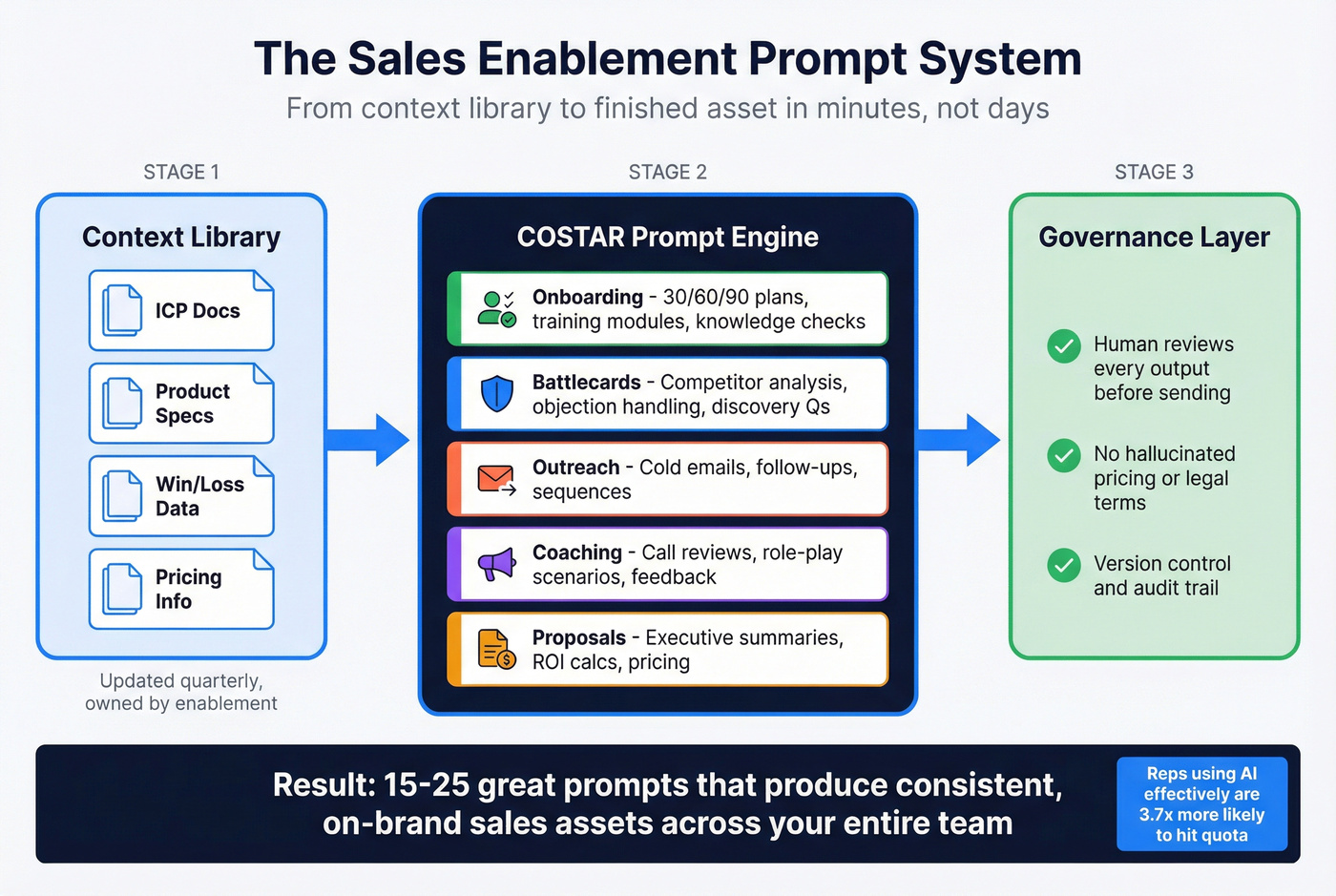
Here's the thing: the problem isn't access to AI. It's that most enablement teams treat prompts like one-off hacks instead of a repeatable system. Skip the prompt libraries with 100+ templates - they're content marketing, not enablement infrastructure. You need 15-25 great prompts, a context library, and a governance layer.
Let's build that system.
What You Need (Quick Version)
- A prompting framework - COSTAR gives every prompt consistent structure so outputs don't vary wildly between reps
- 25+ ready-to-use prompts organized by enablement asset type: battlecards, onboarding, outreach, coaching, proposals
- The right AI tool for each task - ChatGPT for general drafting, Claude for long-document analysis, Perplexity or Gemini for live competitive research
- A governance layer so nobody sends a hallucinated pricing term to a prospect and creates a legal problem
The COSTAR Prompting Framework
You've probably pasted something like "Write me a cold email for a VP of Marketing" into ChatGPT, gotten a bland paragraph that sounds like it was written by a committee, and concluded AI isn't ready for sales. The prompt was the problem, not the model.
The consensus on r/sales backs this up: AI-generated emails all sound the same. The fix isn't a better model - it's a better prompt with actual context about your buyer.
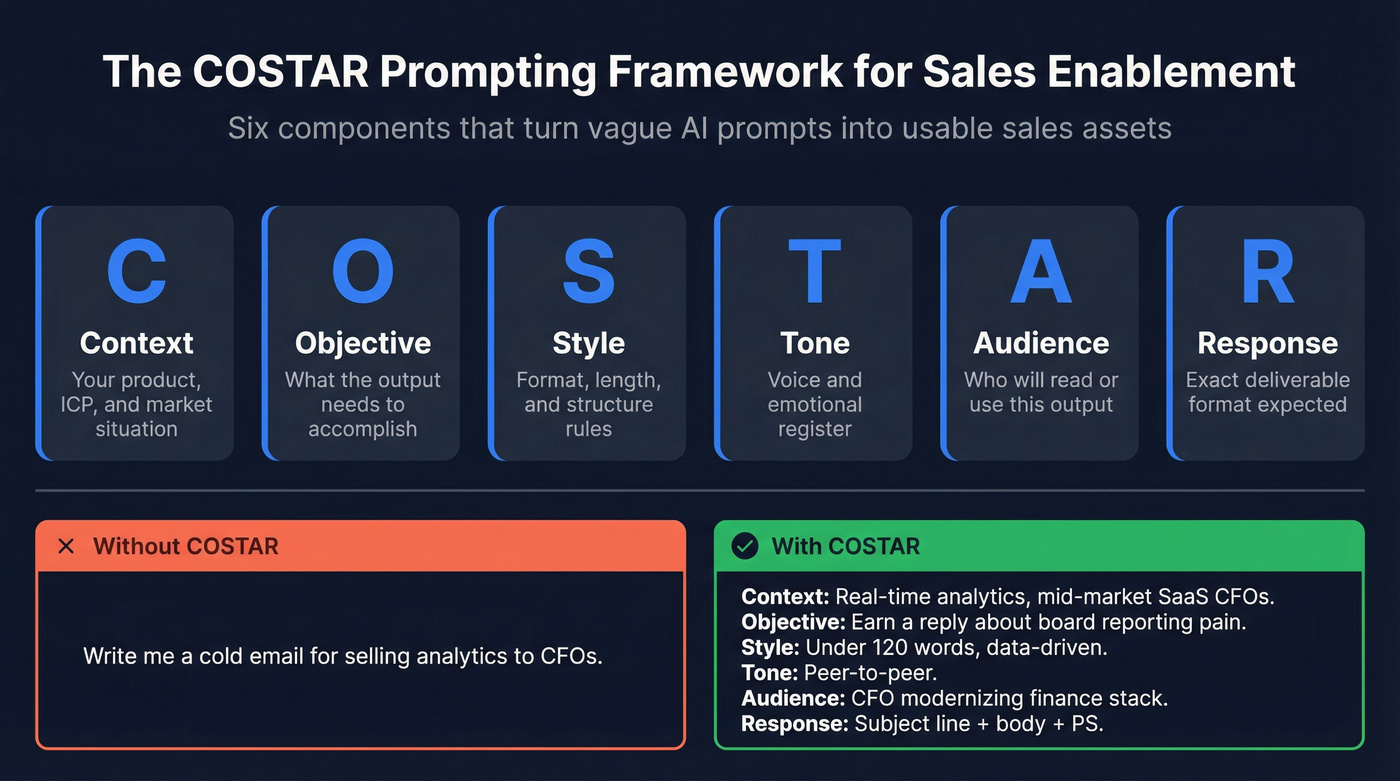
COSTAR is a six-component framework developed by Sheila Teo that won a GPT-4 prompt engineering competition. It stands for Context, Objective, Style, Tone, Audience, and Response format. Each component constrains the model's output in a specific way, and the combination produces dramatically better results than freeform prompts.
Here's the difference in practice:
Vague prompt:
"Write a cold email for selling our analytics platform to CFOs."
COSTAR-structured prompt:
Context: We sell a real-time financial analytics platform that reduces month-end close from 12 days to 3. Our ICP is CFOs at mid-market SaaS companies with 200-1,000 employees who currently use legacy ERP reporting. Objective: Write a cold email that earns a reply by connecting our speed advantage to their quarterly board reporting pain. Style: Concise, data-driven, no fluff. Under 120 words. Tone: Peer-to-peer, confident but not pushy. Like a CFO talking to another CFO. Audience: CFO who's been in role 1-2 years and is modernizing their finance stack. Response: Subject line + email body + one-line PS with a specific ask.
The second prompt takes 90 seconds longer to write and produces output you can actually send. If you want something lighter, SPOTIO's RIGS method (Role, Instruction, Guardrails, Specifics) works for quick tasks. But for enablement assets that need consistency across a team, COSTAR's six dimensions give you more control.
Build Your Context Library First
If you're only going to invest in one section of this system, make it this one. We've seen this play out across dozens of enablement teams: the context library is where 80% of them skip - and where 80% of output quality is lost. Everything downstream improves when you get this right.
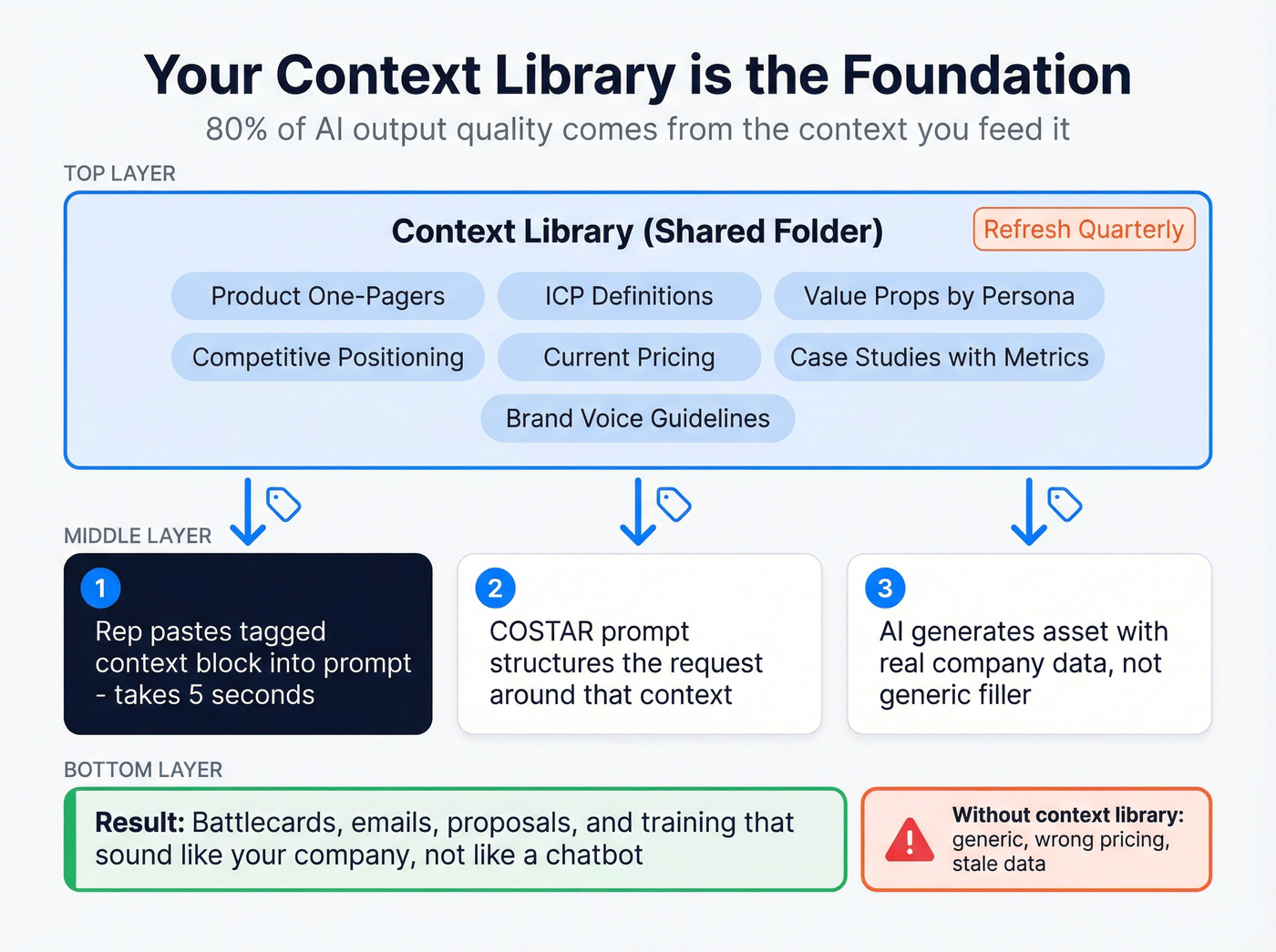
A context library is a shared folder - Google Drive, Notion, whatever your team already uses - containing the raw materials that get pasted into prompts as context.
What goes in it:
- Product brochures and one-pagers, current versions only
- ICP definitions with firmographic and psychographic detail
- Value propositions by persona and vertical
- Competitive positioning docs and win/loss summaries
- Current pricing and packaging, including what's negotiable
- Case studies with specific metrics
- Brand voice and tone guidelines
Structure these documents with tags like <role>, <context>, and <instructions> so reps can quickly copy-paste the right block into any prompt. A rep building a battlecard shouldn't have to hunt through Confluence for your competitive positioning - it should be in a tagged block they grab in five seconds.
Refresh the library quarterly. Stale context produces stale outputs. If your pricing changed in Q2 and your context library still has Q1 numbers, every AI-generated proposal is wrong by default. Assign an owner. Put it on the calendar.
Which AI Tool for Which Task
Stop using one model for everything. Each LLM has a sweet spot, and 81% of Global 2000 companies already use three or more model families in production.
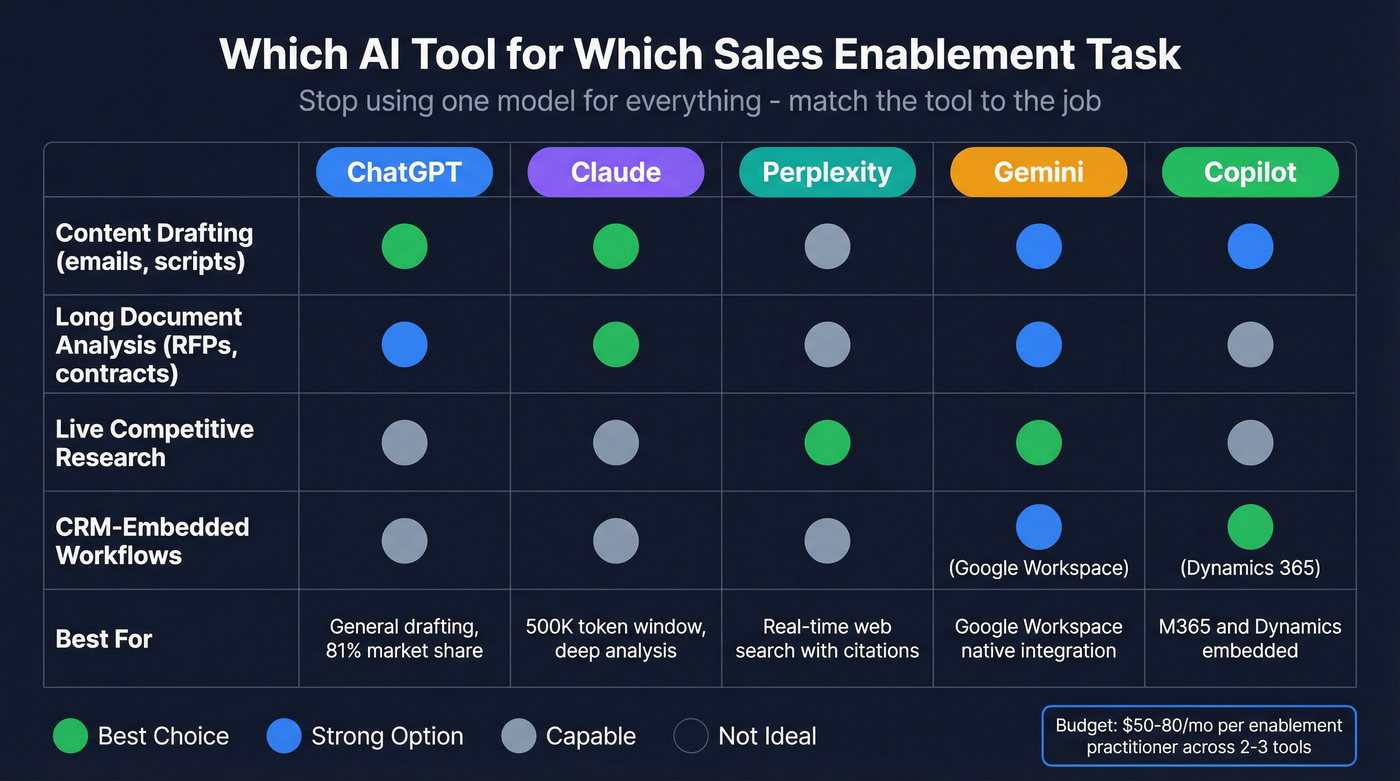
ChatGPT commands roughly 81% of global chatbot traffic and is a strong general-purpose drafting tool - which is why so many teams start with it for enablement workflows before expanding to specialized models. Claude's 500,000+ token context window makes it the top choice for analyzing long RFPs, MSAs, and product specs - documents where smaller context windows start losing detail. Perplexity and Gemini are the go-to options for live competitive research because they browse the web in real time and cite sources. Gemini slots in naturally for teams deep in Google Workspace. Microsoft Copilot embeds directly into Dynamics 365 and M365, which matters if your CRM is already Microsoft.
Pricing is remarkably similar at the individual tier. The differences show up at team and enterprise scale.
| Tool | Individual | Team | Enterprise |
|---|---|---|---|
| ChatGPT | Plus: ~$20/mo | ~$25-30/seat/mo | ~$50-60/seat/mo |
| Claude | Pro: $20/mo | $25/seat/mo | ~$45-80/seat/mo |
| Perplexity | Pro: $20/mo | ~$40/seat/mo | ~$40-60/seat/mo |
| Gemini | Advanced: $20/mo | ~$20-30/user/mo | ~$30-50/user/mo |
| Copilot | Pro: ~$20/mo | M365: $30/user/mo | Sales: ~$40-50/user/mo |
For most enablement teams, the practical recommendation: ChatGPT or Claude for content creation, Perplexity or Gemini for research, and whichever CRM-embedded copilot matches your stack. Budget around $50-80/mo per enablement practitioner across two to three tools.

Your COSTAR prompts can generate perfect outreach - but it's wasted if the email bounces. Prospeo's 98% verified email accuracy and 7-day data refresh mean every AI-crafted message reaches a real inbox. 15,000+ teams use Prospeo as the data layer behind their sales enablement stack.
Feed your AI prompts verified data, not garbage in, garbage out.
25+ Prompts by Enablement Asset Type
Every prompt below uses COSTAR structure. Copy them, paste your context library blocks into the bracketed sections, and iterate. We show the first few in full COSTAR format, then shift to condensed versions - the structure is the same, just trimmed for readability.
Onboarding and Training
30-60-90 Day Plan Generator:
Context:
[paste ICP doc + product overview]. New AE selling[product]into[vertical]. Average sales cycle:[X]days. Ramp target:[X]meetings/month by day 90. Objective: Create a 30-60-90 day onboarding plan with milestones, learning modules, and shadowing activities per phase. Style: Table format with clear deliverables per phase. Tone: Supportive but accountable. Audience: New AE and their manager. Response: Three-phase table - Week, Activity, Deliverable, Success Metric.
Training Module Creator (condensed COSTAR):
Feed it your product feature doc and the specific value prop reps struggle to articulate. Ask for a 15-minute module with talking points, a practice scenario featuring a realistic customer objection, and a 5-question knowledge check. Set the tone to "coach-like" and the audience to mid-career AEs who know the product basics but can't connect features to business outcomes.
Competitive Intelligence and Battlecards
This is where structured enablement prompts earn their keep fastest - and where single-model reliance is most dangerous. (If you want to formalize this, build a lightweight competitive insights motion alongside your prompt library.)
Complete Battlecard Prompt:
Context:
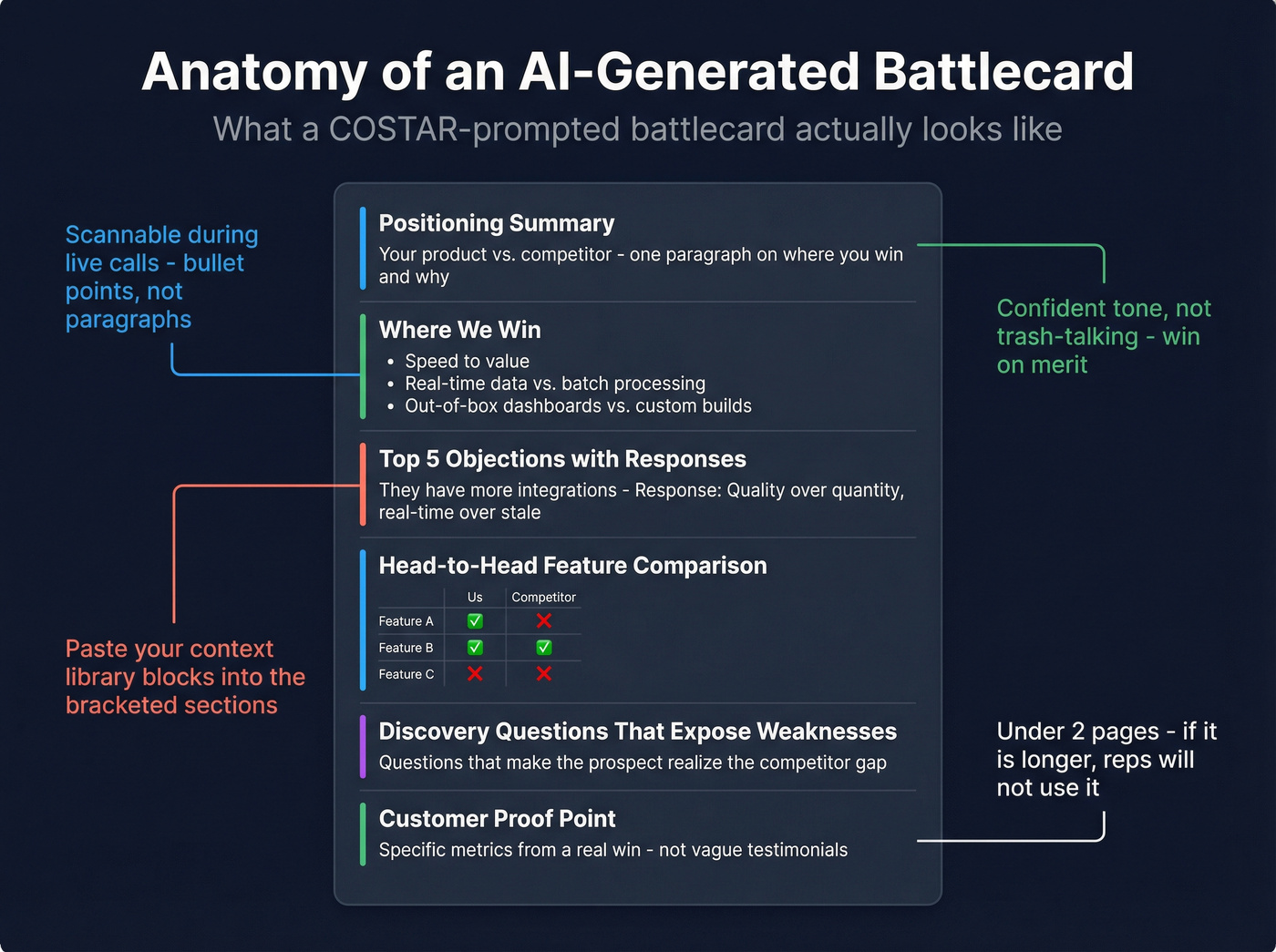
[paste your product positioning + competitor's website copy + any win/loss notes]. We compete against[Competitor]in[segment]. Objective: Create a sales battlecard: positioning summary, ICP overlap, pain points we solve better, key differentiators, head-to-head feature comparison, top 5 objections with responses, pricing guidance, discovery questions that expose competitor weaknesses, and one customer success example. Style: Scannable - bullet points and short paragraphs. Usable during a live sales call. Tone: Confident, factual, not trash-talking. We win on merit. Audience: AEs in competitive deals who need quick-reference ammunition. Response: Structured battlecard with labeled sections. Under 2 pages.
Here's what the output actually looks like when you fill in the context for a hypothetical analytics platform competing against "LegacyBI":
Positioning Summary: DataPulse delivers real-time financial analytics that cuts month-end close from 12 days to 3. LegacyBI offers broader BI dashboards but requires 6-8 week implementation and manual data pipeline configuration.
Where We Win:
- Speed to value: 2-week implementation vs. 6-8 weeks
- Real-time data refresh vs. nightly batch processing
- CFO-specific dashboards out of the box vs. analyst-built custom reports
Top Objection - "LegacyBI has more integrations": Response: "They do connect to more data sources. The question is whether your finance team needs 200 connectors or the 30 that cover your ERP, HRIS, and billing stack - live, not batched overnight. Our customers tell us they'd rather have 30 integrations that update in real time than 200 that are 12 hours stale."
That's a usable battlecard section, not a generic template. The difference is entirely in the context you feed the prompt.
Multi-LLM Consensus Workflow:
Different models give confidently different answers to the same competitive question. Ask ChatGPT, Claude, and Perplexity "What's [Competitor]'s biggest weakness?" and you'll get three plausible but divergent responses. None of them will tell you they're uncertain.
The fix: run your competitor research prompt across three models, then feed all outputs into a single model with this consensus prompt:
Paste all three outputs and ask the model to categorize each finding as High Confidence (all models agree), Medium Confidence (2 of 3 agree), or Gap (only one model mentions it or models contradict). Output a table with Finding, Confidence Level, and Source Models. Flag contradictions explicitly.
Ten extra minutes. Prevents hallucinations from ending up in your battlecard.
Weekly Competitor Monitoring - run this in Perplexity every Monday for live web access:
Track
[Competitor A, B, C]in[market]. Search for developments from the past 7 days: product launches, pricing changes, leadership moves, funding, partnerships, customer wins, negative press. Output a bullet-point digest organized by competitor with source links. Flag anything that changes competitive positioning.
Prospecting and Outreach
Gartner predicted that 30% of outbound messages from large organizations will be synthetically generated by 2028. That future is arriving fast. (If you’re building this into a repeatable motion, pair these with a prospecting workflow so reps don’t improvise.)
Personalized Cold Email:
Context:
[paste ICP + prospect's company info + recent trigger event]. Key differentiator for this persona:[specific value]. Objective: Write a cold email referencing the trigger event, connecting it to a pain point, and asking for a 15-minute call. Style: Under 100 words. No jargon. One clear CTA. Tone: Peer-to-peer. Like a colleague sharing something relevant. Audience:[Title]at[company type]. Response: Subject line + email body.
Here's what this produces for a VP of Finance at a Series C fintech after they announced a new CFO hire:
Subject: Quick thought on [Company]'s finance stack transition
Hi Sarah,
Saw [Company] just brought on a new CFO - congrats. In our experience, new finance leadership almost always triggers a "why does month-end close take 12 days?" conversation within the first 90 days.
DataPulse cuts that to 3 days with real-time reporting that replaces the spreadsheet relay race. Happy to show you what that looks like for a team your size.
Worth 15 minutes this week?
- James
Under 100 words, references a real trigger event, makes a specific claim. That's the bar.
ICP-Based Messaging Generator:
Feed the model your ICP definitions for 3-4 personas and your core value propositions. Ask it to generate persona-specific messaging for each: a one-line hook, a two-sentence value statement, and a proof point. Set the style to "messaging framework" and the response format to a table with columns for Persona, Hook, Value Statement, and Proof Point. This gives your entire team consistent messaging without forcing everyone to sound identical.
Account Research Synthesis:
Paste any existing notes, 10-K excerpts, or news about a target account. Ask for a one-paragraph account brief covering their business model, likely pain points for your ICP persona, and two conversation starters.

Before you run any outreach prompt, verify your list. The best AI-generated cold email is worthless if it bounces. Prospeo's bulk verification catches invalid addresses before they hit your sequencer - upload a CSV, get results in minutes, and protect your domain reputation. (If you’re evaluating options, start with an email checker tool or a dedicated email ID validator.)
Discovery and Call Prep
| Prompt | What to Feed It | What You Get |
|---|---|---|
| Pre-Meeting Research | Company size, industry, tech stack, recent news | One-page prep sheet: company context, persona priorities, 3 pain-point hypotheses, landmines to avoid |
| Discovery Question Generator | ICP + product value props + prospect's role and problem area | 10 discovery questions covering budget, timeline, decision process, and pain severity - conversational, not interrogation-style |
Objection Handling
Objection Response Generator:
Paste your competitive positioning and pricing doc. Include the exact objection the prospect raised. Ask for three response options: one empathetic/consultative, one data-driven, one that reframes the objection as a buying signal. Each response should be under 60 words and never sound defensive.
Objection Anticipation:
Paste the deal context - stage, stakeholders, competitor involved, known concerns. Ask the model to predict the top 5 objections the prospect will raise in the next meeting and draft a response for each. Output as a table: Objection, Likely Source (persona), Recommended Response.
Sales Playbooks and Proposals
Playbook Section Generator - feed it your existing playbook outline, ICP, and sales process stages. Ask for a specific section (e.g., "Qualification Criteria") with decision criteria, red flags, and next-step guidance. Keep it under 500 words and formatted for an internal wiki.
Proposal Executive Summary - paste discovery notes, product fit analysis, and pricing. Ask for a 200-word executive summary connecting stated pain points to your specific solution, with one ROI proof point and a clear next step.
RFP Response (Long Document Decomposition):
For RFPs over 50 pages, don't paste the whole thing into a prompt. Use Claude's large context window and a two-step approach:
Step 1: "Read this RFP in full. Extract every requirement, compliance clause, and evaluation criterion. Output a numbered list with the section and page number for each." Step 2: "For each requirement, draft a response using
[context library blocks]. Flag any requirement we can't meet or where the answer needs human review."
This decomposition catches requirements buried in the middle of the document - exactly where models tend to lose focus.
Coaching and Role-Play
Call Review and Feedback - paste a call transcript or summary. Ask the model to score it on discovery depth, objection handling, next-step clarity, and talk-to-listen ratio, then provide 3 specific coaching recommendations. Set the tone to "senior AE giving feedback to a peer." (If you want to operationalize this, align it to your sales coaching best practices and scorecards.)
Role-Play Scenario Generator - feed it your ICP, common objections, and competitive landscape. Ask it to play the prospect in a specific scenario, like handling a CFO who's comparing you to a competitor on price. The output should include realistic pushback, a curveball question, and a moment where the prospect goes silent. Stage directions noting the prospect's emotional state make the practice feel real.
The Prompt That Cost $1.8M
An HVAC contracting team used AI to summarize a 280-page municipal RFP. The summary looked thorough - scope, timeline, pricing structure, compliance requirements. They built their bid on it.
They lost the $1.8M contract because the AI missed a prevailing wage requirement buried in Section 12.
The model processed the beginning and end of the document carefully but blurred the middle - a well-documented phenomenon called "lost in the middle." The requirement wasn't obscure or hidden. It was just in the wrong part of a long document.
This is context rot in action: as document length increases, accuracy degrades. Traditional RFP responses take 20-40 hours. AI can compress that dramatically, but only if you structure the prompt to force computation instead of guessing. The decomposition technique from the Playbooks section - extract every requirement with page numbers first, then respond individually - exists specifically to prevent this failure mode.
For teams handling high-stakes documents, the advanced version uses a Python extraction step: instruct the model to write and run a script that searches every page for critical terms (Davis-Bacon, liquidated damages, prevailing wage, Buy American) and extracts surrounding paragraphs with page numbers. Overkill for a battlecard. Essential for a seven-figure bid.
AI Governance for Enablement Teams
Look, most enablement teams skip governance until something goes wrong. Don't be that team. Build it before you roll out prompts to the broader org.
Forrester warned that B2B companies stand to lose $10B+ in enterprise value from ungoverned generative AI adoption across sales, marketing, and product. That's not hypothetical risk - it's already materializing.
Picture this: a rep uses ChatGPT to draft a proposal. The model hallucinates a pricing term your company doesn't offer - a 90-day payment window instead of your standard net-30. The prospect accepts. Legal is now involved, and you're either honoring a term that costs you margin or damaging a relationship by walking it back. Or consider the McDonald's "McHire" incident, where an AI hiring tool was exposed with default credentials and no MFA, compromising 64 million job application records.
Here's the governance checklist:
- Approved tools list - which models are sanctioned, which are banned. No shadow AI.
- Data classification - what can go into a public LLM versus what requires an enterprise-tier tool with data retention controls. Nothing with customer PII or proprietary pricing goes into a free-tier model.
- Brand review gate - AI-generated content that touches prospects gets human review before send. No exceptions.
- Human-in-the-loop for buyer-facing assets - proposals, pricing docs, contracts, and RFP responses always get a human sign-off.
- Prompt versioning - track which prompts produce which outputs. When something goes wrong, you need to trace it back.
- Logging - who used which tool, when, for what. Not for surveillance - for accountability and improvement.
At minimum, implement the approved tools list and human-in-the-loop for buyer-facing assets. Everything else can phase in over 30-60 days.
Clean Data Makes the Prompts Work
Every prompt in the prospecting and outreach section has an upstream dependency: contact data. You can craft the perfect COSTAR-structured cold email prompt, generate a message that's personalized, concise, and compelling - and watch it bounce because the email address was stale. (This is usually B2B contact data decay showing up in your reply rates.)

After your AI prompt generates the email, verified contacts feed directly into your sequencer - Salesforce, HubSpot, Lemlist, Instantly, whatever you're running. Upload a CSV for bulk verification, use the API for enrichment workflows, or search the database with 30+ filters including buyer intent signals across 15,000 topics powered by Bombora. (If you’re scaling volume, follow an email deliverability checklist so the infrastructure doesn’t become the bottleneck.)
You just built a context library and a prompt framework. Now you need the prospect data to power it. Prospeo gives you 300M+ profiles with 30+ filters - buyer intent, technographics, job changes - so your AI-generated battlecards and outreach target real, reachable buyers at $0.01 per email.
The best enablement system starts with the best B2B data.
FAQ
Which AI model is best for sales enablement?
ChatGPT is strongest for drafting emails, playbooks, and training content. Claude excels at long-document analysis like RFPs and contracts thanks to its 500K+ token window. Perplexity handles live competitive research with source citations. Most enablement teams need all three - budget ~$60/mo total.
How do I stop AI from writing generic sales copy?
Use the COSTAR framework and feed it a context library with your ICPs, value propositions, and tone guidelines. Specificity in equals specificity out - a prompt with your actual win/loss data produces 10x better output than a generic "write me a cold email" request.
Are AI-generated sales materials safe to send to prospects?
Not without human review. AI hallucinations in proposals create real legal risk - one HVAC team lost a $1.8M contract from a missed RFP requirement. Implement a human-in-the-loop gate for every buyer-facing asset: proposals, pricing docs, contracts, and RFP responses.
How many prompts does an enablement team actually need?
Fifteen to twenty-five well-structured prompts on a consistent framework like COSTAR will outperform a hundred random templates. Pair them with a context library and governance layer - the system matters more than the volume.
What's a good free tool for verifying outbound contact data?
Prospeo offers 75 free verified emails per month with 98% accuracy and a 7-day data refresh cycle. For teams running real outbound campaigns, that free tier covers enough ground to validate the workflow without burning your domain reputation.