Sales Sequence Scheduling: When to Send, How to Space, and What the Data Says
Your 14-day sequence is running. Eight steps, decent copy, solid ICP targeting. Reply rate? 0.8%. Half your emails land at 4pm on Fridays to addresses that bounced three steps ago.
Here's the thing: the problem usually isn't your messaging. It's your sales sequence scheduling - when each step fires, how much breathing room sits between touches, and whether the data feeding your sequencer is any good in the first place.
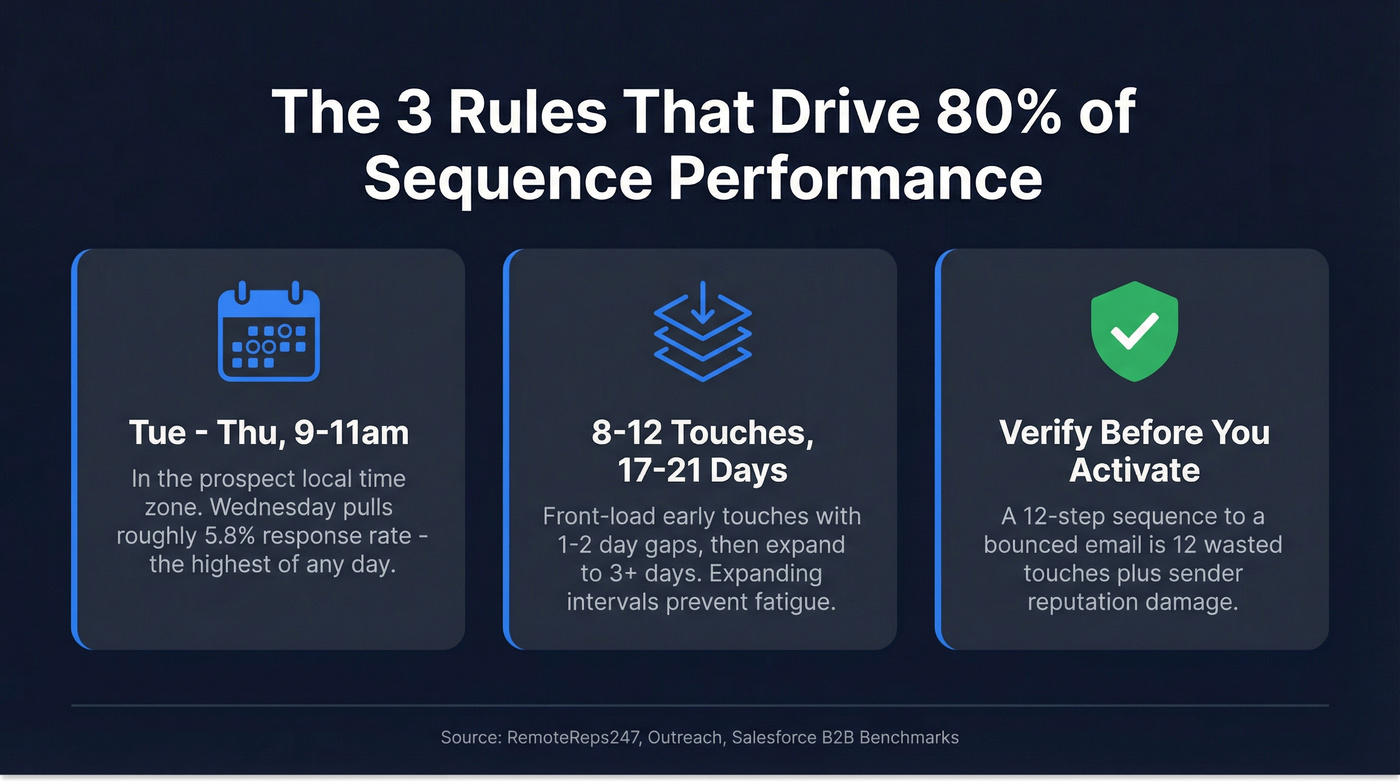
The Three Rules That Drive 80% of Performance
- Tuesday-Thursday, 9-11am in the prospect's local time zone. Wednesday pulls the highest response rates at roughly 5.8%.
- 8-12 touches over 17-21 days, with expanding intervals. Front-load early touches, then widen the gaps. (If you want more ready-to-run blueprints, see sales sequences.)
- Verify your list before you activate. A 12-step sequence to a bounced email is 12 wasted touches plus sender reputation damage. (Use an email validity check workflow before you launch.)
Best Days and Times
Salesforce's B2B benchmarks point to Tuesday through Thursday as the engagement window. Monday inboxes are flooded with weekend catch-up; Friday attention is already drifting. Wednesday stands out - RemoteReps247 data shows it pulling a roughly 5.8% response rate, meaningfully above the 5.1% average.
The hour matters just as much. The 9-11am window in the prospect's local time zone is the sweet spot. Not your time zone - theirs. Lunch hour, roughly 12-1pm, works as a secondary window for prospects who clear their inbox over a sandwich. Weekends crater below 1%. If you're struggling with recipient-local scheduling, use a dedicated cold email time zones playbook.
Here's an operational detail most guides skip: schedule sends at odd minutes. Not :00, not :30 - try :07, :21, or :36. Twilio's SendGrid team flags this because ISPs see massive traffic spikes on the hour and half-hour. Sending at :07 means your email arrives when the inbox isn't competing with 500 other automated sends. Small edge, but small edges compound across thousands of touches.
How to Space Your Touches
Two spacing models dominate.
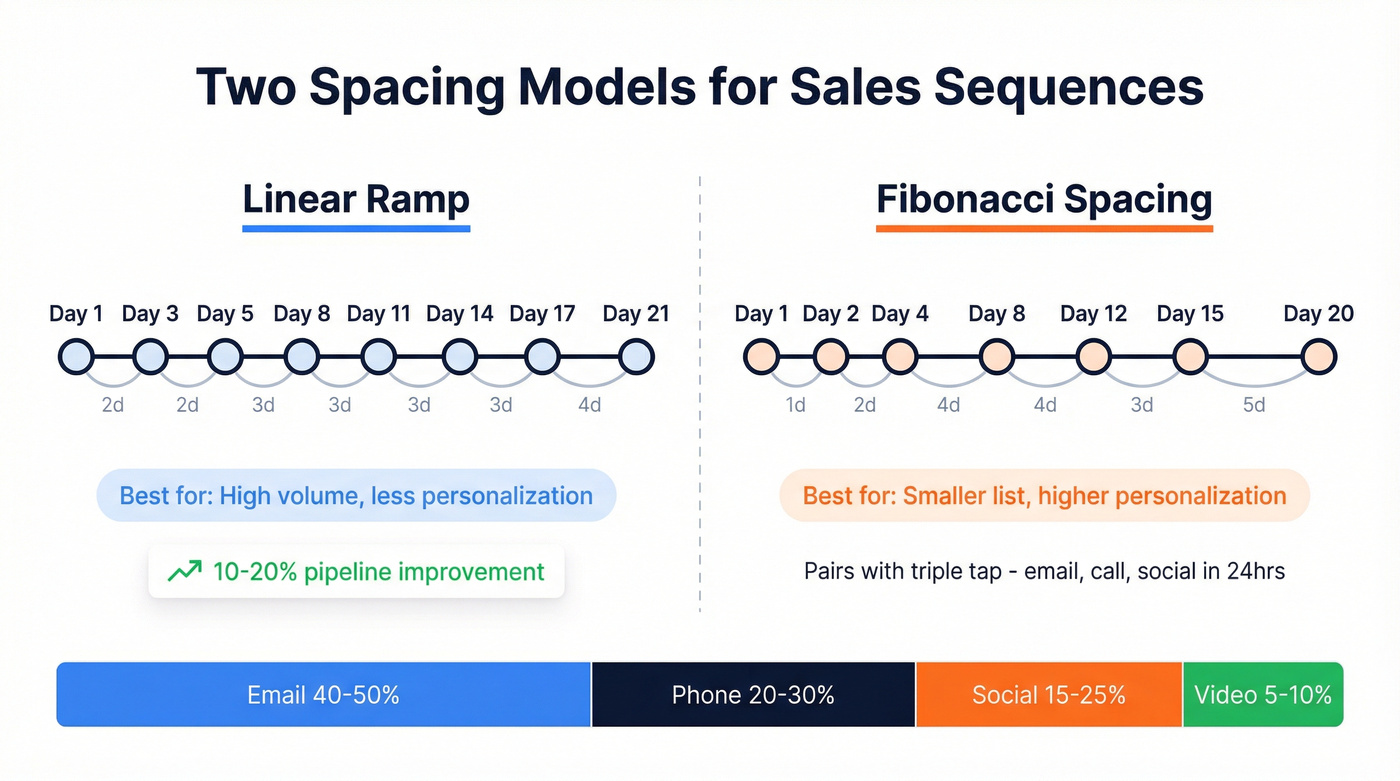
Linear ramp: Outreach recommends 8-12 touchpoints over 17-21 days, starting with 1-2 days between early touches and expanding to 3+ days later. This is the safe default - it keeps you present without creating fatigue, and McKinsey data cited by Outreach suggests systematic engagement processes drive 10-20% pipeline improvements. The channel mix matters: email should be 40-50% of touches, phone 20-30%, social 15-25%, and video 5-10%. For more cadence options, compare against a sales cadence example.
Fibonacci spacing: Heavy upfront, then widening gaps - Days 1, 2, 4, 8, 12, 15, 20. This front-loads urgency while giving later touches room to breathe. It pairs well with the "triple tap" concept: hitting a prospect across three channels within 24 hours. Day 1 email, Day 1 call, Day 2 social touch - that surround-sound effect creates recognition before the prospect has time to forget you. If you're building this into automation, see AI in sales cadences.
We've tested both. The linear ramp works better for teams running high volume with less personalization. Fibonacci spacing outperforms when you're going after a smaller, higher-value list where each touch is more tailored. (If you need help tightening relevance, use a personalization in outbound sales framework.)
Most enterprise sequencers like Outreach and Salesloft run $100-200/user/month. HubSpot Sales Hub Professional typically runs around $100/user/month (often billed annually), with Sequences included. Factor that cost into your decision - if you're paying $150/seat, you should be optimizing every send window. If you're evaluating platforms, start with cold email marketing tools.
Copy-Paste Sequence Schedules
Three templates you can load into your sequencer today. Adjust timing to your ICP, but the structure is battle-tested.
One operational note before you hit activate: throttle sends to around 20 emails per hour per mailbox. Blasting 500 emails at 9:00am from a single mailbox is a fast track to the spam folder. If you're scaling volume, follow cold email volume best practices.
Cold Outbound Multi-Channel (8 Touches / 12 Days)
Based on Sybill's tight-cadence framework:
| Day | Channel | Timing Note |
|---|---|---|
| 1 | 9:07am prospect TZ | |
| 2 | Call | 10:21am prospect TZ |
| 3 | 9:36am prospect TZ | |
| 5 | Social | Afternoon window |
| 7 | Email + asset | 9:07am, attach case study |
| 9 | Call | 10:21am prospect TZ |
| 11 | Email (objection) | 9:36am, address common pushback |
| 12 | Email (close) | 9:07am, clear CTA |
Warm Inbound Follow-Up (5 Touches / 7 Days)
For hand-raisers, demo requests, and content downloads. Faster cadence, email-heavy.
| Day | Channel | Timing Note |
|---|---|---|
| 0 | Within 5 min of trigger | |
| 1 | Call | 10:07am prospect TZ |
| 2 | 9:21am, add social proof | |
| 4 | Email + call | 9:36am email, 2pm call |
| 7 | Email (break-up) | 9:07am, final CTA |
Email-Only Cold (6 Touches / 14 Days)
For teams without phone or social capacity. Wider spacing compensates for single-channel fatigue.
| Day | Channel | Timing Note |
|---|---|---|
| 1 | 9:07am prospect TZ | |
| 3 | 9:36am, new angle | |
| 6 | Email + asset | 9:21am, value-add |
| 9 | 10:07am, social proof | |
| 12 | 9:36am, objection handle | |
| 14 | Email (break-up) | 9:07am, final CTA |

You just read it: sending 12 steps to a bounced email wastes every touch and torches your sender reputation. Prospeo's 5-step verification delivers 98% email accuracy with a 7-day data refresh - so your perfectly timed sequence actually reaches real inboxes.
Stop scheduling sends to dead addresses. Verify before you activate.
Legal Guardrails
These aren't suggestions. They're hard constraints that need to be baked into your sequencer configuration.
TCPA quiet hours prohibit telemarketing calls or texts before 8am or after 9pm in the recipient's local time zone. Penalties run $500-$1,500 per violation. A 1,000-contact campaign with violations means $500K-$1.5M in exposure.
CAN-SPAM requires you to process opt-outs within 10 business days, include a visible unsubscribe link and physical address in every email, and carries penalties up to $53,088 per email. GDPR demands explicit opt-in consent for EU residents, with penalties up to 4% of global revenue or EUR 20M. CCPA gives California residents the right to opt out of data sale, with penalties of $2,663-$7,988 per violation.
Most sequencers let you set quiet hours and auto-unsubscribe rules. The problem is teams leave them at defaults. Check that your tool enforces recipient-local quiet hours, not sender-local. Outreach sequences scheduled by day interval run on the user's time zone by default, so if you need true prospect-local timing, you'll want exact day/time scheduling or a workflow that accounts for the difference.
Scheduling Mistakes That Kill Reply Rates
The biggest scheduling mistake isn't a wrong day or time - it's sending to unverified data. You build a perfect 12-step sequence, load 2,000 contacts, and 15% bounce on step one. That's 300 bounced emails damaging your sender reputation before step two even fires. If you're seeing this, start with B2B contact data decay benchmarks and fixes.
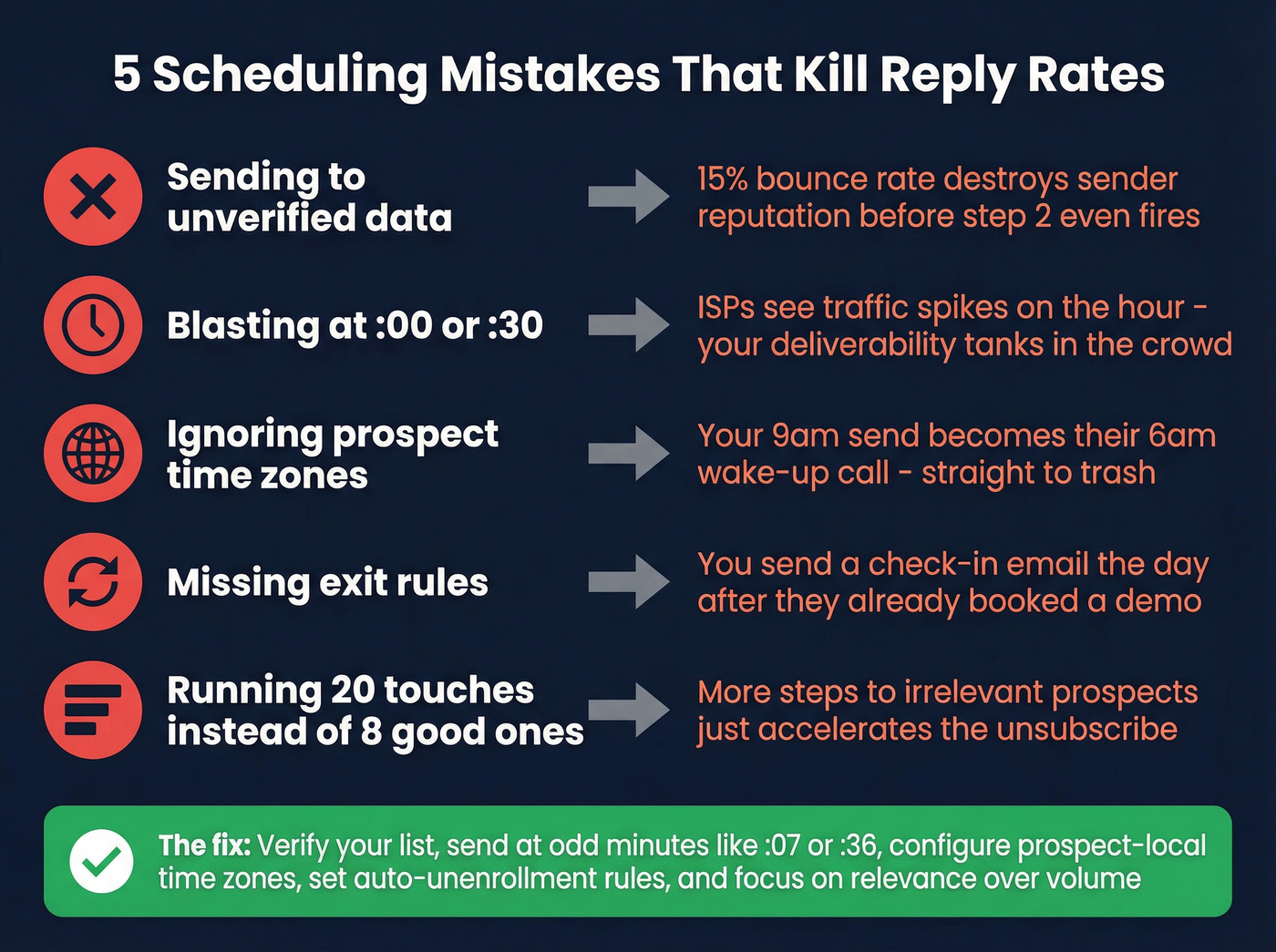
Blasting at :00 is the second most common mistake. Every automated tool defaults to on-the-hour sends. ISPs notice the traffic spike, and your deliverability suffers. Schedule at odd minutes to avoid the jam.
Ignoring prospect time zones turns your carefully planned 9am send into someone else's 6am wake-up call. Most sequencers support time zone-aware sending, but a surprising number of teams never configure it.
Missing exit rules will also torpedo your credibility. Auto-unenrollment on reply, bounce, or meeting booked should be non-negotiable. Without it, you're the rep who sends a "just checking in" email the day after a prospect already booked a demo.
Let's be honest about something the sequence-building community keeps debating: a 20-touch sequence doesn't outperform an 8-touch sequence with better timing and data. As ColdIQ's GTM team puts it, "What matters here is relevancy... If it's ultra personalized but irrelevant, they won't take action." More steps to irrelevant prospects just accelerates the unsubscribe.
Data Quality Makes or Breaks Your Schedule
A perfectly timed sequence to a dead email address is 12 wasted steps plus compounding sender reputation damage. Every bounce tells Gmail and Outlook you're not a trustworthy sender, which drags deliverability down for the contacts that are valid. If you want a KPI framework for this, use a data quality scorecard.
The proof is in production results. Stack Optimize built to $1M ARR running client campaigns at 94%+ deliverability with under 3% bounce rates - zero domain flags across all clients. Snyk's 50-person AE team cut bounce rates from 35-40% down to under 5%, driving AE-sourced pipeline up 180%. Those numbers don't happen with stale data. In our experience, teams that verify before activating see the biggest gains not on open rates but on domain reputation over time, which compounds across every future campaign.
Skip this step if you enjoy watching your sender score drop in real time.

A 12-day multi-channel cadence only works when the contact data behind it is fresh. Prospeo refreshes 300M+ profiles every 7 days - not the 6-week industry average - so your Tuesday 9:07am send hits a real person at their current company.
Fresh data turns good sequence timing into actual pipeline.
How Send-Time Optimization Actually Works
AI-powered send-time optimization picks a 1:1 send time per recipient based on their past engagement behavior and similar profiles. Instead of "Tuesday at 9am for everyone," STO sends to one prospect at 7:43am and another at 11:12am based on when each historically opens emails.
Klaviyo's beta data showed top-performing campaigns hitting a 35% increase in click rates compared to control groups. Shady Rays tested STO across 30+ campaigns and saw a 10%+ increase in placed order rates.
AI timing makes sense for large-volume sequences where you can't manually optimize per-prospect. For your top 50 target logos, manual scheduling based on trigger events still wins - the best time to email a VP is right after they post about a relevant challenge, not when an algorithm says so.
Cold Email Benchmarks by Industry
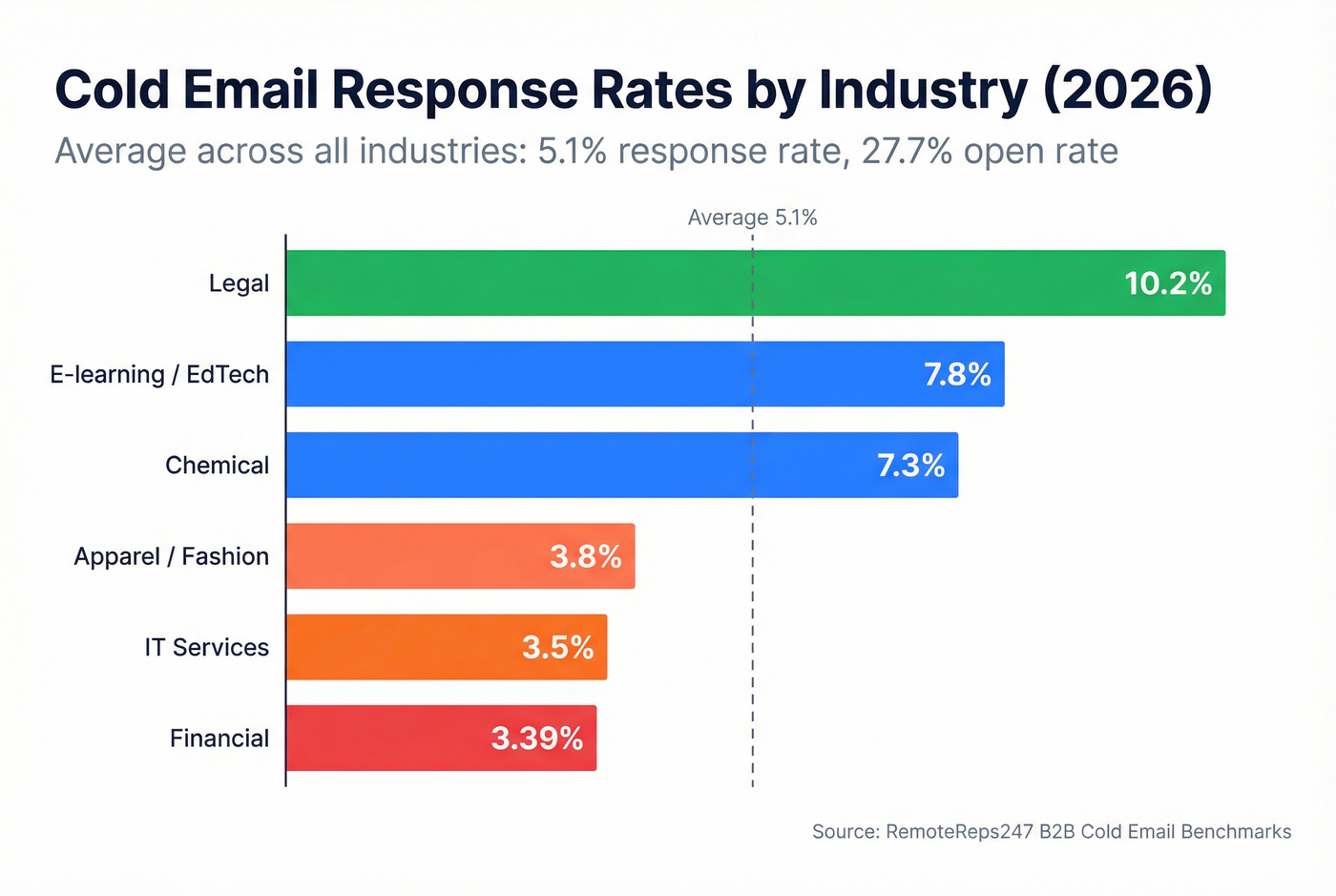
Before you blame your schedule, calibrate your expectations. The average cold email response rate is 5.1% with a 27.7% open rate. But industry variance is massive:
| Industry | Response Rate |
|---|---|
| Legal | 10.2% |
| E-learning / EdTech | 7.8% |
| Chemical | 7.3% |
| Apparel / Fashion | 3.8% |
| IT Services | 3.5% |
| Financial | 3.39% |
| Biotech | 3.2% |
| Veterinary | 2.9% |
| Technology | 1.87% |
If you're selling into legal and hitting 10% response rates, you have room to experiment with timing, spacing, and channel mix. Selling into technology at 1.87%? Every scheduling decision carries more weight - stick to Wednesday 9-11am religiously and don't waste touches on unverified contacts. Our team has found that low-response-rate industries benefit most from tighter verification and fewer, better-timed touches rather than adding more steps.
FAQ
How many touches should a sales sequence have?
Eight to twelve touchpoints over 17-21 days is the benchmark for cold outbound. Warm inbound sequences can be shorter - four to seven touches within a week. More touches won't fix bad timing or bad data.
What's the best day to send a cold email?
Wednesday consistently shows the highest response rates at roughly 5.8%, followed by Tuesday and Thursday. Weekends are dead - under 1% response rate. Send between 9-11am in the prospect's local time zone.
How do I improve deliverability when scheduling sequences?
Verify your contact list before activating any sequence - bounced emails waste every scheduled step and damage sender reputation. Pair that with auto-unenrollment triggers, throttled sends around 20 emails per hour per mailbox, and odd-minute scheduling to avoid ISP traffic spikes.
Does send-time optimization actually work?
For high-volume outbound, yes. Klaviyo's beta showed a 35% increase in click rates when AI selected per-recipient send times. For small, high-value target lists under 100 accounts, manual timing based on trigger events still outperforms algorithmic scheduling.
An 8-touch sequence with verified data and smart scheduling beats a 20-touch blast every time. Get the timing right, get the data right, and the replies follow.