Cold Email Volume Best Practices: Send Less, Book More
Every guide gives you a different number. Twenty emails a day. Fifty. A hundred.
The real cold email volume best practices aren't about picking a number - they're about building a system, and most teams get the system wrong before they send a single email.
Here's what makes this urgent: only 83-87% of emails reach the inbox, and that number is getting worse. Office 365 inbox placement dropped from 77.4% to 50.7% year over year. Gmail alone filters 15 billion spam messages daily. Volume without infrastructure and data quality isn't a growth strategy - it's a domain-burning strategy. The teams booking meetings in 2026 aren't sending more. They're sending fewer, better-targeted emails to verified addresses, scaling with infrastructure instead of brute force.
The Playbook (Quick Version)
If you're short on time, here's the playbook in three bullets:
- Cap at 30-50 cold emails per inbox per day - and that number includes warmup emails. If you're running 25 warmup sends, you've got 25 cold slots. Not 50.
- Warm up for 4+ weeks before scaling. Authenticate everything - SPF, DKIM, DMARC - before you send a single email. Brand-new domains with aggressive sending goals need 4-6 weeks.
- Verify every email address before it enters a sequence. Bad data at volume burns domains faster than high volume with clean data. A bounce spike above 3% can set you back weeks.
The rest of this guide is the math, the schedules, and the data behind those three rules.
How Many Cold Emails Per Day?
The safe ceiling is 30-50 cold emails per inbox per day. Not per domain. Not per account. Per inbox.
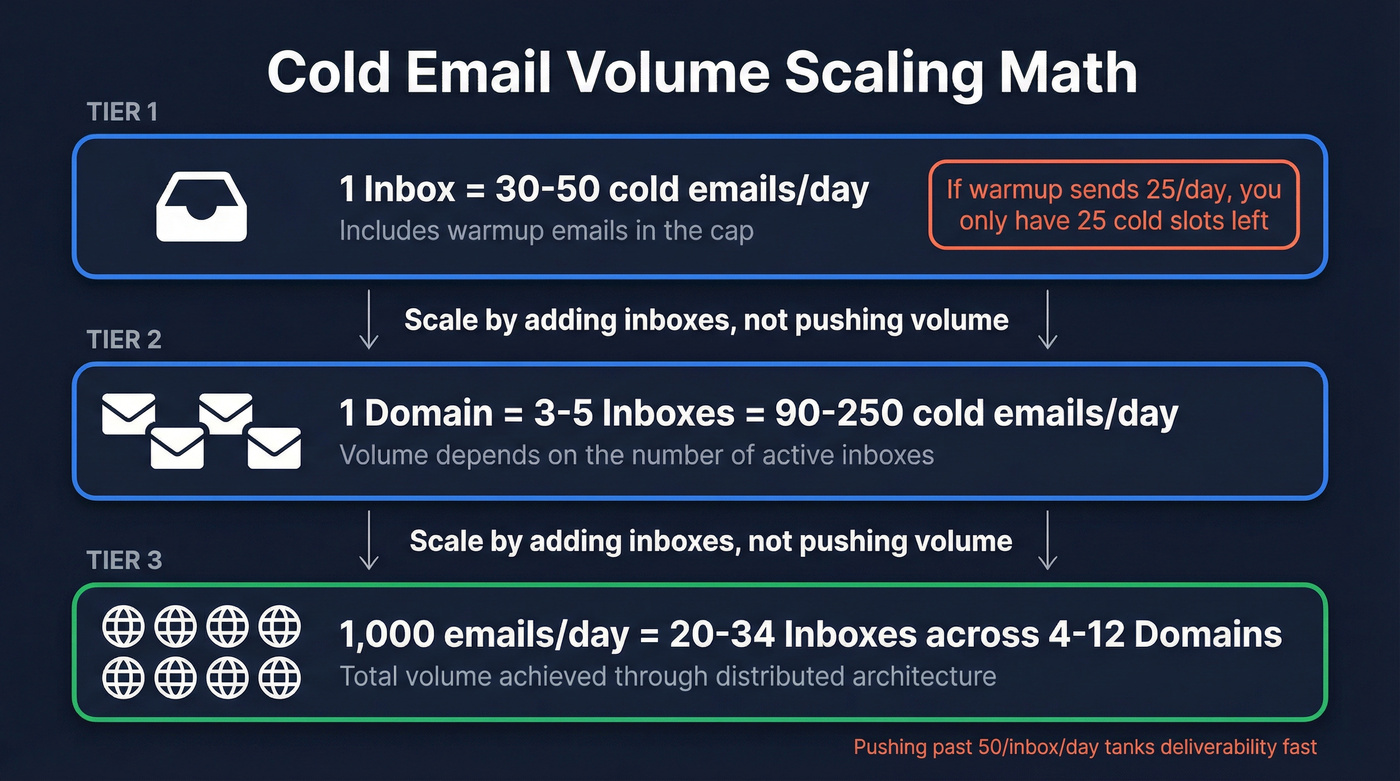
Here's the part most guides bury: that 50/day cap for a Gmail inbox includes warmup emails. If your warmup tool is sending 25 emails a day to build reputation, you have 25 slots left for actual cold outreach.
For scaling beyond 50 emails a day, you don't push a single inbox harder. You add inboxes. A solid setup is 3-5 inboxes per domain, which gives you 90-250 cold emails per domain per day at safe volumes.
Want to send 1,000 a day? At 30-50 per inbox, you need 20-34 inboxes. With 3-5 inboxes per domain, that's 4-12 domains - not one inbox cranked to the max.
When teams push past 50 per inbox, deliverability usually drops fast - even with warmup running. The inbox is the bottleneck by design, and fighting it backfires.
Provider Compliance Rules
Google, Yahoo, and Microsoft have all tightened enforcement. Here's where things stand:
| Provider | Auth Required | Rate Caps | Extra |
|---|---|---|---|
| SPF+DKIM+DMARC | Spam <0.3%, Bounce <2% | One-click unsub | |
| Yahoo | SPF+DKIM+DMARC | Spam <0.3%, Bounce <2% | One-click unsub |
| Microsoft | SPF+DKIM+DMARC | Spam <0.3%, Bounce <2% | Auth required at 5K+/day |
The practical target is tighter than the hard cap. Aim for spam complaints under 0.1%, not just under 0.3%. By the time you're at 0.25%, you're already in the danger zone - providers don't send a warning before throttling.
Microsoft's enforcement starting in 2025 was the big shift. Any domain sending 5,000+ messages per day to Outlook.com addresses now needs full SPF, DKIM, and DMARC authentication. Every provider agrees on one thing: authentication plus consistent sending volume boosts inbox placement 5-10 percentage points versus unauthenticated domains. That's free deliverability you're leaving on the table if you haven't set up DMARC. Monitor your domain reputation via Google Postmaster Tools and Microsoft SNDS - you can't fix what you can't see.
Week-by-Week Warmup Schedule
This is the schedule we recommend for a brand-new domain and inbox. Age your domain 7-14 days and confirm SPF/DKIM/DMARC are live before Week 1.
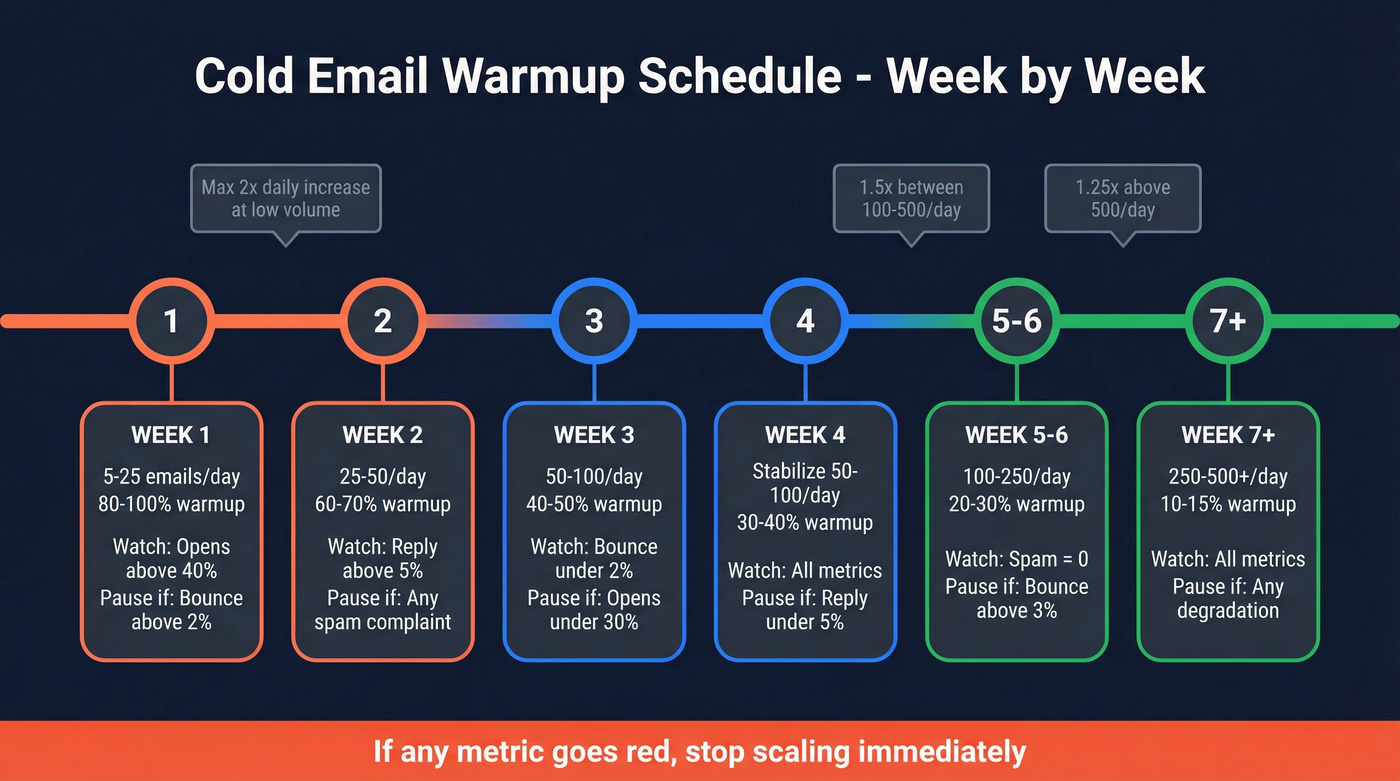
| Week | Daily Volume | Warmup % | Monitor | Pause If |
|---|---|---|---|---|
| 1 | 5 to 25 | 80-100% | Opens >40% | Bounce >2% |
| 2 | 25 to 50 | 60-70% | Reply >5% | Any spam complaint |
| 3 | 50 to 100 | 40-50% | Bounce <2% | Opens <30% |
| 4 | Stabilize 50-100 | 30-40% | All metrics | Reply <5% |
| 5-6 | 100 to 250 | 20-30% | Spam = 0 | Bounce >3% |
| 7+ | 250 to 500+ | 10-15% | All metrics | Any degradation |
Don't exceed 2x day-over-day increases at low volumes. Between 100-500/day, slow to 1.5x. Above 500/day, cap increases at 1.25x. Aggressive jumps trigger provider algorithms faster than steady climbs.
Here are the sending pattern details most guides skip: space sends 2-3 minutes apart, distribute across business hours in the recipient's timezone (see Cold Email Time Zones), and reduce weekend volume to 50-70% of weekday levels. Don't stop weekends entirely - that creates an unnatural pattern that providers notice.
If any metric goes red during warmup, stop scaling immediately. Warmup isn't a checkbox. It's ongoing, even after you've reached your target outreach volume.

A bounce spike above 3% can wreck weeks of warmup. Prospeo's 5-step email verification catches bad addresses before they enter your sequence - 98% accuracy, catch-all handling, spam-trap removal included.
Clean data is the cheapest deliverability insurance you'll ever buy.
Infrastructure Math
Let's do the actual math. The inbox planning formula is:
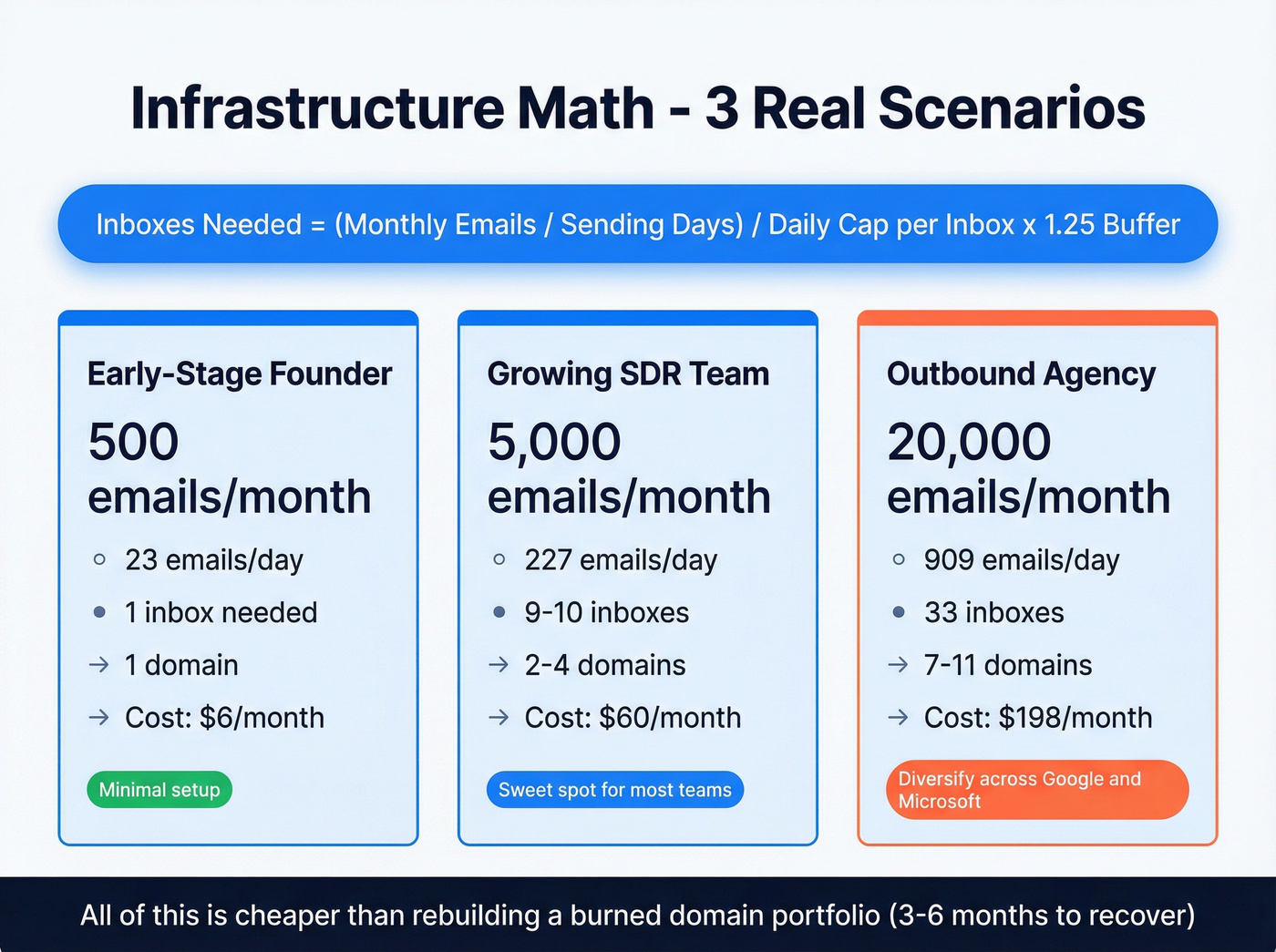
Required inboxes = ceiling((M / D) / C x B)
Where M = monthly emails, D = sending days, C = daily cap per inbox (after warmup), B = buffer multiplier (1.25).
Three worked examples:
500 emails/month (early-stage founder): 500 / 22 days = ~23/day. At 35 cold emails/inbox/day with a 1.25 buffer, that's 23 / 35 x 1.25 = ~0.82, so you need 1 inbox. One domain, one inbox, minimal infrastructure. Cost: about $6/user/month for Google Workspace.
5,000 emails/month (growing SDR team): 5,000 / 22 = ~227/day. At 35/inbox/day x 1.25 buffer, that's 227 / 35 x 1.25 = ~8.1, so plan for 9-10 inboxes across 2-4 domains. Build in headroom for warmup fluctuations - plan for 10 inboxes. Cost: $6/inbox/month x 10 = $60/month in infrastructure.
20,000 emails/month (outbound agency): 20,000 / 22 = ~909/day. At 35/inbox/day x 1.25 = 33 inboxes across 7-11 domains. Cost: $6/inbox/month x 33 = $198/month in workspace licenses. That's trivially cheap compared to rebuilding a burned domain portfolio, which we've seen take teams 3-6 months to recover from.
For provider choice: Google Workspace is a popular default for outbound deliverability (see Email Deliverability Guide for 2026). Microsoft 365 offers higher tenant-level caps through the TERRL formula: TERRL = 500 x (licenses^0.7) + 9,500. If you're sending 10,000+/month, using both providers is a clean way to diversify risk.
Our take on dedicated SMTP: Dedicated cold-email SMTP servers are gaining traction as an alternative to inbox rotation. They solve the scaling problem but introduce new deliverability risks because you lose the reputation halo of sending from a real Google or Microsoft inbox. For most teams, inbox rotation remains the safer default. Dedicated SMTP only makes sense once you've maxed out a multi-domain setup and have a deliverability engineer on staff (see Email Sending Infrastructure).
Why More Volume Hurts Pipeline
This is where the data gets uncomfortable.
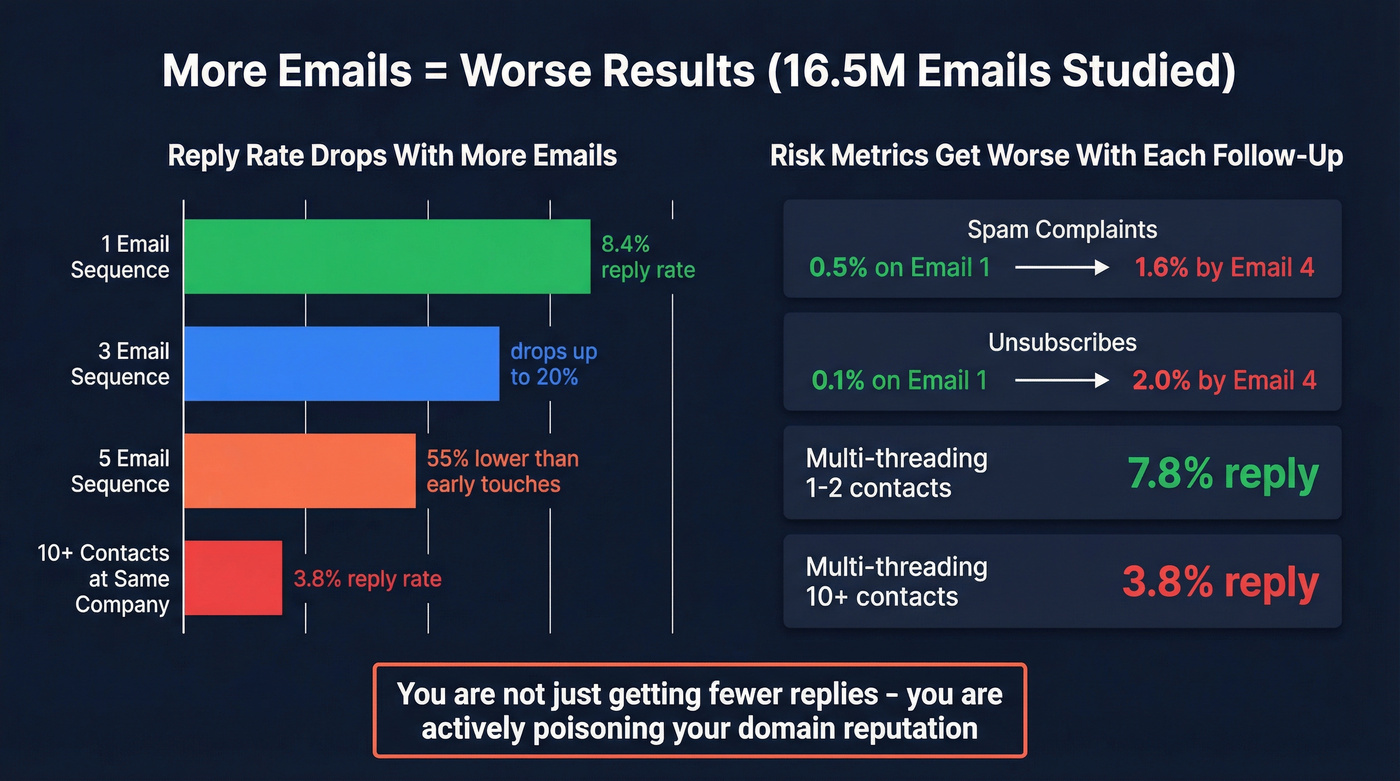
A study of 16.5 million cold emails across 93 domains found that average reply rates dropped to 5.8% - down from 6.8% the prior year. But the real story isn't the average. It's what happens when you add volume.
Single-email sequences had the highest reply rate at 8.4%. Adding a third email dropped reply rates up to 20%. By the fifth email in a sequence, response rates fell 55% compared to earlier touches.
The risk metrics are even more damning. Spam complaint rates climb from 0.5% on the first email to 1.6% by the fourth. Unsubscribes jump from 0.1% to 2% by round four. You aren't just getting fewer replies - you're actively poisoning your domain reputation with every additional follow-up.
Multi-threading makes it worse. Emailing 1-2 contacts per company yields a 7.8% reply rate. Blast 10+ people at the same company and it drops to 3.8%. Wider targeting doesn't compensate for weaker targeting - it amplifies the damage.
One more tactical note: open tracking pixels hurt deliverability, and the data you get back is increasingly unreliable thanks to Apple Mail Privacy Protection. Track replies instead (more on this in Does Open Tracking Hurt Cold Email?). That's the metric that actually correlates with revenue.
Follow-Up Cadence That Works
Do this:
- Send 2-3 follow-ups maximum.
- Space them out: 3 days after the first email, then 6-7 days between subsequent touches.
- Keep every email under 200 words. That length hits a 42.67% open rate and 6.9% reply rate - the sweet spot in the Belkins dataset.
- After 3 emails with no response, switch channels. A connection request or direct message is a better re-entry point than a fifth "just checking in." Wait 2-3 months before re-engaging via email.
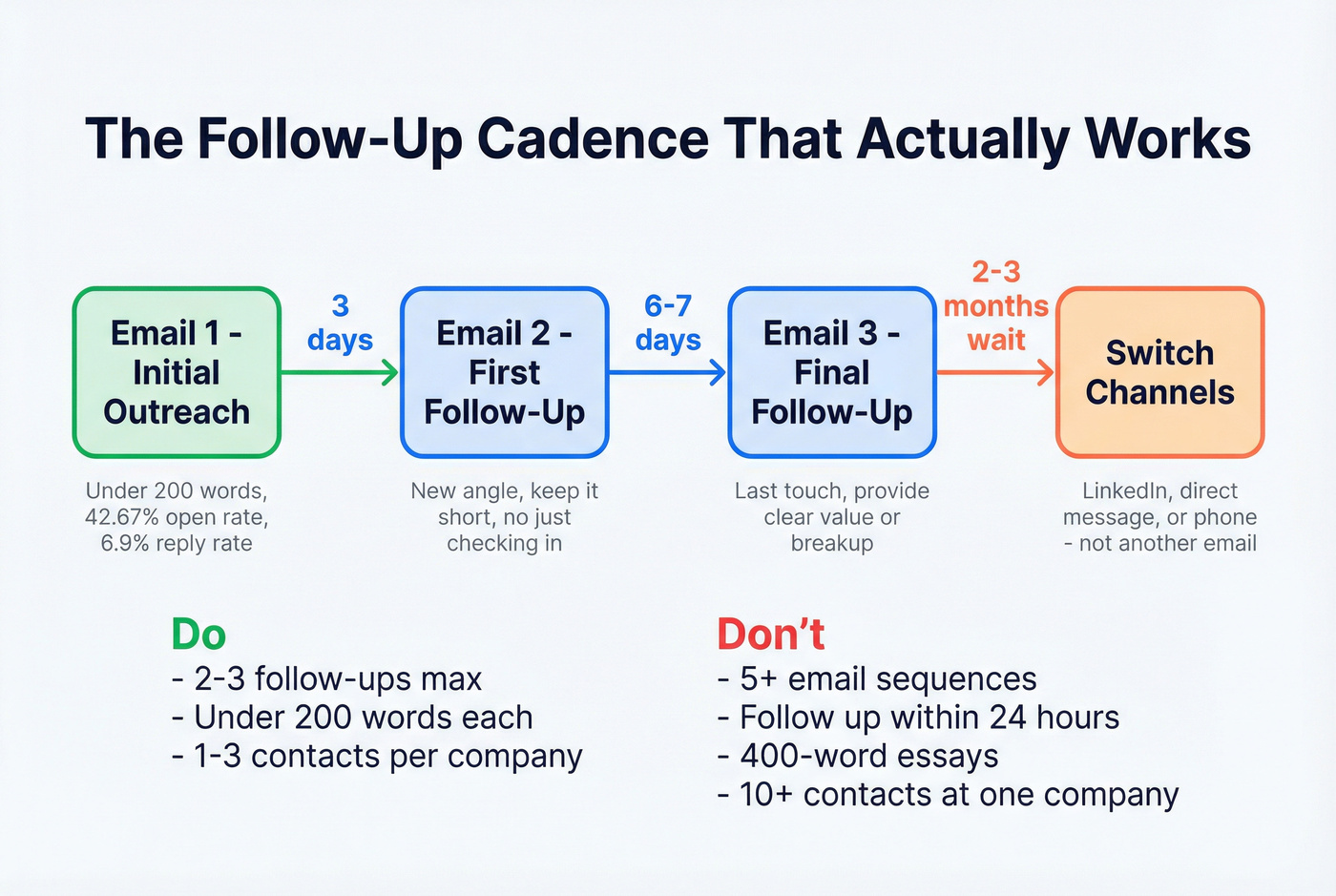
Don't do this:
- Don't send 5+ email sequences. You're trading domain health for marginal reach.
- Don't follow up within 24 hours. It reads as desperate and can trigger spam flags.
- Don't write 400-word follow-ups. If the first email didn't land, a longer second email won't fix it.
- Don't multi-thread to 10+ contacts at the same company. Stick to 1-3 decision-makers.
MailReach's frequency guide recommends the same structure: 3 emails total per prospect per campaign.
Data Quality: The Volume Multiplier
Every formula in this guide assumes clean data. Without it, none of it works.
A bounce spike above 3% can wreck your deliverability in a single afternoon. We've seen teams with perfect infrastructure and warmup schedules tank their inbox placement because they imported an unverified list. Domain reputation damage from bad data takes weeks to recover - Stack Optimize, an outbound agency running campaigns for dozens of clients, keeps deliverability at 94%+ and bounce rates under 3% specifically because they verify every address before it enters a sequence.

Let's be honest: if you're scaling to thousands of emails per month and you aren't verifying addresses, you're building on sand. Prospeo's verification runs every address through a 5-step process - syntax validation, domain verification, mailbox confirmation, catch-all handling, and spam-trap removal - delivering 98% email accuracy (see Email Verification for Outreach). The 7-day data refresh cycle keeps addresses current versus the 6-week industry average, so you aren't sending to stale contacts (see B2B Contact Data Decay). It also integrates natively with Smartlead, Instantly, and Lemlist, so verified contacts flow directly into your sending tool without manual CSV exports (see Cold Email Marketing Tools).
Skip verification if you enjoy rebuilding domain reputation from scratch every quarter. Otherwise, build it into your workflow before anything else (use this Email Deliverability Checklist).
You just did the infrastructure math - inboxes, domains, warmup schedules. Now do the data math: at $0.01 per verified email, Prospeo lets you fill every inbox slot with contacts refreshed every 7 days, not 6-week-old records that bounce.
Send less, book more - starting with data that actually connects.
Benchmarks: Quick Reference
Pin this table. It's every threshold from this guide in one place.
| Metric | Target | Warning | Pause/Stop |
|---|---|---|---|
| Bounce rate | <2% | >2% | >3% |
| Spam complaints | <0.1% | >0.1% | >0.3% |
| Reply rate | >5% | <5% | <2% |
| Open rate | >40% | <30% | <20% |
| Daily cap/inbox | 30-50 | >50 | >75 |
| Warmup minimum | 4 weeks | Skipped | None done |
| Follow-ups | 2-3 max | 4 | 5+ |
| Email length | <200 words | 200-300 | >300 |
| Domains per 5K/mo | ~2-4 | 1 | - |
| Inboxes per domain | 3-5 | >5 | Avoid >7 |
FAQ
How many cold emails can I send per day from one inbox?
Fifty is the safe ceiling for Gmail, and that includes warmup emails. If warmup consumes 25 sends, you have 25 slots remaining for actual cold outreach. Scale by adding inboxes across multiple domains - never push a single inbox past 50.
How long should I warm up a new domain?
Minimum four weeks. Brand-new domains need 4-6 weeks with gradual daily increases capped at 2x day-over-day. Skipping warmup - even briefly - can permanently damage domain reputation and tank inbox placement.
What's the fastest way to scale outbound email volume?
Add more inboxes and domains, not more emails per inbox. Use the formula: (monthly target / sending days) / daily cap per inbox x 1.25 buffer. At 5,000 emails/month, that's roughly 10 inboxes across 2-4 domains.
Do I need email verification before sending?
Yes. A bounce rate above 2% triggers provider penalties. Verifying addresses through catch-all handling and spam-trap removal keeps bounce rates under threshold. The consensus on r/coldemail is that verification is the single highest-ROI step in any outbound workflow - it's cheaper than rebuilding a burned domain.
Are Google Workspace or Microsoft 365 better for cold outreach?
Google Workspace is a popular default for strong out-of-the-box deliverability. Microsoft 365 offers higher tenant-level caps for teams sending 10,000+/month. Many teams use both providers to diversify sending risk and avoid single-provider throttling.