Email Scheduling Best Practices (2026): A Practical Playbook
If your email scheduling "best practices" still start and end with "Tuesday at 10am," you're leaving money on the table.
The 2026 inbox is crowded, filtered, and increasingly summarized before anyone even clicks. And with roughly 392.5B emails sent every day, "send time" isn't a cute tweak anymore - it's part of how you earn attention in the first place.
Here's the hook: most teams pick a time, stare at open rates, and call it optimization. That's how you end up "winning" a metric that doesn't pay the bills.
What you need (quick version)
Use this as your default operating system. Then test from there.
- Pick the KPI first: clicks -> conversions -> replies (if applicable) -> complaints/unsubs. Opens are a deliverability smoke alarm, not a scheduling KPI post-MPP.
- Do these in order
- Optimize for outcomes (clicks/replies), not opens. If opens rise but clicks don't, you learned nothing.
- Schedule in recipient local time. "10am your time" is how you email half your list at 6am.
- Protect deliverability with warmup + batching. A perfect send time won't rescue a reputation spike.
- Make time zones boring: turn on local-time delivery; if you can't, use a sensible fallback window and stop guessing.
- Build a pre-send buffer: schedule 30-60 minutes ahead so you can catch broken links, wrong segments, or stale promos.
- Before scaling tests, verify addresses: tools like Prospeo ("The B2B data platform built for accuracy") help keep bounces from invalidating your results, with 98% verified email accuracy. (If you need a broader shortlist, see email verifier websites.)
What "email scheduling" means (4 use cases)
Benchmarks are useless if you mix use cases. Start here:
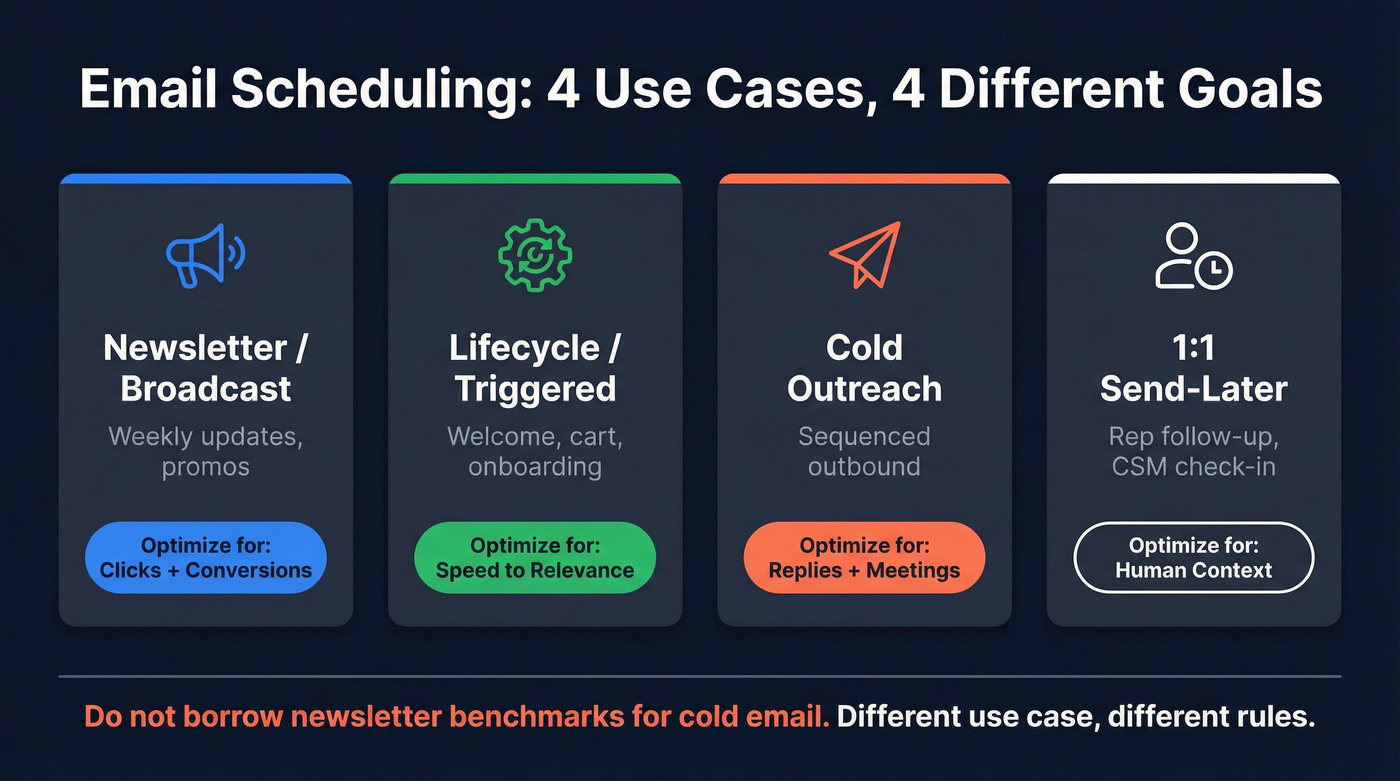
Newsletter / broadcast marketing email (weekly updates, promos) Optimize for clicks and downstream conversions across a broad audience. Timing matters, but cadence + segmentation matter more. (If segmentation is the real lever, use this guide on segmenting your email list.)
Lifecycle / triggered automation (welcome, abandoned cart, onboarding, renewal) Optimize for speed-to-relevance. "Send time" is usually "send immediately" or "send at the next good local-time window," not "every Tuesday at 10." This is where automated scheduling beats rigid calendar rules.
Cold outreach (sequenced outbound) Optimize for replies and meetings, under strict deliverability constraints (domains, throttling, inbox placement). Cold timing behaves differently than opt-in marketing. (For tooling, see cold email outreach tools.)
1:1 send-later (rep follow-up, CSM check-in) Optimize for human context. The best move is scheduling for their morning and keeping it out of the late-night pile, especially if you're doing manual scheduling from Gmail or Outlook.
Don't borrow "best time to send newsletters" benchmarks and apply them to cold email.
Baseline benchmarks for 2026 (use as a starting point)
Benchmarks are training wheels - use them to pick your first tests, then let your own click/conversion data win.
MailerLite's 2026 guidance is grounded in a large historical dataset: 2,138,817 email marketing campaigns sent across the US, UK, Australia, and Canada during Dec 2024-Nov 2026. They also define metrics clearly (weighted vs equal-weight averages), which is why their charts are actually usable.
Here's the baseline that's worth stealing (then you test against your list):
| Benchmark (2026 baseline) | "Best" day/time | What it's really saying |
|---|---|---|
| MailerLite avg open | Fri 49.72% | Friday wins attention in big datasets |
| MailerLite avg click | Fri 8.09% | Friday can win action too |
| Opens peak | 8-11am | Morning scan behavior |
| Clicks peak | 8-9pm | Decisions happen later |
| Brevo default window | Tue/Thu 10-3 | Safe "work hours" baseline |
| Brevo engagement share | Weekdays = 85%+ of opens, ~95% of clicks | Weekends are niche |
The two patterns that matter (and how to use them)
1) Opens peak in the morning. Clicks peak later. MailerLite shows weekday opens clustering around 8-11am, while clicks peak around 8-9pm. That's why "we sent at 9am and opens looked great" is a trap: your buyers click after dinner, not during standup.
2) Marketer habits don't match performance. MailerLite notes sending volume clusters on Thursday, even when Friday wins on opens and clicks. Most calendars are tradition, not optimization.
The anomaly worth testing first: Friday 6pm + Thursday 8am
MailerLite's chart-level detail gives you two high-signal hypotheses:
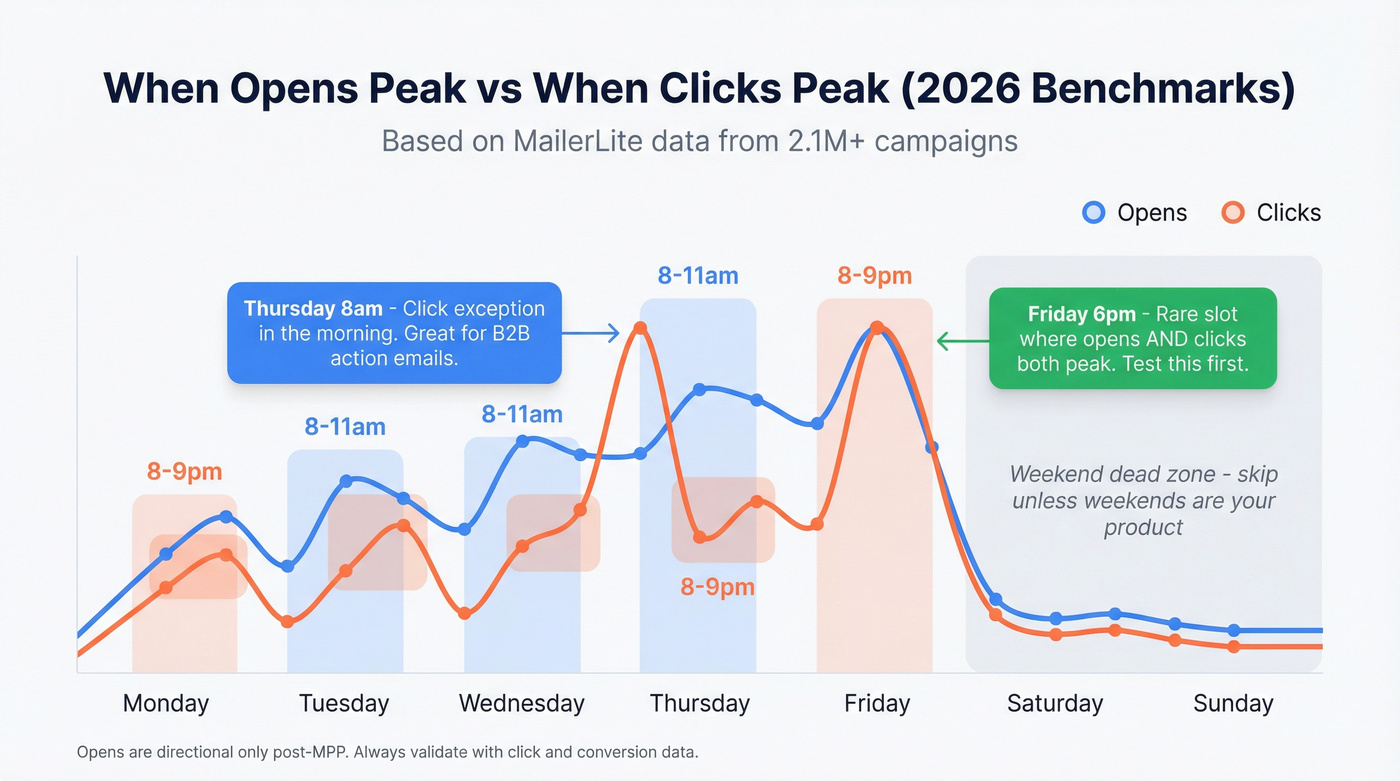
Friday 6pm local is a real outlier: it's the rare slot where opens and clicks both peak in the same window. Test it if you sell to consumers, creators, prosumers, or anyone who "comes up for air" after work. Friday 6pm catches the "weekend planning" mindset.
Thursday has a click exception at 8am (even though clicks usually peak at night). Test it if you're B2B and your email is a "do this today" message - webinar reminders, renewal nudges, "new report is live," or anything that benefits from being first in the morning inbox.
Weekend rule (skip this unless weekends are your product)
Only test weekends if your product is used on weekends: hobbies, local events, family activities, consumer subscriptions, or anything tied to Saturday/Sunday routines. Otherwise, weekends are where campaigns go to die: low conversion, higher "why are you emailing me?" unsub energy, and messy reporting.
If you want the raw benchmark charts, MailerLite's post is worth bookmarking: MailerLite's best time to send email study.
What to optimize for after Apple MPP (and iOS 18 inbox changes)
Post-MPP, open rate isn't reliable for scheduling. If you optimize send time on opens, you'll "prove" that later is better, then wonder why revenue didn't move.
MarTech (citing Statcounter) puts iOS 18.2/18.3 adoption at 46.1%, and iOS 18 inbox changes's inbox experience pushes more email into categories, digests, and AI-driven previews. That changes visibility and behavior, not just tracking.
Here's the thing: if your dashboard rewards opens, your calendar will drift later and later because machine opens cluster in the evening. Your buyers don't.
Use these scheduling KPIs
- Clicks (and click quality) Track clicks to high-intent pages and key in-email actions. Judge performance over 24-48 hours, not the first two hours. (Useful context: email click through rate.)
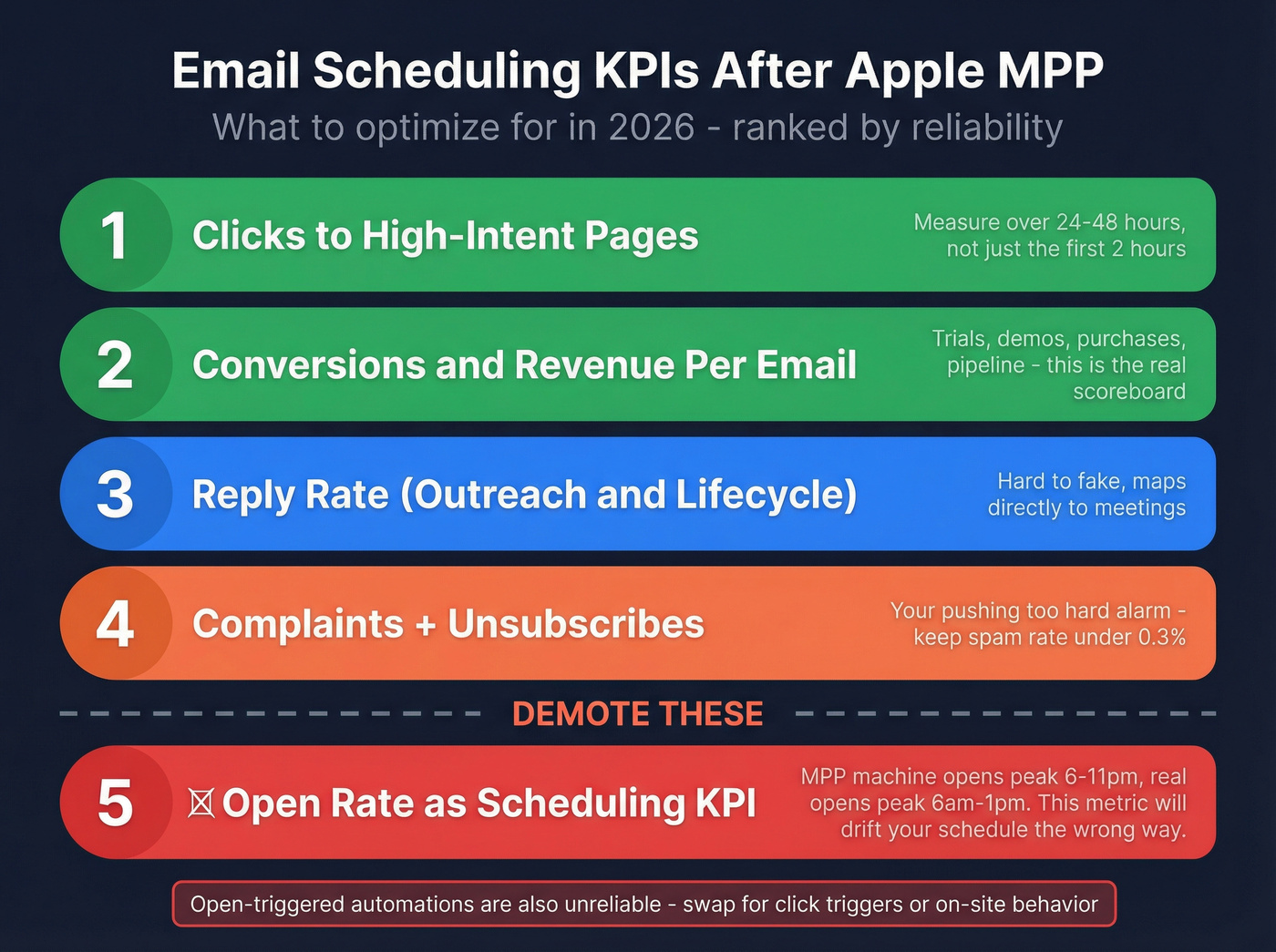
Conversions / revenue per email If you can attribute purchases, trials, demos, or pipeline, that's the scoreboard.
Replies (for outreach or high-touch lifecycle) Reply rate is hard to fake and maps to meetings.
Complaints + unsubscribes These are your "you're pushing too hard" alarms. (If you need thresholds, see spam rate threshold.)
Demote these (hard)
Open rate as the scheduling KPI Twilio's guidance is blunt: open tracking is unreliable because MPP generates machine opens and masks signals. Nutshell quantifies the distortion in a way that matches what we've seen in real accounts: MPP opens peak 6-11pm, while "real" opens peak 6am-1pm. That's exactly how teams drift later and later... and clicks don't follow.
Open-triggered automations Twilio also flags Link Tracking Protection stripping tracking parameters in Apple Mail/Safari. If UTMs are your only attribution source, attribution breaks for some Apple Mail/Safari traffic. Swap open triggers for click triggers or on-site behavior.

Every scheduling test you run is only as valid as the addresses you're sending to. One bad bounce spike tanks your sender reputation and invalidates your timing data. Prospeo's 98% email accuracy and 7-day refresh cycle ensure your A/B tests measure real engagement, not deliverability noise.
Fix your data before you optimize your send time.
Time zones: recipient-local scheduling without guessing
Local-time sending is the highest-leverage scheduling fix most teams still don't implement.
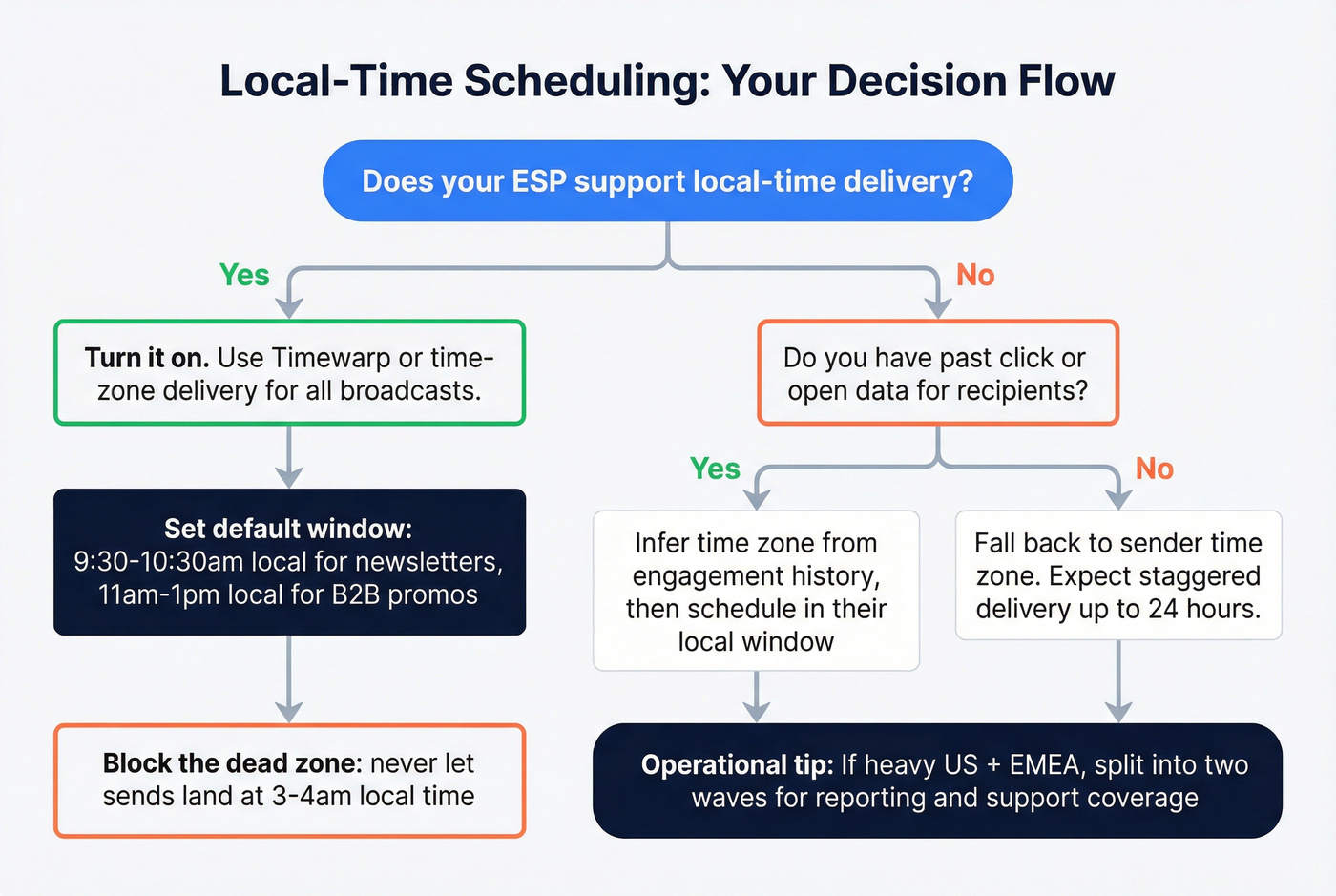
Mailchimp's system-level guidance is a clean default: 10am in the recipient's local time zone performs well for newsletters, and you should avoid extreme hours like 3-4am recipient time. This isn't a hack. It's basic respect for how humans check inboxes.
In our experience, the fastest "free win" is turning on local-time delivery and then stopping the internal debate about whether 9:00 or 10:30 is better. Get the email into the right part of the day first. (If you're doing outreach, this is also covered in cold email time zones.)
Rules I'd actually run:
Turn on local-time delivery in your ESP Use Timewarp/time-zone delivery for broadcasts first.
Set a default local-time window Start with 9:30-10:30am local for newsletters. For B2B promos, test 11am-1pm next.
Block the dead zone Don't let sends land at 3-4am local. Those emails get buried before the morning scan.
If you don't know the time zone, infer it - then fall back Infer from past clicks/opens; if there's no history, fall back to sender time zone. Expect staggered delivery: campaigns can look "not fully sent" for up to 24 hours because the system waits for each recipient's local window.
Operational tip: stagger by region If you're heavy US + EMEA, split into two waves so reporting and support coverage stay sane.
Mailchimp's STO/time-zone guidance is here: Mailchimp insights on send-time optimization.
Cadence & frequency best practices (fatigue controls that protect performance)
Timing tweaks won't save you if you're fatiguing your list.
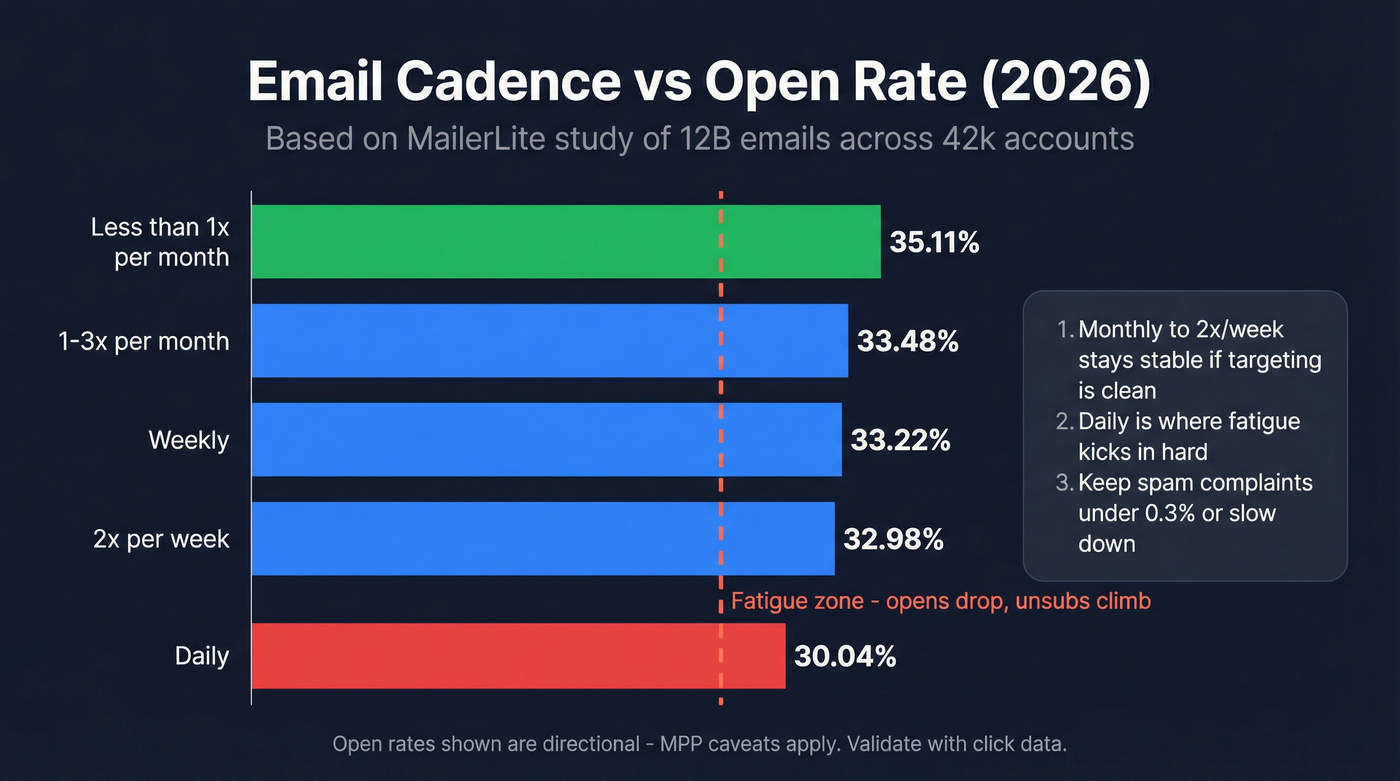
MailerLite's cadence study is massive: 12B emails, 1.4M campaigns, 42k accounts in 2026. It's open-rate-based (MPP caveats apply), but the curve shape is consistent: modest frequency increases don't kill you; going daily does. (Related: email cadence meaning.)
Cadence benchmarks (MailerLite 2026)
| Cadence | Avg open rate |
|---|---|
| <1/mo | 35.11% |
| 1-3/mo | 33.48% |
| Weekly | 33.22% |
| 2x/week | 32.98% |
| Daily | 30.04% |
Rules that hold up in real programs
- Monthly -> 2x/week stays stable if your targeting's clean and your content earns attention.
- Daily is where fatigue shows up: opens drop, and unsub/complaint risk climbs.
- Use a complaint guardrail: keep spam complaints under ~0.3%. If you cross it, slow down and tighten targeting before you touch send time.
- Throttle by engagement: high-engagement gets normal cadence; low-engagement gets reduced frequency or a winback track.
- Don't stack sends: two broadcasts in 24 hours trains people (and inbox providers) to ignore you.
If you want the full cadence breakdown, MailerLite's post is the reference: MailerLite email cadence benchmarks.
A testing framework you can actually run (post-MPP)
Most send-time tests fail because teams "A/B test" three things at once, then declare victory based on opens within 90 minutes.
Run it like an operator. (If you want a deeper testing SOP, use A/B testing lead generation campaigns.)
Step 1: Pick one variable and hold everything else constant
Hold constant:
- Segment definition (same audience rules)
- Subject line + preview text
- Offer + creative + CTA
- Sender identity (from name + from address)
- Deliverability settings (domain, IP/pool, authentication, suppression rules)
- Send day (if testing time-of-day) or send time (if testing day-of-week)
Step 2: Define the measurement window up front
Clicks peak later than opens. Don't call the test at lunch.
- Newsletters/promos: measure 24-48 hours post-send
- Lifecycle: measure conversion within the lifecycle window (often 1-7 days)
- Cold outreach: measure replies over 3-7 days per step
Step 3: Use list-size rules so you don't underpower the test
This is where most "best practices" articles get vague. Here's the practical cut:
- Under 10k recipients per send: run week-over-week tests (same segment, different send time) for 4-8 sends. Splitting the list makes each cell too small.
- 10k-100k recipients: do true split tests plus a holdout control (10-20%) so you don't fool yourself with seasonality.
- 100k+ recipients: use local-time delivery + holdouts by default, and test big swings (morning vs evening, weekday vs Friday) while watching throttling and inbox placement.
Step 4: Use a post-MPP-safe success hierarchy
- Clicks (or high-intent clicks)
- Conversions / revenue / pipeline
- Complaints + unsubscribes (mustn't worsen)
- Opens (directional only)
Step 5: Roll out with a rule, not a feeling
A rollout rule that works:
- If Variant B beats A by >=10% on clicks for two consecutive sends and complaints stay flat, roll B to 80% of the list and keep 20% as a control for two more sends.
Seasonality note: if you're testing around holidays, product launches, or major news cycles, extend the test window. A single weird week can flip results.
We've seen teams waste a month "testing" send times when the real issue was a global list getting hit at 3am local time. This framework prevents that, and it's the core of any durable scheduling strategy.
Deliverability constraints: warmup, batching, provider rules
Scheduling is downstream of deliverability. If inbox providers don't trust you, your "perfect" send time just means you hit spam at a more convenient hour.
Look, I hate saying this because it's not sexy, but it's true: deliverability work beats send-time tinkering almost every time. (If you want the full picture, start with email deliverability.)
Warmup: ramp reputation before you ramp volume
Braze's guidance is the right mental model: IP warming takes 2-6 weeks. Start with the most engaged recipients from the last 30-90 days, then expand. (Step-by-step: how to warm up an email address.)
What "good" looks like during warmup:
| Metric | Target |
|---|---|
| Hard bounce rate | <2% |
| Complaints | <0.3% |
| Engagement | trending up |
| Volume jumps | gradual |
Batching: throttle hourly, not just daily
SMTP2GO's warmup schedule is a practical template for high-volume senders. Use it as a shape, not a religion: ramp daily volume and break it into hourly batches so you don't create a reputation spike at 10:00 sharp that triggers throttling, delays, and inbox placement issues that make your "send time test" basically meaningless.
- Week 1: 500-1,000/day in 100-200/hour
- Week 4: 20k-30k/day in 3k-5k/hour
- Remove hard bounces immediately; keep bounces <2%
This is the part people hate because it feels slow. It's also the part that keeps you out of trouble. (If you're scaling outbound, see email pacing and sending limits.)
Provider rules: Outlook.com will punish sloppy ops
Microsoft's Outlook.com consumer domains (hotmail.com, live.com, outlook.com) require that if you send >5,000 emails/day, you must have SPF, DKIM, and DMARC in place (DMARC at least p=none, aligned with SPF or DKIM). (Setup help: SPF DKIM & DMARC explained.)
Enforcement starts with routing to Junk, then moves toward rejection. Your ESP dashboard can look "fine" while Outlook performance quietly collapses.
Official post: Outlook.com bulk sender requirements.
Before you schedule anything: list quality beats send time
If you're scaling sends and your list has rot, you'll see higher bounces, more complaints, more throttling, and worse inbox placement. Timing becomes irrelevant.
A real scenario I've watched play out: a team "tested" 9am vs 2pm for three weeks, got inconsistent results, and blamed seasonality. The actual issue was simpler and more annoying - 18% of the list was outdated, bounce rates spiked, and Gmail started deferring delivery so the "9am send" was landing across a two-hour window anyway.
This is where Prospeo fits naturally: verify first, then schedule. Prospeo has 300M+ professional profiles, 143M+ verified emails, and a 7-day data refresh cycle (the industry average is about 6 weeks), which is exactly what you want before you run timing tests that depend on clean delivery and stable reputation. (Related: B2B contact data decay.)
Send-time optimization (STO): when it's worth it and how it really works
STO is great when you understand what it's doing, and frustrating when you expect magic. (Deep dive: AI email send time optimization.)
Manual testing vs STO (head-to-head)
Manual testing wins when:
- Your list is small and you need simple, repeatable rules
- You change offers/segments constantly (models don't stabilize)
- You care about clicks/conversions and want clean experiments
STO wins when:
- You have enough engagement history per contact to personalize timing
- You send frequently enough that timing patterns exist
- You can tolerate model behavior that isn't always intuitive
How STO behaves in production (what to expect)
In Salesforce Marketing Cloud implementations, Einstein STO commonly works like this:
- It learns from each contact's engagement over roughly a 90-day window
- It reevaluates on a weekly cadence, not in real time
- With limited history, it falls back to a global model
- Sends often align to top-of-hour delivery, which can create drift if your journey steps trigger at :07 or :23
Those mechanics vary by edition and setup, but the operational takeaway is consistent: STO is a batching system, not a mind reader.
Does STO lift results?
- Mailgun positions STO as a 5-10% uplift in opens and clicks (assuming high deliverability).
- Braze case studies show bigger swings when timing's genuinely misaligned:
- OneRoof: +218% total clicks
- foodora: +9% CTR and 26% unsubscribe reduction
Strong opinion: if your deal sizes are modest (or your emails aren't meaningfully segmented), STO usually isn't your highest-ROI lever. Fix list quality, local-time delivery, and cadence first. STO's the polish, not the foundation.
Common scheduling mistakes (and a pre-send safety checklist)
Most scheduling failures aren't "we picked the wrong hour." They're operational faceplants.
The mistakes I see constantly
- Wrong time zone (global list scheduled from a US calendar)
- Stacked sends (two campaigns collide and cannibalize clicks)
- Stale promos (discount expired, webinar date changed, landing page updated)
- Forgetting to cancel (a scheduled blast goes out during a product incident)
- Broken links or UTMs (and with Link Tracking Protection, relying only on UTMs is fragile)
- Security/compliance misses: scheduled emails sit as drafts/queued jobs - restrict access, use approvals, and don't schedule sensitive info weeks in advance
Scheduling mechanics: ESP vs inbox "send later" (and what can go wrong)
Not all scheduling is equal.
- Inbox "Send later" (Gmail/Outlook): great for 1:1 follow-ups, but it's easy to get burned by timezone drift (travel, VPNs, device settings) and draft edits that don't sync the way you expect. Treat it like a personal reminder, not a campaign tool. In Gmail, scheduled messages live under the Scheduled label; in Outlook, they typically sit in the Outbox until send time.
- ESP scheduling: better for segmentation, throttling, and local-time delivery, but it introduces queue behavior. If you schedule a huge send for 10:00, some providers will throttle and your "10:00" becomes "10:00-12:30," which changes results.
- Approval workflows matter: if your team needs sign-off, schedule earlier and lock the final version. The worst failure mode is "someone fixed a typo" and accidentally broke a link five minutes before launch.
Pre-send safety checklist (steal this)
- Confirm segment size + exclusions (suppression list, recent purchasers, competitors)
- Confirm local-time delivery settings
- Click every link in the email (and the top 2 downstream pages)
- Confirm unsubscribe works and is visible
- Confirm tracking plan (UTMs + backup attribution where possible)
- Pre-schedule a buffer (30-120 minutes) so someone can sanity-check before it goes live and adjust send time if something's off
The most reliable ops tip I've seen: schedule it, then reopen it once before it goes out. It catches the dumb mistakes that ruin "tests."
Cold outreach scheduling (separate rules from opt-in marketing)
Cold outreach is its own sport. Don't use newsletter benchmarks to schedule sequences. (If you're building sequences, start with a B2B cold email sequence.)
Instantly's 2026 benchmark is a clean directional reference:
- Average reply rate: 3.43%
- Top quartile: 5.5%+
- Top 10%: 10.7%+
- Tuesday-Wednesday peak reply rates
- 58% of replies come from step 1 (so your first send timing matters most)
Do / don't for cold outreach scheduling
Do:
- Send during recipient-local business hours (late morning is the default)
- Bias toward Tue-Wed for step 1 when you're unsure
- Keep copy under 80 words with a single CTA
- Give step 1 the best slot; follow-ups can be broader
Don't:
- Blast Mondays at 8am your time (you're competing with backlog triage)
- Send weekends unless your ICP is demonstrably weekend-active
- Optimize based on opens - cold opens are even noisier post-MPP
Timing helps, but it isn't the main lever. I've watched reply rates move 10-15% from timing changes, and double from fixing targeting and list quality.
Summary: the 3 rules that actually matter
If you implement nothing else from this playbook, do this: pick a click/reply KPI, send in local time, and protect deliverability with batching and clean data.
That's the core of effective email scheduling best practices in 2026. Everything else is refinement.
You just learned that clicks peak at 8-9pm and Friday 6pm is the outlier worth testing. But if 15% of your list is stale, your results are garbage. Prospeo verifies 143M+ emails at $0.01 each so every scheduling experiment actually means something.
Clean data turns send-time experiments into revenue insights.
FAQ
What's the best time to schedule marketing emails in 2026?
Weekday mornings (8-11am local) usually win attention, while evenings (8-9pm local) often win clicks, so test both and judge results on clicks and conversions over 24-48 hours. For a high-signal experiment, try Friday 6pm local on consumer-heavy lists and keep complaints under 0.3%.
Should I still use open rate to pick send times after Apple MPP?
No - open rate's too distorted post-MPP to choose timing reliably, so use clicks, conversions, or replies as the primary metric and treat opens as a deliverability smoke alarm. If your "winning" time only improves opens, rerun the test with a 48-hour click window and a holdout control.
How do I schedule emails across time zones if I don't know the recipient's location?
Use your ESP's local-time delivery when available; otherwise infer time zone from prior engagement and fall back to a safe window like 9:30-10:30am in your primary market. Plan for staggered delivery that can span up to 24 hours, and split major sends into US/EMEA waves to keep reporting clean.
How often should I email my list without hurting deliverability?
Most programs stay stable from monthly up to 2x/week when targeting's tight, but daily sending tends to increase fatigue and risk. Keep hard bounces under 2%, complaints under 0.3%, and reduce frequency for low-engagement segments before you start tweaking timing.