Email Sequence First Email: Frameworks, Templates, and Timing (2026)
Your email sequence first email decides whether the rest of the sequence gets read or gets ignored. Nail Email #1 and you buy attention for Emails #2-#5. Miss it and you're "sending" without actually reaching anyone.
Email #1 has one job: create momentum (a click, a reply, an activation step, or a first purchase). Everything else is decoration.
What you need (quick version)
Use this and you'll beat most sequences by default:
Pick one job
- Welcome/onboarding: deliver the promised thing + set expectations
- Activation: drive the first meaningful action
- Ecommerce: deliver the offer + send them to one collection
- Cold outbound: earn a reply with a minimal ask
-
- Immediately after signup/purchase/request, or within 1 hour.
One message, one CTA
- One primary link or one question. If you include multiple links, you're usually doing it wrong.
Keep it short
- Aim for 50-125 words and 1-2 line paragraphs.
Measure the outcome, not the vibe
- Clicks, replies, activation, placed orders, unsubscribes, spam complaints. Opens are directional in 2026.
Why your first email underperforms (it's the wrong job)
Most "first email" advice fails because it mashes together four different emails: welcome, onboarding, activation, and cold outbound. Those are different jobs, so they need different Email #1s.
Here's the take I'll defend all day: stop writing a welcome; write an immediate outcome email.
"Welcome to X" is a fine subject line. But the body should deliver a result fast:
- Deliver the asset/discount/access they came for
- Point to one next step that gets them value today
- Or ask one simple question that earns a reply
Use this approach if: you can name the single action you want (activate, browse, reply, book). Skip it if: you're trying to cram your entire positioning into the first touch. That's what the team email sequences are for. Email #1 is for momentum.
Hot take: if your Email #1 is "introducing the brand," you're already late.
Choose the job of Email #1 (decision tree + edge cases)
If you only fix one thing, fix this: Email #1 must match the funnel stage you're actually in. When the stage and the email don't match, you get the worst combo: low clicks and higher unsubscribes ("why are you emailing me?").
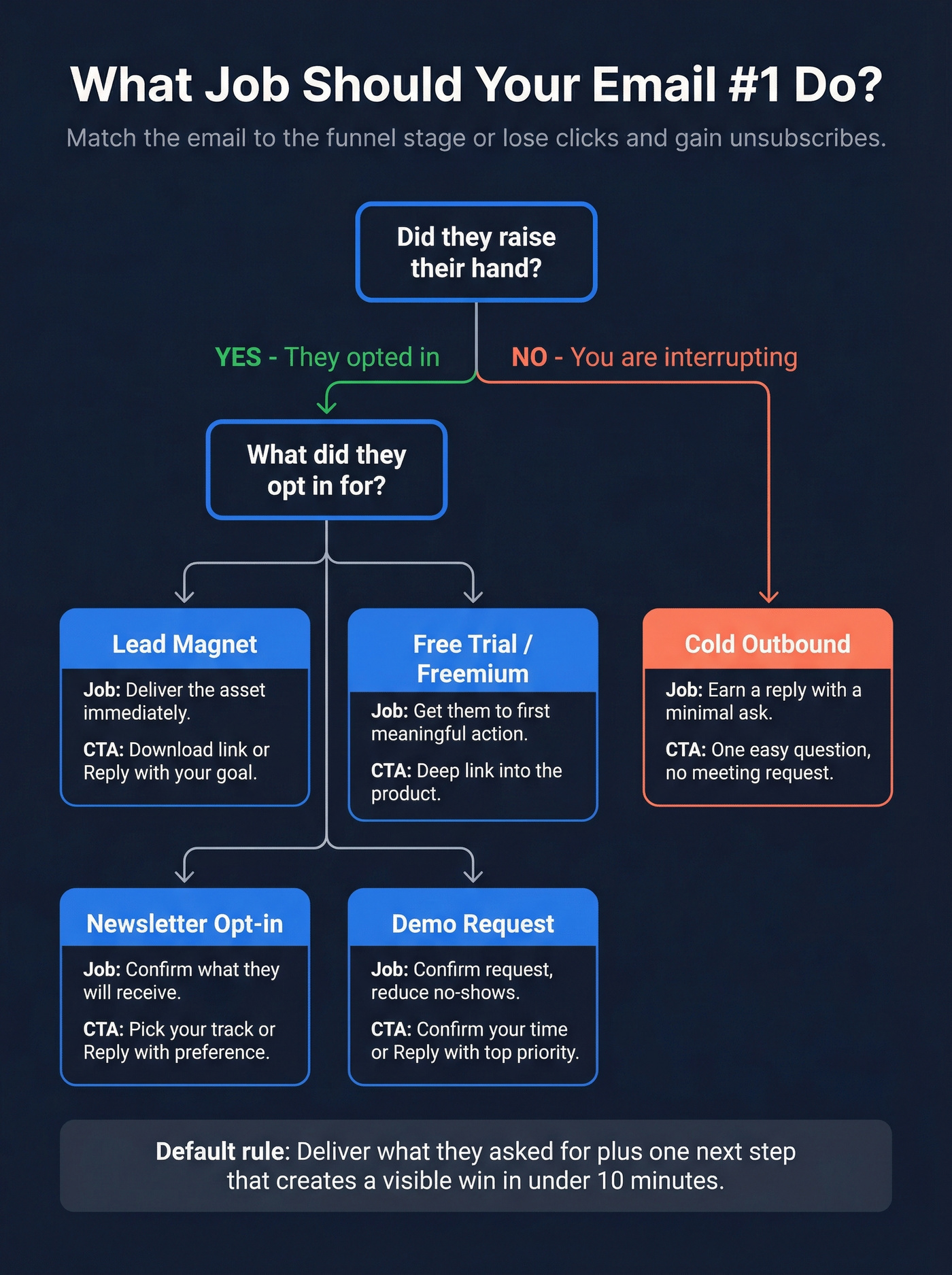
Use this decision tree:
1) Did they raise their hand, or are you interrupting them?
- They opted in / bought / requested something -> lifecycle (welcome/onboarding/ecommerce/activation)
- They didn't opt in -> cold outbound (your job is a reply, not a conversion)
2) What did they opt in for: lead magnet, trial, newsletter, or demo?
Lead magnet (guide/template/webinar replay)
- Job: deliver the exact asset immediately + set expectations for what's next
- Best CTA: "Download/Watch" (one link) or "Reply with your goal"
Free trial / freemium signup (self-serve)
- Job: get them to the first meaningful action (the "aha")
- Best CTA: deep link straight into the product action (skip dashboards)
Newsletter opt-in (no immediate asset)
- Job: confirm what they'll receive + ask a preference so you can segment
- Best CTA: "Pick your track" (one click) or "Reply with what you want"
Inbound demo request (sales-assisted)
- Job: confirm the request, reduce no-shows, and collect one detail that makes the demo relevant
- Best CTA: "Confirm your time" or "Reply with your top priority"
3) Is the next step "use the thing" or "talk to a human"?
- Use the thing -> activation/onboarding/ecommerce
- Talk to a human -> demo request, high-touch onboarding, or outbound after engagement
If you're unsure, default to this rule
Default job: deliver what they asked for + give one next step that creates a visible win in under 10 minutes. If you can't name that win, you're not ready to automate Email #1.
Mini-examples (what "job clarity" looks like):
- Lead magnet: "Here's the template + reply with your use case."
- Trial: "Click here to do the one setup step that unlocks value."
- Demo request: "You're booked - here's what we'll cover + one question."
- Cold: "Are you the right person for X?" (one question, no meeting ask yet)
Welcome/onboarding Email #1 job: set expectations + deliver promised thing
Email #1 should deliver what they came for (discount, resource, access) and set expectations: what you'll send, how often, and what they'll get out of it.
Bury the promised thing under a long story and you train them to skim or unsubscribe.
Activation Email #1 job: get user to first meaningful action
The best early lifecycle Email #1 isn't "nice to meet you." It's "here's the fastest path to value."
Push one action: import data, invite a teammate, create the first project, run the first workflow - whatever creates the first real result.
Ecommerce Email #1 job: deliver offer + first browse/buy action
Treat Email #1 like a clean trade: they gave you attention; you give them the offer and a simple path to shop.
One collection beats twelve category links. "Bestsellers" or "Start here" wins because it removes decision fatigue.
Cold sequence Email #1 job: earn a reply/next step with a minimal ask
Cold Email #1 isn't a pitch deck in paragraph form.
Practitioners who get replies do three things consistently:
- keep it plain-text and short
- use one relevant trigger (not "I saw your company...")
- ask one easy question
Here's the thing: if you ask for a meeting in Email #1, expect lower replies. Earn engagement first, then escalate.
Timing & cadence that actually works (Day 0 rules + 3 schedules)
Day 0 matters because intent decays fast. If someone just subscribed, bought, or requested something, they're paying attention now - not "tomorrow morning."
Send Email #1 immediately (or within 1 hour). It's not a hack. It's just respecting the moment they told you they care.
Day 0 timing rules (immediate vs within 1 hour)
- Signup / lead magnet / trial: send immediately (or within 1 hour)
- Purchase: send immediately (receipt + next step + offer reinforcement)
- Cold outbound: send when your audience's most likely to reply (often Tue-Thu mornings), but don't worship send-time. Message-market fit beats calendar tricks.
Three proven schedules (copy/paste)
| Schedule | Best for | Steps | Example days |
|---|---|---|---|
| "Classic 10-day" | Most teams | 4 emails | Day 0/2/5/10 |
| "Fast 4-day" | Hot intent | 4 emails | Day 0/1/3/4 |
| "Slow 14-day" | High trust | 5 emails | Day 0/3/7/10/14 |

How to choose the right schedule (the part most guides skip)
Pick Fast 4-day when intent's high and the next step's obvious (trial signup, discount capture, webinar attendee). Strike while they still remember you.
Pick Classic 10-day when you need a little education but don't want to drag it out (most B2B lead magnets, most onboarding).
Pick Slow 14-day when the product's complex or the purchase cycle's longer (higher ACV, multi-stakeholder, or anything that needs trust).
One caution: cadence can hurt deliverability if you blast the wrong people. If unsubscribes or complaints spike after Email #1, slow down and tighten targeting - don't power through with more sends.

Your first cold email earns a reply or gets ignored - and bad contact data kills sequences before they start. Prospeo gives you 98% verified emails from 300M+ profiles, refreshed every 7 days, so Email #1 actually lands in real inboxes.
Stop crafting perfect sequences for emails that bounce.
The Email #1 format spec (mobile-first + deliverability-safe)
A lot of Email #1s get read on a phone, half-distracted, with the inbox preview doing the filtering. Formatting decides whether they read line two.
Do this:
- 1-2 line paragraphs (no walls of text)
- 50-125 words for most first emails
- CTA above the fold unless context's truly required
- Keep link count low: 1 primary link (2 max if one's a required legal/receipt link)
- Use simple HTML + a plain-text fallback (multipart) so the message renders cleanly everywhere
- Avoid image-only emails (they look like promos, load slowly, and kill clarity)
Don't do this:
- Don't stack CTAs ("download," "follow," "book," "watch")
- Don't over-design B2B Email #1 until it screams automation
- Don't hide the point until paragraph five
In our experience, when we rewrite Email #1 for clients, we usually cut 30-50% of the words and delete every secondary link. Clicks go up because the decision's easier, and the email stops feeling like a mini-website jammed into an inbox.
Personalization that actually moves metrics (beyond {{first_name}})
Personalization works when it proves the email's about their context, not your product.

Steal these (pick 1-2 per email, not all of them):
- "You signed up from [webinar/guide/page]--here's the exact link again."
- "You chose [role/use case] on the form - start with this setup."
- "You're in [industry]--here's the example built for teams like yours."
- "You're on Day 1 of the trial--do this one action to see value today."
- "You started onboarding but didn't [key action]--this link drops you right into it."
- Ecommerce: "You browsed [category]--start with this collection."
- Demo request: "Before we meet, what's your #1 priority: A / B / C?"
- Newsletter: "Want more tactics or more examples? Click one."
The Email #1 checklist (the blocks to include, in order)
This is the structure I use when I'm fixing first emails that are "fine" but not converting.

Above-the-fold block (first 6-10 lines)
One-line opener "Thanks for signing up - glad you're here."
Why they're receiving this (one line) "You grabbed the [template/discount/trial] on [page]."
Deliver the promised thing immediately Link, code, login, or the single action they need.
One clear CTA "Download the template" / "Run your first workflow" / "Reply with X"
Expectation-setting block (frequency + what's next)
- What you'll send next (1 sentence)
- How often (1 sentence)
- What outcome they'll get (1 sentence)
Example: "You'll get 3 emails over the next 10 days: setup, examples you can copy, and a quick checklist to avoid common mistakes."
Pick ONE of these CTA types (do not include all three)
Choose the CTA that matches the job. If you include all three, you've broken the "one CTA" rule.
- "Do the next step" CTA (activation/ecommerce)
- "Reply with one detail" CTA (creators/B2B)
- "Whitelist / safe-sender" CTA (when deliverability's fragile)
Email sequence first email templates (by scenario) + annotated teardown
Subject lines first: keep them short and literal. Clarity beats clever.
SaaS/PLG activation: "Get to first result in 5 minutes"
Subject: Your first result in 5 minutes Preheader: One step to see value today.
Hi {{first_name}},
Welcome to {{product}}. The fastest path to your first win is {{single_action}}.
Start here: {{deep_link_to_action}}
Reply "done" and I'll send the next best setup for {{use_case}}.
- {{sender_name}}
Why this works:
- outcome-first (not a greeting-first)
- one action keeps cognitive load low
- deep link removes friction
- reply CTA creates engagement and a natural follow-up
Creator/course lead magnet: deliver + set expectations
Subject: Here's the {{lead_magnet_name}} Preheader: Plus what's coming next.
Hey {{first_name}},
Here's {{lead_magnet_name}}: {{link}}
Over the next 10 days, I'll send 3 short emails on {{topic_outcome}}.
Quick question: what are you trying to achieve with {{topic}} right now?
- {{your_name}}
Why this works:
- immediate delivery builds trust
- expectations reduce surprise unsubscribes
- one question earns replies and improves segmentation
Ecommerce: discount/offer + first browse path
Subject: Your code is inside Preheader: Start with our bestsellers.
Hey {{first_name}},
Here's your code: WELCOME10 (expires in 7 days).
Shop bestsellers: {{bestsellers_link}}
Not sure where to start? Reply with what you're shopping for.
- {{brand_name}}
Why this works:
- code's visible immediately
- one primary path beats a link farm
- reply CTA doubles as customer insight
Inbound demo request: confirm + reduce no-shows
Subject: Confirming your demo request Preheader: One question so we tailor it.
Hi {{first_name}},
You're booked for {{date_time}}. Here's the link: {{meeting_link}}
So I tailor this: what's the main goal - pipeline, activation, or reporting?
- {{sender_name}}
Why this works:
- confirms the request (reduces "who is this?")
- one question makes the demo better and increases show rate
- no extra links, no brochure dump
B2B outbound: plain-text, one pain + one question
Subject: Quick question about {{specific_area}} Preheader: Not sure if this is on your radar.
Hi {{first_name}},
Noticed {{trigger}}. Are you already doing anything to {{pain_outcome}}?
If yes, what's working best?
- {{sender_name}} {{title}}, {{company}}
Why this works:
- the subject matches the ask
- trigger makes it feel earned
- one clear question is easy to answer
Before/after: a real Email #1 rewrite (what to cut, what to keep)
This is a real-world scenario I've seen too many times: a team ships a "welcome" that reads like an About page, then wonders why the rest of the sequence can't recover. It isn't that the copy's "bad." It's that the email's asking the reader to do work (read, decide, click around) before it gives them anything.
Before (what I see all the time):
Subject: Welcome to Acme! "Hi Sarah, we're thrilled to have you. At Acme, our mission is to reinvent the way teams collaborate through innovative workflows and best-in-class automation. We've helped thousands of customers streamline operations across industries. Here are a few links to get started: Product tour, pricing, case studies, blog, and our founder story. If you'd like, book a 15-minute call here. Looking forward to partnering together..."
One email. Seven asks. Zero momentum.
After (same intent, higher conversion):
Subject: Start here "Hi Sarah - thanks for signing up. Here's the fastest way to get value today: create your first {{thing}}.
Do it here: {{deep_link}} Over the next 10 days, I'll send 3 short emails: setup, examples, and a checklist.
Quick question: what are you trying to accomplish with {{category}}?"
What changed:
- removed the mission paragraph
- deleted the link pile
- moved the action above the fold
- asked one useful question instead of pushing a call
If you only send one email, send this (one-email "sequence" template)
If bandwidth's low, don't half-build a 5-step flow. Send one strong Email #1 that delivers, sets expectations, and gives one next step.
Subject: Here's your {{thing}}
Hi {{first_name}},
Here's {{thing}}: {{link_or_code}}
Next step (takes 2 minutes): {{single_next_step_link}}
I'll send one more email in a few days with {{specific_help}}. If you want me to tailor it, reply with your goal.
- {{name}}
Subject line swipe file (patterns + a few optional emoji tests)
Patterns to A/B test:
- "Here's your {{thing}}"
- "Start here"
- "Your first {{result}}"
- "Quick question, {{first_name}}"
- "About {{specific_topic}}"
- "Before you {{next_step}}..."
Optional emoji variants (use sparingly, and match your brand voice):
- "✅ Here's your {{thing}}"
- "👋 Start here"
- "⏱ Your first {{result}} in 5 minutes"
Benchmarks & KPIs for Email #1 (what "good" looks like in 2026)
Benchmarks are guardrails, not goals. List quality and inbox placement swing results more than copy.
Also, a lot of benchmark reports lag a year because full-year datasets take time to publish. Don't get hung up on the exact number; use ranges to spot obvious problems.
Benchmark table (broad reference)
| Type | Avg open | Top open | Avg click | Top click |
|---|---|---|---|---|
| Campaigns | 37.93% | 54.78% | 1.29% | 4.74% |
| Automated flows | 48.57% | 65.74% | 4.67% | 12.21% |
| Welcome emails | ~51% | - | - | 15% (top-performing) |
Important: campaigns vs flows are broad categories. Welcome metrics are welcome-specific examples and aren't apples-to-apples with the broader campaign/flow averages. Use them as "what's possible," not as a direct comparison.
A more methodology-heavy baseline (medians)
A large methodology-forward dataset (millions of campaigns) puts typical medians around:
- open rate: 43.46%
- click rate: 2.09%
- unsubscribe rate: 0.22%
Welcome/activation flows often beat these medians because they're triggered by intent. That's exactly why Email #1 is worth obsessing over.
Measurement plan beyond opens
Track outcomes that match the job:
- CTR (did they take the action?) - see Email Click Through Rate
- Reply rate (especially for creator + B2B)
- Activation rate (did they reach the first meaningful action?)
- Placed order rate (ecommerce)
- Unsubscribe rate (watch for spikes after Email #1)
- Spam complaint rate (protects your entire program)
Most sequencers and ESPs show step-level performance. Compare Step 1 vs the rest so you know whether Email #1 is lifting the sequence or dragging it down.
Deliverability & compliance before you automate Email #1 (non-negotiables)
If you send at any real volume, deliverability isn't a "later" problem. Email #1 is your highest-intent send and your first big reputation signal to mailbox providers.
Hard rules in 2026 (Gmail/Yahoo era):
- If you send 5,000+ messages/day to Gmail/Yahoo recipients, you're treated as a bulk sender
- Spam complaint rate max: 0.3% (aim <0.10%) - see Spam Rate Threshold
- One-click unsubscribe required via List-Unsubscribe and RFC 8058
- Opt-outs processed within 2 days
Cold outbound and marketing email can differ legally by jurisdiction, but mailbox providers still grade you on complaints and "easy opt-out" signals. If people can't leave cleanly, they mark you as spam.
Authentication & domain alignment (SPF/DKIM/DMARC + branded domain)
Checklist:
- Set up SPF
- Set up DKIM
- Set up DMARC - see SPF DKIM & DMARC
- Use a branded sending domain and align domains (from-address, sending domain, root domain)
- Use a dedicated click-tracking domain so links use your brand domain and you control that domain's reputation - see domain reputation
Unsubscribe + complaint guardrails
Checklist:
- Add List-Unsubscribe header (one-click)
- Make unsubscribe obvious - see Email Whitelisting
- Process opt-outs within 2 days
- Monitor complaints per send and per segment
- Sunset unengaged contacts (don't keep hammering dead weight)
List hygiene & data quality (where Prospeo fits)
Look, this is where a lot of teams shoot themselves in the foot: they polish copy for two weeks, then send it to a list with stale, risky addresses and wonder why Gmail starts punting them to spam. Your first email can't "outwrite" hard bounces and low engagement.
If you're running outbound or any automated sequence at scale, verifying addresses before you hit send is the cheapest insurance you can buy for inbox placement.
Prospeo ("The B2B data platform built for accuracy") is built for exactly this: 98% email accuracy, a 5-step verification process (including catch-all handling plus spam-trap and honeypot filtering), and a 7-day data refresh cycle. Use it to verify in real time, clean lists in bulk, or find and verify addresses as you build the sequence.
Common mistakes (and the fast fixes)
Mistake: Delaying Email #1
Fix: Send Day 0. Waiting 48 hours is a self-inflicted conversion leak.
Mistake: Too many CTAs
Fix: One message, one CTA. If Email #1 has more than one link, you're probably doing it wrong (exception: required receipt/legal link).
Mistake: Making it look automated
Fix: For B2B and creators, keep it plain-text style. For ecommerce, keep design light and the path obvious.
Mistake: Pitching too early
Fix: Deliver value first, then earn the ask. If Email #1 is a sales pitch, you train people to ignore you.
Mistake: Measuring the wrong thing
Fix: Opens are directional. Optimize clicks, replies, activation, orders, unsubscribes, and complaints.
FAQ
Should the first email in a sequence be sent immediately?
Send it on Day 0 - immediately after signup/purchase (or within 1 hour) to capture peak intent and cut confusion-driven unsubscribes. For cold outbound, prioritize likely reply windows (often Tue-Thu mornings) but keep the message short and the ask minimal.
How long should the first email be?
Most first emails perform best at 50-125 words, with 1-2 line paragraphs and a single CTA, because it fits one mobile screen and forces clarity. If you need extra context, move it to Email #2 and keep Email #1 focused on one action or one question.
What metrics matter most for Email #1 if open rates are unreliable?
Use job-based metrics: CTR for ecommerce and activation flows, activation rate for SaaS trials, and reply rate for creator/B2B sequences. Keep unsubscribes around 0.2% and spam complaints under 0.10%; if complaints approach 0.3%, fix targeting and list quality before sending more.
Should I verify emails before launching an automated sequence?
Yes. Verification reduces hard bounces and protects domain reputation, which directly impacts inbox placement for your email sequence first email. Prospeo verifies with 98% accuracy, runs 5-step verification with spam-trap and honeypot filtering, and includes a free tier (75 emails + 100 Chrome extension credits/month).
You nailed the framework, the timing, the one-CTA rule. But none of it matters if you're emailing dead addresses. Prospeo's 5-step verification and spam-trap removal keep your bounce rate under 4% - just like Snyk and Meritt did at scale.
Protect your domain reputation with data you can trust at $0.01 per lead.
Summary: how to win with your email sequence first email
Pick one job. Send on Day 0. Use one CTA.
Keep it short, mobile-first, and judged by outcomes (clicks, replies, activation, orders). Protect deliverability with authentication, clean opt-outs, and verified data so the rest of your sequence has a chance to work.