How to Increase Email Open Rates for Sales in 2026
Your open rate is probably a lie. Apple Mail Privacy Protection preloads tracking pixels, and Apple accounts for roughly half of all tracked email opens. That "45% open rate" your SDR manager is celebrating? A chunk of those aren't real humans reading your email - they're Apple servers fetching a pixel.
Most guides on increasing email open rates for sales are written for newsletter marketers. They'll tell you to build a welcome series, run re-engagement campaigns, and optimize your preheader text. None of that applies to cold outbound. Sales email is a different animal - different infrastructure, different metrics, different failure modes entirely.
What You Need (Quick Version)
Three things move the needle for sales email performance, in this exact order:
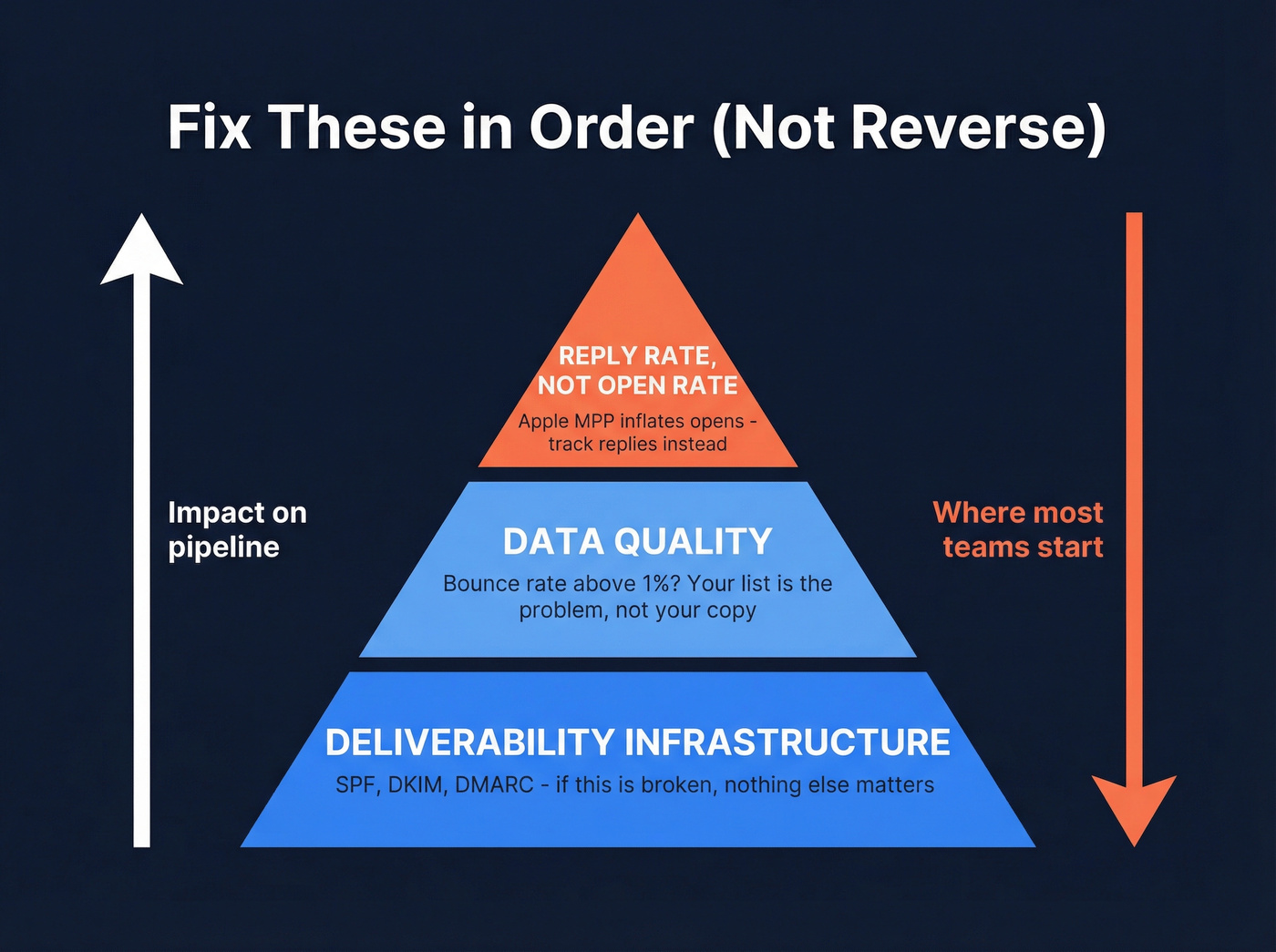
- Deliverability infrastructure. If you haven't set up SPF, DKIM, and DMARC, stop reading and do that first. No subject line trick will save you from the spam folder.
- Data quality. If your bounce rate is above 1%, your list is the problem. Bad data poisons your sender reputation faster than anything else.
- Reply rate, not open rate. Apple MPP inflates opens. Track replies instead - that's the metric that correlates with pipeline.
Sales Email Benchmarks for 2026
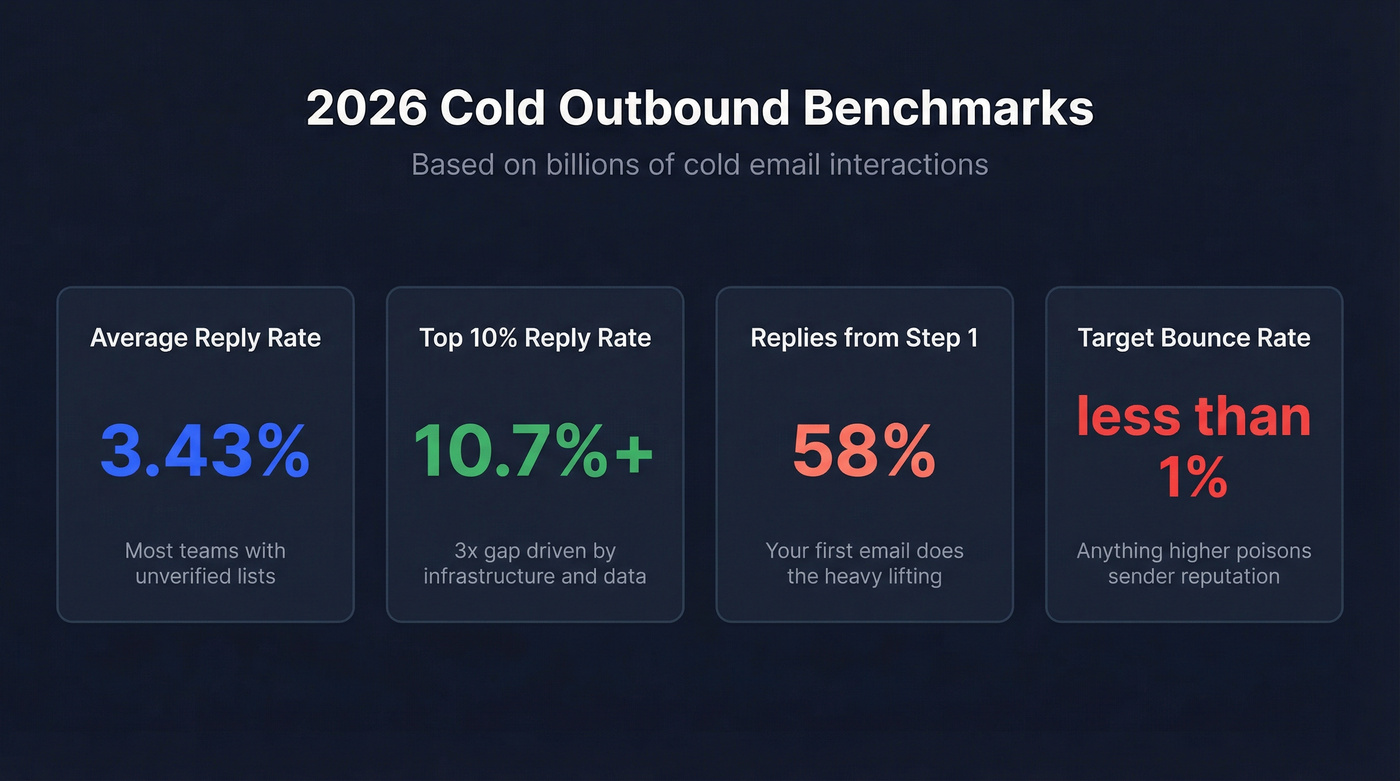
Most benchmark data floating around comes from marketing email - newsletters, drip campaigns, promotional blasts. Useless for cold outbound. The numbers below come from Instantly's cold email benchmark report, which analyzed billions of interactions across thousands of active outbound workspaces.
| Metric | Average | Top 25% | Top 10% |
|---|---|---|---|
| Reply rate | 3.43% | 5.5%+ | 10.7%+ |
| Bounce rate | - | - | ≤1% |
| Inbox placement | - | - | ≥80% |
A 3.43% average reply rate sounds low until you realize most teams are sending to unverified lists with no warm-up. The top 10% hit 10.7%+ - a 3x gap driven almost entirely by infrastructure and data quality, not copywriting genius.
One stat worth memorizing: 58% of all replies come from step 1 of a sequence. Your first email does most of the heavy lifting. If it's landing in spam, no amount of follow-up fixes that.
Why Your Open Rates Dropped
Here's a scenario we see constantly. An SDR manager notices open rates dropped from 45% to 22% over three months. Nobody changed the copy. Nobody switched tools. The team panics and starts rewriting subject lines.
The real culprit is almost never the copy.
Gmail and Yahoo changed the rules. Starting in 2024, Google and Yahoo enforced strict requirements for anyone sending 5,000+ messages per day: full SPF/DKIM/DMARC authentication, spam complaint rates below 0.3% (Gmail recommends under 0.10%), and one-click unsubscribe processed within 2 days. If you're not compliant, your emails quietly start hitting spam. No warning. No bounce notification. Just silence.
Apple MPP broke your tracking. Apple accounted for 49.29% of email opens as of the most recent Litmus data available. MPP preloads email content - including tracking pixels - regardless of whether the recipient actually reads the message. Your "open rate" now includes a large share of phantom opens. The metric is structurally broken for any audience with significant Apple Mail usage.
Fix Your Deliverability Foundation
SPF, DKIM, and DMARC Setup
This isn't optional anymore. Without these three DNS records, Gmail and Yahoo will throttle or spam-folder your outbound. Setup takes 15-30 minutes, though DNS propagation can take up to 24 hours.
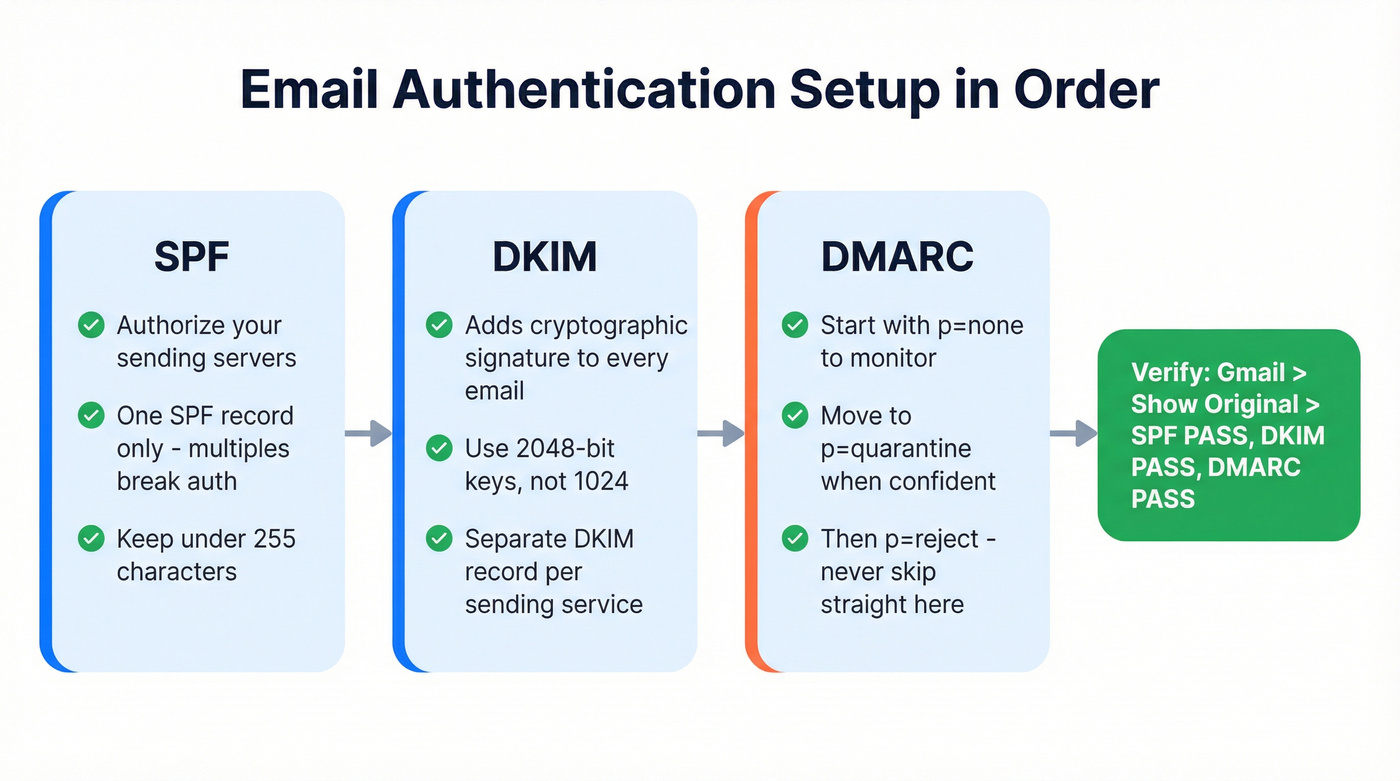
SPF tells receiving servers which mail servers are authorized to send on behalf of your domain. Your record looks something like v=spf1 include:_spf.google.com include:mailgun.org -all. Don't create multiple SPF records - that breaks authentication entirely. Keep your SPF record under 255 characters and use include: statements to stay within the limit.
DKIM adds a cryptographic signature to every email, proving it wasn't tampered with in transit. Use 2048-bit keys, not 1024, and make sure each sending service - your ESP, your outbound tool, your transactional sender - has its own DKIM record. Rotate keys yearly.
DMARC ties SPF and DKIM together and tells providers what to do when authentication fails. Roll it out gradually: start with p=none to monitor, move to quarantine once you're confident, then reject. Jumping straight to reject is the second most common mistake we see - right after not setting up DMARC at all.
To verify everything's working, send an email to a Gmail account, open it, click the three dots, and select "Show original." You should see SPF PASS, DKIM PASS, and DMARC PASS. If any say FAIL, fix it before you send another cold email.
Warm Up Before You Send
Don't send cold email from your primary domain. Use a subdomain like outreach.yourcompany.com - subdomains carry separate sender reputations, so if something goes wrong, your main domain stays clean.
Avoid spammy TLDs. Domains ending in .xyz, .click, or .top get flagged more aggressively by spam filters. Stick with .com, .org, or .co. After purchasing, wait 24-48 hours before configuring anything - brand-new domains with immediate activity look suspicious.
Then follow a conservative warm-up ramp:
| Week | Sends/Day/Inbox | Notes |
|---|---|---|
| 1 | 5 | Engaged contacts only, no cold |
| 2 | 15 | Mix warm + light cold |
| 3 | 30 | Ramp cold volume |
| 4 | 30 | Launch first full campaign |
The consensus on r/coldemail and r/sales is consistent: teams that skip warm-up burn their domains within a week. The 30-day ramp feels slow. It's insurance.

Every bounced email chips away at your sender reputation - and your open rates drop with it. Prospeo's 5-step verification with catch-all handling and spam-trap removal delivers 98% email accuracy, so your sequences hit real inboxes instead of triggering spam filters.
Stop debugging subject lines when your data is the problem.
Clean Your List Before You Send
Picture this: you import 5,000 contacts from a database you haven't touched in six months. You launch a sequence. Within 48 hours, 400 emails bounce. That's an 8% bounce rate - eight times the safe threshold. Gmail notices immediately. Your sender reputation tanks. Now even your good emails land in spam.
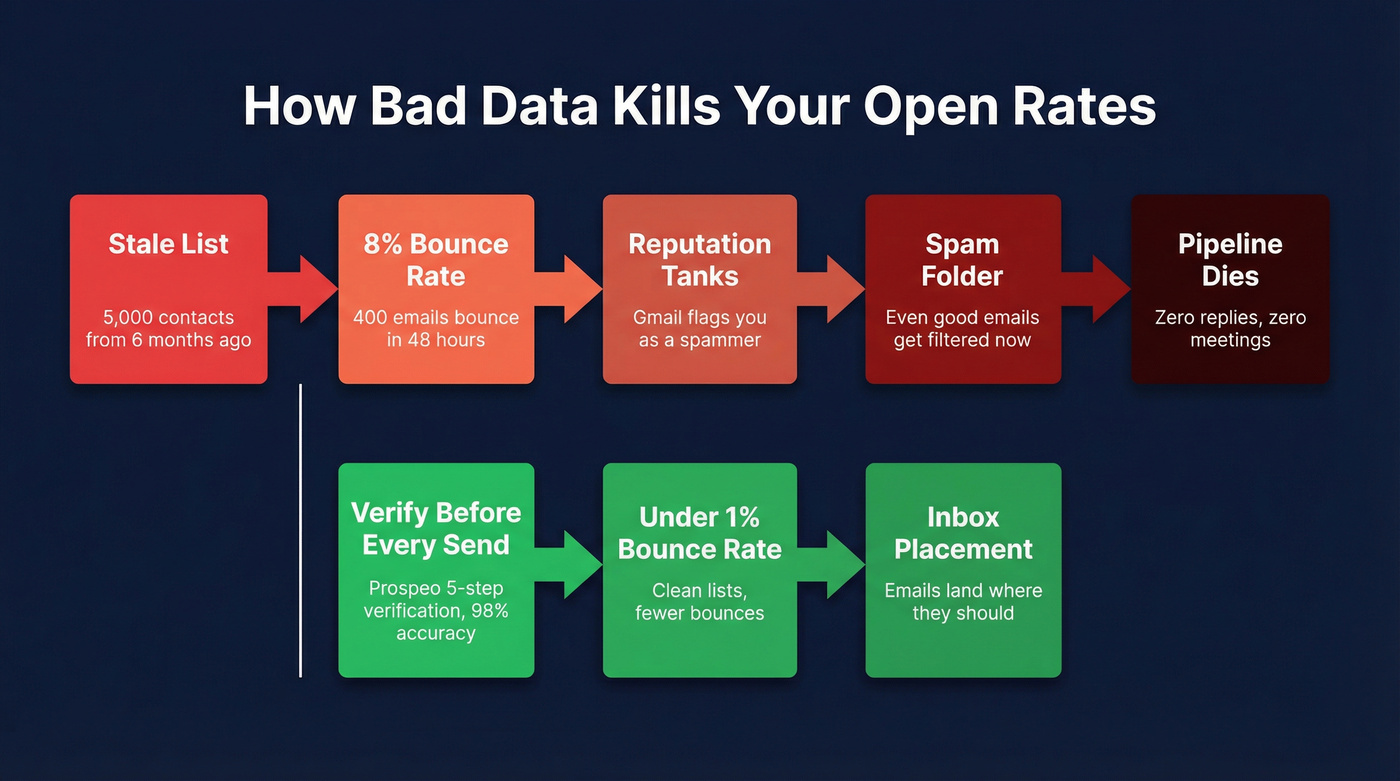
This is the most underrated driver of open rates, and the one most guides skip entirely.
The causal chain is simple: stale data leads to bounces, bounces lead to reputation damage, reputation damage leads to the spam folder. It doesn't matter how clever your subject line is if Gmail has already decided you're a spammer. The fix is verification before every send. Prospeo runs every email through a 5-step verification process with catch-all handling, spam-trap removal, and honeypot filtering - delivering 98% accuracy on verified addresses. The 7-day data refresh cycle means contacts don't go stale between campaigns, compared to the 6-week average most providers operate on. Real results: Snyk cut their bounce rate from 35-40% to under 5% after implementing verification, and Meritt went from 35% bounces to under 4%, tripling their pipeline in the process.
Snyk cut bounce rates from 35-40% to under 5%. Meritt went from 35% bounces to under 4% and tripled pipeline. The difference wasn't copy - it was sending to verified contacts refreshed every 7 days instead of the 6-week industry average.
Clean data is the open rate fix nobody talks about.
Subject Lines That Actually Work
Subject lines matter - they're just not the first thing to fix. Once your deliverability and data are solid, here's what moves the needle for cold outbound.
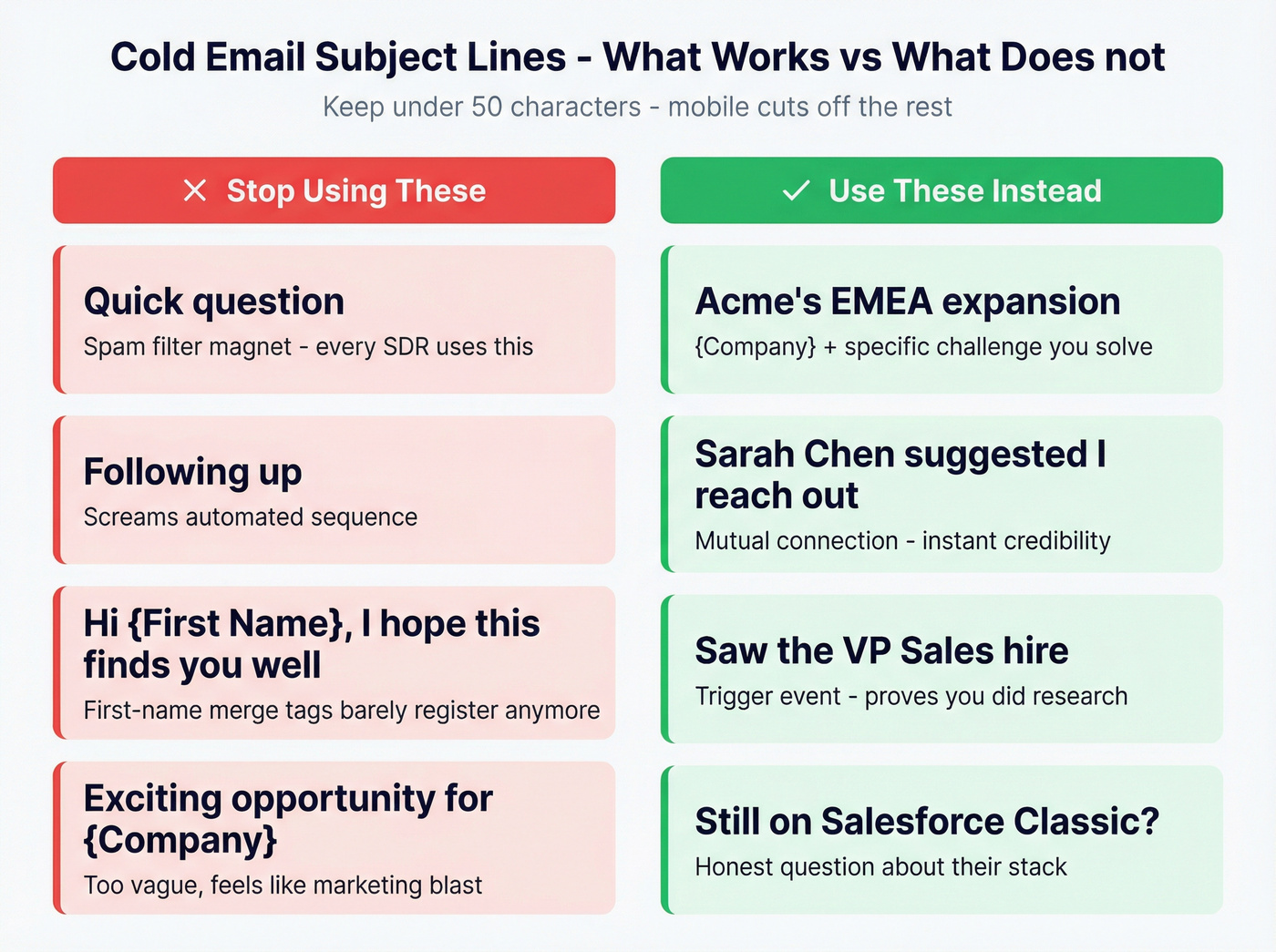
Keep it under 50 characters. Mobile preview windows cut off anything longer, and short subject lines look more like real emails from colleagues than marketing blasts. In cold outbound, the first line of the body often functions as the preview anyway.
Kill the cliches. "Quick question" and "Following up" are spam-filter magnets at this point. Every SDR on the planet has used them. Spam filters know it. Recipients know it. (If you're still using "I hope this finds you well," swap it for one of these alternatives.)
Reference something specific. A recent funding round, a job posting that signals a pain point, a mutual connection. Specificity signals that you actually researched the person, which is the only kind of personalization that moves the needle in cold outbound - first-name merge tags barely register anymore.
Four templates that consistently perform:
{Company} + {specific challenge you solve}- e.g., "Acme's EMEA expansion"{Mutual connection} suggested I reach out{Trigger event}- e.g., "Saw the VP Sales hire"{Honest question about their stack}- e.g., "Still on Salesforce Classic?"
A/B test subject lines weekly. Not monthly. The data compounds fast when you're sending enough volume.
Keep Emails Short, Sequences Tight
The 80-Word Rule
The best-performing cold email campaigns use emails under 80 words. That's not a suggestion - it's what the data shows across billions of sends.
Structure every email the same way. Start with a research-based opener, one sentence proving you know who they are. Follow with one main idea - the value prop or insight. Close with a specific CTA that includes time slots: "Do you have 15 minutes Thursday or Friday?" No company history. No feature lists. No "I hope this finds you well."
If your email takes more than 15 seconds to read, it's too long.
4-7 Touchpoints, Then Stop
Since 58% of replies come from step 1, your first email carries the sequence. But follow-ups still matter - they generate the other 42%. The sweet spot is 4-7 touchpoints. Under 4, you're quitting too early. Beyond 7, you're burning goodwill with diminishing returns.
The best step 2 emails feel like replies, not reminders. Instead of "Just following up on my last email," try something that adds new context - a relevant case study, a different angle on the problem, a question that invites a real response. This approach outperforms formal follow-ups by roughly 30%.
Tuesday and Wednesday are the best days for replies, with Wednesday consistently highest. Avoid Monday mornings when inboxes are overloaded and Friday afternoons when everyone has checked out. (If you want to go deeper on timing, see the best time to send prospecting emails.)
Segment and Personalize at Scale
Let's be honest: most teams don't have a copywriting problem. They have a targeting problem.
"Spray and pray" doesn't just produce bad results - it actively destroys your deliverability. When you email 10,000 random contacts, most won't engage. Gmail reads low engagement as a signal you're unwanted. Your sender reputation drops. Your next campaign performs worse. It's a death spiral that feeds on itself, and we've watched teams spend months trying to recover from a single poorly targeted blast.
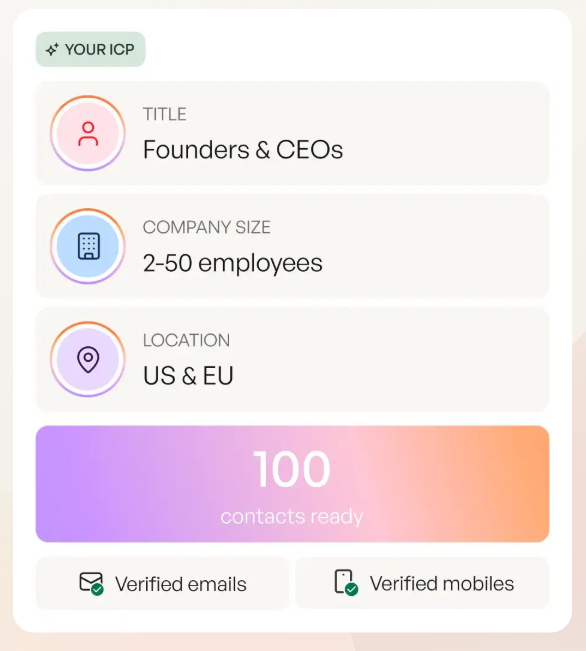
The fix is tighter targeting. Only email prospects who match your ICP and show signals of being in-market. Teams that segment by ICP plus intent signals typically see 2-3x the reply rate of broad-blast campaigns. Prospeo's 30+ search filters - including buyer intent across 15,000 Bombora topics, technographic data, job changes, and headcount growth - let you build lists of people who are actually likely to care about your outreach.
Don't forget compliance. CAN-SPAM requires accurate From information, a physical address, and a clear opt-out mechanism. GDPR requires legitimate interest documentation and the ability to process deletion requests. These aren't just legal boxes to check - violations trigger spam complaints, which trigger deliverability problems. (For the operational version, use this GDPR for Sales and Marketing playbook.)
What to Track Instead of Open Rate
Open rate is a directional signal at best. With Apple MPP inflating a large share of tracked opens, it's not a reliable primary metric for cold outbound. Here's what to track instead:
- Reply rate - your primary metric. 5%+ is strong. 10%+ is elite. (More tactics here: cold email tactics.)
- Bounce rate - keep this at or below 1%. Anything higher means your data needs work. (See: hard bounce.)
- Inbox placement rate - target 80%+ landing in the primary inbox. (Use an email deliverability checklist to diagnose.)
- Positive reply rate - not all replies are good. Track the ones that lead somewhere. (Benchmarks: positive response rate.)
- Meetings booked - the metric that actually pays the bills.
Every tactic in this guide - authentication, warm-up, verification, tighter targeting - contributes to real improvements in sales email performance, not numbers inflated by phantom pixel loads. If a guide on this topic doesn't even mention SPF, DKIM, or DMARC, it was written by content marketers, not people who send cold email. Infrastructure is the foundation. Data quality is the multiplier. Subject lines are the polish. Get the order right and the numbers follow.
FAQ
What's a good open rate for sales emails?
The commonly cited range is 35-55% for well-warmed domains with clean data, but Apple MPP inflates this significantly. Track reply rate instead - 5%+ is strong for cold outbound, and top performers hit 10.7%+ according to 2026 benchmark data.
How long does it take to warm up a new email domain?
Minimum 2-4 weeks. Start at 5 sends per day in week 1, scale to 15 in week 2, 30 in week 3, and launch your first full campaign in week 4. Rushing the ramp can permanently damage a new domain's sender reputation.
Does personalizing subject lines improve open rates?
Yes, but only genuine personalization. A first-name merge tag helps marginally. Referencing a specific company event, job posting, or challenge improves results substantially more - recipients spot lazy merge fields instantly.
Why are my sales emails going to spam?
The most common causes: missing SPF/DKIM/DMARC authentication, high bounce rates from unverified contact data, or sending too much volume too fast from an under-warmed domain. Fix authentication first, then verify your list, then check sending volume.
How do I reduce my bounce rate before a campaign?
Run your entire list through an email verification tool before every send - target under 1% bounces. A 7-day data refresh cycle catches invalid addresses, spam traps, and role-based emails before they damage your sender reputation.