Mass Email Marketing: The System Most Guides Skip
$36 return for every $1 spent. That's not a hypothetical - 35% of marketing professionals report $10-$36 ROI per dollar, and another 30% report $36-$50. Mass email marketing isn't just alive in 2026. It's one of the most profitable channels available, and most teams still execute it poorly.
Why Bulk Email Still Works
Retail and eCommerce teams see 45:1 returns. Software companies average 36:1. Agencies land around 42:1. These figures come from Litmus's State of Email survey of nearly 500 marketing professionals.
Here's the stat that should reshape how you think about email: automated campaigns represent just 2% of total send volume but generate 41% of total email revenue. Automated emails pull a 48.57% open rate versus 25.2% for manual sends. That's not a marginal gap - it's a completely different channel when you build the infrastructure right.
The problem isn't that sending at scale doesn't work. It's that most teams skip the operational foundation - list quality, authentication, warm-up - and then blame the ESP when campaigns underperform. Well-built campaigns are among the highest-ROI activities in marketing. Poorly executed ones just burn your domain.
What You Need Before Anything Else
Before you evaluate a single platform, handle these three things:
- Verify your list. Clean it with a tool like Prospeo before you send anything. A 5% bounce rate will damage your sender reputation faster than any bad subject line.
- Authenticate your domain. SPF, DKIM, and DMARC - all three. Non-negotiable in 2026.
- Warm up your IP and/or domain. New domain or dedicated IP? Ramp volume over 2-4 weeks. Skip this and you'll land in spam on day one. (If you want the deeper playbook, start with email sending infrastructure and automated email warmup.)
If you just want a platform pick: Brevo for SMBs who want email + SMS + CRM in one place. Amazon SES if you have a developer and want the cheapest per-send cost. MailerLite if you're starting from zero and want the best free tier.
Deliverability Numbers Nobody Shows You
Most ESPs show you a delivery rate around 99%. That number is nearly meaningless. Delivery rate measures whether the receiving server accepted your email - not whether anyone saw it.
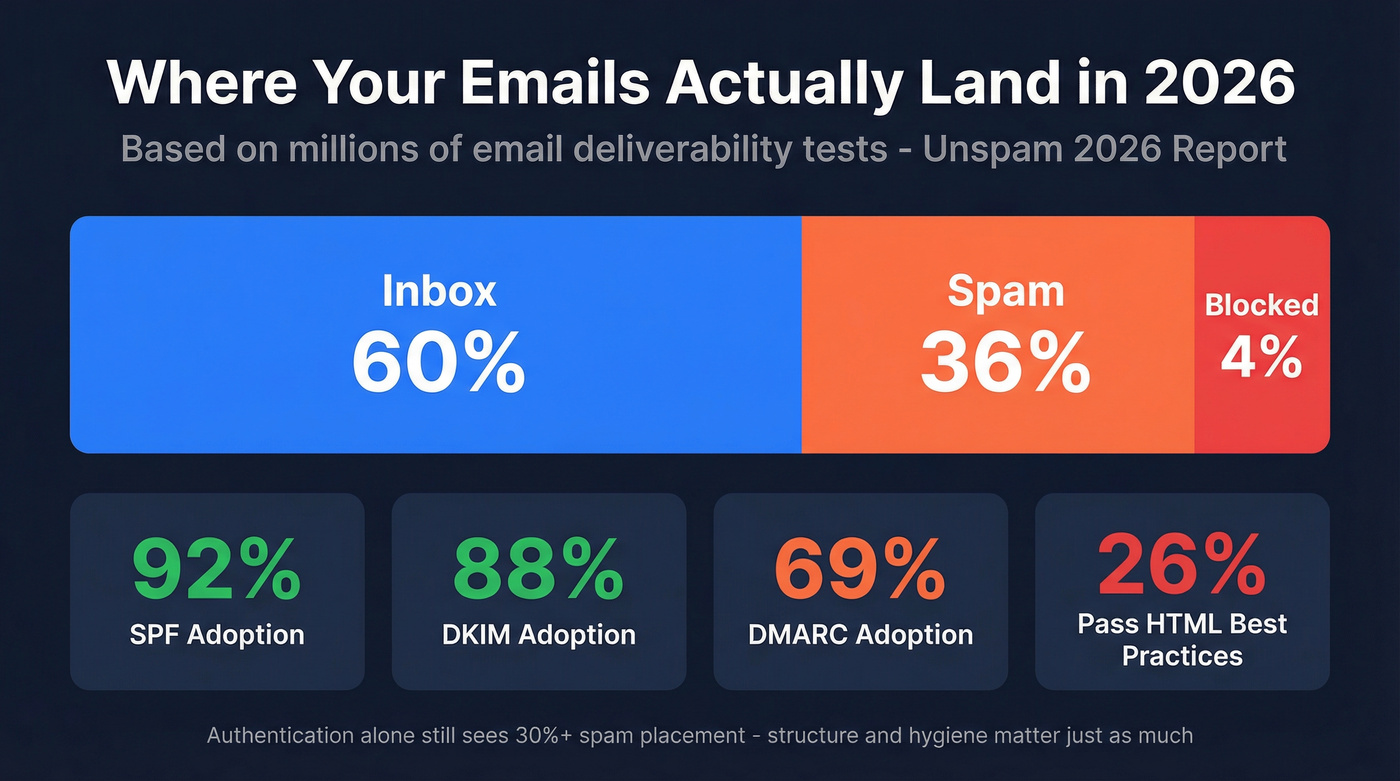
Inbox placement is what actually matters. The 2026 Unspam deliverability report paints a much uglier picture: across millions of email tests, only 60% reached a visible mailbox location. 36% landed in spam. 4% were blocked entirely.
More than a third of all tested emails went straight to spam.
Authentication helps, but it's not enough on its own. SPF adoption sits at 92%, DKIM at 88%, DMARC at 69%. Even fully authenticated mail still sees spam placement exceeding 30%. Authentication is the baseline - it gets you in the door, not into the inbox.
The overlooked details are structural. Only 26% of emails in the Unspam dataset passed HTML best-practice checks, and poor structure made emails 18%-25% more likely to land in spam. One in eight emails had broken or unreachable links. Just 14% included a proper List-Unsubscribe header. These aren't flaws in the channel itself - they're technical debt teams accumulate by ignoring infrastructure. (If you want a step-by-step fix list, use an email deliverability checklist.)
Authentication and Bulk Sender Rules
Three records, one sentence each:
- SPF tells receiving servers which IPs are authorized to send on behalf of your domain.
- DKIM adds a cryptographic signature proving the email wasn't altered in transit.
- DMARC tells servers what to do when SPF or DKIM fails - quarantine, reject, or do nothing.
All three are mandatory for bulk senders in 2026. Gmail defines "bulk sender" as anyone sending roughly 5,000 messages per day to Gmail addresses. Yahoo takes a behavioral approach - no hard cutoff, but bulk sending patterns trigger the same requirements.
Beyond authentication, the rules that matter most:
- One-click unsubscribe. Include a List-Unsubscribe header that supports a single action.
- Keep spam complaints low. Google's threshold is 0.3%. Cross it and you're in trouble.
Look - if you're not monitoring your spam complaint rate in Google Postmaster Tools, you're flying blind. Set it up before your next campaign. It takes ten minutes.
How to Warm Up Sending Infrastructure
If you're sending fewer than 50,000 emails per month, you're likely on a shared IP through your ESP. Shared IPs don't require individual warm-up - the provider manages reputation across all senders. Above that threshold, a dedicated IP makes sense, which means you own the reputation entirely. (For the tradeoffs, see dedicated IP vs shared IP.)
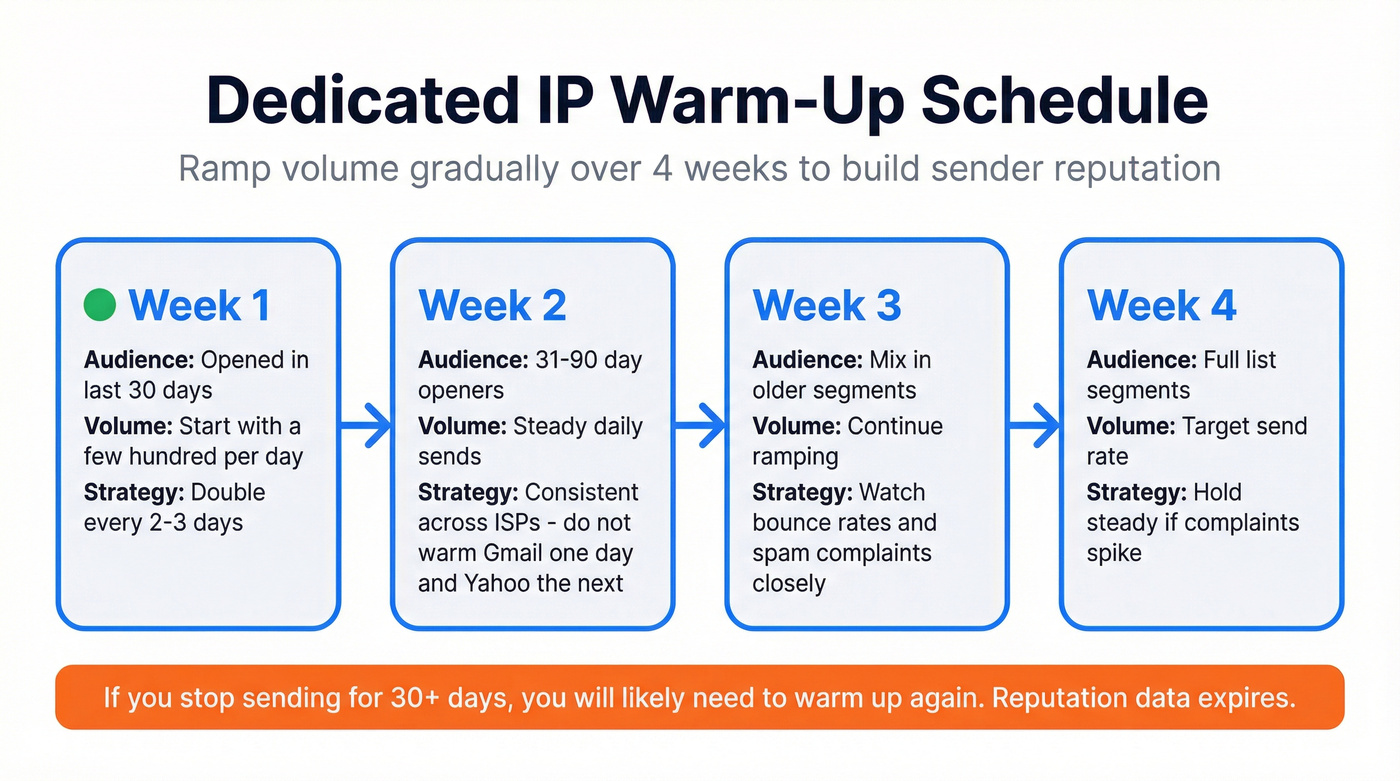
A dedicated IP starts with zero reputation. ISPs don't trust it yet. The warm-up process builds that trust over 2-4 weeks by gradually increasing volume:
- Week 1: Send to your most engaged recipients - people who've opened in the last 30 days. Start with a few hundred per day and double every 2-3 days.
- Week 2: Expand to 31-90 day openers. Maintain consistent daily volume across ISPs - don't warm Gmail one day and Yahoo the next.
- Week 3-4: Mix in older segments gradually. Watch bounce rates and spam complaints at each step. If either spikes, hold volume steady until they normalize.
Most reputation systems store data for roughly 30 days. If you stop sending for a month, you'll likely need to warm up again.
One critical warning: if you're switching ESPs, you need to warm both your new IP and potentially your domain. A team going from 1M to 5M monthly sends needs to ramp just as carefully as a brand-new sender.
List Building and Verification
Email lists decay at 22-30% per year. People change jobs, abandon addresses, companies shut down. (This is even more pronounced in B2B - see B2B contact data decay.)
Never buy lists. The engagement rates are terrible, the spam complaint risk is real, and the legal exposure under GDPR alone makes it a non-starter. Build through opt-in: content downloads, webinar registrations, product signups, newsletter subscriptions. Double opt-in is even better if you can tolerate the friction.
But even opt-in lists need verification before every major campaign. Addresses go stale between sends. Prospeo's 5-step verification process catches invalid addresses, spam traps, honeypots, and catch-all domains that most verification tools skip entirely - running at 98% accuracy across 143M+ verified emails. (If you're comparing vendors, start with email checker tools or email ID validators.)
The impact is measurable. Meritt, a sales agency, saw bounce rates drop from 35% to under 4% after switching their verification workflow. Their connect rate tripled.

Bounce rates above 5% wreck sender reputation and kill mass email campaigns before they start. Prospeo's 5-step verification catches spam traps, honeypots, and catch-all domains at 98% accuracy across 143M+ emails - for roughly $0.01 per address.
Clean your list before your next send destroys your domain.
Segmentation, Personalization, and Automation
Sending the same email to your entire list is the fastest way to train ISPs that your messages aren't worth delivering.
Personalization doesn't have to mean dynamic first-name tokens. It means relevance. Segment by behavior - recent opens, product page clicks, abandoned carts. Segment by demographics - industry, company size, role. Segment by lifecycle stage. A welcome sequence triggered by signup behavior and a batch-and-blast newsletter aren't even the same sport, which is exactly why automated campaigns pull nearly double the open rates of manual sends. (If you want a framework, use behavioral segmentation.)
We've seen teams overthink this. They spend weeks building a 12-step automation sequence with conditional splits and lead scoring tiers, then never actually launch it. Let's be honest: a three-email welcome series that ships next week will outperform a sophisticated flow that lives in draft forever. Start simple, measure, then add complexity where the data justifies it.
On the tactical side: keep subject lines to roughly 60 characters or fewer. Test send times rather than guessing - our team found that "best send time" varies wildly by industry and audience, so universal advice like "Tuesday at 10am" is mostly noise. And always send a test to yourself before hitting the full list. (For subject line pitfalls, see words to avoid in email subject lines.)
Compliance - CAN-SPAM, GDPR, and Real Penalties
The US and EU take fundamentally different approaches to email regulation. CAN-SPAM operates on an opt-out model: you can email someone until they tell you to stop, as long as you include a physical address, a clear purpose, and a working unsubscribe link. Violations carry penalties up to $53,088 per email.
GDPR flips the model to opt-in. You need explicit consent before sending marketing emails to EU residents. Fines reach EUR 20M or 4% of global annual turnover - whichever is higher.
If you're sending to a global audience, default to the stricter standard. Get explicit consent, document it, honor unsubscribe requests within 10 days, and make sure your data processing agreements are in order.
Benchmarks - What Good Looks Like
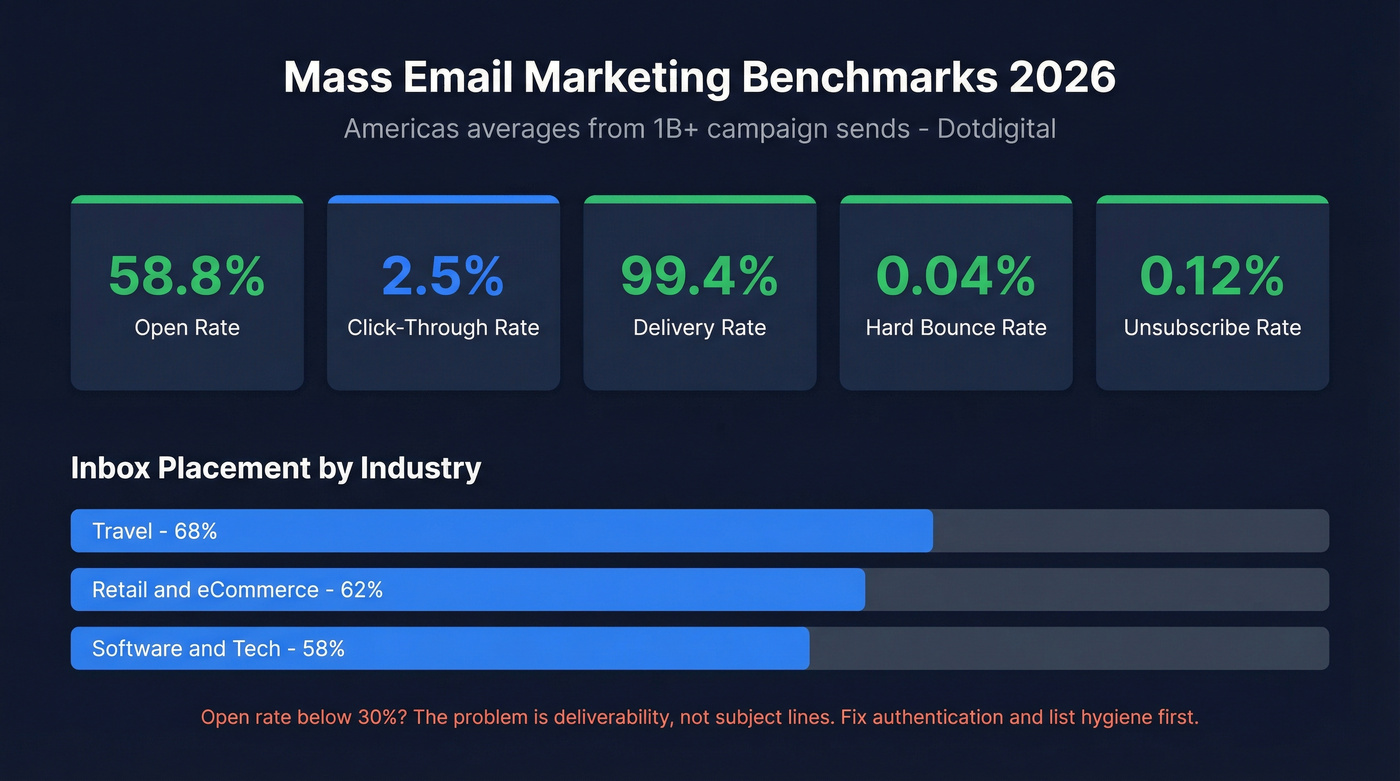
Here's what healthy metrics look like in 2026, based on Dotdigital's Americas dataset covering over a billion campaign sends:
| Metric | Americas Avg |
|---|---|
| Open rate | 58.8% |
| CTR | 2.5% |
| Delivery rate | 99.4% |
| Hard bounce | 0.04% |
| Unsub rate | 0.12% |
Inbox placement varies significantly by industry. Travel leads at 68%, retail and eCommerce sit around 62%, and software/tech averages 58%.
If your open rate is below 30%, the issue isn't your subject lines - it's deliverability. Your emails are landing in spam. Go back to authentication, list hygiene, and warm-up before optimizing creative. (Start with the full email marketing deliverability playbook.)
Best Platforms for Mass Email Marketing in 2026
We evaluated these platforms on free-plan limits, automation depth, deliverability infrastructure, and pricing at scale - the four things that actually determine whether a bulk email tool works for your team.
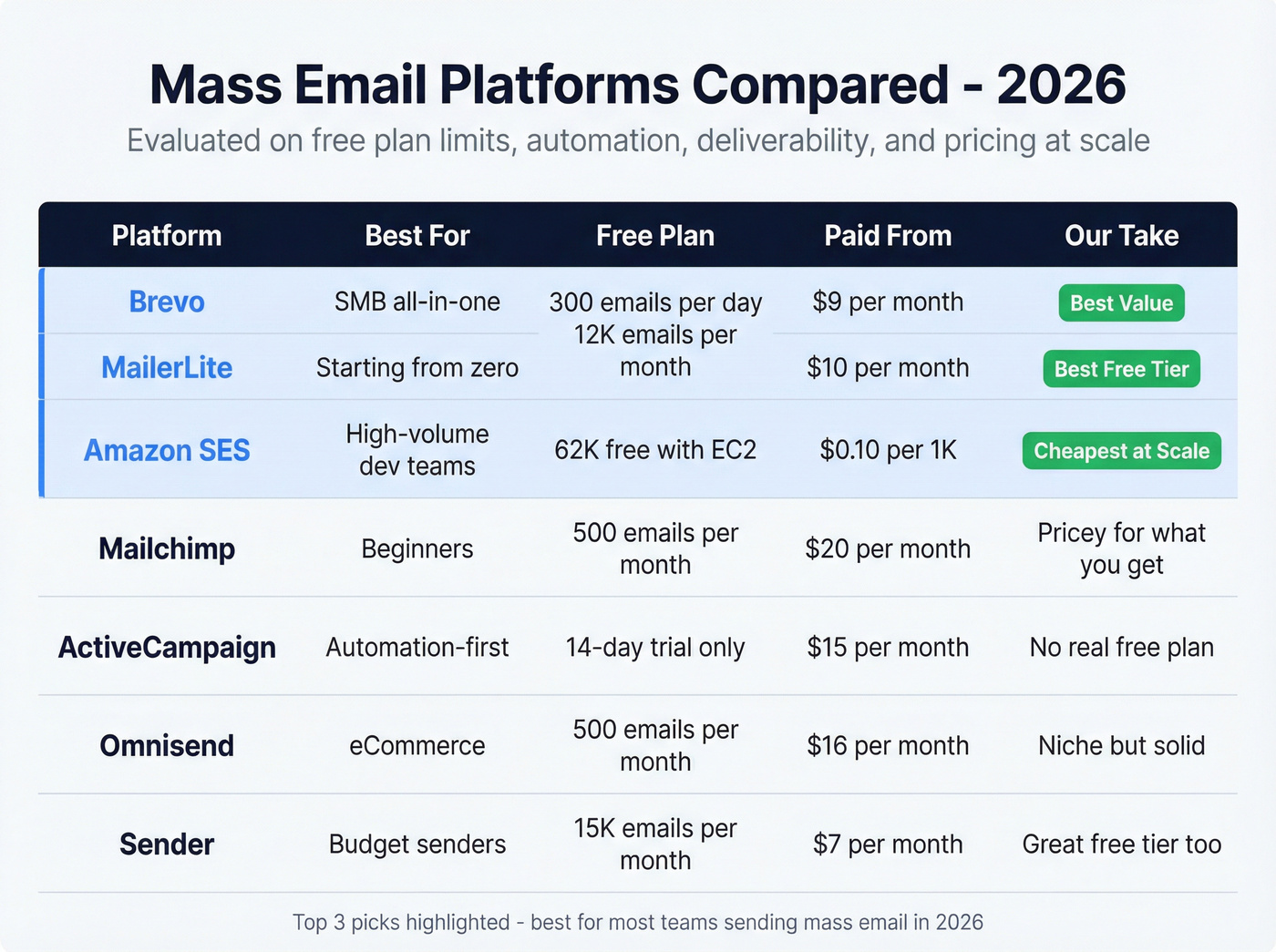
| Tool | Best For | Free Plan | Paid From |
|---|---|---|---|
| Brevo | SMB all-in-one | 300 emails/day | ~$9/mo |
| MailerLite | Starting from zero | 12K emails/mo | $10/mo |
| Amazon SES | High-volume dev teams | 62K free w/ EC2 | $0.10/1K |
| Mailchimp | Beginners | 500 emails/mo | $20/mo |
| ActiveCampaign | Automation-first | 14-day trial | $15/mo |
| Omnisend | eCommerce | 500 emails/mo | $16/mo |
| Sender | Budget | 15K emails/mo | $7/mo |
Best for SMBs on a Budget
Brevo is the best all-around value for teams under 50,000 contacts who want email, SMS, and a basic CRM without stitching together three tools. The free plan caps at 300 emails per day - limiting but functional for early-stage lists. Paid plans start around $9/mo for 5,000 emails. For most small businesses that need more than just email, it's the obvious first choice.
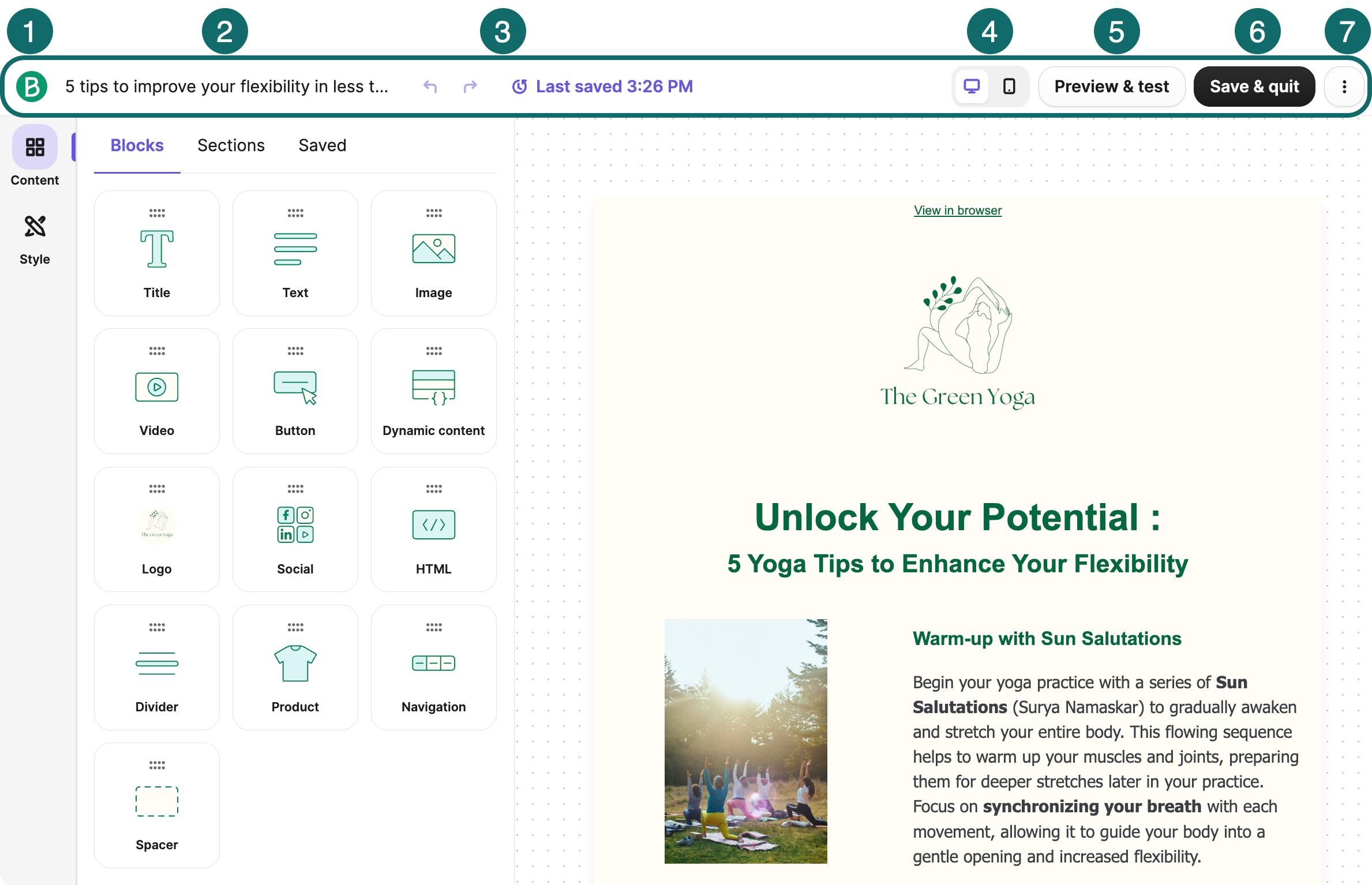
MailerLite has the strongest free tier in the market: 500 subscribers, 12,000 emails per month, and access to the drag-and-drop editor, landing pages, and basic automation. Paid plans start at $10/mo for 500 contacts with no sending limits. If you're under 500 subscribers and just getting started, there's no reason to pay for anything else.
Sender offers 2,500 subscribers and 15,000 emails per month free, with paid plans from $7/mo. Solid budget option, though the automation features are noticeably thinner than Brevo or MailerLite.
Best for Developers and High Volume
Amazon SES costs $0.10 per 1,000 emails. The first 62,000 are free if you're sending from an EC2 instance. Dedicated IPs run $15/mo each. At scale, nothing comes close on unit economics - sending 1M emails per month works out to about $100 in sending fees.
The tradeoff: there's no drag-and-drop editor, no built-in templates, no campaign analytics dashboard. You need a developer to set up sending, manage bounce handling, and build reporting. If you don't have one, skip it entirely. If you do, this is the obvious choice for high-volume sends.
Best for All-in-One Marketing
Mailchimp works for beginners who don't mind outgrowing it quickly. The free plan covers 250 subscribers and 500 emails per month, with standard plans starting at $20/mo. The problem is pricing past 10,000 contacts - Mailchimp gets expensive fast relative to what you get. We've watched multiple teams migrate to Brevo or MailerLite once they hit the 15-20K range and realized they were overpaying.
ActiveCampaign doesn't offer a free plan, but its 14-day trial is worth running if automation is your priority. Starting at $15/mo for 1,000 contacts, it has the best visual automation builder in this list - conditional splits, lead scoring, site tracking, and CRM sync that updates in real time. Skip it if you just need to send newsletters. Choose it if you're building multi-step nurture sequences.
HubSpot Marketing Hub Starter runs $20/mo for 1,000 contacts and scales steeply. Only makes sense if you're already deep in the HubSpot CRM ecosystem.
Best for eCommerce
Omnisend is built specifically for online stores, with product-triggered automations for browse abandonment, cart recovery, and post-purchase flows, plus pre-built templates for Shopify and WooCommerce and SMS built in. Free plan covers 250 subscribers and 500 emails per month, paid from $16/mo.
Hot take: If your average order value is under $50 and your list is under 5,000, you don't need Omnisend or ActiveCampaign. MailerLite's free tier with a three-email welcome sequence will outperform a sophisticated automation setup that you never finish building. The best system is the one you actually launch.
Advantages and Tradeoffs
The advantages of mass email marketing are well-documented: unmatched ROI, direct ownership of the audience relationship, and the ability to segment and personalize at scale. Unlike social media, you're not renting access to your audience - your list is an asset you control.
The tradeoffs are real, though. Deliverability requires ongoing maintenance, compliance obligations differ by jurisdiction, and list decay means you're constantly fighting entropy. Teams that treat email as a "set it and forget it" channel are the ones who end up concluding that campaigns don't work - when the reality is that their infrastructure failed, not the channel.
Mistakes That Kill Campaigns
These five errors account for the majority of deliverability disasters we see:
- Sending without validating your list. Natural decay means 22-30% of addresses go bad every year. Verify before every major campaign.
- Blasting from a new domain or IP without warm-up. ISPs have zero trust in new senders. Ramp over 2-4 weeks or expect spam placement.
- Buying email lists. Low engagement, high spam complaints, legal risk. There's no shortcut here.
- Using misleading subject lines. Short-term open rate gains destroy long-term trust and spike complaints.
- Skipping test sends. Broken layouts, dead links, and rendering issues are embarrassingly common - and entirely preventable with a 30-second test.
FAQ
What is a mass email?
A mass email is a single message sent to a large group of recipients simultaneously through a dedicated ESP or sending platform, covering promotions, newsletters, and transactional updates at scale. It requires authentication, list management, and deliverability monitoring that individual emails don't.
How many emails can I send for free?
MailerLite offers 12,000 emails/month to 500 subscribers. Sender gives 15,000/month to 2,500 subscribers. Brevo caps at 300/day. Amazon SES provides 62,000 free monthly from an EC2 instance. For most early-stage teams, MailerLite or Sender's free tiers are the best starting points.
Do I need a dedicated IP?
Only if you're sending more than 50,000 emails per month. Below that, shared IPs through your ESP work fine without individual warm-up. Above it, a dedicated IP gives you full control over sender reputation - but you'll need to warm it up over 2-4 weeks.
What's a good open rate?
The Americas average is 58.8% across over a billion sends in the Dotdigital dataset. Below 30% almost certainly signals a deliverability problem, not weak subject lines. Check authentication records, verify your list, and review spam complaint rates in Google Postmaster Tools.
What's the difference between delivery rate and inbox placement?
Delivery rate measures whether the receiving server accepted your email - typically around 99%. Inbox placement measures whether it reached the inbox versus spam - closer to 60% on average. Most ESPs only report delivery rate, which makes campaigns look healthier than they are.
Lists decay 22-30% per year, and stale data is the #1 deliverability killer in mass email marketing. Prospeo refreshes records every 7 days - not the 6-week industry average - so your contacts stay valid between campaigns. Meritt cut bounce rates from 35% to under 4%.
Stop sending to dead addresses. Verify your list in minutes.