

Dedicated IP vs Shared IP for Cold Outreach: What Actually Matters in 2026
Your open rates just cratered. Three weeks ago you were cruising at 45%, and now you're staring at 18% across every sequence. The first thing you Google is "dedicated IP vs shared IP cold outreach" - because someone on Reddit told you shared IPs are killing your deliverability.
Here's the thing: that debate is probably the third or fourth most important decision you'll make about your cold email infrastructure. The stuff upstream - your domain reputation, your data quality, your authentication - matters far more than which IP pool you're sitting in.
But you still need to get the IP decision right. So let's get into it.
What You Need (Quick Version)
Before we go deep, here's the short answer:
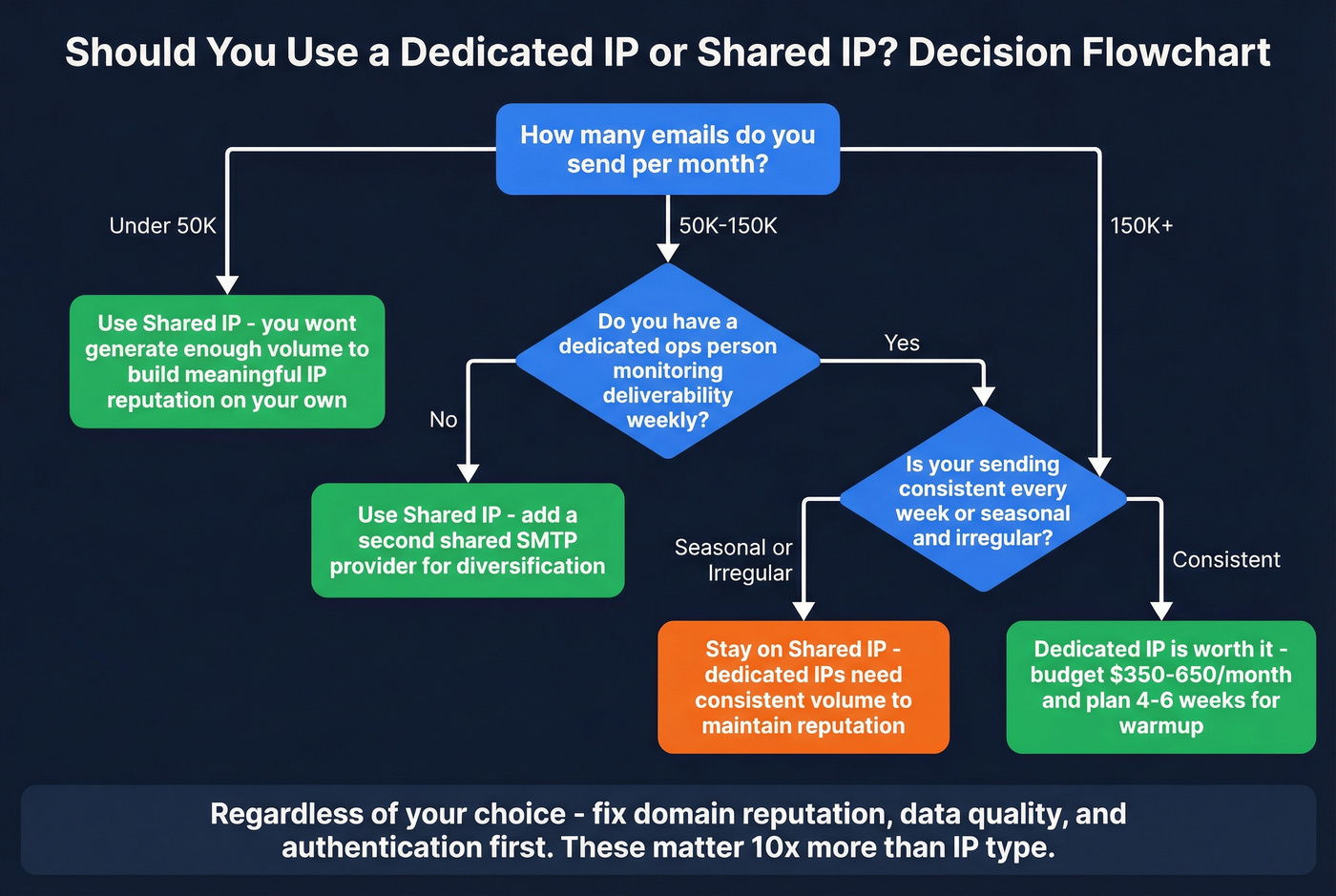
- Under 50K emails/month - stay on shared IP. Google Workspace plus a shared SMTP provider gives you diversification without complexity. Save your money.
- 150K+/month with a dedicated ops person - dedicated IP is worth it. Budget $350-650/month for infrastructure alone.
- Regardless of IP type - your domain reputation and data quality matter more than your IP. Verify your lists, authenticate everything, and monitor weekly. A perfect IP setup with a 5% bounce rate will still land you in spam.
The 4 Types of Cold Email Infrastructure (Not Just 2)
Most guides frame this as a binary: shared or dedicated. That's incomplete. There are four distinct infrastructure types cold emailers use in 2026, and understanding all four changes how you think about the decision.
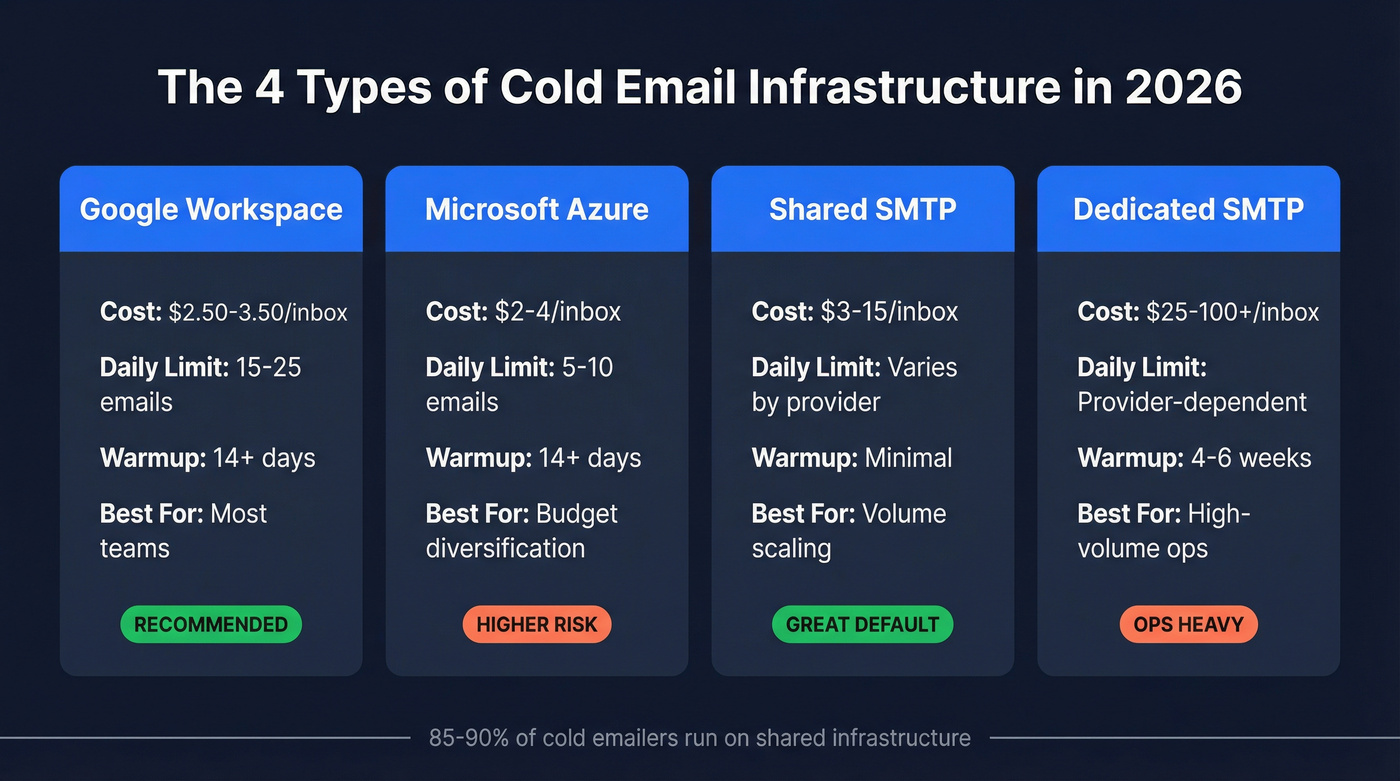
| Type | Cost/Inbox | Daily Limit | Warmup Needed | Best For |
|---|---|---|---|---|
| Google Workspace | $2.50-3.50 (reseller) | 15-25/day | 14+ days | Most teams |
| Microsoft Azure | ~$2-4 | 5-10/day | 14+ days | Budget diversification |
| Shared SMTP | $3-15 | Varies by provider | Minimal | Volume scaling |
| Dedicated SMTP | $25-100+ | Provider-dependent | 4-6 weeks | High-volume ops |
Google Workspace through resellers is the backbone of most cold email setups. You're getting Google's infrastructure at $2.50-3.50/mailbox instead of the direct $8.59/month - and you're riding Google's shared IP pools whether you realize it or not.
Microsoft Azure inboxes are cheaper but riskier. At least two companies running Azure-based cold email infrastructure have shut down in the past year. The 5-10 emails/day sending limit also makes it a supplementary channel, not a primary one.
Shared SMTP providers like Mailforge and Mailscale run $3-15/inbox and distribute deliverability risk across their pool. This is the default recommendation for most people - and for good reason.
Dedicated SMTP through providers like Infraforge or Mailin.ai gives you full IP isolation. It also comes with a management burden that most teams underestimate.
How Shared IPs Work for Cold Outreach
Why Most Cold Emailers Start Here
Roughly 85-90% of cold emailers run on shared IP infrastructure. That's not because they're lazy - it's because shared IPs are genuinely the right call for most sending volumes.
The math is straightforward. Shared IPs come pre-warmed with established reputation. You don't need to spend 4-6 weeks nursing an IP from zero. You plug in, start your warmup sequences, and you're sending within days. The cost savings are real too - shared IP setups save $300-3,600 annually compared to dedicated, based on Smartlead's data across their user base. For a startup running 15 mailboxes, that's money better spent on data quality or hiring another SDR.
And the risk distribution works in your favor at lower volumes. When you're sending 5,000-20,000 emails a month, you don't generate enough sending history to build meaningful IP reputation on your own. You're better off borrowing the pool's collective reputation.
The Real Risks (With 2026 Data)
Shared IPs aren't risk-free. The "one bad actor" problem is real - and it's not just theoretical.
One SaaS company went from 55-60% inbox placement to struggling to hit 35% after the Google/Yahoo authentication changes - despite having SPF, DKIM, and DMARC correctly configured. Their bounce rate was under 3%. Their volume was a modest 100-150/day across three inboxes. The platform-level filtering changes hit them because they had zero control over their shared IP pool's overall reputation.
There's a compounding risk most people miss: shared tracking domains. Most cold email software uses a shared domain to host tracking pixels and link redirects. If another sender on that shared tracking domain gets flagged, your deliverability suffers alongside theirs - even if your IP is fine.
The shared IP risk isn't theoretical. But it's also not a reason to panic-switch to dedicated. It's a reason to diversify. Run Google Workspace plus a shared SMTP provider as two separate lanes. Use custom tracking domains. And keep reading - because the fix for most deliverability problems isn't your IP type.

You just read it yourself: the #1 deliverability killer isn't your IP type - it's bad data. Prospeo's 5-step verification delivers 98% email accuracy with catch-all handling, spam-trap removal, and honeypot filtering. Teams that switch drop bounce rates below 4%.
Stop blaming your IP. Start verifying your lists.
How Dedicated IPs Work for Cold Outreach
When Dedicated IPs Are Worth It
Buzzlead, an agency that's managed cold email for 50+ B2B companies generating $8M+ in revenue, calls private IPs "non-negotiable" for their operation. Their benchmark: 75%+ inbox placement, tested weekly, with immediate diagnosis if it drops below that threshold.
At their scale - setting up 35+ subdomains and 70+ email accounts per client campaign - dedicated IPs make sense. You get full reputation isolation. When something breaks, you know exactly where to look. There's no mystery about whether a stranger's spam blast just torched your deliverability.
Instantly's Light Speed plan at $358/month includes their SISR system (Server & IP Sharding & Rotation), which assigns private servers and dedicated IP blocks and auto-swaps flagged IPs. It's the closest thing to "managed dedicated" infrastructure - you get the isolation benefits without babysitting every IP yourself.
Use dedicated IPs if:
- You're consistently sending 150K+ emails/month
- You have someone (or a tool) actively managing IP reputation
- You're an agency managing multiple client campaigns
- Brand protection is paramount (financial services, enterprise SaaS)
When They'll Hurt You
Here's a practitioner quote that should be tattooed on every cold emailer's forehead: "If you don't know how to manage IP reputation, avoid blacklists, and handle spam complaints, a dedicated IP will hurt you worse than shared. You'll burn it faster than you can warm it up."
Skip dedicated IPs if:
- You're sending under 50K emails/month - you won't generate enough volume to build meaningful IP reputation
- You don't have 4-6 weeks to dedicate to warmup before production sending
- Your sending is irregular or seasonal - dedicated IPs need consistent weekly volume to maintain reputation
- You don't have someone monitoring deliverability at least weekly
The warmup timeline alone kills most teams. You're looking at 4-6 weeks of gradually ramping from 20-50 emails/day, increasing 20-30% weekly. One volume spike or complaint spike during that period can reset the entire process. Klaviyo's deliverability team puts it bluntly: "Simply switching to a dedicated IP will not resolve most deliverability issues."
I've seen teams waste months on dedicated IP warmup only to realize their real problem was a 4% bounce rate from unverified lists. The IP was never the issue.
Why Domain Reputation Matters More Than Your IP Type
Here's the contrarian take that changes the entire conversation: Gmail doesn't weight IP reputation significantly. Domain reputation is the largest factor for inbox placement.
That's not my opinion. That's the conclusion from Klaviyo's deliverability team, and it's consistent with how Gmail, Microsoft, and Yahoo all filter inbound mail. Gmail's filters block over 99.9% of spam - and they do it primarily by evaluating the sending domain, not the sending IP.
Think about what that means. The entire shared-vs-dedicated debate - the one you Googled to get here - is about optimizing a variable that major mailbox providers barely care about.

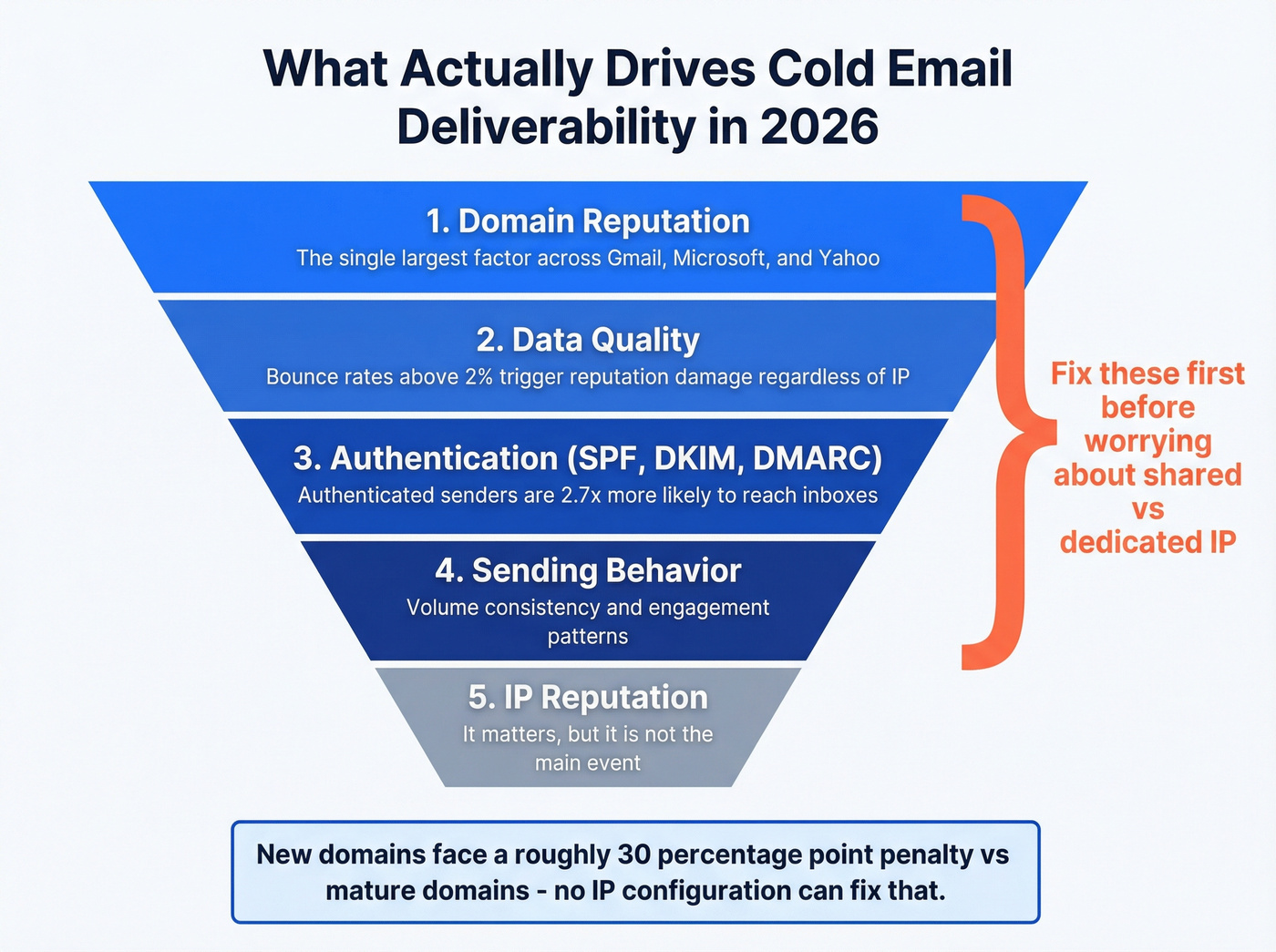
Here's the hierarchy of what actually drives cold email deliverability in 2026:
- Domain reputation - the single largest factor across Gmail, Microsoft, and Yahoo
- Data quality - bounce rates above 2% trigger reputation damage regardless of IP type
- Authentication - fully authenticated senders are 2.7x more likely to reach inboxes
- Sending behavior - volume, consistency, engagement patterns
- IP reputation - yes, it matters. No, it's not the main event.
New domains face a ~30 percentage point penalty versus mature domains (roughly 55% vs 85% inbox placement, per Digital Bloom's benchmarks). That's a domain-level problem no IP configuration can fix. You could have the cleanest dedicated IP on the planet and still land in spam on a 2-week-old domain.
Hot take: If your average deal size is under $15k and you're sending fewer than 100K emails a month, the IP infrastructure debate is a distraction. Fix your domain health, clean your data, and stop overthinking it. The teams we see obsessing over IP type are almost always ignoring a 4%+ bounce rate that's doing ten times more damage.
The reframe: stop asking "shared or dedicated?" and start asking "is my domain healthy, is my data clean, and is my authentication bulletproof?" Get those right, and the IP decision becomes a secondary optimization.
2026 Cold Email Deliverability Benchmarks
The data tells a clear story: deliverability is getting harder across the board, and the gap between disciplined senders and everyone else is widening.
Inbox Placement by Provider (Year-over-Year)
| Provider | 2024 | 2025 | Change |
|---|---|---|---|
| Office365 | 77.43% | 50.70% | -26.7 pp |
| Gmail | 58.72% | 53.70% | -5.0 pp |
| Google Workspace | 63.85% | 53.36% | -10.5 pp |
| Outlook/Hotmail | 49.33% | 26.77% | -22.6 pp |

Source: Digital Bloom's 2025 deliverability report - the most recent comprehensive benchmark available.
Office365 fell off a cliff - down nearly 27 percentage points. If you're sending to enterprise prospects on O365, expect roughly half your emails to miss the inbox entirely.
The ESP picture is equally grim. Mailgun dropped from 53.80% to 26.05%. SendGrid went from 45.30% to 35.31%. These are shared infrastructure providers, and their pool-level reputation is dragging everyone down.
Performance by Volume Tier
| Monthly Volume | Inbox Placement | Open Rate | Reply Rate | Bounce Rate |
|---|---|---|---|---|
| Under 10K | ~50% | 50-60% | 5-10% | ~3% |
| 10K-100K | ~55% | 40-50% | 3-5% | ~5% |
| 50K-200K | ~58% | 40-48% | 3-5% | ~4% |
| 200K-1M | ~61% | 35-45% | 2-4% | ~5% |
| 1M+ | 27.63% | 30-40% | 1-3% | ~8% |
This data draws from Smartlead's dataset of 14.3 billion cold email sends and Digital Bloom's volume-tier analysis. Notice something counterintuitive: the 50K-1M tiers actually outperform very small senders on inbox placement. That's because mid-volume senders tend to invest in proper infrastructure - dedicated IPs, authentication, monitoring - while sub-10K senders often wing it on default settings.
The 1M+ sender tier collapsed 22.35 percentage points year-over-year. More than 7 in 10 emails from mega-senders get filtered. That's not a deliverability problem - that's a business model problem.
Buzzlead's data reinforces this: hyper-targeted lists outperformed mass blasts by 2.76x on reply rates. And 80% of positive responses came from the first two emails in a sequence. If you're sending seven-touch sequences to unfiltered lists, you're burning reputation for diminishing returns.
A few numbers that should scare you into action:
- Only 7.6% of domains enforce DMARC with quarantine or reject policies
- Fully authenticated senders are 2.7x more likely to reach inboxes
- Only 23.6% of B2B marketers verify email lists before campaigns
That last stat is insane. Three-quarters of B2B senders are launching campaigns with unverified lists. They're burning domain reputation on every send and blaming their IP configuration.
Choosing Between Dedicated and Shared IPs: Decision Framework
Here's the framework we'd use if we were setting up cold email infrastructure from scratch today.
| Scenario | Recommendation | Monthly Cost | Setup |
|---|---|---|---|
| Under 50K/mo | Shared IP | ~$45-75 | GW + shared SMTP |
| 50-150K/mo | Hybrid | ~$150-300 | Shared routine + dedicated priority |
| 150K+/mo | Dedicated | ~$350-650 | Full-time management required |
Starter Setup (15 Mailboxes, Under 50K/Month)
Buy 5 domains across 2-3 registrars. Set up 3 inboxes per domain - that's the sweet spot for Google Workspace. Use a shared SMTP provider like Mailforge as your second lane. Total cost: roughly $45-75/month for infrastructure.
This handles 90% of cold email use cases. You get diversification across providers, you're not dependent on a single IP pool, and you're spending your budget where it matters - on data quality and copy.
Growth Setup (45 Mailboxes, 50-150K/Month)
This is where the hybrid approach shines. Run your routine outreach through shared infrastructure (Google Workspace + shared SMTP). Route your highest-priority sequences - think C-suite targets at enterprise accounts - through a dedicated IP lane.
The two-lane strategy means a deliverability hit on one channel doesn't kill your entire operation. Budget $150-300/month. Smartlead's SmartDelivery suite is worth evaluating here for its spam score monitoring and IP analytics.
Agency Setup (200+ Mailboxes, 150K+/Month)
At this volume, dedicated IPs are worth the investment and the management overhead. Instantly's Light Speed plan at $358/month with SISR is the managed option. If you want full control, Infraforge or similar dedicated SMTP providers run $25-100+ per IP.
One advanced tactic worth stealing from enterprise ops: segment your IPs by campaign type. Run prospecting sequences on one IP block, follow-ups on another, and event-driven outreach on a third. This isolates reputation damage - if a prospecting blast triggers complaints, your follow-up sequences keep flowing uninterrupted.
Budget $350-650/month for infrastructure. And budget someone's time - at least 5-10 hours/week - for monitoring, warmup management, and troubleshooting. Dedicated IPs at scale aren't set-and-forget.
The Upstream Problem Nobody Talks About: Data Quality
You can spend weeks perfecting your IP warmup and destroy your reputation in one afternoon with an unverified list.
A bounce rate above 2% triggers reputation damage. Hard bounces above 1% are a red flag that mailbox providers use to throttle or block your sending. And remember that stat from earlier - only 23.6% of B2B marketers verify their lists before campaigns. Three out of four senders are gambling with their domain reputation on every campaign.
I watched a team run a beautiful dedicated IP setup - properly warmed over 6 weeks, authenticated perfectly, custom tracking domains, the works. They imported a purchased list of 12,000 "verified" contacts from a discount data provider. Bounce rate hit 8% on the first send. Six weeks of warmup, gone in an afternoon.

Stack Optimize built from zero to $1M ARR running client campaigns with 94%+ deliverability, bounce rates under 3%, and zero domain flags - all on shared infrastructure. They didn't need dedicated IPs. They needed clean data.
The pattern is consistent: teams that verify every list before every campaign maintain healthy domain reputation regardless of whether they're on shared or dedicated IPs. Teams that skip verification eventually burn their reputation on both.
Infrastructure Setup Checklist
Whether you choose shared, dedicated, or hybrid, this checklist applies to every cold email operation:
Buy 5+ domains - never send cold email from your main company domain. Use .com when possible. Redirect cold domains to your main site for credibility.
Set up SPF, DKIM, and DMARC on every domain - fully authenticated senders are 2.7x more likely to reach inboxes. There's no excuse to skip this in 2026.
Age domains 2-4 weeks before sending - new domains face a ~30 percentage point inbox placement penalty. Let them marinate.
Connect a warmup tool and never turn it off - warmup isn't a one-time setup. It's ongoing maintenance that keeps your sending reputation healthy between campaigns.
Verify your contact list before every campaign - use a tool like Prospeo to build verified lists from scratch, or upload your CSV for bulk verification. At ~$0.01/email, verification costs are negligible compared to the domain reputation damage from a 5% bounce rate.
Cap at 30 emails/inbox/day during ramp - this applies to both shared and dedicated. Resist the urge to blast volume early (see email pacing and sending limits).
Use a custom tracking domain - shared tracking domains are a hidden deliverability risk (more on this in our email deliverability playbook). Set up something like track.yourdomain.com.
Monitor with Google Postmaster Tools + MxToolbox weekly - nearly 70% of email senders don't use Google Postmaster Tools. That's like driving without a dashboard (pair it with a sender score checker).
Keep complaint rate below 0.1% - the Google/Yahoo mandate is 0.3%, but aim for 0.1%. By the time you hit 0.3%, you've already done damage (details: spam rate threshold).
What to Do When Your IP Reputation Tanks
Warning signs that your reputation is in trouble:
- Open rates below 10% (accounting for Apple privacy inflation)
- Bounce rates above 2%
- Spam complaints over 0.1%
- Sudden spike in soft bounces with no volume changes
If you're seeing these, here's the recovery roadmap:
1. Stop all sends from the flagged IP immediately. Continuing to send on a damaged IP makes everything worse. Pause campaigns, not just reduce volume.
2. Run a full audit of your sending behavior. Check your bounce rates, complaint rates, and engagement metrics for the past 30 days. Identify the trigger - was it a bad list, a volume spike, or a content issue?
3. Submit delisting requests if blacklisted. Run your sending IPs through MxToolbox and Cisco Talos. If you're on any blacklists, submit removal requests. Most blacklists have automated delisting processes that take 24-72 hours.
4. Re-warm the IP from scratch. Yes, from scratch. Start at 20-50 emails/day to your most engaged contacts. Increase 20-30% weekly. This takes another 4-6 weeks. There's no shortcut.
5. Segment to most engaged contacts first. During re-warmup, only send to people who've previously opened or replied. High engagement signals to mailbox providers that your sending is legitimate.
Monitoring tools to bookmark:
- Google Postmaster Tools (domain and IP reputation)
- Cisco Talos Intelligence (IP reputation lookup)
- MxToolbox (blacklist checking)
- SenderScore by Validity (aggregate reputation score)
- MultiRBL (multi-blacklist checker)
If you're on shared infrastructure and your pool is compromised, you have a different problem - one you can't fix by warming up. Switch providers. Move to a different shared SMTP pool or spin up Google Workspace accounts on fresh domains. The fastest path back to inbox placement is clean infrastructure plus verified data.
Dedicated IP warmup takes 4-6 weeks. One bounce spike resets it all. Prospeo refreshes 300M+ profiles every 7 days - so the emails you send actually land. At $0.01/email, fixing your data costs less than one month of dedicated SMTP.
Protect your IP investment with data that doesn't bounce.
FAQ
Can I switch from shared to dedicated IP without losing my reputation?
Yes, but you start from zero on the new dedicated IP - budget 4-6 weeks of warmup before production volume. Run both in parallel during the transition: keep shared infrastructure active until the dedicated IP hits target inbox placement rates. Don't cut over all at once.
How long does dedicated IP warmup take for cold email?
Four to six weeks minimum. Start at 20-50 emails/day and increase volume by 20-30% weekly, sending only to your most engaged contacts. One volume spike or complaint spike resets the entire process - patience is structural, not optional.
Does Gmail care about IP reputation for cold outreach?
Barely. Gmail weighs domain reputation far more heavily than IP reputation, and Microsoft and Yahoo follow a similar pattern. This is the single most important insight in the dedicated IP vs shared IP cold outreach debate: the variable you're optimizing matters less than you think. Focus on domain health first.
What bounce rate will destroy my sending reputation?
Anything above 2% triggers reputation damage with major mailbox providers; hard bounces above 1% are a red flag. Verify your list before every campaign - at roughly $0.01/email, catching bad addresses before they become bounce-rate problems is the cheapest insurance you'll ever buy.
How do I know if my shared IP pool is compromised?
Sudden inbox placement drops with no changes to your sending behavior are the telltale sign. Check Google Postmaster Tools - if it shows "Low" or "Bad" IP reputation and you haven't changed anything, your pool is compromised. Confirm via MxToolbox and Cisco Talos, and switch providers immediately if blacklisted.