Pre-Warmed Email Accounts: What They Are, Who Sells Them, and What Nobody Tells You
You signed three agency clients on Tuesday. Campaigns are due next Monday. You don't have warmed inboxes, and you definitely don't have three weeks to build sender reputation from scratch. So you start searching for pre-warmed email accounts - and land in a market where every provider claims instant setup, optimized deliverability, and zero risk. None of them publish inbox placement data.
Here's the thing: pre-warmed email accounts are a band-aid. A useful one, sometimes essential, but still a band-aid. The real question is whether your outbound system maintains reputation over months - not just the first week. Below we'll cover what these accounts actually are, who sells them, what the pricing really looks like, and the part nobody mentions: infrastructure is only half the equation.
What You Need (Quick Version)
If you need to send this week, buy pre-warmed. Infraforge and Maildoso are built for fast scale with dedicated domains. If you can wait 3-4 weeks, warm up your email account yourself and keep full control - it's cheaper and safer long-term. Either way, verify your list before you send a single email. Bad data kills warmed accounts faster than anything else.
What Are Pre-Warmed Mailboxes?
A pre-warmed email account is a Google Workspace or Microsoft 365 inbox that a provider has already run through the warm-up process before selling it to you. That process - sending gradually increasing volumes of emails, generating opens and replies, building a positive engagement history with realistic open patterns and conversational reply threads - normally takes 2-4 weeks when you do it yourself. Buying pre-warmed lets you skip that timeline entirely.
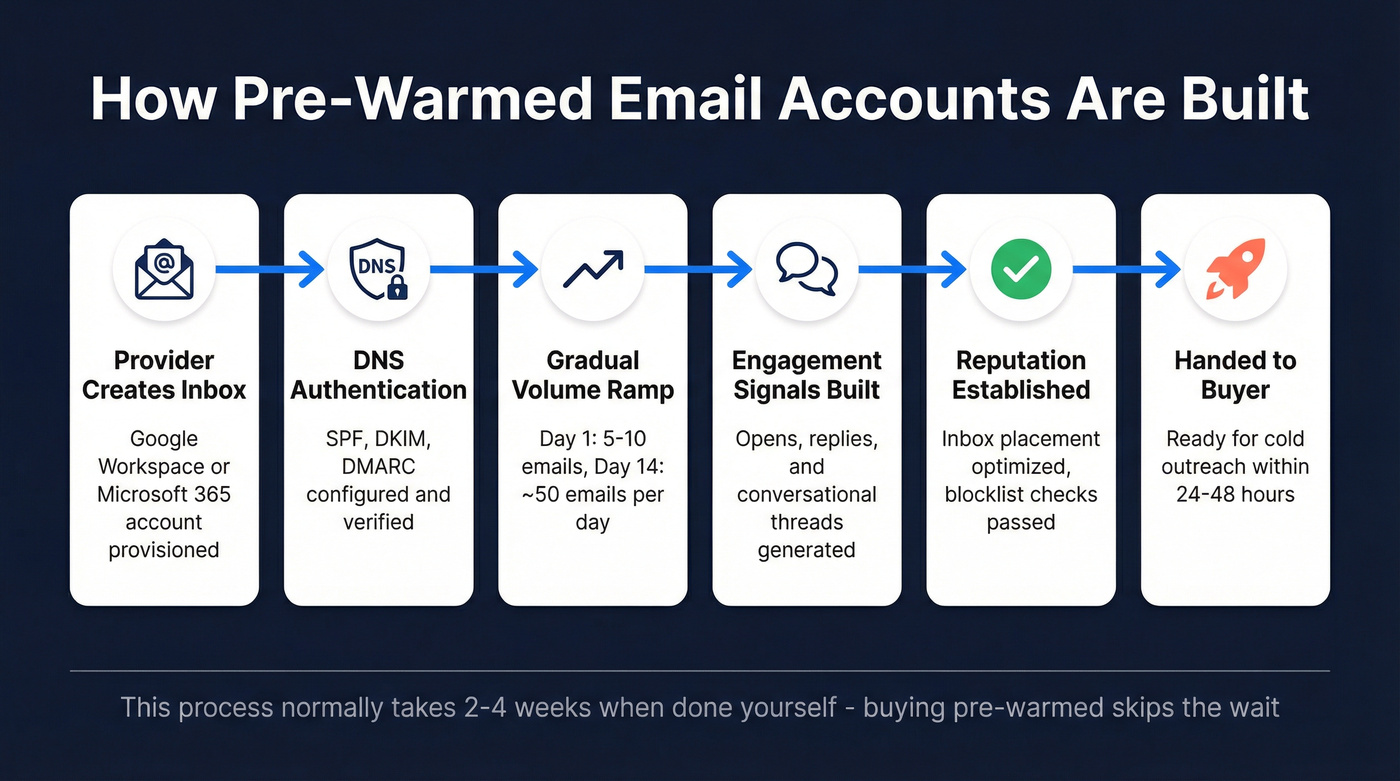
The good providers don't just send fake emails back and forth. They also configure SPF, DKIM, and DMARC authentication on the domain before handing it over. This matters more than most buyers realize. A Mailpool analysis of 1M+ cold emails found that missing DNS authentication can drop deliverability by up to 30%. The baseline isn't great to begin with - average email deliverability sits at 83.1% globally, only 33.4% of the top 1M domains have valid DMARC records, and 85.7% don't enforce DMARC at all. Most senders you're competing with haven't done the basics.
When everything's done right - proper authentication, genuine engagement during warm-up, clean sending patterns - inbox placement rates can hit 96-98% for teams following best practices. The gap between "done right" and "done cheaply" is enormous.
DIY Warm-Up vs. Buying Pre-Warmed
The decision isn't complicated, but the tradeoffs are real.
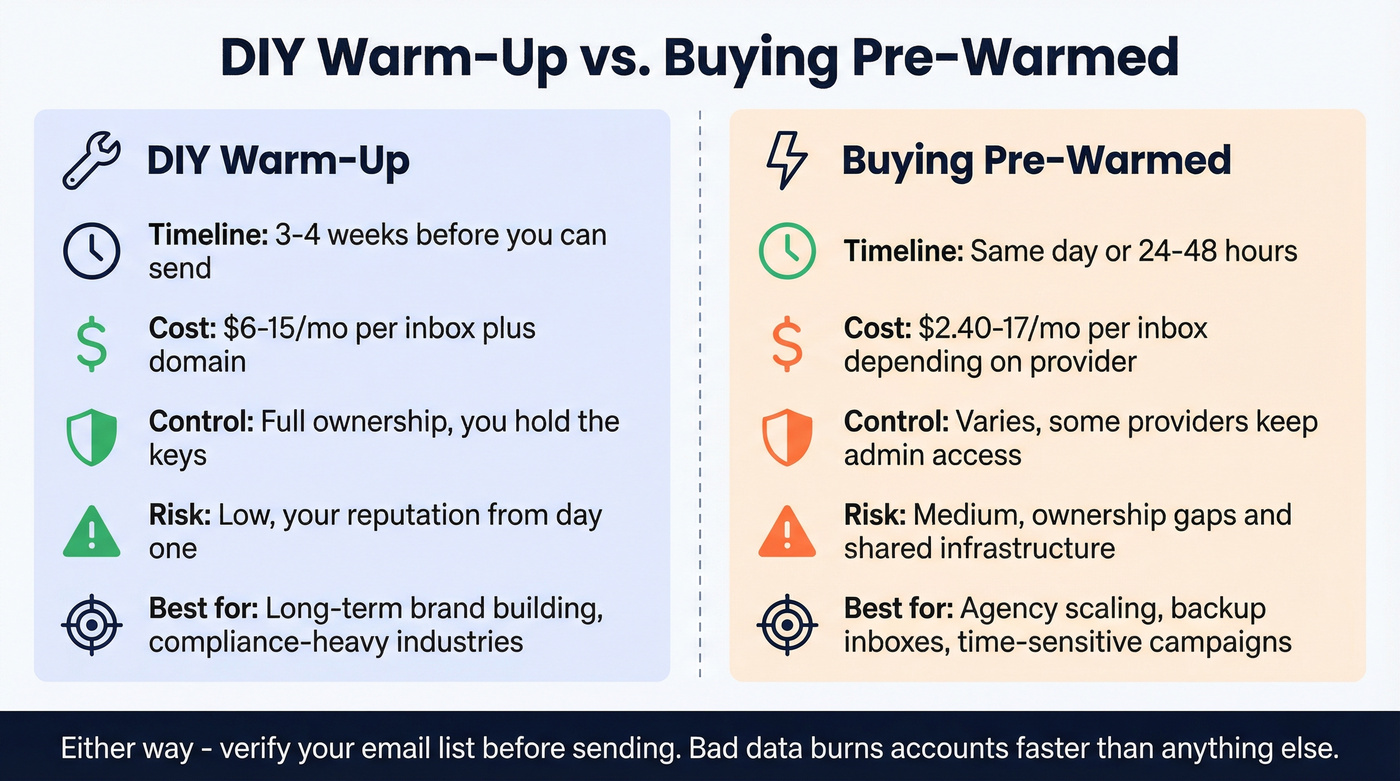
| Factor | DIY Warm-Up | Buying Pre-Warmed |
|---|---|---|
| Timeline | 3-4 weeks | Same day or within 24-48 hours |
| Cost per inbox | ~$6-15/mo (email seat) + domain | Varies widely by provider |
| Control | Full ownership | Varies by provider |
| Risk | Low (you own it) | Medium (ownership gaps) |
| Best for | Long-term brand | Agency scaling, backups |
Mailreach's warm-up guide lays out a concrete ramp schedule: start at 5-10 emails/day on day one, scale to ~50/day by day 14, then begin cold outreach around day 15 at 40 emails/day, ramping to ~100/day by day 21. It works. It's just slow.
Buy pre-warmed when you're scaling an agency across multiple clients, need backup inboxes fast, or have a time-sensitive campaign that can't wait a month. Warm your own when you're building a long-term outbound motion, operate in compliance-sensitive industries, or want zero dependency on a third-party provider.
SMTP-Only Warm-Up Warning: Some warm-up networks operate exclusively over SMTP. Gmail and Outlook can't see SMTP traffic - so engagement signals from SMTP-only networks don't actually improve your inbox placement with those providers. If a provider's warm-up method is SMTP-only, the "warm-up" is cosmetic. Ask before you buy. (If you want the technical breakdown, see our guide to SMTP authentication.)
Best Providers for Pre-Warmed Inboxes (2026)
The pricing across this market is deliberately confusing - monthly vs. yearly, per-mailbox vs. per-domain, minimum purchases buried in fine print. We've normalized it so you can actually compare.
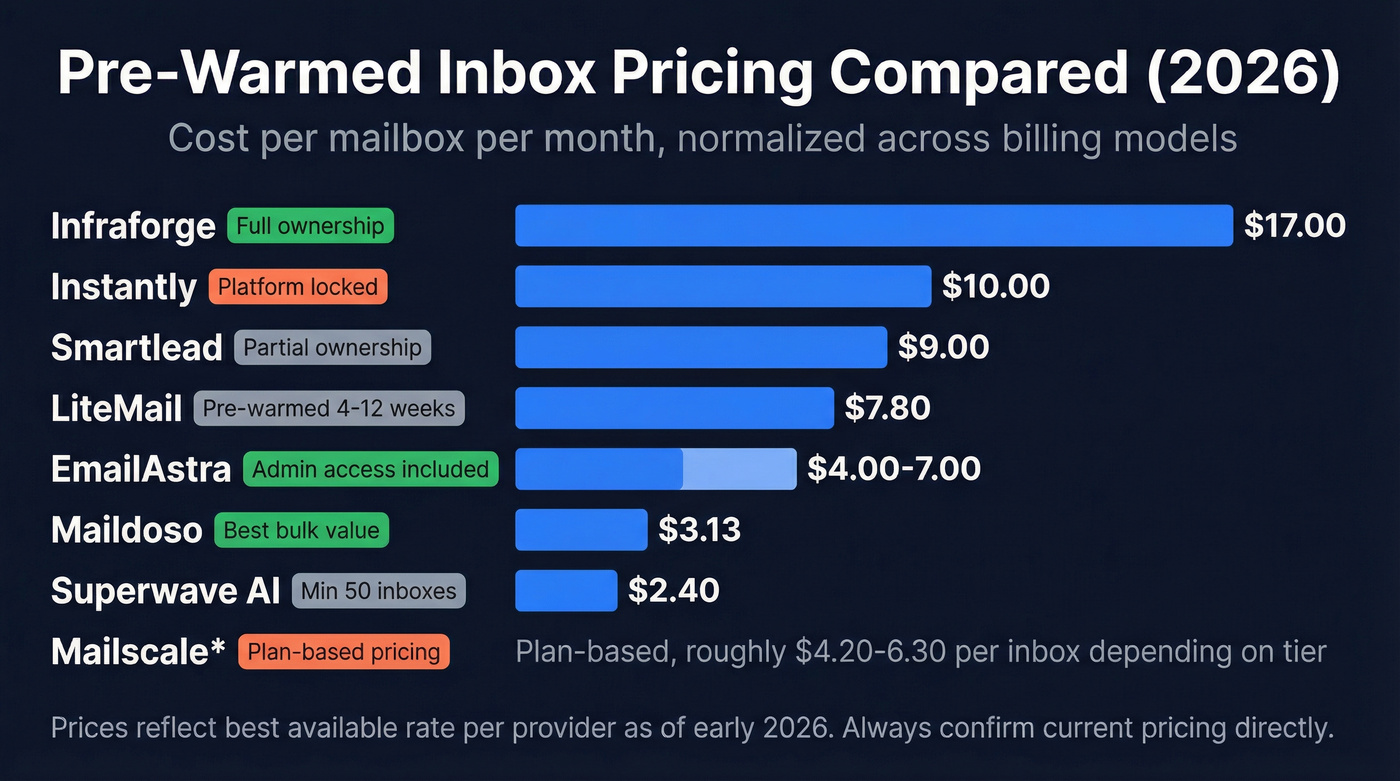
| Provider | $/Mailbox/Mo | Domain Cost | Min. Purchase | Own Domain? |
|---|---|---|---|---|
| Infraforge | ~$17 (annual billing) | $70/yr (.com) | 10 mailbox slots | Yes |
| Instantly | $10/mo per pre-warmed inbox | $15/yr renewal | Batches of 5 | No (Instantly retains admin) |
| Maildoso | ~$3.13 (32-inbox bundle) | Included | Package-based | Included |
| Smartlead | $9 | $18/yr | 1 domain (up to 3 mailboxes) | Partial |
| Mailscale | Plan-based | $9-15 in-app | 15 inboxes (Solopreneur) | No (in-app domains) |
| EmailAstra | $4-7 (depends on term) | Included | Varies | Yes (admin ownership) |
| LiteMail | ~$7.80 (Starter) | 1 domain included; extras $15/yr | 5 mailboxes (Starter) | Included |
| Superwave AI | $2.40 (50-inbox package) | Included | 50 inboxes | Included |
Warm-up and DNS authentication are commonly bundled, but the details vary - always confirm what you're getting. (If you need a full setup walkthrough, use this SPF, DKIM, DMARC explainer.)
Infraforge
Infraforge is the provider we'd point most teams toward first if you care about ownership and setup quality. Pricing starts at $17/mo per mailbox (billed yearly) plus $70/year per .com domain, with a minimum of 10 mailbox slots.
Their Trustpilot profile sits at 3.7/5 from just 4 reviews, so take the rating directionally. Positive reviews praise deliverability and fast deployment. One negative review calls them "scammers" and complains about SMTP compatibility issues with certain sending platforms. Infraforge responded that their SMTP credentials work with any platform that accepts them, and suggested swapping to Google Workspace or MS365 if the user's sending software has issues.
Use this if you want domain ownership and a provider that prioritizes proper setup. Skip this if your sending platform has known SMTP compatibility quirks - test with one mailbox first.
Instantly
Instantly is the most visible name in this space, and for good reason - their cold email platform is genuinely good. But here's the catch most buyers miss: Instantly retains domain ownership and administrator access for pre-warmed purchases. They can't transfer them. These accounts are also exclusively configured for use within the Instantly platform.
Pre-warmed inboxes run $10/month (renewing mid-month) and domains carry a $15/year renewal. Accounts are only available in batches of 5. Even with pre-warmed accounts, Instantly's own guidance is conservative: start at 5 emails/day per account and cap at 20-25 emails/day per account. That's a good rule no matter who you buy from. (For more tooling options, see our roundup of cold email platform picks.)
For teams already on Instantly, the convenience is real. For everyone else, you're trading flexibility for speed.
Maildoso
Maildoso doesn't dominate the way Infraforge and Instantly do, but the pricing is hard to ignore. One published bundle is $100/mo for 32 mailboxes across 8 domains - roughly $3.13 per mailbox. At scale, $733/mo buys 400 mailboxes across 100 domains. Warm-up is included, and the pricing model is built for agencies where per-mailbox cost matters more than brand-name recognition.
Smartlead
Smartlead sells pre-warmed mailboxes and domains that have completed a warm-up process and passed authentication checks. Pricing is $9 per mailbox per month (billed monthly) and $18/year per domain (billed annually). They recommend a 1:3 domain-to-mailbox ratio to maintain deliverability.
If you're already evaluating Smartlead for sending, buying mailboxes inside the same ecosystem simplifies your workflow.
Mailscale
Mailscale is positioned as automation-heavy infrastructure: it can automatically create up to 1,000 email accounts and handles SPF/DKIM/DMARC setup. Published pricing lists Solopreneur at $63/mo for 15 inboxes, Business at $95/mo for 50, and Enterprise at $199/mo for 200 (with the ability to add more at $1/inbox/month).
The complaints are worth knowing. Users point to a domain pricing discrepancy - the FAQ advertises $9-13 per domain, but some buyers see $15 for a .com after subscribing. You're also forced to buy domains inside Mailscale; bringing your own isn't supported. Some users report waiting 2-3 weeks for warm-up before campaigns can launch, which partially defeats the purpose.
EmailAstra
EmailAstra markets "skip warm-up and start immediately" positioning, with DNS records included. Pricing is $4/month per account on a 3-month term, $5.50/month on a 2-month term, and $7/month on a 1-month term. The package includes full Google Admin ownership, a custom .com domain, and compatibility with cold email tools. They also list an Outlook/MS 365 option.
At this price point, ask hard questions about warm-up quality and whether you're sharing infrastructure with a lot of other senders.
LiteMail
LiteMail offers 4-12 weeks of pre-warmed domains and inboxes and advertises "Real US/EU IPs." Starter is $39/month (or $54 for the first month with domain) and includes 5 pre-warmed Google or Microsoft mailboxes. Growth is $99/month (or $159 for the first month with domains) and includes 13 mailboxes. Extra domains run $15/year.
Superwave AI
Superwave AI runs $119/mo for up to 50 inboxes including domain provisioning - that's $2.40/mailbox. The tradeoff is a high minimum commitment. If you need 50+ inboxes, the math works. If you need 10, you're overpaying for capacity you won't use.

Bad data kills warmed accounts faster than anything else - you said it yourself. Prospeo's 5-step email verification delivers 98% accuracy with spam-trap removal and catch-all handling. At $0.01 per email, cleaning your list costs less than replacing a single burned inbox.
Stop burning pre-warmed inboxes on unverified contacts.
How to Evaluate a Provider
Before you hand over money, run through this checklist:
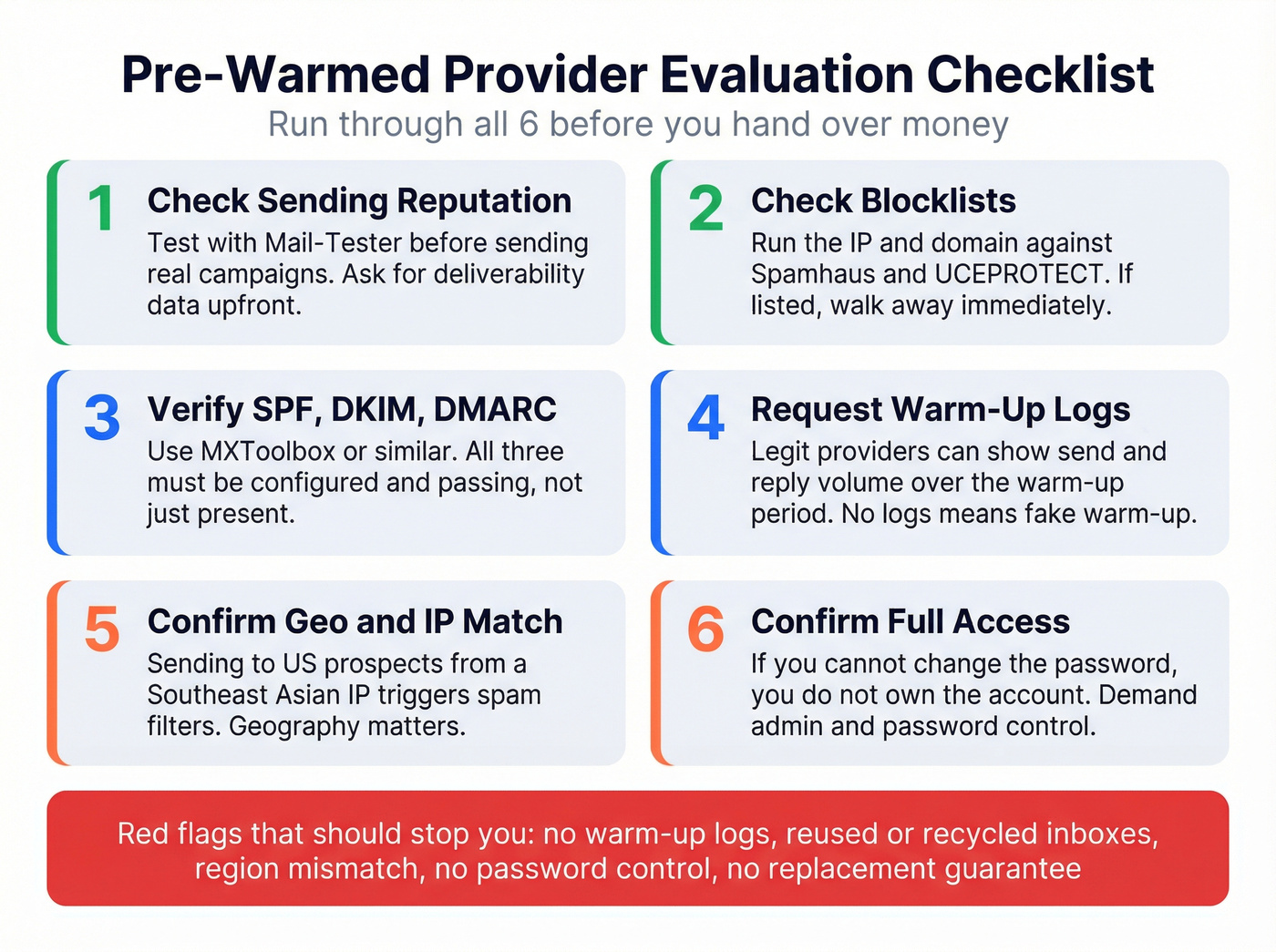
- Check sending reputation - ask for deliverability data or test with Mail-Tester before sending real campaigns.
- Check blocklists - run the IP and domain against Spamhaus and UCEPROTECT. If they're listed, walk away. (If you need a step-by-step, use this blacklist alert triage guide.)
- Verify SPF/DKIM/DMARC - use MXToolbox or similar. All three should be configured and passing. (More detail: email deliverability checklist.)
- Request warm-up logs - legitimate providers can show send/reply volume over the warm-up period.
- Confirm geo/IP match - if you're sending to US prospects from an IP geolocated in Southeast Asia, spam filters notice.
- Confirm full password and admin access - if you can't change the password, you don't own the account.
| Red Flag | What It Means |
|---|---|
| No warm-up logs available | Warm-up is likely fake or minimal |
| Reused/recycled inboxes | Previous owner's reputation follows you |
| Region mismatch (IP vs. target) | Higher spam filter scrutiny |
| No password control | Provider retains access to your account |
| No replacement guarantee | You eat the cost if accounts get flagged |
Risks Nobody Talks About
Buying pre-warmed accounts comes with a predictable set of failure modes: ownership discontinuity, new login environments, and security challenges you can't pass if you don't control the original recovery methods. The escalation path is predictable - silent risk scoring first, then security challenges like phone verification and identity confirmation, then service restrictions, then full suspension.
Link a bought account to valuable assets - payment profiles, storage, or other business-critical services - and a suspension becomes collateral damage across your wider ecosystem.
Instantly's domain retention model adds another layer. If Instantly changes terms, raises prices, or shuts down your account, you lose the domains. That's vendor lock-in dressed up as convenience.
Let's be honest about something most providers won't tell you: if your average deal size is under five figures, you probably don't need pre-warmed accounts at all. A single inbox warmed for three weeks, sending 20 emails a day to a verified list, will outperform five pre-warmed accounts blasting unverified contacts. Infrastructure matters, but it's the least important variable in the equation. Copy, targeting, and data quality do more for your reply rate than any inbox ever will. (If you want to improve the actual outreach, start with these cold email tactics.)
Reputation also decays. Warming up an inbox isn't a one-time event - these accounts need continuous engagement signals to maintain their standing.
How to Warm Up Email Before Cold Outreach
Whether you buy pre-warmed or do it yourself, the ramp-up principles are the same. We've tested this process across dozens of client accounts, and the playbook holds:
Start each inbox at 5-10 sends per day with warm-up tool engagement (opens, replies, removals from spam). Increase volume by 5-10 emails per day every 2-3 days. Stagger your accounts so they don't all hit the same volume milestones on the same day - this looks more natural to providers.
If you need to warm up multiple Gmail accounts, use a tool like Mailreach or Lemwarm that supports Google Workspace natively and generates IMAP-level engagement signals Gmail can actually see. Begin cold sends around day 14-15, starting at half your warm-up volume. Never stop warm-up entirely - keep it running at a maintenance level alongside outreach. (More on what works: automated email warmup.)
In our experience, teams that follow this process consistently see inbox placement hold above 90% even at scale.
After You Buy: Protecting Your Investment
Ramp gradually even on pre-warmed accounts. Start at 5/day, cap at 20-25. Don't blast 100 emails on day one - we've seen agencies torch brand-new pre-warmed inboxes in 48 hours doing exactly this. Rotate across multiple domains. One domain sending 100 emails/day is a red flag, but five domains sending 20 each looks like normal business communication. Keep warm-up running alongside cold outreach so engagement signals offset the lower engagement rates of cold email.
Industry-average cold email reply rates sit at 3-8%, with top performers hitting 15%. If you're below 1%, your copy or targeting is the problem, not the infrastructure. (Use these outreach email templates to reset your baseline.)
And verify every single email address before it enters a sequence. You've invested in the infrastructure - don't waste it on bad data. Prospeo's 5-step email verification catches bounces, spam traps, and honeypot addresses before they ever touch your warmed accounts, with 98% accuracy, catch-all domain handling, and a 7-day data refresh cycle. (If you're comparing tools, see our list of the best email checker tool options.)
Stack Optimize built their agency to $1M ARR using Prospeo for list verification. Client deliverability stayed above 94%, bounce rates under 3%, zero domain flags across all clients. The free tier gives you 75 email verifications per month plus 100 Chrome extension credits to test before committing.
You're spending $3-17/mo per mailbox on warm-up infrastructure. Don't waste those inboxes on stale data from providers that refresh every 6 weeks. Prospeo refreshes 300M+ profiles every 7 days - so the emails you send actually reach real people at current companies.
Fresh data is the difference between inbox and spam folder.
FAQ
How long does it take to warm up an email account from scratch?
Three to four weeks for full trust with Gmail and Outlook. Start at 5-10 emails per day, ramp to ~50/day by day 14, then begin cold outreach around day 15 scaling to ~100/day by day 21. Skipping this timeline is the main reason teams buy pre-warmed inboxes instead.
Are pre-warmed email accounts safe?
Yes, if the provider configures DNS authentication properly and gives you full admin and password access. The risk comes from providers who retain domain ownership, can't produce warm-up logs, or leave you stuck during security challenges. Always test one mailbox before buying in bulk.
How many inboxes do I need?
One inbox per 15-20 cold emails per day. Sending 100 emails daily means 5-7 warmed inboxes with domain rotation. Agencies running multiple client campaigns often need 20-50+ inboxes across dedicated domains per client.
What's the difference between warm-up tools and pre-warmed accounts?
Warm-up tools like Lemwarm or Mailreach automate the process on accounts you already own - you control the domain and timeline. Pre-warmed accounts ship with warm-up already completed, trading control for speed. Tools cost less long-term; buying pre-warmed costs less in time.
Can I protect pre-warmed accounts from getting flagged?
Bad data, spammy copy, or aggressive volume will tank even a perfectly warmed account. Verify every address before sending - Prospeo's free tier (75 verifications/month) catches invalid emails, spam traps, and honeypots that destroy sender reputation overnight.