Email Delivery Best Practices: The 2026 Practitioner's Playbook
You sent 100,000 emails last month. Your ESP says 95,000 were "delivered." But only 68,000 hit the inbox - the other 27,000 landed in spam, and you had no idea until reply rates cratered. That gap between "delivered" and "actually seen" is where campaigns go to die, and it's exactly what email delivery best practices are designed to close.
How Email Delivery Actually Works
Most teams conflate two very different metrics. Delivery rate measures emails accepted by the receiving server - it didn't bounce. Deliverability rate measures emails that reach the inbox instead of the spam folder. You can have 98% delivery and 60% deliverability simultaneously, and your ESP dashboard won't tell you the difference.
With 392.5 billion emails expected daily in 2026, mailbox providers are ruthless about filtering. Gmail, Outlook, and Yahoo don't just check whether your email is technically valid - they're scoring your sender reputation, engagement history, and authentication in real time. The bar keeps rising.
Here's the thing: most deliverability advice stops at "set up SPF and DKIM." That's table stakes. The three levers that actually move inbox placement in 2026 are warm-up discipline, verified contact data, and engagement-based sending. Everything else is plumbing.
What You Need (Quick Version)
Three pillars, in order of priority:
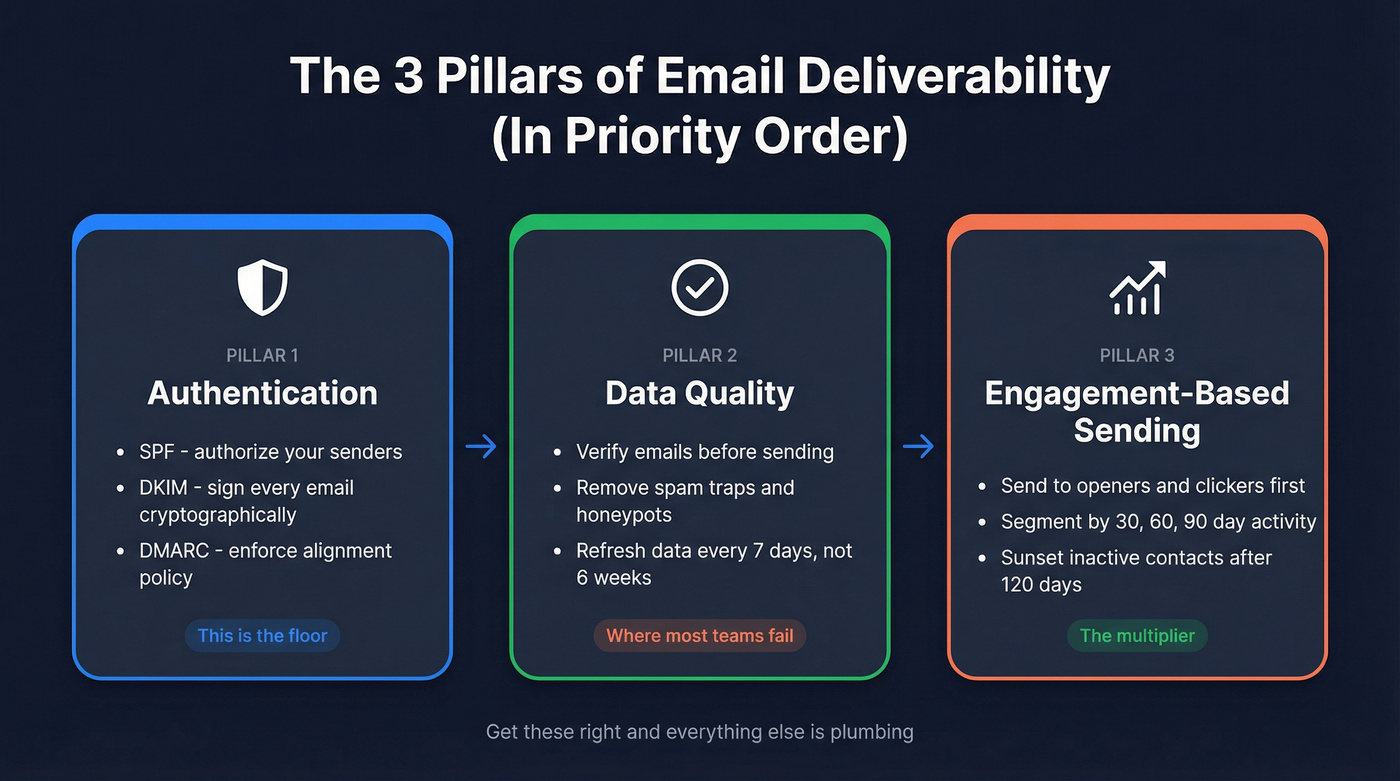
- Authentication - SPF, DKIM, DMARC aligned and enforced. This is the floor.
- Data quality - Verified emails, no spam traps, no stale addresses. This is where most teams fail.
- Engagement-based sending - Send to people who open and click. Sunset the rest.
Your monitoring stack should be three tools, not fifteen: Google Postmaster Tools (free), MXToolbox for DNS and blocklist checks ($129/mo+), and a verification tool like Prospeo to catch bad addresses before anything hits your ESP. That combination covers authentication monitoring, reputation tracking, and upstream data quality.
If you want a deeper, step-by-step framework, start with an email deliverability checklist and work top-down.
2024-2026 Compliance Timeline
The enforcement picture shifted fast. Here's what happened and when:
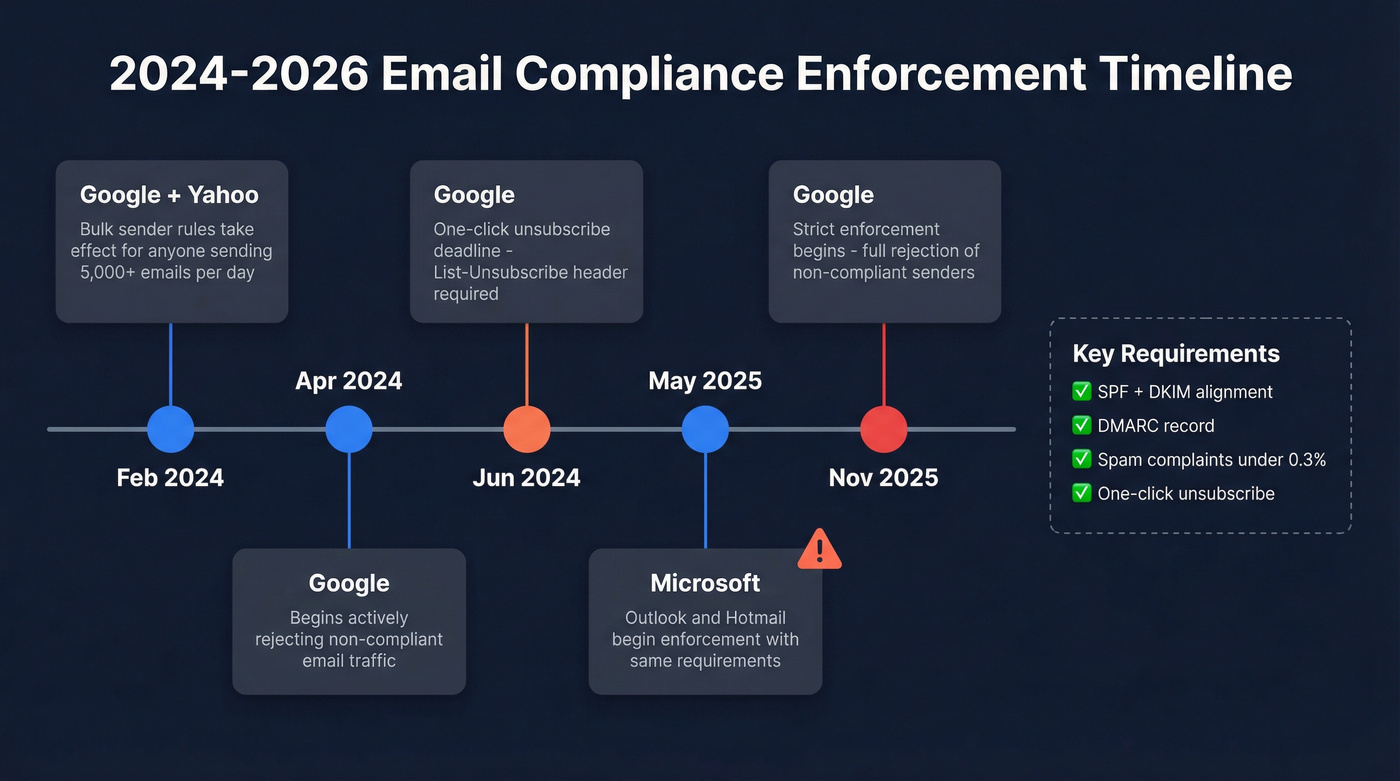
| Date | Provider | What Changed |
|---|---|---|
| Feb 2024 | Google/Yahoo | Bulk sender rules take effect (5,000+/day) |
| Apr 2024 | Begins rejecting non-compliant traffic | |
| Jun 2024 | One-click unsubscribe deadline | |
| May 2025 | Microsoft | Outlook/Hotmail enforcement begins |
| Nov 2025 | Strict enforcement - full rejection |
The 5,000 messages/day threshold is the trigger. If you're sending above that to Gmail or Yahoo recipients, you need SPF and DKIM alignment, a DMARC record (at minimum p=none), spam complaint rates below 0.3% (ideally under 0.1%), and one-click unsubscribe honored within two business days.
Microsoft joined the party in May 2025 with substantially the same requirements. If your authentication isn't aligned, you'll see this rejection error: 550; 5.7.515 Access denied, sending domain [YourDomain] does not meet the required authentication level.` That's not a soft bounce - it's a hard block.
The one-click unsubscribe requirement catches people off guard. It's not just a link in the email body. You need a List-Unsubscribe header with a List-Unsubscribe-Post method, and you must process the unsubscribe within two business days. Miss this, and promotional emails get flagged regardless of your other compliance.
Legal vs. Deliverability Compliance
CAN-SPAM, CASL, GDPR, and CCPA govern what you're allowed to send. Mailbox provider rules govern what actually reaches the inbox. They overlap but aren't the same.
CAN-SPAM requires a physical mailing address and opt-out mechanism in every commercial email. CASL demands express consent for Canadian recipients. GDPR requires a lawful basis for processing EU contacts, and CCPA gives California residents the right to opt out of data sale. Violating these laws won't just land you in spam - it lands you in court. But full legal compliance doesn't guarantee inbox placement. Think of legal compliance as the license to send and deliverability compliance as the skill to land. You need both.
If you're sending cold outreach into Canada, review CASL cold email requirements specifically.
Authentication Setup Guide
Authentication isn't complicated, but it's unforgiving. One misconfigured record and your emails route straight to spam.
For a full walkthrough, see our SPF, DKIM, DMARC explained guide.
SPF Record
Your SPF TXT record tells receiving servers which IPs can send on behalf of your domain:
v=spf1 include:_spf.google.com include:sendgrid.net ~all
Replace the include: entries with your actual ESP and sending services. The ~all softfails unauthorized senders; once you're confident in your setup, move to -all for a hard fail.
DKIM
DKIM adds a cryptographic signature to every email. Your ESP generates the key pair - you add the public key as a DNS TXT record. The critical part: your DKIM signing domain must align with your From: domain. Misalignment is the #1 reason DMARC fails even when both SPF and DKIM individually pass.
DMARC Policy Progression
Don't jump straight to p=reject. Roll it out in stages:
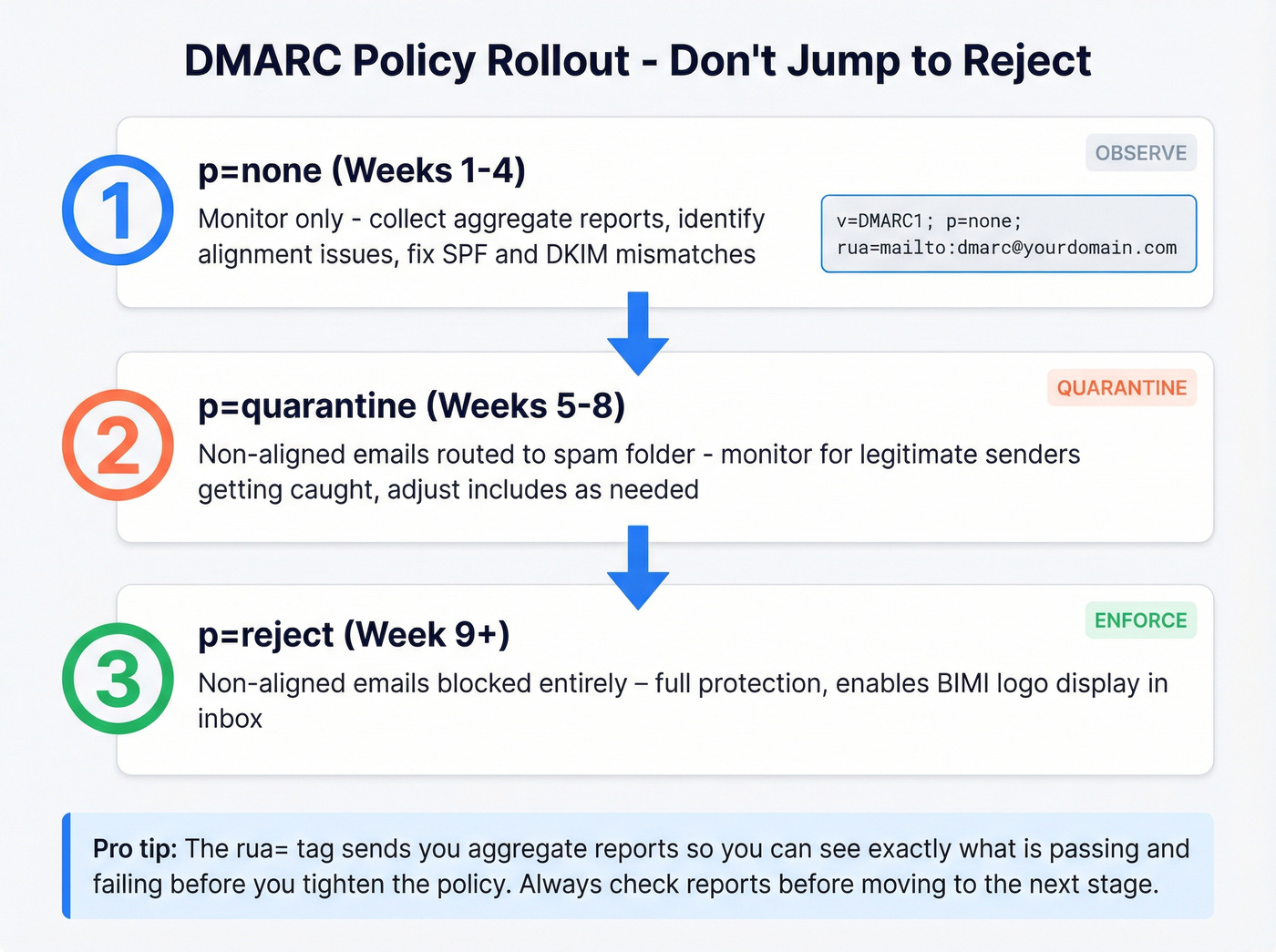
_dmarc.yourdomain.com TXT "v=DMARC1; p=none; rua=mailto:dmarc@yourdomain.com"
Week 1-4: p=none - monitor reports, fix alignment issues.
Week 5-8: p=quarantine - non-aligned emails go to spam.
Week 9+: p=reject - non-aligned emails get blocked entirely.
The rua= tag sends aggregate reports so you can see what's passing and failing before you tighten the policy. Any account with 5,000+ profiles should set up a branded sending domain with DMARC. If you're considering BIMI (Brand Indicators for Message Identification), you'll need p=quarantine or p=reject first - BIMI displays your logo in the inbox, which lifts open rates. A nice-to-have after the fundamentals are locked.
If you're building a modern stack, it also helps to understand your email sending infrastructure end-to-end (domains, subdomains, IPs, and routing).
Warm-Up Schedules
This is the section most deliverability guides skip entirely, and it's the one that matters most when you're launching a new domain, switching ESPs, or moving to a dedicated IP. We've seen teams torch brand-new domains by blasting their full list on day one. Don't be that team.
If you're doing cold outreach, follow cold email volume best practices so you don't outpace your reputation.
New Domain Warm-Up (14 Days)
Based on Customer.io's published schedule, here's a day-by-day ramp for a fresh domain:
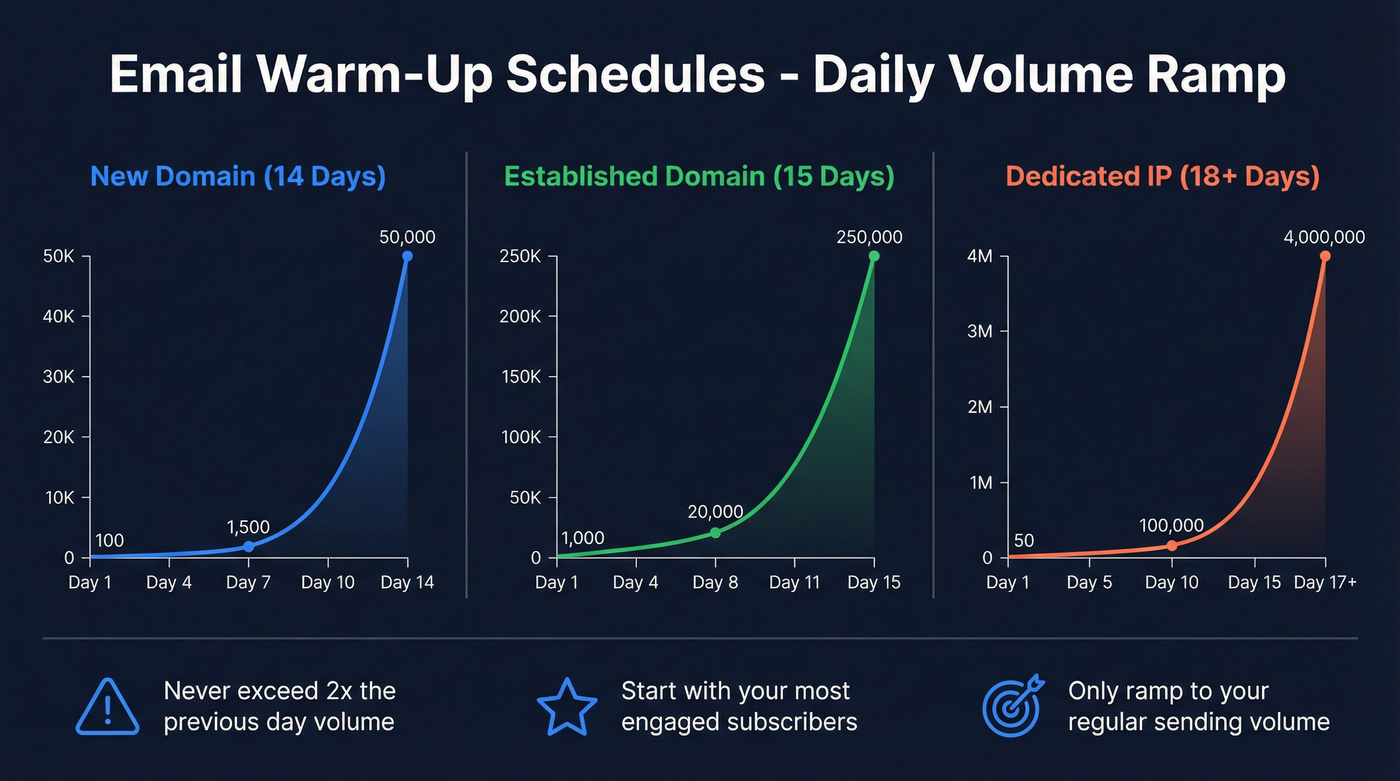
| Day | Daily Volume | Day | Daily Volume |
|---|---|---|---|
| 1 | 100 | 8 | 2,000 |
| 2 | 200 | 9 | 3,000 |
| 3 | 350 | 10 | 5,000 |
| 4 | 500 | 11 | 8,000 |
| 5 | 750 | 12 | 15,000 |
| 6 | 1,000 | 13 | 25,000 |
| 7 | 1,500 | 14 | 50,000 |
Established Domain Warm-Up (15 Days)
If you're migrating an existing domain to a new ESP or infrastructure:
| Day | Daily Volume | Day | Daily Volume |
|---|---|---|---|
| 1 | 1,000 | 9 | 25,000 |
| 2 | 2,500 | 10 | 35,000 |
| 3 | 5,000 | 11 | 50,000 |
| 4 | 6,500 | 12 | 80,000 |
| 5 | 8,000 | 13 | 125,000 |
| 6 | 10,000 | 14 | 175,000 |
| 7 | 14,000 | 15 | 250,000 |
| 8 | 20,000 |
IP Warm-Up (High Volume)
For teams moving to a dedicated IP, the ramp is steeper but the same principle applies. An advanced technique here is traffic splitting - route a percentage of volume through your old infrastructure while the new IP builds reputation, then shift traffic gradually.
| Day | Volume | Day | Volume |
|---|---|---|---|
| 1 | 50 | 10 | 100,000 |
| 2 | 100 | 11 | 150,000 |
| 3 | 500 | 12 | 250,000 |
| 4 | 1,000 | 13 | 400,000 |
| 5 | 5,000 | 14 | 600,000 |
| 6 | 10,000 | 15 | 1,000,000 |
| 7 | 20,000 | 16 | 2,000,000 |
| 8 | 40,000 | 17 | 4,000,000 |
| 9 | 70,000 | 18+ | Scale |
Three rules that apply to every warm-up:
- Never exceed 2x the previous day's volume. If you sent 5,000 yesterday, cap today at 10,000. Jumps larger than that trigger throttling.
- Start with your most engaged subscribers. People who opened in the last 120 days. Their engagement signals tell mailbox providers your email is wanted.
- Only ramp to your regular sending volume. If you normally send 50,000/day, don't warm up to 250,000 just because your list is bigger.
If bounce rates spike above 3% or complaint rates exceed 0.1% during the ramp, hold volume steady for 2-3 days before increasing again. Gmail warms faster than Outlook in our experience. Expect the full process to take 2-6 weeks.
If you want to automate parts of this safely, see our guide to automated email warmup.

You just read that data quality is where most teams fail. Prospeo's 5-step email verification - with catch-all handling, spam-trap removal, and honeypot filtering - delivers 98% accuracy. That's how teams like Snyk cut bounce rates from 35% to under 5%.
Stop warming up domains just to burn them with bad data.
List Quality - The Problem Nobody Talks About
Authentication and warm-up protect your infrastructure. But if you're sending to bad addresses, none of it matters. Bad data leads to bounces, bounces destroy reputation, and reputation damage means the spam folder. It's a chain reaction, and it happens fast.
Designmodo's 2025 benchmark for Advertising & Marketing shows an 8.99% bounce rate. That's catastrophic. As a practical standard, you want bounce rates under ~1%. Above 3% is a serious red flag that will damage your sender reputation with every send.
The upstream fix is verification before emails ever touch your ESP. Prospeo's 5-step verification process catches the addresses other tools miss - catch-all domain handling, spam-trap removal, and honeypot filtering. At 98% email accuracy with a 7-day data refresh cycle, you're not just verifying once; you're keeping data fresh so addresses that went stale last week don't bounce this week.
If you're diagnosing list decay at the source, start with B2B contact data decay benchmarks and fixes.
The results speak for themselves. Stack Optimize built to $1M ARR running client campaigns through verified data - 94%+ deliverability, under 3% bounce, zero domain flags across all clients. Meritt dropped their bounce rate from 35% to under 4%. When your verification tool catches bad addresses before they hit your sending infrastructure, warm-up and authentication actually get to do their jobs.
If you're running outbound campaigns on purchased or scraped lists without verification, you're gambling with your domain reputation every single send. Purchased lists are explicitly called out as a deliverability risk by major ESPs, and they're one of the fastest ways to rack up bounces, complaints, and blocks. Skip them entirely.
If you need a quick way to spot-check, use an email checker tool before you upload anything to your ESP.
Every stale email in your list is a spam trap waiting to happen. Prospeo refreshes 300M+ contacts every 7 days - not the 6-week industry average - so your sends hit real inboxes, not blocklists. Starting at $0.01 per verified email.
Clean data is the deliverability lever your authentication stack can't fix.
Engagement-Based Sending
Mailbox providers watch how recipients interact with your emails. High engagement signals legitimacy. Low engagement signals spam. Your sending strategy needs to reflect this.
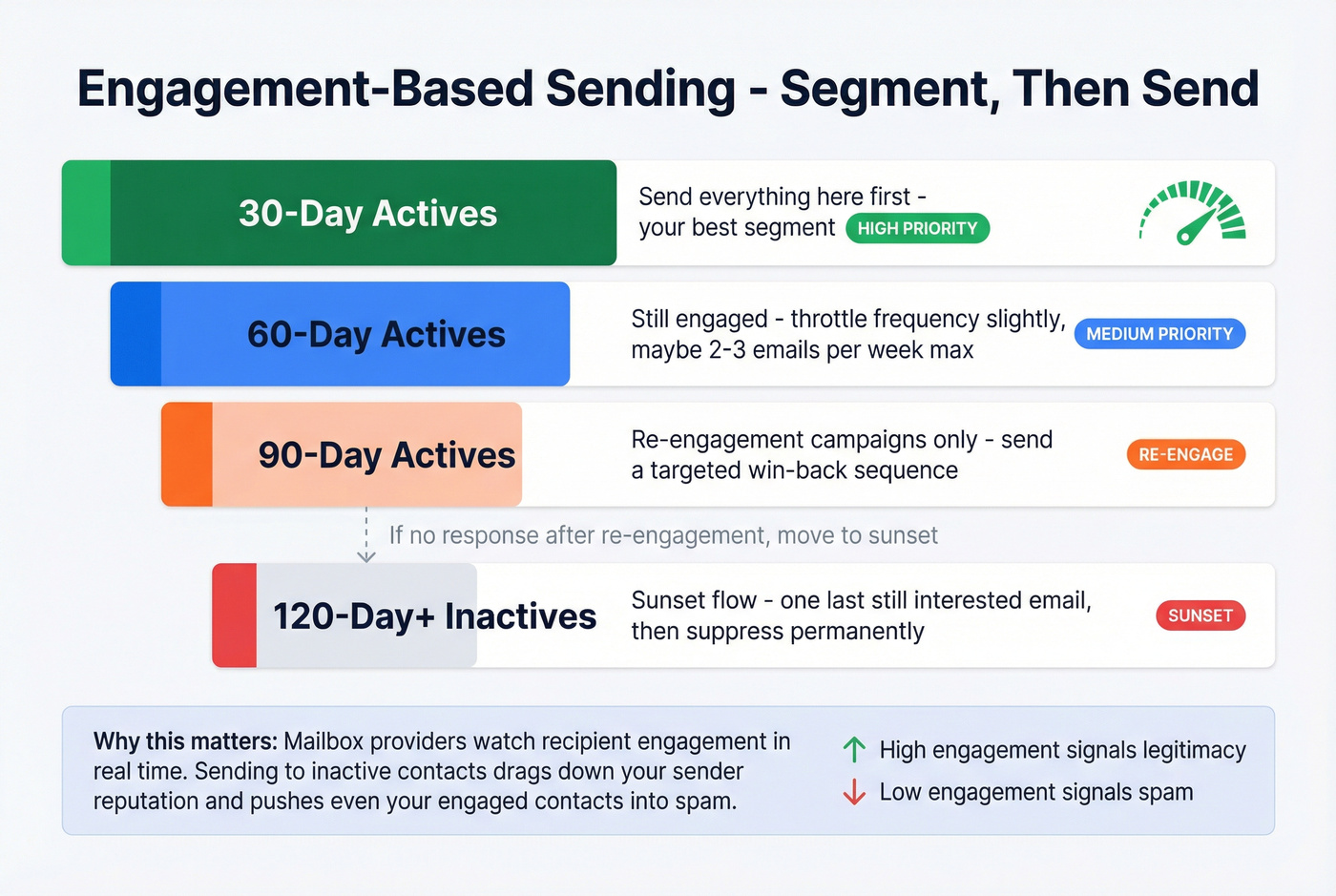
Segment your list by engagement recency:
- 30-day actives - your best segment. Send everything here first.
- 60-day actives - still engaged, but throttle frequency slightly.
- 90-day actives - re-engagement campaigns only.
- 120-day+ inactives - sunset flow. One last "still interested?" email, then suppress.
If you're building those win-back sequences, pull from these re-engagement email subject lines to lift clicks without spiking complaints.
The sunset flow is where most teams chicken out. Removing 20,000 contacts from a 100,000-person list feels wrong. But sending to people who haven't engaged in four months actively hurts your reputation with every send. Smaller, engaged lists outperform bloated, stale ones every time.
Let's be honest about a hard truth: if your average deal size is under $10k, you probably don't need to send to your full list at all. The ROI math on deliverability damage from low-engagement sends almost never works out for smaller-ticket products. Tighten your segments aggressively and watch reply rates climb.
And stop obsessing over open rates. Apple Mail Privacy Protection pre-loads tracking pixels, which inflates open rates across the board - Mailchimp explicitly warns that open-rate accuracy is compromised by MPP. Focus on click rate and complaint rate instead. Those are the metrics mailbox providers actually use to judge your reputation, and they can't be faked by a privacy proxy.
For a clean way to explain this internally, use open rate vs click rate as your reporting baseline.
Monitoring in 2026
Google Postmaster Tools is your primary monitoring dashboard, and it changed significantly in late 2025.
Setting Up GPT V2
- Go to Google Postmaster Tools and add your sending domain.
- Verify ownership by adding a DNS TXT record Google provides.
- Wait 24-48 hours for verification and initial data population.
- Data updates roughly every 24 hours - don't expect real-time metrics.
What Changed in October 2025
Google retired the v1 interface and removed the "IP Reputation" and "Domain Reputation" dashboards. The V2 interface focuses on two things: Compliance Status (pass/fail on SPF/DKIM, DMARC alignment, forward & reverse DNS, TLS, and one-click unsubscribe) and Spam Rate.
The critical limitation most people miss: GPT's spam rate only reflects emails that users manually report as spam. It doesn't capture emails that Gmail automatically routes to the spam folder. You can show a 0.05% spam rate in GPT while 30% of your emails are being auto-filtered. That's why you need complementary tools for true inbox placement visibility.
Microsoft SNDS and Yahoo Sender Hub are free complements that give you reputation data for Outlook and Yahoo recipients respectively. Between the three, you've got visibility into the mailbox providers that handle the vast majority of B2B and B2C email.
A note on seed-list inbox placement tests from tools like GlockApps and InboxAlly: they're useful for spot-checking, but seed accounts lack real engagement history. Mailbox providers treat them differently than real recipients, so seed results should complement GPT and SNDS data, never replace it.
If you land on a blocklist, you'll feel it immediately. Spamhaus analyzes 7.5 million IPs and 3 million domains every 24 hours, protecting 4.5 billion mailboxes. A Spamhaus listing can tank your deliverability overnight. Check their Blocklist Tester regularly - catching a listing early is the difference between a one-day fix and a two-week recovery.
If you do get listed, follow a dedicated blacklist alert triage process so you can delist fast and prevent relisting.
Benchmarks by Industry (2026)
Before you panic about your metrics, check them against industry baselines. Industry-specific rows are from Designmodo's 2025 data; the all-industries average uses Mailchimp's methodology across billions of emails and only includes campaigns sent to at least 1,000 subscribers:
| Industry | Open Rate | CTR | Unsub Rate | Bounce Rate |
|---|---|---|---|---|
| IT & Software | 30.96% | 4.43% | 0.33% | 4.26% |
| Business & Finance | 31.35% | 2.78% | 0.15% | N/A |
| Ecommerce | 25.74% | 2.86% | 0.44% | 6.67% |
| Advertising & Marketing | 25.48% | 3.29% | 0.35% | 8.99% |
| All Industries (avg) | 35.63% | 2.62% | 0.22% | N/A |
Two caveats. Open rates are inflated by Apple MPP - treat them as directional, not precise. And bounce rates above 5% in any industry aren't "normal" - they're a sign of list hygiene problems that verification would fix.
Deliverability Tools and Pricing
You don't need fifteen tools. You need three, maybe four.
| Tool | Category | Starting Price | Free Tier? |
|---|---|---|---|
| Google Postmaster Tools | Monitoring | Free | Yes |
| Microsoft SNDS | Monitoring | Free | Yes |
| Yahoo Sender Hub | Monitoring | Free | Yes |
| MXToolbox | DNS/Blocklist | $129/mo | Yes |
| GlockApps | Inbox Testing | $85/mo | 2 free tests |
| InboxAlly | Seed Testing | $149/mo | No |
| Prospeo | Verification | ~$0.01/email | 75 emails/mo |
| ZeroBounce | Verification | $49/mo | Limited |
| Smartlead | Warm-up | $39/mo | 14-day trial |
| TrulyInbox | Warm-up | $29/mo | No |
| Emailwarmup.com | Warm-up | $19/mo | Free plan |
| Postmark | Transactional | $15/mo | No |
| Mailgun | Sending/Testing | $49/mo | 1-month free trial |
| SendForensics | Analytics | $49/mo | No |
Our recommended stack for most teams: Google Postmaster Tools for Gmail monitoring, MXToolbox for DNS checks and blocklist alerts, and your verification tool of choice for upstream data quality. That covers monitoring, diagnostics, and list hygiene for under $150/month.
One threshold worth knowing: a dedicated IP only makes sense if you're consistently sending 1,000,000+ emails per month. Below that, a shared IP with your ESP is better - you benefit from the collective reputation of other senders on the same IP.
If you're weighing the tradeoffs, see dedicated IP vs shared IP cold outreach.
FAQ
What are the most important email delivery best practices?
Authentication (SPF, DKIM, DMARC), verified contact data, and engagement-based sending. Get those right and you'll outperform 90% of senders - most deliverability problems trace back to a gap in one of these three areas.
How long does domain warm-up take?
Expect two to six weeks depending on target volume and list health. New domains need at least 14 days of gradual ramp; established domains migrating infrastructure can move faster but still require 10-15 days minimum.
Do I need a dedicated IP?
Only if you consistently send over 1,000,000 emails per month. Below that threshold, shared IPs with your ESP deliver better results because you benefit from pooled sender reputation across multiple senders.
What's the difference between delivery rate and deliverability?
Delivery rate measures emails accepted by the receiving server (not bounced). Deliverability measures emails that reach the inbox instead of spam. Your ESP reports delivery rate; tools like Google Postmaster Tools help estimate actual inbox placement.
How can I verify emails affordably before sending?
Upload your list to a verification tool that checks for invalid addresses, spam traps, catch-all domains, and honeypots. Prospeo's free tier covers 75 verifications per month at 98% accuracy - enough to test a segment before committing to a full campaign send.
Start with authentication. Verify your list. Send to engaged contacts first. We've watched teams turn around 40% spam-folder rates in under a month just by nailing those three steps. Run your next campaign through those filters and watch the difference.