

SPF, DKIM, and DMARC: The 2026 Email Authentication Guide
83.9% of domains have no DMARC record. Out of 73.3 million analyzed domains, the vast majority are flying blind - no policy, no reporting, no protection against spoofing. If your domain is in that group, every email you send is one inbox provider update away from landing in spam or getting rejected outright.
Google and Yahoo started enforcing authentication for bulk senders in February 2024. Microsoft followed in early 2025. Now, in 2026, enforcement is strict: noncompliant messages get rejected at the SMTP level. The window for "we'll get to it eventually" closed.
What You Need (Quick Version)
SPF tells mailbox providers which servers can send on your behalf. DKIM cryptographically signs your messages so they can't be tampered with. DMARC ties both to your visible From: address and tells providers what to do when checks fail. All three are mandatory for bulk senders. Below: copy-paste DNS records, a 13-week rollout plan, and the stats that show why authentication alone isn't enough.
What Are DMARC, DKIM, and SPF?
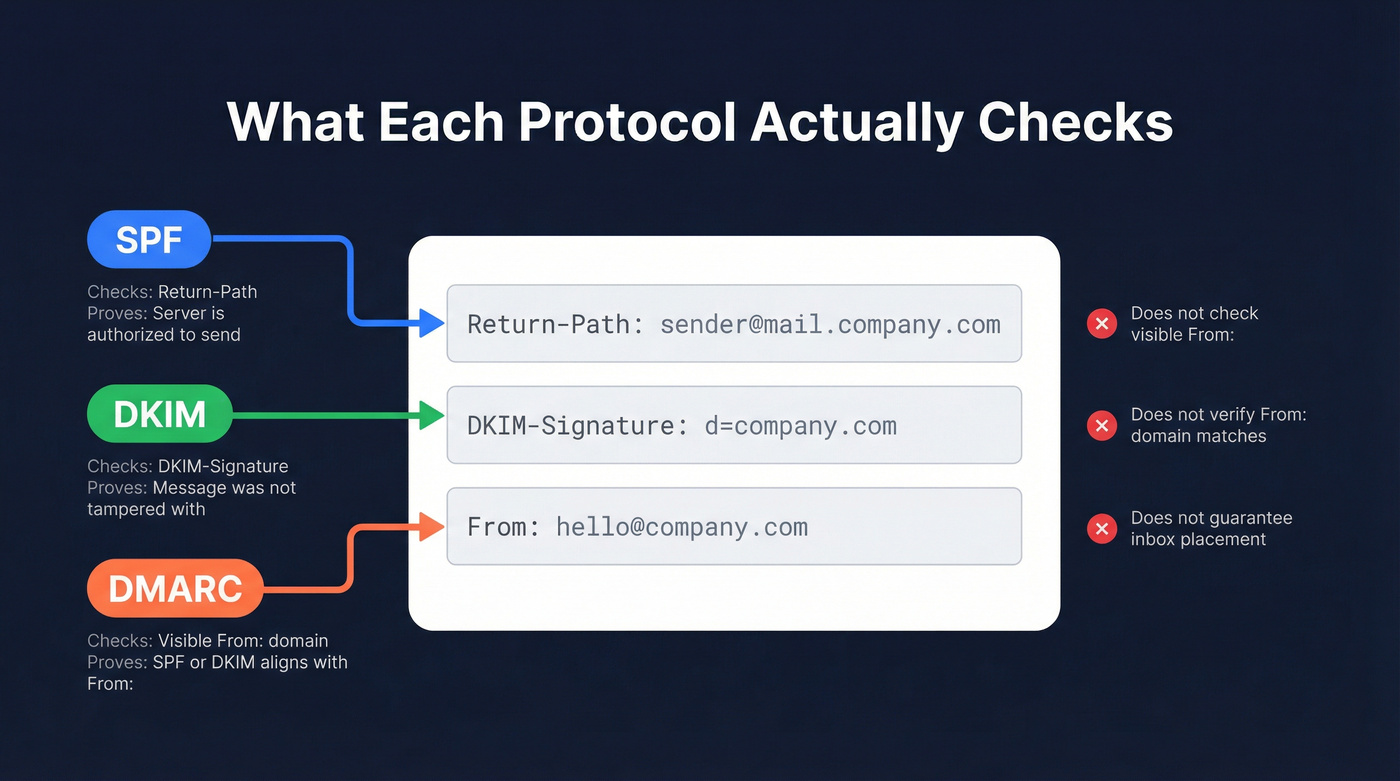
These three protocols solve different problems. Understanding which header each one checks is the difference between a secure domain and a false sense of security.
SPF: Who's Allowed to Send
SPF (Sender Policy Framework) publishes a list of IP addresses and servers authorized to send email for your domain. When a message arrives, the receiving server checks the Return-Path header (also called the envelope sender or MAIL FROM) against your SPF record. If the sending IP isn't on the list, SPF fails.
The critical nuance: SPF doesn't check the From: address your recipient actually sees. An attacker can set their Return-Path to their own domain (passing SPF) while displaying your domain in the visible From: field. SPF alone doesn't prevent this.
DKIM: Was the Message Tampered With?
DKIM (DomainKeys Identified Mail) adds a cryptographic signature to the DKIM-Signature header of every outgoing message. The receiving server retrieves your public key from DNS and verifies the signature. If the message body or signed headers were altered in transit, DKIM fails.
DKIM proves message integrity and ties the message to the signing domain - but like SPF, it doesn't inherently check the visible From: domain. A phisher can sign messages with DKIM using their own domain while spoofing yours in the From: field.
DMARC: The Enforcement Layer
DMARC (Domain-based Message Authentication, Reporting, and Conformance) evaluates the visible From: domain and requires that either SPF or DKIM passes and aligns with that From: domain. Without DMARC, SPF and DKIM authenticate the message but don't verify that the sender is who they claim to be in the header your recipient reads.
DMARC also tells receiving servers what to do when checks fail - nothing (p=none), quarantine the message, or reject it entirely. And it sends you reports so you can see who's using your domain to send email.
| Protocol | What It Checks | What It Proves | What It Doesn't Do |
|---|---|---|---|
| SPF | Return-Path / envelope sender | Sending server is authorized | Check the visible From: address |
| DKIM | DKIM-Signature header | Message wasn't tampered with | Verify the From: domain matches |
| DMARC | Visible From: domain | SPF/DKIM aligns with From: | Guarantee inbox placement |
How the Three Protocols Work Together
DMARC passes when at least one of these conditions is true:
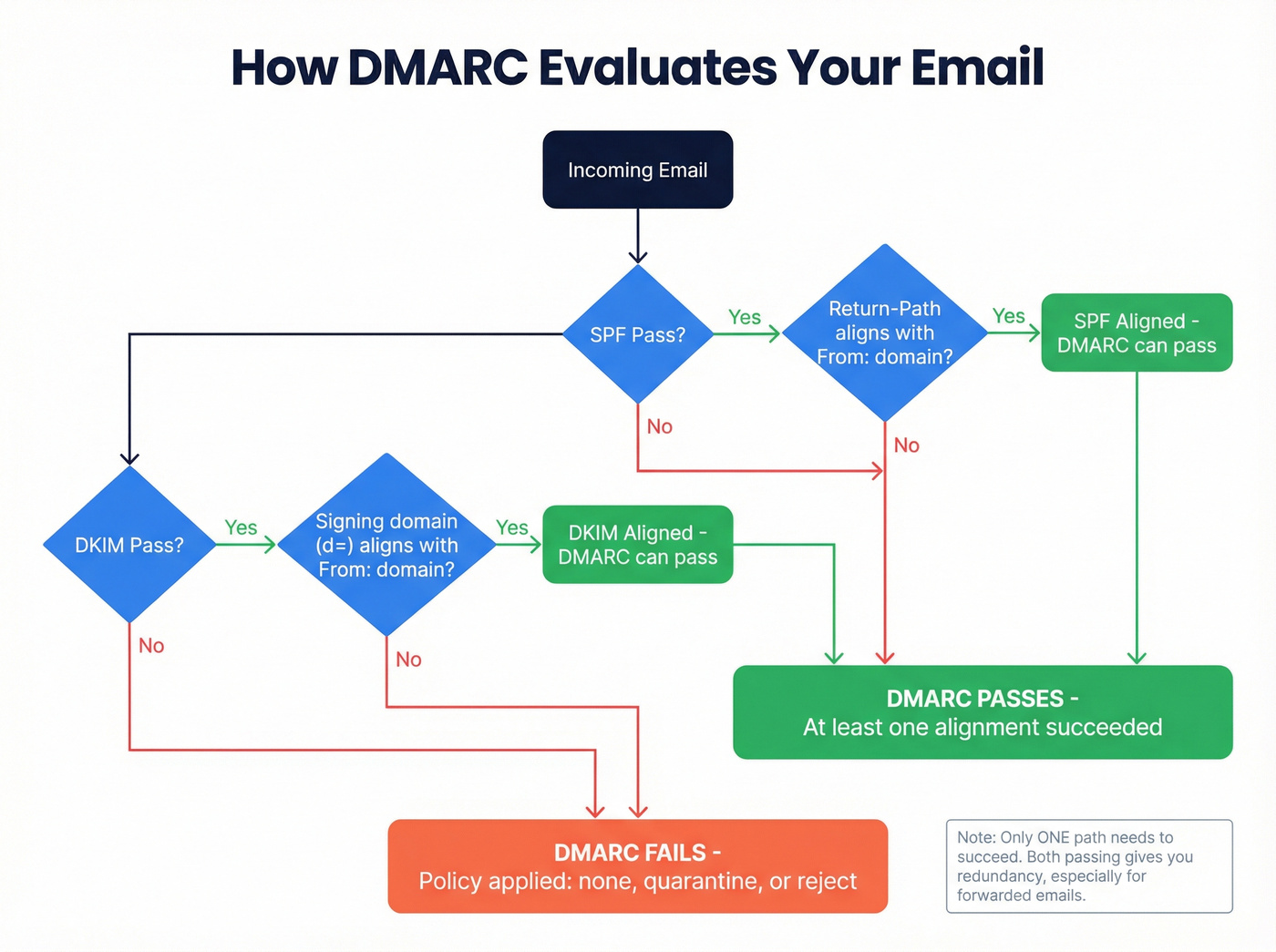
- SPF passes and the Return-Path domain aligns with the From: domain
- DKIM passes and the signing domain (d=) aligns with the From: domain
Do you need both DKIM and SPF to pass? No - but having both provides redundancy. This matters because SPF breaks when emails are forwarded (the forwarding server's IP isn't in your SPF record), while DKIM signatures survive forwarding intact.
Strict vs. relaxed alignment determines how closely domains must match. Relaxed alignment (the default) allows subdomains, so mail.yourdomain.com aligns with yourdomain.com. Strict alignment requires an exact match. Most organizations start with relaxed and tighten later.
Here's the thing: RFC 7489 is explicit that DMARC is a "policy distribution mechanism" and "does not produce or encourage elevated delivery privilege of authenticated email." Translation: DMARC tells providers what to do with failures. It doesn't earn you bonus points for passing. Email authentication is the floor, not the ceiling.
How to Set Up SPF
Start by auditing every service that sends email on your domain's behalf - your email provider, marketing platform, transactional sender, CRM, support desk. Miss one and those emails fail SPF.
Step 1: Build your SPF record. Add a single TXT record to your domain's DNS:
Google Workspace only:
v=spf1 include:_spf.google.com ~all
Microsoft 365 only:
v=spf1 include:spf.protection.outlook.com ~all
Google Workspace + SendGrid:
v=spf1 include:_spf.google.com include:sendgrid.net ~all
Non-sending domain (hard fail everything):
v=spf1 -all
Step 2: Respect the 10-DNS-lookup limit. Every include, a, and mx mechanism triggers a DNS lookup. Nested includes count too. Exceeding 10 total causes a PermError, which means SPF fails entirely. A PermError can be worse than having no SPF record at all.
Step 3: Publish and verify. Only one SPF record per domain - never publish two SPF TXT records on the same domain, or you'll trigger a PermError that fails every message. SPF doesn't inherit to subdomains either. If you send from marketing.yourdomain.com, that subdomain needs its own SPF record.
How to Set Up DKIM
Google Workspace:
- Go to Admin Console → Apps → Gmail → Authenticate email
- Select your domain and click "Generate new record"
- Choose 2048-bit key length (always - 1024-bit is deprecated in practice)
- Add the generated TXT record at
google._domainkey.yourdomain.comin your DNS - Wait up to 48 hours for DNS propagation
- Return to Admin Console and click "Start authentication"
Microsoft 365:
- Go to Microsoft 365 Defender → Policies → Email authentication → DKIM
- Select your domain
- Add two CNAME records:
selector1._domainkey.yourdomain.com→selector1-yourdomain-com._domainkey.yourtenant.onmicrosoft.comselector2._domainkey.yourdomain.com→selector2-yourdomain-com._domainkey.yourtenant.onmicrosoft.com
- Enable DKIM signing after DNS propagation
Key management matters. Use 2048-bit RSA keys. Rotate them every 6-12 months - publish the new key, wait for it to propagate, switch signing to the new selector, and remove the old key after ~30 days. We've seen organizations running the same DKIM key for three years. That's a security liability, not a set-and-forget win.
How to Set Up DMARC
Add a TXT record at _dmarc.yourdomain.com. Start with monitoring mode:
v=DMARC1; p=none; rua=mailto:dmarc-reports@yourdomain.com; sp=none; adkim=r; aspf=r; fo=1;
DMARC Tag Reference
| Tag | Purpose | Common Values |
|---|---|---|
| v | Protocol version | DMARC1 (required) |
| p | Domain policy | none, quarantine, reject |
| sp | Subdomain policy | Same as p options |
| pct | % of messages to apply policy | 25, 50, 75, 100 |
| rua | Aggregate report address | mailto:reports@domain.com |
| ruf | Forensic report address | mailto:forensic@domain.com |
| adkim | DKIM alignment mode | r (relaxed), s (strict) |
| aspf | SPF alignment mode | r (relaxed), s (strict) |
| fo | Failure reporting options | 0, 1, d, s |
Always include sp= to protect subdomains. Without it, subdomains inherit the parent policy - which might be fine, or might leave gaps if you haven't audited subdomain sending.
The 13-Week Rollout Plan
Weeks 1-4: Monitor. Set p=none and collect aggregate reports. Identify every legitimate sender. Fix alignment issues. This is where you discover the marketing tool nobody told IT about.
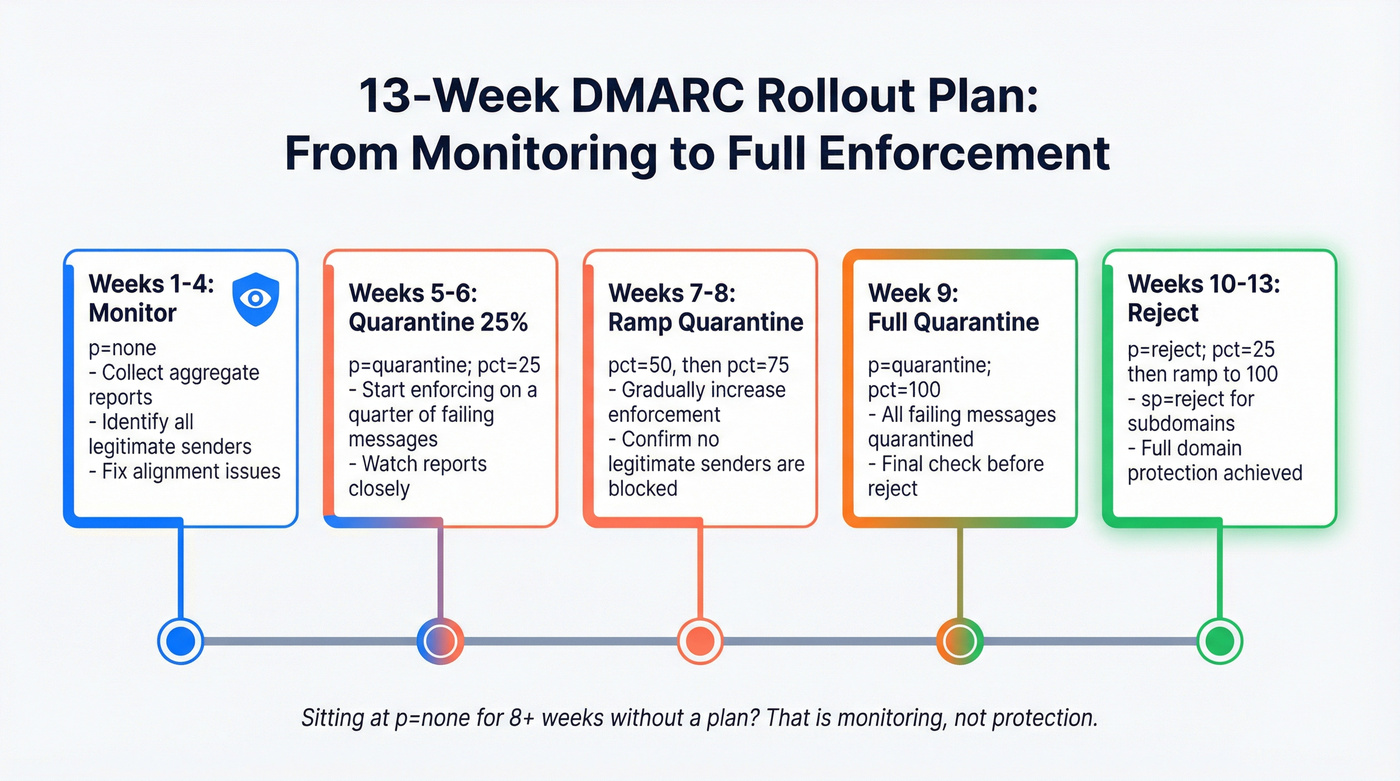
Weeks 5-6: Move to p=quarantine; pct=25; - quarantine 25% of failing messages.
Weeks 7-8: Ramp to pct=50, then pct=75.
Week 9: Full quarantine at pct=100.
Weeks 10-11: Move to p=reject; pct=25; and ramp up.
Weeks 12-13: Full enforcement: p=reject; sp=reject; pct=100;
Let's be honest: DMARC at p=none is monitoring, not protection. If you've been sitting at p=none for eight-plus weeks without a plan to move forward, you're procrastinating. The reports are only useful if they lead to enforcement.
Verify Your Setup
Run these commands from any terminal to confirm your records are live:
SPF:
dig TXT yourdomain.com +short | grep spf1
DKIM (Google Workspace):
dig TXT google._domainkey.yourdomain.com +short
DMARC:
dig TXT _dmarc.yourdomain.com +short
If you're not comfortable with the command line, MxToolbox and Google Admin Toolbox both offer browser-based lookups. Check all three records after any DNS change - and again up to 48 hours later to confirm propagation.

Authentication keeps you out of spam. Bad data puts you right back in. Every bounced email from outdated contact lists damages the sender reputation you just spent 13 weeks building. Prospeo's 98% email accuracy and 7-day data refresh cycle mean your carefully authenticated emails actually reach real inboxes.
Don't let bad data undo your authentication work.
Mistakes That Break Authentication
1. Multiple SPF records. Two TXT records starting with v=spf1 on the same domain causes a PermError. Merge them into one record. This is the single most common SPF mistake we see.
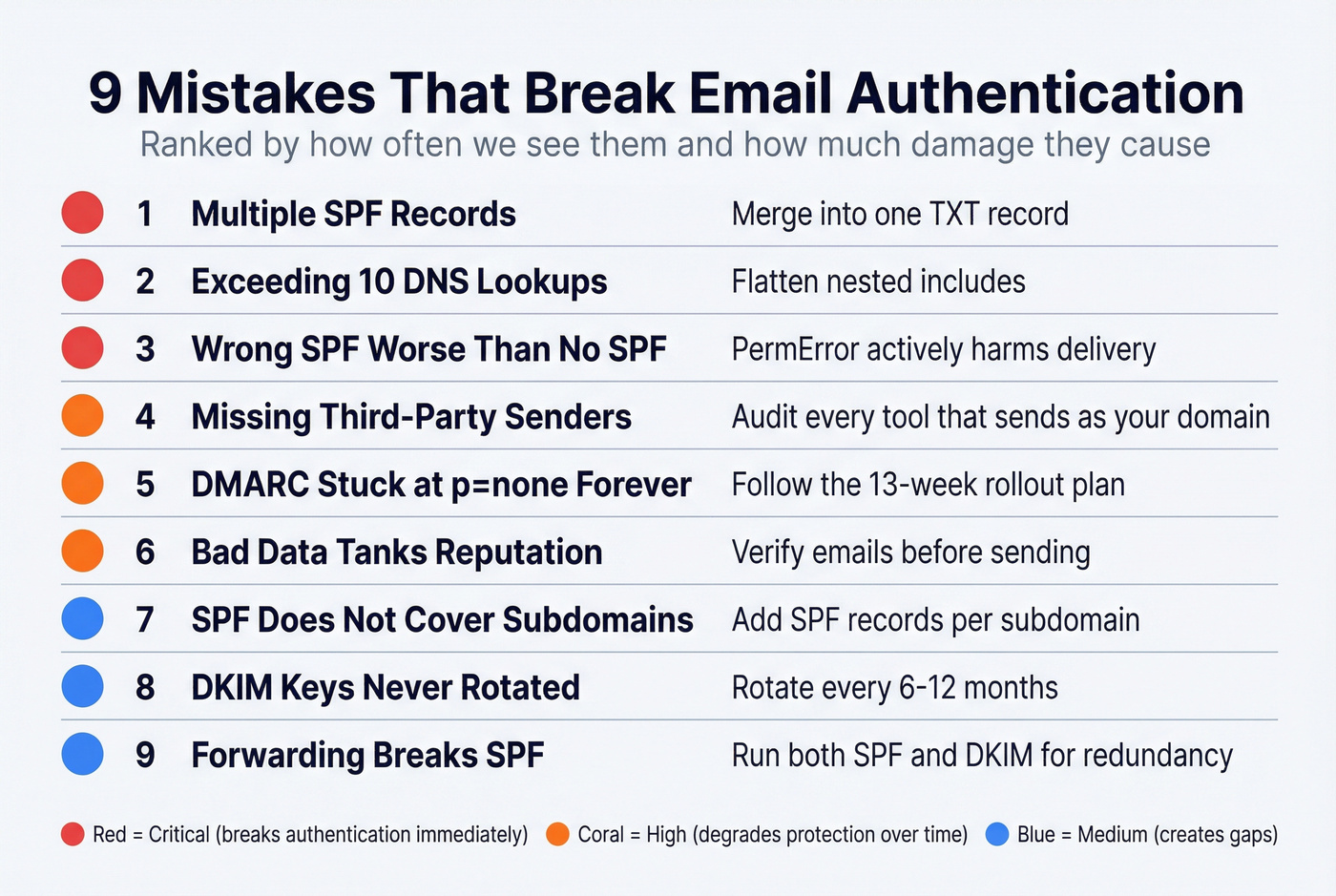
2. Exceeding the 10-lookup limit. Every include and a mechanism counts. Nested includes count too. Use an SPF flattening tool if you're close.
3. Missing third-party senders. That webinar platform your marketing team signed up for last quarter? If it sends email as your domain and isn't in your SPF record, those messages fail authentication. We've audited dozens of domains where the root cause was a forgotten third-party sender that nobody in IT knew about.
4. Assuming SPF covers subdomains. It doesn't. Each sending subdomain needs its own SPF record.
5. Wrong SPF is worse than no SPF. A misconfigured record that causes PermError actively harms deliverability. An absent record just means SPF isn't checked.
6. DKIM keys never rotated. If you set up DKIM two years ago and haven't touched it since, rotate your keys now.
7. DMARC stuck at p=none forever. Monitoring without enforcement doesn't protect your domain from spoofing. It just tells you it's happening.
8. Forwarding breaks SPF. When someone forwards your email, the forwarding server's IP fails your SPF check. ARC (Authenticated Received Chain) can help here. DKIM survives forwarding while SPF doesn't - running both protocols gives you essential redundancy.
9. Bad data tanks your reputation regardless of authentication. You can have perfect SPF, DKIM, and DMARC and still destroy your sender reputation by emailing invalid addresses. Verify your list before you send. Prospeo's email verification runs a 5-step process with catch-all handling and spam-trap removal at 98% accuracy - the free tier covers 75 emails/month, enough to test your most critical sends.
How to Monitor DMARC Reports
DMARC generates two types of reports. Aggregate reports (sent to your rua address) are XML files showing authentication results across all messages - which IPs sent as your domain, whether SPF and DKIM passed, and how many messages each policy applied to. Forensic reports (sent to ruf) contain details about individual failures, though many providers limit or skip these for privacy reasons.
Raw XML is unreadable. You need a tool to parse it.
| Tool | Free Tier | Notes | Paid From |
|---|---|---|---|
| Postmark | Email digests | No dashboard | $14/mo |
| EasyDMARC | Dashboard included | 14-day retention, 1K emails/mo | ~$36/mo (annual) |
| Valimail | No email limits | Dashboard can be confusing | Not public |
| Google Postmaster | Gmail-specific data | Gmail only | Free |
| MxToolbox | Free lookups | Limited monitoring | Paid plans available |
EasyDMARC's dashboard is the most intuitive free option for small teams. Valimail works well if you want no email volume limits. Postmark is fine if you just want a weekly email summary and don't need a visual dashboard.
Review reports weekly during your rollout. After you reach p=reject, monthly checks are sufficient unless you're adding new sending services.
Authentication and Deliverability: The Reality Check
Here's where most authentication guides get it wrong. Unspam's 2025 testing data across millions of emails found SPF adoption at 92%, DKIM at 88%, and DMARC at 69%. Authentication is nearly universal among active senders. Yet 36% of tested emails still landed in spam and 4% were blocked or missing entirely.
The provider breakdown tells the same story. Gmail delivered 87.2% to inbox - actually down from 89.8% in early 2024, before the bulk-sender rules took effect. More enforcement didn't mean less spam. Microsoft managed 75.6%, Yahoo hit 86%, and Apple Mail came in at 76.3%. Even with perfect authentication, one in four emails to Microsoft users misses the inbox.
Only 26% of tested emails had compliant HTML structure, and poor HTML increased spam likelihood by 18-25%. List-Unsubscribe compliance sat at just 14%. Email deliverability depends on SPF, DKIM, and DMARC as a baseline - but what keeps you out of spam is engagement, content quality, HTML hygiene, and sending to real, active email addresses.
Look, most teams obsess over DMARC policy while ignoring the thing that actually kills their deliverability: stale contact data. In our testing, we've seen domains with perfect authentication consistently land in spam because 15% of their list was dead addresses. A perfectly authenticated email to a dead address still hurts your reputation. Fix your list first, then worry about strict alignment.
You've configured SPF, DKIM, and DMARC to protect your domain. Now protect your deliverability. Teams using Prospeo see bounce rates under 4% - because every email passes a 5-step verification with catch-all handling, spam-trap removal, and honeypot filtering before it ever reaches your list.
Sub-4% bounce rates start with data that's verified every 7 days.
2024-2026 Enforcement Timeline
February 2024: Google and Yahoo begin enforcing email authentication for senders exceeding 5,000 messages per day. Bulk senders must also keep spam complaint rates below 0.10% and include one-click List-Unsubscribe. Noncompliant bulk mail can be throttled, deferred, or rejected. 2.3 million domains adopted DMARC in direct response.
Early 2025: Microsoft follows with similar requirements. The three largest consumer mailbox providers are now aligned on authentication mandates.
2026: Strict enforcement. Noncompliant messages are rejected at the SMTP level - not deferred, not quarantined, rejected. This isn't a soft landing anymore.
Beyond deliverability, there's a compliance angle worth knowing about. PCI DSS v4.0 now mandates DMARC for organizations handling credit card data. If you process payments and don't have DMARC at enforcement, you've got a compliance gap on top of a deliverability problem. The trend only tightens from here - getting to p=reject now saves you from scrambling later.
What Comes After: BIMI
BIMI (Brand Indicators for Message Identification) is the carrot for reaching p=reject. It displays your verified brand logo next to your messages in Gmail, Yahoo, and Apple Mail - the visual payoff for doing authentication right.
Requirements:
- DMARC at
p=quarantineorp=rejectwith alignment - An SVG Tiny P/S logo file hosted over HTTPS
- A Verified Mark Certificate (VMC) from DigiCert or Entrust - expect to pay ~$1,000-1,500/year
- DNS record at
default._bimi.yourdomain.com:
v=BIMI1; l=https://yourdomain.com/bimi/logo.svg; a=https://yourdomain.com/bimi/vmc.pem
Fortune 500 companies are at 81.2% BIMI readiness. If your competitors' logos show up in the inbox and yours don't, that's a trust signal you're losing. The VMC cost is real, but for brands sending at volume, the recognition value justifies it. Skip this if you're sending fewer than a few thousand emails a month - the ROI won't be there yet.
SPF, DKIM, and DMARC FAQ
Is DMARC necessary if I already have SPF and DKIM?
Yes. SPF and DKIM authenticate the message but don't check whether the visible From: address matches the authenticated domain. DMARC enforces that alignment. Without it, an attacker can spoof your From: domain while authenticating with their own infrastructure. DMARC is what turns authentication into actual protection.
Can DMARC pass with only SPF or only DKIM?
Yes. DMARC requires either SPF or DKIM to pass with domain alignment - you don't need both. Having both provides redundancy, which matters because SPF breaks when emails are forwarded while DKIM signatures survive forwarding intact.
Will authentication guarantee inbox placement?
No. Authentication is baseline, not a deliverability guarantee. In 2025 testing, 92% of emails had valid SPF but 36% still landed in spam. Content quality, engagement signals, list hygiene, and sending reputation all determine whether authenticated mail reaches the inbox.
What's the SPF 10-DNS-lookup limit?
SPF records can trigger a maximum of 10 DNS lookups. Each include, a, or mx mechanism counts, and nested includes count toward the total. Exceeding 10 causes a PermError, which means SPF fails entirely - worse than having no record at all. Use an SPF flattening tool if you're running close.
How do I monitor DMARC reports for free?
Valimail offers free DMARC monitoring with no email volume limits. Postmark provides free email digests without a dashboard. Google Postmaster Tools gives free Gmail-specific deliverability data. Any of these will get you through the monitoring phase and into enforcement without spending a dollar.