How to Send 10,000 Emails at Once for Free - The Honest Guide
You just exported 10,000 contacts and you want to blast them all without spending a cent. Here's the straight answer on how to send 10,000 emails at once for free - plus the step most people skip that determines whether those emails actually arrive.
The Quick Version
No single tool lets you blast 10,000 emails at once for free. The closest options are Sender (15,000 emails/month to 2,500 subscribers), EmailOctopus (10,000 emails/month to 2,500 subscribers), and Kit (unlimited sends to 10,000 subscribers). Whichever you pick, verify your list first. A 15% bounce rate will get your domain blacklisted faster than any spam filter.
The Honest Answer
Gmail wasn't built for bulk email. Free accounts cap at 500 messages per day. Google Workspace bumps that to 2,000/day, but Google throttles based on account age, sending history, and bounce rate.
The real question isn't "how do I send these for free?" It's "how do I make sure 10,000 emails actually arrive?" A free sending tool paired with a dirty list will torch your domain reputation in a single afternoon.
One critical distinction most guides skip: if those 10,000 contacts opted in to hear from you, the free tools below will work. If this is a cold list - scraped or purchased - most email marketing platforms will shut your account on the first send. Cold outreach requires dedicated infrastructure (multiple sending domains, warmup tools, throttled sending) and is a completely different playbook (see cold outreach vs. opt-in marketing). Everything below assumes an opted-in list.
Gmail & Workspace Limits
Before you try to hack Gmail into a bulk sender, know what you're working with:
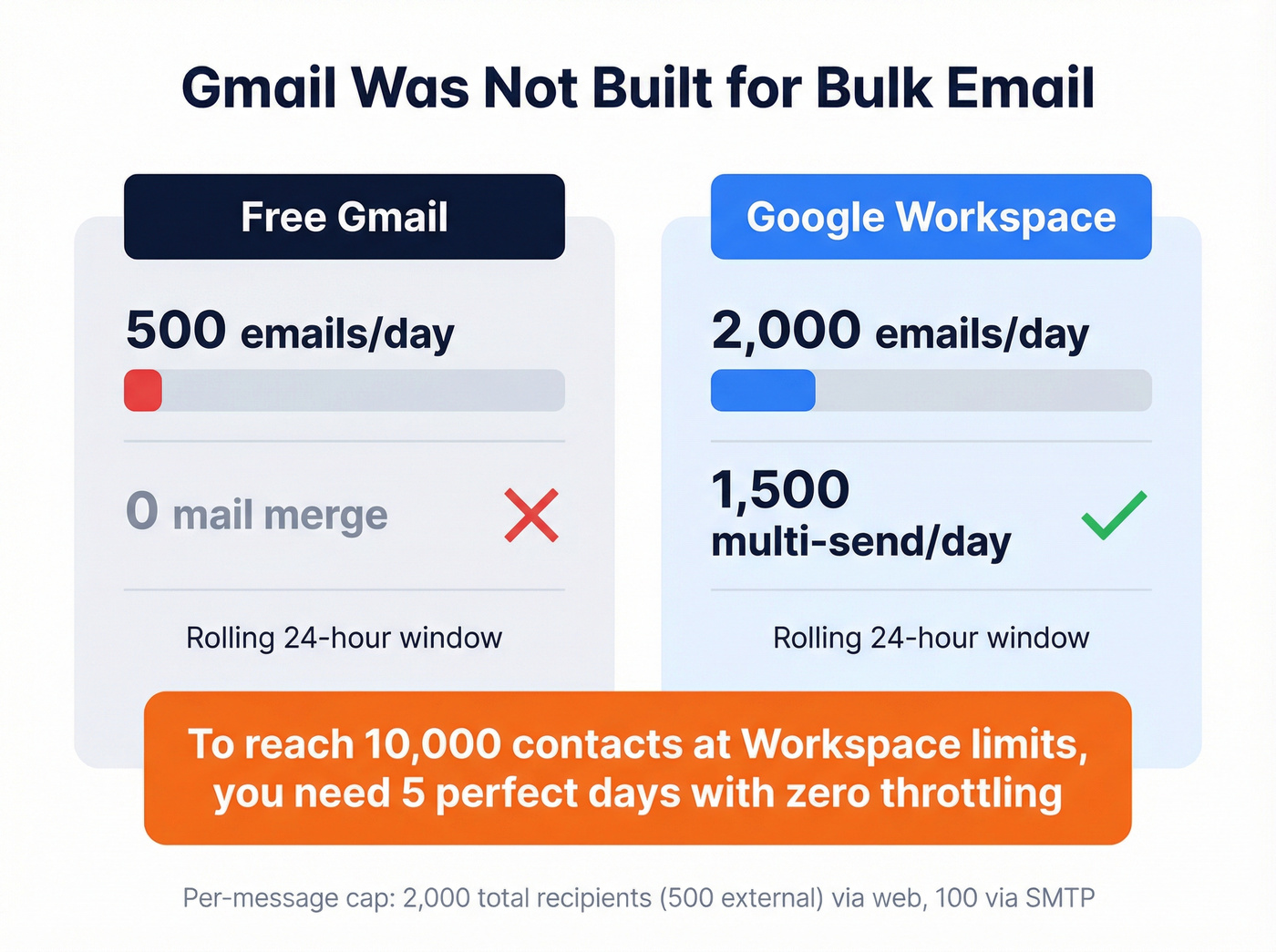
| Limit Type | Free Gmail | Workspace (Paid) |
|---|---|---|
| Messages/day | 500 | 2,000 |
| Multi-send (merge) | N/A | 1,500/day |
| Window | Rolling 24 hrs | Rolling 24 hrs |
These are system caps, not safe limits. The 24-hour window is rolling, not calendar-based - your next batch starts exactly 24 hours after the previous one, not at midnight.
Per-message recipient limits apply too. In Gmail's web interface, a single message can go to up to 2,000 total recipients (max 500 external), and via SMTP that drops to 100 recipients per message. So even if you wanted to brute-force it, the math doesn't work for 10,000 contacts.

Gmail caps you at 500/day. Free tools cap you at 2,500 subscribers. But none of that matters if your list is dirty. Prospeo's 5-step verification catches spam traps, honeypots, and dead addresses at 98% accuracy - so every email you send actually lands.
Clean your list before you burn your domain. Start with 75 free verifications.
Free-Tier Comparison Table
Every free tier worth knowing about, ranked by how close they get you to 10,000 bulk emails:
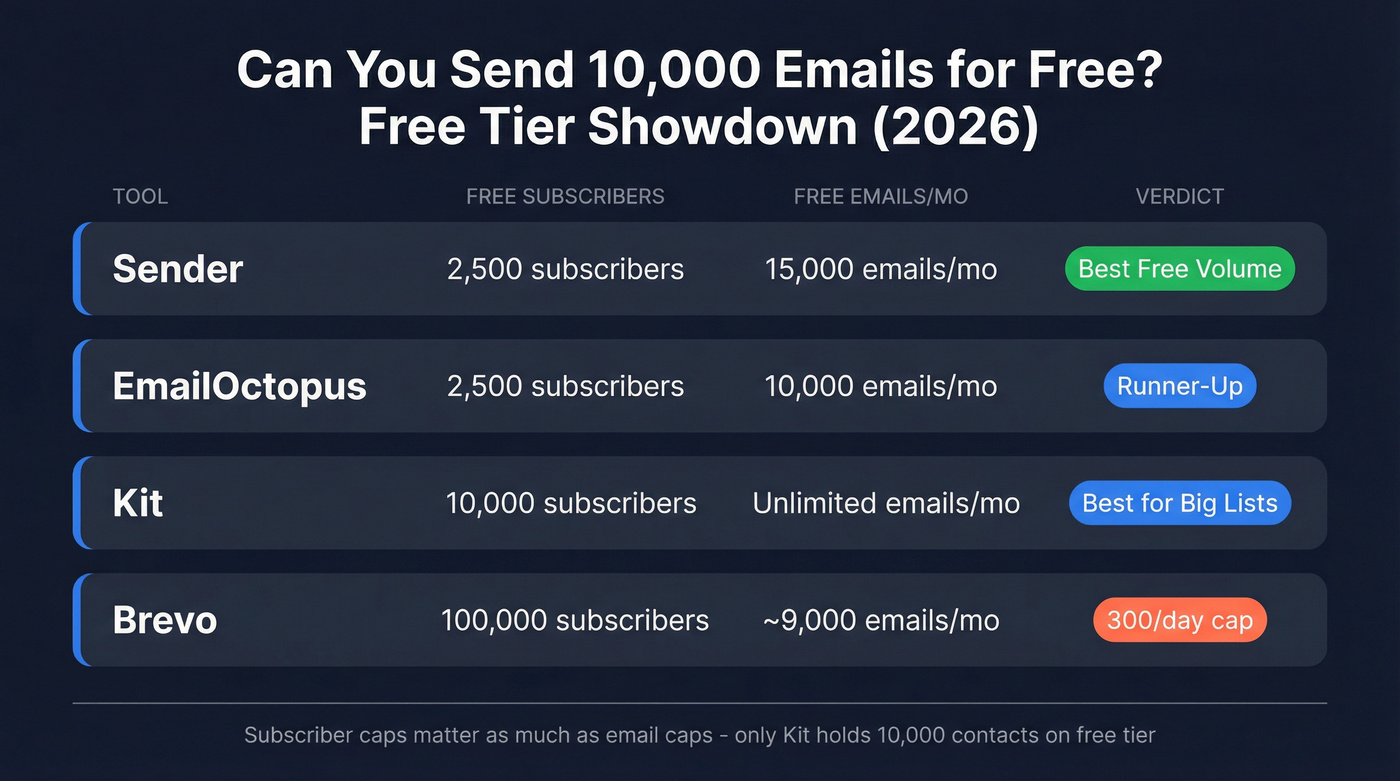
| Tool | Free Subscribers | Free Emails/Mo | Daily Cap | Key Restriction |
|---|---|---|---|---|
| Sender | 2,500 | 15,000 | None listed | Sender branding |
| EmailOctopus | 2,500 | 10,000 | None listed | - |
| Kit | 10,000 | Unlimited | None listed | - |
| MailerLite | 500 | 12,000 | None listed | - |
| Brevo | 100,000 | ~9,000 | 300/day | Brevo branding |
| Mailjet | 1,000 | 6,000 | None listed | - |
| Loops | 1,000 | 4,000 | None listed | - |
| Omnisend | 250 | 500 | None listed | 250-subscriber cap |
About Elastic Email: their "free tier" only lets you send to yourself. It's a test mode, not a real free plan. Skip it.
Our picks: Sender takes the top spot - 15,000 emails/month with automation included, and no other free tier matches that combination. EmailOctopus is the runner-up for straightforward campaigns. Kit works if your list already hits 10,000 subscribers.
The catch: your subscriber cap matters as much as your email cap. If you've got 10,000 contacts, only Kit's free tier can hold them all. Sender and EmailOctopus both cap at 2,500 subscribers, which means you'd need to split your list across multiple accounts (messy and against most platforms' terms of service) or accept that you'll only reach a quarter of your contacts for free.
When Free Isn't Enough
Let's be honest - if your list exceeds free-tier limits, paid options are cheaper than you'd expect. Brevo Starter starts around $9-$15/month for entry volumes. Elastic Email charges $19/month for 10,000 emails. SendPulse comes in around $32 to send 10,000 emails.
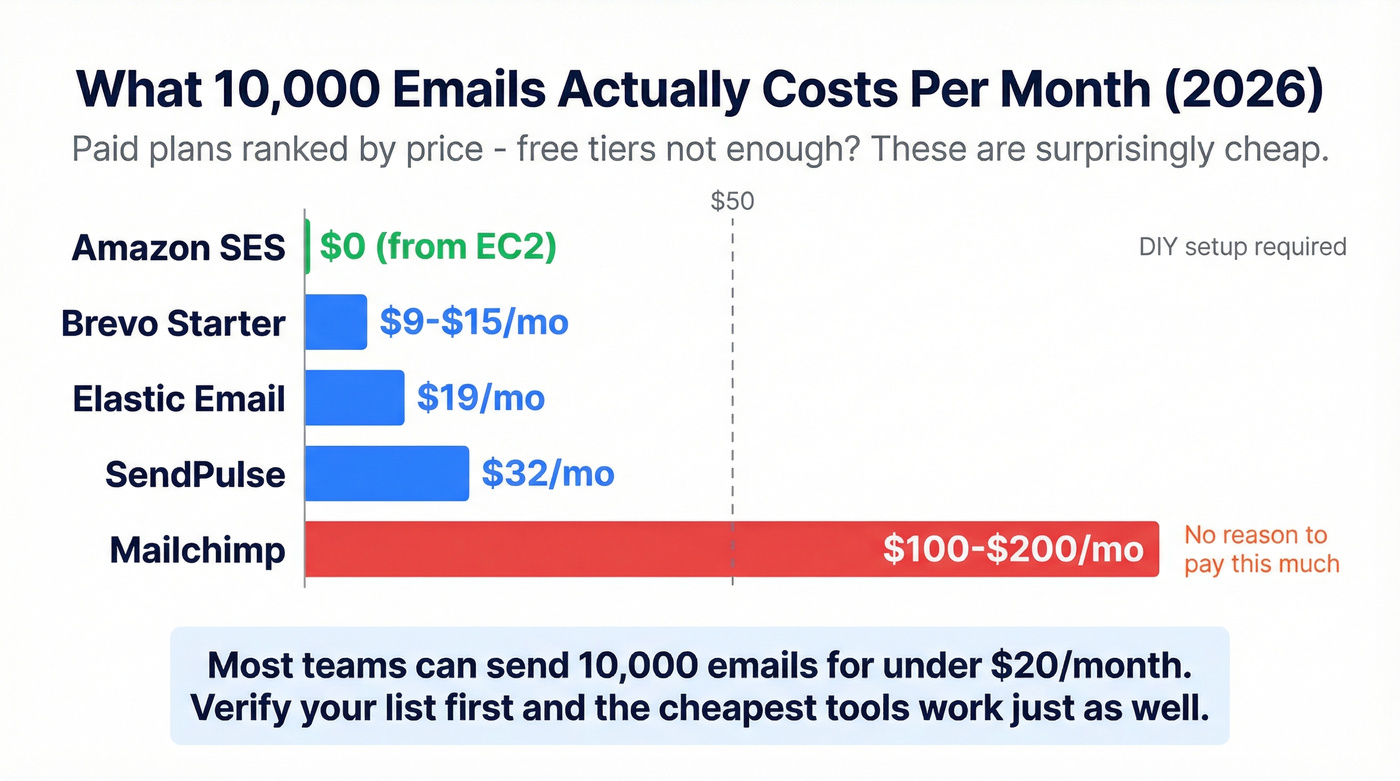
If you're technical, Amazon SES offers roughly 62,000 free emails/month from EC2 - but you'll configure everything yourself and need to request production access. That's not a weekend project for most marketers (and it helps to understand your email sending infrastructure first).
For context, Mailchimp charges roughly $100-$200/month for similar volume depending on plan and list size. There's no reason to pay that when Sender or Brevo does the same job at a fraction of the cost.
Before You Hit Send
This is the part that separates campaigns that convert from campaigns that get your domain blacklisted. We've seen teams skip these steps and nuke a perfectly good domain in one afternoon.
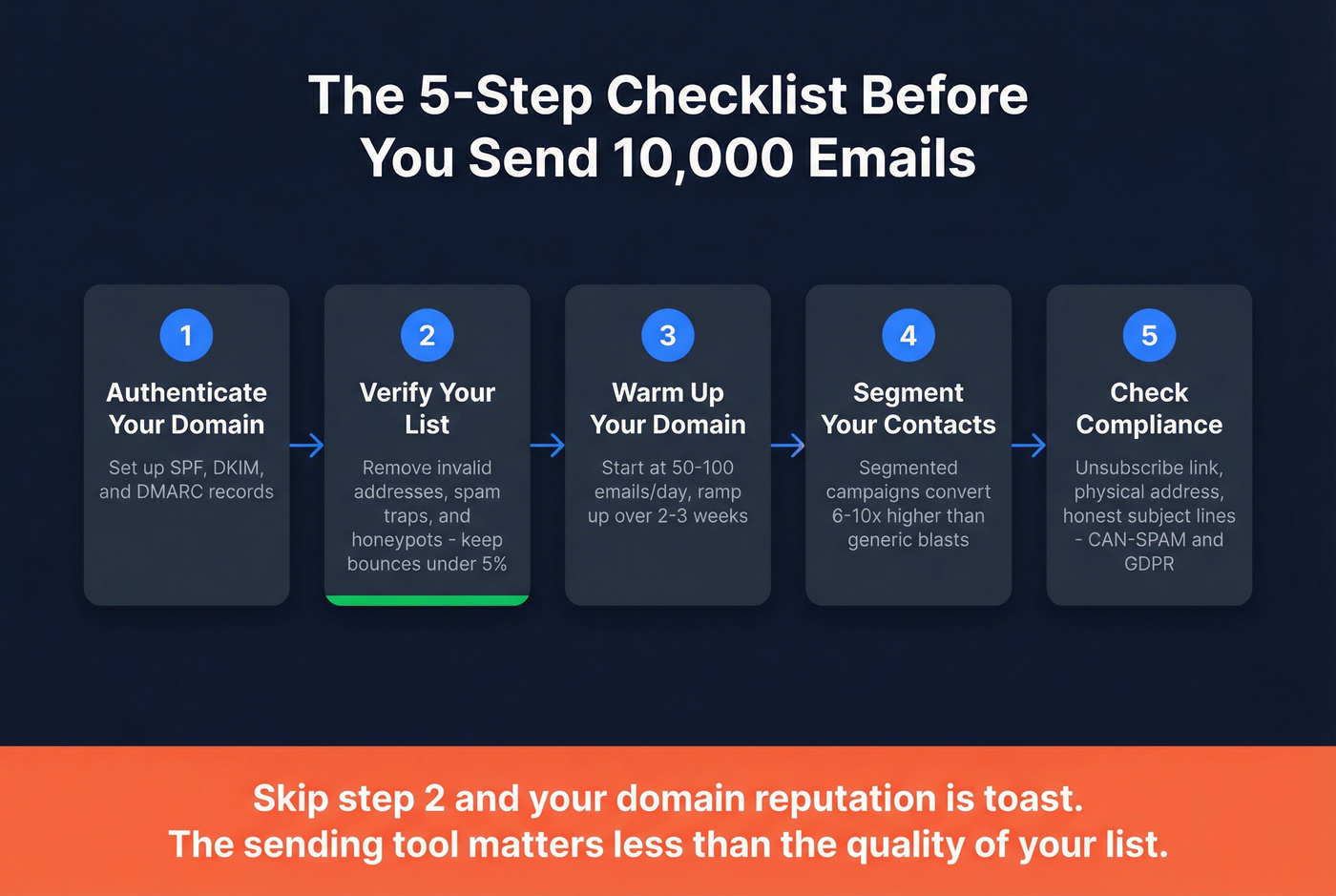
1. Authenticate your domain. Set up SPF, DKIM, and DMARC records. Without these, inbox providers assume you're a spammer. No exceptions. (If you need the walkthrough, start with SPF, DKIM, DMARC.)
2. Verify your email list. A bounce rate above 5% triggers deliverability problems fast. We've verified lists where 20%+ of addresses were invalid - that's a blacklisting waiting to happen. Before you load 10,000 addresses into any sending tool, run them through verification. Prospeo's 5-step verification catches invalid addresses, spam traps, and honeypots at 98% accuracy, and the free tier covers 75 verifications per month. If you're comparing tools, see our guide to the best email validators and email checker tools.

3. Warm up new domains. Don't blast 10,000 emails on day one from a fresh domain. Start with 50-100/day and ramp over 2-3 weeks. Patience here saves you months of reputation repair later (use a proper automated email warmup process).
4. Segment your list. Segmented campaigns convert 6-10x higher than generic blasts. Even basic segmentation by industry or role makes a measurable difference (here’s a deeper guide to behavioral segmentation).
5. Stay under complaint thresholds. Keep spam complaints as close to zero as possible. CAN-SPAM requires a physical mailing address, a working unsubscribe link, and honest subject lines. GDPR penalties run up to EUR 20M or 4% of global revenue - and yes, they enforce it. If you’re operating in the EU/UK, follow a real GDPR for Sales and Marketing playbook.
Here's the thing: the sending tool you pick matters far less than the quality of your list. A verified list on Sender's free tier will outperform a dirty list on a $500/month platform every single time. If you're going to spend time on one thing, spend it on cleaning your data (and preventing email blacklisting before it starts).
A 15% bounce rate blacklists your domain in one send. Prospeo verifies emails at 98% accuracy for ~$0.01 each - cheaper than rebuilding a burned domain. Teams using Prospeo-verified lists keep bounce rates under 4%.
Verify 10,000 emails for the cost of a single Mailchimp month.
FAQ
Can I send 10,000 emails from Gmail?
No. Free Gmail caps at 500 emails/day, and Google Workspace maxes out at 2,000/day. Even at the Workspace limit, reaching 10,000 takes five days of perfect sending with zero throttling - and Google will throttle aggressively if your bounce rate spikes.
What's the best free tool for mass email?
Sender offers 15,000 emails/month to 2,500 subscribers - the highest free volume available in 2026. Kit allows unlimited sends but caps at 10,000 subscribers. For most lists under 2,500 contacts, Sender gives you the most headroom.
Do I need to verify my list before sending bulk email?
Yes - it's the single highest-ROI step in the process. A bounce rate above 5% can wreck deliverability and tank performance for every future campaign. Run your list through a verification tool before loading it into any platform, full stop.