Verify My Email: The 3 Meanings (and the Right Fix for Each)
When you search "verify my email," it's rarely a minor annoyance. You're either locked out of an account, you're about to torch deliverability with bounces, or you're trying to figure out whether your address is sitting in a breach dump.
Same phrase. Three different problems.
Here's the thing: the internet mixes terms. In apps, "verify" usually means "prove you own the inbox" (link/code). In outreach and email marketing, people say "verify" when they mean "validate deliverability" (will this bounce?). We'll follow intent, not sloppy labels.
Verify my email - which "verify" do you mean?
Use this quick selector. Don't overthink it.
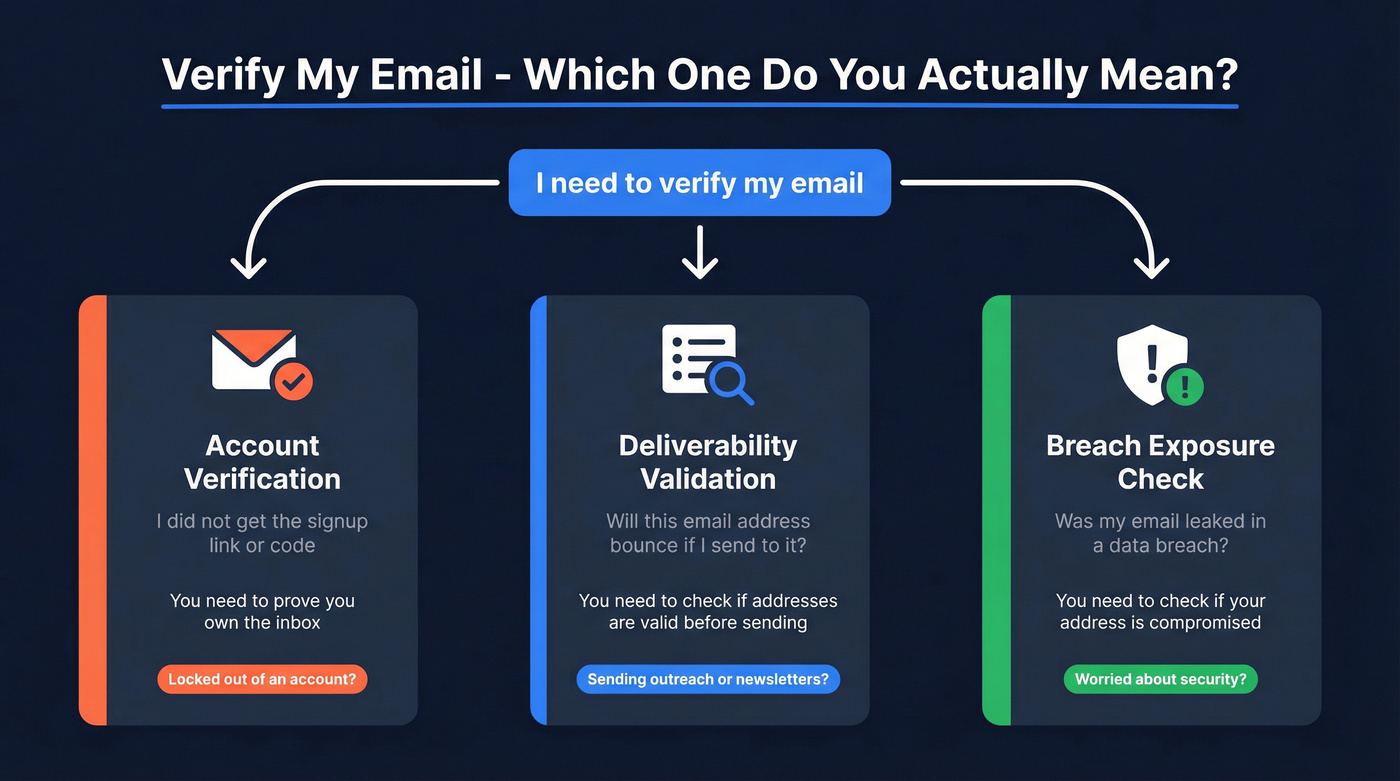
A) You're trying to log in / finish signup You need an account verification link or code (ownership verification). -> Go to: Account verification (link/code)
B) You're about to send emails (outreach/newsletter) and want fewer bounces You need to know whether an address is valid for sending (deliverability validation). -> Go to: Verify before you send (is this address valid?)
C) You're worried about security You want to know whether your email was leaked in a breach (breach exposure check). -> Go to: Security check (was my email leaked?)
Account verification (you didn't get the link/code)
This is the "I can't verify my email address" problem most people mean.
And yes, it's maddening: you're staring at a "Verify your email" banner, you click "Resend," and... nothing.
Fast checklist (works for almost any app)
- Confirm you typed the right email
- Check for common typos:
gmial.com,hotnail.com, missing dots, extra characters. - If you used an alias like
+promo, try the base address.

- Search your inbox like a machine
- Search:
verify,verification,confirm,activate, the product name, and the sender domain. - Check Spam/Junk, Promotions, and Updates tabs.
One-sentence reality check: if you use Gmail, the email is often in Promotions, not Spam.
- Resend the verification email
- Most products throttle resends. Wait a few minutes, then try again.
- If there's a "Resend" button, use it once, then stop hammering it (you can trigger rate limits).
- Allowlist the sender
- Add the sender to contacts or allowlist the domain in your email settings.
- If you're on a corporate inbox, ask IT to allow the sender domain.
- If you need a step-by-step SOP, see email whitelisting.
- Try a different inbox
- If your company filters aggressively, switch to a personal inbox for the verification step, then change it back later.
Official resend patterns (real examples you'll see)
Microsoft account (alias verification)
Microsoft's flow is literal: go to "Manage how you sign in to Microsoft," find the unverified alias, click Verify next to it, then click Send email. That "Verify -> Send email" pattern is the one to look for in Microsoft account settings.
Epic Games Epic shows a warning when your email isn't verified, with a "click here to resend" link. Click it, then open the email and hit VERIFY YOUR EMAIL. If it's missing, you're back to spam/junk checks.
Dropbox Dropbox's verification email comes from no-reply@dropbox.com. If you don't see it:
- check spam/junk
- add the sender to contacts
- ask your email provider/IT admin about filtering
- change the email on the account and try again
- contact support (they can manually verify after identity checks)
UI cues to look for (works across most apps)
- A banner at the top of the dashboard/profile that says "Email not verified" with a Resend link.
- A path like Settings -> Security/Account -> Email with a Verify button next to your address.
- An alias list (multiple emails) where only one is marked "unverified."
When it's still not showing up
- You're on a locked-down domain (education, government, enterprise). Filtering is the #1 culprit.
- You've unsubscribed from that sender in the past. Some systems treat verification as "marketing" and suppress it.
- The app is sending to a different address (old email on file). Log in (if possible) and check profile settings.
A scenario I've seen more than once: a teammate signs up with name@company.com, the company gateway blocks the verification email, and the teammate keeps smashing "Resend" until the vendor rate-limits the domain for an hour - then everyone else trying to sign up gets stuck too.
If you can log in but can't verify, open a support ticket and ask them to confirm the destination address and sender domain. Ask for the exact sending address/domain they use so your provider (or IT) can unblock it.
Verify my email before you send (is this address valid?)
This is the version that matters for deliverability.
People also confuse domain authentication with address checking, then act surprised when bounces don't go away. Those are different jobs, and you need both if you're sending at any real volume.
Domain verification vs email verification (two different jobs)
Domain verification (SPF/DKIM/DMARC via DNS) proves you control the domain you're sending from. It's done by adding DNS records (TXT/CNAME) for:
- SPF (who's allowed to send)
- DKIM (message signing)
- DMARC (policy + reporting)

This helps prevent spoofing and improves trust with inbox providers. If you need the full setup walkthrough, see SPF DKIM & DMARC.
Email verification (address validation) checks whether a specific address looks deliverable before you send. Most tools run a sequence like:
- syntax checks (
name@domain.com) - domain + MX records checks (can the domain receive mail?)
- SMTP handshake checks (without sending an email)
Look, if you're selling lower-ticket deals and sending cold email, you don't need a "GTM suite." You need clean data and disciplined sending. Verification is the boring lever that actually moves results. For more on the mechanics and the tradeoffs, see verification email.
Practical workflow (what to do before and after verifying)
Before you verify
- Remove obvious junk: role accounts you don't want (
info@,support@) and disposable domains. - Normalize formatting: lowercase, trim spaces, dedupe.
- Decide your policy up front: "Do we ever email catch-all?" (Most teams should say "only for top accounts.")
Verify
- Run a verifier on the list.
- Segment results into valid, invalid, risky/catch-all, unknown.
After you verify
- Suppress invalids immediately.
- For risky/catch-all: send in micro-batches and watch bounce rate closely.
- Keep a "do-not-email" list (hard bounces, complaints, unsubscribes) and apply it everywhere: CRM, sequencer, enrichment workflows. If you want a repeatable SOP, use an email verification list.

You're reading about email verification because bounces are killing your deliverability. Prospeo eliminates that problem at the source: 143M+ emails pre-verified through a 5-step process with catch-all handling, spam-trap removal, and honeypot filtering. 98% accuracy. Under 4% bounce rates for teams that switched.
Start with 100 free credits and see zero bounces for yourself.
What email verification tools actually check (and what they can't prove)
Most verifiers do a standard set of tests. The marketing pages make it sound like wizardry. It's not; it's a bunch of heuristics plus SMTP behavior, and the mail server gets the final say.
What they usually check
- Syntax: is it shaped like an email address?
- Domain exists: does DNS resolve?
- MX records: is there a mail server configured to receive mail?
- SMTP handshake: connect to the MX server and simulate a delivery attempt
That last step is where things get messy.
The key technical limitation (why "verified" isn't a guarantee)
Many validators simulate SMTP only up to RCPT TO and stop there. They don't send the message body (no DATA command). So they're testing "would the server accept this recipient during the handshake," not "will a real email from my sending domain land."
Also, the old-school SMTP VRFY command (which could confirm whether a mailbox exists) is often disabled because it enables user enumeration. Modern mail systems shut it down or neuter it.
One sentence you should tattoo on your process docs: verification is probability management, not proof.
The operational consequences (where teams get burned)
- Accept now, bounce later: some servers accept recipients during RCPT TO, then later bounce (or silently drop) based on internal rules, mailbox state, or filtering. Your verifier says "valid"; your campaign still bounces.
- Validator IP != your sending IP: a verifier tests from its own infrastructure. Your actual sends come from your ESP or your SMTP. If your sending domain/IP is blocked or has weak reputation, you can bounce even when the address is real.
- Big providers are intentionally unhelpful: Gmail and Microsoft 365 resist mailbox probing. They'll give ambiguous responses rather than help anyone enumerate users. That's why "unknown" and "risky" are normal outcomes, not tool failure.
How to read results: valid vs invalid vs risky vs unknown (with SMTP codes)
If you only remember one thing: 250 doesn't mean "the mailbox exists." It means "the server accepted the recipient during this handshake."
| Result bucket | What it means | Common SMTP signal | Do this next |
|---|---|---|---|
| Valid | Likely deliverable | 250 OK | Send normally, monitor bounces |
| Invalid | Won't deliver | 550 (user unknown) | Suppress immediately |
| Risky | Might bounce later | 250 + catch-all | Micro-batch + watch bounces |
| Unknown | Server won't confirm | 450 / timeouts | Retry later or treat as risky |
| TLS required | Validator can't test | 530 STARTTLS req | Use a tool that supports TLS |
SMTP examples (and the trap people fall into)
250 accept != mailbox proof A server can accept RCPT TO and still bounce later, silently drop, or route to a sink folder. Catch-all domains do this constantly.
550 invalid This is the clean one. If you see 550 "no such user," suppress it. Don't argue with it. If you want a deeper troubleshooting tree, see 550 Recipient Rejected.
450 temporary / greylisting Greylisting is a defensive tactic: "come back later." Some verifiers treat this as unknown; others retry and decide later. Operationally, treat it as "unknown until retried."
530 Must issue a STARTTLS command first This creates tool disagreement. If a verifier can't negotiate TLS, it can label the address invalid even though it's deliverable.
Catch-all domains explained (why "unknown" is common)
Catch-all (accept-all) domains are the reason you'll see "risky" or "unknown" even with good tools.
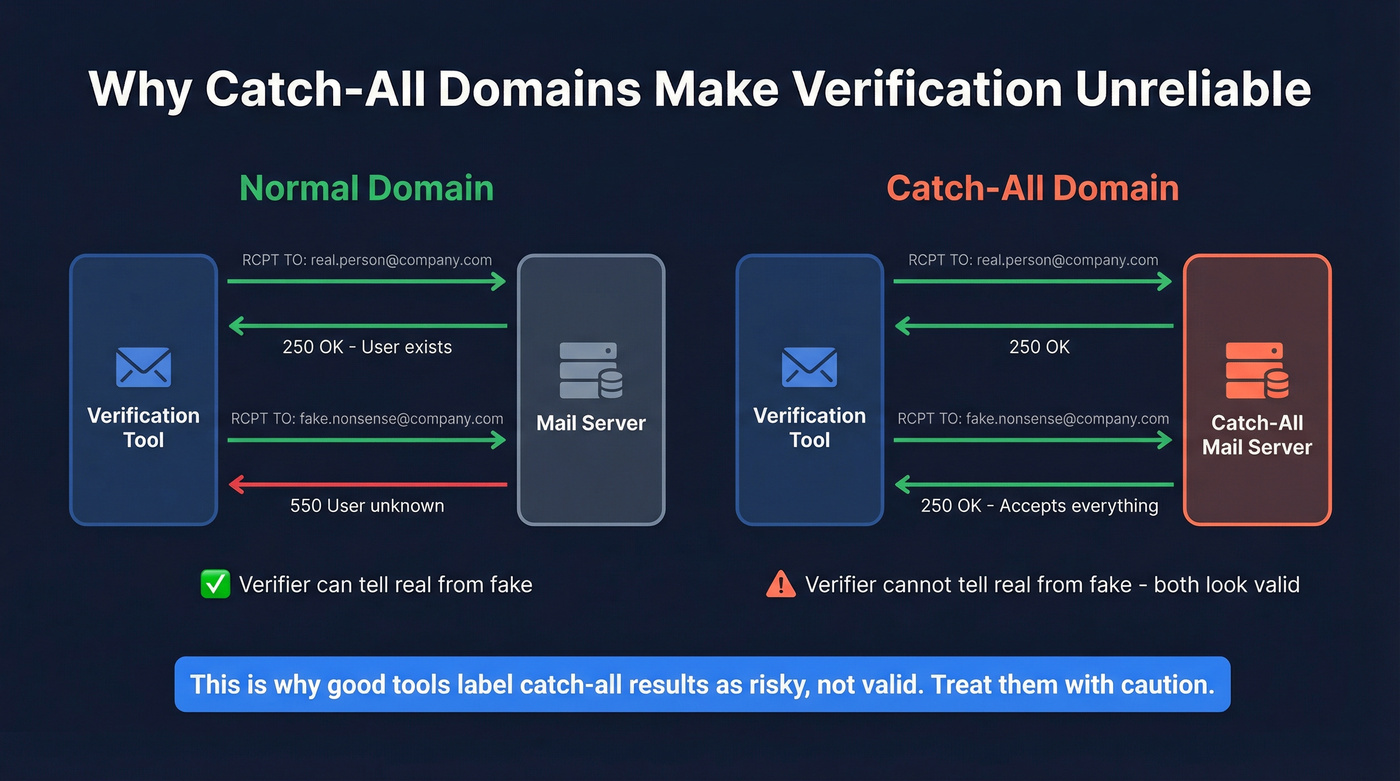
Myth vs reality
Myth: "The verifier said valid, so it's safe."
Reality: On a catch-all domain, the server returns 250 OK for any username during RCPT TO. asdfgh@company.com can look "valid" even if it's nonsense.
Myth: "Catch-all means the domain is shady." Reality: Plenty of legitimate companies enable catch-all so they don't miss emails from typos.
The numbers (why this keeps happening)
A widely cited dataset published in 2025 showed catch-all share ranging 13.3% to 28.1% monthly, averaging 17.5%. Expect similar behavior in 2026 because accept-all is a configuration choice, not a trend.
Action policy (what I'd do)
- Default: quarantine catch-all addresses.
- If you must email them: send in micro-batches (25-100), prioritize higher-intent contacts, and stop if hard bounces spike.
- Never blast catch-all at scale from a fresh domain. That's how you earn a bad reputation fast.
Why tools disagree (and how to avoid false confidence)
I've run enough deliverability cleanups to tell you this: two verifiers can test the same address and disagree, and both can be "right" given what the mail server decides to reveal that day.
Why it happens:
- Anti-enumeration defenses: servers avoid confirming whether a mailbox exists.
- Greylisting and throttling: one tool retries and gets a different answer than another tool that doesn't.
- STARTTLS requirements (530): tools that can't negotiate TLS misclassify deliverable addresses.
- Different retry logic: timeouts, backoff, and IP reputation vary by vendor.
My rule in practice: when two tools disagree, I treat "invalid" as final, and I treat "valid" on catch-all as risky until a small real send proves otherwise.
Use this / skip this (to stay sane)
Use verification tools if:
- you're sending cold email or newsletters and you care about domain reputation
- you're importing lists into a sequencer and want to suppress obvious bad data
- you're cleaning legacy CRM data before enrichment
Skip "deep verification" fantasies if:
- you think a tool can guarantee a mailbox exists on Gmail or Microsoft 365 (it can't, not reliably)
- you're using verification as an excuse to ignore consent, targeting, or unsubscribe hygiene
Tools you can use to verify an email address (quick shortlist + pricing)
The honest "pick this" version:
- Pick Prospeo if you want top accuracy plus fresh B2B data, and you verify while building lists (not just cleaning them).
- Pick Hunter if you want a simple workflow and you'll use its API/Sheets/CRM connections to keep verification from becoming a one-off chore.
- Pick Verifalia if you want granular classifications and automation with adjustable strictness.
- Pick EmailListVerify if you want the cheapest bulk clean and you're fine with a utilitarian experience.
If you want a longer ranked list across vendors, see email verifier websites.
Prospeo - The B2B data platform built for accuracy
Prospeo is the best choice when you care about email accuracy, data freshness, and self-serve B2B data. It includes 300M+ professional profiles, 143M+ verified emails, and 125M+ verified mobile numbers, and it's used by 15,000+ companies and 40,000+ Chrome extension users. Email accuracy is 98%.
It refreshes data every 7 days (the industry average is about 6 weeks), which matters more than people think: if you're building lists weekly but your data source refreshes monthly, you're basically paying to email yesterday's org chart.
Prospeo's verification uses a 5-step verification process with catch-all handling, spam-trap removal, and honeypot filtering. Pricing stays simple: about $0.01 per email, plus a free tier with 75 emails/month and 100 extension credits/month. If you want a plan-by-plan breakdown, see Prospeo pricing.
Links if you want the exact details: https://prospeo.io/pricing and https://prospeo.io/email-finder.
In the verification results screen, you'll see a table of contacts with clear status badges (Valid/Invalid/Risky/Unknown), plus a reason-style column (for example: catch-all behavior, SMTP timeouts, or other deliverability flags). Filter to Valid, export, and you won't accidentally upload risky addresses into your sequencer.
Hunter
Hunter is the classic "simple UI, gets the job done" verifier. It's especially handy when you want verification in the same workflow as finding addresses.
What makes it different from bare-bones verifiers: it checks email syntax, domain information, server response, and also looks up checked emails in Hunter's B2B database. It's easy to operationalize via API and spreadsheet workflows (including a Sheets add-on) so verification doesn't become a quarterly cleanup project.
Pricing: free includes 50 credits/month, and verification costs 0.5 credit per email. Paid tiers are $49/mo (Starter), $149/mo (Growth), and $299/mo (Scale). For big one-off cleans, bulk is $6,500 for 200,000 verification credits (plus 1,000 search credits), usable for up to 12 months.
Verifalia
Verifalia is for people who want knobs and dials. The standout is the quality levels: Standard uses 1 credit, High uses 2, and Extreme uses 4 per verification, so "Extreme" can cost 4x what "Standard" costs for the same list.
It also goes deeper on classification than most tools and can return 30+ detailed outcomes/statuses, which is useful when you're building routing rules ("send," "suppress," "manual review," "retry later") instead of treating everything as yes/no. For automation, it plays well with workflows like Google Sheets and connectors such as Zapier or Pipedream.
Free tier: 25 free credits/day. Paid plans are daily credit tiers (Starter 250/day up to Ultimate 25,000/day).
EmailListVerify
EmailListVerify is the budget workhorse. It offers 100 free credits, then pay-as-you-go from $5, and credits never expire (great for sporadic list cleaning).
Pricing reality: expect roughly $20-$80 per 10k emails depending on volume and options. I've used tools like this when the job is "clean what we already have," not "build a pristine outbound engine with enrichment, routing, and ongoing refresh."
Their homepage is https://emaillistverify.com/.
Quick comparison table (features + pricing reality)
| Tool | Best for | Key checks | Catch-all handling | Free tier | Starting price | Notes/limits |
|---|---|---|---|---|---|---|
| Prospeo | B2B list QA + building | SMTP + trap filter | Yes | 75/mo | ~$0.01/email | 7-day refresh |
| Hunter | Simple verify + workflows | SMTP + dataset signals | Yes | 50 credits/mo | $49/mo | 0.5 credit/verify |
| Verifalia | Granular outcomes | SMTP + detailed statuses | Yes | 25/day | Daily credits | 1/2/4 credits by quality |
| EmailListVerify | Cheap bulk cleaning | Bulk hygiene + SMTP | Basic | 100 credits | From $5 | ~$20-$80/10k |
Security check (was my email leaked?)
This is the security version of "verify my email," and it's worth doing even if you aren't paranoid.
Step-by-step
- Go to Have I Been Pwned and search your email. The site currently lists 950 pwned websites and 17,440,617,561 pwned accounts.
- If you show up in breaches, assume any reused password (or close variant) is compromised somewhere.
- Turn on breach alerts ("Notify Me") so you don't have to remember to check.
The nuance people miss (and what to do about it)
Being in a breach doesn't automatically mean someone can log into your accounts today. It does mean your address is now a better target for two very real attacks, and both show up fast after breach news: credential stuffing (trying your leaked combo across lots of sites) and targeted phishing (more convincing "DocuSign" and "password reset" emails).
Prioritize fixes like this:
- Change passwords on accounts where you reused the breached password (start with your email inbox, then finance, then work tools).
- Turn on MFA everywhere that matters.
- Treat "unexpected verification codes" as an active attack - someone is trying to log in as you.
Security checklist (do these, not just "change password")
- Use a password manager.
- Set unique passwords for every important account (email, banking, work apps).
- Enable MFA (authenticator app beats SMS).
- Review account recovery options (backup codes, recovery email/phone).
- Watch for targeted phishing right after breach news.
Outreach compliance & risk (what "verification" doesn't excuse)
Verification is deliverability hygiene. It's not a permission slip.
CAN-SPAM penalties are commonly cited at up to $51,744 per email in FTC guidance recaps and industry compliance write-ups. Even if you never see a fine, inbox providers punish sloppy behavior faster than regulators do. For the operational requirement most teams miss, see CAN-SPAM physical address requirement.
Guardrails I'd actually enforce
- Keep truthful headers (From/To/Reply-To) and honest subject lines.
- Include a working unsubscribe in every outreach stream.
- Include a valid physical address.
- Don't email people who opted out, complained, or hard-bounced.
Minimum compliance ops (do this and you'll avoid most self-inflicted pain)
- Store consent/source fields in your CRM (where the lead came from, date captured, and any stated preferences).
- Honor opt-outs globally (one unsubscribe should suppress across every list, tool, and workspace).
- Maintain a suppression list that includes hard bounces, complaints, and "do not contact" requests - and sync it into every sending system.
- If you rely on "legitimate interest" in certain regions, document your rationale (who you contacted, why it was relevant, and how you minimize impact). For a practical outbound-focused rundown, see GDPR for sales and marketing.
- Set a process for privacy requests (access/delete/opt-out). Route them to one owner and track completion.
If your plan is "we verified it so we're fine," you're building on sand.
FAQ
What's the difference between verifying an email and validating an email?
Verifying an email usually means proving inbox ownership via a link/code, while validating an email means checking deliverability signals (syntax, MX records, SMTP response) before sending. In practice: use account verification to unlock access, and use validation to cut bounce rates and protect domain reputation.
Why does an email verifier say "valid" but my email still bounces?
A "valid" result typically means the server accepted the recipient during SMTP up to RCPT TO, not that the mailbox definitely exists or will accept your message later. Catch-all domains, greylisting, reputation blocks, and post-acceptance filtering can still cause bounces, especially when the verifier's IP differs from your sending setup.
What does "catch-all" mean, and should I email those addresses?
A catch-all domain accepts any recipient during SMTP (often returning 250 OK), even for non-existent mailboxes. Treat catch-all as risky: quarantine by default, and only send in small batches (25-100) if the contact's high priority and you're monitoring hard bounces closely.
How can I resend a verification email if I never received it?
Use the product's resend flow, then search your inbox and spam/junk for "verify/confirm," and allowlist the sender domain. If it still doesn't arrive after 10-15 minutes, try a different inbox or ask support for the exact sender address/domain so your provider (or IT) can unblock it.
What's a good free tool to verify a list before outreach?
For small outbound lists, Prospeo's free tier includes 75 email checks/month with 98% accuracy, plus exportable statuses (Valid/Invalid/Risky/Unknown) so you can suppress bad records fast. Hunter (50 credits/month) and Verifalia (25 credits/day) are also solid free starting points for quick list hygiene.
Running lists through a verifier after the fact is a band-aid. Prospeo's proprietary email-finding infrastructure delivers already-verified contacts refreshed every 7 days - not the 6-week-old data other providers sell. One customer dropped bounce rates from 35% to under 4% overnight.
Skip the verification step entirely - start with clean data.
If you came here thinking "verify my email" was one thing, you're not alone.
Pick the intent first, then apply the right fix: resend steps for account access, deliverability validation before outreach, or breach response.