SPF, DKIM, and DMARC: The Complete Setup and Troubleshooting Guide for 2026
You added a new sending tool last Tuesday. By Thursday, half your outbound emails were landing in spam. Nothing changed in your copy, your list, or your sequences - but somewhere in the DNS records you forgot to update, a single missing include: broke your SPF, killed your DMARC alignment, and tanked your sender reputation overnight.
This happens constantly. Google, Yahoo, and Microsoft now actively reject unauthenticated emails instead of just filtering them. DMARC adoption hit 53.8% in 2024, up from 42.6% the year before - the remaining domains are increasingly getting punished. The enforcement window is closed. If you haven't set up SPF and DKIM email authentication correctly, you're not just risking the spam folder. You're risking outright rejection.
The setup itself isn't hard. It takes 30-60 minutes if you know what you're doing. The problem is that most guides either oversimplify ("just add a TXT record!") or drown you in RFC references. This guide sits in the middle - real DNS examples, real troubleshooting, and the specific mistakes I've seen break authentication for teams that thought they had it right.
- SPF tells receiving servers which IPs are allowed to send email for your domain.
- DKIM attaches a cryptographic signature to each email proving it wasn't altered in transit.
- DMARC ties SPF and DKIM together, adds alignment rules, and tells ISPs what to do when authentication fails.
Three things to do right now:
- Publish an SPF record listing every service that sends email from your domain.
- Enable DKIM for every tool that sends from your domain - each gets its own selector.
- Add a DMARC record starting at
p=noneand monitor the reports.Google, Yahoo, and Microsoft all enforce these in 2026. Non-compliance means emails get rejected - not filtered, rejected.
Quick check: Run
dig TXT yourdomain.comin your terminal or paste your domain into MXToolbox.com. If you see records starting withv=spf1andv=DMARC1, you're published. Read on to verify they're configured correctly.Already have records published? Jump to Best Free Monitoring Tools to check them.
What Are SPF, DKIM, and DMARC? Understanding Email Authentication
Here's how the three protocols relate to each other:

| Protocol | What It Checks | DNS Record Type | Simple Analogy |
|---|---|---|---|
| SPF | Sending server IP | TXT | A guest list at the door |
| DKIM | Message integrity | TXT (public key) | A wax seal on a letter |
| DMARC | Alignment + policy | TXT | The bouncer's instructions |
SPF checks the Return-Path address - not the From address. This is the single most misunderstood aspect of email authentication. An email can pass SPF even if the From address is completely fake, because SPF only validates the envelope sender.
DKIM verifies that the email content wasn't altered between the sending server and the recipient. It uses public-key cryptography: the sending server signs the message with a private key, and the receiving server checks the signature against a public key published in DNS.
DMARC is the policy layer that makes the rest of your email authentication stack actually useful. Without DMARC, ISPs see authentication results but decide on their own what to do. DMARC gives you control - you tell receiving servers whether to deliver, quarantine, or reject emails that fail authentication. Critically, DMARC adds alignment: the domain in the From header must match the domain authenticated by SPF or DKIM. That's what stops spoofing.
Even if your domain doesn't send email, publish a DMARC record with p=reject to prevent anyone from spoofing it.
How SPF Works (And How to Set It Up)
SPF Record Syntax Explained
An SPF record is a single TXT record published on your domain that lists every server authorized to send email on your behalf. Here's a real-world example:
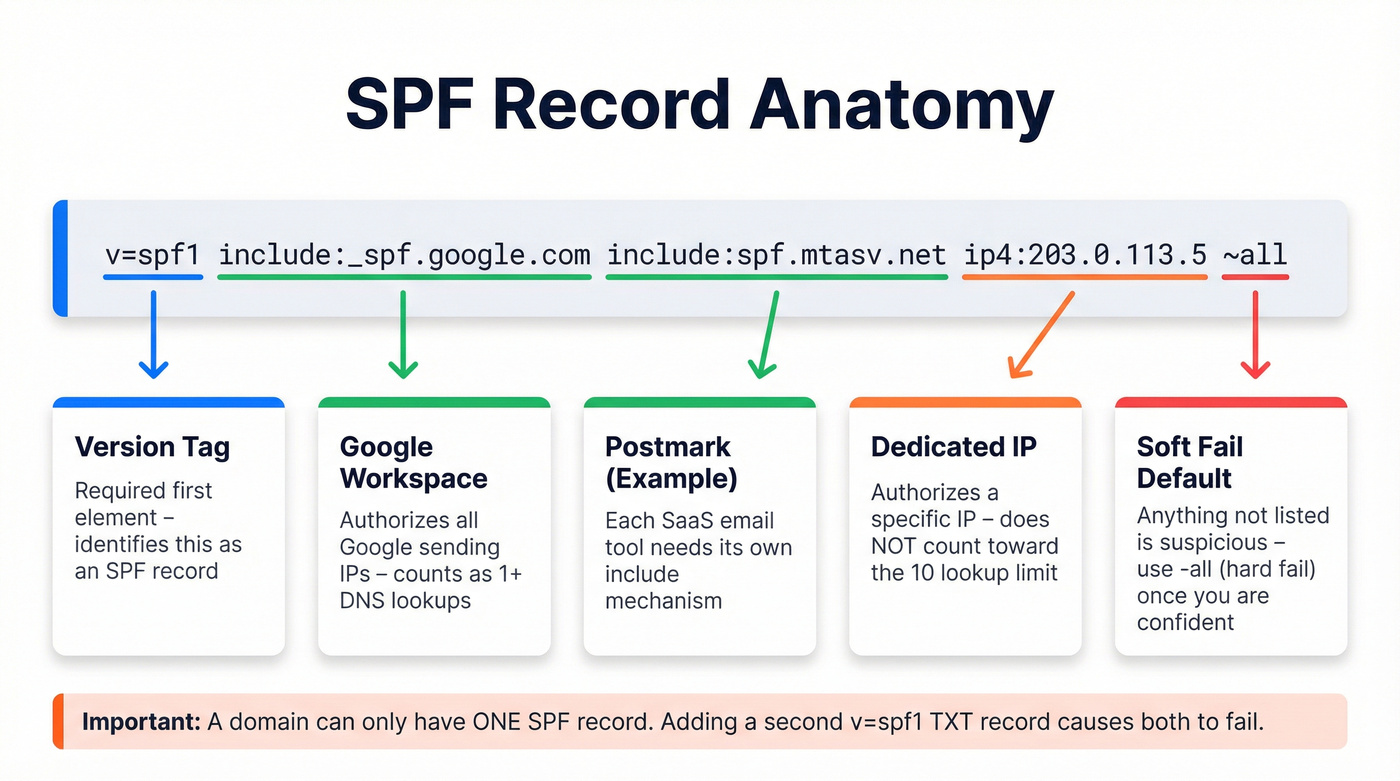
v=spf1 include:_spf.google.com include:spf.mtasv.net ip4:203.0.113.5 ~all
Breaking this down:
v=spf1- version identifier. Every SPF record starts with this.include:_spf.google.com- authorizes Google Workspace's sending servers. Each SaaS tool you use gets its owninclude:.include:spf.mtasv.net- authorizes Postmark's servers (as an example of a transactional email service).ip4:203.0.113.5- authorizes a specific IP address. Use this for your own mail servers or dedicated sending IPs.~all- soft fail. Tells receiving servers that anything not listed should be treated with suspicion but not outright rejected.
Other mechanisms you'll encounter:
mx- authorizes whatever servers your MX records point to.a- authorizes the IP your domain's A record resolves to.ip6:- same asip4:but for IPv6 addresses.-all- hard fail. Anything not listed gets rejected. More aggressive than~all, and recommended once you're confident your record is complete.
Here's the critical nuance: SPF validates the Return-Path domain, not the From address. The Return-Path is an envelope header that recipients rarely see. SPF alone doesn't prevent someone from spoofing your visible From address - that's why you need DMARC alignment on top of it.
Some ESPs use your domain in the Return-Path (Google Workspace does this, so you must configure SPF). Others use their own domain in the Return-Path (Postmark, for example), which means SPF is handled automatically on their end - but you'll need DKIM alignment for DMARC to pass.
A domain can only have one SPF record. Adding a second TXT record starting with v=spf1 causes both to fail. If you're adding a new sending service, merge its include: into your existing record.
The 10-Lookup Limit (And How to Fix It)
SPF caps DNS evaluations at 10 lookups per check. Each include: and redirect counts as a lookup. Nested includes count too - if _spf.google.com itself includes three other records, that's four lookups just for Google.
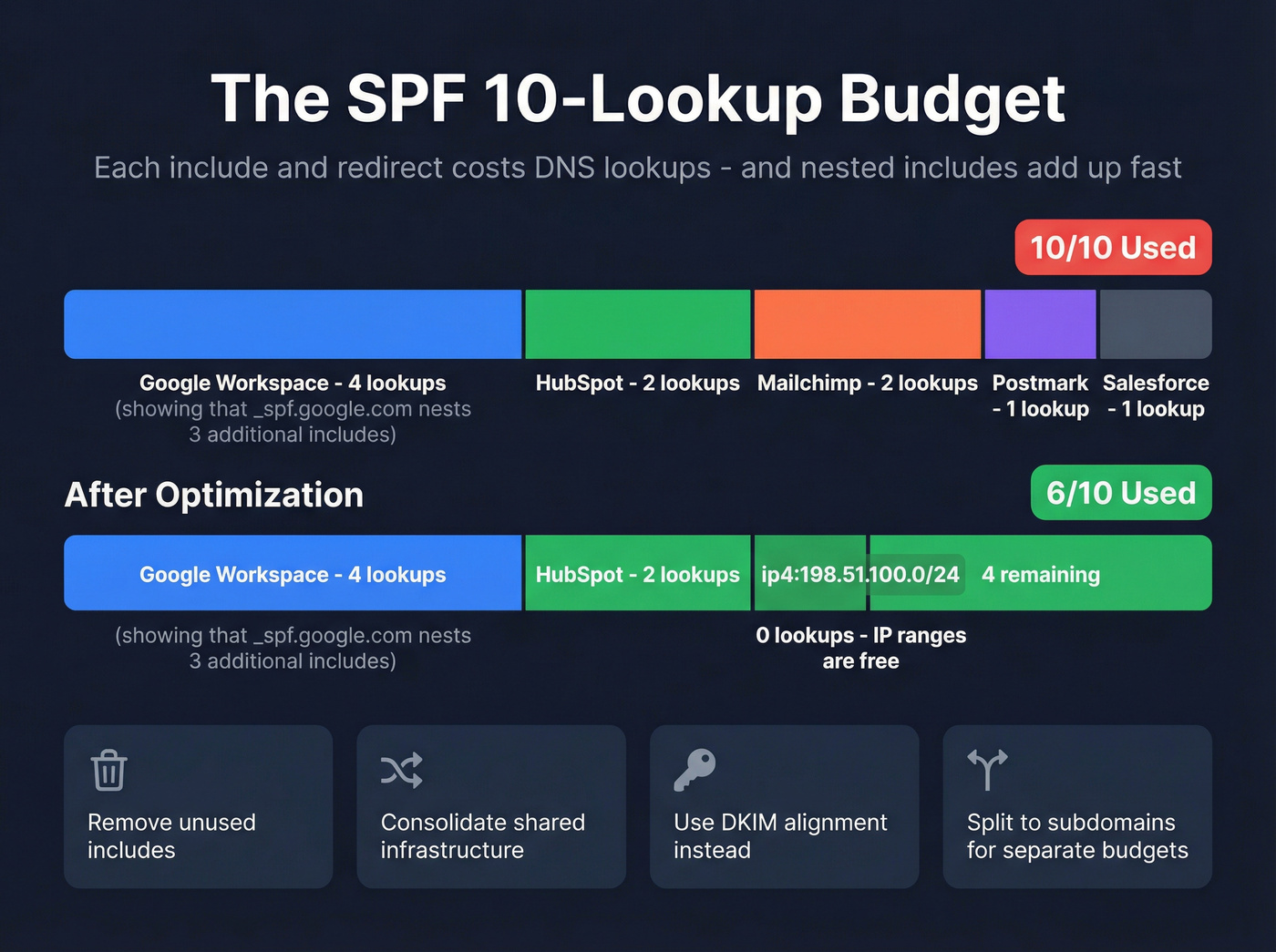
Roughly 30-40% of mid-to-large organizations with multiple SaaS tools exceed this limit. When you go over, SPF returns a permanent error - even if every IP in the record is legitimate.
What doesn't count: ip4: and ip6: mechanisms don't trigger DNS lookups. Neither does all. So replacing an include: with the actual IP ranges it resolves to can save lookups - but those IPs can change without warning, breaking your record.
Here's how to fix it:
- Audit your senders. List every tool that sends from your domain. Kill the
include:for any service you've stopped using. I've seen teams with includes for tools they cancelled two years ago. - Consolidate where possible. If two tools send through the same infrastructure, you only need one include.
- Prefer DKIM for alignment. If a sender supports custom DKIM, you don't strictly need it in your SPF record for DMARC to pass. DKIM alignment satisfies DMARC independently.
- Use dedicated subdomains. Route marketing email through
marketing.yourdomain.comwith its own SPF record. Each subdomain gets its own 10-lookup budget.
Is the limit actually enforced? Enforcement is inconsistent across providers - the debate rages on in practitioner forums. But treat it as a hard rule. The providers that do enforce it will silently fail your SPF, and you won't know until deliverability craters.
How DKIM Works (And How to Set It Up)
DKIM uses public-key cryptography to verify that an email wasn't tampered with between the sender and recipient. When a sending server dispatches an email, it signs the message headers and body with a private key. The receiving server looks up the corresponding public key in DNS and checks the signature.

The DNS record follows this format:
selector1._domainkey.yourdomain.com IN TXT "v=DKIM1; k=rsa; p=MIGfMA0GCSqGSIb3DQEBA..."
The selector is a label that identifies which key to use. Each sending service gets its own selector - Google Workspace uses google, Postmark uses pm, HubSpot uses something like hs1. A single domain can have multiple DKIM records, each with a different selector. That's by design.
When you enable DKIM in a sending platform, the platform generates a key pair and gives you the public key to publish as a DNS TXT record. The two-step process trips people up: enabling DKIM in the platform is step one, but if you don't add the DNS record, the signature can't be verified and DKIM fails.
Key length matters. Use 2048-bit RSA keys. The minimum per the standard is 1024-bit, and no real-world compromises of 1024-bit DKIM keys have been documented. In 2012, researcher Zachary Harris demonstrated that 512-bit keys could be cracked - validating why the standard sets 1024-bit as the floor. Google and most security experts recommend 2048-bit as the default. There's no performance penalty.
DKIM doesn't encrypt anything. It only verifies integrity - confirming the message wasn't altered in transit. ISPs also use DKIM to build domain reputation over time. Consistent DKIM-signed emails with low spam complaints and high engagement build trust that improves inbox placement.
Rotate keys every 6-12 months, or immediately after any security incident. Publish the new key, update your sending platform, and keep the old key active for 24-48 hours to cover in-flight messages.
DKIM propagation typically takes 24-48 hours, though some changes take effect in minutes. Don't panic if verification doesn't work immediately after publishing.

You just spent 30 minutes fixing your SPF, DKIM, and DMARC records. Don't waste that deliverability by sending to bad email addresses. Prospeo's 5-step verification with catch-all handling, spam-trap removal, and honeypot filtering keeps your bounce rate under 4% - protecting the sender reputation you just worked so hard to build.
Bad data destroys sender reputation faster than a broken SPF record.
How DMARC Works (And How to Set It Up)
DMARC Record Tags Explained
With SPF and DKIM alone, ISPs decide what to do with authentication results. DMARC gives you control. Here's a complete DMARC record with every tag annotated:

v=DMARC1; p=none; rua=mailto:dmarc@yourdomain.com; ruf=mailto:forensics@yourdomain.com; pct=100; sp=none; aspf=r; adkim=r
Tag by tag:
v=DMARC1- version. Must be first.p=none- policy. What to do when authentication fails:none(monitor only),quarantine(send to spam),reject(block entirely).rua=mailto:dmarc@yourdomain.com- where to send aggregate reports. These are XML files showing who's sending email from your domain and whether it passes authentication.ruf=mailto:forensics@yourdomain.com- where to send forensic (failure) reports. More detailed but not all providers send them. Microsoft, for example, sends RUA but not RUF reports.pct=100- percentage of failing messages the policy applies to. Use this to gradually roll out enforcement.sp=none- subdomain policy. Separate from the root domain policy.aspf=r- SPF alignment mode.r= relaxed (subdomains OK),s= strict (exact match required).adkim=r- DKIM alignment mode. Same relaxed/strict options.
How powerful is that control? PayPal publishes a DMARC record with p=reject. During the 2013 holiday season, DMARC helped PayPal block an estimated 25 million phishing attacks. Globally, DMARC implementation has eliminated 265 billion unauthenticated messages. That's the difference between hoping ISPs catch spoofed emails and telling them to reject every single one.
DMARC Policy Progression (none -> quarantine -> reject)
Don't jump straight to p=reject. You'll block legitimate email from services you forgot to authenticate. Here's the progression:
- Start at
p=none. This monitors without taking action. Collect aggregate reports for 2-4 weeks to see every service sending email from your domain. - Move to
p=quarantineatpct=25. One quarter of failing messages go to spam. Watch for complaints from internal teams or customers whose emails suddenly disappear. - Increase to
pct=50, thenpct=100. Each step, check reports. If alignment is clean, keep going. - Move to
p=reject. This is the goal. Unauthenticated emails get blocked entirely. Only do this when you're close to 100% alignment across all legitimate senders.
Once you reach p=reject, you unlock BIMI (Brand Indicators for Message Identification) - which displays your brand logo next to emails in supported inboxes like Gmail and Apple Mail. It's the reward for doing authentication right, and it measurably improves open rates.
Every vendor must be individually configured for alignment - many make it optional, and some gate it behind expensive plans.
PCI DSS v4.0 now mandates DMARC for any company handling credit card data. Beyond PCI DSS, compliance frameworks like SOC 2 and ISO 27001 increasingly reference DMARC alignment as a security control. If you process payments or handle sensitive data, this isn't optional - it's a compliance requirement.
SPF vs DKIM: Key Differences
These two protocols solve different problems.
| Dimension | SPF | DKIM |
|---|---|---|
| Validates | Sending server IP | Message integrity |
| DNS record | TXT (one per domain) | TXT (one per selector) |
| Survives forwarding? | No | Usually yes |
| Alignment checks | Return-Path domain | d= tag domain |
| Common failure cause | Too many lookups | Missing DNS record |
The forwarding problem is the biggest practical difference. When an email is forwarded, the sending server changes - but the Return-Path stays the same. The new server's IP isn't in your SPF record, so SPF fails at the final destination. This is why mailing lists, forwarding rules, and shared mailboxes constantly break SPF.
DKIM was developed partly to solve this. Because the signature is embedded in the email headers, it survives forwarding as long as the message content isn't altered. The catch: mailing lists that add footers, modify subject lines, or rewrite headers will break the DKIM signature.
You need both. They aren't either/or. SPF catches unauthorized servers. DKIM catches content tampering. DMARC ties them together with alignment. Google, Yahoo, and Microsoft all mandate both protocols for bulk senders in 2026. Skip one and you're non-compliant.
For forwarding scenarios, Microsoft recommends ARC (Authenticated Received Chain) as an additional layer. ARC preserves authentication results across forwarding hops. It isn't required yet, but it's increasingly recommended.
Why SPF and DKIM Pass But DMARC Fails (Alignment Explained)
Alignment is the concept that trips up 90% of people setting up email authentication for the first time. I've watched teams spend days debugging this exact scenario.
Here's a typical case from Reddit that illustrates the problem perfectly: a user had SPF and DKIM both passing. Their DMARC monitoring tool showed "not aligned." They contacted their ESP - ActiveCampaign - and were told alignment was only available on the Enterprise Marketing plan. That's a frustrating answer when Google's about to start rejecting your emails.
So what is alignment? Simple in concept, maddening in practice.
The domain in your visible From header (what recipients see) must match the domain authenticated by SPF or DKIM. If your From address is you@yourdomain.com, then either:
- The Return-Path domain (checked by SPF) must be
yourdomain.comor a subdomain of it, OR - The DKIM
d=tag must beyourdomain.comor a subdomain of it.
Only one needs to align for DMARC to pass. But if your ESP uses their own domain in the Return-Path (bounce.esp.com) and signs DKIM with their own domain (d=esp.com), both authentication results are tied to the wrong domain. SPF passes for esp.com. DKIM passes for esp.com. But your From address is yourdomain.com. DMARC fails.
Relaxed vs strict alignment:
aspf=r/adkim=r(relaxed): subdomains are allowed.mailer.yourdomain.comaligns withyourdomain.com. This is the default and what most teams should use.aspf=s/adkim=s(strict): domains must match exactly.mailer.yourdomain.comdoes NOT align withyourdomain.com.
Why does this matter beyond deliverability? Without alignment, a phishing email could show From: ceo@yourcompany.com but pass DKIM for d=totally-legit.biz. The email looks authenticated - but the proof is tied to the wrong domain. This is called "identifier misbinding," and it's exactly the attack DMARC alignment prevents. Understanding the relationship between DKIM, DMARC, and SPF alignment is what separates domains that get spoofed from those that don't.
The fix: configure your sending platforms to use your domain in either the Return-Path (for SPF alignment) or the DKIM d= tag (for DKIM alignment). Most modern ESPs support custom DKIM signing. If yours doesn't, or gates it behind an enterprise plan, that's a serious red flag.
2024-2026 Enforcement Timeline
Here's what actually happened and what's enforced now:
| Date | Provider | What Changed | Error Code |
|---|---|---|---|
| Feb 2024 | Google/Yahoo | Initial enforcement, temp errors | 421 |
| Apr 2024 | Google/Yahoo | Stricter rejection begins | 421/550 |
| May 2025 | Microsoft | Outlook enforcement starts | 550; 5.7.515 |
| Nov 2025 | Permanent 550 rejections | 550-5.7.26 | |
| 2026 | All three | Full enforcement | Various |
The error codes matter. If you're seeing 421-4.7.26, both SPF and DKIM failed. 550-5.7.26 means DMARC failed. 550-5.7.1 means the message was rejected per your own DMARC policy (or the receiver's). Microsoft's specific code - 550; 5.7.515 - tells you the sending domain doesn't meet their authentication requirements.
Beyond authentication, there are additional requirements:
Spam complaint rate must stay below 0.1% as measured by Google Postmaster Tools. Hit 0.3% and Gmail's mitigations become unavailable - meaning you can't recover easily. This is a hard ceiling. (If you're troubleshooting rejection errors, see our guide to /s/550-recipient-rejected - 550 Recipient Rejected: Meaning, Causes & Fixes (2026 Guide).)
One-click unsubscribe (RFC 8058) is required for marketing and promotional emails. The List-Unsubscribe and List-Unsubscribe-Post headers must be present, and unsubscribe requests must be processed within 2 days.
FCrDNS (Forward-Confirmed reverse DNS) is required for sending IPs. Your IP's reverse DNS must resolve to a hostname that resolves back to that IP.
TLS is required for email transmission. Table stakes in 2026.
Mailbox providers now actively flag misaligned From domains, third-party senders without authorized authentication records, and messages forwarded without ARC. The trend is clear: enforcement only gets stricter. Red Sift's guide to bulk sender requirements has a detailed breakdown if you want the full timeline.
Where to Add Your DNS Records
The simple rule: add DNS records wherever your nameservers point.
This trips up more people than any technical concept. One Reddit user was confused between Google Domains (their registrar), Hostinger (their web host), and Google Workspace (their email provider). They tried adding DKIM records in three different places and nothing worked for 48+ hours.
Here's the decision tree:
| If your nameservers point to... | Add DNS records at... |
|---|---|
| Your registrar (default) | Registrar's DNS panel |
| Cloudflare | Cloudflare dashboard |
| Your web host (Hostinger, etc.) | Host's DNS panel |
| A managed DNS provider (Route 53, etc.) | That provider's console |
The registrar is where you bought the domain. The DNS host is where your nameservers point. These are often different. Records added at the wrong location simply don't exist as far as the internet is concerned.
Allow 24-48 hours for propagation after adding or changing records. Some changes take effect in minutes, but don't troubleshoot until you've given it a full day.
Common Mistakes That Break Email Authentication
Organizations with properly configured SPF, DKIM, and DMARC see a 28% improvement in inbox placement versus those with misconfigurations. Here are the seven mistakes that cause those misconfigurations:
Adding two SPF records instead of merging. A domain must have exactly one SPF TXT record. Two records cause both to fail. When adding a new service, merge its
include:into your existing record.Exceeding the 10-lookup limit. Every
include:and nested include counts. Audit your record quarterly - especially after adding new SaaS tools.Forgetting to update records after adding a new sending tool. You signed up for a new email platform, connected your domain, and started sending. But you never added the
include:to SPF or published the DKIM record. Authentication fails silently.Enabling DKIM in the platform but not adding the DNS record. The platform generates the key pair and starts signing. But without the public key in DNS, receiving servers can't verify the signature. DKIM fails.
Deleting DKIM records while a tool still sends. You're cleaning up DNS and remove an old-looking DKIM record. But that tool is still sending transactional emails. Instant DKIM failure.
Setting DMARC to strict before monitoring. Jumping to
p=rejectwithout weeks ofp=nonemonitoring is the fastest way to block your own legitimate email.Using an invalid email for DMARC reports. If the
rua=address bounces or doesn't exist, you'll never see the reports that tell you what's broken.
Here's one that keeps happening: a SaaS company switched email providers and forgot to update their DKIM records. Inbox placement dropped 30% before anyone noticed. The fix took five minutes - publishing the new DKIM key. The damage took weeks to recover from.
Diagnostic tip: consistent failures from a single IP address = configuration issue on your end. Unknown IPs sending high volume from your domain = someone's spoofing you. DMARC reports tell you which. (If you want a deeper workflow, see our guide to DMARC reports.)
Best Free and Paid DMARC Monitoring Tools
Here's my hot take: most guides on this topic are written by email security vendors trying to sell you a DMARC platform. You don't need one - at least not yet. For most small-to-mid businesses, free tools handle everything. You only need a paid platform when managing 10+ sending services or pushing toward p=reject across a complex domain structure.
| Tool | Price | Best For | Key Feature |
|---|---|---|---|
| MXToolbox | Free | Quick lookups | Instant SPF/DKIM/DMARC check |
| Postmark DMARC | Free | Ongoing monitoring | Weekly digest reports |
| spf.access.nu | Free | SPF debugging | Pre-publish mode |
| EasyDMARC | Free / $35.99/mo | Scaling senders | Record generators |
| PowerDMARC | $8/mo | Budget monitoring | DKIM analytics |
| Valimail | $19/mo | Automation | Auto-publish records |
| dmarcian | $19.99/mo | Enterprise rollout | Deep reporting |
| Cloudflare | $25/mo | Existing CF users | Integrated DNS |
| Bouncer | $25/mo | Deliverability | Inbox placement tests |
| ZeroBounce | $99/mo | High volume | No email limits |
MXToolbox (Free) - Start Here
The first tool everyone should reach for. Paste your domain, get instant results for all three protocols. It shows record syntax, lookup counts, and common errors. Bookmark it. You'll use it constantly.
Postmark DMARC Monitor (Free) - Best for Set-and-Forget Monitoring
Publish your DMARC record with Postmark's address in the rua= tag and you'll get weekly digest reports - human-readable summaries instead of raw XML. It's the simplest way to monitor DMARC without paying anything. Owned by ActiveCampaign, reliable, and genuinely useful.
Skip the Paid Tools Unless...
spf.access.nu is a community-built tool created by a sysadmin - no ads, no tracking. Its pre-publish mode lets you check SPF record changes before making them live. It visualizes the entire include chain and shows lookup counts. Several practitioners on r/DMARC rate it higher than dmarcian's similar tools.
EasyDMARC's free plan covers 1 domain and 1,000 emails/month - enough for a small sender to get started. The paid tier at $35.99/mo unlocks higher volume and more domains.
When you actually need to pay: PowerDMARC ($8/mo) for solid DKIM analytics. Valimail ($19/mo) if you want automated record publishing. dmarcian ($19.99/mo) is the gold standard for enterprise DMARC rollouts. Cloudflare ($25/mo) makes sense if you're already using their DNS. Bouncer ($25/mo) bundles DMARC monitoring with inbox placement testing. ZeroBounce ($99/mo) charges more but removes email limits.
Don't forget the free essentials: Google Postmaster Tools (mandatory for monitoring spam complaint rates - the 0.1% threshold that Google enforces), mail-tester.com (send a test email, get an instant deliverability score), and Google Admin Toolbox for header analysis. (For the bigger picture, see our email deliverability playbook.)
Why This Matters for Cold Email and Outbound
Email authentication via SPF, DKIM, and DMARC is non-negotiable for cold email in 2026. Without these protocols, your emails don't just land in spam - they get rejected at the server level. But authentication alone isn't enough. I've seen teams with perfect DNS records still crater their sender reputation by sending to bad addresses.
Here's a 14-day launch plan for getting a new cold email domain inbox-safe:
Days 1-2: Authentication
- Publish SPF record listing your sending tool.
- Enable DKIM and publish the DNS record.
- Add DMARC at
p=nonewith arua=address.
Days 3-5: Custom tracking domain
- Set up a branded CNAME for link tracking. Shared tracking domains are a deliverability risk - every sender using the same domain shares its reputation.
Days 3-7: Verify your contacts
- Authentication protects your domain. But sending to invalid emails still damages sender reputation through bounces. Run your prospect list through a verification tool like Prospeo before loading it into your sequencer - near-zero hard bounces protect the DNS work you just did. (If you're comparing options, see our ranked list of email verifier websites or the full guide on how to verify an email address.)

Days 7-10: Write content
- Short, personalized, no spammy language. One link max. Plain text outperforms HTML for cold outreach. (If you need a structure, start with a proven B2B cold email sequence.)
Days 10-14: Warm up and test
- Start at 10-20 emails/day, scaling to 40-50/day by week two when metrics are healthy. Use mail-tester.com or Bouncer to check where your emails actually land. (More on ramping safely in our guide to warm up an email address.)
Target hard bounces at near zero. Total bounces under 2%. If you're above that, your list quality is the problem - not your authentication.
Look, I've seen teams obsess over DNS records while blasting 5,000 unverified emails from a week-old domain. Authentication is the foundation. Verified data is the other pillar. You need both.
Teams that fix authentication but send to unverified lists still land in spam. Prospeo refreshes 300M+ contacts every 7 days - not every 6 weeks like competitors. At 98% email accuracy, your perfectly configured DMARC policy finally gets to do its job: deliver emails that actually reach real inboxes.
Start with 100 free credits and see the difference fresh data makes.
FAQ
Do I need SPF, DKIM, and DMARC, or is one enough?
All three are mandatory for bulk senders in 2026. SPF validates the sending server, DKIM validates message integrity, and DMARC enforces policy with alignment. Without all three, Google, Yahoo, and Microsoft will reject your emails outright - not filter them, reject them.
How long does it take for DNS records to start working?
DNS propagation typically takes 24-48 hours, though some changes take effect within minutes. DMARC aggregate reports can take up to 48 hours to arrive. Don't troubleshoot until you've waited a full day - premature changes cause more problems than they solve.
Can I have more than one SPF record on my domain?
No. Multiple SPF records cause all of them to fail - even if each one is individually valid. Merge all sending services into a single record using include: mechanisms. This is the most common misconfiguration and takes 2 minutes to fix.
What's the difference between DMARC p=none and p=reject?
p=none monitors without taking action - use it for 2-4 weeks to identify every legitimate sender. p=reject blocks unauthenticated emails entirely. Progress through quarantine first, then move to reject only after confirming near-100% alignment across all senders.
How do I verify my email list won't damage sender reputation after setup?
Authentication protects your domain, but sending to invalid addresses causes bounces that tank reputation regardless of DNS configuration. Verify your list before every campaign, keep hard bounces at zero, total bounces under 2%, and monitor complaint rates in Google Postmaster Tools - stay below 0.1%.