

How to Check Email Domain Reputation (and Fix It If It's Broken)
Your open rates just dropped 40% overnight. Nothing changed - same list, same copy, same send time. So you check your domain reputation and find a different answer at every provider.
That's the part most guides skip: your domain doesn't have one reputation. It has a different score at Gmail, Outlook, Yahoo, and every blacklist in between. You can be "Good" at Gmail and blacklisted elsewhere at the same time.
If you check one thing today, check Google Postmaster Tools. It's the single most important free tool for domain reputation monitoring, full stop. Then layer in Microsoft SNDS for Outlook signals, a blacklist checker like MxToolbox or Spamhaus, and an aggregate score from SenderScore. No single tool gives you the full picture. The rest of this guide shows you how to interpret results, what the actual thresholds are, and how to fix damage when you find it.
What Is Domain Reputation?
Domain reputation is the trust score mailbox providers assign to your sending domain. Aggregate tools like SenderScore rate it on a 0-100 scale, while providers like Gmail use their own internal scoring. Most providers calculate it from a mix of spam complaints, bounce rates, engagement signals, authentication records, and spam trap hits.
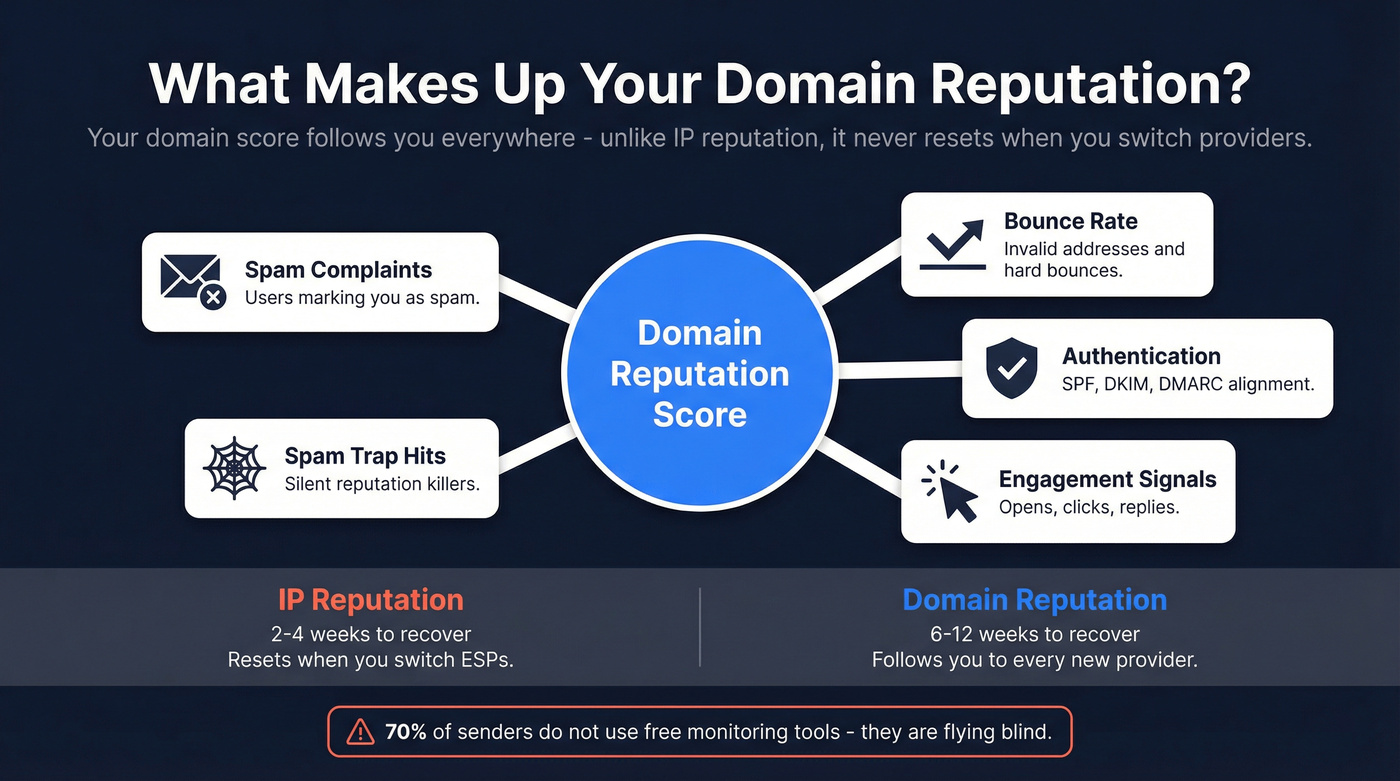
The critical concept: domain reputation is portable. Unlike IP reputation, which resets when you switch ESPs or move to a new IP, your domain reputation follows you everywhere. Switch from Mailchimp to Klaviyo? Your domain's history comes along for the ride. That's what makes it both powerful and dangerous.
IP reputation can bounce back in roughly 2-4 weeks of clean sending. Domain reputation takes 6-12 weeks.
And here's a stat that should concern you: 70% of senders don't use free monitoring tools like Google Postmaster Tools at all. They're flying blind.
Why Reputation Matters More Than Ever
The numbers tell the story. Validity's deliverability benchmarks show average email placement sitting at 83.5% inbox, 6.7% spam, and 9.8% missing entirely. That means 1 in 6 legitimate marketing emails never reaches the inbox - and the trend line is heading the wrong direction, down from around 87% in early 2024.
Mailbox providers are shifting more weight from IP reputation to domain reputation. IP addresses are cheap and disposable, but domains carry history. The practical consequence: domain reputation mistakes are harder to undo than they used to be.
Here's our take: if your deals average under $10k, you probably can't afford to ignore domain reputation - but you also can't afford the enterprise monitoring tools most guides recommend. The free tools covered below are genuinely sufficient for most teams. You don't need a $500/month deliverability platform. You need discipline.
Let's make this concrete. Say you buy a list, send 50,000 emails, and hit a 12% bounce rate with a handful of spam trap hits. Your marketing domain's reputation tanks. Now your transactional emails - password resets, order confirmations, invoices - start landing in spam too, because they share the same domain.
How to Check Email Domain Reputation
Google Postmaster Tools (Gmail)
Google Postmaster Tools is the most important free reputation tool available. If you're only going to run one domain reputation check, make it this one.
What trips people up: Google retired the old Postmaster Tools (V1) interface in Oct 2025, and the "IP Reputation" and "Domain Reputation" dashboards disappeared in that transition. GPT V2 centers on two things. First, the Compliance Status dashboard, which shows pass/fail checks on SPF, DKIM, DMARC alignment, PTR/rDNS, TLS, and one-click unsubscribe. Second, the Spam Rate dashboard, which is now your primary behavioral metric.
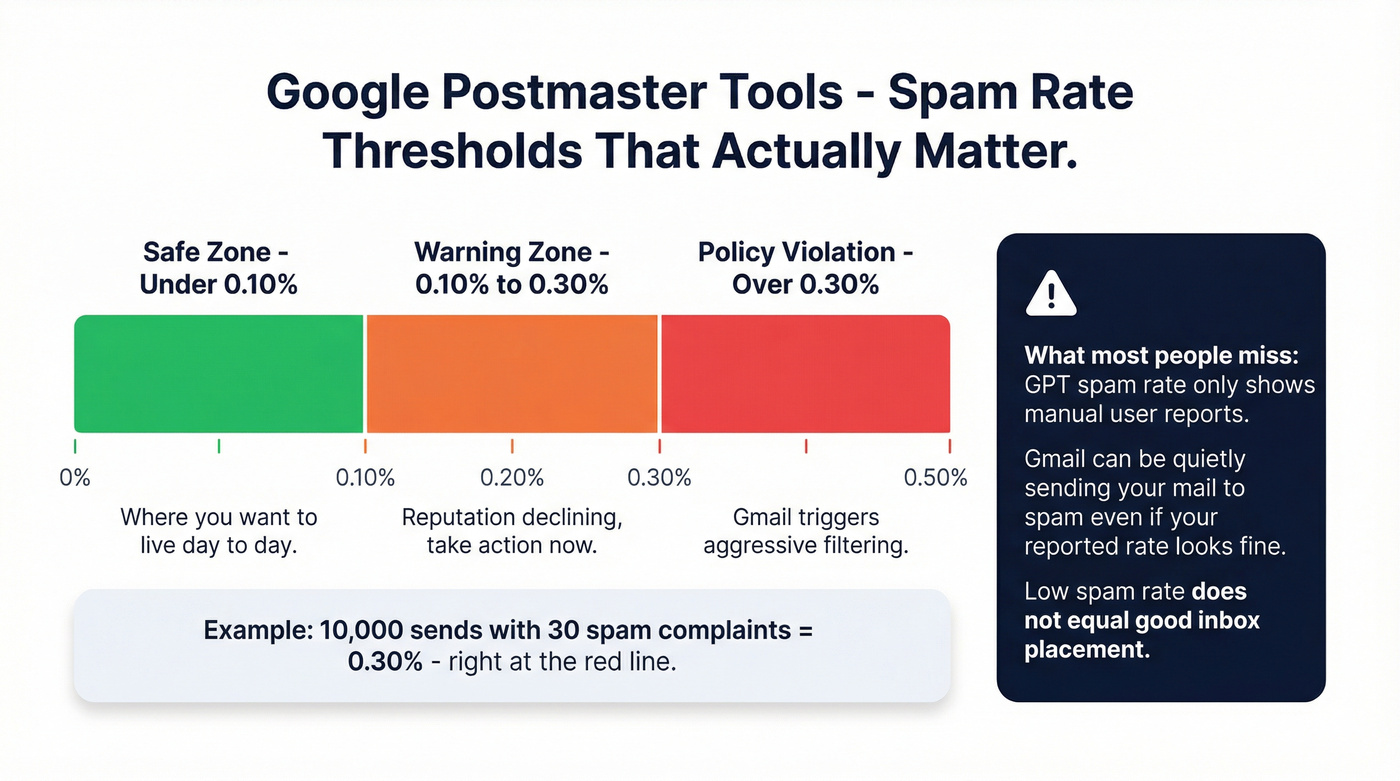
The spam rate thresholds are concrete and enforced. Google recommends staying below 0.10%. Policy violation kicks in at > 0.30%. The math is simple: 10,000 sends with 30 spam complaints puts you right at that 0.30% line.
Here's what most people miss, though. GPT's spam rate only reflects manual user reports - messages delivered to the inbox that users then mark as spam. It doesn't show automatic spam filtering. You can have a 0.05% spam rate in Postmaster Tools while Gmail is quietly routing a big chunk of your mail to the spam folder. Low GPT spam rate doesn't equal good inbox placement. It just means the people who did see your email didn't complain about it.
Microsoft SNDS (Outlook/Hotmail)
Microsoft makes reputation monitoring harder than Google does. SNDS (Smart Network Data Services) is free, but it's fundamentally an IP reputation tool, not a domain reputation tool. And SNDS data doesn't include Microsoft 365 (Exchange Online) enterprise traffic.
For B2B senders, that's a massive blind spot.
Setup requires a Microsoft account, your IPv4 sending IP (or range), and access to the WHOIS-listed email for that IP for verification. If you send fewer than 100 messages per day, you won't see any data - SNDS has a minimum volume threshold. What it does show is useful: IP activity, volume, spam complaints, spam trap hits, and RCPT vs DATA command counts. The gap between RCPT and DATA can indicate rejections before delivery - if RCPT shows 1,000 and DATA shows 950, you've got 50 messages rejected at the gate.
Starting November 2025, Microsoft added authentication requirements for SNDS access, JMRP reports are being standardized to ARF format, and automated report links now expire after 30 days. It's getting more locked down, not less.
Blacklist and Aggregate Checkers
No single blacklist checker covers everything. Here's what's worth your time:
| Tool | What It Checks | Coverage | Free/Paid | Best For |
|---|---|---|---|---|
| Google Postmaster | Domain + spam rate | Gmail only | Free | Primary monitoring |
| Microsoft SNDS | IP reputation | Outlook/Hotmail (consumer) | Free | Outlook IP signals |
| MxToolbox | 100+ blacklists | Cross-provider | Free + paid (~$100+/mo) | Blacklist scanning |
| Spamhaus | Reputation + blocklists | Cross-provider | Free lookup | Blocklist authority |
| SenderScore | Aggregate 0-100 | Cross-provider | Free | Quick health check |
| Talos Intelligence | IP + domain | Cross-provider | Free | Cisco ecosystem |
| Barracuda | Reputation signals | Cross-provider | Free lookup | Quick check |
| EasyDMARC | IP + domain + blacklists | Cross-provider | Free (no account needed) | Fast blacklist visibility |
MxToolbox is the Swiss Army knife - blacklist checks across 100+ lists, with paid monitoring if you want alerts. Spamhaus is the blocklist authority that mailbox providers actually reference. SenderScore gives you a quick aggregate 0-100 number. Use at least two of these alongside Google Postmaster Tools. Several let you run a check without creating an account, so there's no excuse to skip this step.

That 12% bounce rate scenario above? It starts with bad data. Prospeo's 5-step email verification delivers 98% accuracy - teams using it report bounce rates dropping from 35%+ to under 4%. Stop guessing which contacts are real.
Fix your domain reputation at the source: start with verified emails.
What's a Good Score?
Here's a benchmark table with green/yellow/red thresholds across the metrics that actually matter:
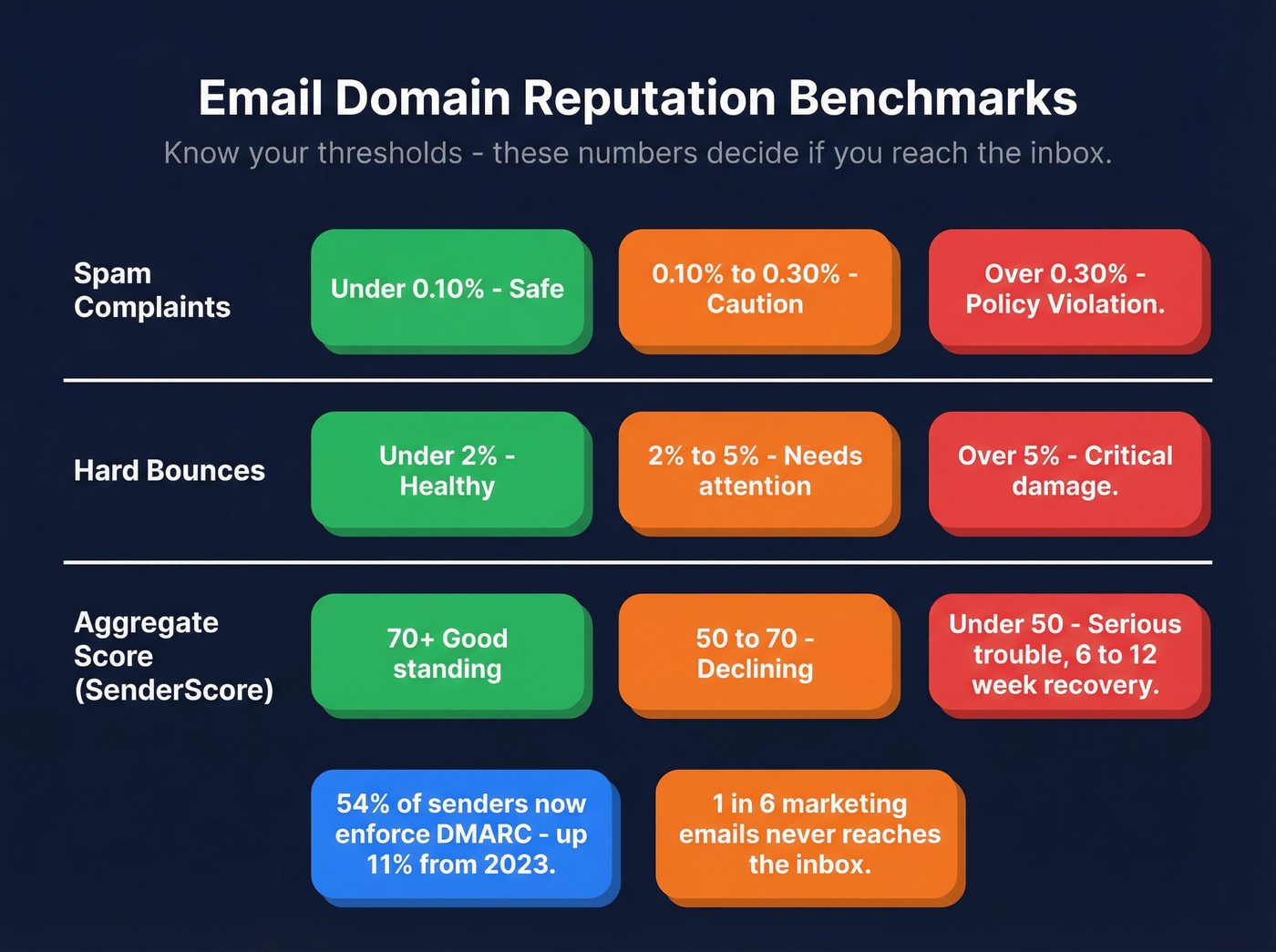
| Metric | Green | Yellow | Red |
|---|---|---|---|
| Spam complaints | <0.10% | 0.10-0.30% | >0.30% |
| Hard bounces | <2% | 2-5% | >5% |
| Domain reputation (aggregate) | 70+ | 50-70 | <50 |
The 0.30% spam complaint threshold isn't arbitrary - Gmail treats it as a policy violation, and Yahoo uses ~0.30% as a practical red line. Cross it and you're not just risking lower placement, you're triggering aggressive filtering. The 0.10% threshold is where you want to live day-to-day.
Keep your aggregate score above 70 in tools like SenderScore. Below 50 and you're in serious trouble - recovery at that point takes the full 6-12 weeks of disciplined sending.
One encouraging trend: DMARC adoption has hit 54%, up 11% from 2023. Authentication is becoming table stakes, not a differentiator. If you haven't enforced DMARC yet, you're behind the majority of senders.
What Damages Domain Reputation
Seven fastest ways to tank your sending reputation:
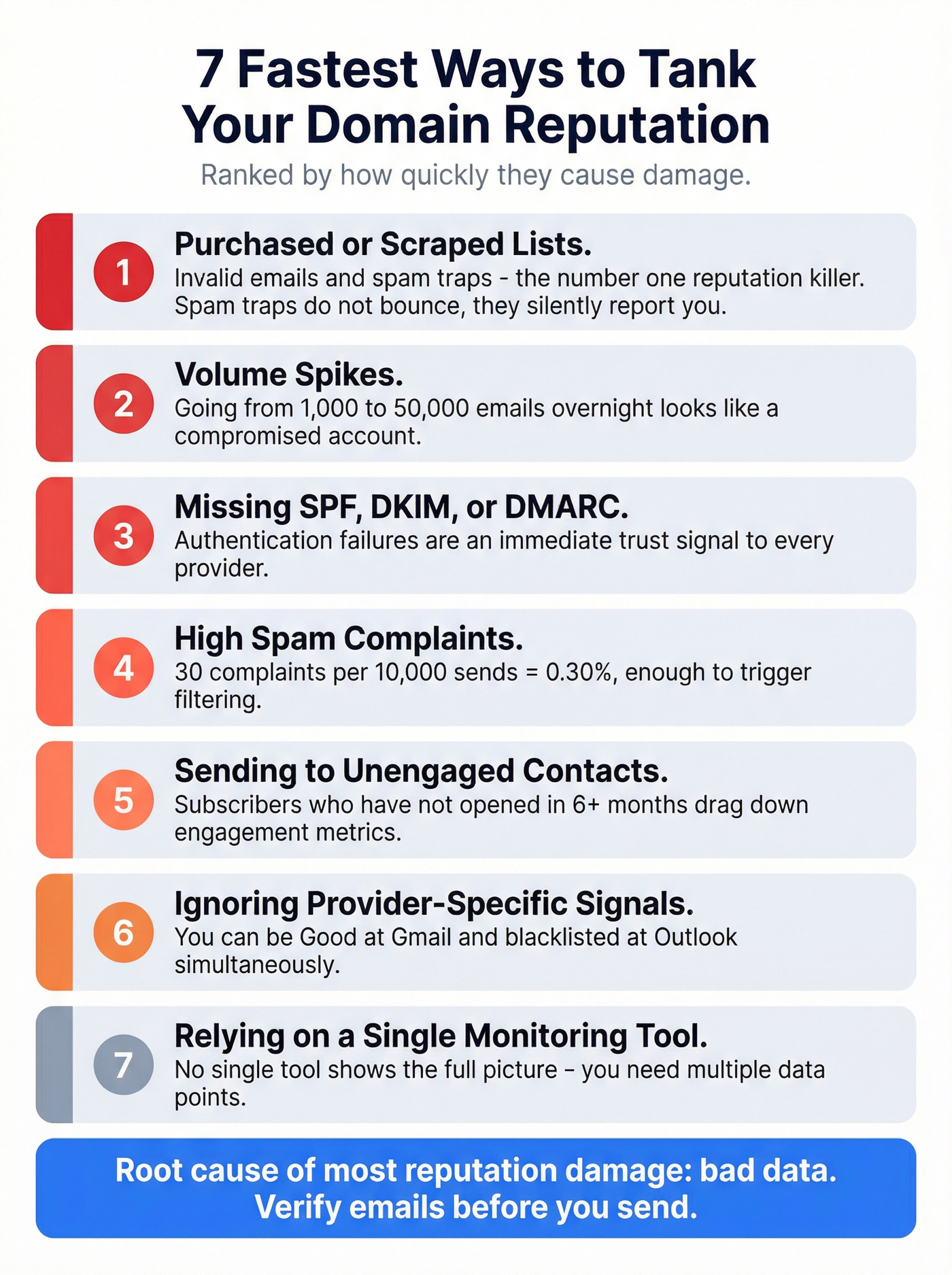
Purchased or scraped lists with invalid emails and spam traps. This is the #1 reputation killer. Spam traps don't bounce - they silently report you.
Volume spikes. Going from 1,000 emails/day to 50,000 overnight looks exactly like a compromised account to mailbox providers.
Missing or misconfigured SPF/DKIM/DMARC. Authentication failures are an immediate trust signal. No authentication, no inbox. (If you need a walkthrough, use this SPF/DKIM/DMARC setup guide.)
High spam complaints. 10,000 sends with 30 spam complaints = 0.30% - enough to trigger filtering at Gmail and a red line at other major providers.
Sending to unengaged contacts. Subscribers who haven't opened in 6+ months drag down your engagement metrics, which providers use as a ranking signal. (Use a re-engagement pass before you keep mailing them.)
Ignoring provider-specific signals. You can be "Good" at Gmail and still have serious issues elsewhere. Checking only one provider gives you a false sense of security.
Relying on a single monitoring tool. Google Postmaster Tools doesn't show automatic filtering. SNDS doesn't cover Microsoft 365 enterprise traffic. You need multiple data points. (If you’re troubleshooting a block, start with a blacklist alert workflow.)
This is why email verification matters before you hit send. Bad data is the root cause of most reputation damage we see across the teams we work with, and tools like Prospeo's email finder catch invalid addresses, spam traps, and catch-all domains through a 5-step verification process before a single email leaves your server.
How to Fix Damaged Reputation
If your reputation is already damaged, here's the recovery sequence.
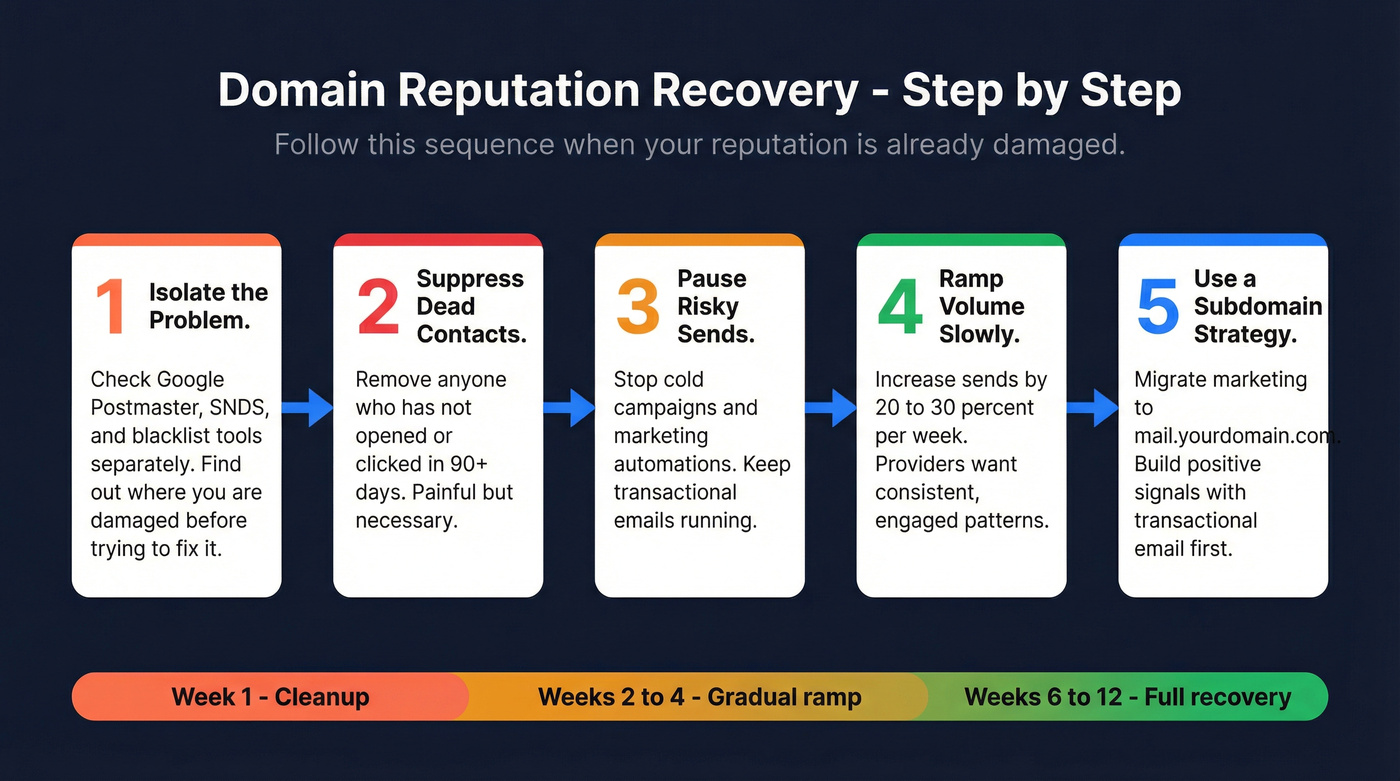
Step 1: Isolate the problem provider. Check Google Postmaster Tools, SNDS, and blacklist tools separately. You need to know where you're damaged before you can fix it. The problem might be Gmail-specific, Outlook-specific, or a blacklist cascading everywhere.
Step 2: Suppress disengaged audiences. Remove anyone who hasn't opened or clicked in 90+ days. This is painful if it's a big chunk of your list, but sending to dead addresses is what got you here. (If you need copy, use these re-engagement email subject lines.)
Step 3: Pause risky automations and cold campaigns. Every email you send while your reputation is damaged makes it worse. Keep transactional emails running but pull back on marketing and outbound. (If you're running outbound, align to a deliverability-first outbound email campaign structure.)
Step 4: Gradually ramp volume. As engagement metrics improve, slowly increase send volume - 20-30% increases per week, not overnight jumps. Providers want to see consistent, engaged sending patterns.
Step 5: Use a subdomain strategy. For severe cases, migrate marketing to a new subdomain (e.g., mail.yourdomain.com) while protecting your root domain for transactional email. Start by sending only transactional emails from the new subdomain to build positive engagement signals, then gradually reintroduce marketing sends. This gives marketing a fresh start without risking password resets and invoices.
Timeline expectations: 6-12 weeks for domain reputation recovery, 2-4 weeks for IP reputation. If you're sending more than 1,000 emails/day, a dedicated IP makes sense - otherwise, shared IP pools introduce variables you can't control. (Here’s a deeper breakdown of dedicated IP vs shared IP tradeoffs.)
Protect Your Reputation Proactively
Prevention is cheaper than recovery. And faster.
Authentication. Enforce SPF, DKIM, and DMARC with a policy of at least p=quarantine (ideally p=reject). This is non-negotiable in 2026. AWS puts authentication as pillar one of its email reputation framework for a reason.
List hygiene cadence. Monthly verification for high-volume senders. Quarterly at minimum for everyone else. Email addresses decay at roughly 2-3% per month through job changes, company closures, and abandoned accounts. (If you’re evaluating vendors, start with these email ID validators.)
Monitoring schedule. Check Google Postmaster Tools and SNDS weekly if you send more than 10,000 emails/month. Biweekly for lower volumes. Set calendar reminders - 70% of senders never check at all. Add a monthly deep-dive with blacklist scanners and SenderScore to catch issues the primary tools miss. (Use an email deliverability checklist to standardize the routine.)
Subdomain separation. Run transactional and marketing email on different subdomains or IPs. When marketing experiments go wrong (and they will), your transactional delivery stays clean.
Verify before you send. Stack Optimize built their agency to $1M ARR while maintaining 94%+ deliverability, under 3% bounce rates, and zero domain flags across all clients - largely by verifying every address before sending. We've seen this pattern repeat across our customer base: the teams that verify upfront don't end up reading articles about reputation recovery. (If you want the mechanics, see email verification for outreach.)

You don't need a $500/month deliverability platform - you need data that doesn't destroy your sender reputation in the first place. Prospeo verifies every email through catch-all handling, spam-trap removal, and honeypot filtering. At $0.01 per email, clean data costs less than one bounced campaign.
Spend less fixing reputation damage. Send to verified contacts from day one.
FAQ
How often should I check domain reputation?
Weekly if you send more than 10,000 emails per month, biweekly for lower volumes. Google Postmaster Tools and at least one blacklist checker (MxToolbox or Spamhaus) should be your baseline. Set a recurring calendar reminder - reputation problems compound fast when you're not watching.
Can I reset my domain reputation?
You can't wipe a domain's history clean. Recovery requires 6-12 weeks of disciplined sending: suppressing unengaged contacts, fixing authentication, and gradually ramping volume. For severe cases, migrating marketing to a new subdomain gives you a fresh start while protecting your root domain.
Does domain reputation affect transactional emails?
Yes - if marketing campaigns tank your domain reputation, password resets and order confirmations from the same domain land in spam too. Separating transactional and marketing onto different subdomains is insurance against marketing experiments going sideways.
What free tools can I use to check email domain reputation?
Google Postmaster Tools covers Gmail signals, Microsoft SNDS handles Outlook IP data, and MxToolbox or EasyDMARC scans 100+ blacklists - all free. SenderScore adds a quick aggregate 0-100 number. Use at least two together since no single tool covers every provider.
How does email verification prevent reputation damage?
Bad addresses cause hard bounces and hit spam traps - two of the fastest ways to destroy domain reputation. Verifying your list before sending catches invalid, disposable, and trap addresses before they do damage. Prevention takes minutes; recovery takes months.