Email Cadence Meaning: What It Is (and How to Set One That Works)
Most teams don't have a cadence. They've got a habit.
Email cadence meaning comes down to one thing: the intentional rhythm of your follow-ups - so you're not "just checking in" your way into the spam folder. What happens when your "reasonable" schedule quietly turns into five emails in six days? You don't just annoy people - you train mailbox providers to distrust you.
Cadence isn't a vibes-based decision anymore. It's a system you set, measure, and keep inside deliverability guardrails.
Email cadence meaning (simple definition + 3-part model)
Email cadence meaning is simple: the planned rhythm of your emails--when you send, how often you send, and in what order you send them.
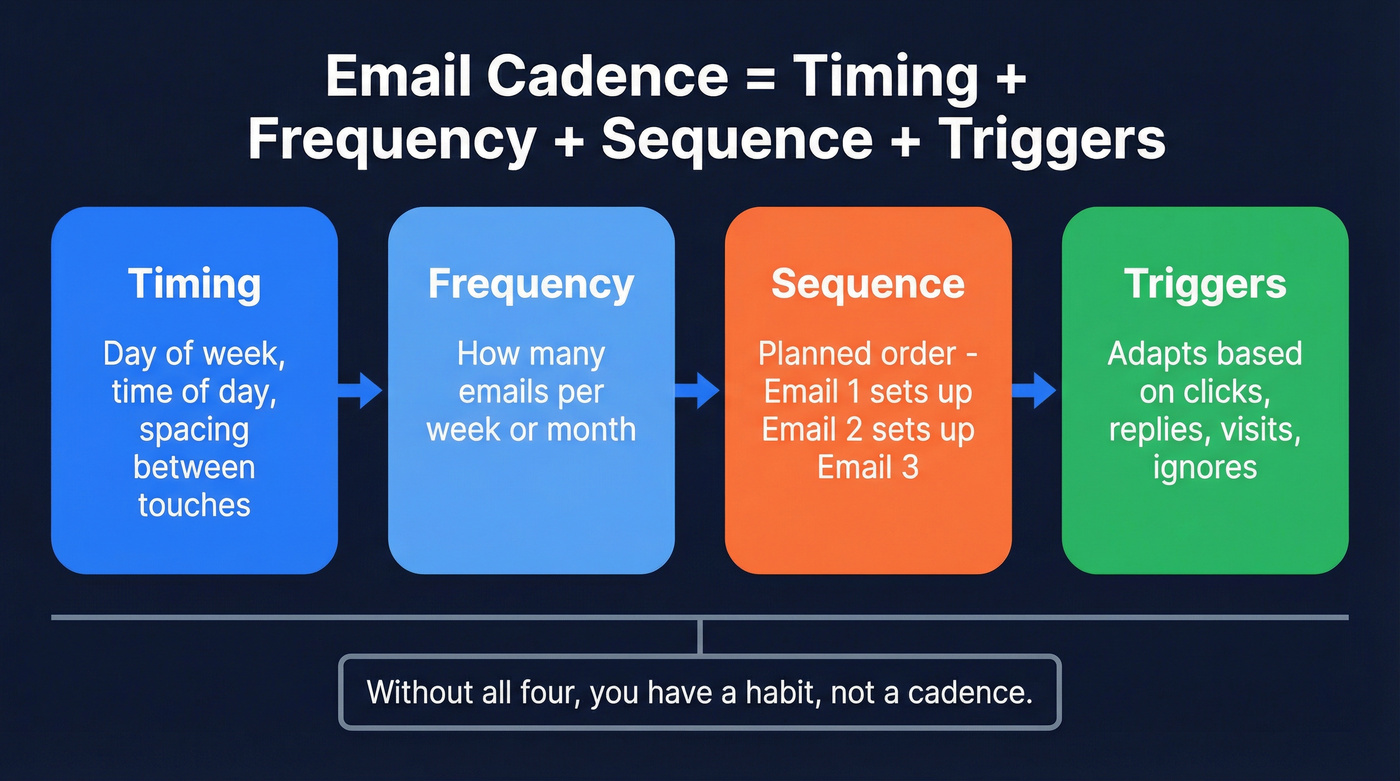
Here's the model I use because it forces clarity:
Email cadence = Timing + Frequency + Sequence (and in modern programs, you add Triggers so it adapts to behavior)
- Timing: day of week + time of day (and spacing between touches).
- Frequency: how many emails a person gets in a window (per week/month).
- Sequence: the planned order and relationship between messages (Email 1 sets up Email 2, which sets up Email 3).
- Triggers (the upgrade): rules that change the path based on behavior (clicked, replied, visited pricing, ignored, unsubscribed).
Cadence matters because it stops you from optimizing one thing (like "send more!") while breaking another (like reputation). I've watched teams crank frequency to hit pipeline targets, then spend the next quarter crawling back from junk-folder placement after a handful of segments got fatigued and started hammering "Report spam."
What you need (quick version)
If you only do three things, do these:
Define cadence as timing + frequency + sequence + triggers. Write it down like a recipe. If it's not written, it's not a cadence - it's improvisation.
Pick a starter cadence by lifecycle stage. New leads tolerate tighter spacing than long-term subscribers. Start with every 2-3 days (short burst), weekly, or monthly - then earn the right to send more.
Stay inside deliverability guardrails. Target spam complaints <0.1% and treat 0.3% as the ceiling. If you're a bulk sender, you also need authentication and one-click unsubscribe.
Do this:
- Use clicks, replies, conversions, unsubscribes, and complaints as your decision metrics.
- Segment by intent and recency (new, warm, dormant) before you touch frequency.
Avoid this:
- Optimizing to opens. Opens are a weak KPI in 2026 because Apple Mail Privacy Protection and other privacy features distort them.
- "Blasting everyone" because your ESP makes it easy.
Email cadence vs frequency vs sequence (and drip vs sales cadence)
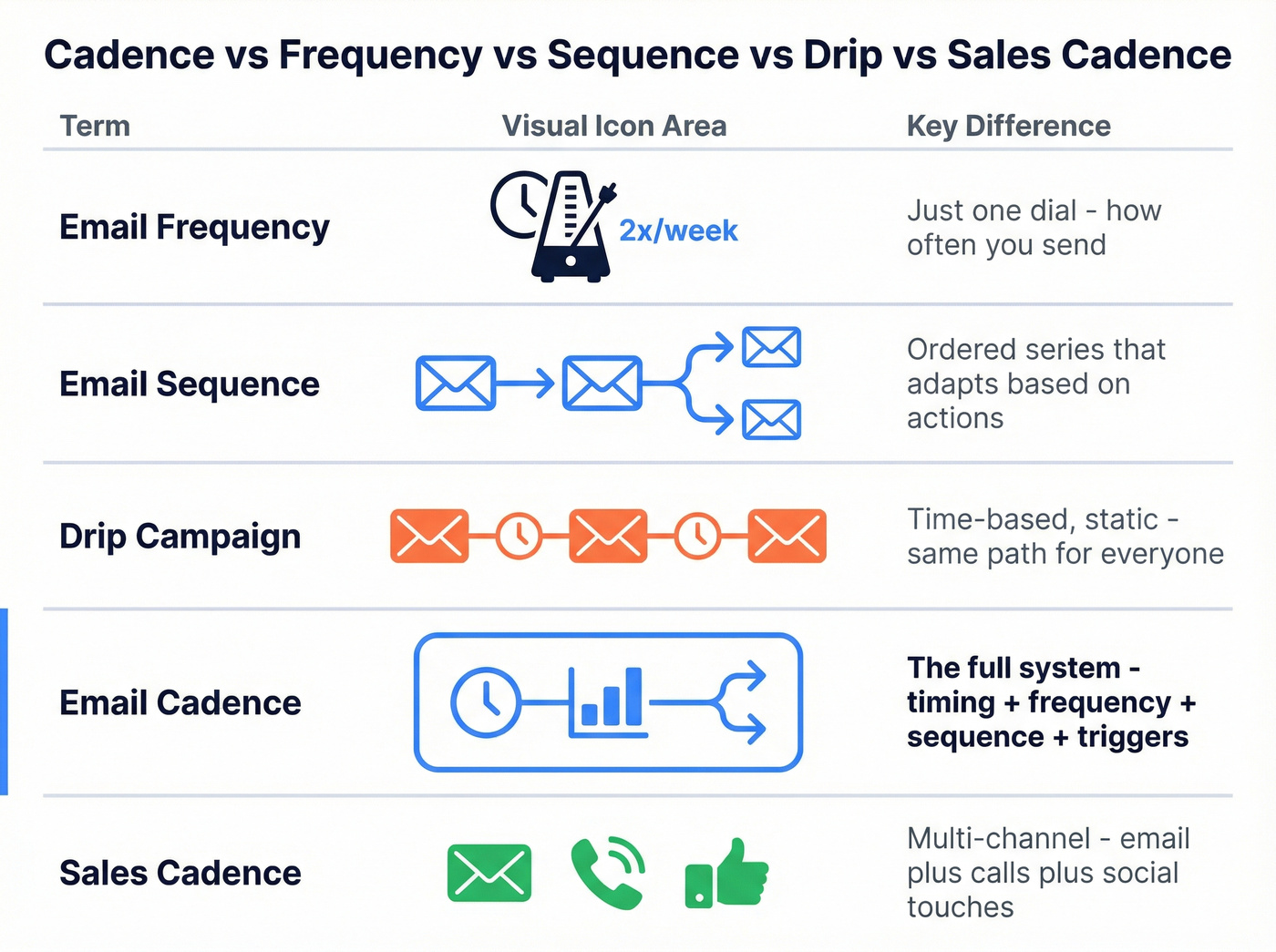
Teams waste time arguing definitions and still ship messy programs. Use this table to keep everyone aligned:
| Term | Meaning | What changes it |
|---|---|---|
| Email frequency | How often you send (e.g., 2 emails/week) | Volume rules + fatigue |
| Email sequence | Ordered series of emails | Behavior triggers (click/reply/visit) |
| Drip campaign | Time-based, static series | Time only (same path for everyone) |
| Email cadence | The full plan: timing + frequency + sequence (+ triggers) | Strategy + deliverability + behavior |
| Sales cadence | Multi-channel plan (email + calls + social touches) to move a deal | Channel mix + rep workflow |
A few crisp takeaways:
- Frequency is one dial. Cadence is the system.
- Drip vs sequence: drip is "everyone gets the same schedule," sequence adapts based on actions.
- Sales cadence is broader than email. If someone says "8 touches," that might be 3-4 emails plus calls and social touches.

Tighter cadences punish bad data. Every bounce and spam trap complaint chips away at the reputation you need to land in the inbox. Prospeo's 98% email accuracy and 7-day data refresh cycle mean you're never sending into dead inboxes - so you can run the cadence you want without triggering deliverability alarms.
Fix your list before you speed up your cadence.
Cadence guardrails in 2026 (deliverability policy sets the ceiling)
Look, you can't "creativity" your way around mailbox-provider rules. Cadence lives inside deliverability constraints, and those constraints got sharper.
Use this / skip this (cadence edition)
Use a tighter follow-up rhythm if:
- You've got explicit opt-in or clear recent intent (trial, demo request, webinar).
- Complaints are consistently <0.1% and unsubscribes are stable.
- Your list is clean and you're not spiking bounces.
Skip tight cadences if:
- You're sending cold to broad lists and hoping segmentation happens later.
- You're already flirting with 0.3% complaint rates.
- You're a high-volume sender without proper authentication and unsubscribe plumbing.
Gmail + Yahoo: bulk sender rules that directly cap cadence
If you send more than 5,000 emails/day to Gmail and Yahoo, you're a bulk sender. At that point, cadence isn't just "what converts"--it's "what keeps you out of spam."
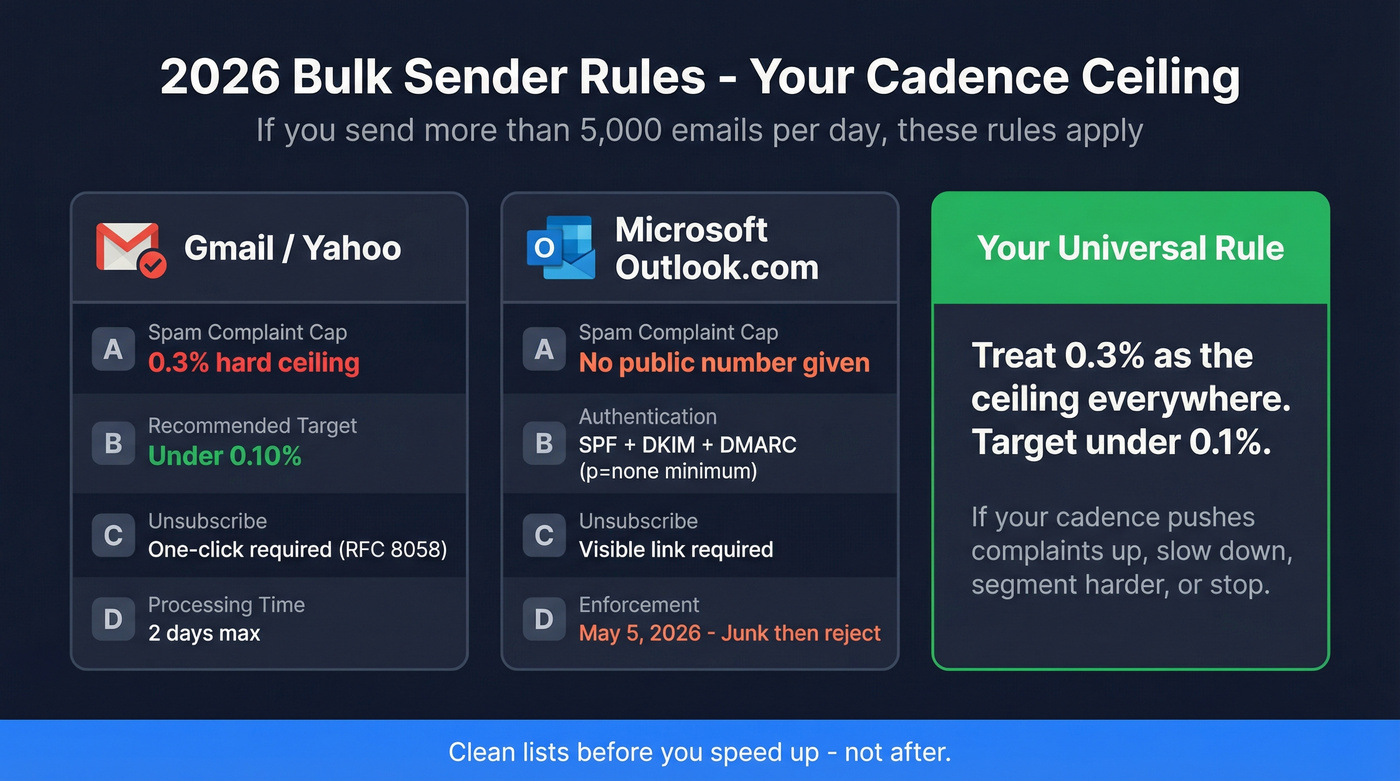
Per Gmail and Yahoo bulk sender requirements summarized by Braze, the practical guardrails are:
- Spam complaint cap: 0.3% (hard ceiling)
- Recommended target: <0.10%
- One-click unsubscribe required via List-Unsubscribe + RFC 8058
- Unsubscribes must be processed within 2 days
Rule: if your cadence pushes complaints up, you don't debate it. You slow down, segment harder, or stop.
Microsoft Outlook.com (consumer): May 2026 high-volume requirements (still relevant in 2026)
Microsoft's consumer domains (outlook.com, hotmail.com, live.com) also tightened up. For senders doing >5,000 emails/day, Microsoft's official policy requires:
- SPF pass
- DKIM pass
- DMARC with at least p=none, plus alignment with SPF or DKIM
Enforcement began May 5, 2026: non-compliant mail gets routed to Junk first, with rejection as the next step.
Mailgun also notes an important nuance: Microsoft doesn't explicitly require RFC 8058 one-click unsubscribe the way Gmail and Yahoo do, but it does expect a visible, functional unsubscribe link. That's a wording difference - not a reason to skip one-click unsubscribe.
Here's the cheat sheet:
| Provider set | Bulk threshold | Complaint rule | Unsubscribe rule |
|---|---|---|---|
| Gmail/Yahoo | >5,000/day | 0.3% cap | One-click + 2 days |
| Outlook.com | >5,000/day | No # given | Link required |
One frustrating reality: Microsoft doesn't give you a neat numeric complaint threshold, but reputation math still applies. If Gmail's ceiling is 0.3%, treat that as your universal ceiling everywhere.
Practitioner reality (2026): operators keep saying the same two things in community threads: (1) cap per-inbox volume instead of "send more to everyone," and (2) clean lists before you speed up. I've seen the before/after in the wild: a team went from a messy, scraped list to a verified, tightly filtered segment, and their bounce rate dropped from 25% to 2.4% while replies climbed from 1.2% to 6.3%--no magic copy, just better inputs and less brute force.
One practical note from the RevOps side: cadence isn't safe without list quality. If you're feeding bad addresses into a faster cadence, bounces and complaints force you to slow down anyway. Tools like Prospeo (tagline: "The B2B data platform built for accuracy") exist for exactly this moment: you can verify in real time at 98% email accuracy, work off a 7-day refresh cycle (the industry average is 6 weeks), and stop burning sends on dead inboxes before you tighten spacing.

How often should you send? (cadence in practice)
Most cadence advice online is just someone's preference dressed up as a "best practice." The rare exception is large-scale ESP data.

MailerLite published a 2025 dataset across 42,000 accounts, 1.4M campaigns, and 12B emails sent in 2025. Their open-rate averages by frequency are surprisingly stable until you hit daily:
- Daily: 30.04% open rate
- Weekly: 33.22%
- Less than 1/month: 35.11%
My take: daily is the cliff for most lists. Not because daily is always wrong, but because daily exposes every weakness you have - weak targeting, weak value, weak list hygiene, weak preference controls.
Practical ranges that work in the real world:
- Cold outbound (email-only): 4-6 emails over ~14-21 days, then stop or switch to a slower nurture.
- Warm inbound (requested something): 3-5 emails over 7-10 days, then weekly.
- Newsletter / content: weekly or 2x/week if you've earned it.
- Product updates: monthly (or quarterly for low-change products).
Hot take: if your deal size is small and your sales cycle is short, you don't need "8 touches in 10 days." You need one great email, one great follow-up, and the discipline to stop when the signal is dead.
Timing: best day/time to send (MailerLite dataset + 2026 guidance)
Timing is the most over-argued lever in email. It matters, but it's not magic.
MailerLite analyzed 2,138,817 campaigns across the US/UK/AU/CA sent Dec 2026-Nov 2026. Their headline result is simple:
- Best day: Friday (49.72% opens, 8.09% clicks)
- Opens peak: 8-11 AM local time (weekdays)
- Clicks peak: 8-9 PM
- Opens vs clicks peak at different times
MailerLite also notes a Friday 6 PM anomaly where opens and clicks align - worth testing for consumer-heavy lists.
Apply it like this:
- If it's newsletter/content, test Friday morning vs Tuesday morning.
- If it's webinar/event, schedule for morning opens, then add a same-day evening reminder for clicks.
- If it's B2B outbound, send in the morning, but put follow-ups at different times to avoid looking automated.
If you want to go deeper on timing, send-time optimization can help you test without guessing.
Starter cadences (copy/paste templates for marketing + sales)
Cadences should change by lifecycle stage. A clean default by stage:

- Awareness: every 2-3 days (short series)
- Consideration: weekly
- Retention: monthly or quarterly
And for sales outreach, keep the "touchpoint" idea straight: a real sales cadence is multi-channel, so email count should usually be lower than the total touches.
Marketing cadence template: Awareness -> Consideration -> Retention
Use this when you're running lifecycle marketing and want a clean default.
| Lifecycle stage | Cadence | Goal |
|---|---|---|
| Awareness | Every 2-3 days | Teach + qualify |
| Consideration | Weekly | Proof + cases |
| Retention | Monthly/quarterly | Value + updates |
Day-by-day example (Awareness welcome series, 10 days):
| Day | Trigger | |
|---|---|---|
| 0 | Welcome + "what to expect" | Signup |
| 2 | Quick win / checklist | No unsubscribe |
| 5 | Social proof + case | If clicked Email 2, show deeper case |
| 10 | "Pick your track" | Preference link |
Hot take: the "pick your track" email is underrated. It's where you segment people into the cadence they actually want.
Sales cadence template: warm inbound (3-5 emails)
This is for demo requests, inbound content downloads, partner intros - anything where the prospect's already leaning in. It's also a solid default when intent is high and you can justify tighter spacing.
| Day | Email theme | Notes |
|---|---|---|
| 0 | Fast response + confirm goal | Keep it short |
| 2 | Proof + relevant customer | 1 case, 1 metric |
| 5 | Objection handling | Pricing, security, timeline |
| 8 | "Close the loop" | Offer 2 timeslots |
If you're using automation, keep the "Day 0" email human. I've watched teams lose deals because the first response felt templated.
Sales cadence template: cold outbound (email-only, 5-6 emails)
If you're doing email-only, here's a cadence that doesn't torch your domain. Think of this as a prospecting sequence you can run consistently, then tune by segment and deliverability signals.
| Day | Email theme | Trigger |
|---|---|---|
| 1 | Relevance hook | Personalize 1 line |
| 3 | Value prop + proof | Add 1 customer |
| 6 | Problem angle | New framing |
| 10 | Resource | Short, useful |
| 14 | Breakup | Polite exit |
| 30 | Re-engagement | Only if engaged |
Rule: if there's no reply after Email 4, stop sending daily or near-daily. Either switch to weekly nurture or end the sequence. Continuing to "check in" every 48 hours is how you rack up complaints from people who were never a fit.
If you're building from scratch, a B2B cold email sequence gives you a clean baseline to adapt.
Bonus scenario: post-event follow-up cadence (webinar / trade show)
This is the scenario most teams botch: they wait a week, then send one giant "thanks for attending" blast. Don't.
Post-event intent decays fast, so you want a short burst that moves from value -> proof -> meeting ask - a follow-up rhythm that respects attention while cashing in on recency.
| Day | Goal | |
|---|---|---|
| 0 (same day) | Slides + 1 key takeaway | Deliver value immediately |
| 1 | "Most-asked question" + short answer | Keep engagement high |
| 3 | Relevant case study (same use case) | Add proof |
| 7 | Direct meeting ask (2 options) | Convert intent to a call |
If they click the case study (Day 3) but don't book, send one extra email on Day 10: "Want the template we used?" That's a clean excuse to re-open the conversation without sounding desperate.
For event-specific follow-ups, this pairs well with a dedicated webinar lead follow-up playbook.
What "good" looks like: cadence health metrics + red lines
Most teams only notice cadence problems after deliverability drops. You want earlier warning signals.
Here are the thresholds I use operationally:
| Metric | Good | Red line |
|---|---|---|
| Spam complaints | <0.10% | 0.30% |
| Unsub per send | <0.3% | 0.5%+ |
| Hard bounce rate | <1% | 2%+ |
| Click/reply trend | Flat/up | Down 2 sends |
Benchmarks to calibrate expectations:
- Mailchimp's benchmarks page (last updated Dec 2026) shows 0.22% unsubscribe rate across all users.
- Klaviyo's automated flows average 0.81% unsubscribe with 48.57% opens (flows run hotter because they're triggered and more relevant).
Interpretation notes:
- If unsubscribes jump to ~0.3-0.5% per send, don't "write better subject lines." Reduce frequency or segment harder.
- If complaints rise while unsubscribes don't, your targeting is off - people are annoyed enough to hit spam instead of unsubscribe.
- If clicks or replies fall across two consecutive sends, you're fatiguing the segment. Slow down before mailbox providers slow you down.
If you're hitting bounce-related issues, diagnosing errors like 550 Recipient Rejected can save you weeks.
How to test cadence properly (without fooling yourself)
Cadence testing is where teams accidentally lie to themselves. The biggest trap is changing frequency and content at the same time, then declaring victory based on opens.
A clean experiment plan:
Pick one variable. Test frequency (weekly vs 2x/week) or spacing (2 days vs 4 days), not both.
Use a holdout group. Adobe Journey Optimizer documents a simple split: 45% / 45% / 10% holdout (holdout receives nothing from that campaign). That holdout is how you prove incremental lift instead of just shifting conversions earlier.
Run it long enough. Minimum 2-4 weeks. Cadence effects compound - especially unsubscribes and complaints.
Choose the right success metrics.
Prioritize: clicks, replies, booked meetings, purchases, pipeline created. Also track: unsubscribes and spam complaints. Treat opens as directional only.
- Normalize by recipient. Look at revenue (or meetings) per 1,000 recipients, not just totals. Higher frequency often "wins" on totals while losing on efficiency and list health.
I've run cadence tests where the higher-frequency variant won for 10 days, then got crushed by unsubscribes and inboxing in week three, and the team had to spend the next month rebuilding sender reputation and explaining to Sales why "more activity" produced less pipeline.
If you want a cleaner framework, use an A/B testing lead generation campaigns approach (same logic, better discipline).
Fixing cadence problems (too much / too little) + preference center tactic
When cadence goes wrong, it usually fails in one of two ways: you're sending too much and burning trust, or you're sending too little and getting forgotten.
Troubleshooting checklist
If you're sending too much:
- Cut frequency by 30-50% for the worst-performing segment first.
- Add a rule: if no click or reply in X days, move to a slower track.
- Stop emailing people who never engage. Braze's deliverability guidance uses a simple sunsetting rule: disengaged for 6 months -> sunset.
- Audit for common cadence mistakes like repeating the same "just checking in" message, stacking follow-ups too tightly, or failing to suppress recent unsubscribers and complainers across tools.
If you're sending too little:
- Add a short burst for new intent (welcome series, post-demo series).
- Use behavior triggers (clicked pricing, visited docs) to justify tighter spacing.
- Make sure your "value email" isn't just a product pitch.
Preference center pattern (the easiest win)
A good preference center gives people control instead of forcing them to unsubscribe. The most practical setup is four options:
- Daily
- Weekly
- Monthly
- Pause (30 or 60 days)
Digioh reports robust preference options can reduce unsubscribes by up to 30%.
One more lever that's unsexy but decisive: list hygiene. Before you scale volume or tighten spacing, verify and clean your contacts so you're not hammering dead inboxes. If you also need to keep CRM records current, data enrichment helps: https://prospeo.io/b2b-data-enrichment
Summary: the loop that makes cadence work
Email cadence meaning, in the real world, is "a written plan for timing, frequency, and sequence that adapts to behavior - without breaking deliverability."
Define it as timing + frequency + sequence + triggers, set guardrails (complaints under 0.1%, absolute ceiling 0.3%, and bulk-sender requirements handled), then test one variable at a time with a holdout. Let engagement decide who earns more emails - not your monthly send quota.
FAQ
What's the difference between email cadence and email frequency?
Email frequency is just the count (like "two emails per week"), while cadence is the full plan for timing, spacing, order, and triggers. For most teams, the practical rule is: set frequency limits per segment (for example, 1-2/week), then use triggers to speed up only for high-intent clicks and replies.
What is a good email cadence for cold outreach vs newsletters?
For cold outreach, a safe default is 4-6 emails over 14-21 days, then stop or move the contact to a slower nurture track. For newsletters, weekly is the most reliable baseline, and 2x/week can work if you've got consistent value; daily sending is where complaints usually spike unless your audience expects it.
How do Gmail/Yahoo and Outlook rules affect cadence?
If you send >5,000 emails/day to Gmail/Yahoo, you must keep spam complaints under 0.3% (target <0.1%), support one-click unsubscribe (RFC 8058), and process unsubscribes within 2 days. Outlook.com's high-volume policy also requires SPF, DKIM, and DMARC (p=none minimum), and non-compliance routes mail to Junk first.
That team that dropped bounces from 25% to 2.4%? They didn't rewrite their emails - they switched to verified contacts. Prospeo gives you 300M+ profiles with real-time verification at $0.01/email, so your cadence stays inside the 0.1% complaint guardrail instead of crashing into the 0.3% ceiling.
Stop burning sends on dead addresses. Start with data that's 7 days fresh.