

AI Email Send Time Optimization in 2026: A Practical Guide That Actually Works
Most "best time to send" advice falls apart the second you factor in privacy changes (Apple MPP), throttling, and list quality. AI email send time optimization (STO) still works in 2026, but only if you treat it like a constrained system: clean inputs, a KPI you can trust, strict guardrails, and a holdout you actually check.
Hot take: if you're selling low-ticket or your list hygiene's messy, STO isn't your first lever. Fix deliverability and targeting first.
STO's a multiplier, not a rescue mission.
What you need (quick version)
Checklist (do this before you touch STO):
- Pick the right KPI: clicks or conversions beat opens in 2026.
- Set a sane send window: start with 6-24 hours unless you've got a reason not to.
- Define quiet hours: don't let the model "discover" 2am unless you sell to night-shift workers.
- Make sure deliverability isn't broken: auth, unsub, complaint rate, bounce rate.
- Have enough volume: STO's weak on tiny lists; you need real sample sizes.
- Run a holdout: otherwise you'll "prove" whatever you wanted to believe.

Use STO when:
- You're sending non-urgent marketing messages (newsletters, promos, nurture).
- Your audience spans multiple time zones or mixed work patterns.
- You can tolerate "send within a window," not "send at exactly 9:00."
Skip STO when:
- The message is time-sensitive (password resets, event reminders, flash-sale deadlines).
- You're throttled so hard that "send time" won't equal "inbox time."
- Your list is dirty enough that bounces/complaints will swamp any timing lift.
Realistic expectation: the "best time to send" is a myth. STO's about marginal gains, not magic. Adobe's guidance puts average lift in the 2%-10% range in email click rate (and push open rate) across optimized messages.
One non-negotiable: clean list + verified emails before STO testing. I've watched teams burn weeks "testing STO" when the real issue was simple: 3-5% of the list was junk, and the rest was half stale, so the model learned more about bounce patterns than human behavior.

What send time optimization is (and what it isn't)
STO predicts when each recipient is most likely to engage, then schedules delivery inside a window you allow. True STO is per-recipient prediction, not "we'll send the whole segment on Tuesday at 10am."
What it isn't:
- It isn't a universal rule like "Tuesdays at 9am always win."
- It isn't a guarantee of inbox placement.
- It isn't a replacement for segmentation, offer quality, or deliverability basics.
Two details separate STO that works from STO that looks random.
1) Local time vs account time zone
Good STO operates in the recipient's local time (or a time-zone-aware approximation). If your platform's using the account time zone for scheduling, you'll see "weird" recommendations because you're optimizing New York behavior for London recipients. Before you blame the model, confirm how time zones are handled and whether daylight savings shifts are normalized.
2) Objective mismatch (opens vs clicks vs conversions)
STO optimizes what you tell it to optimize (or what the platform hard-codes). If the objective is opens, Apple Mail Privacy Protection can poison the feedback loop. If the objective is clicks, link protection and stripped parameters can blur attribution. If the objective is conversions, long lag windows slow learning.
Also: send time != delivery time. You can schedule a message for 9:07am and still have it land at 9:52am if you're throttled, deferred, or rate-limited. That gap is where a lot of "STO doesn't work" complaints come from.
Why "best time to send" advice fails in 2026
Stop doing this / do this instead.
Stop doing this
Stop optimizing for opens like they're ground truth. Apple MPP preloads pixels and fakes "opens." Litmus puts Apple at 49.29% of email opens, so a big chunk of "open-time" signal is machine-generated.
Stop copying generic benchmarks into your calendar. Higher Logic's association benchmark shows opens drifting down 38.18% -> 35.64% while clicks rose 2.71% -> 3.69%. Caveat: Higher Logic calculates click rate as a % of opens, so MPP-inflated opens can distort that metric. It's directionally useful, not gospel.
Stop believing one-off A/B results. Teams run a single "10am vs STO" test, see no lift, and declare STO dead. That's not analysis; it's impatience.
Do this instead
Use STO as a controlled system under constraints. Give it a window (6-24h is a great default), set quiet hours, and pick a KPI that survives privacy changes.
Treat opens as a diagnostic, not the goal. Opens still help you spot deliverability issues (like a sudden collapse), but they're a shaky target for optimization. If you need to sanity-check open data tooling, start with a best email open tracker comparison and then decide what to trust.
Measure lift on clicks or conversions with a holdout. If you refuse to run a holdout, you're not doing optimization. You're doing vibes.
The point: most "best time to send" advice assumes your tracking's honest and your delivery's instant. In 2026, neither's reliably true.


You just read it: STO learns from bounce patterns when your list is junk. Clean inputs are non-negotiable. Prospeo's 5-step verification delivers 98% email accuracy with a 7-day refresh cycle - so your STO model trains on real human behavior, not stale data.
Fix the inputs before you optimize the timing.
How AI email send time optimization actually works (not marketing)
Adobe Journey Optimizer's STO documentation is one of the few explanations that reads like engineering, not copywriting. It's a solid mental model even if you're using another platform: Adobe Journey Optimizer send-time optimization.
The core idea: predict engagement by hour-of-week
STO systems build a probability map: "For this person, what's the likelihood they'll engage if we send at hour X?"

Adobe predicts engagement for each hour of the week per user using three layers, combined with a Bayesian approach:
- Overall user behavior (global patterns)
- Lookalike users in the same time zone
- Individual behavior (your specific recipient)
Bayesian combination's the right approach because it handles sparse data. If a user has little history, the model leans on population + lookalikes. As history accumulates, it leans on the individual.
Training window and scoring cadence (where rollouts go wrong)
Adobe trains on the last 16 weeks of send, open, and click events across all journeys/actions (even if STO wasn't used).
- Early on, it's trained/scored weekly
- After you've got a full 16 weeks, it's retrained/rescored monthly
Practical implication: if you turn STO on tomorrow and expect a miracle next week, you're setting yourself up for disappointment. Adobe recommends running Email/Push actions for at least 30 days before using STO, and performance improves up to that 16-week mark.
Exploration vs exploitation (why it sometimes does dumb things)
Adobe runs 5% exploration / 95% optimized.
That means 5% of recipients get a random send time within your allowed window. It's not a bug. It's how the model keeps learning and avoids getting stuck in a local optimum.
Look, if you're staring at a small send and you see a few weird times, that's often exploration. Don't panic and shut it off.
The send window is the product
Adobe lets you set "Send within the next" from 1-168 hours.
- Too small (1-2 hours): the model's got no room to choose.
- Too big (5-7 days): you risk content staleness and operational weirdness.
Adobe's guidance: best results are 6-24 hours, with the strongest performance in 6-12 hours. That's the default we use for most marketing sends because it balances freedom with freshness.
Mini flowchart: what happens when you hit "send"
- You define constraints
- Window: e.g., "send within 12 hours"
- Objective: clicks or opens (platform-dependent)
- Quiet hours: if supported

- Model scores each recipient-hour
- Builds a per-recipient heat map (hour-of-week)
- Model picks the best hour inside your window
- 95% get the best predicted hour
- 5% get a random hour (exploration)
- Platform schedules + queues
- This is where throttling and provider limits shift actual delivery
- Outcomes feed back into training
- Weekly at first, then monthly once the 16-week window's full
One more operational gotcha: in Adobe, STO's only for built-in Email/Push actions in Journeys (not custom actions, not Campaigns), and it's enabled upon request. That's not "AI magic." That's product packaging.
STO readiness score (a rubric you can actually use)
If you want STO to produce measurable lift, you need baseline stability. Here's a blunt readiness score you can run in 10 minutes.
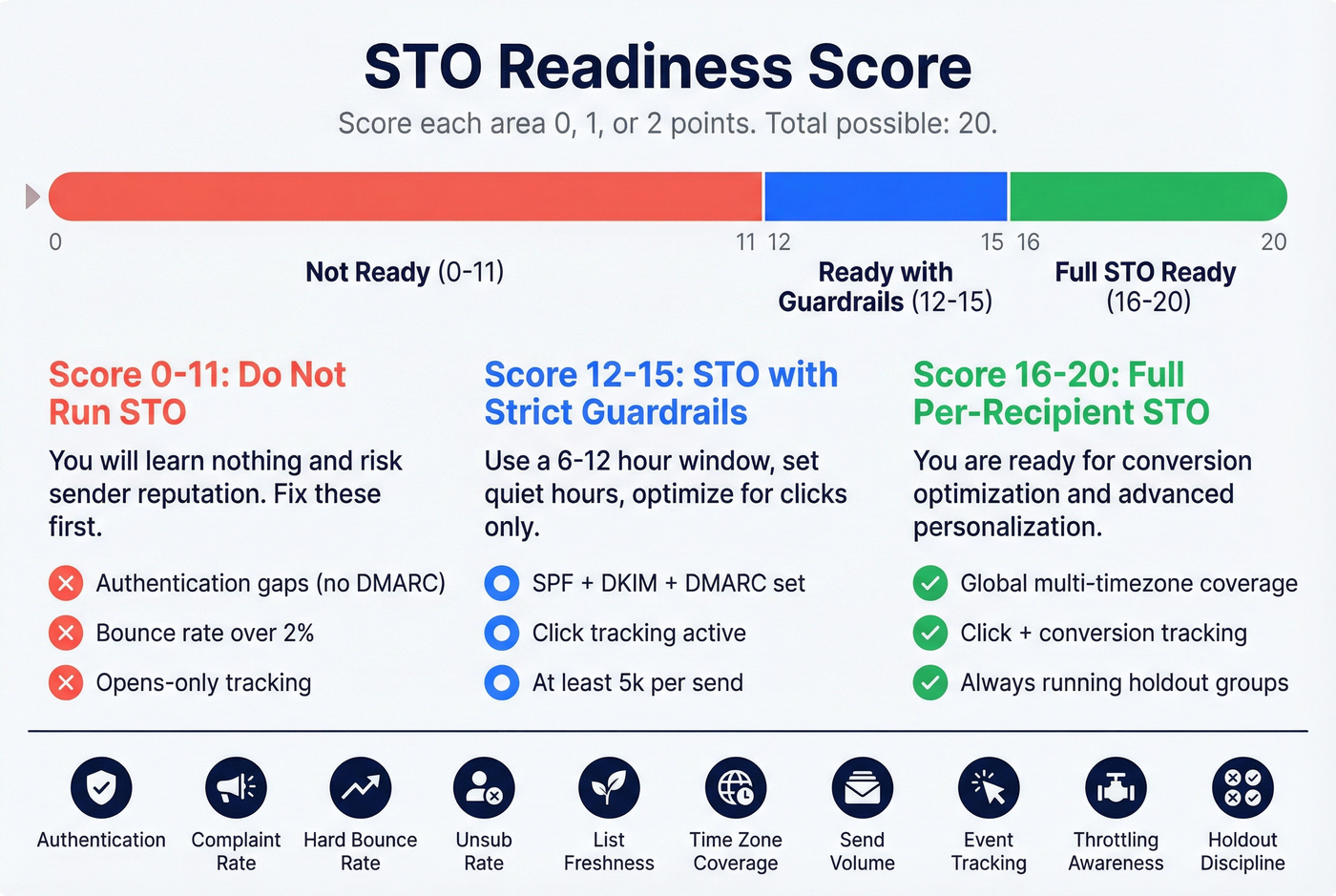
Score each line 0 / 1 / 2. Total possible: 20.
| Area | 0 points | 1 point | 2 points |
|---|---|---|---|
| Authentication | SPF/DKIM missing | SPF+DKIM ok | SPF+DKIM+DMARC set |
| Complaint rate | >0.1% | 0.05-0.1% | <0.05% |
| Hard bounce rate | >2% | 1-2% | <1% |
| Unsubscribe rate | >0.5% | 0.2-0.5% | <0.2% |
| List freshness | lots of old leads | mixed | actively refreshed |
| Time zone coverage | single TZ | 2-3 TZs | global/multi-TZ |
| Send volume | <5k per send | 5k-12k | 12k+ |
| Event tracking | opens only | clicks | clicks + conversions |
| Throttling awareness | none | basic | measured by provider |
| Holdout discipline | never | sometimes | always |
Interpretation:
- 0-11: Don't run STO tests. You'll learn nothing and risk reputation.
- 12-15: Run STO with strict guardrails (quiet hours + 6-12h window) and optimize for clicks.
- 16-20: You're ready for per-recipient STO and conversion optimization.
Signals and success metrics: what to optimize for now
If you optimize the wrong signal, STO will faithfully optimize you into nonsense.
Twilio's point is simple: open tracking's unreliable, and Link Tracking Protection can strip tracking parameters like UTMs, which breaks attribution. That's why "optimize for opens" is a trap, and why you need redundancy in measurement.
Braze's approach is closer to what you want in 2026: it uses multiple behavioral signals and explicitly excludes machine opens. Overview: Braze send time optimization.
Practical signal table (what helps vs what breaks)
| Signal | Why it helps | What breaks it |
|---|---|---|
| Sessions | Real behavior timing | Cross-device gaps |
| Push opens | Strong intent signal | Notification batching |
| Push influenced opens | Captures "near misses" | Attribution ambiguity |
| Email clicks | Best email signal | Link protection/UTM loss |
| Email opens (no bots) | Weak timing proxy | MPP/machine opens |
| Purchases/conversions | True north KPI | Long lag windows |
| Site visits post-send | Good proxy | Cookie loss/consent |
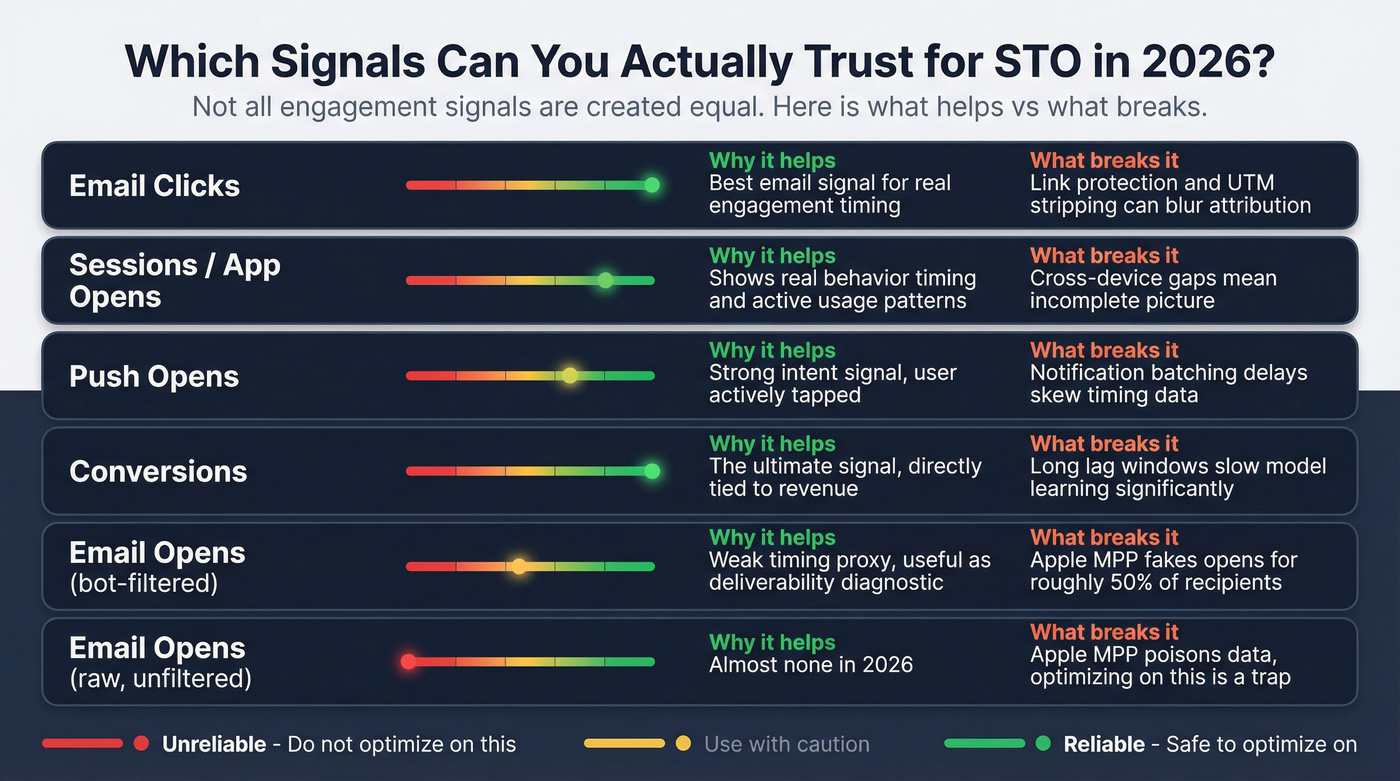
What to optimize for (ranking):
- Conversions (when attribution's reliable inside a defined window)
- Clicks (best balance of volume + signal quality)
- Downstream proxy (site visit, product action)
- Opens (diagnostic only)
How to instrument conversions when UTMs get stripped
If you've ever looked at analytics and thought, "Clicks went up but revenue didn't move," you might be blind, not wrong. Fix it with at least one of these, and ideally two, because attribution breaks in different ways on different devices and browsers:
- Server-side conversion events: send purchase/signup events from your backend to your ESP/CDP so attribution doesn't depend on browser parameters.
- First-party click IDs: append a first-party parameter (e.g.,
cid=) that your own server logs, then map it to conversions. - Coupon codes / offer IDs: not glamorous, but effective for promos. STO learns from clean "used code" outcomes.
- Landing-page pass-through: store campaign metadata in a first-party cookie or session storage on landing, then attach it to the conversion event.
- Short attribution windows: if you're optimizing send time, don't use a 30-day conversion window. Start with 1-5 days so the model learns faster and your test reads cleanly.
If you can't measure outcomes consistently, STO becomes a scheduling feature, not optimization.
Windows, guardrails, and "why is it sending at 11pm?"
A Mailchimp user summed up the universal STO anxiety: "It's recommending 11pm... can I trust this for B2B?"
You're right to question it. Unconstrained STO drifts into late-night sends because some recipients genuinely engage late, your window allows it, and the model's optimizing a metric that doesn't map to "professional hours." Evening peaks are real for plenty of audiences, especially mobile-heavy lists, parents catching up after bedtime, and global audiences where "late" in one region is "morning" in another.
The fix isn't arguing with the model. It's setting rules.
Quiet-hours policies that work (copy/paste)
B2B default (safe):
- Quiet hours: 8pm-6am local time
- Window: 6-12 hours
- Segments: split execs vs operators (they behave differently)
B2C default (pragmatic):
- Quiet hours: none (or only 2am-5am)
- Window: 12-24 hours
- Segments: split new vs returning customers
What the major platforms actually do
HubSpot (per-contact STO)
- Uses opens/clicks from the past 90 days
- Excludes bot-activity opens
- If there's not enough engagement data, it sends at the start of the range
- Range can be up to 168 hours (7 days)
- Requires Marketing Hub Enterprise
Mailchimp
- Optimizes within 24 hours of the selected send date
- Available on Standard+
- Not available for automations
- Requires >5 hours left in the day (account time zone)
- Requires the delivery date to be set at least 48 hours in advance
- Open-based optimization (simple, but more exposed to MPP noise)
Guardrails that prevent "11pm sends"
- Set quiet hours: block late-night hours for B2B.
- Use a tighter window: start with 6-24h; go tighter if content's perishable.
- Segment by persona: execs and frontline operators don't keep the same hours.
- Define "latest acceptable delivery": if the message's only relevant today, STO mustn't push it into tomorrow.
- Cold-start policy: decide what happens when there's no data (start-of-range's a good default).
I've seen STO look "wrong" because the account time zone was misconfigured. Check the boring settings first.
Deliverability prerequisites (timing won't fix a broken sender)
If you're a bulk sender (5,000+ emails/day), 2026 is the year you stop treating deliverability as optional. Enforcement's real across Microsoft/Google/Yahoo, and STO won't save you from authentication failures or high complaint rates.
Compliance checklist (non-negotiables)
- SPF + DKIM configured correctly
- DMARC at least p=none (minimum bar)
- One-click unsubscribe present
- Honor unsubscribes within 2 days
- Keep spam complaints <0.1% and never hit 0.3%
- Monitor deferrals (421) and hard bounces (550) as first-class metrics
If you need a practical setup walkthrough, use this SPF/DKIM/DMARC guide.
If/then guardrails (do this, not that)
- If complaints >0.1% -> stop STO tests; tighten targeting and reduce frequency.
- If hard bounces >2% -> stop adding new addresses; clean sources and verify before the next send.
- If deferrals spike -> throttle and warm; STO timing's irrelevant if providers are pushing you back.
This is where data quality becomes the hidden lever. Bad addresses drive bounces. Bad targeting drives complaints. Both swamp the 2%-10% lift STO can deliver.
In our experience, the fastest way to make STO "work" is boring: verify, dedupe, refresh, then test. Tools like Prospeo (The B2B data platform built for accuracy) are built for exactly that job: 300M+ professional profiles, 143M+ verified emails, 98% verified email accuracy, and a 7-day refresh cycle, plus spam-trap/honeypot filtering so your STO test measures timing instead of bounce noise.
If you're comparing vendors for this step, start with an email verifier website roundup.
Why STO timing doesn't always equal inbox time (throttling + scale limits)
Even with a perfect model, the platform still has to deliver mail through provider constraints.
Yahoo's Sender Hub guidance is blunt: they accept a limited number of messages per SMTP connection, and when you hit the limit, the server can terminate the connection without an error message. You can reopen connections immediately, and concurrency's allowed, but the exact limits aren't published.
What that means for STO:
- Your "scheduled hour" becomes a queued hour.
- Large sends smear across multiple hours due to throttling.
- Provider-side deferrals push delivery outside your intended window.
On the platform side, there are throughput guardrails too. Adobe Journey Optimizer B2B Edition documents send-rate limits of 5M/hour, 20M/day, 80M/week. Most teams won't hit those, but the point stands: STO's always subordinate to capacity and reputation controls.
Assume STO optimizes when you attempt delivery, not when the inbox receives it. That's still useful, you just have to test it honestly. If you're running into provider errors, troubleshoot bounces like 550 recipient rejected before you blame timing.
How to test send time optimization correctly (so you can trust the result)
Most STO tests fail because the test design's sloppy, not because the model's bad. The most common failure modes I've seen:
- "No lift" because the list was half stale and bounces ate the signal.
- "No lift" because the conversion window started at journey trigger time, not delivery time.
- "No lift" because the team compared one send to one send and called it science.
Klaviyo has a clean practitioner framework because it treats STO as experimentation, not mysticism. Their docs lay out a two-phase approach: exploratory randomization, then focused validation.
Step-by-step STO test framework (steal this)
Step 1: Lock the audience (reduce noise)
Freeze your audience definition for the test. No mid-test segmentation tweaks, no "we added a new source," no surprise suppression changes.
If your list quality's questionable, fix it before the test. A clean audience makes small lifts visible; a dirty audience hides everything. Use a documented email verification list SOP so the test stays stable.
Step 2: Choose the primary metric and conversion window
- Primary metric: conversion (best) or click-through rate (most practical)
- Conversion window: start with 1-5 days for most funnels (Klaviyo uses 5 days as a default)
Rule: if you can't defend your conversion window in one sentence, your results won't be defensible either.
Step 3: Exploratory phase (random-by-hour, local time)
Run a true exploration send:
- Spread sends across a 24-hour period
- Randomly assign recipients to an hour in local time
This builds an unbiased map of "hour vs outcome," instead of comparing two arbitrary times.
How many exploratory sends do you need? You don't need infinite tests. You need enough to stabilize the hour buckets.
| Audience size (per send) | Recommended exploratory sends |
|---|---|
| 12,000-17,999 | 4-5 |
| 18,000-23,999 | 3-4 |
| 24,000-47,999 | 2-3 |
| 48,000-71,999 | 1-2 |
| 72,000+ | 1 |
If you're under 12,000, skip exploratory-by-hour STO testing. Run a simpler test with 2-3 time blocks and focus on deliverability and list quality first, because noise will hide any timing lift.
Step 4: Focused phase (validate +-2 hours around the winner)
Once you find a top hour, validate it by testing:
- the best hour
- +-2 hours around it
Example: if 7am local wins, test 5am / 7am / 9am local.
This catches false peaks and confirms the "best hour" isn't just noise.
Step 5: Add a holdout (and align the monitoring window)
Holdout should receive the same content, same audience criteria, same frequency. Only timing differs.
Now the part that breaks most analyses: when does the conversion window start?
Worked example: monitoring-window alignment (the part everyone messes up)
Let's say:
- Journey triggers at Monday 9:00am
- STO window is 12 hours
- Recipient A is scheduled for Monday 6:00pm
- Due to throttling, actual delivery is Monday 7:10pm
- Your conversion window is 48 hours
If you start measuring conversions from 9:00am (trigger time), you give the holdout/control extra time exposed to the offer compared to STO recipients scheduled later. That biases results against STO.
Correct rule: start the conversion window from exposure time, and exposure time should be delivery time (or the closest proxy you've got).
Use this timeline:
- T0 (Trigger): journey qualifies the user
- T1 (Scheduled): STO picks the hour
- T2 (Delivered): provider accepts / message delivered
- T3 (Engaged): click/session
- T4 (Converted): purchase/signup
What to do in practice:
- If your platform provides delivered timestamp, anchor the conversion window to that.
- If you only have send timestamp, shorten the STO window (6-12h) so the bias is smaller.
- If you're using SFMC-style path optimization, treat "exposure" as delivered, not "entered the journey," or you'll misread lift.
This one fix turns a lot of "STO doesn't work" conclusions into "our measurement was wrong."
Step 6: Avoid weird weeks
Don't run exploratory tests during major holidays, launches, unusual discount periods, or deliverability incidents. You're trying to learn stable behavior, not seasonal chaos.
Step 7: Decide what "worth it" means (before you look)
If Adobe's average lift range is 2%-10%, set expectations accordingly:
- A 1%-3% click lift is meaningful at scale.
- A "no lift" result can be real if your manual schedule was already close to optimal.
- A negative lift usually means you picked the wrong KPI, your deliverability's unstable, or your guardrails are missing.
Tool landscape + pricing reality (build vs buy)
STO's either:
- a feature inside your ESP/CEP, or
- a specialist layer that adds scheduling + throttling controls.
What you're paying for isn't "AI." You're paying for plan gating, data volume, enablement hoops, and deliverability controls.
Below is a practical comparison with decisive "best for" picks. Pricing ranges are typical market ranges based on plan tiers, contact volume, and common packaging.
| Tool | Best for | STO style | Typical pricing (2026) | Window |
|---|---|---|---|---|
| Adobe Journey Optimizer | Enterprise journey orchestration | Bayesian per-user | $30k-$250k+/yr | 1-168h |
| Braze | Multi-channel lifecycle at scale | Multi-signal | $60k-$500k+/yr | Varies |
| HubSpot STO | HubSpot-first B2B teams | Per-contact | $15k-$120k+/yr (Enterprise-tier) | up to 168h |
| Mailchimp STO | Simple newsletters | Open-based | $20-$1,000+/mo (Standard+) | 24h |
| Seventh Sense | HubSpot deliverability + throttling | STO + throttling | $960+/yr (starts at $80/mo billed annually) | Custom |
Constraints that matter:
- Adobe STO is tied to Journeys and can require enablement.
- Braze pricing climbs with events + channels + scale; it's powerful, not cheap.
- HubSpot STO is locked behind Enterprise, so you pay for the tier, not the feature.
- Mailchimp STO is convenience scheduling; it's open-based and not for automations.
- Seventh Sense shines when throttling/frequency controls are the real bottleneck, especially in HubSpot-heavy stacks.
Three blunt calls (because readers deserve them):
If you're enterprise and already run Adobe or Braze, use native STO before buying a bolt-on.
If you're on Mailchimp and relying on opens, treat STO as convenience, not optimization.
If deliverability's unstable, buy data hygiene before buying more "AI."
Where Prospeo fits: it's not an STO engine. It's the accuracy layer that makes STO measurable. It's self-serve (no contracts), credit-based, refreshes data every 7 days, and it's the best option for email accuracy and data freshness at this price point: ~$0.01/email, with a free tier that includes 75 emails/month + 100 extension credits/month. If you want to compare cost/limits, see Prospeo pricing.
Teams burn weeks testing send times while 3-5% of their list is garbage. Prospeo catches invalid addresses, spam traps, and honeypots before they poison your engagement data - at $0.01 per email. Your STO model deserves clean signal, not noise.
Stop training your AI on bad data. Start with 143M+ verified emails.
FAQ: AI send time optimization
Does AI send time optimization still work if open tracking's unreliable?
Yes. Optimize for clicks or conversions, not opens, and expect a smaller but real lift (often 2%-10% on click rate for optimized messages). In 2026, Apple MPP distorts opens, so open-based timing's weaker; validate results with a holdout and a 1-5 day conversion window.
Why does STO sometimes recommend late-night send times (like 11pm)?
It recommends late hours when your allowed window includes them and the model sees higher engagement there, especially across mixed time zones. For B2B, block it with quiet hours like 8pm-6am local time and keep the window at 6-12 hours so content doesn't drift into "tomorrow."
How big does my list need to be to test STO properly?
For exploratory "random-by-hour" testing, aim for 12,000+ recipients per send so hour buckets aren't too thin. Below that, run a simpler test with 2-3 time blocks and focus on deliverability and list quality first, because noise will hide any timing lift.
What's a good free tool to clean data before STO testing?
Prospeo's the best self-serve option if you care about accuracy and freshness: 98% verified email accuracy, 7-day refresh, and spam-trap/honeypot filtering, with a free tier of 75 emails/month plus 100 extension credits/month. If you're bouncing over 2%, clean first. Timing tests won't be trustworthy.
Summary: when AI email send time optimization is actually worth it
AI email send time optimization's worth it when you've got stable deliverability, enough volume to learn, and a KPI that survives 2026-era privacy changes, usually clicks or short-window conversions. Keep it constrained (quiet hours + a 6-24 hour window), run a holdout, and remember: STO can add marginal lift, but it can't fix a broken list or a damaged sender reputation.