


Bitscale Pricing (2026): What You'll Pay, What You'll Get, What's Gated
Bitscale pricing looks simple at first glance: $0 / $89 / $314 / $719 / custom.
Then you notice the fine print: credits, search caps, grid limits, and (most importantly) which CRM integrations are locked behind which tier. That's where budgets get blown up.
I've watched teams budget for Growth, build the whole workflow, and only then realize Salesforce forces Booster. Nobody enjoys that meeting.
Bitscale pricing in 2026 (at a glance)
Bitscale keeps pricing public up to Booster: Free ($0) -> Starter ($89) -> Growth ($314) -> Booster ($719) -> Enterprise (custom). Annual billing shows a 10% discount, and quarterly billing's also available.

What actually changes as you move up tiers (the stuff that triggers "surprise upgrades"):
- Credits jump hard, not gradually. Starter is 36k credits/mo, Growth is 240k, Booster is 780k. If you're doing real enrichment at scale, you'll feel those jumps immediately.
- Search volume is a second throttle. Free tops out at 2,000 searches/mo, Starter 3,000, Growth 20,000, Booster 65,000. You can have credits and still get boxed in by search caps.
- CRM gating is the real pricing story. HubSpot 2-way sync is Growth+. Salesforce integration is Booster+. If either integration's non-negotiable, your "starting price" is already decided - especially once you factor in your broader sales stack.
- Enterprise is about governance, not more buttons. That's where you buy SSO/SOC2, Role-based access controls (RBAC), and custom plumbing (including Snowflake pipelines and custom CRM sync).
Look, if your average deal size is in the low five figures and you're not running an ops-led workflow, Bitscale can be overkill. You'll pay for flexibility you won't use - and you'll still argue about credits.
Official reference (plans and list prices): Bitscale's pricing page.
Bitscale pricing tables (Free -> Enterprise)
To keep this scannable on mobile, here are two tables: one for cost + credits, one for limits + gating.
Table A - price, annual effective rate, credits, and "best for"
| Plan | Monthly | Eff. annual/mo | Credits/mo | Best for |
|---|---|---|---|---|
| Free | $0 | $0 | 200 | Testing grids + tiny enrichment runs |
| Starter | $89 | $80.10 | 36k | Solo/founder workflows; light enrichment |
| Growth | $314 | $282.60 | 240k | HubSpot-centric RevOps; repeatable workflows |
| Booster | $719 | $647.10 | 780k | Salesforce teams; higher-volume ops |
| Enterprise | Custom | Custom | Custom | Security, governance, custom plumbing |
Table B - usage limits and what's gated
| Plan | Search limit (mo) | Rows/grid | Action cols | Key gated features |
|---|---|---|---|---|
| Free | 2,000 | 50k | 20 | Sandbox access; basic grids |
| Starter | 3,000 | 100k | 30 | More credits + larger working grids |
| Growth | 20,000 | 100k | 30 | HubSpot 2-way sync |
| Booster | 65,000 | 100k | 50 | Salesforce integration |
| Enterprise | Custom | Custom | Custom | SSO/SOC2, RBAC, Snowflake pipelines, custom CRM 2-way sync |

Enterprise-only (what you're really paying for):
- SSO + SOC2
- Role-based access controls (RBAC) / governance
- Snowflake pipelines
- Custom CRM 2-way integrations
- Enterprise support + procurement-friendly terms
One pricing note worth saying out loud: once SSO/SOC2 and custom plumbing enter the chat, Enterprise commonly starts around $15k+/year.
What each plan includes (the limits that actually matter)
Most pricing pages bury the stuff that breaks your workflow. For Bitscale, four limits matter day-to-day: Company/People Search, grid row limits, action columns, and credits.
Company/People Search limits (monthly)
- Free: 2,000
- Starter: 3,000
- Growth: 20,000
- Booster: 65,000
- Enterprise: custom
Grid row limits
- Free: 50k rows
- Paid (Starter/Growth/Booster): 100k rows
Action columns per grid
- Free: 20
- Starter: 30
- Growth: 30
- Booster: 50
Credits/month
- Free: 200
- Starter: 36,000
- Growth: 240,000
- Booster: 780,000
Who each plan's actually for (in practice)
Free You're validating the product and building your first grid templates. You're also learning how "action columns" behave before you bet your pipeline on them.
Starter ($89) Founder-led outbound, a small agency, or a couple of lightweight workflows. You want meaningful credits without committing to deep stack plumbing.
Growth ($314) You're operationalizing repeatable enrichment + routing, and HubSpot 2-way sync matters. This is where Bitscale starts acting like an ops system instead of a one-off tool - more like lead enrichment infrastructure than a point solution.
Booster ($719) Salesforce is your source of truth and you need the integration. The 50 action columns is the tell: your grids are doing real work, not just enrichment.
Enterprise (custom) Security/compliance and governance are requirements, not "nice-to-haves." You need custom integrations and pipelines into internal systems.
Support hours by tier (only on annual/quarterly)
This is one of the most overlooked value levers in Bitscale: dedicated support hours scale with tier, and they're tied to annual or quarterly billing.
- Growth: 3 dedicated support hours
- Booster: 8 dedicated support hours
- Enterprise: 12+ dedicated support hours
We've seen those hours make or break adoption. A team with a clear owner and a few structured support sessions builds something durable; a team that wings it often ends up with a fragile science project nobody wants to touch.

Bitscale gates Salesforce behind a $719/mo tier and HubSpot behind $314/mo. Prospeo integrates natively with both Salesforce and HubSpot on every plan - plus Smartlead, Instantly, Lemlist, and Clay. 98% email accuracy, 125M+ verified mobiles, and data refreshed every 7 days. No credit gymnastics, no surprise upgrades.
Stop letting CRM gating decide your budget. Get the integrations included.
Billing, rollover credits, and annual upfront credits (with examples)
Bitscale's billing mechanics are genuinely good - if you understand the caps.
Two rules drive everything:
- On monthly plans, unused credits roll over.
- Rollover caps:
- Growth can accumulate up to 3x the plan's monthly credits.
- Booster can accumulate up to 4x the plan's monthly credits.
- On annual plans, you get all credits upfront to use anytime during the year.
Example 1: Growth monthly rollover (Month 1-3)
Assume you're on Growth (240,000 credits/month).

- Month 1: you use 120,000 credits -> 120,000 roll over.
- Month 2: you use 200,000 credits -> you roll over another 40,000. Banked credits now: 160,000.
- Month 3: you barely run workflows and use 20,000 credits -> 220,000 roll over. Banked credits now: 380,000.
Growth caps at 3x, so the max bank is 720,000 credits total.
Example 2: Booster monthly rollover (Month 1-3)
Assume Booster (780,000 credits/month).
- Month 1: you use 300,000 -> 480,000 roll over.
- Month 2: you use 500,000 -> 280,000 roll over. Banked credits now: 760,000.
- Month 3: you use 100,000 -> 680,000 roll over. Banked credits now: 1,440,000.
Booster caps at 4x, so the max bank is 3,120,000 credits.
Example 3: Annual upfront credits (why Finance likes it)
On annual, you get the year's credits upfront. So Growth annual is effectively 2,880,000 credits available on day one (240,000 x 12).
If your enrichment is spiky - big imports monthly or quarterly, plus a few heavy backfills when territories change - annual credits remove the "wait for the reset" problem and make usage easier to plan around real operations instead of calendar boundaries.
How to pick a plan (HubSpot vs Salesforce vs SOC2/SSO)
Bitscale's one of those tools where the integration you need picks the plan for you.

Just testing workflows and building grids -> Free Enough to validate the workflow style. You'll hit limits fast.
Light outbound without deep CRM requirements -> Starter Cheapest paid tier that still gives you real credits and 100k-row grids.
HubSpot is non-negotiable (2-way sync) -> Growth For HubSpot-centric ops, Growth's the real starting tier.
Salesforce is non-negotiable -> Booster This is the classic finance surprise: teams budget Growth, then Salesforce forces Booster.
Security/compliance is required (SOC2, SSO, governance) -> Enterprise Enterprise is where you buy control: SSO/SOC2, RBAC, and the plumbing to fit Bitscale into a governed environment.
The biggest pricing unknown: what does one credit buy?
Bitscale markets 55+ enrichment actions across 100+ sources/providers. That's exactly why it's powerful - and exactly why forecasting is hard.
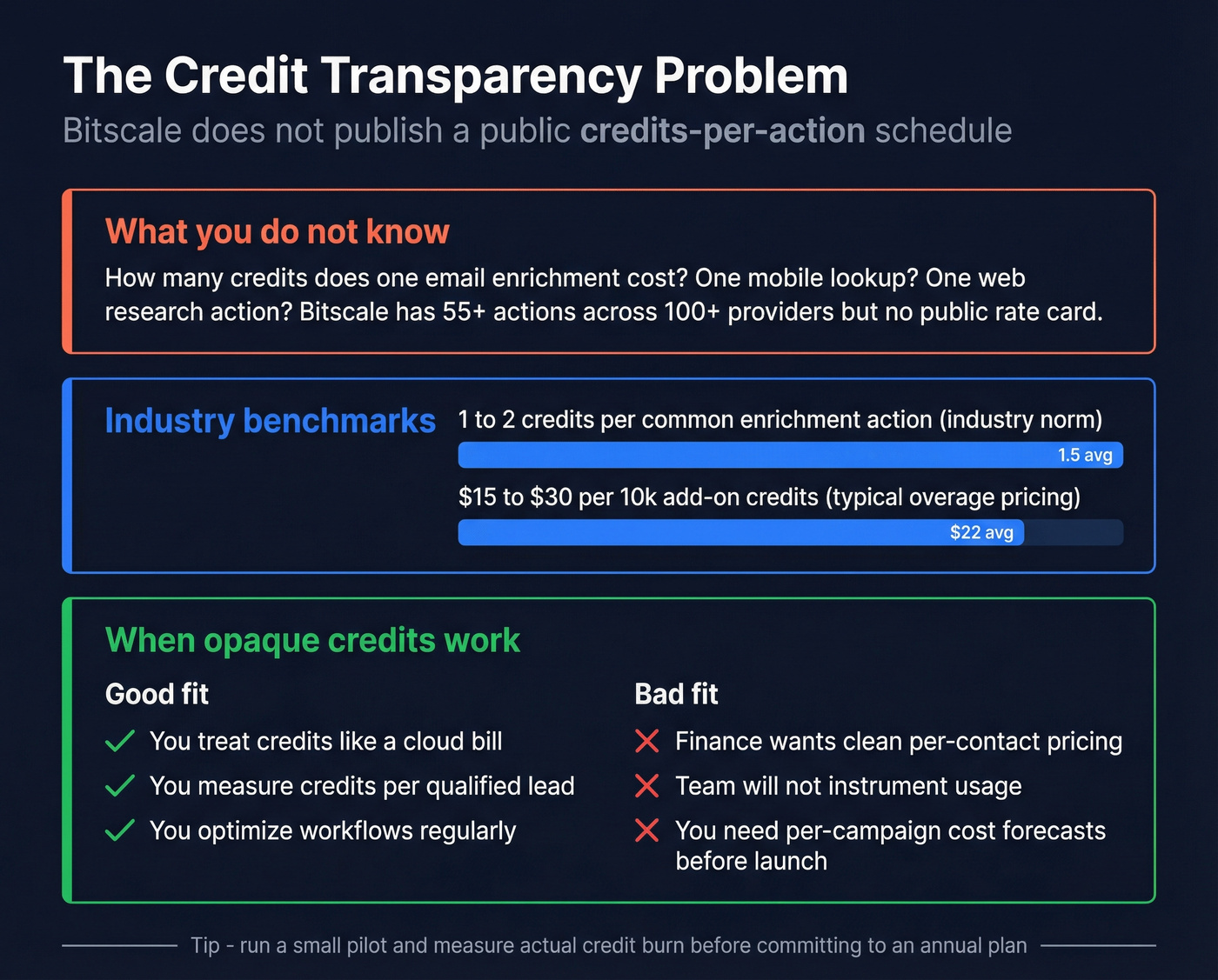
Bitscale doesn't publish a public credits-per-action schedule (a table like "email enrichment = X credits, mobile = Y, web research = Z"). In our experience, opaque credit schedules are the #1 reason RevOps underestimates spend: you don't feel it in week one, you feel it when a workflow goes from "cool demo" to "daily production" and suddenly you're burning credits on steps nobody even remembers adding.
Use this / Skip this (credit economics edition)
Use Bitscale if:
- You're comfortable managing credits like a cloud bill.
- You can measure credits per qualified lead (or per routed account) and optimize workflows.
- You want flexibility across many actions/providers more than you want a fixed unit price.
Skip Bitscale if:
- Finance demands a clean $/contact model with predictable unit economics.
- Your team won't instrument usage (you'll burn credits and argue about it later).
- You need to forecast per-campaign costs before you run the campaign.
What credits usually cost in this market (practical estimates)
Two norms hold across credit-based enrichment tools:
- Industry norm: 1-2 credits per enrichment action for common steps (basic enrichment, validation, lightweight research).
- Overage norm: add-on credits commonly land around $15-$30 per 10k credits depending on volume.
If you want a quick sanity check on cost-per-verified-contact, Prospeo is a good benchmark because it's self-serve and transparent: 300M+ professional profiles, 143M+ verified emails, 125M+ verified mobile numbers, and 98% verified email accuracy on a 7-day refresh cycle. That makes it easy to do the boring-but-useful math before you commit to a credit system you can't forecast - especially if you're comparing against other B2B data providers or trying to decide between email lookup tools and workflow-first enrichment.
Why you're seeing different prices online (official vs G2 vs older reviews)
If you've Googled this topic, you've probably seen conflicting numbers. That's normal: directories and review sites lag behind pricing changes.
What's happening:
- Bitscale's official pricing page shows Starter $89 / Growth $314 / Booster $719 with today's credit counts.
- G2 shows an older snapshot with different prices and much lower credits, and that snapshot's dated (last updated on July 09, 2026).
Mini timeline that explains the mismatch:
- The dated G2 snapshot lists Growth at $349/mo and Booster at $799/mo, with 20,000 / 65,000 credits respectively - an older credit scale than the current pricing page.
- Older reviews and directory pages still repeat the $349/$799 era numbers, so they look "wrong" next to current pricing.
If you want one source of truth, use the official pricing page. If you want to understand why your teammate's quoting different numbers, check the timestamp on the directory listing.
Lifetime deal status (LTD): expired, and what it used to be
Yes, Bitscale had a lifetime deal. No, you can't buy it anymore.
This deal's expired.
When it was live, the LTD was structured as "codes" you could stack:
- $69 per code = 4,000 one-time credits
- Stack up to 20 codes (so up to 80,000 one-time credits)
- Add-on credits were also listed at $69/4,000 (as listed on the deal page)
Here's the historical math, because people still ask "was it worth it?"
| LTD item | Price | Credits | $/1k credits | Status |
|---|---|---|---|---|
| 1 code | $69 | 4,000 | $17.25 | Expired |
| 5 codes | $345 | 20,000 | $17.25 | Expired |
| 20 codes | $1,380 | 80,000 | $17.25 | Expired |
| Add-on pack | $69 | 4,000 | $17.25 | Expired |
My take: LTD credits are fine if you run occasional enrichment and treat credits like a finite resource. They're a bad fit for ongoing outbound at scale - recurring work wants recurring credits, and "one-time" always turns into "we ran out at the worst moment."
Is it worth it? (by team type + the "finance surprise" scenario)
Bitscale's built for teams who want workflow power (grids + actions + multi-source enrichment), not just a static database. The pricing is fair until you hit gating and realize the "real" plan is the one your stack demands.
One honest reality check: G2 only has 2 reviews for Bitscale right now, so sentiment's directional, not definitive. Still, the same themes show up: teams like the responsiveness of support, and performance can slow down when grids get heavy.
Use-case matrix (who gets value fast)
| Team type | Bitscale fit | Best tier | Watch-out |
|---|---|---|---|
| Agency | Strong | Starter / Growth | Credit burn without standardized deliverables |
| RevOps | Strong | Growth / Booster | CRM gating (HubSpot vs Salesforce) |
| Founder-led | Medium | Starter | Time cost of building/maintaining workflows |
Agency teams get value fast when they standardize delivery ("credits per deliverable") and reuse grids/playbooks across clients. RevOps teams win when they treat credits like a tracked cost center and keep workflows tight. Founder-led teams do best on Starter if they resist the urge to build a sprawling, multi-step waterfall before they've measured what each step costs - this is also where a waterfall approach can either save spend or quietly amplify it.
Bitscale's credit rollover math is clever - until you realize you're paying $314/mo just for HubSpot sync. Prospeo delivers verified contact data at ~$0.01/email with 92% API match rates and 50+ enrichment data points. No tiers to unlock features. No search caps throttling your workflow.
Enrichment that scales without spreadsheet math on rollover caps.
Summary: the practical take on Bitscale pricing
Bitscale pricing makes sense when you're paying for workflow flexibility and you're willing to manage credits like a budget line item.
If you need HubSpot 2-way sync, start at Growth. If Salesforce is required, Booster's the real entry point. And if you need governance and SSO/SOC2, you're in Enterprise.