Best Email Open Tracker (2026): Tools, Accuracy & What to Track Instead
You send a follow-up and your tracker pings: "Opened 3 times." You call the prospect and they swear they never opened it. Your tool isn't broken - open tracking is.
In 2026, "opens" are a noisy signal because Apple Mail Privacy Protection (MPP), Gmail image proxying, and security scanners fetch tracking pixels like robots doing chores. The result: opens aren't reliable per recipient. Treat them as trend-only (subject line A vs B), not as a trigger for "hot lead" behavior.
I've audited sequences where open-based triggers doubled follow-ups to the wrong people because the "opens" were scanners.
And yes, mobile makes it worse: a lot of trackers depend on how tracking is injected (extension vs add-in vs API), so tracking can be less reliable when emails are sent from the Gmail/Outlook mobile apps.
This article still answers the keyword head-on: we rank the best email open tracker tools for Gmail and Outlook. Then we show what to track instead, how to spot false opens fast, and a simple decision tree so you can pick a tool in under a minute.
Our picks (TL;DR)
If you only trial three tools, make it these because they map to three real workflows.
Use Mixmax if you want tracking plus a real engagement workflow (templates, sequences, scheduling, meeting links) and you're fine paying for a productivity layer, not just a pixel. Skip Mixmax if you only want a tiny "seen it" checkmark. Mixmax is a full cockpit.
Use Mailsuite (Mailtrack) if you're Gmail-first and want the simplest "open/click + notifications" experience with a clear upgrade path. Skip Mailsuite if you need a full sequencing suite or you hate plan gating.
Choose Prospeo when deliverability and list quality are the bottleneck. Verified, fresh emails make clicks and replies measurable again. Pair it with any tracker you like for the pixel; use Prospeo to make the downstream metrics real.
One-liner to keep you honest: opens are a weak signal; clicks and replies win.

Best email open tracker comparison table (2026 pricing & limits)
Table 1 - Quick fit (workflow + compatibility + price)
| Tool | Best for | Gmail/Outlook | Price (2026) |
|---|---|---|---|
| Mixmax | Sequences + tracking | Both | $29-$105 per user/mo (tier + billing dependent) |
| Mailsuite (Mailtrack) | Simple Gmail tracking | Gmail | $0-$11.99 per user/mo |
| Prospeo | List hygiene + deliverability (pairs with tracker) | Works with any sender (pre-send) | $0-$249 per month (credit-based) |
| HubSpot Sales Hub | CRM logging + tracking | Both | $0, or $15-$100+ per seat/mo |
| Right Inbox | Lightweight Gmail add-on | Gmail | $7.95-$19.95 per user/mo |
| Mailbutler | Apple Mail + Outlook tracking | Both + Apple Mail | around $5-$16 per user/mo |
| GMass | High-volume Gmail sending + tracking | Gmail | $25-$55 per user/mo |
| Gmelius | Shared inbox + collaboration | Gmail | $19-$40 per user/mo |
| Salesflare | CRM-first tracking | Both | starts at $29/month |
| Streak | Gmail CRM + tracking | Gmail | $15-$129 per user/mo |
| Hunter MailTracker | Minimal tracker | Gmail | starts around $20-$30 per user/mo |
| Snov.io | Outreach suite | Both | $33-$158 per month (volume-based) |
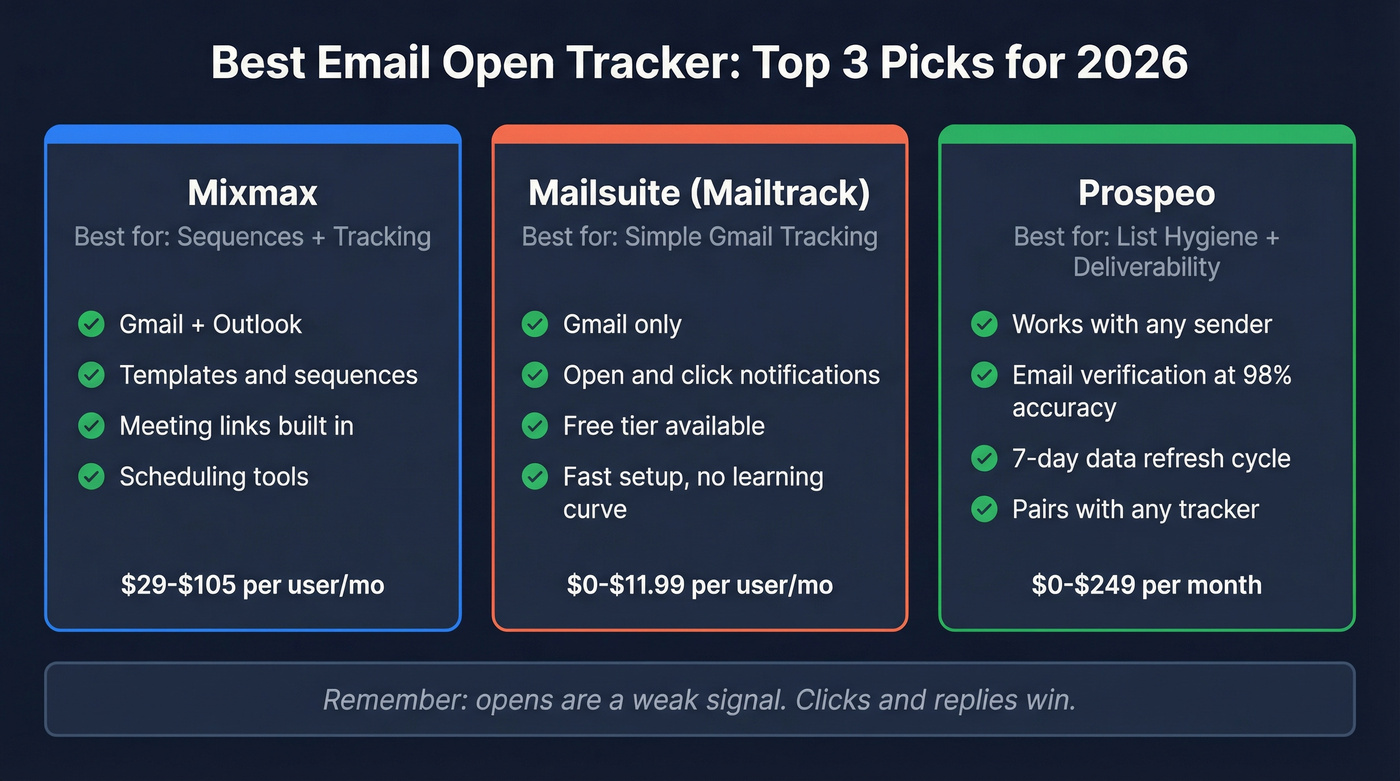
Table 2 - Tracking reality (limits + false opens + caveats)
| Tool | Tracks opens/clicks | Free limits (headline) | False-open handling | Key caveat |
|---|---|---|---|---|
| Mixmax | Yes/Yes | 20 tracked emails | Shows activity; you interpret it | Suite feel, not "just tracking" |
| Mailsuite (Mailtrack) | Yes/Yes | Counts for 10 emails | Standard pixel noise | Gating's real on free |
| Prospeo | No/No (pairs) | 75 emails + 100 ext credits/mo | Improves deliverability upstream | Not a pixel tool |
| HubSpot Sales Hub | Yes/Yes | 200 notif/mo on free users | Standard pixel noise | Cap blurs notifications |
| Right Inbox | Yes/Yes (paid) | No tracking on free | Standard pixel noise | Free tier's tiny |
| Mailbutler | Yes/Yes | 14-day trial | Standard pixel noise under MPP | MPP hides device/location |
| GMass | Yes/Yes | Limited trial | Filters/flags bot-like opens | Built for sending first |
| Gmelius | Yes/Yes | 7-day trial | Standard pixel noise | Collaboration-first suite |
| Salesflare | Yes/Yes | Trial | Standard pixel noise | CRM commitment |
| Streak | Yes/Yes | Limited free | Standard pixel noise | Gmail-only world |
| Hunter MailTracker | Yes/Yes | Small free | Standard pixel noise | Minimal workflow |
| Snov.io | Yes/Yes | Limited trial | Standard pixel noise | Overkill for "just opens" |
How to choose (the part most comparison tables skip):
- If you live in Gmail and want the simplest tracker: start with Mailsuite. It's the fastest path to "I can see opens/clicks" without adopting a whole platform.
- If you want sequences + scheduling + templates in one place: pick Mixmax. It's the most practical "do the work from your inbox" option.
- If you want tracking tied to pipeline reporting and logging: choose HubSpot Sales Hub. It's not the most exciting tracker, but it's the cleanest system of record.
- If your team sends from mobile a lot: prioritize tools that don't rely solely on a browser extension. Tracking can be less reliable on mobile depending on how the tool injects tracking.
- Hot take: for smaller deal sizes, open tracking's a distraction. Spend that energy on list quality, deliverability, and a click/reply workflow.
Deliverability risk checklist (the rubric most teams ignore)
Trackers don't just "measure" email - they change it. Link rewriting and tracking domains can affect deliverability and trust, and I've seen one sloppy rollout tank a team's inbox placement for weeks because every link suddenly looked like it came from a brand-new domain.

Use this checklist before you roll a tracker to the whole team:
- Branded tracking domain/subdomain: Can you use
track.yourdomain.cominstead of a generic domain? - Link rewriting domain control: Are tracked links branded or vendor-branded?
- Multiple tracking domains: Can you rotate domains to reduce reputation concentration?
- DKIM alignment / authentication: Does your setup keep authentication clean after links are rewritten? (If not, review your SPF DKIM & DMARC setup.)
- Transparency in notifications: Does the tool warn you about false opens, or does it quietly encourage open-based automation?
My 1-5 deliverability risk rating (lower is better):
- Mixmax: 2/5 - mature sending workflow; still a tracker, so don't automate on opens.
- Mailsuite (Mailtrack): 3/5 - simple Gmail add-on; fine for basics, but you're living in extension land.
- Prospeo: 1/5 - pre-send verification and freshness reduce bounces and protect reputation.
- HubSpot Sales Hub: 2/5 - solid for CRM-native logging; still subject to pixel noise.
- Right Inbox: 3/5 - lightweight add-on; keep expectations modest.
- Mailbutler: 2/5 - strong fit for Apple Mail/Outlook users; MPP still distorts opens.
- GMass: 3/5 - powerful sending; safe when configured well, risky when used like a blast cannon.
- Gmelius: 3/5 - suite behavior; tracking isn't the core value.
- Salesflare: 2/5 - CRM-first and thoughtful about tracking setup.
- Streak: 3/5 - Gmail-centric; good workflow, standard tracking tradeoffs.
- Hunter MailTracker: 3/5 - minimal utility; limited controls.
- Snov.io: 3/5 - outreach suite; more moving parts.

Open trackers can't fix bad data. If 30% of your list bounces, every "opened" notification is a distraction from the real problem. Prospeo verifies emails at 98% accuracy on a 7-day refresh cycle - so when someone clicks or replies, you know it's real.
Stop chasing phantom opens. Start measuring real engagement.
How email open tracking works (and what it can't see)
Open tracking's simple mechanics dressed up as certainty.
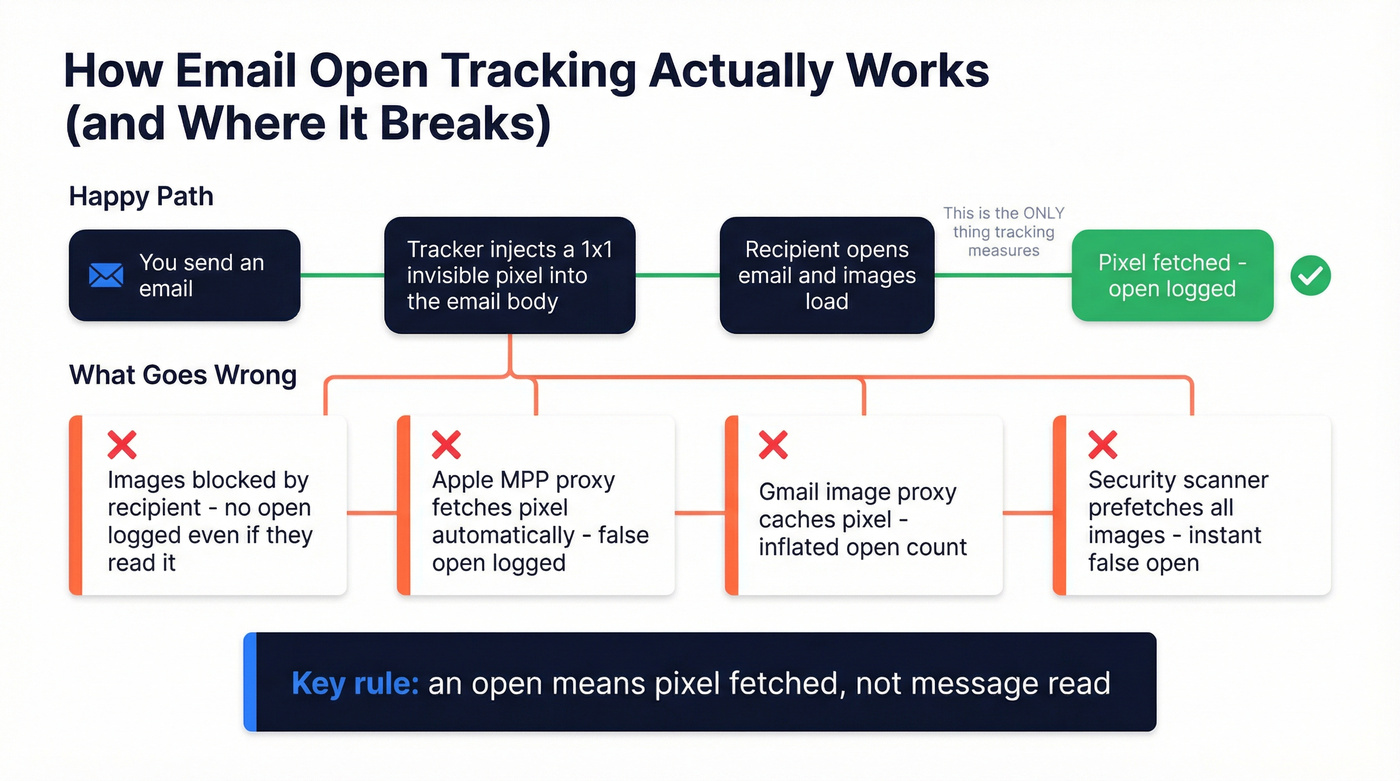
Most trackers insert an email tracking pixel (a 1x1 invisible image) into your email. When the recipient's client downloads images, the tracker logs an open. Opens are recorded when the pixel image is downloaded, not when a human reads your message, and privacy features can download that pixel on the recipient's behalf.
What breaks open tracking:
- Images blocked: no download, no open logged.
- Proxy caching (Apple, Gmail, security tools): a machine fetches the pixel, so you get an "open" without a human.
- Preview panes / preloading: the client fetches images during rendering.
- Multi-device behavior: one person can generate multiple opens without "reading twice."
- Mobile sending gap: if your tracker injects pixels via a browser extension or a specific desktop compose flow, tracking can be less consistent when sending from mobile apps.
If you remember one rule: an open means "pixel fetched," not "message read."
Best email open tracker accuracy in 2026: what's actually happening
Open tracking didn't die. It became untrustworthy at the individual level.
Myth: "Apple MPP only affects @icloud.com addresses"
Wrong. MPP is about the Apple Mail client, not the email domain. If someone reads their corporate email in Apple Mail, MPP behavior still applies.
Callout: What MPP breaks (and what it doesn't) Breaks: per-person open accuracy, device details, IP-based location, and clean timestamps. Doesn't break: your ability to compare broad trends across campaigns if you treat opens as directional only.
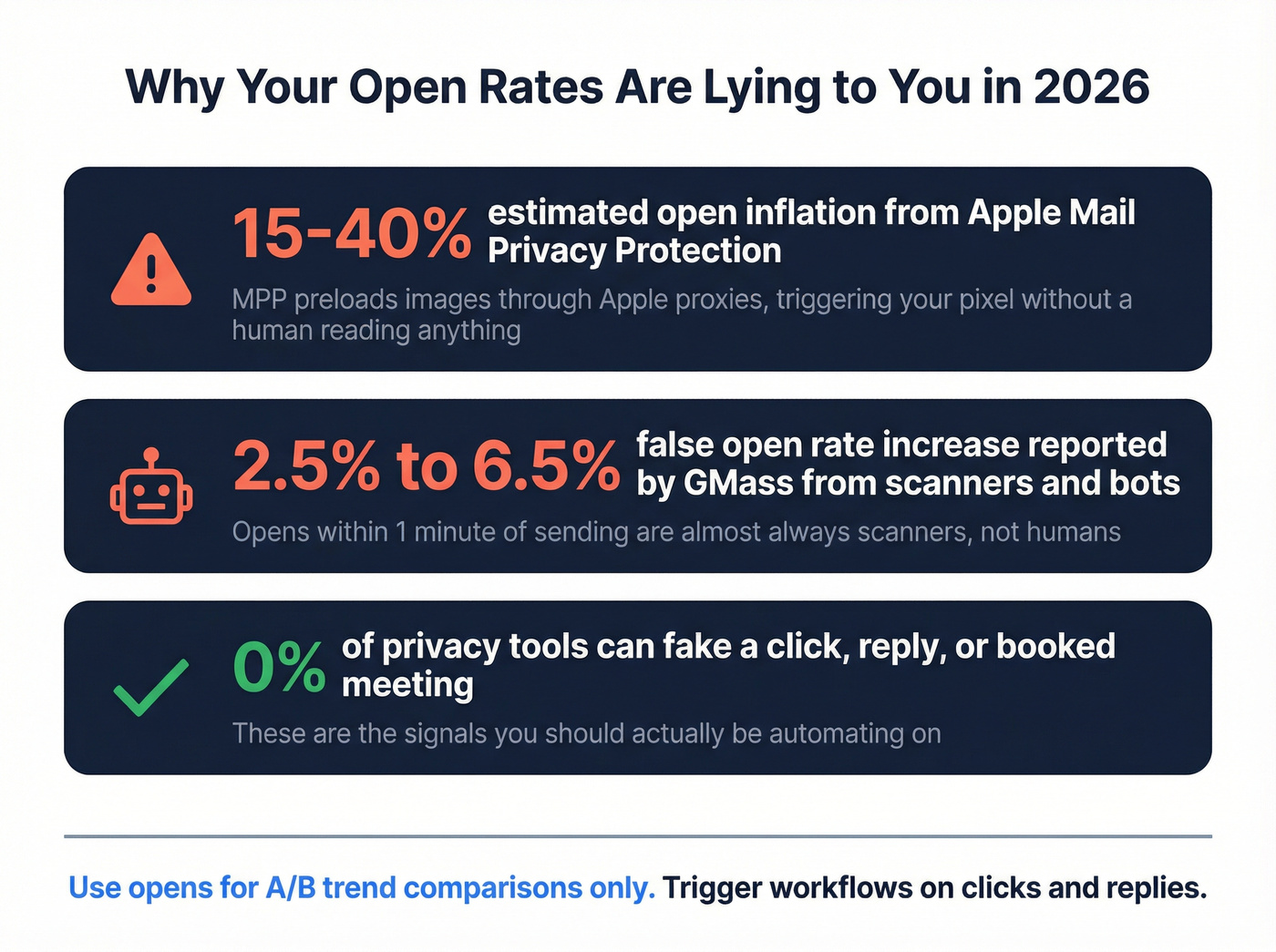
MPP preloads and caches images through an Apple-hosted proxy. That proxy fetch triggers your pixel, so you see opens that are machine activity.
Here's the thing: if your audience is heavy Apple Mail, expect 15-40% open inflation. I've watched teams celebrate "engagement spikes" that were just Apple doing Apple things, then wonder why pipeline didn't move an inch.
Myth: "Gmail broke open tracking in 2026"
Gmail didn't kill pixels. The bigger issue is interpretation. That "images are hidden / suspicious" banner usually points to sender reputation or new infrastructure problems, not a sudden Gmail policy change.
Callout: When opens are still useful Use opens to compare subject lines and send-time tests across a big enough sample. Don't use opens to decide who gets a follow-up, who gets routed to sales, or who gets tagged "hot."
The newer twist: Link Tracking Protection
Apple's Link Tracking Protection strips tracking parameters in supported contexts. That pushes teams toward first-party measurement: replies, booked meetings, and on-site events you control.
Callout: What to use instead for automations Trigger follow-ups on clicks, replies, meetings booked, and conversions - signals privacy tech can't fabricate as easily as opens.
Why you're seeing "instant opens" (false-open diagnostics)
If your tracker shows an open seconds after sending, don't high-five yourself. Diagnose it.

Use these heuristics:
- Under 1 minute = scanner/proxy. GMass reported false opens rising from about 2.5% to ~6.5% and recommends treating sub-minute opens as bot/proxy behavior.
- Open-with-no-click pattern = junk. If "opens" spike but clicks and replies don't move, you're watching machines.
- Same-IP bursts = automated scanning. Multiple opens from one IP in a tight window is almost never a human.
A troubleshooting checklist we've used with teams:
- If opens jump but reply rate stays flat, ignore the opens.
- If you're running open-based follow-ups ("opened twice -> bump"), stop. You're automating on randomness.
- If Gmail frequently hides images as suspicious, fix authentication and reputation before you debate trackers. (This is usually a deliverability issue - start with an email deliverability audit.)
Decision tree: pick the right email tracker in 60 seconds
- Gmail-only + you just want open/click notifications: Mailsuite (Mailtrack).
- Gmail-only + you want lightweight scheduling/reminders too: Right Inbox.
- Gmail power-sending at volume (campaigns, mail merge): GMass.
- Need sequences, templates, meeting links, and tracking in one workflow: Mixmax.
- CRM-first team that cares about logging + reporting: HubSpot Sales Hub.
- Apple Mail or Outlook desktop-heavy team: Mailbutler.
- Shared inbox + internal collaboration is the real problem: Gmelius.
- Your metrics feel random, bounce rate is above 3-5%, or spam placement is creeping up: fix the list first, then track. (Use an Email Verification List SOP to keep it clean.)
Best email open tracker tools (ranked for Gmail & Outlook)
Mixmax (Tier 1)
Best for: reps who want sequences + scheduling + tracking without leaving the inbox.
What you get: open and click tracking, notifications, templates, sequences, meeting links, and a workflow that pushes toward replies and booked meetings instead of "opened 7 times." Mixmax is also one of the few tools on this list that feels like it was designed for the whole follow-up loop: send, see engagement, and act, all without bouncing between tabs.
Watch-outs: opens are still noisy, and Mixmax surfaces a lot of activity. Use it to drive conversations, not to micromanage opens. Mobile coverage depends on how the message is composed and how tracking is injected, so if your team lives on phones, test it with real sends before you standardize.
Pricing: Free includes tracking for 20 tracked emails. Paid is $29-$105 per user/month depending on tier and billing.

Mailsuite (Mailtrack) (Tier 1)
Best for: Gmail users who want the simplest "open/click + notifications" setup.
What you get: open tracking, click tracking, desktop notifications, and lightweight reporting. If you want a tracker that feels like a small Gmail upgrade instead of a new platform, this is it. We've set this up for founders who just wanted to answer one question - "did they engage at all?" - without taking on sequences, CRMs, and a week of onboarding.
Watch-outs: the free plan's heavily gated: counts show for 10 emails, and click tracking's limited at that level. Also, you're in extension land, which means reliability's best on desktop web Gmail; sending from mobile can be less consistent depending on the compose flow.
Pricing: Free is $0. Advanced is $11.99 per user/month.
Prospeo (Tier 1)
Best for: making engagement metrics trustworthy by fixing deliverability and data freshness before you send.
What you get: Prospeo is "The B2B data platform built for accuracy" with 300M+ professional profiles, 143M+ verified emails, 125M+ verified mobile numbers, and 98% email accuracy on a 7-day refresh cycle (industry average: 6 weeks). It's used by 15,000+ companies and 40,000+ Chrome extension users.
Real talk: if your bounce rate's ugly or your list is stale, arguing about open tracking is a waste of time. Fix the inputs first. Prospeo helps you verify and refresh contacts so emails land, bounce stays low, and clicks/replies reflect real humans instead of a mix of bounces, spam placement, and proxy noise. If you need options, compare email lookup tools and email verifier websites.
How it fits with trackers: pair it with your preferred open/click tracker for the pixel; Prospeo is the upstream layer that protects sender reputation and makes the downstream numbers worth looking at.
Pricing: credit-based. Free includes 75 emails + 100 Chrome extension credits/month. Paid runs $39-$249 per month depending on volume.
Useful links: Email Finder, Chrome Extension, Pricing.
HubSpot Sales Hub (Tier 1)
Best for: teams that want tracking tied directly to CRM logging, reporting, and an activity feed.
What you get: tracked emails, open/click notifications, and clean visibility inside HubSpot when your team already runs pipeline there. If your real problem is "half the team doesn't log anything," HubSpot's tracking is less about the pixel and more about getting consistent activity data into the system of record. (If you're evaluating systems, see our guide to CRM automatic email logging.)
Watch-outs: HubSpot doesn't fix false opens. MPP and proxies still distort opens. The practical gotcha is the free-user cap: HubSpot limits free users to 200 sales activity notifications per month and blurs notifications after the cap, which can make tracking feel flaky even when it's working.
Pricing: free tools exist, but most teams end up on paid seats. Paid seats typically start around $15/seat/month and can reach $100+/seat/month depending on tier.
Right Inbox (Tier 2)
Best for: a lightweight Gmail add-on when you want tracking plus send-later and reminders. What you get: tracking on paid plans, plus a small set of productivity features that feel native in Gmail. Skip this if: you want meaningful tracking on the free plan. Free doesn't include it. Pricing: $7.95-$19.95 per user/month depending on plan and billing.
Mailbutler (Tier 2)
Best for: Apple Mail and Outlook users who want tracking without living in Chrome extensions. What you get: tracking across clients, plus options that fit teams who send from desktop mail apps. Skip if: you need per-recipient open truth. MPP still distorts opens, and location/device data can be missing. Pricing: around $5-$16 per user/month, with a 14-day trial.
GMass (Tier 2)
Best for: Gmail power users sending at volume who want tracking plus a sender's view of false opens. What you get: sending + tracking in one place and practical heuristics for bot/proxy behavior. Skip if: you only need a 1:1 tracker. GMass is built for sending workflows. Pricing: $25-$55 per user/month depending on plan.
Gmelius (Tier 2)
Best for: shared inboxes and team collaboration where tracking is secondary. What you get: assignments, tags, automation, and tracking as part of a broader Gmail workspace. Skip if: you'll only use tracking. You'll pay for collaboration features you won't touch. Pricing: $19-$40 per user/month on annual plans.
Salesflare (Tier 3)
A lightweight CRM with built-in email tracking for Gmail and Outlook. Pick it if you want tracking plus pipeline hygiene in one tool; skip it if you've already got a CRM and just need a tracker. Pricing starts at $29/month.
Streak (Tier 3)
The cleanest "CRM inside Gmail" option with tracking baked in. Pick it if you live in Gmail all day; skip it if your team needs Outlook support. Pricing is $15-$129 per user/month depending on tier.
Hunter MailTracker (Tier 3)
A minimal Gmail tracking utility for opens and clicks. Pick it if you want something small and cheap; skip it if you need sequences, templates, or team reporting. Pricing starts around $20-$30 per user/month depending on billing.
Snov.io (Tier 3)
An outreach suite that includes tracking and campaign analytics. Pick it if you want sequences and list workflows; skip it if you only want open tracking. Pricing is $33-$158 per month (volume-based).
Mailtrack (legacy) (Tier 3)
Mailtrack is the legacy name many people still search for; it now lives under Mailsuite branding. If you're confused by "Mailtrack vs Mailsuite," treat them as the same family and compare plans under Mailsuite's pricing.
Leadfeeder (Tier 3)
Leadfeeder isn't an email open tracker - it's web visitor identification. It's useful after the click: when someone visits your site, it can help identify the company behind the visit, which is often more actionable than an "open."
What to track instead of opens (and automations that still work)
If you're still using opens as your main KPI, you're optimizing for a metric privacy tech fabricates.
Track these instead:
- Clicks (CTR): more intentional than opens. (Track against email click through rate benchmarks.)
- Replies: the cleanest outbound engagement signal.
- Conversions: booked meetings, trials started, purchases.
- Expansion events: upgrades, activation milestones.
- Poll votes / referrals: great for newsletters and community motions.
Callout: illustrative open inflation One newsletter saw open rate jump from 28% to 55% after privacy changes. That's why "open rate improved" isn't a victory lap anymore - it's a warning label.
Replace-this-with-that table (automation-safe triggers)
| Don't trigger on... | Trigger on... |
|---|---|
| Opened email | Clicked key link |
| Opened 2+ times | Replied / asked a question |
| "Hot lead" open spike | Meeting booked |
| No opens in 3 days | No reply in 5-7 days |
| Opened on mobile | Visited pricing page |
| Opened after resend | Completed signup/trial |
You just read that false opens from scanners and MPP make per-recipient tracking unreliable. The fix isn't a better pixel - it's cleaner data upstream. Prospeo's 5-step verification eliminates bounces, protects your domain reputation, and makes clicks and replies trustworthy signals again. At $0.01 per email, it costs less than one wasted follow-up.
Pair any tracker with data that actually delivers to real inboxes.
FAQ
Did Gmail break open tracking in 2026?
No. Pixels still work in Gmail, but open data's routinely inflated by image proxying and security scanning, so it isn't reliable per person. Use opens for A/B subject tests, and use clicks, replies, and booked meetings as your real engagement signals.
Why does my tracker show an open seconds after I send?
That's almost always a proxy or security scanner fetching images, not a human reading your email. As a rule, treat opens under 1 minute as machine activity unless you also see a click or a reply shortly after.
Is email open tracking legal (GDPR/consent)?
In the EU/UK, treat open tracking as personal-data processing and assume you need clear disclosure plus tight retention and opt-outs. A practical baseline is: document it in your privacy policy, store only what you need for 30-90 days, and avoid open-based profiling without proper consent.
What's a good free option to improve tracking results (without trusting opens)?
If your list quality's the issue, Prospeo's free tier includes 75 verified emails plus 100 Chrome extension credits per month, which helps you reduce bounces and improve deliverability so clicks and replies become measurable again. For the pixel itself, Mailsuite's free plan can work for light Gmail use, but expect gating.
Do email open trackers work on mobile?
They can, but reliability varies by tool and sending method, and mobile clients add more proxy/preload behavior. If mobile sending's core, test with 20-30 real sends across iOS Mail, Gmail mobile, and Outlook mobile before rolling it out to the team.
Closing recommendation
If you want the best email open tracker for Gmail with minimal fuss, start with Mailsuite (Mailtrack) and treat opens as directional only. If you want tracking plus a real engagement workflow, Mixmax is the most practical upgrade.
If you want tracking tied to CRM logging and reporting, HubSpot Sales Hub is the cleanest choice. Just respect the notification cap on free users.
Decision-tree recap:
- Simple Gmail tracking: Mailsuite
- Sequences + scheduling + templates: Mixmax
- CRM-native tracking + logging: HubSpot Sales Hub
- Apple Mail/Outlook desktop workflows: Mailbutler
- High-volume Gmail sending: GMass
- If bounce/spam is the real issue: fix list quality first, then measure clicks and replies because even the best email open tracker can't save bad data.