CallTools vs Readymode (2026): Which Predictive Dialer Wins?
$15k/month in media spend, a 20-person dialing floor, and suddenly half your outbound shows up as "Spam Likely." Ops blames carriers, reps blame the dialer, and leadership wants answers yesterday.
Here's the thing: CallTools and Readymode can both push volume. They just win in different places.
I've watched teams waste an entire quarter arguing about "predictive vs progressive" while the real problem was poisoned caller IDs and a list full of dead mobiles.
30-second verdict (who should pick what)
If your floor's dialing hard and answer rates just fell off a cliff because you're getting labeled, you don't need "more features." You need a dialer that treats caller ID reputation like the product, not a footnote.
Pick CallTools if your bottleneck is RevOps speed. You want self-serve control (API + webhooks), fast iteration, and a pacing system (CallTools Auto Pilot) that targets a 3% abandon rate without constant babysitting. This is the dialer for teams that ship workflow changes weekly and hate waiting on vendor queues.
Pick Readymode (especially iQ) if your bottleneck is spam labels and caller ID reputation. Readymode iQ is built around DID reputation monitoring, managed remediation, and Autopilot dialing from healthy numbers. If your "Spam Likely" problem's already real, iQ is the most direct fix.
Skip the dialer bake-off until your list is clean if connect rates are low because your records are stale, duplicated, or missing mobiles. That's not a dialer problem. It's an inputs problem.
One line you should take seriously: TCPA statutory damages can hit $1,500 per call; DNC penalties can hit $43,792 per call. Dialing fast's useless if your workflow makes it easy to call the wrong person at the wrong time.
CallTools vs Readymode: side-by-side comparison (what actually decides the purchase)
This is the matrix that decides the deal in a buying meeting: the levers that change connects, transfers, and risk.

| Category | CallTools | Readymode Starter | Readymode iQ |
|---|---|---|---|
| Seat price | Quote-based; market pricing commonly lands around $101.99-$119.99/agent/mo | $199/license/mo | $249/license/mo |
| Calling coverage | Depends on your telephony/carrier setup | US + Canada | US + Canada |
| Outbound minutes | Unlimited minutes | Free (subject to fair use) | Free (subject to fair use) |
| Inbound minutes | Unlimited minutes | $0.02/min | $0.02/min |
| SMS | $0.015/message | Usage-based add-on | Usage-based add-on |
| Concurrency | Channels configurable (example: 3); some third-party breakdowns cite up to 10 numbers/agent; official max isn't published | Up to 20+ | Up to 20+ |
| Pacing control | Auto Pilot | Predictive/progressive | Autopilot + cadences |
| Abandon guardrail | 3% target | Configurable | Configurable |
| Reputation tooling | Monitoring + caller ID auditing | Basic | Monitoring + remediation |
| Integrations | Self-serve (API) | Integration Request process | Unlimited included |
| DIDs included | Varies by quote | 30/license | 75/license |
How to read this table (the only parts that matter):
- Raw attempt volume: Readymode's 20+ concurrent calls/agent is the headline if your KPI is touches/hour.
- Operational speed: CallTools wins when you need self-serve integrations + automation and you don't want "submit a ticket" to be your operating model.
- Reputation as a first-class product: Readymode iQ isn't "Starter plus extras." It's a different approach: dial only from healthy numbers and actively remediate the bad ones.
Best for / avoid if (quick decision block)
CallTools - best for: RevOps-led teams, fast iteration, event-driven workflows, and compliance automation you can enforce at scale. Avoid if: you want a vendor-run reputation program to fix spam labels for you.
Readymode Starter - best for: straightforward high-volume dialing when you don't need the iQ reputation layer. Avoid if: you need deep self-serve customization and hate waiting on integration requests.
Readymode iQ - best for: spam labeling, DID reputation monitoring, and remediation when caller ID health is your limiting factor. Avoid if: your main pain is workflow agility and you're not willing to run a more vendor-led integration motion.
Dialing throughput & pacing (the "throughput math" most pages skip)
Throughput isn't "predictive vs progressive." It's a chain:
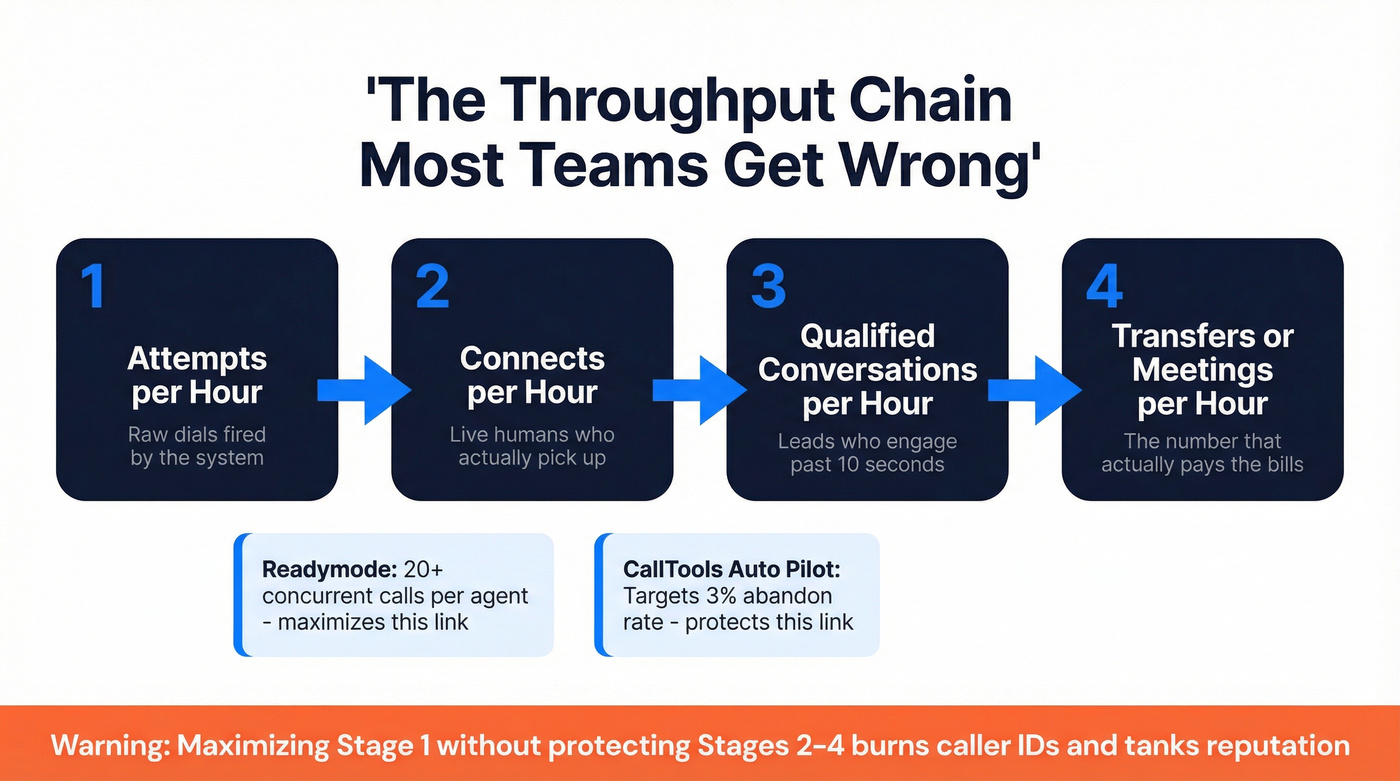
Attempts/hour -> connects/hour -> qualified conversations/hour -> transfers or meetings/hour.
Readymode makes the first link easy. In progressive/predictive, it supports 20+ concurrent calls per agent, which is how teams get to "we touched the whole list by lunch." The tradeoff is obvious once you run it for real: you're now living and dying by list quality, answer rates, and abandonment controls, and if any one of those slips you can burn a week's worth of caller IDs in an afternoon.
CallTools comes at it differently. Auto Pilot adjusts channels per agent based on agent wait-time stats and targets a 3% abandon rate. It shines with 8+ agents, because predictive pacing needs enough capacity to smooth out answer-rate variance, and with tiny teams predictive can feel jumpy: one hot streak of answers and you're suddenly abandoning.
Real talk: max concurrency looks great in a demo. In production, it can turn into a short-call factory that tanks reputation.
What to measure in week 1 (the metrics that decide the winner)
If you only track dials and "connect rate," you'll pick the wrong tool. Track these instead:

- Connects/hour per paid agent hour (not per dial) by dialing mode
- Transfer rate (or meeting set rate) per connect
- Abandonment rate by hour of day + list segment
- Average handle time (AHT) split into talk time vs wrap time
- Spam label rate (how many of your active DIDs show "Spam Likely" / "Scam Likely" signals over time)
- Short-call rate (sub-10s calls), because it correlates with reputation damage
Hot take: for smaller deal sizes and a not-so-pristine list, chasing "max concurrency" is usually a trap. You'll generate a mountain of low-quality connects, burn numbers faster, and spend more time cleaning up the mess than closing deals.
A practical trial checklist (don't skip this)
- Run the same list through both tools for 2-3 days. If you change the list, you're not testing the dialer. You're testing randomness.
- Track agent idle time (waiting for a live answer) vs wrap time (dispo + notes).
- Watch abandonment by hour and by segment.
- Test AMD settings on real lists. CallTools' AMD is 80% accuracy, and that last 20% is where transfers get lost; AMD also adds a small delay, which is fine for some motions and brutal for others.
- Audit dedupe + suppression logic if you're feeding the dialer from CRM views. I've seen teams "increase throughput" and accidentally triple-call the same lead because sync rules were sloppy.

You just read 2,000 words on dialer pacing and spam labels. Here's the part nobody talks about: none of it matters if your list is full of dead numbers. Prospeo's 125M+ verified mobiles hit a 30% pickup rate - and data refreshes every 7 days, not 6 weeks.
Fix the inputs before you optimize the dialer.
Caller ID reputation, spam labeling & STIR/SHAKEN readiness
Spam labeling's the silent killer of dialing programs. Your dashboards look fine, but answer rates collapse and reps start saying "no one picks up anymore."

They're right.
The problem (what's actually happening)
Carriers and device-level filters score your numbers based on patterns: volume spikes, complaint rates, short calls, repeat attempts, and whether your calling identity is properly attested. Once you're flagged, rotating numbers without changing behavior just spreads the damage.
What Readymode does (why iQ exists)
Readymode iQ is built for this pain. It includes DID reputation monitoring, managed remediation, and Autopilot that dials only from healthy numbers. Readymode also talks about STIR/SHAKEN ("Our Token") in its materials; treat that as a real evaluation item and validate exactly what's included during your security/telephony review, because the details matter and "we support it" can mean five different things depending on the carrier setup.
Readymode also shares directional outcomes like fewer wasted dials and more transfers. The exact lift depends on your list and offer, but the mechanism's real: stop dialing from poisoned numbers and you waste fewer attempts.
What CallTools does (and what you own)
CallTools includes caller ID reputation monitoring and "caller ID auditing" to swap out bad caller IDs quickly. It can work well, but you'll own more of the reputation playbook: number rotation policy, call cadence discipline, complaint minimization, and coordinating registration/attestation steps with your voice provider.
If you want control, that's a feature. If you want a vendor-run program, it's a chore.
Carrier registration checklist (high-level, non-vendor-specific)
If you want fewer spam labels, do these before you turn up the dial:
- Register your brand and outbound use case with your voice provider/carrier ecosystem (your carrier will tell you the exact path)
- Align caller ID name (CNAM) and business identity so your numbers don't look anonymous
- Segment traffic by intent (cold outbound vs warm follow-up vs customer calls) so one bad stream doesn't contaminate everything
- Throttle new numbers (ramp volume over days, not hours)
- Monitor short-call and complaint signals weekly and pull volume back before you get fully labeled
What to ask sales (so you don't get hand-wavy answers)
- How do you define a "healthy" vs "flagged" DID?
- What's the remediation workflow - who does what, and how long does it take?
- Do you manage STIR/SHAKEN attestation end-to-end, or do we coordinate with our carrier?
- Can Autopilot automatically suppress bad numbers and re-route volume to good ones?
- What reporting do we get at DID level (not just campaign level)?
If spam labels are already hurting you, Readymode iQ is the more purpose-built bet. Trying to out-dial a reputation problem is how teams waste a quarter.
Compliance automation (TCPA/DNC/timezone controls that prevent expensive mistakes)
Compliance isn't a checkbox. It's a system that prevents one tired rep - or one bad import - from creating a five-figure mistake.

Baseline: TCPA curfew is 8 a.m. to 9 p.m. local time, and state rules can be stricter. Penalties are brutal: TCPA up to $1,500 per call; DNC up to $43,792 per call.
CallTools is unusually explicit about compliance controls:
- Timezone protection (calls align to recipient local time)
- State-specific holiday recognition
- FDNC integration with real-time updates
Operational workflow I'd validate in a pilot (for either tool):
- Suppression hierarchy: internal DNC > FDNC > litigators list > recent opt-outs
- Timezone logic: confirm it's based on lead location, not agent location
- Holiday handling: confirm it blocks state holidays, not just federal
- Auditability: can you prove why a call was allowed if legal asks?
- Permissioning: who can override curfews, and is it logged?
Most "compliance features" are just UI toggles. The real win is whether your team can enforce rules without exceptions becoming the norm.
Integrations & RevOps speed (self-serve vs "submit a ticket" reality)
This is where the two platforms feel like different operating systems.
CallTools: built for self-serve ops teams
CallTools gives you a REST API, webhooks, automations, connectors, and Zapier triggers. Those aren't the same thing, and the difference matters when you're trying to ship changes without breaking your call logging.
- Automations = server-side workflows that fire on events (example: "disposition saved -> POST to your router -> update CRM field -> trigger follow-up task").
- Connectors = agent-facing UI buttons that can GET/POST to your internal systems (useful for real-time lookups, eligibility checks, or pushing a lead to the right queue without leaving the dialer).
That combo is what lets you build an event-driven RevOps loop instead of living in spreadsheets.
We've tested this pattern in real outbound ops: the dialer isn't the system of record, but it is the system that creates the mess when events don't sync cleanly, and CallTools makes it easier to keep the mess contained.
Readymode: solid integrations, more vendor-led
Readymode supports plenty of CRMs and tools, but integrations are typically completed in 3-5 business days after you submit an Integration Request. That's fine if you're stable and process-heavy.
It's painful if you're iterating daily.
You also see a consistent theme in reviews: CRM integration takes work. Translation: you'll spend time mapping edge cases and chasing "why didn't that disposition sync?" issues until it's stable.
Mini-table: how fast can we ship changes?
| Change type | CallTools | Readymode |
|---|---|---|
| Add a field mapping | Hours-days | 3-5 biz days |
| New dispo logic | Self-serve | Often assisted |
| Real-time routing | Webhooks/API | Limited |
| Custom workflow | Buildable | Ticket-led |
If your dialer is feeding Salesforce tasks, updating lead stages, and triggering follow-ups, CallTools is the faster ops platform. If your primary pain is caller ID reputation, Readymode iQ can be worth the slower integration motion.
CallTools vs Readymode pricing & true TCO (what you'll actually pay per month)
Sticker price is the easy part. True cost is seats + minutes + numbers + integration effort + "oops" fees.
Pricing table (practical view)
| Cost driver | CallTools | Readymode Starter | Readymode iQ |
|---|---|---|---|
| Seat | Quote-based; market pricing commonly lands around $101.99-$119.99 | $199 | $249 |
| Minutes (outbound) | Unlimited minutes | Free (subject to fair use) | Free (subject to fair use) |
| Minutes (inbound) | Unlimited minutes | $0.02/min | $0.02/min |
| SMS | $0.015/message | Usage-based add-on | Usage-based add-on |
| DIDs included | Varies by quote | 30/license | 75/license |
| Setup fee | Typically $0 | Waived | Waived |
| Admin seat | No manager seat cost | Included | Included |
| Integrations | Included | Not included | Unlimited included |
Pricing signals that matter:
- Readymode's pricing is public and clean: $199 Starter and $249 iQ per license per month, inbound at $0.02/min, outbound free (subject to fair use). Starter includes 30 DIDs/license; iQ includes 75 DIDs/license.
- CallTools is quote-based, but market pricing is consistent: $101.99/agent/mo on a 12-month term or $119.99 month-to-month, with unlimited inbound and outbound minutes. SMS is $0.015/message.
Shift-based licensing math (where TCO surprises people)
Readymode licensing is concurrent, not "named user." That's great if you run clean shifts and disciplined logins: two part-time shifts can share the same license pool.
It's expensive if your handoffs are sloppy.
Example: if you have 20 reps but only 10 dialing at any moment, you can often run 10 Readymode licenses - as long as you enforce logouts and don't overlap shifts. If you routinely have 12-14 people "just logged in," your savings evaporate fast.
Also note the enforcement angle: Readymode can charge $200 per simultaneous usage if simultaneous usage triggers their anti-account-sharing controls. Treat that as an ops policy problem, not a random fee.
Gotchas to model before you sign
Gotcha box: The fastest way to blow up TCO is underestimating (1) DID needs, (2) integration labor, and (3) list waste. If 30% of your dials are dead records, you're paying for agent time you can't get back.
A simple TCO example (10 agents, outbound-heavy):
- CallTools: ~$1,020-$1,200/mo seats + SMS usage.
- Readymode Starter: ~$1,990/mo seats + inbound minutes (if you run inbound) + SMS add-on usage.
- Readymode iQ: ~$2,490/mo seats, but you're buying reputation tooling that can raise answer rates and reduce wasted dials.
My recommendation's simple: pay for the constraint you actually have. If reputation is killing you, iQ can be cheaper than hiring two extra agents to brute-force volume.
What reviewers complain about (and how to de-risk in a pilot)
CallTools' ratings are strong: G2 4.9/5 (68), Capterra 4.8/5 (153), Trustpilot 5.0 (225). The consistent praise is support and productivity.
The recurring complaints are specific - and you should plan around them:
- No mobile app (annoying for managers on the go)
- Audio/call stability issues show up in reviews, including "delays in calls and dropped calls" (2026)
- UI feedback like "feels dated" (2026)
- Workflow limitation: "can't be in two campaigns at once" (2026), which can block blended motions
Readymode sits around 4.5/5 (60) on Capterra. The positives are speed and value. The recurring negative is integration friction, including "difficult integration process to the CRM" (2026).
De-risk plan for a 10-business-day pilot
- Day 1-2: integrate CRM, map dispositions, confirm call logging.
- Day 3-5: run identical lists through both tools; measure connects/hour, AHT, transfer rate, and abandonment.
- Day 6-7: test number health workflows (rotation, suppression, DID-level reporting).
- Day 8-10: run a "bad data day" on purpose (stale segment) and see how quickly ops can recover without breaking compliance rules.
If neither wins your bake-off: fix list quality before you scale dialing
If connect rates are low, the dialer choice is secondary. Dead records waste agent hours and quietly damage caller ID reputation.
Look, this part frustrates me because it's so common: teams will spend weeks tuning pacing while their CRM export still has duplicates, old job titles, and missing mobiles. You're paying people to dial ghosts.
Prospeo is the publisher's product, and it's also the cleanest "fix the inputs" move we've seen for outbound teams: 300M+ professional profiles, 143M+ verified emails at 98% accuracy, and 125M+ verified mobile numbers with a 30% pickup rate, all on a 7-day refresh cycle (the industry average is 6 weeks). If you run enrichment before you dial - import -> verify -> enrich -> dial - you cut dead dials, reduce repeat attempts to the wrong records, and give your caller IDs a better shot at staying healthy.
Skip this step if your list is already pristine and you're running tight suppression. Most teams aren't.

Burning DIDs because half your list bounces? That's not a CallTools or Readymode problem - it's a data problem. Prospeo delivers 98% email accuracy and verified direct dials at $0.01/lead. Teams using Prospeo data see bounce rates under 4%.
Stop blaming the dialer. Start with a list that actually connects.
FAQ
Is Readymode iQ worth it over Starter?
Yes, if spam labeling is limiting answer rates. iQ is usually worth the extra $50/license/month because it adds DID reputation monitoring, managed remediation, Autopilot, cadences, and unlimited integrations. Starter's fine for basic high-volume dialing, but it won't solve a caller ID reputation problem by itself.
How do "20+ concurrent calls per agent" and "channels per agent" change results?
Higher concurrency increases attempts/hour and can lift connects/hour when your list and numbers are healthy, but it also increases abandonment risk when multiple people answer at once. In a pilot, aim for <=3% abandonment, and compare connects/hour, AHT, transfer rate, and short-call rate by hour of day.
What does "outbound minutes free (fair use)" mean in practice?
For most teams, it means you can run normal business calling without per-minute outbound fees, while inbound is billed at $0.02/min. If you run extreme high-volume blasting at high concurrency all day, every day, expect review or throttling, so model costs around peak dialing days, not averages.
How long do Readymode integrations take vs CallTools?
Readymode integrations are typically completed in 3-5 business days after an Integration Request, which is fine for stable processes but slow for daily iteration. CallTools is faster for ops-led teams because you can ship changes self-serve using API, webhooks, automations, connectors, and Zapier.
How can Prospeo help if my connect rate is low on either dialer?
Prospeo improves connect rates by fixing the inputs: 125M+ verified mobile numbers (with a 30% pickup rate) plus 143M+ verified emails at 98% accuracy, refreshed every 7 days. In practice, that means fewer dead records, fewer duplicates, and less wasted dialing time before you touch pacing settings.
Summary: choosing between CallTools and Readymode in 2026
In CallTools vs Readymode, the "winner" is whichever matches your constraint.
If you need self-serve RevOps speed, fast workflow iteration, and event-driven automation, CallTools is the better operating model. If your program's getting crushed by spam labels and you want a purpose-built reputation layer, Readymode iQ is the more direct fix.
Either way, clean your list first. Bad data will sabotage both.