How to Scale Outbound Sales (Without Killing Deliverability) in 2026
If you're trying to scale outbound by "adding leads and turning up sends," you're not scaling - you're torching domain reputation.
In 2026, inbox providers enforce real thresholds, buyers ignore generic sequences, and sloppy data gets punished fast: throttling, spam placement, and pipeline that looks busy but goes nowhere.
The teams that win aren't louder. They're cleaner, steadier, and annoyingly disciplined about capacity.
What you need (quick version)
Use this checklist before you touch volume. Six bullets. No heroics.
- Pick one ICP + one offer + one CTA for a 2-4 week scale cycle. If you can't describe the target in one sentence, you're not ready.
- Guardrails (non-negotiable): bounces <2% and complaints <0.3%. Miss either and you pause volume to fix list + copy.
- Run one sustainable cadence: 15 touches / 3 weeks (email + calls + social). Consistency beats "new sequence every Monday."
- Scale with lanes, not send spikes: add domains/inboxes gradually; keep 15-25 sends/day/inbox as your steady-state.
- Refresh and suppress weekly: dedupe, suppress unsubscribes/not-a-fit/customers, and re-verify before every new segment.
- Do capacity math before headcount: if AEs can't absorb meetings, more SDR activity just creates backlog and slow follow-up.

Why outbound feels harder to scale in 2026
Outbound's harder now for three reasons: inbox providers got strict, buyers got numb, and most teams still try to brute-force volume.
A blunt benchmark makes the point. Union Square Consulting's newsletter, citing Jeremy Donovan's work, put the shift like this: outbound used to take ~200-400 touches per opportunity; now it's ~1,000-1,400. That's not "a bit tougher." That's a different operating model, and if you don't change the system, you'll just buy more tools to produce more ignored messages.
What that shift looks like in real life:
- Lists rot faster than your calendar. Job changes, re-orgs, and security tooling turn last quarter's list into this quarter's bounce problem. (If this keeps happening, plan around contact data decay.)
- Deliverability is enforceable policy. Yahoo and Microsoft turned "best practices" into requirements with measurable thresholds.
- Email-only outbound is fragile. One channel gets filtered, ignored, or both. Multichannel works better, but it adds coordination and QA work.
- Personalization theater backfires. Fake tokens and "saw you're the VP of..." lines don't feel personal; they feel automated, and complaints go up. (Worth reading: AI cold email personalization mistakes.)
Here's the thing: scaling outbound in 2026 is less about clever copy and more about boring discipline - clean inputs, stable infrastructure, and tight segmentation.
I've seen teams double volume while list quality quietly degraded, then act shocked when replies fell off a cliff two weeks later.
Hot take: if your deal size is small and your sales cycle is short, you probably don't need "enterprise outbound." You need a clean list, a simple offer, and a cadence your team can execute without burning domains or burning out reps.
The 4 levers of scale (the system) + a 90-day roadmap
Scaling isn't "more messages." Scaling is better inputs + deliverability discipline + repeatable cadence + capacity math - the system behind how to scale outbound sales without breaking your reputation.
The 4 levers (and what "good" looks like)
- Data quality (accuracy + freshness + coverage) Bad data creates bounces and spam complaints. Good data creates conversations.

Deliverability + compliance (authentication, unsubscribe, thresholds) This is your license to operate. Lose it and your "volume" becomes junk-folder volume.
Cadence + messaging (repeatable, multichannel, segment-specific) Cadence turns "no response" into "eventually yes" without annoying people into reporting spam.
Capacity math (execution limits for SDRs + AEs) This prevents the classic failure mode: activity outpacing follow-up, which kills conversion and creates a fake "we need more leads" panic.
When one lever is weak, teams compensate with volume.
Volume's the most expensive lever - and the easiest way to get punished.
90-day implementation order (so you don't do this backwards)
| Timeline | Focus | What "done" means |
|---|---|---|
| Weeks 1-2 | Deliverability foundation + list SOP | SPF/DKIM/DMARC aligned, one-click unsubscribe works, suppression lists unified, verification + dedupe process documented |
| Weeks 3-4 | Lane setup + ramp plan | 2-4 domains live, inboxes warmed, monitoring dashboard in place, first segment launched at conservative volume |
| Weeks 5-8 | Cadence + segmentation | 15 touches/3 weeks running, 3-5 segments with distinct angles, reply/meeting rates tracked per segment |
| Weeks 9-12 | Capacity + reporting + hiring triggers | S1/S2 model agreed, AE absorption confirmed, weekly KPI review, clear rule for when to add lanes vs add reps |

Follow that order and scaling feels boring.
Ignore it and scaling feels like constant firefighting.
How to scale outbound sales safely in 2026: deliverability + compliance (Yahoo + Microsoft)
This is pass/fail. If you fail a gate, you're not scaling outbound - you're scaling risk.
Yahoo began enforcement of its bulk sender requirements in February 2024, and Microsoft began enforcing new requirements for high-volume senders to Outlook.com consumer addresses on May 5, 2025. In 2026, the "we'll fix deliverability later" approach doesn't "catch up." It just drags your whole motion into the junk folder while you keep paying for data, inboxes, and rep time.
Pass/fail gates (print this)
Gate 1: Complaint rate
- PASS: spam complaint rate <0.3%
- FAIL: >=0.3% -> pause scaling, tighten ICP, shorten copy, reduce volume, fix list quality

Gate 2: Bounce rate
- PASS: bounces <2%
- FAIL: >=2% -> stop adding volume; re-verify, suppress, refresh contacts
Gate 3: Authentication (baseline for general sending)
- PASS: SPF or DKIM in place (minimum baseline)
- FAIL: missing auth -> you're volunteering for junk placement
Gate 4: Bulk sender requirements (Yahoo)
If you're a bulk sender:
- SPF + DKIM + DMARC (DMARC policy at least p=none)
- From-domain alignment
- List-Unsubscribe header with one-click unsubscribe
- Visible unsubscribe link in the email body
- Honor unsubscribes within 2 days
- DNS/RFC hygiene: forward/reverse DNS isn't broken, headers aren't malformed, and you're not doing weird redirect chains
Yahoo's official requirements: https://senders.yahooinc.com/best-practices/
Gate 5: Outlook.com high-volume requirements (Microsoft) If your domain sends >5,000 emails/day to Outlook.com consumer addresses (outlook.com, hotmail.com, live.com):
- SPF must pass
- DKIM must pass
- DMARC at least p=none
- DMARC alignment with SPF or DKIM
Operational checklist (what actually breaks)
Unsubscribe handling
- One-click unsubscribe works (test it)
- Unsubscribes honored within 2 days
- Unsubscribed contacts suppressed across sequencer, CRM, enrichment, and call lists
Alignment sanity check
- "From" domain matches SPF/DKIM/DMARC alignment expectations
- Subdomains are intentional (and consistently configured)
Content risk controls
- No image-only emails or heavy HTML
- Minimal links on first touch
- Personalization is real (no fake tokens)
Monitoring
- Track bounce + complaint daily during ramp weeks
- If either spikes, roll back immediately - don't "push through"
Deliverability isn't a one-time setup. It's an operating discipline.
Treat it like uptime.

You just read that bounces must stay under 2% and complaints under 0.3%. That's impossible with stale data. Prospeo refreshes every 7 days (not 6 weeks like competitors) and delivers 98% email accuracy - so you scale lanes, not risk.
Stop guessing which emails will bounce. Start with data that won't.
How to scale sales outreach volume safely (inboxes, domains, warmup, lanes, rollback)
Scaling volume without blowing up reputation requires lanes.
A lane is a domain + inbox set + ESP configuration that can take a predictable daily load. Scaling is adding lanes, not cranking one lane to 200/day because you're impatient and the quarter ends next week.
Use this / skip this rules
Use this if:
- You can commit to 14 days minimum warmup for new inboxes
- You'll keep steady-state volume around 15-25 sends/day/inbox
- You'll treat 20-50/day/inbox as an outer limit (not a target)
- You'll diversify infrastructure as you grow (multiple registrars and ESPs)
Skip this if:
- You're trying to go from 0 to 2,000/day in a week
- You're sending from your primary corporate domain
- You're not watching bounces/complaints daily during ramp
Real talk: diversification feels paranoid until the first time an ESP hiccup or policy change pauses your outbound for a week. Then it feels obvious.
Volume planning table (simple, usable)
Assumptions:
- Warmed inbox steady-state: 15-25/day
- Conservative planning: 20/day
- 3 inboxes per domain

| Daily target | Sends/inbox | Inboxes needed | Domains (3 inboxes/domain) |
|---|---|---|---|
| 250/day | 25 | 10 | 4 |
| 500/day | 25 | 20 | 7 |
| 1,000/day (25/inbox) | 25 | 40 | 14 |
| 1,000/day (20/inbox) | 20 | 50 | 17 |
| 2,500/day | 20 | 125 | 42 |
A ramp schedule that doesn't get you throttled
A clean ramp is slow on purpose:
- Days 1-14: warmup only (new inboxes)
- Week 3: 10/day/inbox
- Week 4: 15/day/inbox
- Week 5: 20/day/inbox
- Week 6+: 20-25/day/inbox steady-state (only if metrics stay clean)
Keep warmup running in the background even after you start sending. It stabilizes engagement signals.
Ramp & rollback protocol (what to do when metrics break)
This is the part most teams skip - and it's the part that saves you.
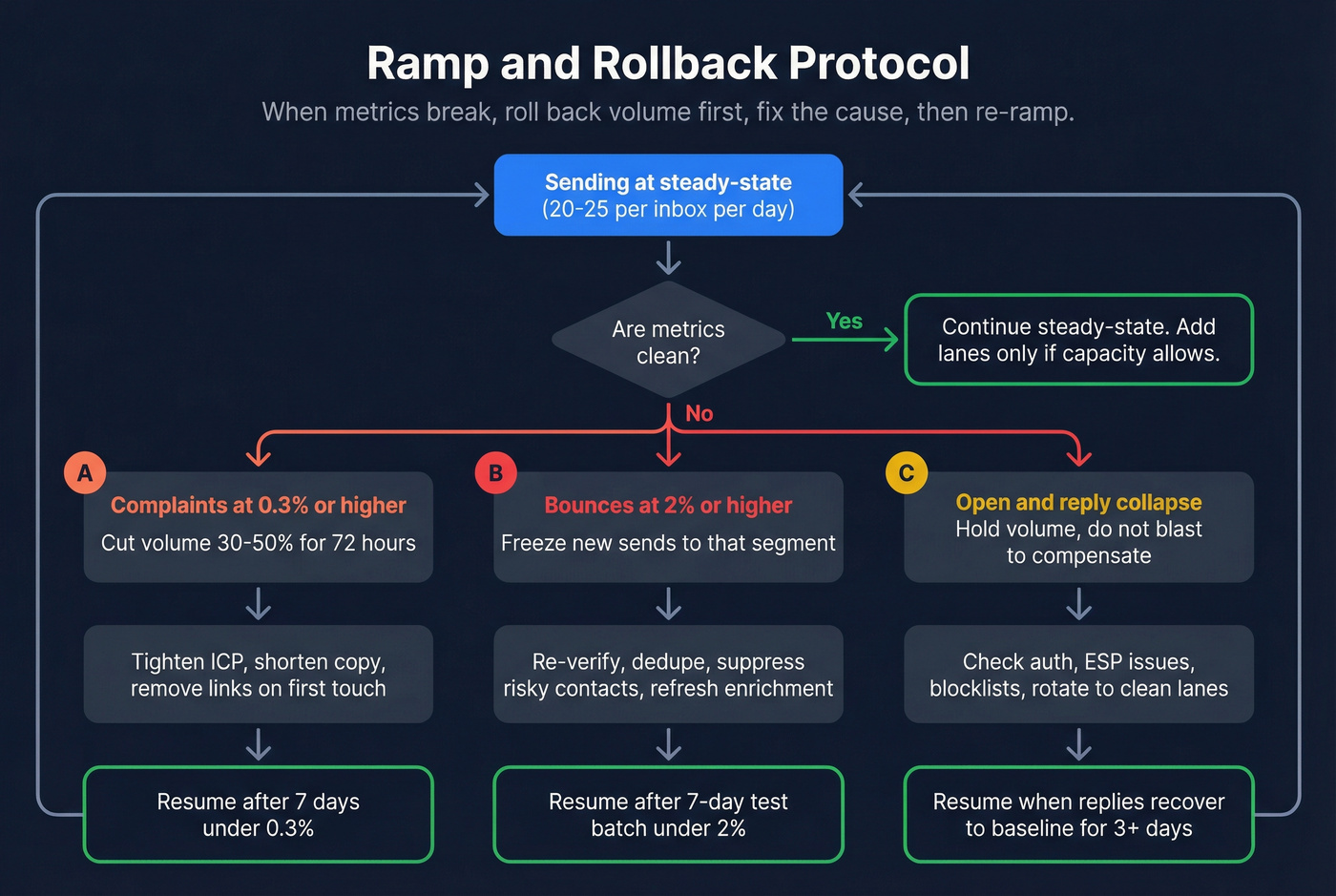
Rule: when a metric breaks, you roll back volume first, then fix the cause, then re-ramp.
| Metric breaks | Immediate action (today) | Fix (next 24-72h) | Resume criteria |
|---|---|---|---|
| Complaints >=0.3% | Cut volume 30-50% for 72h; pause the riskiest segment | Tighten ICP, remove links on first touch, shorten copy, reduce follow-ups, swap to a more relevant offer | 7-day run with complaints <0.3% and stable replies |
| Bounces >=2% | Freeze new sends to that segment; stop adding volume | Re-verify, dedupe again, suppress catch-all/risky, refresh contacts; fix enrichment gaps | 7-day run with bounces <2% on a small test batch |
| Open/reply collapse across lanes | Hold volume; don't blast to compensate | Check auth/alignment changes, ESP issues, blocklists; rotate to other lanes only if clean | Replies recover to baseline for 3-5 days |
| One domain tanks | Isolate the lane; stop sending from that domain | Audit list source + copy; rebuild lane slowly | Domain stable for 7-14 days at low volume |
Concrete lesson from our own testing: when catch-all/risky addresses creep above roughly 15-20% of a segment, bounce risk and throttling go up even if you "verified once." The fix's simple: route risky to calls/social first, and keep email lanes for clean addresses.
Scaling outbound's boring when it's done right.
That's the point.
List quality SOPs that let you scale (verify, enrich, suppress)
Most outbound "scale problems" are list problems wearing a deliverability costume.
You can have perfect SPF/DKIM/DMARC and still get crushed if your list's stale, duplicated, or full of catch-all landmines. I've watched strong copy lose to a bad list because a 3-4% bounce rate triggered throttling and the domain never recovered during the campaign window, so the team spent the rest of the quarter arguing about subject lines instead of fixing the inputs.
The two guardrails (tattoo these on your dashboard)
- Bounces <2%
- Complaints <0.3%
Break either and you fix inputs before you add volume.
SOP: list build -> verify -> enrich -> suppress -> ship
Step 1) Define your list spec (so you can QA it)
Your spec should include:
- ICP filters (industry, headcount, geo, tech stack, funding, etc.)
- Personas (titles, seniority, departments)
- Exclusions (competitors, customers, partners, students, free email domains)
- Required fields (first name, last name, company, role, email, country; phone optional)
If you can't write a spec, you can't delegate list building without chaos.
Step 2) Dedupe before you verify (saves money and mess)
Dedupe in this order:
- Email (exact match)
- Person + company (name + domain)
- Company domain (account-level suppression)
Then apply suppression lists:
- Unsubscribes (global)
- Prior "not a fit"
- Existing opportunities/customers
- Competitors and sensitive domains
Step 3) Verify emails with catch-all handling (don't guess)
Your verification output must separate:
- Valid (safe to send)
- Invalid (never send)
- Catch-all / risky (route carefully)
This is where tools like Prospeo fit naturally: it's "The B2B data platform built for accuracy," and it gives you a clean split between valid, invalid, and catch-all so you can protect lanes instead of gambling with them. (If you’re comparing vendors, start with email verifier websites or the broader email lookup tools.)
Step 4) Enrich to increase conversion per touch (not just volume)
Enrichment's how you earn relevance without turning reps into researchers.
Minimum fields that actually move replies:
- Company size and growth signals
- Role/function normalization (for segmentation)
- Location/time zone (for call windows)
- Technographics (when it changes the pitch)
- Recent job change (high reply propensity)
Track enrichment match rate as a KPI. If half your list comes back blank, your source is weak or your targeting's too broad.
Step 5) Definition of done (DoD) for a shippable list
A list is "done" only if:
- Verified, deduped, suppressed
- Segments labeled (persona, industry, tier)
- Ownership clear (who calls, who emails)
- Refresh date attached (so it doesn't rot silently)
Qualification signals that scale (without personalization theater)
You don't need "hyper-personalization." You need segmentable triggers that make your message obviously relevant.
Use signals you can pull at scale:
- Event signals: speaking, sponsoring, hosting webinars, attending industry events
- Hiring signals: job posts for your buyer's function, new leadership hires, team build-outs
- Tech changes: new tooling, migrations, security/compliance rollouts
- Growth signals: funding, headcount growth, new regions, new product lines
People report spam when the message is irrelevant, not when it's short.
QA checklist (fast, brutal)
Before launch, sample 50 records and check:
- 0 free email domains (unless intentional)
- Titles match persona rules
- No obvious duplicates
- Company domains resolve
- Verification status present
- Suppression rules applied
If your sample fails, the full list fails.
A quick scenario (because this is where teams screw up)
Monday: you pull 5,000 "VP Marketing" contacts, verify once, and launch.
Wednesday: bounces look fine, so you add 30% volume.
Friday: you hit a pocket of stale contacts from a single source, bounces spike past 2%, and now every segment pays the price because the lane's reputation took the hit.
That Friday is avoidable. Weekly refresh + suppression isn't busywork; it's insurance.
What this looks like in Prospeo (concrete workflow)
Upload your CSV, run verification + enrichment, and you'll see results split into valid, invalid, and catch-all so you can route risk appropriately. Export only valid emails to your sequencer, and push enriched fields to your CRM so reps aren't working blind.
Multichannel cadence you can copy (15 touches / 3 weeks)
Stop inventing new cadences. Pick one that works and enforce consistency.
Jason Bay's KISS framework is a clean default: 15 touches / 3 weeks = 6 emails + 6 calls + 3 social touches. If you're trying to figure out how to scale outbound sales without sacrificing quality, this is the kind of repeatable cadence that holds up under volume.
Copy/paste cadence template (3 weeks)
Week 1 (Theme: problem + relevance)
- Day 1: Email #1 (short, direct)
- Day 1: Call attempt #1
- Day 2: Social touch #1 (light interaction)
- Day 3: Email #2 (in-thread follow-up)
- Day 4: Call attempt #2
- Day 5: Call attempt #3
Week 2 (Theme: different angle / trigger)
- Day 8: Email #3 (new angle, one proof point)
- Day 9: Call attempt #4
- Day 10: Social touch #2
- Day 11: Email #4 (polite "close the loop")
- Day 12: Call attempt #5
Week 3 (Theme: specific use case + clean CTA)
- Day 15: Email #5 (use case + question)
- Day 16: Call attempt #6
- Day 17: Social touch #3
- Day 19: Email #6 (final, simple CTA)
Timing notes that matter
- Email length: 50-125 words. Longer emails don't sound thoughtful; they sound like you're trying to win an argument.
- Follow-ups: keep most segments to 1-3 follow-ups in-thread. Past that, complaints creep up.
- First follow-up lift: Instantly's 2026 benchmark write-up shows the first follow-up adds 40-50% more replies. Skipping it leaves easy responses on the table.
Also: social touches are a reputation system. Keep automation conservative. If you push connection requests like it's email, you'll throttle that channel too.
Outbound scaling KPI targets (2026)
If you don't have targets, you can't tell "needs iteration" from "needs rollback."
Use this as a practical dashboard:
| KPI | Target | What it means |
|---|---|---|
| Bounce rate | <2% | List quality + verification is working |
| Complaint rate | <0.3% | Targeting + copy relevance is acceptable |
| Cold email reply rate (baseline) | 1-2% | Healthy starting point; good segments beat this |
| Positive reply -> meeting | 30-50% | Qualification + CTA are aligned |
| Call connect rate | 3-10% | List quality + call windows + numbers are decent |
| Dial-to-meeting rate | ~2.3-2.5% (about 1 per 40-45 dials) | Your calling motion is efficient enough to scale |
| Meetings per SDR (monthly) | ~15 S1/mo | Capacity anchor for planning |
When one metric drifts, don't "work harder." Change the lever that controls it.
Capacity planning with math (S1/S2 model + hiring rule)
Outbound scale breaks when activity outpaces capacity. The fix is math, not motivation.
A clean model uses two stages:
- S1: meetings/opportunities created
- S2: sales-accepted opportunities
Benchmarks that are actually usable:
- SDR capacity: 15 S1/mo
- AE capacity: 30 S1/mo
- Ramp: 75% productivity in year 1 (so an SDR runs ~11 S1/mo)
Outbound Kitchen's math guide lays out the model: https://newsletter.outbound.kitchen/p/scale-outbound-sales-with-math-guide
Mini-calculator (inputs -> outputs)
| Input | Example | Output |
|---|---|---|
| SDRs | 2 | 30 S1/mo |
| Yr-1 ramp | 75% | 22 S1/mo |
| S1->S2 | 50% | 11 S2/mo |
| AEs | 1 | 30 S1 cap |
| AE load | 22 S1 | OK (no backlog) |
The hiring rule (BDRs first vs AEs first)
- If outbound meetings (S1) are below AE capacity, hire BDRs first.
- If outbound meetings are at AE capacity, you're in the sweet spot. Improve conversion before headcount.
- If outbound meetings are above AE capacity, hire AEs first or you'll create a follow-up bottleneck that kills win rates.
Activity reality check (calls example)
If an SDR does 40 quality calls/day, that's ~800 calls/month (20 workdays). If it takes 8 attempts to reach a prospect, that's 100 prospects worked per month.
That's why list quality and segmentation matter: you don't have infinite attempts. You've got a fixed number of real touches, and wasting them on bad data is one of the most frustrating, expensive mistakes in outbound.
Budget & scaling options (in-house vs agency vs DIY infrastructure)
Outbound scale is an economics decision as much as a sales decision. You're choosing between three models: build, buy, or bootstrap infrastructure.
| Model | Typical cost | Speed | Tradeoff |
|---|---|---|---|
| In-house (1 SDR + 1 AE) | ~$14.5k/mo | Slower | Ramp + churn risk |
| In-house year-1 | $175k-$200k | - | Real cash burn |
| Agency | $6k-$10k/mo | Faster | Less control |
| DIY infra (email lanes) | $1.2k-$2.0k/mo | Medium | Ops burden |
The in-house baseline (before meetings)
A common baseline for one SDR + one AE:
- SDR: ~$5,000/mo
- AE: ~$9,000/mo
- Tools: ~$500/mo
Total: ~$14,500/mo before meetings
Hidden costs that bite:
- Data/enrichment can be $1,000+/mo at scale
- Manager/founder time: 5-10 hrs/week
- Ramp: month 1 is often zero meetings; real ramp is 3-5 months
- SDR churn resets your ramp clock
Agency model (when it makes sense)
Agency pricing typically lands at $6,000-$10,000/mo.
Agencies move fast because they've already got SOPs and infrastructure. The trade: you still need to own ICP, offer, and qualification rules. If those aren't crisp, you'll buy a lot of activity and not much pipeline.
DIY infrastructure cost math (concrete)
Common DIY assumptions:
- $3.50/inbox/mo
- $12/domain/year
- 3 inboxes per domain
- 20 sends/day/inbox
- Tools + CRM: ~$500/mo
- Data/enrichment: $500-$1,000/mo
Examples:
- 1,000/day ~= $1,175/mo (after initial domain purchase)
- 2,500/day ~= $1,940/mo (after initial domain purchase)
DIY is cheaper in cash, more expensive in attention. If nobody on your team enjoys ops, it becomes a mess fast.
Tool stack by stage (what to buy, what to skip)
Outbound tools are only useful when each tool has a job. Buy responsibilities, not logos.
Lean (founder-led or 1-2 reps)
- Sequencing: Smartlead, Instantly, or Lemlist (~$30-$100+/mo depending on plan and add-ons)
- CRM: HubSpot Starter (~$20-$50/seat/mo) or a lightweight CRM
- Automation: Zapier / Make / n8n (~$0-$50+/mo to start)
- Data + verification + enrichment: a dedicated accuracy-first layer (don't rely on your sequencer's "verification")
Skip if you're lean: full sales engagement platforms. They add process overhead before you've got process.
SMB (3-15 reps, real outbound motion)
- Sequencing: Smartlead / Instantly / Lemlist with rotation + team controls (~$60-$200+/mo plus inbox costs)
- Data ops workflows: Clay (~$149-$800+/mo depending on usage; credits can climb fast)
- CRM: HubSpot or Salesforce (wide range; plan for ~$50-$200+/seat/mo depending on edition)
- Integrations: Zapier/Make/n8n for routing, suppression sync, and logging
Skip if you don't have an owner: complex enrichment automations. Credit sprawl is real, and nobody notices until the bill hits.
Mid-market (process + governance)
- Sales engagement: Outreach or Salesloft (~$100-$180+/seat/mo planning estimate; enterprise packaging can push higher)
- CRM: Salesforce (plan for ~$150-$350+/seat/mo depending on edition and add-ons)
- Data governance: tighter suppression, field mapping, and enrichment rules
Apollo can be a cost-effective all-in-one starting point for smaller teams. G2 shows Apollo tiers at $49 / $79 / $119 (pricing page last updated Oct 9, 2026).
Opinionated takeaway: keep your data/verification layer separate from your sequencer. Sequencers optimize sending. Data tools optimize accuracy. Mixing them is how bounces creep up unnoticed. (More on infrastructure: email sending infrastructure.)

Your 90-day scale plan dies at Week 1 if your list is rotten. Prospeo's 5-step verification with catch-all handling and spam-trap removal means you pass every deliverability gate before you send a single message. At $0.01/email, clean data costs less than one bounced domain.
Clean inputs first. Everything else follows. Try 100 credits free.
What scaling looks like in practice (60-day example + pitfalls)
A realistic 60-day path looks like this: slow start, infrastructure fixes, then consistent volume.
One founder-led run I like because it's painfully honest:
- Warmup: 18-day warmup
- Volume: 270/day (30/day/inbox across 9 accounts)
- Results: 0->22 meetings in 60 days
- Performance: 4.7% reply rate
- Biggest early mistake: a bought list caused 40%+ bounces
- Biggest copy fix: cutting email length 280 -> ~90 words increased replies
I've lived a version of this. The "we'll just test it" bought list turns into a week of cleanup, then a month of reputation recovery, then a retro where everyone pretends the list source wasn't the problem.
Do this:
- Warm up properly, then hold steady volume
- Keep copy short and specific
- Re-verify lists before every new push
- Segment by triggers (hiring, tech change, growth) so relevance stays high
Avoid this:
- Buying a list and "just sending to see"
- Scaling volume while bounces are spiking
- Writing essays in email to pre-handle objections
- Letting AEs drown in meetings without a follow-up SLA
Outbound works in 2026. The bar's higher, and the penalties are real.
FAQ
What metrics tell you you're ready to scale outbound volume?
You're ready when bounces are under 2% and complaints are under 0.3% for 7-14 straight days. Then confirm reply rate and meeting rate are stable by segment (not just blended). If one segment drags the averages down, pause that segment first and keep the rest running.
What are the non-negotiable deliverability thresholds in 2026?
Keep complaint rate below 0.3% and bounce rate below 2%, or you stop ramping volume immediately. Bulk senders also need SPF, DKIM, and DMARC with alignment, plus one-click unsubscribe (List-Unsubscribe header) and unsubscribe processing within 2 days to stay compliant with major inbox rules.
How many inboxes and domains do I need to send 1,000 cold emails/day safely?
Plan on 50 inboxes at 20 emails/day/inbox for a conservative setup, which is about 17 domains if you run 3 inboxes per domain. If you can hold clean metrics at 25/day/inbox, you can do it with ~40 inboxes and ~14 domains, but lanes beat per-inbox pushing.
What's a good free tool to clean and enrich lists before scaling?
Prospeo's free tier includes 75 email credits plus 100 Chrome extension credits per month, which is enough to verify a small batch and prevent bounce spikes. For teams doing real volume, pair verification with weekly dedupe + suppression so you don't "scale" a list that's quietly rotting.
Summary: how to scale outbound sales without breaking your domain
If you want a real answer to how to scale outbound sales in 2026, it's not "send more." It's: lock list SOPs, treat deliverability as a gate, add lanes gradually, run one repeatable multichannel cadence, and do capacity math so meetings get worked fast. If you want a deeper operating model, map this into an outbound sales engine.
Get the boring discipline right, and volume becomes a multiplier instead of a liability.