Sales Cadence Example Templates You Can Copy and Run in 2026
Most "cadence problems" aren't messaging problems. They're effort, timing, and channel mix problems.
I've watched teams run six touches, all email, all to one person, then act surprised when pipeline looks like a ghost town. The fix isn't "write better subject lines." It's building a cadence that matches how buyers behave in 2026, and putting guardrails in place so you don't wreck deliverability while you're trying to be persistent.
Look, if your cadence doesn't have a stop line, it's not a cadence. It's just you bothering someone on a schedule.
Best sales cadence example (copy/paste)
If you only want one template, use this. It's simple, multi-channel, and it has a clean exit so reps don't keep poking a dead thread for 60 days.
7-touch "baseline outbound" cadence (10 business days)
| Day | Touch | Channel | Why this step exists | Personalize this (3 tokens) |
|---|---|---|---|---|
| 1 | Touch 1 | Earn relevance fast | Trigger + role pain + proof asset | |
| 1 | Touch 2 | Call | Create immediacy | Trigger + reason for call + 1 question |
| 2 | Touch 3 | Add value (not a "bump") | 1 tactic + metric + peer | |
| 4 | Touch 4 | Call + VM | Catch a different time | 10-sec VM + "I'll email you" |
| 6 | Touch 5 | Video (60-90 sec) | Pattern break + trust | Screen share 1 slide + 1 insight |
| 8 | Touch 6 | Handle the obvious objection | Why now + risk of doing nothing | |
| 10 | Touch 7 | Clean exit (permission close) | Later / Not us options |
Email to paste (Touch 1)
Subject: {{Company}} + {{trigger}}
Hi {{FirstName}} - noticed {{trigger}}.
When {{role/team}} does that, the usual snag is {{pain}}. We help teams like {{peer}} get {{outcome}} without {{tradeoff}}.
Worth a quick look, or should I close the loop?
-- {{YourName}}
Below are templates for outbound, inbound, events, referrals, stalled deals, SMB, and enterprise.
What a sales cadence is (and what it isn't)
A sales cadence is a planned series of touchpoints (email, calls, social touches, and video; SMS only where compliant) spread across a defined window to create conversations with a specific segment. It's your touch plan: what happens, when it happens, and why.
It's not "spam harder." It's controlled persistence with a point.
Where teams get sloppy:
- Cadence vs. sequence: A sequence is the automation object in your engagement tool (steps + delays). A cadence is the strategy: channels, timing, who you target, and what you say at each step. (If you want the email-only version, start with an email cadence.)
- Cadence vs. playbook: A playbook is the whole motion (ICP, routing, messaging pillars, objection handling, handoffs, SLAs, reporting). The cadence is one component inside that playbook.
Two rules that keep cadences from turning into noise:
- Every touch needs a job (new angle, new proof, new ask). If it's "checking in," delete it.
- Cadence success is coverage, not harassment: more attempts should mean more channels and more stakeholders, not 21 pings to one inbox.
Pick one cadence (and stop overcomplicating it)
Most teams don't need eight cadences. They need one that fits their motion, plus one fallback for when the first path fails.
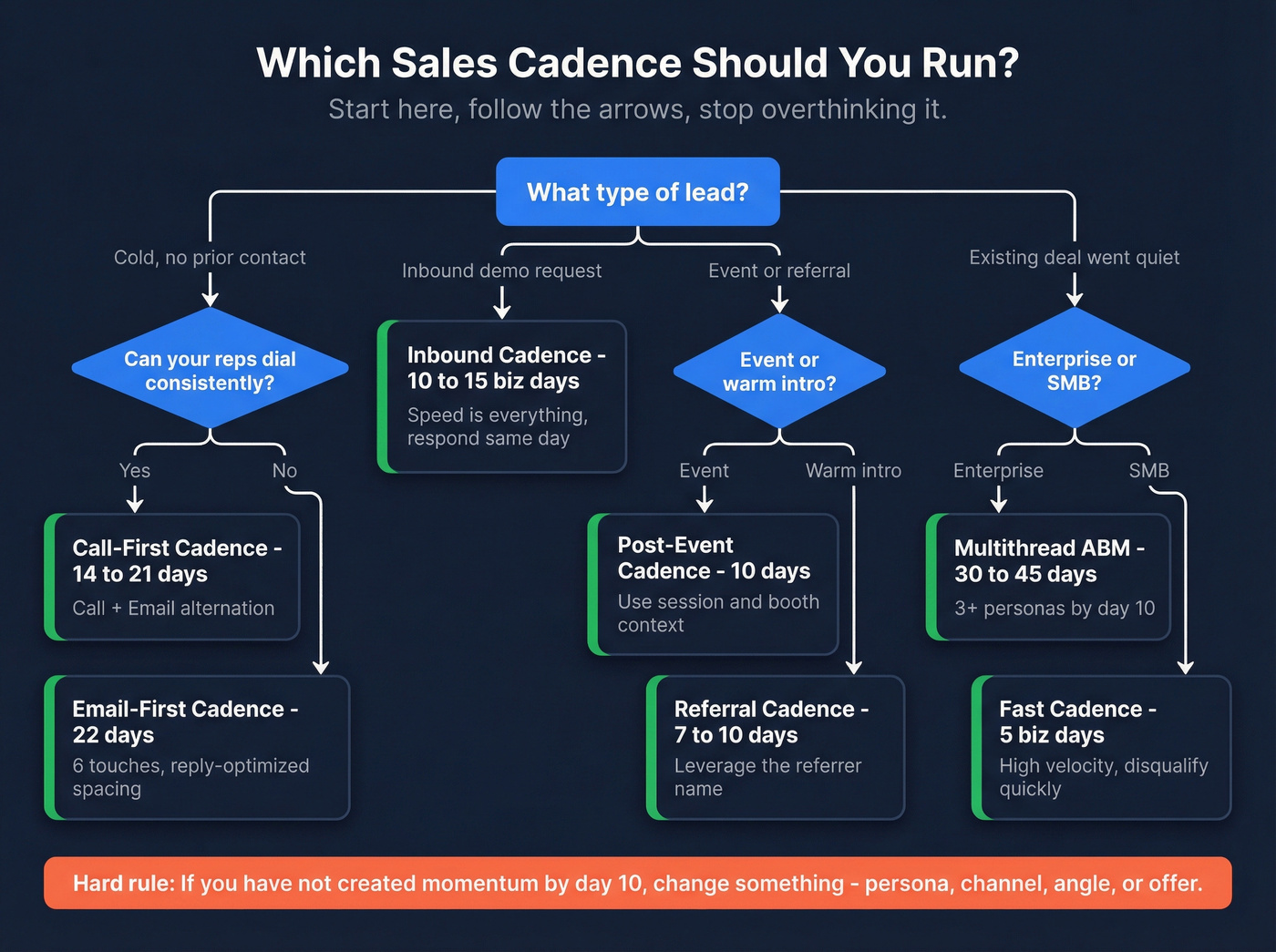
- Cold outbound and you're email-forward -> run the Outbound email-first cadence (reply-optimized spacing). It's built around proven spacing (Day 3/7/11/15/19/22) that drives replies without daily nagging. (Pair it with a real B2B cold email sequence instead of random follow-ups.)
- You're working inbound demo requests -> run the Inbound demo-request cadence (10-15 business days). Inbound is a speed game; if you're slow on day one, you're volunteering to lose. (Benchmark your average lead response time so you know if you're actually fast.)
- You're selling enterprise or anything committee-heavy -> run the Enterprise multithread account cadence. One-threading is how good deals die quietly. (This is where multithreading in sales stops being optional.)
Hard rule I've used for years: if you haven't created momentum by day 10, change something (persona, channel, angle, offer). Don't "stay the course" into a silent month.
Mini decision tree (print this mentally)
- High list volume + light personalization -> email-first outbound
- Strong phone coverage + reps who dial -> call-first alternation
- Hand-raiser lead -> inbound 10-15 business day cadence
- Event lead -> post-event 10-day cadence
- Warm deal went quiet -> went-dark 14-day cadence
- Intro from someone -> referral / intro cadence
- SMB high-velocity -> 5-day fast cadence
- Enterprise -> 30-45 day multithread cadence
Which cadence to use by scenario (and what to avoid)
| Scenario | Use this template | Duration | Channels | Winner outcome | Skip if... |
|---|---|---|---|---|---|
| Cold outbound (scale) | Email-first | 22 days | Email + light social | Reply volume | Your bounce rate's >3% or your list isn't verified |
| Cold outbound (high-fit) | Call-first | 14-21 days | Call + email | Live connects | Reps won't dial consistently |
| Demo request | Inbound | 10-15 biz days | Call + email + social | Speed-to-lead | You can't respond same day |
| Event leads | Post-event | 10 days | Email + call + social | Context follow-up | You've got zero event context (session, booth topic, convo notes) |
| Referral / intro | Referral / intro | 7-10 days | Email + call + social | Fast meetings | You don't have permission to use the referrer's name |
| Post-demo | Went dark | 14 days | Email + call + video | Re-engage | There's no agreed next step to anchor to |
| SMB | Fast | 5 biz days | Email + call | High velocity | Your ICP's broad and you can't disqualify fast |
| Enterprise | Multithread ABM | 30-45 days | Email + call + social | Committee coverage | You're still single-threading after day 10 |


A 7-touch cadence with bad data is just 7 ways to bounce. Prospeo's 98% email accuracy and 125M+ verified mobile numbers mean every touch in your cadence actually reaches a real person. Bounce rates drop under 4% - just ask the teams already running on our data.
Stop perfecting your cadence copy and start fixing your contact data.
Sales cadence benchmarks for 2026 (touches, timing, multithreading)
These are the benchmarks that should change how you design your cadences in 2026.
The cadence math to anchor to
- Attempts per contact: ~21 attempts per contact (6sense BDR benchmark).
- Channel mix: roughly 8 calls, 8 emails, 5 social touches.
- Cadence length: average cadence ends after 53 days.
- Multithreading is normal: 90% of BDRs multithread, reaching about 9 people per account.
- The 50-day cliff: opportunities closed within 50 days win at 47%. After 50 days, win rates drop to ~20% or lower (Outreach benchmark).
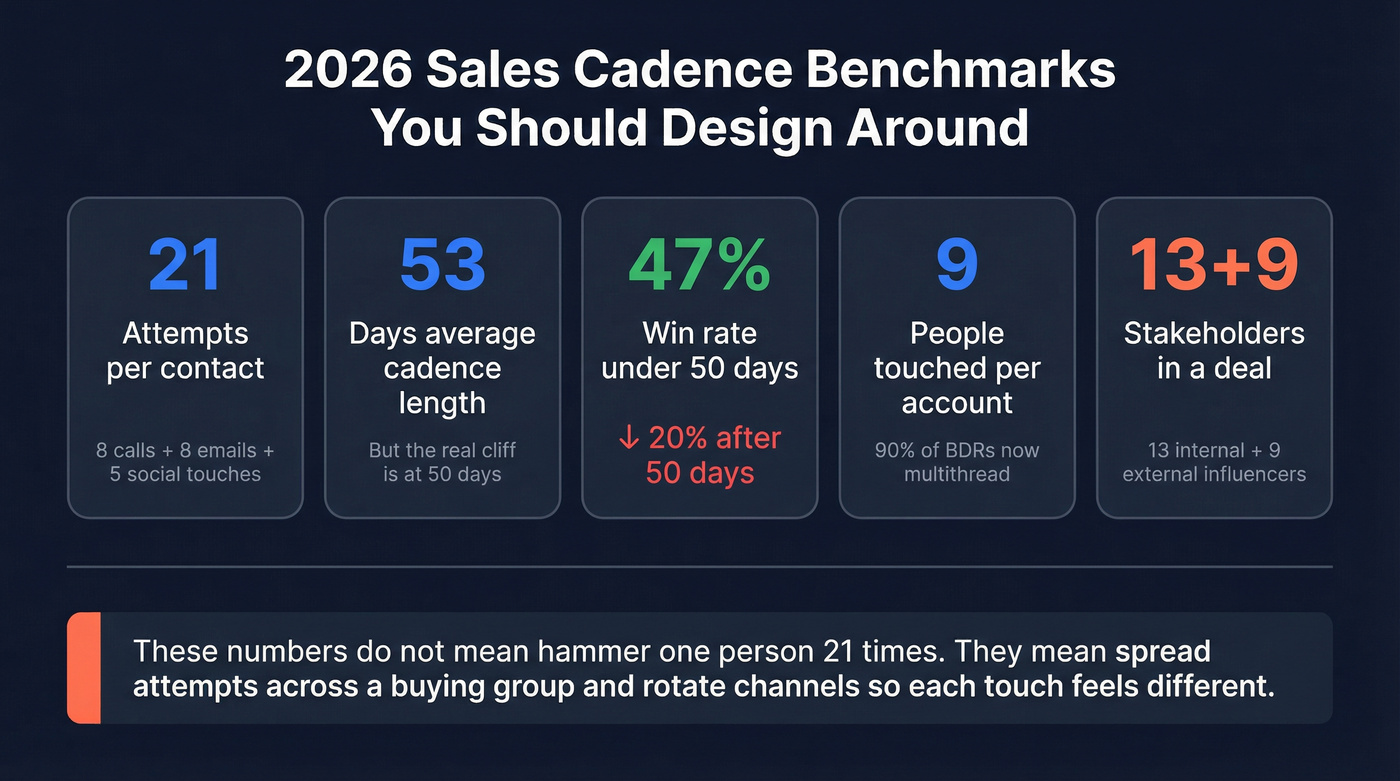
My take: the 50-day cliff is the most useful number on this page. It's a forcing function that keeps you honest about whether you're progressing a deal or just keeping it "warm" until it dies.
Buying groups got bigger, and buyers shortlist early
Forrester's buying-group research is the other 2026 reality check:
- Typical buying decisions include about 13 internal stakeholders plus about 9 external influencers.
- 92% of buyers start the process with at least one vendor already in mind.

Translation: your cadence has two jobs now. First, earn "vendor-in-mind" status fast with relevance and proof early. Second, cover the buying group before the shortlist hardens.
Concrete rule: in any mid-market or enterprise motion, by day 10 you should've touched at least 3 personas (champion + economic buyer + technical/ops). Waiting until day 30 is self-sabotage.
Here's the thing: none of these numbers mean "hammer one person 21 times." They mean spread attempts across a buying group and rotate channels so each touch feels different.
Sales cadence example library (copy/paste templates)
1) Outbound email-first cadence (reply-optimized spacing)
When to use: high-volume outbound where email's your primary channel and you can personalize lightly. Who to target: clear ICP matches with a real trigger (hiring, tool change, funding, job change). (If your ICP is fuzzy, fix your ideal customer definition first.) What to personalize: trigger + role pain + one proof asset (case, benchmark, teardown).

Yesware's analysis of 10M email threads found the most successful reply-based cadence was six touches over about three weeks, with follow-ups on Day 3/7/11/15/19/22. Waiting more than four days between touches reduces response likelihood.
Day-by-day cadence table (email-first)
| Day | Touch | Channel | Why this step exists | Personalize this (3 tokens) |
|---|---|---|---|---|
| 1 | Touch 1 | Relevance fast | Trigger + role pain + outcome | |
| 3 | Touch 2 | Add value | 1 tactic + metric + timeframe | |
| 7 | Touch 3 | Pattern break | New angle + new proof + new CTA | |
| 11 | Touch 4 | Handle "why now" | Cost of delay + risk + priority | |
| 15 | Touch 5 | Social proof | Peer logo + metric + use case | |
| 19 | Touch 6 | Permission close | Later / Not us options | |
| 22 | Optional | Social | Light visibility | Like/comment + short DM |
6 subject lines (mix these)
- Quick question about {{initiative}}
- {{Company}} + {{trigger}}
- Worth a look?
- Idea for {{team}}
- Re: {{pain}}
- Should I close the loop?
Email body - Touch 1 (tight relevance)
Subject: {{Company}} + {{trigger}}
Hi {{FirstName}} - noticed {{trigger: hiring, tool change, growth, new region}}.
Teams like {{peer}} usually run into {{pain}} when {{context}}. We help {{role/team}} get {{outcome}} without {{common tradeoff}}.
Worth a quick look, or should I close the loop?
-- {{YourName}}
Email body - Touch 2 (value follow-up)
Subject: Idea for {{team}}
Hi {{FirstName}} - one concrete idea:
If you're seeing {{symptom}}, a simple fix is {{tactic}}. It typically lifts {{metric}} in 2-4 weeks because {{reason}}.
Want me to send a 1-page example for {{Company}}?
-- {{YourName}}
Email body - Touch 6 (breakup / permission close)
Subject: Should I close the loop?
Hi {{FirstName}} - I haven't heard back, so I'm going to assume this isn't a priority.
If you want, reply with:
- "Later" and I'll circle back in {{30/60}} days, or
- "Not us" and I'll stop.
Either way, appreciate it.
-- {{YourName}}
2) Outbound call-first cadence (call/email alternation)
When to use: high-fit accounts where a live conversation changes outcomes. Who to target: roles that pick up (ops, IT, finance, frontline leaders) plus your likely champion. What to personalize: reason for call + one question + one proof point. (Use a real B2B cold calling guide so reps don’t freestyle.)
If your team can actually dial, call-first works because it creates immediacy and forces message discipline.
Yesware's analysis of 33M tracked activities across phone + email recommends this early order: call -> email -> call+voicemail -> call -> value emails for the first six touches.
Day-by-day cadence table (call-first alternation)
| Day | Touch | Channel | Why this step exists | Personalize this (3 tokens) |
|---|---|---|---|---|
| 1 | Touch 1 | Call | Try for live connect | Trigger + 1 question + next step |
| 1 | Touch 2 | Add context | Tried calling + 2 bullets + CTA | |
| 3 | Touch 3 | Call + VM | Anchor memory | 10-sec VM + "I'll email you" |
| 5 | Touch 4 | Call | Different time slot | New question + new angle + short ask |
| 7 | Touch 5 | Value | Insight + checklist + metric | |
| 10 | Touch 6 | Proof | Case + number + peer | |
| 14 | Touch 7 | Call | Final connect attempt | Worth it or close it? |
2 call openers (don't overthink it) Opener A (reason-first): "Hey {{FirstName}}, {{YourName}} here - calling because we're seeing {{peer group}} run into {{pain}} when {{trigger}}. Quick question: how are you handling {{specific}} today?"
Opener B (permission + reason): "Hi {{FirstName}} - can I take 20 seconds? Reason I'm calling: {{one sentence relevance}}. Then I'll ask one question and you can tell me if I'm off."
Voicemail script (10-15 seconds) "Hey {{FirstName}}, it's {{YourName}}. Reason I called: {{trigger}} and we help {{role}} reduce {{pain}}. I'll send a quick email with context - reply 'yes' if it's worth a look."
Follow-up email after voicemail
Subject: Left you a quick VM
Hi {{FirstName}} - left you a short voicemail.
The reason I reached out: {{trigger}}. We help {{role/team}} get {{outcome}} by {{how}}.
If it's relevant, reply with "yes" and I'll send the 2 bullets that usually matter.
-- {{YourName}}
3) Inbound demo-request cadence (10-15 business days)
When to use: demo requests, pricing-page leads, contact-us forms. Who to target: the requester plus one adjacent stakeholder (manager, IT, finance) if your category usually needs review. What to personalize: their form fields + page intent + what good looks like for their use case.
Inbound is where teams lose deals by being slow and weirdly passive. Your first day matters more than your tenth touch.
Highspot's inbound guidance is 8-12 touchpoints over 10-15 business days, mixing call, email, and social touches.
Day-by-day cadence table (inbound demo request)
| Day | Touch | Channel | Why this step exists | Personalize this (3 tokens) |
|---|---|---|---|---|
| 1 | Touch 1 | Call | Book while intent's hot | Their request + 2 questions + time |
| 1 | Touch 2 | Confirm + reduce friction | Recap + agenda + calendar link | |
| 2 | Touch 3 | Make scheduling effortless | 2 time options + link + fallback | |
| 3 | Touch 4 | Social | Light credibility | Connect + 1-line note |
| 4 | Touch 5 | Proof | Relevant case + metric + use case | |
| 6 | Touch 6 | Call | Re-attempt | Different time + short opener |
| 8 | Touch 7 | Summary | 2 paths + which one? | |
| 10 | Touch 8 | Permission close | Close it or book it | |
| 30 | Touch 9 | Re-engage | New insight + new CTA |
Fast response email (send same day)
Subject: Re: demo request
Hi {{FirstName}} - got your demo request.
Two quick questions so I bring the right examples:
- Are you trying to improve {{use case A}} or {{use case B}}?
- Are you already using {{tool/process}}?
If you'd rather skip email, here's my calendar: {{link}}.
-- {{YourName}}
Calendar link email (Day 2)
Subject: easiest next step
Hi {{FirstName}} - easiest next step is grabbing 15 minutes here: {{link}}.
If none of those times work, reply with two windows that do and I'll fit it in.
-- {{YourName}}
Breakup email (Day 10)
Subject: closing this out?
Hi {{FirstName}} - I don't want to be annoying.
If you still want to look, grab time here: {{link}}. If not, reply "no" and I'll close this out.
-- {{YourName}}
4) Post-event follow-up cadence (attended / no-show / booth scan)
When to use: conferences, webinars, roundtables, field events. Who to target: attendees plus 1-2 adjacent stakeholders if the topic implies a buying group. What to personalize: session name, booth topic, question asked, or the exact problem they mentioned.
Skip this if your "event lead" list is just a CSV of scanned badges with no context. You'll get better results treating it like cold outbound with a trigger than pretending you had a relationship.
10-touch post-event cadence (10 business days)
| Day | Touch | Channel | Why this step exists | Personalize this (3 tokens) |
|---|---|---|---|---|
| 0 | Touch 1 | Use fresh context | Event + topic + 1 takeaway | |
| 0 | Touch 2 | Social | Name recognition | Connect + 1-line note |
| 1 | Touch 3 | Call | Catch them while it's recent | Event reference + 1 question + ask |
| 2 | Touch 4 | Give the asset | Slides/recording + 2 bullets | |
| 4 | Touch 5 | Add proof | Similar company + metric + use case | |
| 5 | Touch 6 | Call + VM | Different time slot | 10-sec VM + "sent the recap" |
| 7 | Touch 7 | Objection handling | Why now + risk + next step | |
| 8 | Touch 8 | Social | Light touch | Comment/like + short DM |
| 10 | Touch 9 | Permission close | Later / Not us | |
| 20 | Touch 10 | Re-open with new angle | New insight + new CTA |
Email to paste (Day 0, attended)
Subject: {{EventName}} - quick follow-up
Hi {{FirstName}} - good seeing you at {{EventName}}.
You mentioned {{their context}}. The pattern we see is {{pain}} showing up right after {{trigger}}. If it's helpful, I can send a 1-page example of how teams fix it (with numbers).
Worth a quick chat next week?
-- {{YourName}}
Email to paste (Day 0, no-show)
Subject: missed you at {{EventName}}
Hi {{FirstName}} - looks like you registered for {{EventName}} but couldn't make it.
Want the recording + the 3 takeaways most people asked about? If you tell me which track you care about ({{A}} or {{B}}), I'll send the right clip.
-- {{YourName}}
5) Referral / intro cadence (7-10 days)
When to use: warm intros, partner referrals, customer referrals. Who to target: the referred person, and only loop the referrer back in if you agreed to. What to personalize: referrer's name + why the intro makes sense + one clear next step.
7-touch referral cadence (7 business days)
| Day | Touch | Channel | Why this step exists | Personalize this (3 tokens) |
|---|---|---|---|---|
| 0 | Touch 1 | Make the intro easy | Referrer + 1 sentence context + 2 times | |
| 1 | Touch 2 | Call | Fast scheduling | Referrer + reason + short ask |
| 2 | Touch 3 | Reduce friction | Calendar link + agenda + 2 bullets | |
| 3 | Touch 4 | Social | Light credibility | Connect + short note |
| 5 | Touch 5 | Proof | Relevant case + metric + use case | |
| 7 | Touch 6 | Call | Final live attempt | Quick check + close loop |
| 7 | Touch 7 | Clean close | Later / Not now |
Email to paste (Day 0)
Subject: intro via {{ReferrerName}}
Hi {{FirstName}} - {{ReferrerName}} suggested we connect.
Based on what they shared, I think this might help with {{problem}}. Open to a quick 15 minutes? I can do {{time option 1}} or {{time option 2}}.
If it's easier, here's my calendar: {{link}}.
-- {{YourName}}
6) Stalled deal / went dark cadence (post-demo)
When to use: you had a real conversation, then silence. Who to target: your champion plus the person who cares about budget and the person who cares about implementation. What to personalize: the last agreed next step + the cost of delay + a low-friction ask.
This is where reps get emotional and start sending "just bumping this" emails. Don't. Give them a decision.
8-touch went-dark cadence (14 days)
| Day | Touch | Channel | Why this step exists | Personalize this (3 tokens) |
|---|---|---|---|---|
| 1 | Touch 1 | Anchor to next step | Last meeting + agreed action + date | |
| 2 | Touch 2 | Call | Confirm status | 10-sec reason + 1 question |
| 4 | Touch 3 | Remove blockers | 3 common blockers + pick one | |
| 6 | Touch 4 | Video | Rebuild context fast | 60-sec recap + 1 recommendation |
| 7 | Touch 5 | Call + VM | Different time | "sent a quick recap video" |
| 10 | Touch 6 | Create a fork | Option A / Option B | |
| 12 | Touch 7 | Stakeholder add | "who else should weigh in?" | |
| 14 | Touch 8 | Close file | "I'll close this out" |
Email to paste (Day 1)
Subject: next step from {{meeting}}
Hi {{FirstName}} - after {{meeting}}, we had {{agreed next step}} as the next move.
Still the plan? If priorities changed, just tell me and I'll stop chasing.
-- {{YourName}}
Fork email (Day 10)
Subject: should we do A or B?
Hi {{FirstName}} - quick fork so we don't drag this out:
A) We run {{pilot/next step}} this month and review results on {{date}}, or B) We pause until {{month}} and revisit then.
Which one should I put on the calendar?
-- {{YourName}}
7) SMB fast cadence (high-velocity)
When to use: SMB offers where you win on speed and clarity. Who to target: the owner of the problem (not a committee). What to personalize: one pain + one outcome + one proof point.
SMB is speed and volume. SaaStr's take is blunt: SMB reps often get 2 touches, 3 max to close because they're running high velocity.
Strong opinion: if you're selling lower-ticket and you need a 21-attempt cadence to get a meeting, your targeting or offer is off. Narrow your ICP, use stronger triggers, or switch to inbound capture.
6-touch SMB cadence (5 business days)
| Day | Touch | Channel | Why this step exists | Personalize this (3 tokens) |
|---|---|---|---|---|
| 1 | Touch 1 | Call | Fast connect | Trigger + 1 question + ask |
| 1 | Touch 2 | Context | 2 bullets + proof + CTA | |
| 2 | Touch 3 | Call + VM | Second time slot | 10-sec VM + "sent details" |
| 3 | Touch 4 | Offer | 1 clear offer + deadline | |
| 4 | Touch 5 | Call | Final live attempt | Worth it or close it |
| 5 | Touch 6 | Close loop | Later / Not us |
Email to paste (Day 1)
Subject: quick question, {{FirstName}}
Hi {{FirstName}} - quick one.
If you're dealing with {{pain}}, we can usually get {{outcome}} in {{timeframe}}. Want to see the 2-minute version?
-- {{YourName}}
8) Enterprise multithread account cadence (30-45 days)
When to use: enterprise, security reviews, procurement cycles, anything with a committee. Who to target: champion, economic buyer, technical owner, ops/enablement, and a "skeptic" persona. What to personalize: role-specific pain + role-specific proof + a next step that matches their job.
Gong's insights (published Jan 2026 summarizing 2025 analysis) are the clearest justification for multithreading:
- Strategic enterprise deals average 17 contacts
- Closed-won deals have about 2x the buyer contacts of closed-lost
- Multithreading boosts win rates 130% on deals over $50K
Here's a scenario I've seen too many times: the champion loves you, the pilot goes well, then legal shows up in week six with a brand-new set of concerns and nobody on your side knows how to answer them. Multithreading early prevents that, because you're not meeting the "real buyer" for the first time in procurement.
Enterprise multithread cadence (sample structure) Instead of a strict day-by-day script, run this as a repeating weekly rhythm for 4-6 weeks:
- Week 1: Champion + technical owner (value + feasibility)
- Week 2: Economic buyer (ROI + risk) + ops (implementation plan)
- Week 3: Security/legal (controls + docs) + champion (internal selling kit)
- Week 4: Procurement (commercials) + exec sponsor (why now)
- Weeks 5-6 (if needed): Competitive angle, reference call, mutual action plan refresh
Email to paste (economic buyer)
Subject: {{Company}} ROI math (quick)
Hi {{FirstName}} - looping you in because this usually lands with whoever owns budget.
Based on what we saw with {{team}}, the ROI tends to come from {{lever 1}} and {{lever 2}}. For a team of {{size}}, that's typically {{range}} in {{timeframe}}.
If I send a one-page model, who else should sanity-check it on your side?
-- {{YourName}}
Messaging rules that raise reply + meeting rates
These apply across every cadence above.
- Lead with the trigger, not your product. "Noticed you're hiring SDRs" beats "We help teams drive pipeline."
- One email, one idea. If you need three paragraphs, you don't have a point yet.
- Every follow-up changes something: new proof, new angle, new stakeholder, new ask.
- Ask for a small next step. "Worth a quick look?" beats "Can we schedule 30 minutes this week?" (More frameworks in our sales CTA guide.)
- Use a stop line. permission closes work because they respect time and force a decision.
Social touches: don't get rate-limited (and don't be weird)
Social works best as support, not as the main event.
- Keep it light: connect, like/comment once, then a short DM that matches the email angle.
- Don't write a novel in DMs.
- Don't send a pitch right after a connect request. That's how you get ignored fast.
Deliverability guardrails (so more touches don't burn your domain)
Dotdigital's deliverability benchmarks are a good sanity check: good delivery is 97%+, and their global average delivery rate is 99.21%. Global average total bounce is 0.79% (soft 0.74%, hard 0.05%).
If you're seeing hard bounces creep up, stop and fix the list. More volume won't save you; it'll just get you filtered. (If you’re troubleshooting rejections, start with 550 Recipient Rejected.)
Two practical rules:
- Keep bounces low by verifying before you send, not after you get punished. (Here’s the full SOP on how to verify an email address.)
- Segment by engagement so you're not blasting cold contacts from the same domain that's also sending warm follow-ups.
Compliance guardrails for calling + SMS (2026 reality)
Follow your local laws and your company's policies. If you don't have permission for SMS, don't use it as a "pattern break." It's not clever; it's a complaint waiting to happen.
Step 0 before you launch any cadence: clean, verify, and enrich your list
Data decay is the silent cadence killer. B2B contact data decays about 2.1% per month (~22.5% annually), and teams lose 27.3% of their time to bad data. (More detail in our B2B contact data decay benchmarks.)
Here's the workflow we use in practice:
- Deduplicate (company + domain + person).
- Verify emails (including catch-all handling).
- Enrich so reps aren't guessing titles, regions, and team context.
- Export only verified contacts into your sequencer.
- Monitor bounces weekly and quarantine risky segments.
This is where Prospeo fits naturally: it's the B2B data platform built for accuracy, with 300M+ professional profiles, 98% email accuracy, and a 7-day refresh cycle. You can upload a CSV (or select records), verify in real time, enrich with 50+ data points, then export only the verified set so your cadence volume doesn't turn into bounce volume, and you can add verified mobile numbers when you want a real multi-channel motion.
Multithreading 9 contacts per account only works if you have verified emails and direct dials for all of them. Prospeo gives you 30+ filters to find every stakeholder in the buying group - with data refreshed every 7 days, not 6 weeks.
Cover the entire buying committee with contacts you can actually reach.
Measure and iterate: the few metrics that actually matter
Track these weekly by segment (not just overall):
- Hard bounce rate (if this rises, fix data before you touch messaging)
- Reply rate (split positive vs. negative)
- Connect rate (calls that actually reach a human)
- Meeting rate per 100 contacts
- Meetings per rep per week (the only number leadership really feels)
If replies are fine but meetings are low, your ask is too big or your qualification's off. If connects are low, change call blocks and add direct dials. If everything's low, your targeting's wrong.
FAQ
How many touches should a sales cadence have in 2026?
For outbound, plan for persistence: many teams design around roughly 15-25 attempts per contact spread across channels and stakeholders. For inbound, 8-12 touches over 10-15 business days is a solid baseline.
What's the difference between a cadence and a sequence?
A sequence is the set of automated steps inside a tool. A cadence is the strategy behind it: channel mix, timing, targeting, and what each touch is trying to accomplish.
Should I use a breakup email?
Yes, if it's a real permission close with clear options (later / not us). It keeps your reps from dragging dead threads and it often triggers a reply from people who were ignoring you.
Summary
A good sales cadence example isn't "more follow-ups." It's a planned, multi-channel touch plan with a stop line, built around 2026 benchmarks (attempt volume, channel mix, multithreading) and protected by deliverability basics like verification and enrichment.
Copy one template, run it for 2-4 weeks, then iterate based on connects, replies, and meetings without burning your domain.