

How to Build a B2B Cold Email Sequence That Actually Gets Replies in 2026
The playbook that worked in 2023 - spin up a few inboxes, blast a generic template, watch the replies roll in - is dead. Building a b2b cold email sequence that converts in 2026 demands a completely different approach. Reply rates that used to land at 15-25% with solid targeting now struggle to crack 8-10% for Fortune 1000 prospects. Belkins found it takes 306 cold emails to generate a single B2B lead. That's not a broken channel. That's a channel that punishes lazy execution and rewards the teams who get infrastructure, data, and sequencing right.
The gap between average and elite senders has never been wider. Benchmark data across billions of cold email interactions shows the average reply rate sitting at 3.43%. The top 10% of senders? Over 10.7%. That's a 3x difference, and it isn't because top performers write better subject lines. It's because they've built the plumbing correctly: clean domains, verified data, and sequences designed as systems instead of one-off blasts.
Here's the thing: most cold email guides spend 80% of their word count on copywriting templates and 20% on the infrastructure that determines whether your email even reaches an inbox. That ratio is backwards. Microsoft started rejecting non-compliant emails outright as of May 2025 - not filtering to spam, rejecting. Gmail and Yahoo tightened their own rules. The era of spinning up 10 inboxes and going full send is over.
What follows flips the ratio. You'll get templates - good ones, from real campaigns. But you'll also get the deliverability setup, warmup protocol, verification workflow, and benchmarks that separate the 3.43% average from the 10.7% elite. A perfectly written email that lands in spam is worth exactly nothing.
What You Need Before Sending a Single Cold Email
Here's the checklist. If you do nothing else, do these six things:
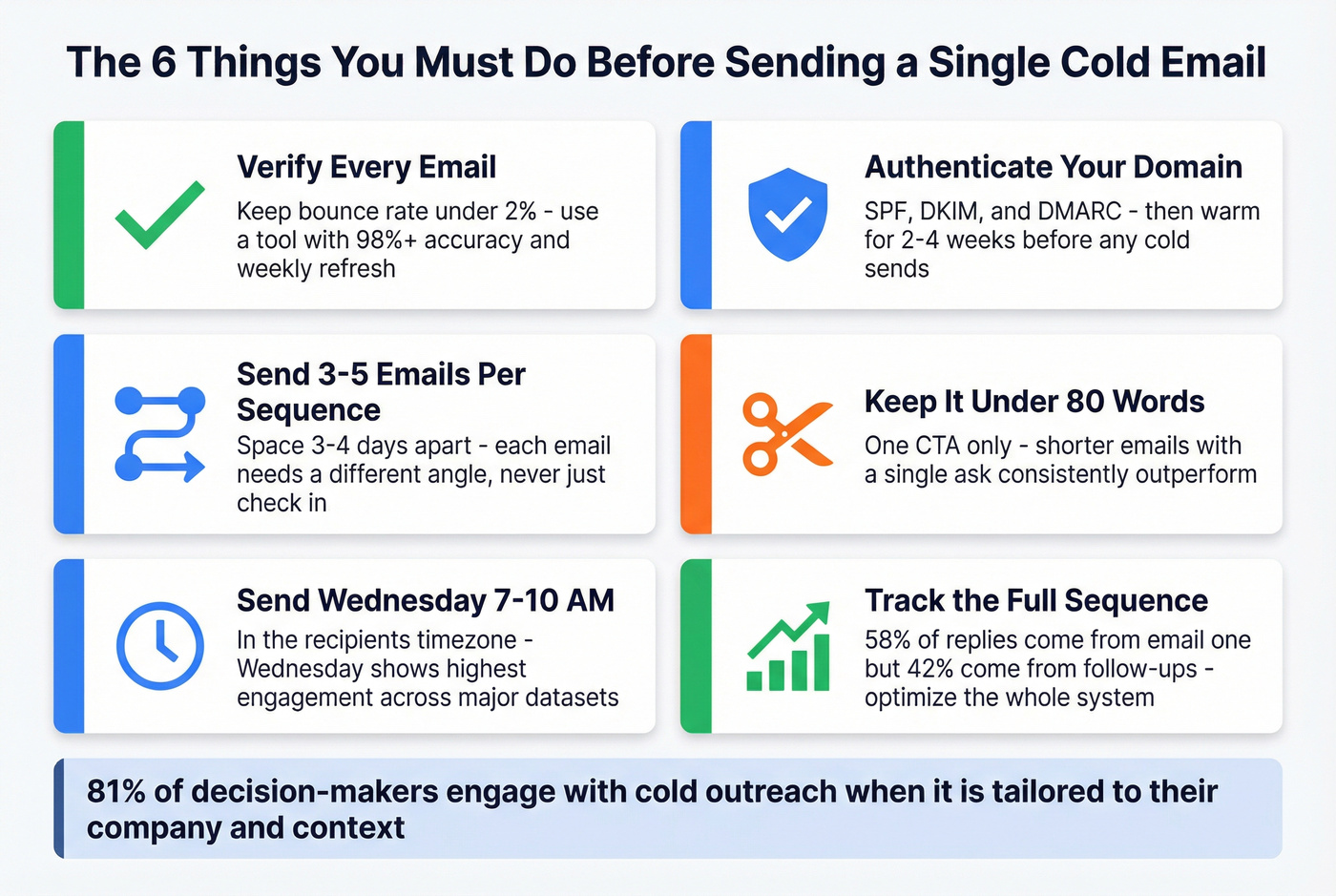
- Verify every email before sending. A bounce rate above 2% damages your sender reputation. Use a verification tool with 98%+ accuracy and a weekly refresh cycle. (If you’re comparing vendors, start with an email verifier website roundup.)
- Set up SPF, DKIM, and DMARC. Then warm your domain for 2-4 weeks before sending a single cold email. Skip this and Microsoft will reject your messages outright. (If you need the exact DNS record mechanics, use this SPF DKIM & DMARC setup guide.)
- Send 3-5 emails, spaced 3-4 days apart. Each email needs a different angle. Never just "check in." If you want a ready-to-run structure, use these cold email cadence templates.
- Keep emails under 80 words with one CTA. Benchmark data across billions of emails confirms: shorter emails with a single ask consistently outperform longer ones.
- Send on Wednesday, 7-10 AM in the recipient's timezone. Wednesday shows the highest engagement across major datasets. (More nuance on scheduling: cold email time zones.)
- Track the full sequence as a system. 58% of replies come from email one, but 42% come from follow-ups. Optimizing only your first email leaves almost half your replies on the table. Use a KPI set like this email outreach analytics guide.
2026 Cold Email Benchmarks - What "Good" Actually Looks Like
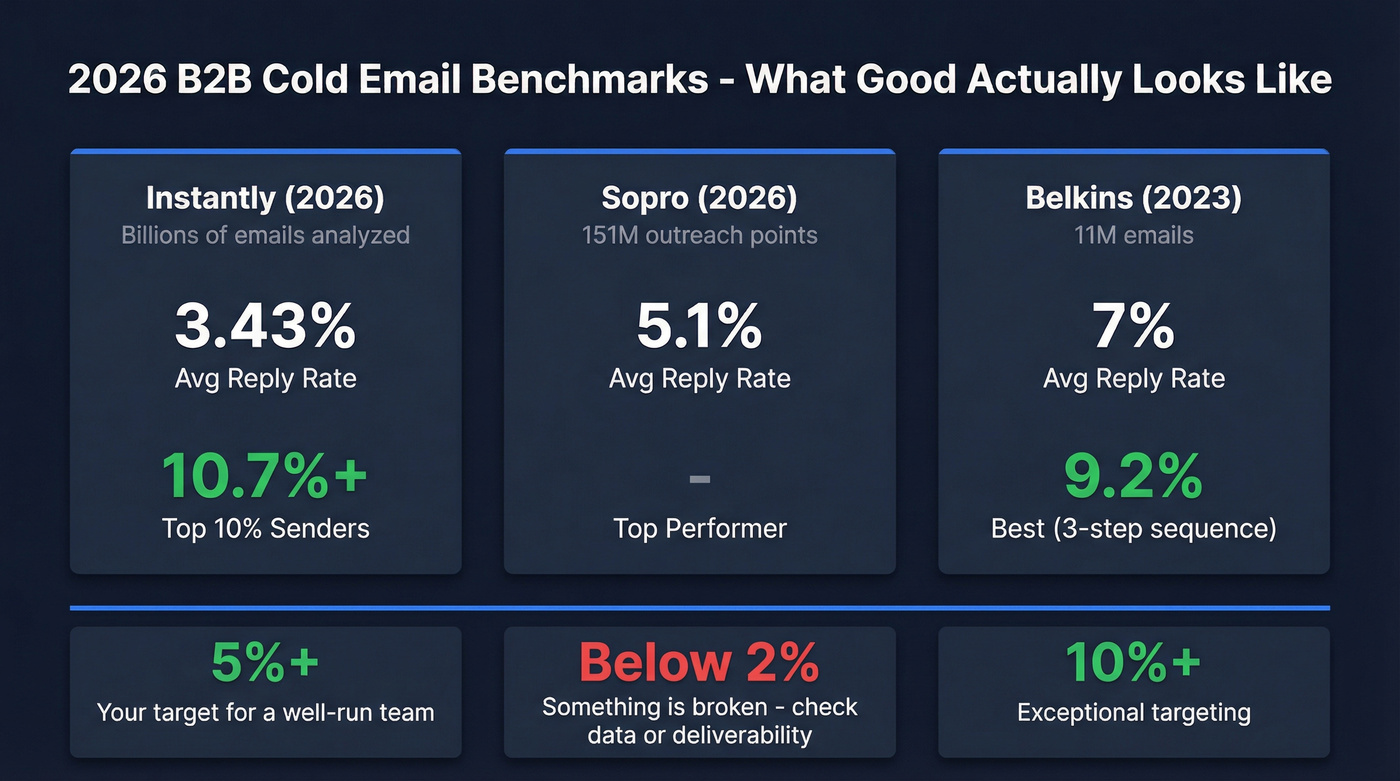
"Good" depends on who's measuring and how. Three major datasets tell slightly different stories, and understanding why matters more than fixating on a single number.
| Metric | Instantly (2026) | Sopro (2026) | Belkins (2023) |
|---|---|---|---|
| Dataset size | Billions of emails | 151M outreach points | 11M emails |
| Avg reply rate | 3.43% | 5.1% | 7% |
| Top performer | 10.7%+ | - | 9.2% (3-step) |
Why the spread? The Instantly dataset skews toward high-volume senders (including plenty of poorly targeted campaigns), which drags the average down. Sopro's 5.1% comes from managed campaigns with professional targeting - they're doing the work for clients. The Belkins figure reflects agency-quality execution across 90+ industries, though their data is from 2023 when inboxes were less hostile.
The honest benchmark for a well-run in-house team in 2026: aim for 5%+ reply rates. Anything above 10% means your targeting is exceptional. Below 2%? Something's broken - usually data quality or deliverability, not copy. (If you suspect list issues, start with B2B contact data decay.)
Industry matters more than most people realize. Financial services leads B2B cold email responses at 3.39% while tech trails at 1.87%. If you're selling into tech, a 3% reply rate is actually strong. If you're in financial services and hitting 3%, you're underperforming.
A few more benchmarks worth knowing:
- C-level execs reply 20% more than non-C-suite (6.4% vs 5.2%). If you aren't targeting the top of the org chart, you're leaving replies on the table.
- Campaigns targeting 240-499 people get the highest reply rates (10%). Smaller, tighter lists beat massive blasts every time.
- Contacting 2-4 prospects per organization yields reply rates above 7%. Go too wide within a single account and you dilute your message. (This is also a core ABM multi-threading principle.)
One stat that should change how you think about personalization: 81% of decision-makers engage with cold outreach when it's tailored to their company and context. The problem isn't that buyers hate cold email. It's that most cold email gives them nothing worth responding to.
Before You Write a Single Email - Infrastructure Setup
This is the section most guides rush through. Don't. Infrastructure determines whether your email reaches an inbox or gets rejected before the recipient ever sees it. We've seen teams spend weeks perfecting copy, only to discover their domain was already burned from day one. (If you want the full systems view, see email sending infrastructure.)
Authentication: SPF, DKIM, and DMARC (The Non-Negotiables)
As of May 2025, Microsoft rejects non-compliant emails from high-volume senders with a 550; 5.7.515 Access denied error. Not spam-foldered. Rejected. This applies to Outlook.com consumer domains (hotmail.com, live.com, outlook.com) for senders at 5,000+ emails/day. Gmail and Yahoo enforce similar rules. Here's what each provider requires:
| Requirement | Microsoft (May 2025) | Gmail | Yahoo |
|---|---|---|---|
| SPF/DKIM/DMARC | Required (5K+/day) | Required (5K+/day) | Required (5K+/day) |
| One-click unsub | Functional link | RFC 8058 | RFC 8058 |
| Spam threshold | No defined % | <0.3% | <0.3% |
| Non-compliance | 550 rejection | Spam folder | Spam folder |
The setup itself isn't complicated - SPF, DKIM, and DMARC are DNS records your IT team or domain registrar can configure in an afternoon. DMARC at minimum needs p=none aligned with either SPF or DKIM. But here's what catches people: you also need functional unsubscribe links, valid From/Reply-To addresses, and active bounce management.
If you're sending cold email without all three authentication protocols configured, stop reading this article and go fix that first. Nothing else matters until your domain is authenticated. (If you're seeing the specific reject code, this 550 Recipient Rejected guide helps you triage fast.)
Domain Warmup: The 14-Day Launch Plan
New domains and fresh inboxes need a warmup period before you can send at any meaningful volume. Here's the recommended 14-day launch plan:

- Days 1-2: Publish SPF, DKIM, DMARC records. Start warmup tool (Instantly, Lemlist, and Smartlead all have built-in warmup). (Deeper walkthrough: automated email warmup.)
- Days 1-14: Run warmup sequences - automated emails between real inboxes that build your sender reputation.
- Days 3-5: Set up a custom tracking domain (branded CNAME) to isolate your reputation from shared tracking pools.
- Days 3-7: Verify your contact list. Every email. No exceptions. (Use this email verification list SOP if you need a repeatable workflow.)
- Days 7-10: Write your sequence copy. A/B test two subject lines and two body variants.
- Days 10-14: Run inbox placement tests. If you're landing below 80% inbox placement, don't launch.
Practitioners on Reddit report that warmup now takes 6-8 weeks before they trust a domain with real volume - up from 3 weeks in 2023. M365 spam filters are particularly aggressive. Start conservative and ramp slowly.
Email Verification: Why Bad Data Kills Sequences Before They Start
Here's the most expensive mistake in cold email: sending to unverified lists. A bounce rate above 2% triggers reputation damage with every major email provider. Above 5%, you're actively burning your domain. And once a domain's reputation tanks, recovery takes weeks - sometimes you're better off starting fresh.

Prospeo's 5-step verification process catches what simpler tools miss: catch-all domains, spam traps, and honeypots. The 98% email accuracy rate comes from proprietary infrastructure - no reliance on third-party email providers, which means verification goes beyond basic syntax or MX checks.
The proof is in production results. Meritt went from a 35% bounce rate to under 4% after switching their data source. Stack Optimize built their entire agency model on verified data - 94%+ deliverability across all clients, bounce rates under 3%, zero domain flags.

A bounce rate above 2% kills your sender reputation - and your sequence. Prospeo's 5-step verification delivers 98% email accuracy with a 7-day refresh cycle, so every email in your cold sequence hits a real inbox.
Stop burning domains with bad data. Verify before you send.
Volume Management: Daily Caps and Ramp Strategy
Even with a warmed domain and verified data, volume management determines long-term deliverability:

- Week 1: 10-20 emails per day per inbox
- Week 2: 20-40 per day
- Week 3+: 40-50 per day (healthy domain)
Never exceed 100 cold emails per day per mailbox on Google Workspace or M365. If you need more volume, add inboxes - don't push existing ones past safe limits. (More detail on limits: email pacing and sending limits.)
Keep bounce rates under 2% and spam complaints under 0.3%. Monitor both weekly. One bad list import can undo months of warmup. I've run head-to-head tests where the team with the "best" copy lost because they imported a dirty list that spiked their bounce rate to 8% in a single day.
Top 10% senders hit 10.7%+ reply rates because they target tighter lists with verified contacts. Prospeo gives you 300M+ profiles with 30+ filters - buyer intent, job changes, technographics - so your 240-500 person sequences land with precision.
Build the list that gets replies, not bounces.
Anatomy of a High-Performing B2B Cold Email Sequence
How Many Emails to Send (and When to Stop)
The sweet spot is 4-7 touchpoints. Under 4, you're giving up too early - 42% of replies come from follow-ups. Beyond 7, you're burning domain reputation for diminishing returns.
Data across 11 million emails makes the case for restraint: a 3-step sequence generates the highest reply rate at 9.2%. The first follow-up boosts replies by 49%. The second adds another 9%. But the third follow-up actually decreases replies by 20%. There's a clear point of diminishing returns, and most teams blow past it.
58% of all replies come from your first email. That's where the bulk of your optimization effort should go. But don't neglect the follow-ups - that remaining 42% is real pipeline. And here's a stat that should shape your expectations: 95% of cold emails that receive replies get one within 24 hours. If you haven't heard back in a day, that specific email probably isn't going to convert - which is exactly why the follow-up sequence matters.
If you're closing deals under $10k, you probably don't need more than 3 emails. The data supports it, and the domain risk of a longer sequence isn't worth the marginal gains. Save the 7-email sequences for enterprise deals where the payoff justifies the exposure.
The Word Count Debate: Short vs. Long
You'll hear "keep it under 80 words" everywhere, and for high-volume SDR outreach, that's right.
But there's a nuance nobody talks about: agency data across 11 million emails found that 200-250 word emails gathered the most responses at 19%, while sub-50-word emails came in at 17%. The difference comes down to context. High-volume SDR outreach benefits from brevity. Consultative enterprise emails - where you're building a case for a complex solution - can afford more depth. Match your word count to your deal size. Selling a $500/month tool? Keep it tight. Selling a $50k implementation? You've earned more real estate.
The Role of Each Email in Your Outreach Sequence
Each email in your sequence has a job. When every email repeats the same pitch, you're not following up - you're spamming.
- Email 1 (Value): Lead with a specific observation about their business. One pain point, one relevant insight, one low-friction CTA. This email does the heavy lifting. (If you want more first-touch options, see email opener examples.)
- Email 2 (Proof): Add social proof - a case study, a metric, a customer result. Make it feel like a reply to your first email, not a formal follow-up. Step 2 emails that feel like replies outperform formal follow-ups by ~30%.
- Email 3 (Objection): Address the most common reason people don't respond. "I know timing might be off" or "Most [role] I talk to are skeptical about [category] until they see [specific result]." Another approach that works surprisingly well: the soft disqualification. "We may not be the right fit - but if [specific problem] is costing you [specific amount], it's worth a 10-minute conversation to find out."
- Email 4 (Breakup): "Should I close the file?" Simple, direct, no pressure. Some prospects only ever reply to the breakup email.
Each follow-up adds a new angle. If you can't think of a new angle, your sequence is long enough.
SMB vs. Enterprise: How Sequence Length Changes by Deal Size
For sub-$10k deals targeting SMBs: 5-8 total touchpoints over 30 days, with a maximum of 2-4 emails. The rest should be other channels (calls, social, etc.).
Enterprise deals with longer sales cycles: 10-18 total touchpoints over 30-60 days, with 5-9 emails max. Enterprise buyers need more touches, but they're also more likely to flag aggressive senders. (If you sell long-cycle, use this enterprise sales playbook to align cadence to the buying process.)
Critical rule: 50% or less of your total sequence steps should be email. The rest should be phone, social, or other channels. An 8-email sequence with zero phone calls isn't a multi-touch cadence - it's an email barrage.
Cold Email Templates for B2B Sequences You Can Steal
Template 1: SaaS / Tech (3 Emails - PAS, BAB, Breakup)
Email 1 (Day 1) - PAS Framework:
Subject: {{Company}}'s [specific challenge]
Hi {{FirstName}},
Most [role] at [company stage] struggle with [specific problem]. It usually means [agitate: consequence they feel daily].
We helped [similar company] [specific result with number]. Worth a quick chat this week?
[Your name]
Email 2 (Day 4) - BAB Framework:
Subject: re: {{Company}}'s [specific challenge]
{{FirstName}} - before working with us, [customer] was [before state]. Now they're [after state with metric].
The bridge? [One-sentence description of what changed.]
Would you have a couple minutes to chat about this over the next few days?
Email 3 (Day 8) - Breakup:
Subject: Should I close the file?
{{FirstName}}, I haven't heard back - totally fine. Should I take this off my list, or is this something worth revisiting next quarter?
Each email is under 80 words. Each has a different angle. Email 2 feels like a reply (no formal "Following up on my previous email" opener). The breakup is low-pressure and gives them an easy out.
Template 2: Agency / Services (4 Emails - CPPC, PAIB, PAS, Breakup)
This is modeled on a real case study: a 3-email sequence targeting small e-commerce shops that hit a 67.88% open rate and generated 8 qualified leads from 344 recipients. It was sent on a Friday morning at 8:30 AM - proving that a strong signal and tight copy can override "optimal" send days.
Email 1 (Day 1) - CPPC:
Subject: Noticed {{Company}} is [specific signal]
{{FirstName}}, saw that {{Company}} recently [context: hiring, launched new product, expanded to new market].
Most companies at that stage run into [problem]. We typically see [projection: what happens if solved].
Open to a 10-minute call this week?
Email 2 (Day 4) - PAIB:
Subject: re: [original subject]
{{FirstName}} - [problem] usually leads to [agitation: specific downstream impact]. The implication? [What it costs them.]
[Benefit: one sentence about the outcome you deliver.]
Worth exploring?
Email 3 (Day 8) - PAS:
Subject: Quick thought on {{Company}}
[Problem statement]. [Agitate with a specific number or scenario.] We solve this with [solution - one sentence, no jargon].
Happy to share how - no pressure, no pitch deck.
Email 4 (Day 12) - Breakup:
Subject: Closing the loop
{{FirstName}}, I'll assume the timing isn't right. If [problem] becomes a priority, I'm here. Should I check back in Q[next quarter]?
Template 3: Enterprise (5 Emails Over 25-30 Days)
Enterprise sequences run longer because buying committees move slower. Space these 4-5 days apart. Unlike the SaaS and agency templates above, enterprise emails can run longer (150-250 words) because the deal size justifies the reader's time investment.
Email 1 (Day 1) - Specific Observation:
Subject: {{Company}}'s [industry trend] exposure
{{FirstName}},
I've been tracking how [industry shift] is affecting [their segment]. Most [role] I talk to at [company stage/size] are seeing [specific consequence] - especially teams that [relevant detail about their situation].
[One relevant insight or data point about their industry.]
Is this on your radar for Q[current quarter], or is the priority elsewhere right now?
[Your name]
Email 2 (Day 5) - Peer Case Study:
Subject: re: {{Company}}'s [industry trend] exposure
{{FirstName}} - [peer company in their space] was dealing with the same [problem]. In [timeframe], they [quantified result: reduced X by Y%, increased Z by $amount].
The short version: [one sentence on what changed.]
Worth 15 minutes to see if the same approach applies to {{Company}}?
Email 3 (Day 10) - Objection Handler:
Subject: Quick thought
{{FirstName}}, most [role] I talk to already use [incumbent/existing approach]. The gap we fill is [specific gap the incumbent doesn't cover].
Not asking you to rip and replace anything - just wondering if [specific gap] is costing you enough to explore alternatives.
Email 4 (Day 18) - New Angle:
Subject: [Relevant data point or trend]
{{FirstName}} - came across [industry report/data point/trend] that's relevant to what {{Company}} is doing with [initiative]. [One-sentence insight.]
Happy to share the full analysis if useful - no strings attached.
Email 5 (Day 25) - Breakup:
Subject: Should I close the file?
{{FirstName}}, I've reached out a few times and haven't heard back - completely understand. Should I close this out, or would it make sense to reconnect in 90 days?
Adapting Templates by Industry
The frameworks above work across industries, but the specifics change. Financial services responds at 3.39% - nearly double the tech rate of 1.87%. Your financial services sequences can be more direct about ROI and compliance benefits, while tech sequences need sharper hooks to cut through noisier inboxes.
For regulated industries (finance, healthcare, legal): lead with compliance and risk reduction. "We helped [peer] reduce [regulatory risk] by X%" lands harder than feature-based pitches.
For tech and SaaS: lead with speed and integration. Decision-makers in tech are drowning in vendor pitches. Your differentiator isn't what you do - it's how fast you prove it works.
Framework Cheat Sheet: PAS vs. AIDA vs. BAB vs. CPPC
| Framework | Best For | Structure | When to Use |
|---|---|---|---|
| PAS | Email 1 (initial) | Problem, Agitate, Solve | Creating urgency; cold opens |
| BAB | Follow-ups | Before, After, Bridge | Showing transformation |
| AIDA | Longer emails | Attention, Interest, Desire, Action | Complex value props; enterprise |
| CPPC | Warm-ish opens | Context, Problem, Projection, CTA | When you have a specific signal |
PAS is the workhorse. It works for first emails because it mirrors how buyers think: "I have this problem, it's getting worse, and someone might be able to fix it." BAB works best in follow-ups because you've already established the problem - now you're painting the picture of what life looks like after.
AIDA is for longer emails where you need to build a case. Use it sparingly in cold email - most cold emails should be under 80 words, and AIDA tends to run long. CPPC shines when you have a real signal (job change, funding round, product launch) that gives you context.
Subject Lines That Get Opens in 2026
33% of recipients decide whether to open based on the subject line alone. 70% of cold emails get marked as spam because of their subject line. Those two stats should reshape how you think about those 6-10 words. (If you want more examples to test, see cold email subject lines that get opened.)
With 81% of emails now opened on mobile, front-load your hook in the first 40-50 characters. Everything after that gets truncated on most devices.
What works:
- Company name inclusion: +22% open rate. "{{Company}}'s outbound pipeline" beats "Improving your outbound pipeline."
- Numbers: +45% open rate. "Cut SDR no-shows by 22%?" beats "Reducing SDR no-shows."
- Referral mentions: +17% opens and +56% responses. If you have a mutual connection, put it in the subject line. This is the single highest-leverage subject line tactic in the data.
- Questions: +10% open rate. Questions create a curiosity gap that statements don't.
- Personalized subject lines: +26% open rate. Real personalization - not just
{{FirstName}}. Subject lines between 36-50 characters generate the highest response rates.
What's dead:
- "Quick question" - overused to the point of being a spam signal.
- ROI language ("improve," "increase," "scale") - decreases open and reply rates by 33-34%. Buyers have been conditioned to ignore these words.
- Anything that sounds like marketing. "Unlock your potential" and "Transform your pipeline" trigger the same mental filter as "You've won a free iPad."
The counter-intuitive one: "Hope this finds you well" actually boosts meeting bookings by 24%. I know - it sounds like the most generic opener possible. But in a sea of hyper-optimized, AI-generated subject lines, a genuinely human greeting stands out. Use it sparingly and only when the rest of your email delivers real value.
Formulas that work right now:
- Benefit + timeframe: "Book 2 more meetings in 10 days"
- Question + value: "{{Company}}'s open rate dipped on Outlook?"
- Specific observation: "Noticed your team is hiring 3 SDRs"
- Peer reference: "How [similar company] fixed [problem]"
Subject lines have a shelf life. What works today will be stale in six months. Test constantly - two subject lines per campaign minimum, measuring reply rate (not open rate) as your winning metric.
Personalization That Actually Scales
"Saw you're hiring" and "Love what you're doing at {{Company}}" are now spam signals. Every outreach tool generates these openers, which means every buyer's inbox is full of them. Highly personalized cold emails boost reply rates by 142% - but only when the personalization is real. (If you’re using AI for first lines, watch for these AI cold email personalization mistakes.)

The best workflow I've seen comes from an 8-figure SaaS company's sales team:
- Pull signals from your data source. Job changes, funding rounds, headcount growth, new product launches, tech stack changes. Intent data tracking thousands of topics helps surface these automatically, so you're not manually hunting for triggers. (More on this: intent signals.)
- Scrape recent content. Posts, podcast appearances, company announcements. Anything that shows you've done 30 seconds of homework.
- Run through GPT-4o mini. Feed the signal + prospect context into a prompt that generates a custom first line or opening paragraph. Export as a CSV column.
- Parse as a merge variable.
{{custom_message}}in your sequence tool pulls the AI-generated personalization for each recipient.
This workflow generated 3x response rates compared to their old generic approach. The key insight: use one strong signal per email, not multiple weak ones. "Noticed you just announced your Series B and are expanding into EMEA" is one strong signal. "Noticed you're hiring, love your product, and saw your post about AI" is three weak ones crammed together.
The four pillars of effective personalization: Relevance (why now?), Context (what you know), Intent (what you want them to do), Clarity (short, direct, human). Every personalized email should hit all four. If you can't articulate why you're reaching out now - not last month, not next quarter - the personalization isn't strong enough.
One more data point worth remembering: emails with 1-3 questions are 50% more likely to get a response. Questions create engagement loops. A statement like "We help companies reduce churn" is easy to ignore. A question like "Is churn above 5% a priority for your team this quarter?" demands a mental response - even if they don't reply.
Beyond Email - Building a Multi-Channel Outreach Cadence
Multi-channel campaigns achieve a 287% higher purchase rate compared to single-channel outreach. It takes an average of 8 touches to get an initial meeting. Eight emails in a row feels aggressive. Eight touches spread across email, phone, and social feels like persistence. (If you want more channel mix ideas, see multi channel social selling.)
Here's a sample multi-channel cadence:
- Day 1: Email 1 (value-led, PAS framework)
- Day 3: Social touch (connect request with a note referencing your email)
- Day 5: Phone call (reference the email - "I sent you a note about X on Monday")
- Day 7: Email 2 (proof/case study, feels like a reply)
- Day 10: Social engagement (comment on their content, share something relevant)
- Day 12: Email 3 (objection handler or new angle)
- Day 15: Phone call + voicemail
- Day 18: Email 4 (breakup)
The graduated approach works best: start with low-commitment touches (email, profile view), move to medium (phone, video message), then high (direct mail, executive outreach). This creates the "mere exposure effect" - familiarity builds trust without triggering spam fatigue.
Remember the rule: 50% or less of your total sequence should be email. If you're running an 8-touch sequence, that's 4 emails max. Teams that over-index on email burn their domains faster and miss the prospects who respond better to a phone call.
Mistakes That Kill B2B Cold Email Sequences
1. Sending from fresh inboxes too aggressively. One practitioner shared this: they launched a new domain and started sending at full volume immediately. Got flagged within days. Warmup isn't optional - it's the price of admission.
2. Using unvalidated data. The fastest way to burn a domain. One bad list import with a 10% bounce rate can undo months of reputation building. Verify every email, every time.
3. "Just checking in" follow-ups. The worst two words in cold email. Every follow-up needs a new angle, a new piece of value, or a new reason to respond. "Checking in" tells the prospect you have nothing new to say.
4. Over-templated openers. "I came across your profile and was impressed by..." - every buyer reads this 15 times a week. If your opener applies to anyone in their role at any company, it's not personalized. It's a template with a merge tag.
5. Ignoring timing. Sending whenever it's convenient for you instead of when recipients check email. Wednesday at 7-10 AM in the recipient's timezone consistently outperforms random sends. Data shows a 7.2% reply rate on Wednesdays - that's not a minor optimization.
6. Not monitoring sender health. 44% of recipients unsubscribe due to high frequency. Almost 20% of cold emails are flagged as spam despite legitimate intent. If you aren't checking bounce rates, spam complaints, and inbox placement weekly, problems compound silently. One practitioner admitted their bounce and spam rates stayed bad for weeks before they noticed - by then, the domain was toast.
7. Optimizing only email 1. Most teams obsess over the first email and ignore the rest of the sequence. But the real conversion lever isn't the open rate on email 1 - it's what happens between emails 2-5. Treat your outreach sequence as a system, not a collection of individual emails.
Skip the mistake of over-engineering your stack, too. I've watched teams spend three months evaluating 12 different tools before sending a single email. Pick one data tool, one sending tool, integrate them, and start testing. You'll learn more from 500 real sends than from 500 hours of tool comparison.
Tools for Building and Sending Cold Email Sequences
Your cold email stack has two layers: the data layer (where you get verified contacts) and the sending layer (where you build and execute sequences). Mixing these up - or skipping the data layer entirely - is how domains get burned. (If you’re rebuilding your stack, use this B2B sales stack blueprint.)
| Tool | Type | Starting Price | Best For |
|---|---|---|---|
| Prospeo | Data + verification | Free (75 emails/mo), ~$0.01/email | Verified contact data before sending |
| Instantly | Sequence + warmup | Free, paid ~$30/mo | High-volume sending |
| Saleshandy | Sequence + analytics | ~$25/mo | Scaling with unlimited accounts |
| Lemlist | Sequence + personalization | ~$39/mo per user | Visual personalization |
| Apollo | All-in-one sales | Free, paid from $59/mo | CRM + data + sequences |
| Smartlead | Sequence + warmup | ~$39/mo | Agencies, multi-client |
| GMass | Gmail-based sending | $25-55/mo | Solopreneurs on Gmail |
The data quality layer sits upstream of all the sending tools. You verify and enrich contacts first, then push them into your sequence tool via native integrations. The sequence tool handles sending and warmup. The data layer handles making sure you're sending to real, active email addresses.
Look, the best sequence tool in the world can't fix bad data. And the best data in the world can't fix a broken sending infrastructure. You need both layers working together.
FAQ
How many emails should be in a B2B cold email sequence?
Three to five emails works for most teams. A 3-step sequence generates the highest reply rate at 9.2%, while 4-7 touchpoints is the broader sweet spot. Beyond 7 emails, you risk burning your domain for diminishing returns. Enterprise deals may warrant 5-9 emails over 30-60 days, but keep email to 50% or less of total touchpoints.
What's a good reply rate for cold email outreach in 2026?
The average is 3.43% across billions of emails. Above 5% is strong; above 10% puts you in the top 10% of senders. Industry matters - financial services leads at 3.39% while tech trails at 1.87%. Below 2%, check data quality and deliverability before rewriting copy.
How long should I wait between follow-up emails?
Three to four business days between each email. Waiting 3 days before following up increases reply rates by 31%, while waiting longer than 5 days drops response likelihood by 24%. Following up within 1 day actually hurts reply rates by 11%.
Do I need to verify emails before sending a B2B email sequence?
Yes - a bounce rate above 2% damages sender reputation and pushes future emails to spam. Even "fresh" lists from reputable providers can contain 10-15% invalid addresses. Prospeo's free tier (75 verified emails/month) is enough to test your first campaign.
What's the best day and time to send B2B cold emails?
Wednesday consistently shows the highest engagement - 7.2% reply rate and 37% open rate. Send between 7-10 AM in the recipient's timezone for replies, or 1 PM if optimizing for volume. Avoid weekends and Friday afternoons.