

Email Opener Examples (2026): 150 Copy/Paste First Lines That Earn Replies
The "perfect" first line is a myth. Your opener works or fails before anyone reads your email, because it's judged in the inbox preview next to your subject line and sender name. If it looks like a pitch, a template, or a fake-friendly greeting, you've already made the reply harder.
Here's the hook: write the first line for the preview, not the body.
And yes, that changes everything.
What the inbox actually shows:
- Subject:
quick question - Preview:
Hope you're well - I wanted to introduce...(delete this) - Preview (better):
SDR ramp time - is that a priority in Q1?(keep this)
What you need (quick version)
7 rules that work in 2026
- Write the first line for the inbox preview, not for the email body. It's a snippet, not a paragraph.
- Lead with relevance, not introductions. Your name/signature already exists.
- One idea per opener. If it needs a semicolon, it's too much.
- No pitch in the opener. Save "what we do" for line 2-3 (or skip it).
- Make it easy to say "yes" or "no." Binary questions beat "thoughts?"
- Use plain words. Buzzwords and hype read like marketing and get ignored.
- Match the relationship. Cold = permission + context. Warm = continuity. Hot = next step.
3 opener styles that consistently earn replies
- Observation + relevance: "Noticed X -> here's why it matters to you."
- Problem + question: "Teams like yours hit Y -> is that true for you?"
- Trigger + permission ask: "Saw Z happened -> open to a quick idea?"
3 safe default openers (copy/paste)
- "Are you the owner for [topic] at [Company]?"
- "Noticed [specific signal] - is [priority] on your radar this quarter?"
- "If I'm off, tell me - is [goal] something you're working on right now?"
Preview-text spec (use this): 50-90 characters for the first line so it survives mobile truncation and still makes sense.
Why your opener is really "preview text" (and must fit)
Preview text is the inbox snippet that appears next to (or under) your subject line. Gmail calls it "Snippets," Apple Mail calls it "preview," and Outlook calls it "Message Preview." Different names, same reality: your email opener is part of the inbox ad unit.

That's why "Hope you're well" is expensive. It burns the only real estate you get before the open.
Preview text also isn't always your first sentence in a clean way. Many clients pull from the first visible lines of copy, and messy HTML pulls the wrong thing (ALT text, "view in browser," footer links).
Litmus case studies show why this matters: Autoplicity saw an 8% open-rate lift after using preview text intentionally, and WeddingWire got a 30% click-through lift by testing preview text.
Write your opener like it's a headline. Because it is.
The quick spec for openers that earn replies (2026 rules)
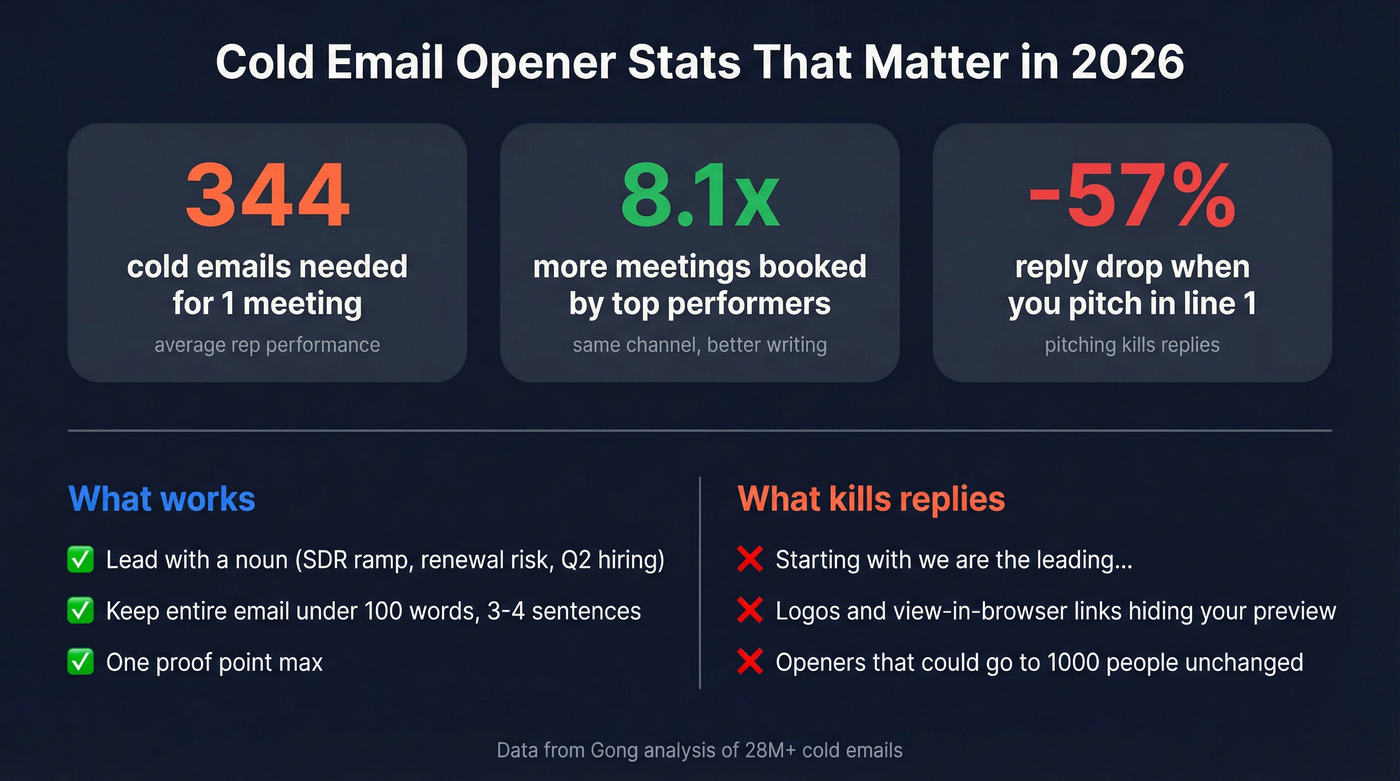
Gong's analysis of 28M+ cold emails is blunt: the average rep needs 344 cold emails to land one meeting. Top performers book 8.1x more meetings, and that gap doesn't come from "personality" - it comes from writing emails that look relevant in the preview and ask for something small, clear, and easy to answer.
In our experience, the opener is where most sequences die.
The opener checklist (reply-first)
- Length: keep the whole email <=100 words and 3-4 sentences. Your opener is a single line.
- Content: opener = relevance hook. Body = one supporting detail + one ask.
- Tone: neutral, specific, non-needy.
- Ask: small and clear (permission, routing, or a 10-15 min chat).
- Proof: one proof point max (customer, metric, or credible observation).
- No pitch: Gong found pitching drops replies up to 57%. If line one smells like "we're the leading...", you're done.
Two things I'll put my name on after reviewing thousands of inbox previews:
- Openers that start with the noun ("SDR ramp time", "renewal risk", "Q2 hiring") beat "Quick question" because the preview carries meaning even when truncated.
- Logos and "view in browser" links are the #1 reason good openers don't show. If your template leads with design, your preview becomes junk.
Use / skip callouts
Use this if...
- You can name a real trigger (job change, new initiative, funding, hiring, tech change).
- You can ask a routing question ("who owns X?") without sounding lazy.
- You can offer a tiny, concrete next step (audit, benchmark, 2 options).
Skip this if...
- You're about to "circle back," "touch base," or "bump this."
- Your opener could be sent to 1,000 people unchanged.
- You're leading with your company, your product, or your calendar link.
Look, if your email needs three sentences of setup before it makes sense, it's not an email problem. It's a targeting problem.

Every opener in this list works better when you have a real trigger - a job change, a funding round, a new hire. Prospeo tracks these signals across 300M+ profiles with a 7-day refresh cycle, so your first line references something that actually happened this week, not last quarter.
Stop writing generic openers. Start with signals that make replies automatic.
Choose the right opener with a simple decision tree
Pick your opener based on four inputs: relationship x intent x urgency x tone. Don't mix categories.

Relationship: cold / warm / hot
- Cold: they don't know you. You need permission + relevance.
- Warm: they've engaged (reply, meeting, event, download). You need continuity.
- Hot: active deal/support escalation/job process. You need next step.
Intent: ask / update / apology
- Ask: you want something (routing, meeting, decision, approval).
- Update: you're sharing status (internal, project, timeline, decision).
- Apology: you're owning a miss (delay, outage, mistake, confusion).
Urgency: low / medium / high
- Low: no deadline.
- Medium: "this week" (soft deadline).
- High: "today" (real deadline + reason).
Tone: formal / neutral / casual
Default to neutral unless you're mirroring their tone. If you're emailing across cultures or hierarchy, "Hello" is the safest global middle ground.
If you're writing cross-culturally (tone-risk rules)
This is where good emails get accidentally rude or accidentally fluffy.
- Start with "Hello [Name] - [purpose]." No idioms, no slang.
- Avoid "Hey" unless they used it first.
- Use explicit timeframes ("by Thursday 3pm ET") instead of "ASAP."
- Skip sarcasm and "playful" negs. It doesn't travel.
If you're cold + ask + low urgency + neutral tone, your opener is trigger + permission. If you're warm + ask + medium urgency, your opener is context + next step. If you're hot + apology + high urgency, your opener is acknowledge impact + timeline.
Opener length + inbox constraints (character limits by client)
Your opener has two jobs:
- survive truncation, and
- still make sense when chopped.

Use these client ranges as your writing constraint:
| Client | Desktop preview | Mobile preview |
|---|---|---|
| Gmail | 100-120 chars | 85-90 chars |
| Apple Mail | up to 140 | ~85 chars |
| Outlook (web) | 90-100 | ~80 chars |
| Yahoo | ~95 | 80-85 chars |
| Samsung Email | ~80 | 70-75 chars |
50-90 characters is the mobile-safe range. Desktop can show more, but don't write for desktop.
Writing rules that prevent "preview chop"
- Put the meaningful noun early: "SDR ramp time" beats "Quick question..."
- Don't front-load filler: "Hope you're well" / "My name is" / "I'm reaching out"
- Keep greetings short. "Hi Sarah -" is fine. Don't add a second clause.
- If you use a greeting, do greeting + hook on the same line: "Hello Sarah - quick question about onboarding."
The swipe file - 150 email opener examples by scenario (copy/paste)
This is built for scanning, not suffering. Each cluster includes:
- a fill-in template
- when to use / avoid
- three tiers: Safest, Bolder, If you have proof
Cold email openers (60)
1) Observation-based (relevance-first)
Fill-in template: Noticed [signal]. Is [priority] a focus in [timeframe]?
Use when: you have a real public signal (hiring, launch, new page, new market).
Avoid when: you're guessing and can't name the signal.

Safest
- "Noticed you're hiring for [role] - is [goal] a priority this quarter?"
- "Saw [Company] expanding in [region] - who owns [process]?"
- "Your pricing page highlights [use case] - is that your main buyer?"
- "Noticed you're using [tool] - is it working for [job-to-be-done]?"
- "Your roadmap mentions [capability] - is that tied to [segment]?"
Bolder 6. "Looks like you're targeting [segment] - is [objection] slowing deals?" 7. "Your team's posting a lot about [topic] - are you investing there now?" 8. "Saw your team grew from [X] to [Y] - has process kept up?" 9. "Noticed you're remote-first - does onboarding consistency come up?" 10. "Your support docs emphasize [metric] - are you tracking it weekly?"
If you have proof 11. "I pulled 3 examples of [competitor/peer] doing [thing] - want them?" 12. "I ran a quick teardown of [asset] - two fixes stood out."
2) Problem call-out (direct, not rude)
Fill-in template: When [context], [problem] shows up. Is that true for you?
Use when: the pain is common for their role/stage.
Avoid when: the problem's too personal ("your site is bad") or unverifiable.
Safest 13. "When teams scale [X], [Y] breaks - is that happening at [Company]?" 14. "Do you have a clean way to measure [metric], or is it manual?" 15. "Is [handoff] between [team A] and [team B] smooth or messy?" 16. "Are you trying to reduce [cycle time] right now?" 17. "Is [risk] something you're worried about this year?"
Bolder 18. "Are you happy with [process], or is it a pain?" 19. "Is [team] spending too much time on [busywork]?" 20. "Is [cost] creeping up as volume grows?" 21. "Are you getting pushback on [change] internally?" 22. "Are you trying to improve [conversion] without adding headcount?"
If you have proof 23. "Most teams at [stage] lose time to [bottleneck] - want the checklist?" 24. "I benchmarked [metric] for [industry] - want the range?"
3) Trigger event (timely hook)
Fill-in template: Saw [trigger]. Does that change [priority] for you?
Use when: the trigger's fresh and relevant.
Avoid when: the trigger's old news or purely congratulatory.
Safest 25. "Congrats on the funding - are you scaling [team] next?" 26. "Saw the product launch - how are you measuring adoption in week 1?" 27. "Noticed the leadership change - are priorities shifting for [function]?" 28. "Saw you're migrating tools - is data quality a concern during the move?" 29. "Noticed a spike in job posts for [dept] - is growth the driver?"
Bolder 30. "Saw the acquisition - are systems being consolidated now?" 31. "Noticed the rebrand - is outbound messaging changing too?" 32. "Saw new pricing tiers - are you optimizing for expansion now?" 33. "Noticed you launched in [country] - are you localizing sales messaging?" 34. "Saw you're adding integrations - is that driven by enterprise deals?"
If you have proof 35. "I mapped 2 rollout plans teams use post-[trigger] - want the options?" 36. "I pulled examples of post-launch follow-up that lifted activation - want them?"
4) Referral / mutual connection (warm-by-association)
Fill-in template: [Name] suggested I reach out about [topic]. Are you the right owner?
Use when: the connection's real and recent.
Avoid when: the name-drop's weak ("we both follow...").
Safest 37. "[Name] suggested I reach out - are you the right person for [topic]?" 38. "I spoke with [Name] on your team - they said you own [area]." 39. "[Name] and I worked together at [Company] - can I ask a quick question?" 40. "I got pointed your way by [Name] - who's best for [thing]?"
Bolder 41. "[Name] mentioned you're evaluating [category] - is that active now?" 42. "We helped [peer company] after [Name] introduced us - open to the playbook?" 43. "[Name] said you're the decision-maker for [area] - is that right?" 44. "I met [Name] at [event] - they said you'd have context on [problem]."
If you have proof 45. "[Name] asked me to send a 3-bullet summary - want it here or as a doc?" 46. "I can share exactly what we changed for [peer] - want the short version?"
5) Permission-based (low-friction, high reply)
Fill-in template: Can I ask a quick yes/no about [topic]?
Use when: you're cold and want a reply more than a meeting.
Avoid when: you're using permission language to hide a pitch.
Safest 47. "Are you the right person to ask about [topic], or should I talk to someone else?" 48. "Can I sanity-check something with you about [topic]?" 49. "Open to a quick benchmark on how peers handle [problem]?" 50. "Mind if I send a 3-bullet idea on [goal]?"
Bolder 51. "If I'm off-base, tell me - is [priority] even on your roadmap?" 52. "Is it okay if I ask one blunt question about [pain]?" 53. "Should I stop here if [topic] isn't relevant?" 54. "If I send 3 ideas, will you tell me which one's dumb?"
If you have proof 55. "I can send a one-page checklist for [use case] - want it?" 56. "I can share a teardown of [asset] - interested?"
6) Concrete value offer (no fluff)
Fill-in template: I can send [specific asset] for [specific outcome]-want it?
Use when: you can deliver the asset fast (same day).
Avoid when: the "value" is vague ("insights," "thought leadership").
Safest 57. "I can audit your [thing] and send 5 fixes - want that?" 58. "I can send a short template for [task] - would that help?" 59. "I can share a simple scorecard for [decision] - helpful?" 60. "I can put together 2 options with tradeoffs - want to see them?"
Bolder 61. "I can outline a 2-week plan to improve [metric] - should I send it?" 62. "I can show where [bottleneck] hides - want a quick checklist?" 63. "I can send a sample sequence for [use case] - want a copy?" 64. "I can share 3 subject+preview pairs that lifted replies - want them?"
If you have proof 65. "I pulled a quick benchmark for [industry] on [metric] - want the numbers?" 66. "I can share what we changed to reduce [issue] - want the exact steps?"
Follow-up openers that add value (25)
Follow-ups are where replies show up. Plan 5+ touches, and expect many replies after email #3 or #4.
Here's a real scenario I've seen too many times: a rep sends one solid email, gets silence, then follows up with "Just bumping this" twice, tanks their own credibility, and blames the market. The fix isn't more persistence. It's better follow-ups.
Email #2 (same ask, new angle)
Template: One detail that changes the relevance: [detail].
Use when: you can add context without adding length.
- "Adding one detail that might make this relevant: [detail]."
- "Quick follow-up with context: [one sentence]."
- "Different angle: are you focused more on [A] or [B] right now?"
- "Routing question: who owns [topic]?"
- "If this isn't relevant, I'll close the loop - should I?"
Email #3 (micro-value drop, no meeting ask)
Template: Here are [2-3] ideas/checks-no pitch.
Use when: you want a reply, not a calendar click.
- "Here are 3 ideas teams use to fix [problem] (no pitch):"
- "Quick benchmark: most [persona] teams see [metric] at [range]."
- "Two options I'd consider if I were in your seat:"
- "One mistake I see with [process] that's easy to avoid:"
- "A question to pressure-test: what happens if you don't fix [problem] this quarter?"
Email #4 (permission + deadline)
Template: Quick yes/no so I don't keep bugging you: [question].
Use when: you want a clean close or a clear next step.
- "Should I keep this on your radar, or is it a 'not now'?"
- "Worth a quick yes/no: [binary question]?"
- "If I don't hear back, I'll assume timing's off - fair?"
- "Are you already set with a solution for [topic]?"
- "Is there a better month to revisit this?"
Email #5 (breakup, respectful)
Template: I'll close this out unless [condition].
Use when: you want to protect brand + deliverability.
- "I'm going to close this thread - should I?"
- "Seems like timing's off. Want me to check back in [month]?"
- "Before I go away: who's the right owner for [area]?"
- "If you're already covered, I'll bow out - are you set?"
- "I'll assume 'not now' unless you tell me otherwise."
Everyday "request an intro / ask for help" openers (20)
This is the scenario most people actually need: you're not selling, you're asking for help, context, or a connection.
1) Asking for help (clear + respectful)
Template: Could you help me with [specific thing] by [time]?
Use when: you can name the exact output you need.
Avoid when: you're vague ("pick your brain").
- "Could you help me with [specific thing] by [day/time]?"
- "Quick favor: can you point me to the owner for [topic]?"
- "Can you sanity-check this plan for [project]?"
- "Do you have 2 minutes to confirm [fact/decision]?"
- "I'm stuck on [blocker] - can you suggest the next step?"
- "Could you review [doc/link] for [specific feedback]?"
- "Can you share the latest on [status] so I don't duplicate work?"
- "Are you okay if I loop you in on [thread] for context?"
- "Can you confirm whether [assumption] is correct?"
- "What's the best way to handle [situation] on your side?"
2) Requesting an intro (make it easy to forward)
Template: If you're comfortable, could you intro me to [Name/Role] about [topic]?
Use when: you provide a forwardable blurb.
Avoid when: you ask for an intro without explaining why it's worth their social capital.
- "If you're comfortable, could you intro me to [Name/Role] about [topic]?"
- "Who's the right person for [topic]? A quick intro would help a lot."
- "Could you connect me with whoever owns [area]? I'll keep it short."
- "If an intro isn't possible, can you tell me the best inbox for [team]?"
- "Can I send you a 2-sentence blurb to forward to [Name]?"
- "Would it be okay to mention your name when I reach out to [Name]?"
- "Is [Name] the right contact for [topic], or is there someone else?"
- "Could you point me to the right owner for [topic] so I don't spam the wrong team?"
- "If you'd rather not intro, no worries-what's the right path here?"
- "Can you route this to the right person internally?"
Scheduling / rescheduling + logistics openers (20)
These win replies because they're concrete and low-drama.
1) Scheduling (propose options)
Template: Can we do [duration] on [2 options] to cover [topic]?
Use when: you offer two times and a clear agenda.
Avoid when: you ask "when works?" with no constraints.
- "Can we do 15 minutes on [day/time option 1] or [option 2] for [topic]?"
- "Are you free [two windows] this week to cover [topic]?"
- "Does [day/time] work for you, or should I send two other options?"
- "If easier, I can send a calendar invite for [time]-okay?"
- "Can we keep this to 10 minutes and decide [decision]?"
- "Do you prefer [Zoom/phone/in-person] for this?"
- "What's the best time zone for you so I don't guess wrong?"
- "Can we move this earlier/later by 30 minutes?"
- "Is it okay if I add [person] to the invite for context?"
- "If we only cover one thing, should it be [A] or [B]?"
2) Rescheduling (own it + propose fix)
Template: I need to move this-can we do [new options]?
Use when: you propose new times immediately.
Avoid when: you over-apologize or give no alternatives.
- "I need to move our [day] meeting-can we do [option 1] or [option 2] instead?"
- "Running behind today-can we start at [new time]?"
- "Something urgent came up-can we reschedule for [two options]?"
- "Can we push this to next week? I'm free [two windows]."
- "If rescheduling's a pain, I can send a 3-bullet update instead-prefer that?"
- "Can we swap to async? I'll send a short Loom + questions."
- "I can't make [time]-is [later time] workable?"
- "Can we shorten to 10 minutes and just cover [one decision]?"
- "If you'd rather cancel, I'm fine with that-should we?"
- "Thanks for the flexibility-confirming the new time: [time]."
Professional / internal update openers (10)
Keep these boring on purpose. Internal email is where clarity beats personality.
Template: Update on [project]: [status] + [what you need].
Use when: you want action, not discussion.
- "Quick update on [project]: we're on track for [date]."
- "Status: [project] is blocked on [thing]; we need [action]."
- "Heads up: [change] goes live on [date]; impact is [one line]."
- "Decision needed: choose [A] or [B] by [date]."
- "Flagging a risk: [risk] could affect [deadline] unless we [action]."
- "Sharing a draft for review-feedback by [date] would help."
- "FYI: [metric] moved from [x] to [y] this week."
- "Request: can someone review [doc] for [specific feedback]?"
- "Reminder: [deadline] is [day]; we still need [items]."
- "Good news: [win]. Next: [next step]."
Support + apology openers (15)
Support openers have one job: reduce anxiety. Acknowledge fast and give a timeline.
Acknowledge + own + timeline
Template: You're right-[what happened]. Here's what we're doing + by when.
Use when: something broke or you missed an SLA.
- "You're right to flag this - we missed the mark, and I'm sorry."
- "Thanks for your patience - I'm on this now and will update by [time]."
- "I'm sorry for the disruption - here's what we know so far."
- "You shouldn't have had to follow up - I'm taking ownership."
- "I hear you - this is frustrating, and we're treating it as urgent."
- "We caused this issue, and I'm sorry - here's the plan to fix it."
- "I'm sorry you had this experience - I'm going to make this right."
- "We're investigating and I'll share next steps today."
- "I understand the impact - here's what we're doing now."
- "You've been patient; we haven't been fast enough-updating you now."
Apology + immediate next step
Template: First: sorry. Second: [action]. Third: [ETA].
- "First: sorry. Second: we've already [action taken]."
- "I'm sorry for the delay-escalated to [team]; update by [time]."
- "We're treating this as urgent-current ETA: [ETA]."
- "I'm sorry for the confusion-here's the correct information."
- "You're not wrong-that's on us. We're fixing it now."
When to use warmth/humor (and when it backfires)
Warmth works when you already have context (warm relationship) or when the email's low-stakes (internal, scheduling). Humor fails when it's cold outreach, cross-cultural, or high urgency. It reads like you're not taking the recipient seriously.
Five safe "warm" openers that don't try too hard:
- "Quick one and I'll get out of your inbox: [question]"
- "I'll keep this short - can you confirm [thing]?"
- "I might be mixing you up with someone else - do you own [topic]?"
- "Thanks again for the help last week - one follow-up: [question]"
- "Appreciate the quick steer here - should I talk to [team/person]?"
Personalization that doesn't feel creepy (and scales)
Woodpecker's dataset shows "advanced personalization" drives 17% response rates vs 7% without it. That's not "Hi {{first_name}}." It's context.
My standard: personalization must be explainable. If they ask "how did you know that?", your answer should be "it's on your site / job post / product page / public announcement."
Do / don't
Do
- Personalize to role reality: priorities, KPIs, constraints.
- Personalize to company signals: hiring, expansion, product changes, new markets.
- Personalize to category pain: what breaks at their stage.
Don't
- Don't reference personal social activity ("saw you liked..."). It reads creepy fast.
- Don't fake familiarity ("been meaning to connect").
- Don't over-personalize the wrong thing (their hobby) when you're emailing professionally.
Example rewrites (creepy -> contextual)
Creepy: "Loved your post about AI :)" Better: "Noticed your team's rolling out AI features - are you focused on adoption or risk?"
Weak: "I'm reaching out because we help companies like yours..." Better: "When teams scale outbound, bad data kills deliverability - is that hurting replies?"
Overdone: "Congrats on your promotion!!!" Better: "Congrats on the new role - are you inheriting [priority] or changing it?"
Subject line + opener continuity (the "inbox envelope")
Your subject line and opener are one unit. If the subject looks internal but the preview screams "sales pitch," you create a trust gap.
The continuity rule (use this every time)
- Subject = label (what bucket is this?)
- Preview = relevance (why you?)
- Line 2 = ask (what now?)
If you nail those three, your email reads like a real message, not a template.
Subject words to avoid (they cost opens)
Gong found buzzwords and numbers reduce opens up to 17.9%. That means no "Revolutionary," "AI-powered," "10x," "#1," "guaranteed," or "$0" in the subject - and don't sneak the same hype into the preview line.
Pair subject + opener like this:
| Subject | Opener (preview) |
|---|---|
| "quick question" | "Are you the owner for [topic] at [Company]?" |
| "about onboarding" | "SDR ramp time - is that a priority in Q1?" |
| "timing?" | "Should I send the 3-bullet benchmark, or drop it?" |
| "re: [event]" | "Great meeting you - next step is [action] by [date]." |
| "fixing bounces" | "Deliverability - are bounces hurting replies right now?" |
| "priority for q1" | "Are you focused more on [A] or [B] this quarter?" |
What to avoid (anti-swipe file) + formatting pitfalls
Delete these from templates:
- "Hope you're well"
- "I'm reaching out because..."
- "Sorry to bother you"
- "Just following up"
- "Haven't heard back"
- "Just bumping this up..."
Bad -> better (copy/paste upgrades):
Bad: "Hope you're well - just following up..." Better: "Worth a quick yes/no: is [topic] a priority this quarter?"
Bad: "Sorry to bother you..." Better: "Quick routing question - who owns [topic] at [Company]?"
Bad: "I wanted to introduce myself..." Better: "Noticed [trigger] - open to a quick idea?"
Bad: "Just bumping this..." Better: "One new detail that changes the relevance: [detail]."
Formatting pitfalls that wreck preview text
Preview text is pulled from HTML source order, not what looks "first" visually. That's how inbox previews end up showing "View in browser" or "unsubscribe."
Two rules:
- Put your real opener first in the HTML, not after a logo block.
- Hidden preheader hacks are volatile and don't work in Yahoo Mail. Don't build your strategy on hacks.
How to use these openers (A/B tests + before-you-send checklist)
Great openers are useless if your emails don't land. And if you're testing, keep it clean: one variable, one audience, one window, one metric.
A/B test rules (Mailchimp-style)
- One variable (subject or opener, not both)
- One audience (same persona + segment)
- One window (same days/times)
- One success metric (replies per 1,000 delivered, meetings booked, qualified replies)
A simple A/B test plan (operational)
- Pick one variable: opener only (keep subject constant) or subject+opener as a pair.
- Define success: replies per 1,000 delivered (not sent), meetings booked, or qualified replies.
- Run long enough: 300-500 delivered emails per variant.
- Keep the list consistent: same persona, same segment, same sending window.
- Log outcomes: positive reply, neutral reply, objection, unsubscribe.
Before-you-send checklist (the stuff that saves campaigns)
- Opener fits 50-90 characters and still reads clean when truncated.
- First line has one idea and one noun that signals relevance.
- No pitch in line one (or line two, ideally).
- Ask is low-friction (permission, routing, or a small next step).
- Follow-up plan is ready (you're not stopping at email #1).
And here's the unsexy truth: none of this matters if you're bouncing.
We've tested this the hard way: the same copy can look "dead" on a dirty list and look "great" on a verified one, because email deliverability and reputation decide whether your opener even gets a chance to be judged.
The best opener in the world bounces if the email is wrong. Prospeo's 98% verified email accuracy means your carefully crafted first line actually lands in the inbox - not a dead address. At $0.01 per email, bad data is no longer an excuse for low reply rates.
Your opener earns the reply. Prospeo makes sure it gets delivered.
FAQ
What's a good first line for a cold email?
A good first line is a preview-friendly relevance hook: a specific observation, a clear problem question, or a trigger + permission ask in 50-90 characters.
Three safe defaults:
- "Noticed [trigger] - is [priority] on your list this month?"
- "Who owns [topic] at [Company]?"
- "When teams scale [X], [Y] breaks - is that happening for you?"
How long should an email opener be for mobile preview text?
Keep it 50-90 characters so it survives mobile truncation and still reads clean. Put the meaningful noun in the first 10-20 characters, then add a simple question or permission ask.
Example:
- Weak: "Quick question - are you the right person for onboarding?"
- Strong: "Onboarding - are SDR ramp times a priority this quarter?"
What can I say instead of "Hope you're well"?
Use a relevance-first line that earns the preview space, ideally with a routing question or a yes/no.
Three safe swaps:
- "Quick routing question - who owns [topic]?"
- "Noticed [signal] - is [priority] a focus this quarter?"
- "Can I ask a quick yes/no about [topic]?"
How do I personalize an opener without sounding creepy (and still scale it)?
Personalize with explainable context from public sources: role KPIs, hiring/launch signals, or a category pain tied to their stage. A good rule is 1 concrete signal + 1 simple question, and nothing that implies you tracked personal activity.
If you're building a swipe file, treat these email opener examples as starting points: swap in one real signal and keep the first line preview-safe.
Summary: steal the structure, not the fluff
The best email opener examples aren't clever. They're preview-safe, specific, and easy to answer.
Lead with a noun, keep it in the 50-90 character range, ask a binary question, and save the pitch for later (or skip it). Then verify your list so your best first line actually gets delivered.