Lead Prioritization: A Scoring Template, Common Mistakes, and the Data Problem Nobody Talks About
A RevOps lead ran a scoring model for six months before realizing 30% of the "hot" leads had bounced emails and disconnected phones. Lead prioritization isn't a scoring problem - it's a data problem dressed up as one, and most teams get the order of operations wrong.
The short version:
- Start with clean data. Scoring on stale emails and dead phones is worse than no scoring at all.
- Use the scoring template below with positive, negative, and decay rules.
- Avoid the 7 mistakes that kill most models - especially scoring email opens and blocking hand-raisers from reaching Sales.
Why 80% of Your Leads Never Convert
The uncomfortable math: 80% of new leads never convert into sales. The average B2B conversion rate across 14 industries sits at 2.9%. And only 44% of companies use any lead scoring system at all.
That means most teams work leads in arrival order, not close-probability order. Your reps spend Tuesday morning calling a marketing intern who downloaded a whitepaper instead of the VP who visited your pricing page three times last week. The consensus in RevOps communities captures it well: MQL scores don't match sales reality because the underlying data is stale. We've seen this pattern at dozens of companies - a prioritization model reps can trust fixes it, but only if the data underneath is real.
Fix Your Data Before You Score It
Here's the thing: your SDR picks up the phone, dials a "hot" lead, and gets a disconnected number. They try the email - it bounces. That lead scored 85 points because they had the right title at the right company, but the contact data was 18 months old and the person left that job a year ago.
One enterprise security team saw bounce rates running 35-40%. After cleaning the data layer, bounces dropped under 5% and AE-sourced pipeline jumped 180%. That's not a scoring improvement - it's a data quality improvement that made scoring actually work. Before you build any model, run your contact list through a verification layer. Prospeo handles this at roughly $0.01 per email with 98% accuracy on a 7-day refresh cycle - the cheapest insurance policy your scoring model can have.

Scoring Template You Can Copy Today
Most guides tell you to "score behavior and fit" without giving you actual numbers. Here are the numbers. Start with 5-7 criteria that correlate most strongly with closed-won deals and set your MQL threshold to capture the top ~20% of leads by score.
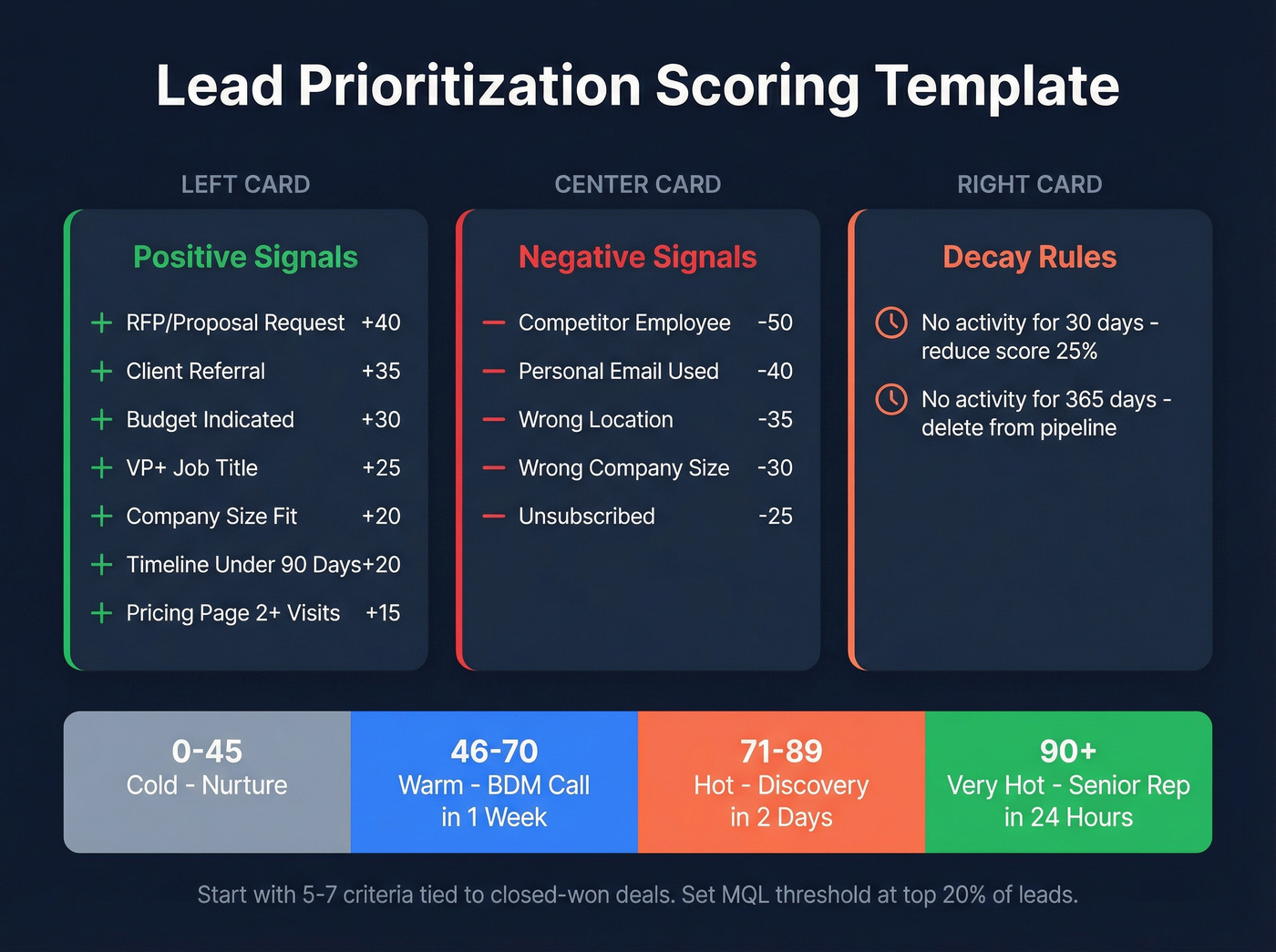
Positive Signals
| Signal | Points | Why It Matters |
|---|---|---|
| Requested RFP/proposal | +40 | Strongest buying intent |
| Referral from client | +35 | 68% of B2B revenue traces to referrals |
| Budget indicated | +30 | Removes biggest objection |
| Job title match (VP+) | +25 | Decision-maker access |
| Company size fit | +20 | ICP alignment |
| Timeline under 90 days | +20 | Active buying window |
| Pricing page 2+ visits | +15 | Research-stage signal |
Negative Signals
| Signal | Points | Why It Matters |
|---|---|---|
| Competitor employee | -50 | They're scouting, not buying |
| Personal email used | -40 | Low commercial intent |
| Wrong location | -35 | Can't serve them |
| Wrong company size | -30 | Outside ICP |
| Unsubscribed | -25 | Explicit opt-out |
Score Bands and Routing
| Range | Label | Action | Timeline |
|---|---|---|---|
| 0-45 | Cold | Nurture sequence | Ongoing |
| 46-70 | Warm | BDM call | Within 1 week |
| 71-89 | Hot | Discovery meeting | Within 2 days |
| 90+ | Very Hot | Senior rep outreach | Within 24 hours |
Reduce scores by 25% monthly without new activity. After 365 days of zero activity, delete them - they're dead weight misleading your pipeline forecasts. And tight routing rules matter just as much as the scores themselves: without clear handoff rules, even a perfect scoring model falls apart at the rep-assignment layer.
Prioritizing Inbound Leads
Not all inbound leads deserve the same response time. A demo request from a VP at a 500-person SaaS company is fundamentally different from a student downloading an ebook.
Effective inbound prioritization means applying the scoring template above the moment a lead enters your system - before it sits in a queue for 48 hours. The best approach we've found follows a simple rule: score on entry, route instantly, and let reps focus on high-value prospects over everything else in their queue. When a hand-raiser comes in with a score above 70, the system should bypass nurture entirely and push a notification to the assigned rep. Inbound leads that don't meet your ICP criteria still get scored - they just enter a nurture track instead of consuming rep time.

Scoring leads on stale contact data is how teams waste months chasing ghosts. Prospeo verifies emails at 98% accuracy on a 7-day refresh cycle - so every lead that scores "hot" actually has a working email and phone number behind it. At $0.01 per email, it's the cheapest fix for your entire prioritization model.
Fix the data layer before you score another lead.
Intent Signals Worth Scoring
Score this combination: third-party surge plus first-party download happening within the same week. Someone researching your category externally and then engaging your content is the strongest "in-market" signal available. Mark the account, notify the rep, and move within a day. Platforms like 6sense and Bombora track third-party intent across thousands of topics - the key is scoring across three dimensions: frequency, recency, and relevance (more on intent signals).
Skip these: raw page views without frequency thresholds, social media follows, and single-touch content downloads in isolation. These create noise, not signal.
7 Mistakes That Kill Scoring Models
This is where most teams quietly sabotage themselves. We've audited enough scoring setups to know these seven show up again and again.
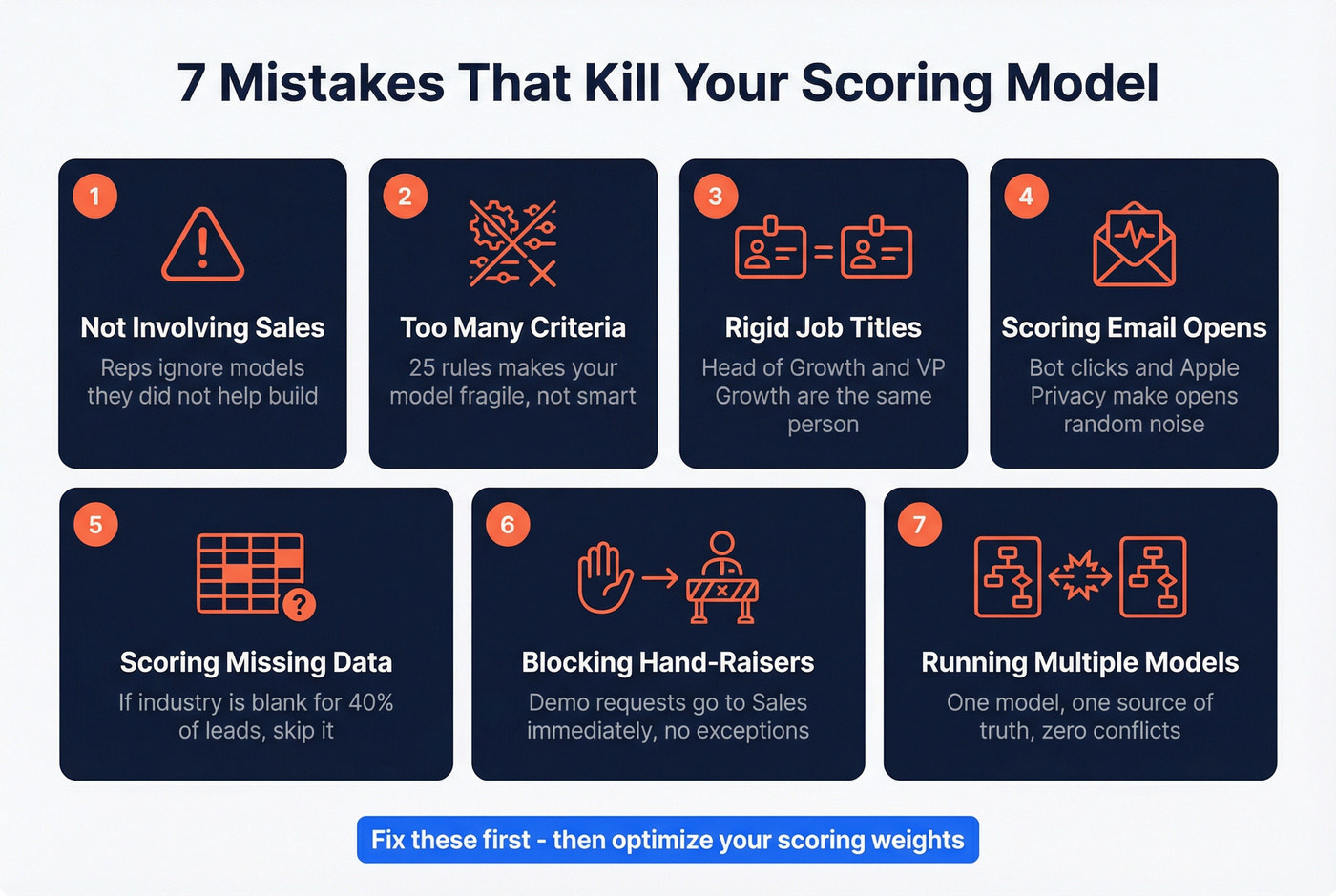
- Not involving Sales. If reps don't trust the model, they'll ignore it. Build it together (see Revenue Operations Alignment).
- Needless complexity. Starting with 25 criteria makes your model fragile, not sophisticated. In our experience, the 5-7 criteria approach outperforms complex models consistently (use a single lead scoring system).
- Demanding perfect job titles. "Head of Growth" and "VP Growth" are the same person. Be inclusive with free-text matching.
- Scoring email opens. Between bot clicks, Apple Mail Privacy Protection, and corporate firewalls, open data is random noise. Score form fills and page visits instead (or use a best email open tracker guide to see what’s reliable).
- Scoring on data you don't have. If "industry" is blank for 40% of your CRM, don't make it a criterion. You're penalizing leads for your own data gaps - fix CRM hygiene first.
- Letting scoring block hand-raisers. Someone requests a demo? That goes to Sales immediately. No score threshold should delay an explicit buying signal - ever (see Explicit vs Implicit Buying Signals).
- Running multiple models. One model. One source of truth. Multiple models create conflicting priorities and maintenance headaches nobody wants to own.
Skip the urge to build a second model for inbound vs. outbound. Use one model with a baseline bonus for inbound leads instead.
Automating the Process
Once your scoring model is validated against real conversion data, automate it so reps never manually sort a queue again. Most CRMs - HubSpot, Salesforce, even Pipedrive - support workflow triggers that recalculate scores on every new activity and reassign leads when they cross a threshold.
Start simple: one automation that moves leads above 70 points into a "hot" pipeline stage and notifies the assigned rep via Slack or email. The goal is a system where a lead's score updates in real time and routing happens without human intervention. You can layer in complexity later, but that single trigger will handle 80% of the value on day one (especially with revenue workflow software).
AI vs. Rules-Based Scoring
A 2026 paper in Frontiers in Artificial Intelligence tested 15 classification algorithms against 16,600 real CRM records. Gradient Boosting won, and the most predictive features were surprisingly simple: lead source and lead status.
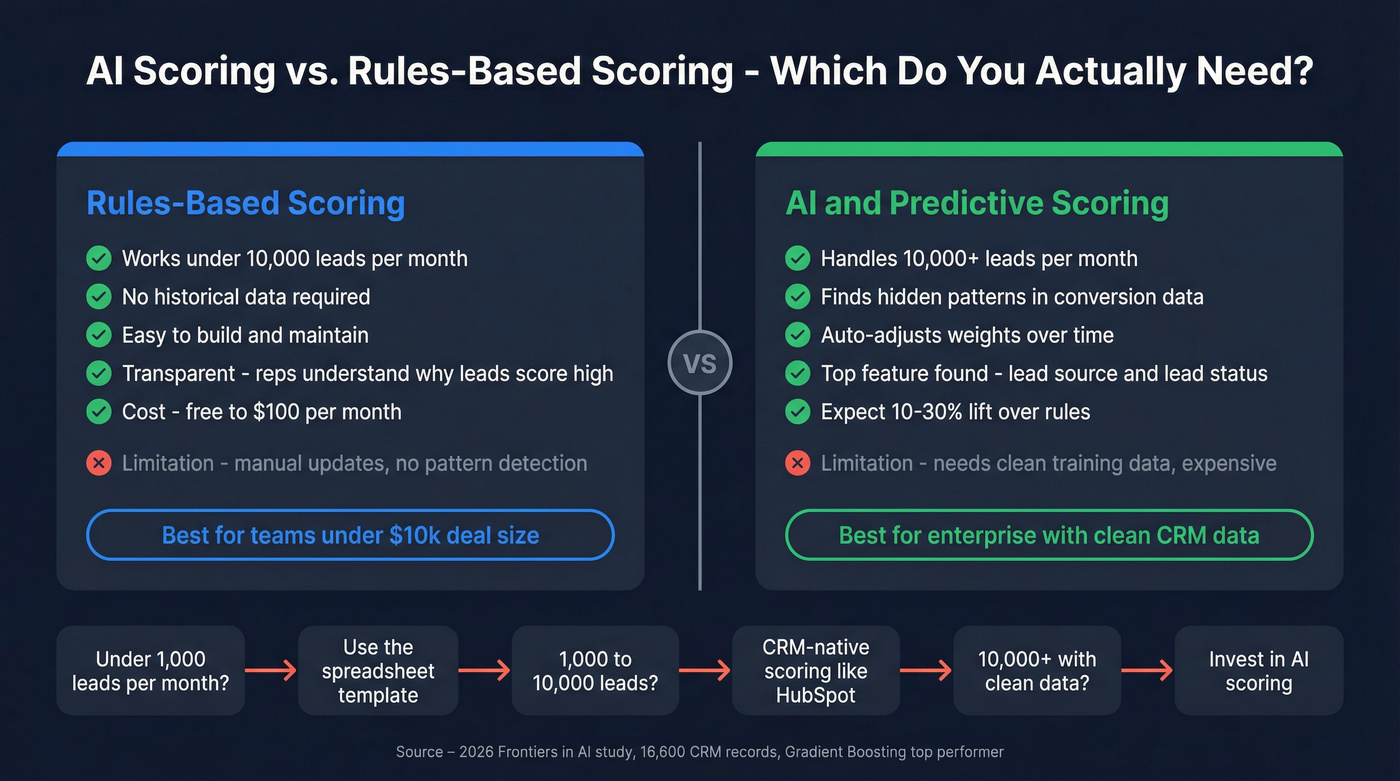
Let's be honest - rules-based scoring works fine until you're processing 10,000+ leads per month with clean historical conversion data. Below that volume, the point model above will outperform a poorly trained ML model every time. Expect a conservative 10-30% lift when you do jump to predictive, but only if your training data is clean (see AI Lead Qualification).
If your average deal size is under $10k and you're processing fewer than 1,000 leads a month, you don't need AI scoring. You need a spreadsheet, the template above, and verified contact data. The AI-scoring market grew from $1.4B in 2020 to $5.6B by 2026, but most of that spend is enterprise teams solving enterprise-scale problems.
Tools and What They Cost
| Tool | What It Does | Approx. Cost |
|---|---|---|
| Prospeo | Data quality + enrichment + intent | Free tier; ~$0.01/email |
| HubSpot | CRM-native scoring, Professional tier+ | ~$800-$1,000+/mo |
| Salesforce Einstein | AI scoring add-on | ~$50-75/user/mo |
| 6sense | Enterprise intent + scoring | $25k-$100k+/yr |
| ZoomInfo | Database + intent + scoring | $15k-$40k+/yr |
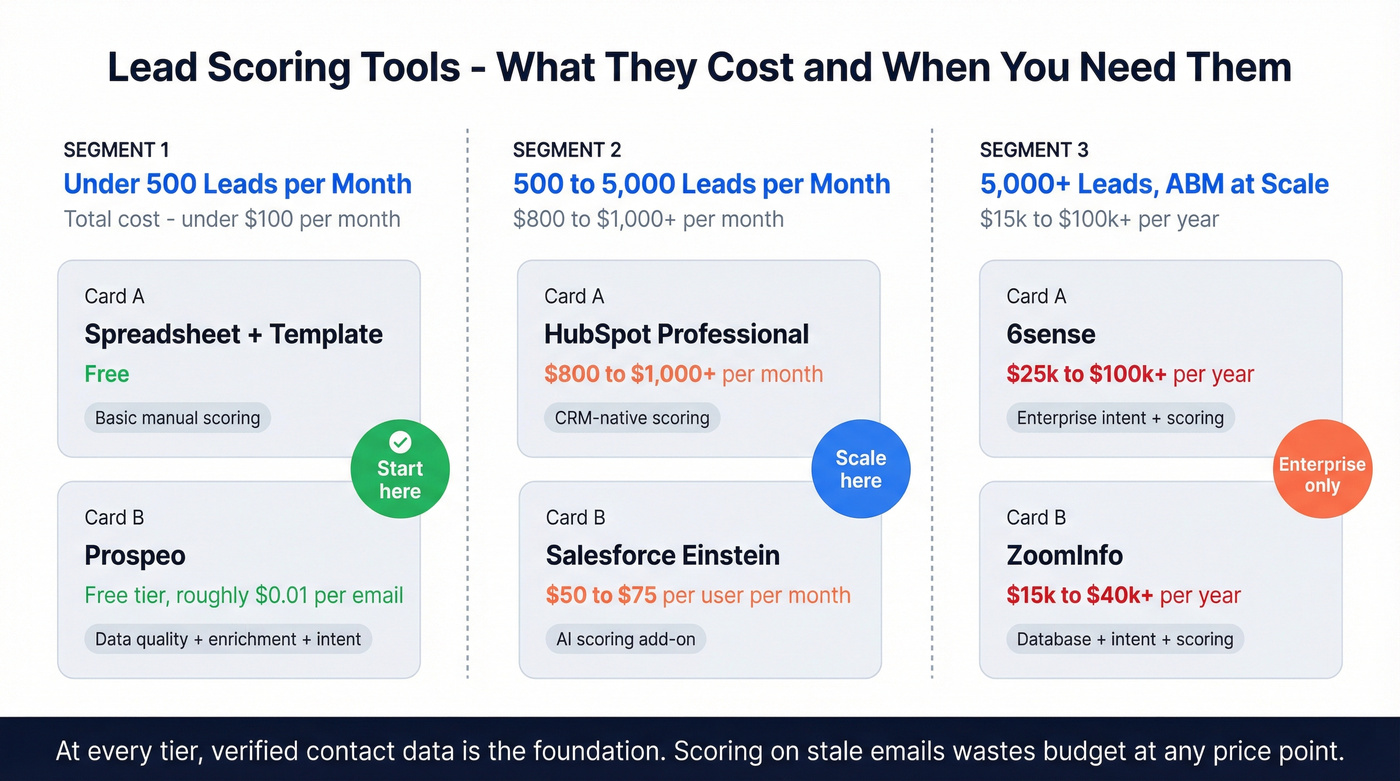
For teams under 500 leads/month, a spreadsheet with the template above plus verified data keeps you under $100/month total. Enterprise intent platforms make sense when you're running ABM at scale - not before (see ABM Lead Scoring).
Intent signals only matter when you can actually reach the buyer. Prospeo combines Bombora intent data across 15,000 topics with 143M+ verified emails and 125M+ direct dials - so when your model flags an in-market account, your rep connects on the first attempt, not the fifth.
Turn intent scores into booked meetings with data that picks up.
FAQ
What's the difference between lead scoring and lead prioritization?
Lead scoring assigns numerical values to individual contacts. Lead prioritization is the broader strategy - combining scoring, routing rules, intent signals, and response-time policies into a system that tells reps exactly who to call next and when.
How many scoring criteria should I start with?
Five to seven criteria correlated with closed-won deals. Expand only after validating against 90+ days of real conversion data. More criteria before that point adds fragility, not precision.
Can I prioritize leads without expensive software?
Yes. A spreadsheet with the scoring template above works for teams under 500 leads/month. Pair it with a free verification tool for data quality, and you're under $100/month. HubSpot adds CRM-native scoring at roughly $800-$1,000+/month when you're ready to scale.
How should inbound leads be handled differently from outbound?
Inbound leads already showed intent by reaching out, so they should enter your scoring model with a baseline bonus of 10-15 points. Apply the same fit and behavior criteria from there. The key difference is speed - inbound demands sub-hour response times because the buyer is actively evaluating options right now.